Domain SearchInstantly check and register your preferred domain name
 Web Hosting
 cPanel HostingHosting powered by cPanel (Most user friendly)
 WordPress HostingHost your WordPress website with fast, secure, and affordable WordPress hosting in Kenya.
 KE Domains
 Reseller HostingStart your own hosting business without tech hustles
 Windows HostingOptimized for Windows-based applications and sites.
 Free Domain
 Affiliate ProgramEarn commissions by referring customers to our platforms
 Free HostingTest our SSD Hosting for free, for life (1GB storage)
 Domain TransferMove your domain to us with zero downtime and full control
 All DomainsBrowse and register domain extensions from around the world
 .Com Domain
 WhoisLook up domain ownership, expiry dates, and registrar information
 VPS Hosting
 Managed VPSNon techy? Opt for fully managed VPS server
 Dedicated ServersEnjoy unmatched power and control with your own physical server.
 Website Builder
 Online Store BuilderLaunch a professional e-commerce store without writing code.
 Web Design ServiceGet a custom-designed website tailored to your brand and goals. From just KES 15,600
 BlogRead our guides on web hosting, online business, digital marketing, and more
 SupportOur support guides cover everything you need to know about our services
 ContactContact us via chat or email
If you want to run powerful autonomous AI agents in OpenClaw without dealing with unpredictable pay-as-you-go API costs, the OpenClaw OpenAI subscription is worth a close look.
It lets you connect your existing ChatGPT Plus ($20/mo) or ChatGPT Pro ($200/mo) account through OAuth, so your agents run on a flat monthly rate.
This means you can run advanced models like GPT-5.5 or Codex variants directly through the native Codex harness, without needing separate API credits sitting in a different account.
For many of us, that means greater cost predictability and fewer concerns about token usage accumulating unexpectedly.
But the biggest advantage of all is you can run capable AI agents using the OpenAI subscription you already pay for, without maintaining a separate API billing setup.
As OpenClaw continues to expand its support for autonomous workflows, this subscription-based connection provides a convenient way to access powerful models while keeping expenses easier to manage.
How the Openclaw OpenAI Subscription Integration Works
OpenClaw is built to work with different AI models, but its OpenAI subscription integration creates a particularly sleek experience.
Here, OpenClaw acts like your digital workshop, organizing tasks, managing memory, connecting to apps, and handling channels like WhatsApp or Telegram.
Then, OpenAI provides the “brain” (the thinking power), and the OpenAI API is the connection cable that lets your “workshop” talk directly to that brain for automated, smart actions.
The Mechanics
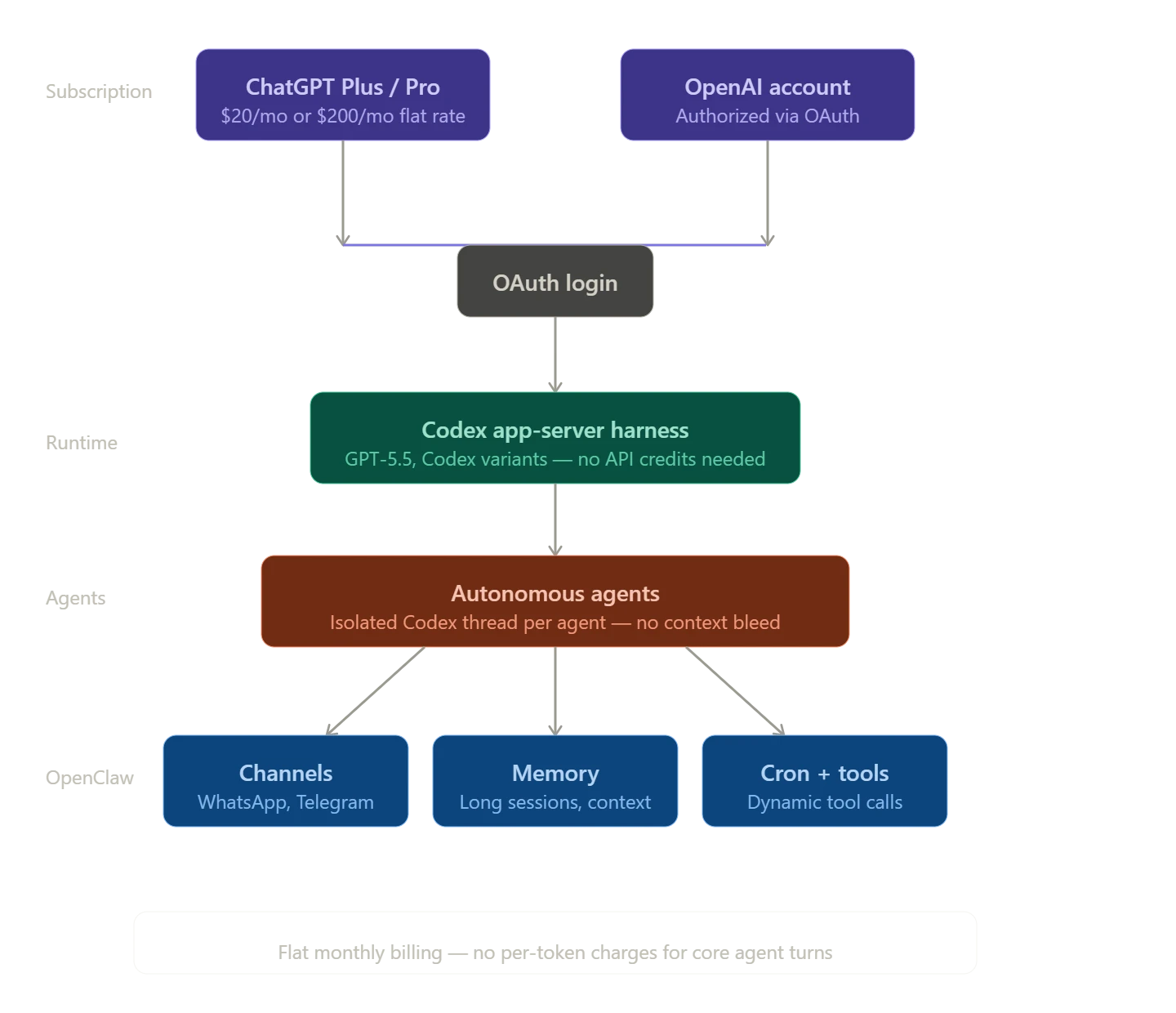
The Openclaw OpenAI subscription integration is built around OpenAI’s OAuth authentication system.
Instead of configuring API keys and managing separate usage-based billing, you can connect your existing ChatGPT Plus or Pro account directly to OpenClaw.
Following major developments in the project, including OpenClaw’s creator joining OpenAI, ChatGPT subscriptions can now power Codex usage inside OpenClaw agents.
Once authenticated, agent requests are routed through the native Codex runtime, allowing your subscription to handle core agent interactions without requiring separate API credits.
Benefits Over Traditional API
One of the biggest differences is cost predictability. Traditional OpenAI API usage charges based on token consumption, which means costs can increase as agent activity grows.
With the Openclaw OpenAI subscription model, you work within a flat monthly subscription instead of monitoring per-token charges for core agent turns.
The integration also runs on the native Codex app-server runtime, which is designed for agent workflows.
This provides stronger support for tool calling, persistent memory, and longer-running sessions, helping agents operate more effectively across complex tasks.
Isolation
Each OpenClaw agent receives its own dedicated Codex home and thread state.
This separation allows every agent to maintain its own context, history, and working environment independently.
So if you’re managing multiple agents, this structure helps keep conversations, memory, and tasks organized, ensuring that one agent’s activities do not interfere with another’s workflow.
Value-Add
The integration combines OpenAI’s native agent experience with OpenClaw’s automation capabilities.
So, agents can use dynamic tools, generate visible responses, maintain heartbeats, and take advantage of the features built into the Codex runtime.
At the same time, OpenClaw handles the operational layer, including channels, memory management, scheduled cron jobs, workflow orchestration, and external integrations.
This combination gives you the flexibility of a full automation platform while benefiting from the capabilities included in your OpenAI subscription.
Supported Tiers, Models, and What You Get
Tiers
The Openclaw OpenAI subscription works with two primary ChatGPT subscription plans: ChatGPT Plus and ChatGPT Pro.
ChatGPT Plus costs $20 per month and is a practical choice for individual users, personal AI assistants, testing agent workflows, and moderate automation tasks.
ChatGPT Pro at $200 a month is built for heavier workloads. If you’re running multiple agents or production-level automation, Pro’s significantly higher usage limits make it the more practical fit.
Primary Models
The models you’ll mainly work with are openai/gpt-5.5 and Codex variants like openai-codex/gpt-5.3-codex, or whichever the latest equivalents are at the time you’re reading this.
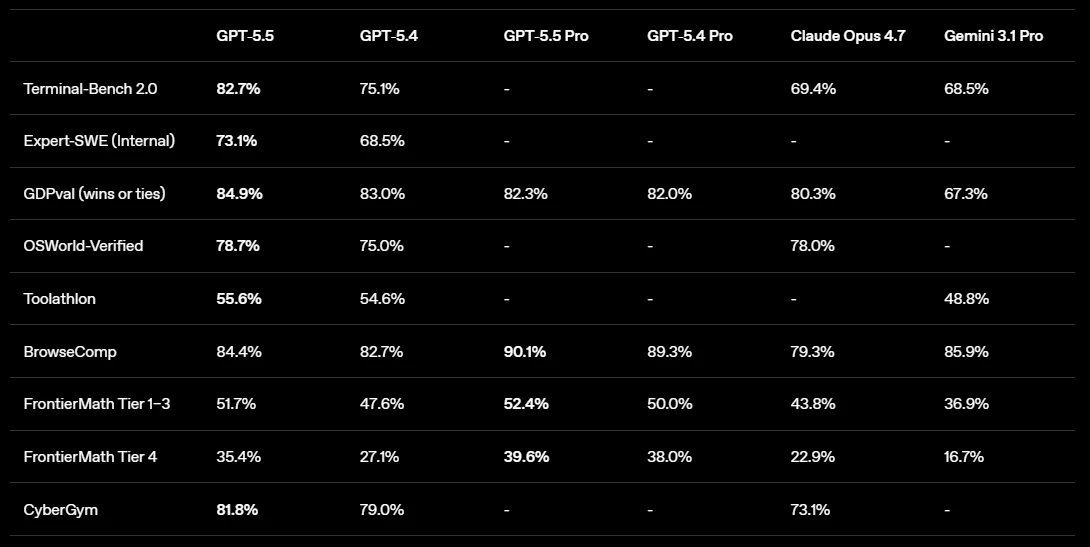
These are well-suited for coding tasks, multi-step reasoning, task automation, and memory management, the kind of work OpenClaw agents are designed around.
What Works Well
The OpenClaw OpenAI subscription performs particularly well for:
- Coding and software development tasks
- Task automation and workflow execution
- Multi-step reasoning and problem-solving
- Long-running agent sessions
- Memory management and contextual conversations
- Tool usage and agent orchestration
Because agents run through the native Codex harness, they can interact with tools more naturally while maintaining context over extended periods.
What May Still Need Fallback
Some OpenAI features may still rely on separate platform resources or credits depending on how they are accessed.
Examples include:
- Real-time voice capabilities
- Advanced image generation features
- Certain specialized multimodal workloads
As OpenAI continues to evolve its product offerings, the exact handling of these features may change, so it is worth checking the latest OpenClaw and OpenAI documentation when planning large-scale deployments.
Plus vs Pro Comparison
| Aspect | Plus Tier | Pro Tier |
|---|---|---|
| Monthly Cost | $20 | $200 |
| Usage Limits | Standard | Much higher (approximately 6× higher) |
| Best For | Personal agents, testing, light automation | Production workflows, multiple agents, heavy automation |
| Agent Capacity | Moderate workloads | High-volume workloads |
| Recommended Users | Individuals and hobbyists | Teams, businesses, and power users |
Step-by-Step: Setting Up Your Openclaw OpenAI Subscription
1) Prerequisites
Before you begin, make sure you have:
- An active ChatGPT Plus or ChatGPT Pro subscription
- A deployed and running OpenClaw instance
- Access to your OpenClaw terminal or gateway
Once these requirements are in place, you are ready to connect your OpenAI subscription to OpenClaw and start using supported models.
2) Detailed Wizard Steps
Step 1: Connect to your OpenClaw terminal or gateway.
Access the server or environment where OpenClaw is running.
Step 2: Start the onboarding process.
Run one of the following commands:
openclaw onboard --auth-choice openaiOr
openclaw onboard --auth-choice openai-codexStep 3: Review and accept the onboarding prompts.
The wizard will display a risk acknowledgment along with an authorization URL.
Step 4: Complete the OpenAI login process.
Copy the authorization URL into your browser and sign in to the ChatGPT account associated with your Plus or Pro subscription.
Step 5: Authorize OpenClaw.
After granting permission, you will receive a redirect URL. Copy this URL and paste it back into the OpenClaw terminal when prompted.
Step 6: Select your preferred model.
Configure the model you want OpenClaw to use:
openclaw models set openai/gpt-5.5You can also choose a supported Codex variant if preferred.
Step 7: Restart the gateway.
Restart your OpenClaw gateway or service to apply the new configuration.
Step 8: Verify the connection.
Confirm that the integration is working correctly by running:
openclaw models list --provider openaior checking agent status with:
/codex status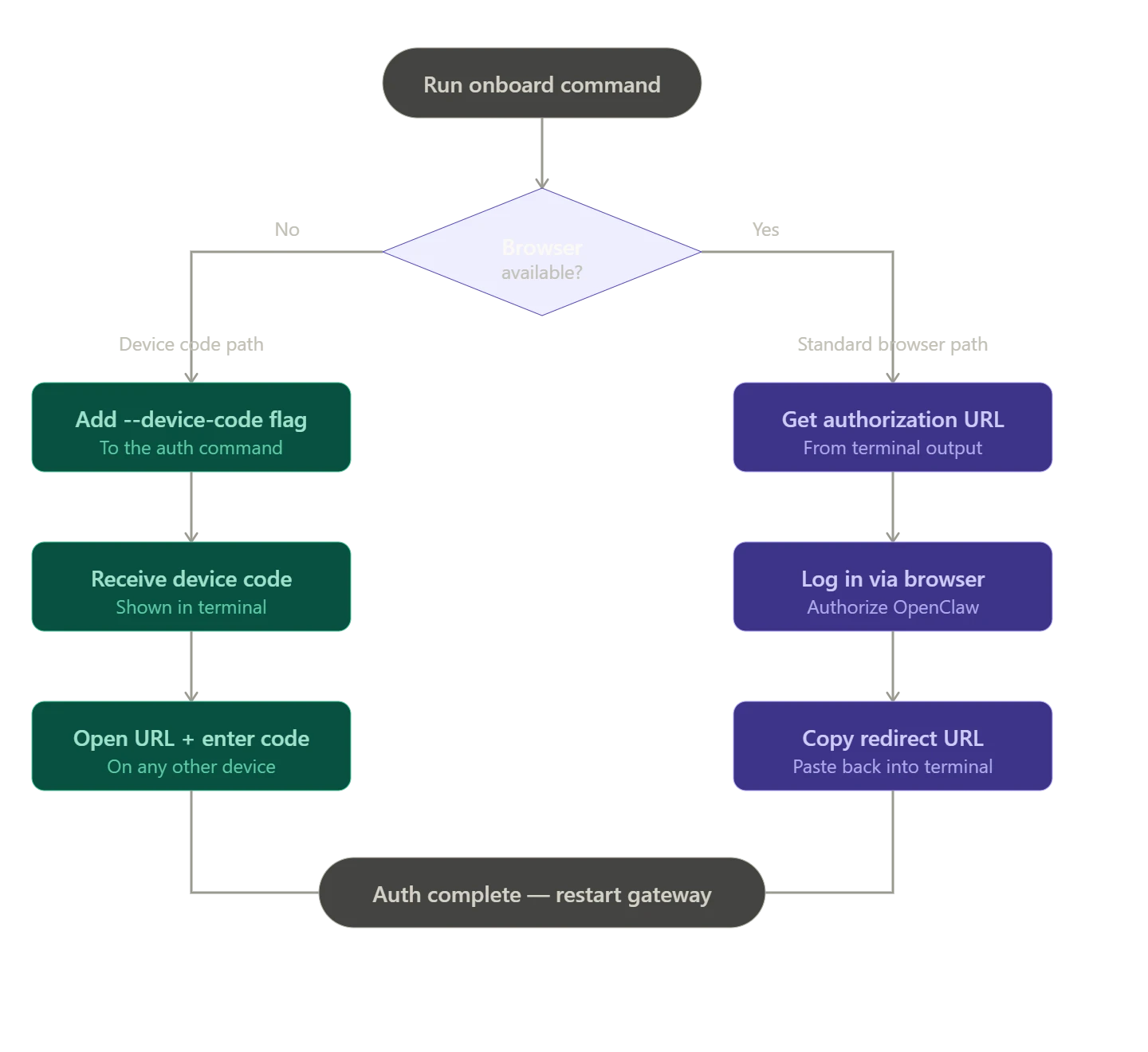
If your server does not have a browser interface, you can use device-code authentication during onboarding.
This allows you to complete the authorization process from a separate device while keeping OpenClaw running on your server.
If you are hosting OpenClaw on a Truehost VPS or managed hosting plan, the setup process is typically much faster.
With OpenClaw already deployed, you can focus on connecting your OpenAI subscription and configuring your preferred models without spending time on server provisioning and initial infrastructure setup.
3) Troubleshooting
A few common issues can occur during setup:
- Authentication errors: Confirm that your ChatGPT Plus or Pro subscription is active before starting the onboarding process.
- Rate limit warnings: Heavy usage may temporarily trigger platform limits, especially on lower subscription tiers.
- Model selection issues: Verify that the selected model is available to your subscription and OpenClaw version.
- Fallback configuration conflicts: If you use API keys as a backup, complete the subscription-based authentication first before configuring additional access methods.
- Verification failures: Restart the gateway and run the status commands again to refresh the connection.
In most cases, reconnecting the account and verifying your subscription status resolves the issue quickly.
Important Limitations and Usage Rules
1. Rate Limits: The Openclaw OpenAI subscription is not unlimited. Both ChatGPT Plus and Pro plans have usage quotas that reset periodically, often every few hours.
2. Heavy Workloads Can Hit Limits: Running multiple agents, frequent cron jobs, or parallel automation workflows can consume your available usage faster and trigger temporary limits.
3. No Self-Editing: Avoid giving agents permission to modify their own authentication settings, model configurations, or system controls. Administrative changes should always be performed manually.
4. Fallback Needs: Keep a low-balance OpenAI API key available as a backup for features that may not be fully covered by the subscription integration, such as advanced image generation or real-time voice capabilities.
5. Complex Workloads Require Monitoring: The subscription works well for coding, automation, task management, and most agent workflows.
However, resource-intensive processes such as video editing pipelines, large-scale multi-agent systems, and long-running automation chains may require additional monitoring or a higher-tier subscription.
6. Pro Offers More Capacity: Community feedback indicates that ChatGPT Pro provides substantially higher usage limits than Plus, making it a stronger option for production environments and heavy automation.
7. Future Platform Changes Are Possible: The integration currently relies on OpenAI’s supported OAuth authentication system. Future changes to platform policies or access methods could affect how the integration operates.
Best Practices and Maximizing Value
a. Use the Right Model for the Job: Reserve powerful models for complex reasoning, coding, and advanced automation tasks. Use lighter models for routine actions whenever possible.
b. Write Efficient Prompts: Clear instructions reduce unnecessary agent steps, improve response quality, and help conserve available usage.
c. Monitor Agent Activity Regularly: Check system status and model availability periodically to ensure your agents are operating as expected.
d. Verify Configuration Changes Manually: Make model updates, authentication changes, and system modifications from an administrator environment rather than through agent actions.
e. Keep a Backup Access Method: Maintaining a backup API key can help prevent workflow interruptions when subscription limits are reached or when using features outside subscription coverage.
f. Prioritize Security: Self-hosting OpenClaw gives you greater control over your data, credentials, and automation environment, making it a strong option for business and enterprise deployments.
g. Take Advantage of Multi-Channel Support: Connect agents to platforms such as Telegram, WhatsApp, web applications, and internal business systems from a single OpenClaw deployment.
h. Scale Gradually: Start with a few workflows, monitor usage patterns, and expand your automation infrastructure as your requirements grow.
Openclaw OpenAI Subscription FAQ
What is included in an OpenAI subscription?
ChatGPT Plus and Pro subscriptions cover access to OpenAI’s models, including GPT-5.5 and Codex variants, at a flat monthly rate. When connected to OpenClaw via OAuth, that subscription extends to power your agents through the Codex harness, covering core agent turns without separate API credits.
Is OpenAI good for OpenClaw?
Yes. The native Codex integration gives OpenClaw better performance for tool calling, long sessions, and memory management than the standard API path. For coding tasks, multi-step automation, and daily agent workflows, it’s a solid fit.
Do you need a subscription to use OpenClaw?
No. OpenClaw supports other model providers and API keys. But if you want flat-rate billing and native Codex performance without managing per-token costs, the subscription route is the more practical option for regular use.
How much is an OpenAI subscription per month?
ChatGPT Plus is $20 per month. ChatGPT Pro is $200 per month and offers significantly higher usage limits, roughly six times more capacity than Plus, which makes it the better fit for production workloads or multiple parallel agents.
Why Self-Host OpenClaw on Truehost’s VPS?
Running OpenClaw on a local machine works for testing, but stable agent systems need something more consistent, especially when connected to an Openclaw OpenAI subscription.
Hosting on Truehost’s OpenClaw Application Hosting in Kenya gives a more reliable environment for always-on agents.
With infrastructure built for uptime and low latency, your workflows stay responsive even when handling continuous automation or user interactions.
Key benefits include:
- One-click OpenClaw deployment for faster setup
- 99.99% uptime for always-available agents
- Free SSL for secure connections
- Easy scaling when moving from Plus to Pro workloads
- Full root access for advanced configuration
- Local payment support, including M-PESA
So, if you are building serious automation workflows, starting with a solid hosting setup and a properly configured subscription setup creates a smoother long-term experience.
Ready to get started? Check out our OpenClaw hosting plans and bring your agents online today.
If you need help with setup, the Truehost support team is available to walk you through it.