Domain SearchInstantly check and register your preferred domain name
 Web Hosting
 cPanel HostingHosting powered by cPanel (Most user friendly)
 WordPress HostingHost your WordPress website with fast, secure, and affordable WordPress hosting in Kenya.
 KE Domains
 Reseller HostingStart your own hosting business without tech hustles
 Windows HostingOptimized for Windows-based applications and sites.
 Free Domain
 Affiliate ProgramEarn commissions by referring customers to our platforms
 Free HostingTest our SSD Hosting for free, for life (1GB storage)
 Domain TransferMove your domain to us with zero downtime and full control
 All DomainsBrowse and register domain extensions from around the world
 .Com Domain
 WhoisLook up domain ownership, expiry dates, and registrar information
 VPS Hosting
 Managed VPSNon techy? Opt for fully managed VPS server
 Dedicated ServersEnjoy unmatched power and control with your own physical server.
 Website Builder
 Online Store BuilderLaunch a professional e-commerce store without writing code.
 Web Design ServiceGet a custom-designed website tailored to your brand and goals. From just KES 15,600
 BlogRead our guides on web hosting, online business, digital marketing, and more
 SupportOur support guides cover everything you need to know about our services
 ContactContact us via chat or email
Chatbots answer questions. OpenClaw does things.
That’s the shift that’s quietly reshaping how businesses operate now.
AI is no longer just a search bar that talks back, it’s an agent that reads your emails, updates your CRM, monitors your infrastructure, and files your reports. All while you sleep.
OpenClaw is an open-source, self-hosted AI agent framework that executes real tasks locally on your own server, under your full control.
Unlike cloud-dependent assistants, it connects directly to your operating system, your files, and your tools. You give it access. You give it a task. It runs.
The numbers tell you everything you need to know about its momentum. By April 2026, OpenClaw had 346k+ GitHub stars and 38M monthly visitors, making it one of the fastest-growing open-source projects in recorded history.
It took React years to reach that kind of traction. OpenClaw did it in roughly 60 days.
So what makes it different for businesses?
Everything. Businesses are deploying OpenClaw use cases across operations, marketing, development, and customer support, automating workflows that used to require entire teams.
This guide breaks down the most impactful openclaw usecases, sector by sector.
OpenClaw Use Cases Table
| Sector/Category | Key Use Cases | Main Benefits | Automation Level |
|---|---|---|---|
| Customer Support | 24/7 ticket handling, Multilingual support | 70% tickets resolved autonomously | High |
| Marketing & Content | Content ideation, Social scheduling, Repurposing | Double output, consistent posting | Medium-High |
| Business Operations | Client onboarding, Expense tracking, Invoicing, KPI reports | Reduces manual work from days to minutes | High |
| Competitive Intelligence | Competitor monitoring, Daily briefings | Always-informed without daily research | Medium |
| Developer & DevOps | Code reviews, Infrastructure chat, Security scanning | Faster reviews, proactive security | High |
| Project Management | Event-driven updates, Meeting action items | No manual follow-ups | High |
| Sales & CRM | Lead enrichment, Personalized follow-ups, Call summarization | Better-qualified leads, automatic CRM updates | High |
| Finance & Compliance | Reconciliation, Regulatory monitoring | Error reduction, stays compliant | Medium-High |
| E-commerce | Order fulfillment, Review responses, Dynamic pricing | Faster processing, better customer experience | High |
| Executive Assistance | Personal assistant, Research briefs | More focus time for high-value work | High |
Detailed explanations and implementation tips for each use case follow below.
1) Customer Support & Service Automation
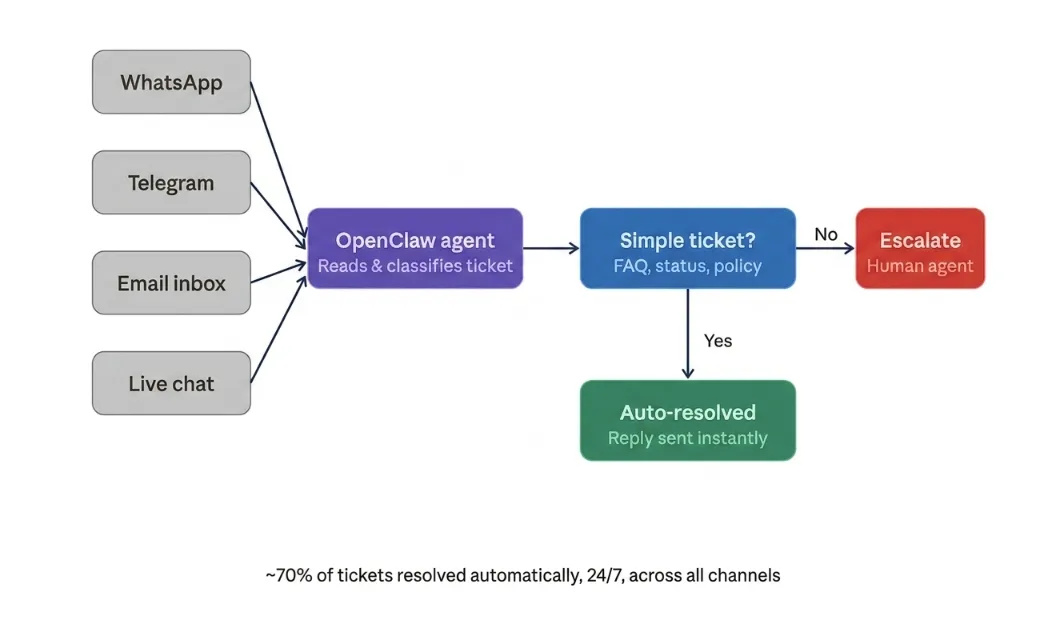
24/7 Multi-Channel Customer Support
Your customers don’t keep office hours. Your support system shouldn’t either.
OpenClaw can monitor your support inbox around the clock, categorize incoming tickets, draft replies for straightforward cases, and escalate anything complex to a human agent.
Teams using agentic support setups like this report handling up to 70% of tickets autonomously without sacrificing quality.
Plug it into Telegram, WhatsApp, Slack, or your helpdesk tool. Customers get instant responses.
Your team wakes up to a cleared queue with only the cases that need them.
Multilingual Support
Running a business across Nairobi, Lagos, and Johannesburg? Your support agent needs to speak the language.
OpenClaw supports multilingual responses natively, switching language based on how the customer writes to you.
It adapts so your customers feel heard in their own language.
2) Marketing & Content Operations
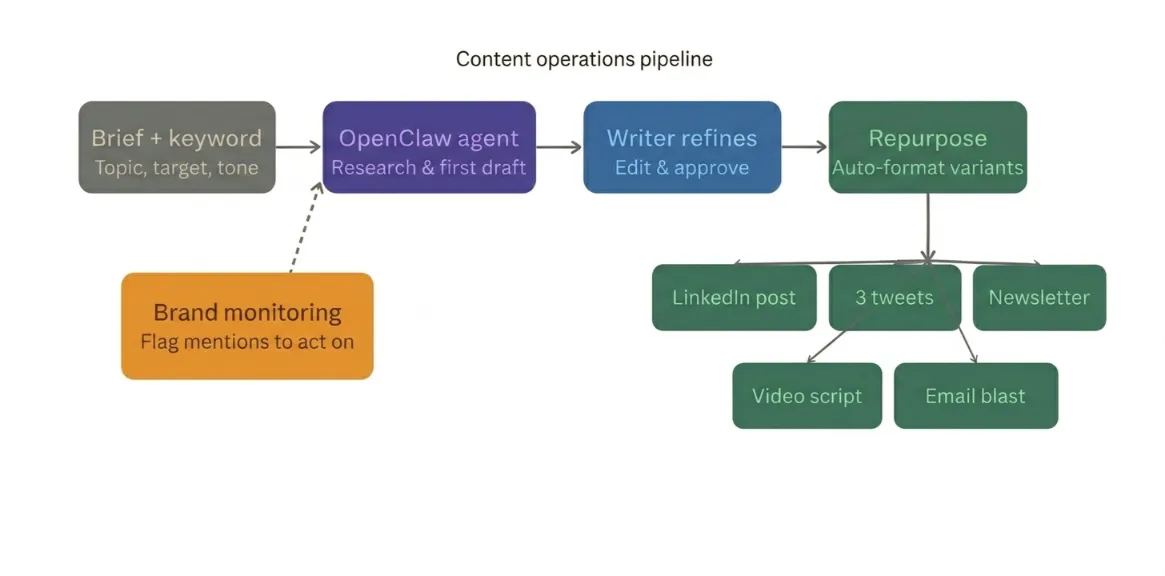
Content Ideation & First-Draft Generation
Every content team knows the pain: briefs piling up, deadlines closing in, and the blank page staring back.
OpenClaw can take a topic, a target keyword, and a brief and produce a structured first draft that your writer refines into something publish-ready.
It doesn’t replace your writer. It removes the bottleneck. A solo content marketer can realistically double their output without burning out.
Social Media Scheduling & Brand Monitoring
Staying consistent on social media is a full-time job. OpenClaw makes it a background task.
Set it up to draft weekly posts based on your latest blog content, check brand mentions across platforms, and flag conversations where you need to respond.
It watches the noise so you can focus on the signal.
Content Repurposing Across Platforms
You published a 2,000-word article. Now your team needs a LinkedIn post, three tweets, an email newsletter blurb, and a video script from the same piece.
OpenClaw handles all of it in one run. Feed it the article. Define the output formats.
It produces each variation in the right tone for the right platform — in minutes, not hours.
3) Business Operations & Workflow Automation
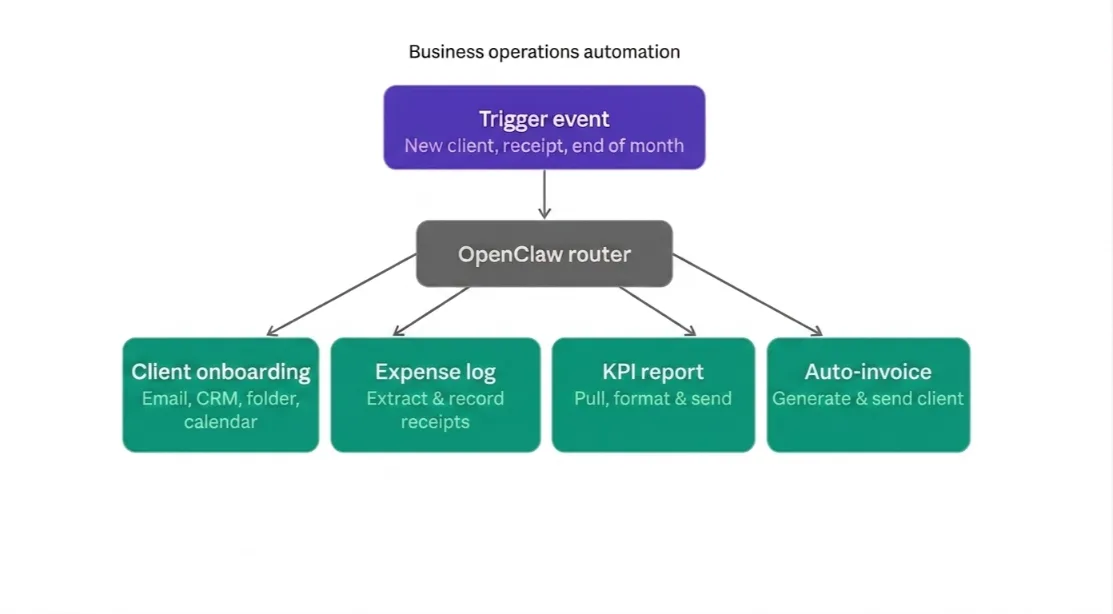
Client Onboarding Automation
New client signed? The onboarding checklist usually takes days of manual steps, welcome emails, contract sends, folder setups, and intro calls booked.
OpenClaw can trigger the entire sequence automatically.
It creates the project folder, sends the welcome email, adds the client to your CRM, and books the onboarding call all from a single trigger event.
Expense Tracking & Receipt Processing
Finance teams drown in receipts.
OpenClaw can watch a designated email inbox, extract expense data from attached receipts, and log everything into a spreadsheet or accounting tool.
KPI Reporting & Team Dashboards
Your weekly report shouldn’t take half a day to pull together.
OpenClaw can be configured to query your data sources. It compiles the key metrics for you.
The system then formats them into a clear, readable summary.
This summary is delivered to your team’s Slack or email every Monday morning, before anyone’s had coffee.
Automated Invoicing & Reporting
End of the month is always chaos.
OpenClaw can pull completed projects from your project management tool. It then generates invoices using a template.
The invoices are sent to clients along with a summary report. A copy is saved for your records.
4) Competitive Intelligence & Market Research
Competitive Intelligence Agent
Knowing what your competitors are doing is important. Doing it manually doesn’t scale.
OpenClaw can monitor competitor websites, pricing pages, and press releases then surface changes in a structured daily or weekly briefing.
You stay informed without spending hours on research you’ll forget by Friday.
Daily Industry Briefings
Every morning, before your team’s standup, OpenClaw can pull the latest news in your industry.
It summarizes the five most relevant developments. It then delivers a two-minute briefing straight to your inbox.
5) Developer & DevOps Workflows
Automated Code Reviews & PR Summaries
Pull requests shouldn’t sit waiting for review for three days.
OpenClaw can scan new PRs. It checks for common issues. It also summarizes what the change does.
It flags anything that looks off. This gives the human reviewer a head start rather than a blank slate.
Infrastructure Monitoring via Chat
Your infrastructure shouldn’t require a dashboard open on a second screen at all times.
OpenClaw integrates with your monitoring tools and lets you query server health, uptime, and performance via a simple chat message.
‘What’s the CPU usage on the API server?’ Gets you an answer in seconds, no logging into dashboards required.
Dependency & Security Vulnerability Tracking
OpenClaw can scan your dependency files, check packages against vulnerability databases, and surface a prioritized list.
It can tell what needs immediate patching versus what can wait for the next maintenance window.
Security issues get flagged the moment they appear not the next time someone remembers to check.
6) Project Management & Internal Operations
Event-Driven Project State Management
When a task is marked complete in your project tool, OpenClaw can automatically update the project status.
It can notify the next person in the workflow. It can also log the update in your reporting system.
This keeps projects moving without manual follow-ups.
Every project moves forward without anyone having to push it manually.
Meeting Transcription & Action Item Extraction
After every meeting, OpenClaw can take a transcript, identify the decisions made, and assign action items.
It can then send each person their specific tasks before they’ve even closed their laptop.
7) Sales & CRM Automation
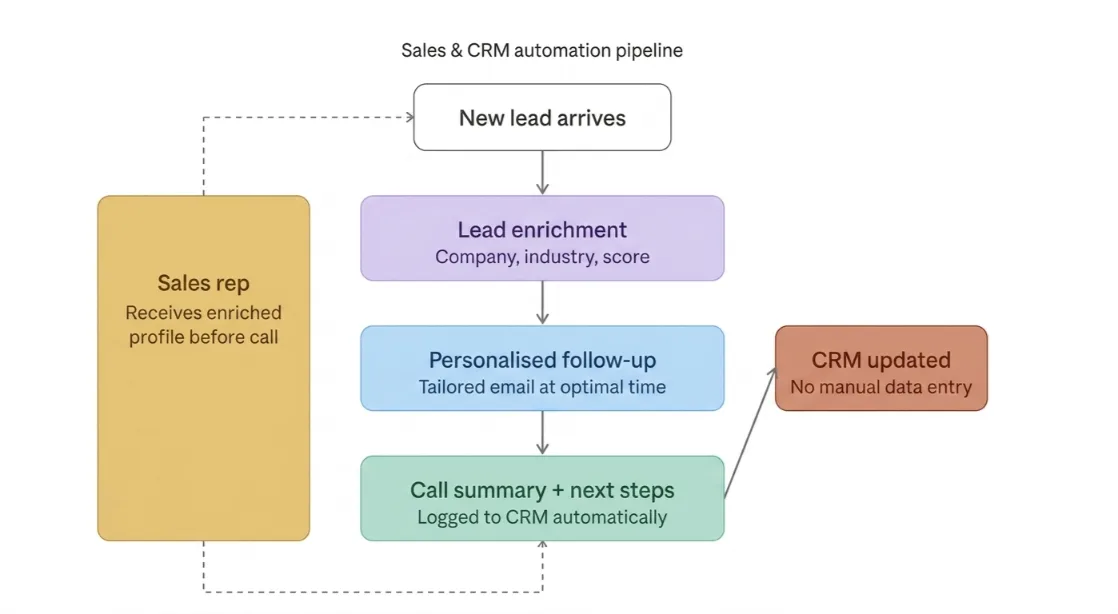
Lead Enrichment & Qualification
When a new lead comes in, OpenClaw can pull publicly available data to build a fuller profile.
It gathers details such as company size, industry, recent news, and other relevant context.
The platform then scores the lead based on this information.
By the time it reaches your sales rep, the lead is already enriched and prioritized.
Your team speaks to prospects already understanding who they are.
Personalized Follow-Up Sequences
Sales follow-up is repetitive work that still needs to feel personal.
OpenClaw can draft tailored messages for each prospect. It uses what you know about their industry, pain points, and stage in the sales pipeline.
The platform then schedules and sends these messages at the optimal time. This helps improve engagement and saves your team time.
You define the strategy. It handles the execution.
Sales Call Summarization & CRM Updates
After a call, it can take the transcript, extract the main points, and agreed next steps, and log everything directly into your CRM.
Your sales rep finishes a call, and the CRM is already updated.
Check our guide on: VPS use cases and workloads
8) Finance & Compliance
Financial Reconciliation
Matching payments against invoices is tedious, error-prone work.
OpenClaw can cross-reference incoming payments with your records. It flags any discrepancies for review.
The platform then generates a clean reconciliation report. Tasks that once took hours can be completed automatically overnight.
Regulatory Compliance Monitoring
Tax laws change. Industry regulations shift. Staying current is hard when it’s not your full-time job.
OpenClaw can monitor official sources for updates relevant to your business.
It tracks new KRA guidelines and regulatory changes from your sector’s governing body.
The platform then compiles these updates into a weekly digest. This helps ensure that nothing slips through the cracks.
9) E-commerce Operations
Order Processing & Fulfillment Coordination
When a customer places an order, OpenClaw can trigger the fulfillment workflow. It updates inventory.
It notifies the warehouse. It generates the shipping label. It also sends the customer a confirmation automatically.
All of this happens in sequence without manual input.
Customer Review Response & Sentiment Analysis
A negative review that is left unanswered sends the wrong message. OpenClaw can monitor your reviews across different platforms.
It can flag urgent or high-priority reviews. It can also draft suitable responses for your team to review and approve.
In addition, it tracks sentiment trends over time. This helps you see whether your product and service quality is improving or declining.
Dynamic Pricing Assistance
OpenClaw can monitor competitor pricing. It can also check your inventory levels. It surfaces pricing recommendations when conditions change.
This helps you stay competitive without needing someone constantly glued to a spreadsheet.
10) Personal & Executive Assistance
Executive AI Assistant
Your calendar, your inbox, your research requests, and your travel logistics are all connected.
OpenClaw can act as a personal assistant. It handles the coordination layer of your day.
It schedules meetings and triages emails. It also pulls information before calls.
This allows you to focus on work that requires your attention.
Personalized Research Agent
Before a big client meeting, OpenClaw can prepare a deep-dive brief. It includes the company’s recent developments.
It also covers important news and competitor context. It adds any relevant background you should know.
You walk into the room prepared every time.
Learn how to set up OpenClaw on a VPS
Put These OpenClaw Use Cases to Work: Deploy in Minutes
OpenClaw needs a server that’s always on, properly configured, and secure. Running it from your laptop doesn’t cut it for anything business-critical.
At Truehost, we’ve built OpenClaw hosting, which is specifically designed for the Kenyan market.
You get the full power of a self-hosted AI agent, and you don’t have to deal with infrastructure headaches.
Here’s what makes our setup practical for local businesses and developers:
Managed plans starting from KES 1,120/month (Europe/US) or an unmanaged Kenya VPS from KES 1,400/month for local low-latency performance.
Deploy in minutes. Our pre-configured OpenClaw packages handle dependencies, SSL, and server setup for you.
No sysadmin experience is required. Most users are up and running in under an hour.
Your data stays on your server. This is the core privacy advantage of self-hosted AI.
Unlike cloud-based tools, your business data does not pass through third-party servers.
OpenClaw on your Truehost VPS keeps everything on the infrastructure you control.
Confidential client data, financial records, and internal documents never leave your environment.
Local support and local pricing in KES. You can pay via M-PESA.
You also get support from a team that understands the Kenyan business context. There are no USD conversion surprises at the end of the month.
Read also: How to Upgrade to a VPS