Rank #1 on Google Maps
India English
Kenya English
United Kingdom English
South Africa English
Nigeria English
United States English
United States Español
Indonesia English
Bangladesh English
Egypt العربية
Tanzania English
Ethiopia English
Uganda English
Congo - Kinshasa English
Ghana English
Côte d’Ivoire English
Zambia English
Cameroon English
Rwanda English
Germany Deutsch
France Français
Spain Català
Spain Español
Italy Italiano
Russia Русский
Japan English
Brazil Português
Brazil Português
Mexico Español
Philippines English
Pakistan English
Türkiye Türkçe
Vietnam English
Thailand English
South Korea English
Australia English
China 中文
Somalia English
Canada English
Canada Français
Netherlands Nederlands

WordPress Hosting in Kenya.Build a site you can edit as your business changes.

Keep the address, content and editing tools for your website in your business’s control. Install WordPress on a hosting account, add the pages your customers need and make changes without commissioning a new site each time. Our Kenya plans list WordPress support, an installer and automated SSL.

Start with WebHosting Starter

Kshs 188 / month

Billed every 3 years · Kshs 6,768 recurring total

  • 10Websites
  • CpanelControl panel

WordPress Hosting Pricing

Billing cycle

Best value compares each plan's lowest monthly equivalent; contract lengths can differ.

Swipe sideways to compare all 4 plans

WebHosting Starter

Kshs 208.33/moSave 10%

Kshs 188/mo

Kshs 6,768 billed every 3 yearsSave KES 732

Order Now

Renews at Kshs 188/month

  • Hosts 10 Websites
  • WordPress Hosting & other CMS
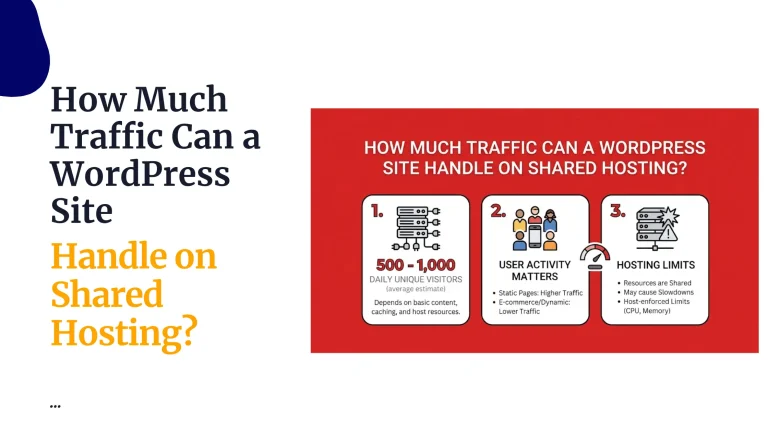
  • ~25 000 visits monthly
  • Free Website Migrations
  • 30 GiB SSD Storage

Terms: 3 years2 yearsYearly

WebHosting Unlimited

Kshs 3,480/moSave 53%

Kshs 1,632/mo

Kshs 58,752 billed every 3 yearsSave KES 66,528

Order Now

Renews at Kshs 1,632/month

  • Free .CO.KE Domain (for annual plan)
  • Hosts Unlimited Websites
  • WordPress Hosting & other CMS
  • Free Website Migrations
  • Unmetered SSD Storage

Terms: 3 years2 yearsYearly6 monthsQuarterlyMonthly

Webhosting Starter Monthly

Kshs 500/moSave 62%

Kshs 188/mo

Kshs 6,768 billed every 3 yearsSave KES 11,232

Order Now

Renews at Kshs 188/month

  • Ksh.2500 Annually
  • Hosts 10 Websites
  • WordPress Hosting & other CMS
  • ~25 000 visits monthly
  • Free Website Migrations

Terms: 3 years2 yearsYearly6 monthsQuarterlyMonthly

Choose hosting around the work your site does

A service website

Give customers an accurate service description, examples and a working enquiry route. Start with the pages that help someone decide whether to contact you, then add useful material as the business grows.

An independent publication

Organise articles around subjects and give contributors accounts with appropriate roles. Keep the archive searchable and establish who reviews and publishes work instead of sharing one administrator login.

A WooCommerce shop

Plan your catalogue, stock variations, delivery areas and payment provider. Hosting resources need to accommodate the plugins and checkout activity as well as the number of products visible on a page.

Keep hosting and site maintenance in view

The hosting account

The catalogue lists cPanel, a one-click installer and automated SSL. Use the hosting controls for files and databases, and WordPress for editing the pages and content customers see.

The application

Choose a supported theme and only the plugins the site requires. Save a recovery copy before substantial changes, test the important actions afterward and remove unused extensions.

The resource choice

Compare the listed website count, storage and available billing terms. Treat visit estimates as planning indicators, not a fixed capacity guarantee; a busy checkout can place different demands on hosting than a simple article page.

Check a move before changing the public address

Collect the existing material

Save the website files and database together. Record the domain and mail settings, plus any separate service the site depends on.

Prepare the new installation

Discuss the listed migration service with support and agree what is being moved. Check WordPress, theme and plugin compatibility in the replacement environment.

Try real visitor tasks

Review important URLs, images, sign-ins and search. Submit a test enquiry or use the payment provider’s test flow, and verify the resulting notifications.

Connect and monitor

Change the required domain records after the checks pass. Preserve email delivery records and monitor the site while the new records take effect.

WordPress Hosting FAQs

What am I buying with WordPress hosting?

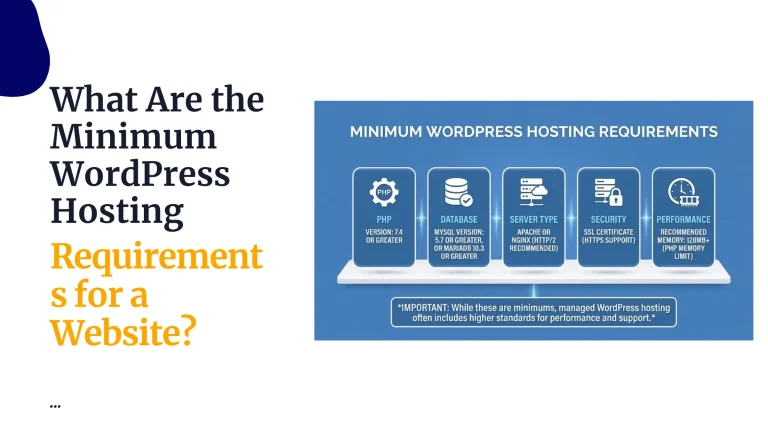
You are buying a hosting account on which the WordPress software runs. The current Kenya web-hosting catalogue supports WordPress and other content-management systems, with different resources and terms.

Your domain, content, theme and plugin choices form the website built on that account. Review any separate licence or service needed by those choices.

Which plan should I choose?

List the sites you will host, the files you will store and the work visitors will perform. Compare those requirements with the live cards, then allow room for the changes you expect to make.

A brochure site and a shop with several active extensions may need different resources. Measure the workload rather than selecting a tier from visitor numbers alone.

How do the payment terms compare?

The selector shows a monthly equivalent together with the amount billed for the chosen term. Read the renewal line and available terms for the specific plan, then follow its matching order button.

A lower monthly equivalent can require a longer upfront commitment. Choose the total and term that fit your budget.

Can I keep my existing domain?

Keep the domain with its current registrar if you want to. Once the replacement website is checked, point the required records to the hosting account.

If email uses another provider, preserve its records. Confirm ownership and recovery access for the domain before beginning a migration.

Does the plan include an SSL certificate?

The hosting catalogue lists free automated SSL. Connect the domain correctly and confirm that the intended address loads over HTTPS after the certificate is issued.

Review mixed-content warnings and test important pages. An encrypted connection is one part of site protection; updates and account permissions still require attention.

Who applies WordPress and plugin updates?

Assign someone to maintain the WordPress installation, themes and plugins. That person should review compatibility, save a recoverable copy and test significant changes.

Use hosting support for the issues covered by your service. Ongoing development or content work should have its own agreed scope.

What backups are included?

Check the wording on the chosen plan. Starter and Pro currently list daily backups; Unlimited lists automatic backups. Confirm the applicable retention and restoration process with support.

Keep an additional recoverable copy before an important change and test how the files and database are restored together. Do not infer one plan’s schedule for every package.

Can support move a site for me?

The current catalogue lists free website migrations. Share the relevant source-hosting details through the appropriate support channel and agree the transfer scope before work begins.

Check the copied website, forms and mail routing before changing DNS. Keep the previous environment available until the move has been verified.

Can this host an online shop?

WordPress supports WooCommerce, but the shop still needs the appropriate theme, extensions and configuration. Prepare product data, payment access and delivery rules before launch.

Test an unsuccessful payment as well as a successful test order. Check notification delivery and stock changes so the store works beyond its product pages.

Can you design the website for us?

Our web design service is a separate project for a business site or an online shop. Prepare the page list and supplied content, then compare the current package scope.

Review Kenya web design packages when you want help building the site rather than only hosting it.

How do we give a colleague editing access?

Create an individual WordPress account with the role required for that person’s work. A writer may need to prepare posts without installing plugins or changing account settings.

Review access when duties change and remove unused accounts. Keep an administrator and recovery method under the business’s ownership.

What should we test before publishing?

Read the site on a phone, open the key navigation links and verify the action each page asks visitors to take. Check forms, sign-ins or shop functions with the agreed test data.

  • Confirm the receiving inbox gets enquiries.
  • Review the domain and HTTPS address.
  • Check important old URLs after a move.
  • Keep a recovery copy and access record.

Guides

WordPress Hosting guides

Help with the next step in your project.

Compare hosting for your next WordPress website.

Review the resources and billing terms for the plan you choose.