Domain SearchInstantly check and register your preferred domain name
 Web Hosting
 cPanel HostingHosting powered by cPanel (Most user friendly)
 WordPress HostingHost your WordPress website with fast, secure, and affordable WordPress hosting in Kenya.
 KE Domains
 Reseller HostingStart your own hosting business without tech hustles
 Windows HostingOptimized for Windows-based applications and sites.
 Free Domain
 Affiliate ProgramEarn commissions by referring customers to our platforms
 Free HostingTest our SSD Hosting for free, for life (1GB storage)
 Domain TransferMove your domain to us with zero downtime and full control
 All DomainsBrowse and register domain extensions from around the world
 .Com Domain
 WhoisLook up domain ownership, expiry dates, and registrar information
 VPS Hosting
 Managed VPSNon techy? Opt for fully managed VPS server
 Dedicated ServersEnjoy unmatched power and control with your own physical server.
 Website Builder
 Online Store BuilderLaunch a professional e-commerce store without writing code.
 Web Design ServiceGet a custom-designed website tailored to your brand and goals. From just KES 15,600
 BlogRead our guides on web hosting, online business, digital marketing, and more
 SupportOur support guides cover everything you need to know about our services
 ContactContact us via chat or email
WordPress hosting requirements are simpler than most people expect.
To run a WordPress website, you need a web server, PHP, a supported database, HTTPS and enough server resources to keep pages loading. That’s the short answer.
But there’s a gap between the bare minimum and what a real website needs. WordPress will install on a modest server.
A busy blog, an online shop or a site stuffed with plugins needs a lot more room to breathe.
Pick a plan based on the minimum alone and you’ll likely end up with slow pages and annoyed visitors.
This guide walks through each requirement in plain terms.
You’ll see what the official WordPress.org requirements say, what is just sensible advice, and what to check before you pay.
We also cover what Kenyan site owners should look for.
By the end, you should be able to read any hosting plan and tell fast whether it can run your site.
What Are the Minimum WordPress Hosting Requirements?
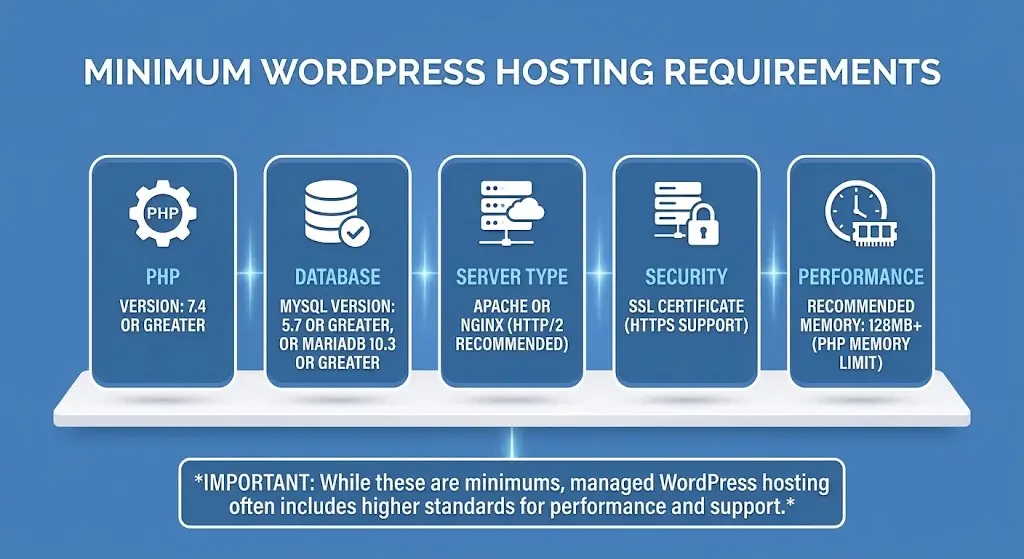
The minimum WordPress hosting requirements are a supported PHP version, a supported MySQL or MariaDB database, HTTPS support, a compatible web server such as Apache or Nginx, and enough server resources to run your site.
The official WordPress.org requirements are the baseline.
Everything else, like RAM, CPU and storage, depends on how big and busy your website is.
So the list below mixes two things. Software requirements are fairly fixed. Resource needs are flexible.
Here’s a quick reference before we go through each one.
| Requirement | What to look for |
| PHP | A WordPress-supported PHP version |
| Database | A supported MySQL or MariaDB version |
| HTTPS | SSL/TLS support for secure connections |
| Web server | Apache or Nginx, or another compatible server |
| RAM and CPU | Enough resources for WordPress, plugins and traffic |
| Storage | Enough space for WordPress files, themes, plugins, uploads and backups |
| Hosting access | A way to manage files, databases and WordPress settings |
One warning. Recommended versions change over time. Before you buy anything, check the current requirements page on WordPress.org. It takes two minutes and can save you a painful migration later.
1) PHP 8.3 or Later
WordPress recommends PHP 8.3 or later. PHP is the programming language that runs WordPress.
It powers the core software, your theme, every plugin and the admin dashboard. If PHP is too old, things slow down or break.
Ask your host which PHP versions it offers. Also ask if you can switch versions yourself from the hosting control panel. Good hosts make this a two-click job.
Stay away from outdated PHP versions.
They no longer get standard security updates, which leaves your site open to known attacks.
Some older plugins will complain when you upgrade, so test on a staging copy first if you can.
Moving to a newer PHP version is one of the easiest ways to make a site faster and safer at once.
2) MySQL 8.0 or MariaDB 10.11 or Later
WordPress stores almost everything in a database.
That includes your posts, pages, user accounts, settings and comments. Without one, WordPress has nowhere to keep your content.
The recommended options are MySQL 8.0 or later, or MariaDB 10.11 or later.
Both do the same job for WordPress, so don’t lose sleep over which one your host uses.
The good news is that you rarely need to install or maintain this software yourself.
Most shared hosting plans include database tools, often phpMyAdmin or a similar panel.
You just create a database, connect it to WordPress, and carry on. If you’re on a VPS and managing your own server, the story changes. Then the database is your job.
3) HTTPS Support and an SSL Certificate
Your hosting account must support HTTPS. That’s what lets visitors connect to your website securely.
HTTPS encrypts the information passing between the browser and your site. That’s especially useful for login forms, contact forms and online payments.
There’s also a trust angle. Modern browsers flag sites without HTTPS as not secure. Visitors see that warning and many leave straight away.
Before you buy, check two things.
First, does the plan include an SSL certificate? Many hosts offer a free one, such as Let’s Encrypt.
Second, does it renew automatically? A certificate that expires without warning can take your site offline for a morning, and that’s a bad way to find out.
4) Apache or Nginx Web Server Support
A web server is the software that receives a visitor’s request and sends back your page.
WordPress recommends Apache or Nginx. Both support the features WordPress sites commonly rely on.
With Apache, WordPress often uses a module called mod_rewrite.
It powers clean permalinks, like yoursite.com/about instead of yoursite.com/?p=123.
Nginx can run WordPress just as well. Its rewrite rules are set up differently, though, so the configuration looks different.
Here’s the relief for beginners. If you buy regular shared hosting, your provider installs and manages the web server.
You never touch it. Some hosts also use compatible servers like LiteSpeed, which is fine too and often brings extra speed through built-in caching.
5) Sufficient Disk Space for WordPress Files and Content
WordPress needs storage for its core files, themes, plugins, images, documents and database files.
The official software requirements don’t set one universal minimum, because websites vary so much in size.
A basic blog with compressed images needs very little space.
A WooCommerce store with hundreds of product photos needs far more. A site with video, downloads or a big media library will grow even faster.
So think beyond today. Choose a plan with room for your current content, future uploads and backups.
If email is included in your plan, remember it shares that same space. Also check how the host counts storage.
Some count backups against your quota, others don’t. Faster SSD storage is a nice extra, since it helps pages load quicker.
6) Enough PHP Memory and Server Resources
WordPress uses memory and processing power every time someone loads a page.
It runs plugins, processes forms, builds pages and serves visitors. All of that takes resources.
Here’s the honest truth.
There’s no single RAM or CPU number that guarantees your site will run well. It depends on your theme, your plugins, your caching setup and your traffic.
Features like WooCommerce, membership systems and page builders push resource use up fast.
Check two numbers with your host. The first is the PHP memory limit, which caps how much memory a single script can use.
The second is the account’s CPU and memory limits, which cap what your whole account can use at once.
If you plan to run a large or busy site, ask about these before you pay. Caching helps a lot, because it cuts the work the server repeats for every visit.
7) Support for WordPress PHP Extensions
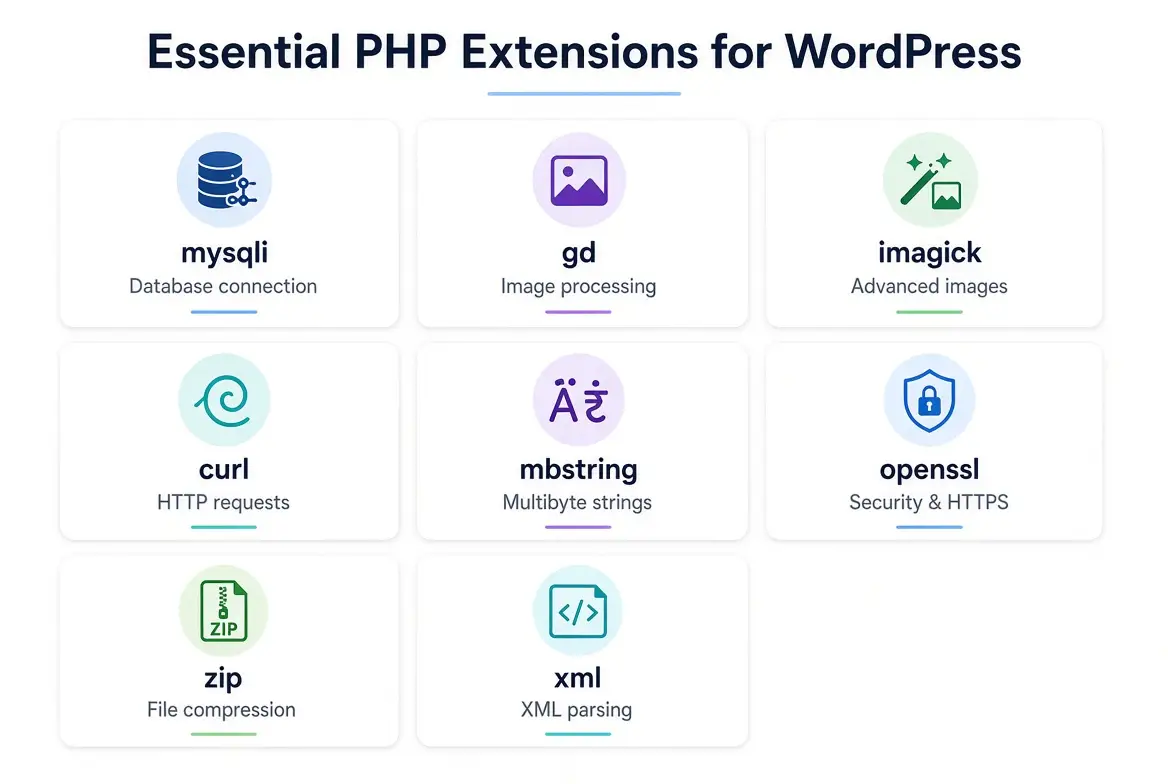
PHP extensions are add-on modules that give PHP extra abilities.
WordPress and many plugins rely on them for jobs like image processing, secure connections, text handling and database access.
Common extensions include curl, dom, exif, fileinfo, hash, imagick or gd, mbstring, mysqli, openssl, xml, zip and zlib.
You don’t need to memorize that list. Most quality hosts switch these on by default.
The exact requirements vary by WordPress version and plugin. If you hit an installation or compatibility error, don’t panic.
Ask your provider to check the current WordPress Hosting Handbook recommendations against your server setup. A missing extension is usually a quick fix once someone spots it.
WordPress Hosting Requirements in Kenya
The technical list above applies everywhere. But a few practical things deserve extra attention when you’re buying hosting in Kenya.
Start by comparing the technical requirements with the plan’s practical features.
A plan can tick every software box and still be a poor fit. Before paying, look at:
- SSL: Is it free, and does it renew on its own?
- Backups: How often do they run, and can you restore them yourself?
- Storage: Is there room for your content and your backups?
- Support: Can you reach a real person when something breaks?
- Control panel: Is there an easy way to manage files, databases and WordPress?
Server location is worth a thought too.
The physical location of a hosting server can affect latency, which is the delay between a visitor’s click and your site’s response.
If most of your visitors are in Kenya, a server close to them can help pages load faster, especially on weaker mobile connections.
That said, location isn’t everything. The best choice also depends on your audience and the quality of the service. A nearby server with poor support can still leave you stranded.
If you want a Kenya-based option, Truehost offers dedicated WordPress hosting. Its plans come in Starter, Pro and Unlimited tiers.
According to Truehost, they include a one-click WordPress installer, free SSL, daily or automatic backups, unlimited email and free WordPress migrations.
Truehost also runs local servers in Kenya, and its shared plans use cPanel and LiteSpeed caching.
If your site outgrows shared hosting, there’s an upgrade path to VPS plans without leaving the provider.
Plan details and prices change, so check the current Truehost plan pages before you commit.
Match the storage, resource limits and features to your own site, not to a headline price.
Before you buy anywhere, run through one last checklist. Check software compatibility, storage, server resources and security.
Then leave yourself room to grow. A site that fits perfectly today can feel cramped in six months.
Ready to compare? Explore Truehost Kenya WordPress hosting plans and check the features against your website’s needs.