Domain SearchInstantly check and register your preferred domain name
 Web Hosting
 cPanel HostingHosting powered by cPanel (Most user friendly)
 WordPress HostingHost your WordPress website with fast, secure, and affordable WordPress hosting in Kenya.
 KE Domains
 Reseller HostingStart your own hosting business without tech hustles
 Windows HostingOptimized for Windows-based applications and sites.
 Free Domain
 Affiliate ProgramEarn commissions by referring customers to our platforms
 Free HostingTest our SSD Hosting for free, for life (1GB storage)
 Domain TransferMove your domain to us with zero downtime and full control
 All DomainsBrowse and register domain extensions from around the world
 .Com Domain
 WhoisLook up domain ownership, expiry dates, and registrar information
 VPS Hosting
 Managed VPSNon techy? Opt for fully managed VPS server
 Dedicated ServersEnjoy unmatched power and control with your own physical server.
 Website Builder
 Online Store BuilderLaunch a professional e-commerce store without writing code.
 Web Design ServiceGet a custom-designed website tailored to your brand and goals. From just KES 15,600
 BlogRead our guides on web hosting, online business, digital marketing, and more
 SupportOur support guides cover everything you need to know about our services
 ContactContact us via chat or email
A few years ago, securing a website with SSL, the technology behind the small padlock icon and HTTPS, was something that often came with extra costs, technical configuration, and the hassle of manually renewing certificates before they expired.
For many website owners, especially beginners and small businesses, it felt like an added barrier to getting online safely. That has changed completely.
Today, most modern web hosting providers in Kenya and around the world include free SSL certificates as a standard feature, usually powered by Let’s Encrypt. This nonprofit certificate authority has made it possible for anyone to secure their website at no cost, and in most cases, the process is fully automated.
The moment your domain is connected to hosting, SSL is often installed and activated in the background without you having to lift a finger.
This shift has had a big impact on how websites are built and trusted online. Visitors now expect secure browsing by default, and websites without SSL are quickly flagged by browsers as “Not Secure,” which can discourage users from continuing.
On the other hand, HTTPS websites instantly feel more reliable, especially when they handle sensitive actions like logins, contact forms, or online payments.
Beyond trust, SSL also plays a role in visibility and performance. Search engines like Google give preference to secure websites, meaning SSL can indirectly improve your search rankings. At the same time, users are far more likely to complete actions on a site they feel is safe, which can translate into better engagement and higher conversion rates for businesses.
Perhaps the biggest advantage is that all of this now comes at no extra cost. What used to be a paid add-on is now included in most hosting plans, even entry-level packages.
On top of that, SSL certificates are automatically renewed every few months, removing the risk of expiration and saving website owners from ongoing technical maintenance.
In simple terms, SSL has become a standard part of every serious website, quietly working in the background to protect users, build trust, and support better online performance without adding complexity or cost.
Top Web Hosting Providers Offering Free SSL (2026)
Choosing a hosting provider today is no longer just about storage space or bandwidth.
Security is now built into the foundation of modern hosting, and one of the most important features included by default is free SSL, usually powered by Let’s Encrypt.
This means you can launch a website that is automatically encrypted, trusted by browsers, and SEO-friendly without paying extra or dealing with a complex setup.
Here are some of the leading hosting providers offering free SSL in 2026, each with its own strengths depending on your needs and budget.
1) Truehost
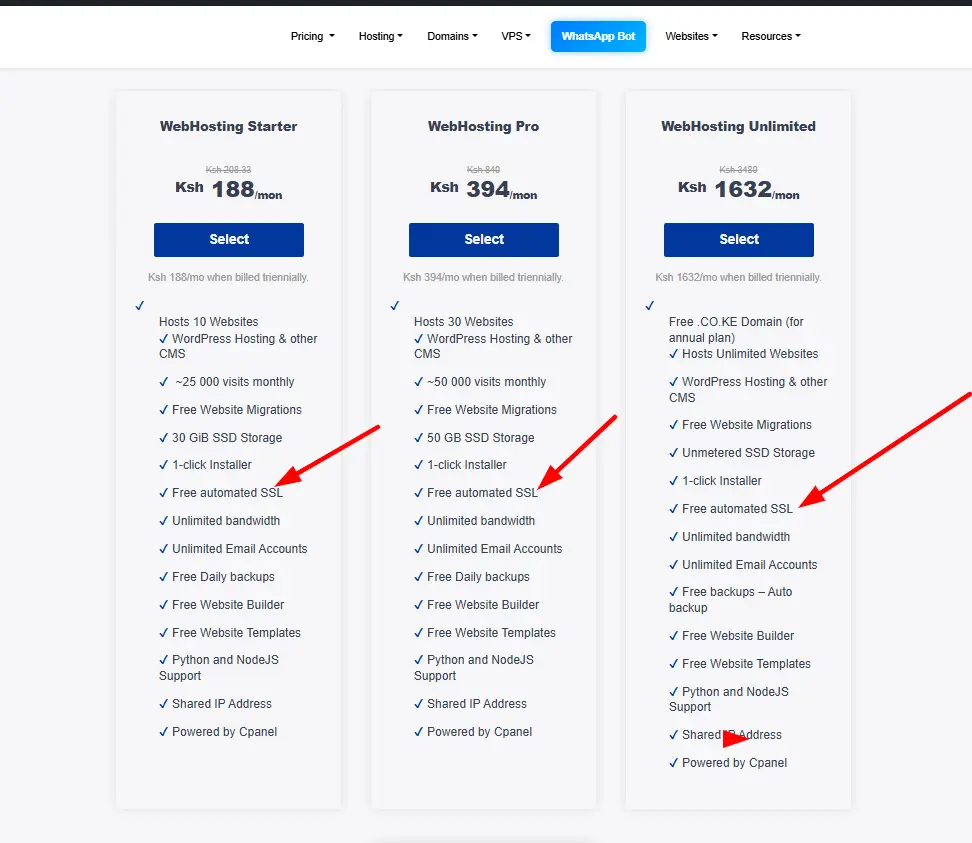
Truehost provides free Let’s Encrypt SSL across all its hosting plans, including shared hosting, cloud hosting, WordPress hosting, and reseller packages. In most cases, SSL is activated automatically once your domain is pointed to the server.
For users who prefer manual control, it can also be issued through cPanel using AutoSSL with a single click. The best part is that renewal is completely automated every 90 days, so there is no risk of certificates expiring unnoticed.
Beyond security, Truehost has built its reputation around affordability and accessibility, especially for users in Africa. It is designed to be beginner-friendly, with a clean setup process, local customer support, and hosting plans that don’t strain small budgets.
Features like daily backups, WordPress optimization, and stable performance make it a common choice for startups, bloggers, and small businesses that want a reliable online presence without technical complexity.
2) HostAfrica
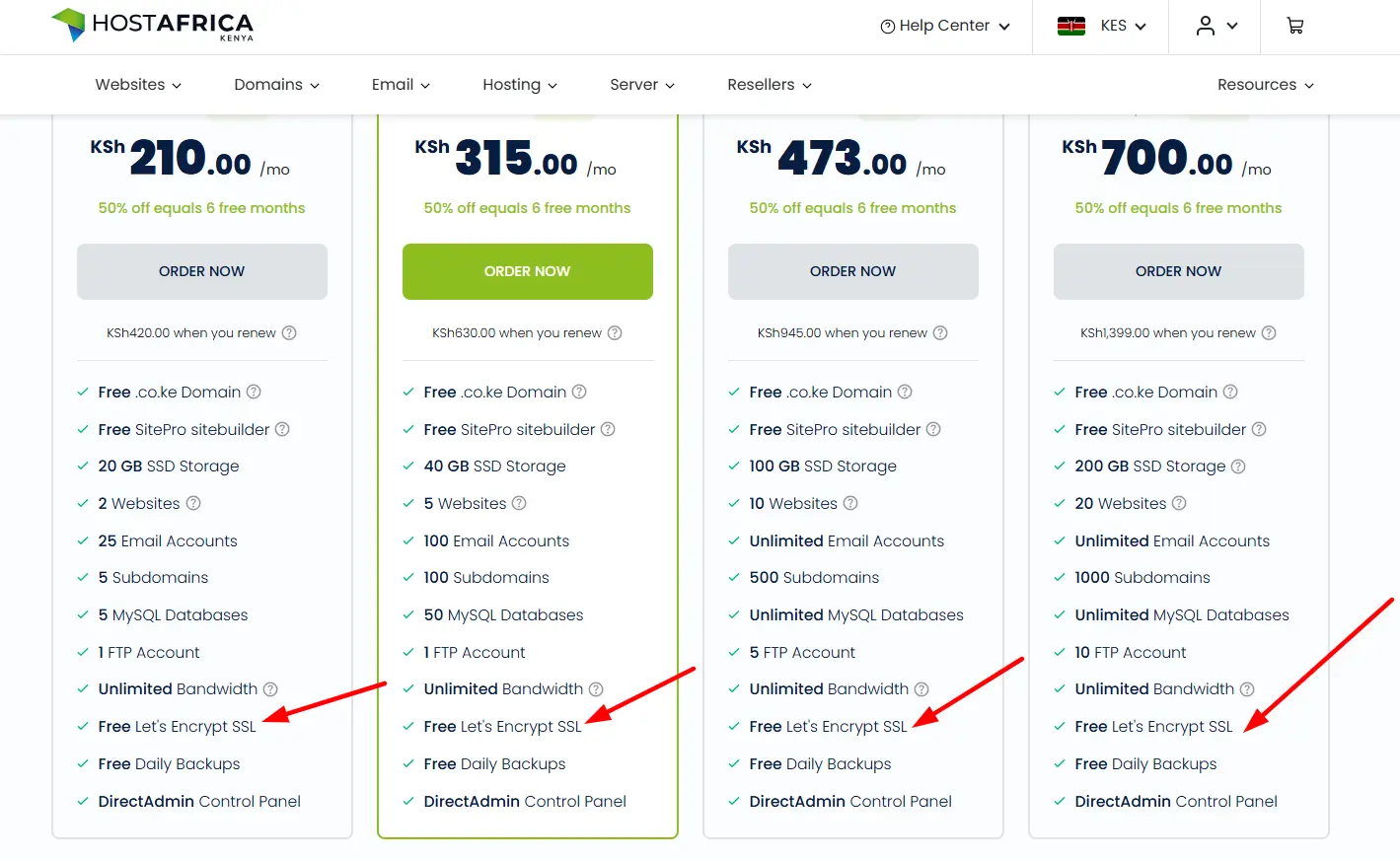
HostAfrica also includes free Let’s Encrypt SSL certificates across all hosting plans, with automatic installation and renewal handled through cPanel AutoSSL. This ensures that websites remain secure at all times without requiring manual intervention from the user.
What makes HostAfrica stand out is its focus on performance and infrastructure stability. Their hosting environment is often powered by LiteSpeed servers, which improve website loading speeds and overall responsiveness.
Many of their packages also include promotional extras such as free domain options (including .africa in selected plans), making them attractive for businesses targeting African audiences.
On top of that, HostAfrica offers continuous security monitoring and 24/7 support, which appeals to businesses that prioritize uptime and reliability.
It is commonly chosen by SMEs and growing companies that need dependable hosting with a strong regional footprint across Africa.
3) HostPinnacle
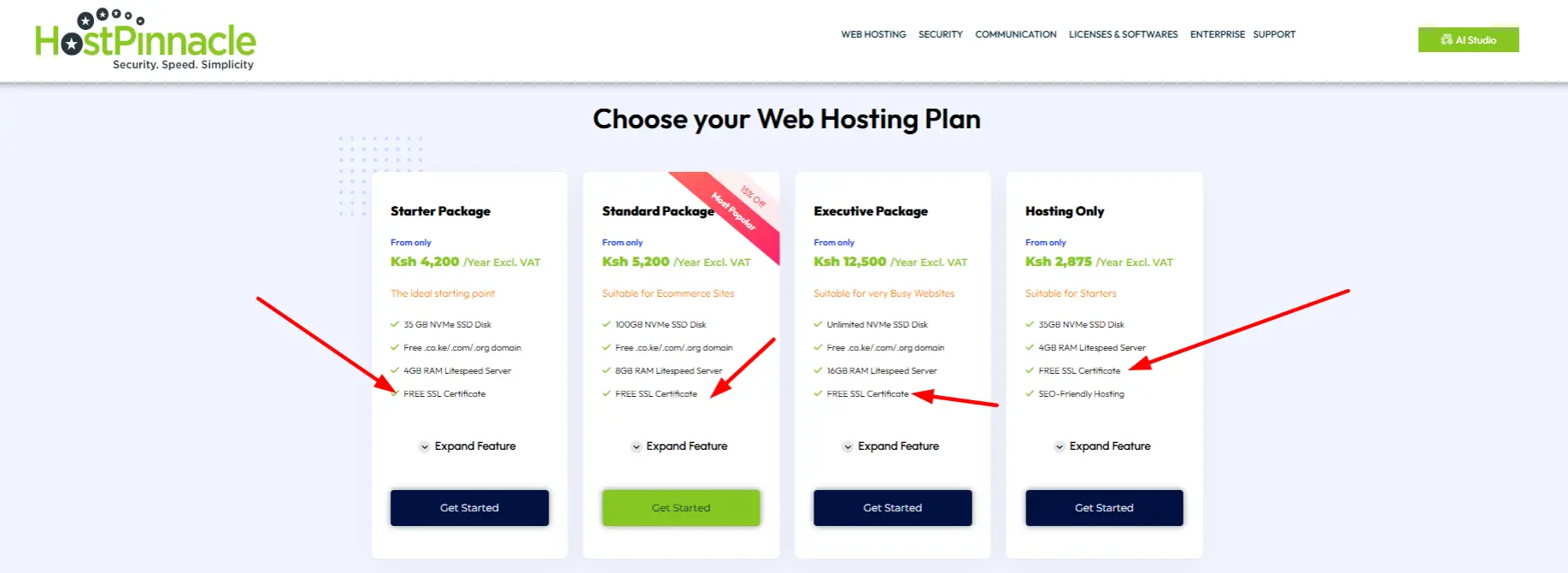
HostPinnacle provides free SSL certificates on all hosting accounts, offering both Let’s Encrypt and AutoSSL options depending on the setup.
SSL is fully integrated into their hosting environment, meaning users can secure their websites without additional configuration.
HostPinnacle is especially popular in Kenya due to its strong value proposition. Alongside free SSL, most plans include free domain registration, NVMe SSD storage for faster performance, unlimited bandwidth on selected packages, and support for multiple websites and email accounts.
It also integrates smoothly with M-Pesa, making payments simple and locally accessible.
This combination of affordability, performance, and local convenience makes HostPinnacle a strong option for individuals, developers, and small businesses that want reliable hosting without high recurring costs.
4) Bluehost
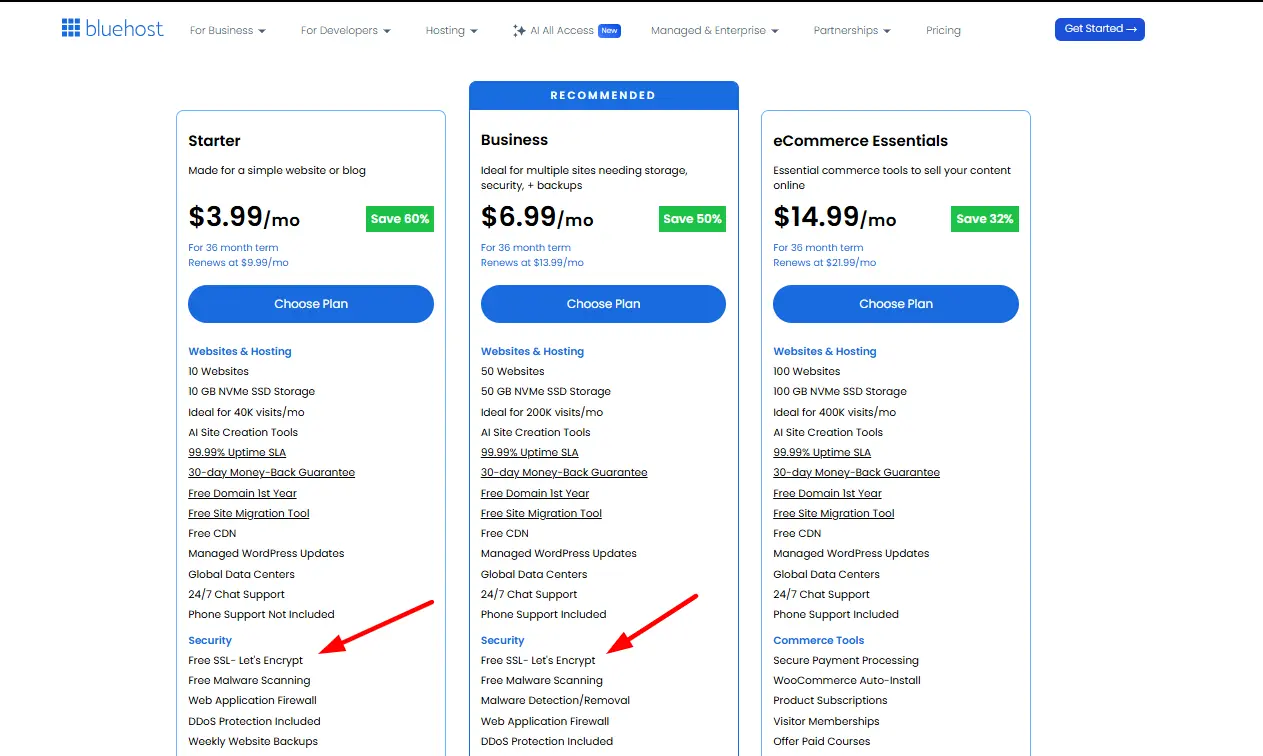
Bluehost includes free Let’s Encrypt SSL certificates across all hosting plans, including shared hosting and WordPress-specific packages. SSL is automatically activated once a domain is connected, making the setup process extremely simple for beginners who don’t want to deal with manual configuration.
Bluehost is one of the most globally recognized hosting providers and is officially recommended by WordPress.org. It is known for its strong uptime, user-friendly dashboard, and seamless one-click WordPress installation.
Beyond SSL, users benefit from a well-optimized hosting environment, marketing credits for new websites, and scalable plans that support long-term growth.
Because of its global infrastructure and ease of use, Bluehost is often chosen by users building international websites or planning to scale beyond local markets, especially those who want a straightforward, beginner-friendly experience with room to grow.
Steps to Install Free Let’s Encrypt SSL on cPanel Hosting
Even though most hosting providers today automate SSL installation, it’s still useful to understand how the process works inside cPanel, especially if you ever need to troubleshoot or manually trigger it.
Most setups rely on Let’s Encrypt certificates combined with cPanel’s AutoSSL feature to handle everything from issuance to renewal.
Here’s a clear step-by-step breakdown:
i) Log in to your cPanel account
Start by accessing your hosting control panel. Your hosting provider (for example, Truehost or similar cPanel-based hosts) will give you login details. Once inside, you’ll land on the main dashboard where all hosting tools are available.
ii) Open the SSL management section
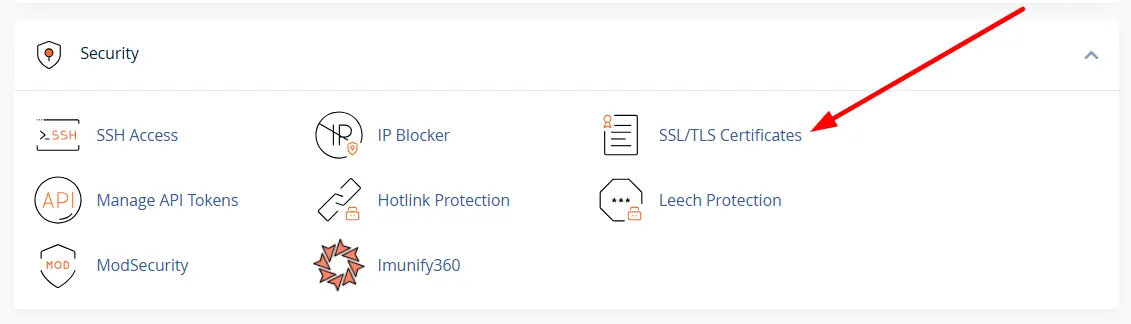
Scroll to the Security area of cPanel. Depending on your host, you’ll either see Let’s Encrypt SSL, SSL/TLS Status, or AutoSSL. This is the section responsible for managing all website certificates.
iii) Select your domain or subdomain
Choose the specific domain you want to secure. If you have multiple domains or subdomains (like blog.yoursite.com), you can select them individually or secure everything at once if your hosting plan allows wildcard SSL.
iv) Issue or run AutoSSL
Click Issue SSL, Run AutoSSL, or a similar button depending on your hosting interface. This triggers the system to request a certificate from Let’s Encrypt, verify your domain ownership, and prepare the SSL configuration automatically.
v) Wait for validation and installation
At this stage, the system communicates with the certificate authority, verifies your domain, and installs the SSL certificate. This process is usually automatic and takes anywhere from a few seconds to a few minutes. Once complete, your website becomes accessible via HTTPS.
vi) Force HTTPS redirect via .htaccess
To ensure all traffic is secure, go to File Manager → public_html and locate the .htaccess file. If it doesn’t exist, you can create one. Add a redirect rule so that all visitors are automatically sent from HTTP to HTTPS. This prevents users from accessing the unsecured version of your site.
vii) Save changes and test your website
After updating the file, save your changes and open your website in a browser. Type your domain with https:// and confirm that a padlock icon appears next to the URL. This indicates that the SSL certificate is active and working correctly.
Once these steps are complete, your website is fully secured, encrypted, and trusted by modern browsers. From this point onward, all data between your site and visitors is protected automatically, and most hosting systems will handle renewals in the background without any further action from you.
Why Free SSL Hosting Is Now the Standard
Free SSL has become a standard requirement for every website, not a premium add-on. Today, search engines expect it, browsers flag sites without it, and users trust only secure websites. Because of this shift, most reliable hosting providers now include SSL by default, usually powered by Let’s Encrypt and handled automatically from setup to renewal.
This has moved the focus away from whether SSL is included and toward what really counts: speed, uptime, support quality, scalability, and overall hosting value. In other words, SSL is already assumed, and the real decision is choosing a host that delivers performance and reliability alongside security.
If you’re launching a website, SSL shouldn’t be something you worry about; it should just work from the start. For users in Kenya, Truehost is a solid option because it includes free SSL automatically and keeps the setup simple, especially for beginners and small businesses.
Secure hosting is now the baseline for any serious website; the difference is in choosing the right provider to build on it.