Domain SearchInstantly check and register your preferred domain name
 Web Hosting
 cPanel HostingHosting powered by cPanel (Most user friendly)
 WordPress HostingHost your WordPress website with fast, secure, and affordable WordPress hosting in Kenya.
 KE Domains
 Reseller HostingStart your own hosting business without tech hustles
 Windows HostingOptimized for Windows-based applications and sites.
 Free Domain
 Affiliate ProgramEarn commissions by referring customers to our platforms
 Free HostingTest our SSD Hosting for free, for life (1GB storage)
 Domain TransferMove your domain to us with zero downtime and full control
 All DomainsBrowse and register domain extensions from around the world
 .Com Domain
 WhoisLook up domain ownership, expiry dates, and registrar information
 VPS Hosting
 Managed VPSNon techy? Opt for fully managed VPS server
 Dedicated ServersEnjoy unmatched power and control with your own physical server.
 Website Builder
 Online Store BuilderLaunch a professional e-commerce store without writing code.
 Web Design ServiceGet a custom-designed website tailored to your brand and goals. From just KES 15,600
 BlogRead our guides on web hosting, online business, digital marketing, and more
 SupportOur support guides cover everything you need to know about our services
 ContactContact us via chat or email
Running a powerful personal AI assistant requires the right infrastructure.
Most cloud setups are either too expensive or too complex to manage and that’s before you even get to the AI configuration.
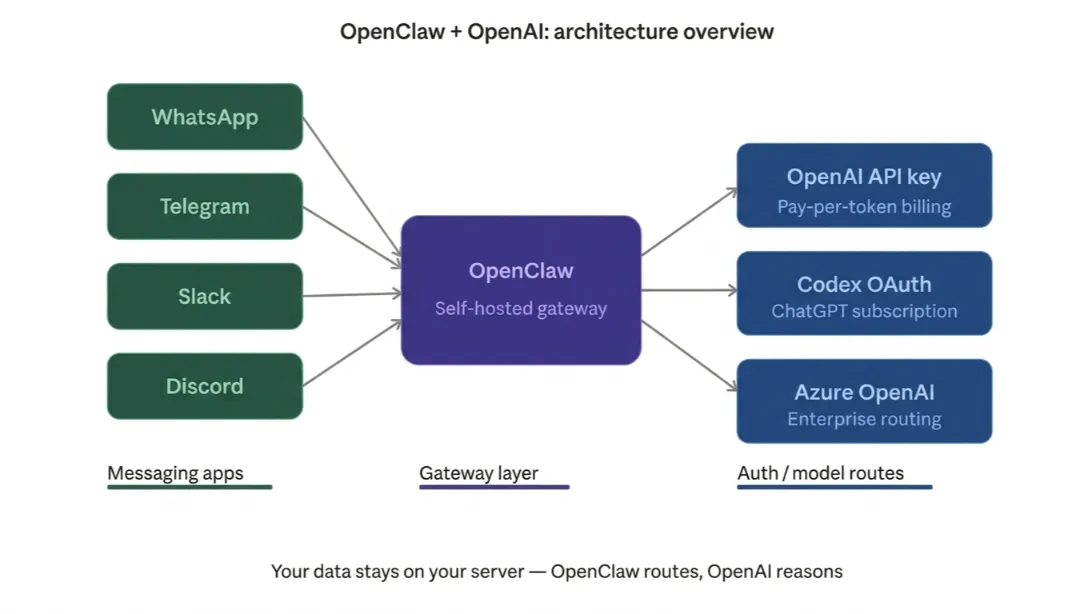
OpenClaw solves that. It’s a self-hosted gateway that connects your messaging apps, WhatsApp, Telegram, Slack, and more directly to AI models like OpenAI’s GPT.
Your data stays on your server, and you stay in control.
The OpenCLAW OpenAI integration is faster to set up than most people expect, especially when you start on the right infrastructure.
We at Truehost offer preconfigured OpenClawVPS plans in Kenya starting from KES 1,120/mo.
The environment is ready, so you skip straight to connecting your AI credentials.
This guide walks you through how to do that.
Prerequisites Before You Start
Make sure you have these ready before touching any configuration:
- An OpenClaw instance running: either via Truehost VPS or a manual install
- Node.js installed and OpenClaw installed globally:
npm install -g openclaw - An OpenAI account with either:
- An OpenAI Platform API key (usage-based billing), or
- An active ChatGPT Plus/Pro subscription (for the Codex OAuth path)
- Access to OpenClaw’s dashboard or CLI
If you’re setting up from scratch on a raw VPS, the manual setup process takes 30–60 minutes.
If you’re on Truehost’s preconfigured plan, you skip that entirely and go straight to connecting your OpenAI credentials.
OpenClaw’s OpenAI Architecture
OpenClaw keeps model routing and authentication as separate layers.
Every OpenAI model uses the openai/* prefix regardless of how you authenticate.
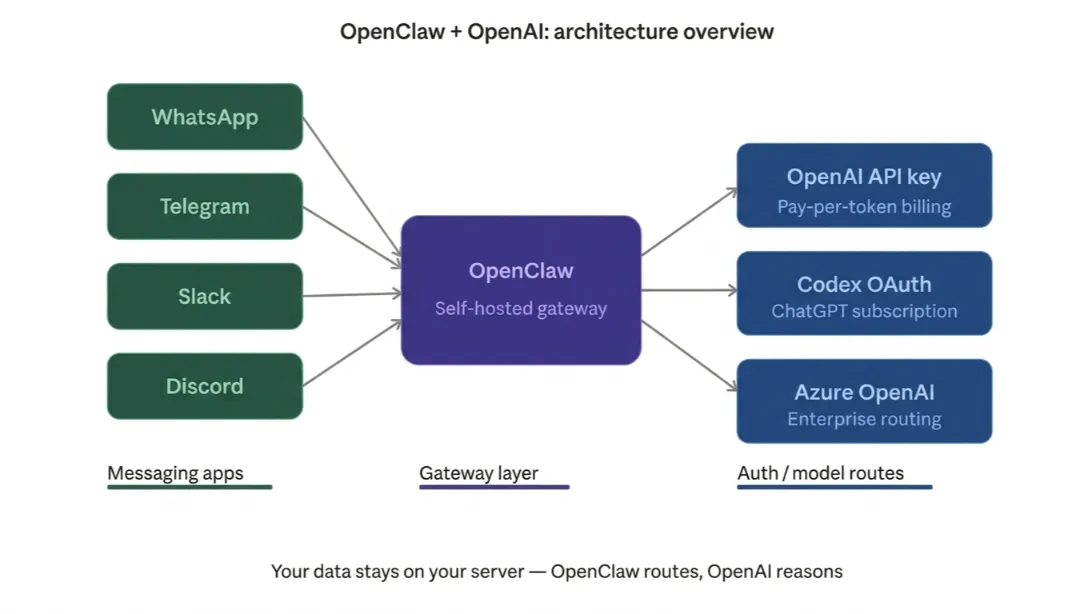
The auth method determines billing, rate limits, and which runtime executes your agent.
There are three distinct paths:
| Goal | Model Reference | Notes |
| Direct API billing | openai/gpt-5.5 | Set OPENAI_API_KEY |
| ChatGPT subscription | openai-codex/gpt-5.5 | Best for subscription setups |
| Native Codex behavior | openai/gpt-5.5 + agentRuntime.id: codex | Advanced users |
The practical tradeoff: API keys give you metered access with no usage ceiling.
The Codex subscription routes through your ChatGPT account, which means a fixed monthly rate but with your tier’s limits.
For development, prototyping, and moderate workloads, the Codex path is often cheaper
Choose your path based on your usage volume and whether you already pay for ChatGPT.
1) Connecting OpenClaw to OpenAI via API Key
This is the most flexible path. You pay per token, there’s no usage ceiling, and it works with every OpenAI model.
a) Generate Your API Key
Head to the OpenAIPlatform dashboard, create a new key, and give it a clear name like ‘OpenClaw Production.’ Copy it immediately, you won’t be able to see it again.
b) Add It to OpenClaw
You have two options here:
- Set it as an environment variable:
OPENAI_API_KEY=your-key-here- Or run the interactive setup wizard:
openclaw configureThen follow the prompts and set your model to openai/gpt-5.5.
OpenClaw stores config at ~/.openclaw/openclaw.json. You can also use environment variables in ~/.openclaw/.env for sensitive data like API keys.
c) Verify the Connection
Start the gateway and open the dashboard:
openclaw gateway
openclaw dashboard
Send a test message through any connected channel. If it responds you’re live.
2) Connecting via Codex Subscription (OAuth Path)
This is the path to choose if you already pay for ChatGPT Plus or Pro.
In May 2026, OpenAI made its ChatGPT subscription the authentication and billing layer for OpenClaw.
ChatGPT Plus subscribers can log in via OAuth, access GPT-5.4 through the Codex endpoint, and run autonomous AI agents on their own hardware for $23 per month total.
OpenAI enabled ChatGPT subscription access for OpenClaw in May 2026, opening the Codex auth path to 3.2 million OpenClaw users.
The openai-codex identifier handles authentication, while model references continue using the standard openai/* prefix.
a) Run the OAuth Flow
openclaw onboard --auth-choice openai-codexThis opens a browser window for the OAuth flow. Sign in with your ChatGPT account and authorize OpenClaw.
b) Headless Server Setup
Running OpenClaw on a VPS without a browser? Add the device-code flag:
openclaw onboard --auth-choice openai-codex --device-codeThis generates a code you enter on a separate device, so you can authorize from your phone or laptop while the VPS waits.
c) Knowing Auth Priority
Auth resolution follows a priority chain: the explicit OpenClaw profile first, then the app-server account, then falls back to CODEX_API_KEY or OPENAI_API_KEY environment variables.
This is important when you have multiple credentials configured. If you want a specific agent to use a specific auth method, set an explicit profile; don’t rely on the fallback chain.
3) Advanced: Native Codex App-Server Harness
For power users who want the full native Codex execution experience, not just GPT-5.5 called through the standard API, but Codex running with its agent-native behaviors intact.
Set your config to:
model: openai/gpt-5.5
agents.defaults.agentRuntime.id: 'codex'
After the gateway is running, verify the setup:
/codex status
/codex models
Send either command through your connected chat channel. OpenClaw passes its capabilities to Codex as dynamic tools that can be discovered on demand, keeping the initial context window smaller and reducing latency on the first call.
This is the recommended path if you’re building agent workflows that involve multi-step code execution or automated file operations.
Check our guide on Openclaw use cases
Azure OpenAI Configuration (Optional)
For enterprise teams or anyone routing through Azure for compliance, regional data residency, or to consume Azure credits, this section is for you.
The default API version is 2024-12-01-preview when the AZURE_OPENAI_API_VERSION variable is unset. You can pin a specific Azure preview or GA version using this environment variable.
Key things to note for Azure configuration:
- Set your provider’s
baseUrlto your Azure OpenAI resource endpoint - Provide your Azure API key
- Model names must match your Azure deployment names, not the public OpenAI model IDs
Azure OpenAI binds models to deployments. The model field in OpenClaw must be the Azure deployment name you configured in the Azure portal, not the public OpenAI model ID.
For example, if you create a deployment called gpt-image-2-prod that serves gpt-image-2, you reference the deployment name.
One important version note: Azure routing for the openai provider’s image-generation path requires OpenClaw 2026.4.22 or later. Earlier versions will fail against Azure image deployments.
For enterprise teams on Azure that need compliance-ready OpenClaw deployments, GitHub Copilot is often the best choice.
Most enterprise Azure teams already have GitHub Copilot licenses.
Microsoft also recommends selecting the GitHub Copilot provider in the OpenClaw onboarding wizard for these environments.
Learn how to set up OpenClaw on a VPS
Troubleshooting Common Issues
| Issue | Cause | Fix |
| Model not on the allowlist | Agent auth picking the wrong profile | Add model to the allowlist in configThe |
| OAuth window won’t open | Headless server | Use --device-code flag |
| Legacy model refs failing | Old openai-codex/* format | Run openclaw doctor --fix |
| API key not recognized | Missing env variable | Set OPENAI_API_KEY explicitly |
| Agent auth picking wrong profile | Priority chain conflict | Set an explicit OpenClaw profile |
A particularly handy command for users migrating from early 2026 configs: legacy openai-codex/gpt-* model references can be repaired automatically by running:
openclaw doctor --fixThis migrates old references to the canonical openai/* format without requiring manual config edits.
OpenAI uses OAuth (Codex PKCE flow), so token rotation can cause occasional auth failures. When this happens, re-run openclaw models auth login --provider openai-codex to refresh.
Deploy Your OpenClaw + OpenAI Integration on Truehost Today
You now have everything you need to wire up a full OpenCLAW OpenAI integration from basic API key setup to native Codex execution and Azure enterprise routing.
The biggest remaining hurdle is reliable, always-on hosting.
Running OpenClaw on your laptop means the agent goes offline when you close the lid. Running it on a misconfigured VPS means spending your weekend reading Nginx logs instead of using your AI assistant.
Truehost preconfigured OpenClaw VPS plans are built specifically for this.
The environment is ready Node.js, OpenClaw, and all dependencies pre-installed.
You connect your OpenAI credentials and you’re live in minutes, not hours.
Read also: How to upgrade to a VPS
OpenClaw OpenAI Integration: FAQs
What is the difference between OpenAI Codex and OpenClaw?
OpenAI Codex is an AI model (and now an agent cloud service) built by OpenAI. OpenClaw is an open-source, self-hosted framework that uses models like Codex as its intelligence layer.
Does OpenClaw support DeepSeek?
Yes. DeepSeek is a supported model backend. You configure it like any other provider set your API key, and point the model reference to your DeepSeek endpoint, or use an aggregator like OpenRouter that includes DeepSeek in its catalog.
What LLMs can OpenClaw use?
Supported model backends include Anthropic Claude, OpenAI GPT-5 family and Codex, Google Gemini, xAI Grok, Mistral, DeepSeek, and local models via Ollama or any OpenAI-compatible endpoint.
What is the difference between OpenClaw and ChatGPT?
ChatGPT is a cloud-hosted AI assistant. OpenClaw is a self-hosted agent framework. ChatGPT lives on OpenAI’s servers; OpenClaw lives on your machine or VPS. OpenClaw can also act autonomously, executing tasks without waiting for your next message, while ChatGPT requires you to drive each interaction.
Is GPT-5 mini good enough for OpenClaw?
For lightweight tasks, scheduling, email drafts, and quick lookups GPT-5 mini performs well and keeps costs low. For complex multi-step reasoning or code generation, GPT-5.5 or the full Codex runtime will give you noticeably better results.
Can I use a ChatGPT subscription for OpenClaw?
Yes. Since May 2026, OpenAI officially supports ChatGPT Plus and Pro subscriptions as the authentication layer for OpenClaw via the Codex OAuth path. It’s one of the most cost-effective setups for moderate workloads.
Does OpenClaw need an API?
Not necessarily. You can connect it via direct API key (pay-per-token) or via the Codex OAuth path using a ChatGPT Plus/Pro subscription. The Codex subscription route requires no separate API billing.