Domain SearchInstantly check and register your preferred domain name
 Web Hosting
 cPanel HostingHosting powered by cPanel (Most user friendly)
 WordPress HostingHost your WordPress website with fast, secure, and affordable WordPress hosting in Kenya.
 KE Domains
 Reseller HostingStart your own hosting business without tech hustles
 Windows HostingOptimized for Windows-based applications and sites.
 Free Domain
 Affiliate ProgramEarn commissions by referring customers to our platforms
 Free HostingTest our SSD Hosting for free, for life (1GB storage)
 Domain TransferMove your domain to us with zero downtime and full control
 All DomainsBrowse and register domain extensions from around the world
 .Com Domain
 WhoisLook up domain ownership, expiry dates, and registrar information
 VPS Hosting
 Managed VPSNon techy? Opt for fully managed VPS server
 Dedicated ServersEnjoy unmatched power and control with your own physical server.
 Website Builder
 Online Store BuilderLaunch a professional e-commerce store without writing code.
 Web Design ServiceGet a custom-designed website tailored to your brand and goals. From just KES 15,600
 BlogRead our guides on web hosting, online business, digital marketing, and more
 SupportOur support guides cover everything you need to know about our services
 ContactContact us via chat or email
Have you ever found yourself copying customer details from an email into a spreadsheet or sending repeated WhatsApp messages just to get someone to approve an expense?
These are the kinds of everyday tasks that slow businesses down, and they’re exactly what workflow automation is designed to eliminate.
Many Kenyan SMEs still rely on manual processes that seem small on their own but quickly add up throughout the day.
- An order waits until someone notices it
- An approval stalls because the right person is away
- Staff spend hours on administrative work instead of serving customers
Workflow automation solves this by using software to move work automatically based on predefined rules. Instead of someone manually deciding, “This should go to accounts,” the system recognizes the trigger and routes it to the right place instantly.
One important point from the start: workflow automation doesn’t require AI. It simply follows a set of rules and performs the same actions consistently whenever a specific event occurs.
So, basically, most repetitive business tasks don’t require human decision-making.
When a new customer signs up, the next steps are usually predictable:
- Send a welcome email
- Add their details to a spreadsheet
- Notify the sales team
- Create a folder
- Schedule a follow-up
These tasks need to happen every time, in the same order, without relying on someone to remember them. That’s exactly what workflow automation is built to do.
What are the Steps in a Workflow Automation Process?
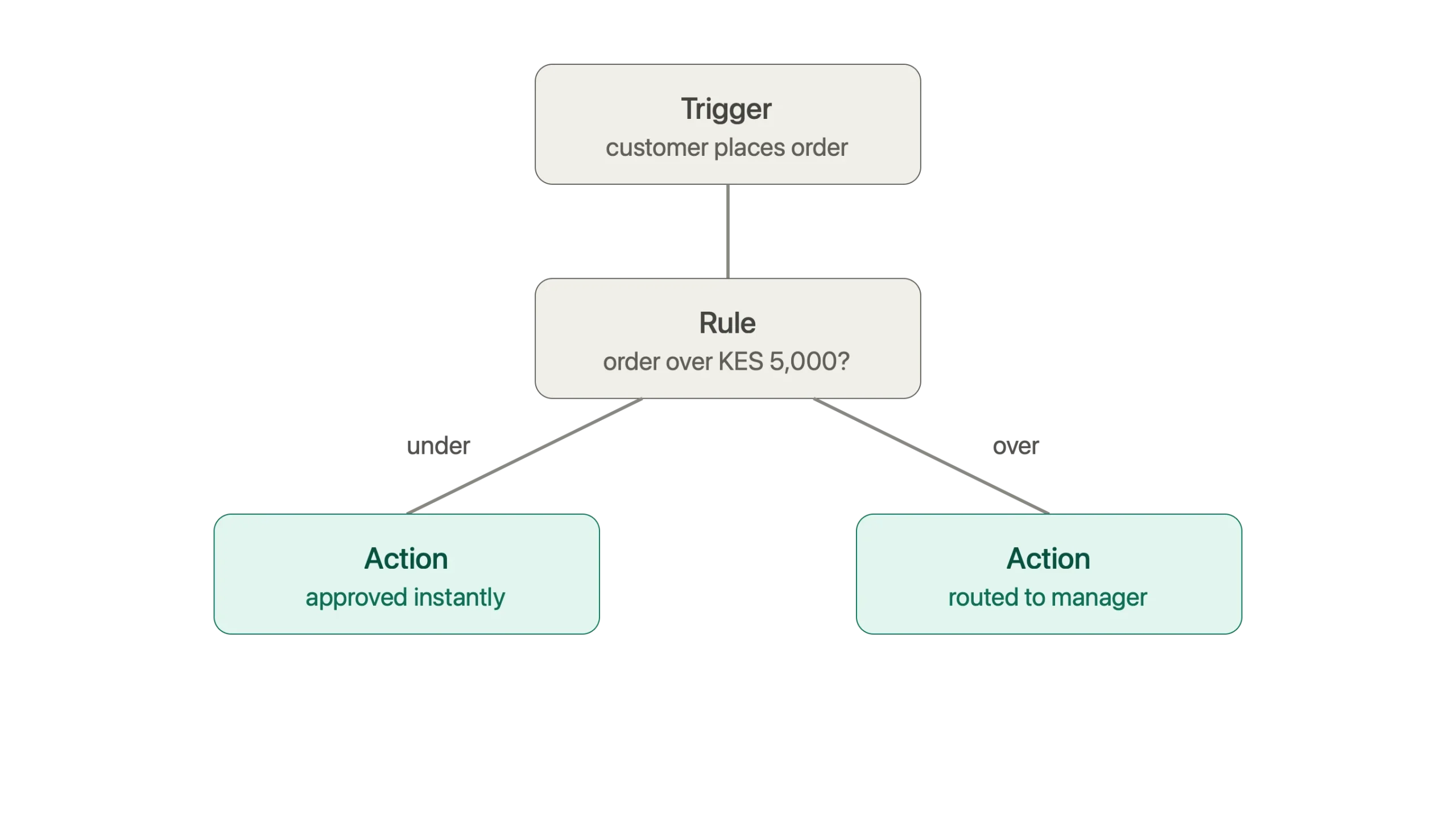
Every workflow automation process, from the simplest task to a complex business operation, follows the same three-step structure:
- Trigger – An event starts the workflow. This could be a form submission, a new invoice arriving, or a payment being completed.
- Rule or condition – The software checks the event against the rules you’ve already defined. For example, if an order is worth more than KES 5,000, send it to a manager for approval.
- Action – Once the conditions are met, the software completes the next task automatically. It might send a notification, update a spreadsheet, or move an order to the next stage.
After you set up the workflow, it continues running on its own. There’s no need to copy information between systems or worry about someone forgetting the next step.
Here’s a practical example. A customer places an order through your online store. The workflow checks the order value against a predefined threshold.
If it’s below the limit, the order is approved immediately without any manual review.
If it’s above the limit, it’s automatically sent to a manager for approval.
That same trigger>rule>action process can also update your CRM, send a WhatsApp notification, or record the sale in a spreadsheet as soon as the order is placed.
How to Actually Build One, Step by Step
Knowing the trigger>rule>action structure is one thing. Rolling one out in your own business is another, and most successful rollouts follow the same sequence:
- Identify a repetitive task that’s wasting time: Common starting points include assigning leads, approving expenses, or following up on payment confirmations.
- Map your current process: Write down every step exactly as it happens today before making any changes. This gives you a clear view of what needs to be automated.
- Define the trigger, rule, and action: Decide what starts the workflow, what conditions the software should check, and what actions it should complete automatically.
- Build the workflow in your chosen tool: Use the logic you’ve mapped out to create the automation.
- Test it with real scenarios: Run through different situations before rolling it out to everyone so you can catch unexpected issues early.
- Deploy, monitor, and refine: Once the workflow is live, keep an eye on how it performs and make small improvements as your business processes evolve.
A good way to get started is by automating one process at a time. It’s easier to manage, easier to test, and gives you a proven workflow you can use as a template for future automations.
What are the Benefits of Workflow Automation?
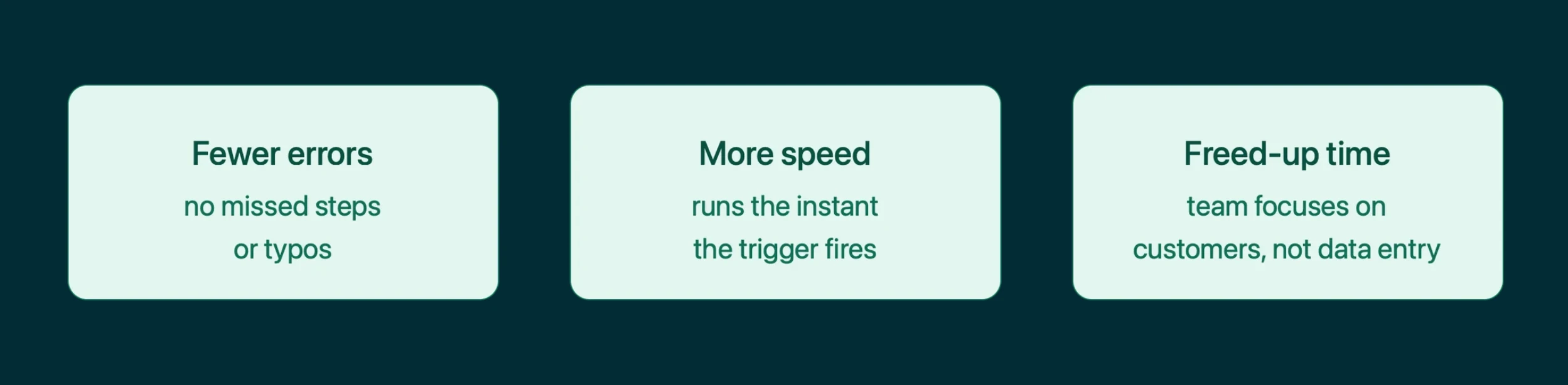
Businesses that automate repetitive tasks often see the same benefits almost immediately:
- It eliminates human error: Typos, missed approval steps, and forgotten follow-ups become far less common when software handles routine tasks using predefined rules instead of manual processes.
- It increases speed: Tasks begin as soon as the trigger occurs. Instead of waiting for someone to notice an email or update a spreadsheet, the workflow runs automatically within seconds.
- It frees people for higher-value work. When repetitive tasks are handled automatically, your team can spend more time serving customers, closing sales, solving problems, and focusing on work that helps the business grow.
Common Examples of Workflow Automation
A handful of patterns show up across almost every industry:
- Employee onboarding – When a new employee is added to your HR system, the workflow creates their user accounts, sends a welcome email, assigns onboarding documents, and schedules their first training tasks automatically.
- Lead routing – A new sales enquiry is assigned to the right salesperson based on factors such as location, product interest, or company size, while an instant notification is sent through your team’s chat platform.
- Expense and payment approvals – Once an employee submits an expense claim, it’s automatically sent to the right manager for approval. After approval, the accounting system updates without anyone having to enter the information manually.
- M-Pesa reconciliation – Incoming M-Pesa payments are automatically matched with customer orders, any mismatches are flagged for review, and accounting records are updated without opening a spreadsheet.
- Customer support ticketing – A new support request is automatically categorized, assigned to the appropriate team, and prioritized based on urgency, helping customers receive faster responses.
- Inventory management – When stock levels drop below a set threshold, the system alerts your purchasing team or creates a purchase request automatically to avoid running out of products.
Each of these examples follows the same trigger > rule > action pattern discussed earlier. The process changes, but the automation logic stays the same.
Popular Workflow Automation Tools
Most businesses reach for a low-code, drag-and-drop platform to connect their apps rather than hiring a developer to build something from scratch.
These tools show up the most:
- Zapier – A beginner-friendly platform that connects thousands of popular applications such as Gmail, Slack, Trello, Google Sheets, and HubSpot through simple, linear workflows.
- Make – A visual automation platform designed for more advanced, multi-step workflows, with powerful options for handling complex business processes.
- n8n – An open-source workflow automation platform that offers extensive customization and can be self-hosted, giving businesses greater control over their data and infrastructure.
- Microsoft Power Automate – A strong choice for organizations using Microsoft 365, making it easy to automate processes across Outlook, Excel, SharePoint, Teams, and other Microsoft services.
- Pipedream – A developer-friendly automation platform that combines workflow automation with custom code, making it ideal for API integrations and advanced automation projects.
Again, all of these platforms use the same trigger>rule>action approach.
The biggest differences come down to pricing, ease of use, available integrations, customization options, and in the case of n8n, the ability to host the platform on your own server for greater control.
How is Workflow Automation Different from RPA?
Workflow automation and robotic process automation (RPA) are often mentioned together, but they solve different problems.
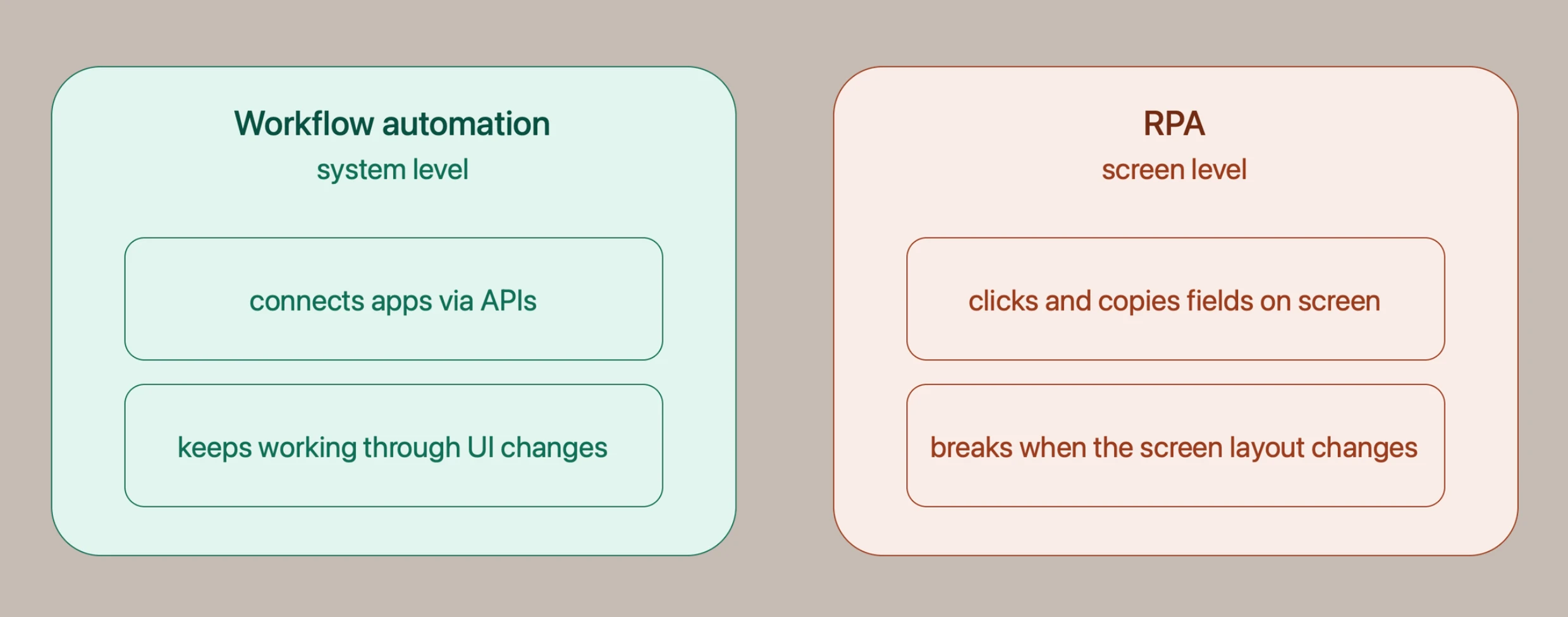
Workflow automation manages an entire business process from start to finish.
It connects people, applications, and systems using predefined rules and integrations, following the trigger > rule > action pattern we’ve discussed. Information moves automatically from one step to the next without manual intervention.
RPA (Robotic Process Automation) focuses on automating the actions a person performs on a computer.
It can click buttons, copy and paste information, fill in forms, and move data between applications that don’t have built-in integrations. This makes it especially useful for older or legacy systems.
However, because RPA relies on the user interface, even a small change to a screen layout or application update can interrupt the automation.
For most growing businesses, workflow automation delivers greater flexibility because it works directly with applications and systems instead of interacting with them through the screen.
That doesn’t mean it’s a choice between one or the other.
Many organizations use both together, RPA to automate legacy applications that can’t be integrated easily, and workflow automation to connect modern systems and manage end-to-end business processes.
What are the Features to Look for in Workflow Automation Tools?
Every workflow automation tool is built a little differently, and the right pick depends on what your business actually needs day to day.
A few features consistently separate a tool worth adopting from one that turns into its own source of busywork:
- Easy integrations – The platform should connect smoothly with the applications you already use, including email, CRMs, payment systems, spreadsheets, cloud storage, and communication tools, without requiring custom development for every integration.
- Customizable workflows – Every business has unique processes. A good automation platform should let you build and modify workflows that match the way your business operates instead of forcing you into fixed templates.
- Scalability – The platform should continue performing reliably as your business grows, handling increasing numbers of workflows, users, and transactions without creating performance bottlenecks or unexpected costs.
- Data control and security – Workflow automation often handles customer records, financial data, and internal business information. Look for a platform that offers strong security, user access controls, and clear visibility into where your data is stored.
- Transparent pricing – Some automation platforms charge for every workflow run or task completed, which can become expensive as automation grows. Clear, predictable pricing makes it much easier to scale without worrying about rising operating costs.
That last point is where the choice of tool, and where you host it, starts to count for as much as the automation itself.
Why Self-Host n8n Instead of Using a Cloud Plan?
As your business grows, so does the number of workflows running behind the scenes. That’s where pricing starts to make a real difference.
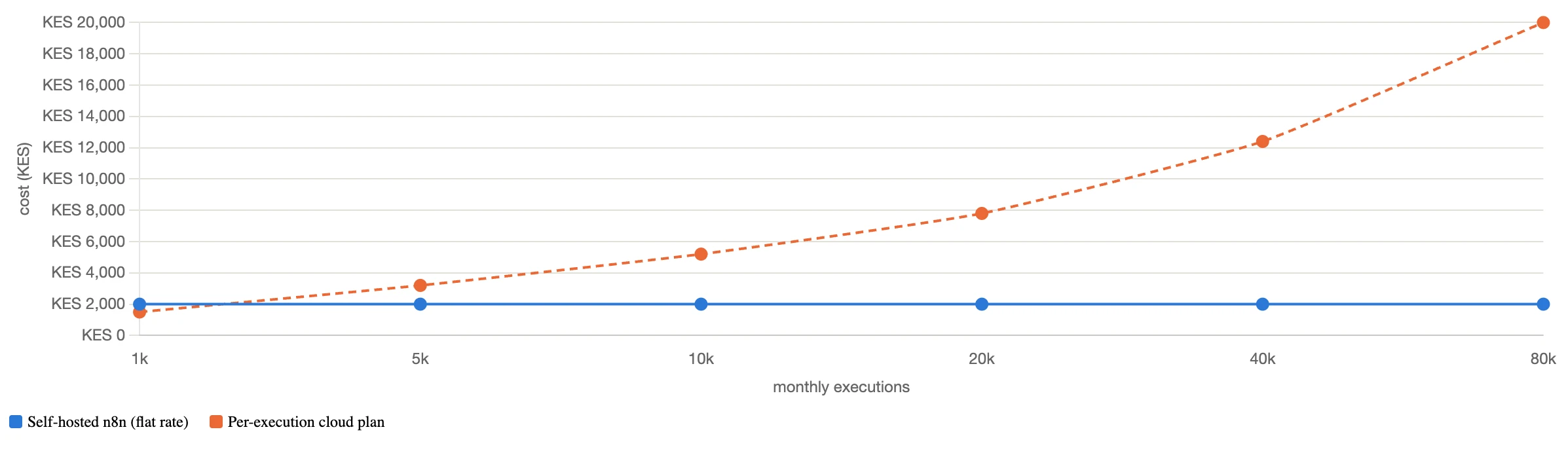
Most automation platforms bill per task or per execution on their cloud plans, so the more your business grows and the more workflows you run, the higher the monthly bill climbs.
n8n is different because it’s open-source, meaning you can run it on your own server instead of relying on a vendor’s cloud infrastructure.
Self-hosting n8n gets you:
- Predictable costs – Pay a fixed monthly hosting fee instead of charges that increase with every workflow execution.
- Unlimited workflows and executions – Build and run as many automations as your server can handle, without platform-imposed limits.
- Full control over your data – Customer information, payment records, and business workflows stay on infrastructure you control.
At Truehost, we’ve made self-hosting n8n simple with ready-to-launch hosting plans that remove the complexity of server setup.
| Plan | Price | Specifications | Includes |
|---|---|---|---|
| N8N KVM1 | KES 1,999/month | 1 vCPU, 2GB RAM, 50GB NVMe storage, 4TB bandwidth | Unlimited workflows and concurrent executions, community nodes, queue mode, 100+ pre-built workflows, one-click installation |
| N8N KVM2 | KES 2,499/month | 2 vCPU, 4GB RAM, 100GB NVMe storage, 8TB bandwidth | Unlimited workflows and concurrent executions, community nodes, queue mode, 100+ pre-built workflows, one-click installation |
Both plans include one-click installation, so you can launch n8n in minutes without configuring a server from scratch.
What is Workflow Automation FAQs
Is workflow automation the same as artificial intelligence?
No. Workflow automation follows rules that you define, such as “if this happens, do that.” Artificial intelligence can be added to make workflows more intelligent, but most everyday automations such as approving orders, sending confirmation emails, or updating customer records, work perfectly without AI.
Do I need to know how to code to set up workflow automation?
No. Most modern automation platforms, including n8n, Zapier, and Make, use visual drag-and-drop builders that make creating workflows straightforward. n8n also includes more than 100 pre-built workflow templates that you can import and customize instead of starting from scratch.
What’s the difference between workflow automation and business process automation?
Workflow automation usually focuses on a specific sequence of tasks, such as assigning leads or approving expenses. Business process automation takes a broader approach by automating complete business processes that may span multiple departments. In practice, many small and medium-sized businesses use the two terms interchangeably.
How much does n8n self-hosting cost in Kenya?
Truehost’s n8n self-hosting plans start at KES 1,999 per month for N8N KVM1, which includes 1 vCPU, 2GB RAM, and 50GB NVMe storage. Businesses that need additional resources can choose N8N KVM2 at KES 2,499 per month, which includes 2 vCPU, 4GB RAM, and 100GB NVMe storage. Both plans come with unlimited workflows, unlimited concurrent executions, and one-click installation.
How to Get Started
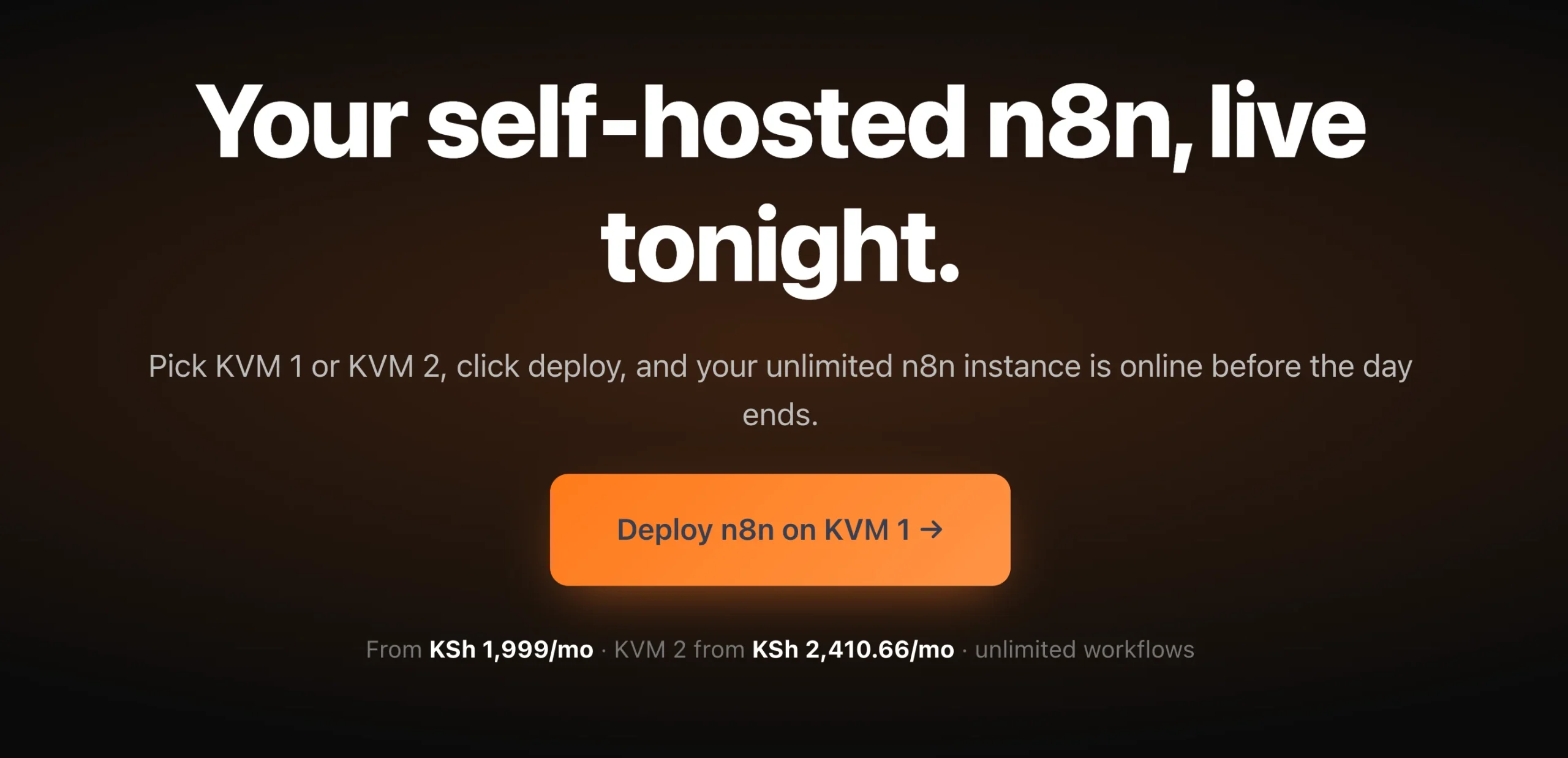
- Choose the right hosting plan. N8N KVM1 is a great starting point for most small businesses, while KVM2 provides additional resources as your automation needs grow.
- Launch n8n with one click. Install the platform without using the command line or configuring a server manually.
- Import a pre-built workflow. Start with one of the 100+ ready-made templates to see automation in action right away.
- Connect your first application. Link your email, CRM, M-Pesa integration, or another business tool, then watch your trigger > rule > action workflow run automatically.