Domain SearchInstantly check and register your preferred domain name
 Web Hosting
 cPanel HostingHosting powered by cPanel (Most user friendly)
 WordPress HostingHost your WordPress website with fast, secure, and affordable WordPress hosting in Kenya.
 KE Domains
 Reseller HostingStart your own hosting business without tech hustles
 Windows HostingOptimized for Windows-based applications and sites.
 Free Domain
 Affiliate ProgramEarn commissions by referring customers to our platforms
 Free HostingTest our SSD Hosting for free, for life (1GB storage)
 Domain TransferMove your domain to us with zero downtime and full control
 All DomainsBrowse and register domain extensions from around the world
 .Com Domain
 WhoisLook up domain ownership, expiry dates, and registrar information
 VPS Hosting
 Managed VPSNon techy? Opt for fully managed VPS server
 Dedicated ServersEnjoy unmatched power and control with your own physical server.
 Website Builder
 Online Store BuilderLaunch a professional e-commerce store without writing code.
 Web Design ServiceGet a custom-designed website tailored to your brand and goals. From just KES 15,600
 BlogRead our guides on web hosting, online business, digital marketing, and more
 SupportOur support guides cover everything you need to know about our services
 ContactContact us via chat or email
You are about to deploy your app, and the order form asks for an operating system.
That single dropdown menu can shape your monthly bill and your app’s speed. It also decides how much control you get over the server.
Pick the wrong one, and you might pay for a Windows license your app never needed. Or you might land on Linux and hit a wall the moment your app needs ASP.NET or Microsoft SQL Server.
A VPS, or virtual private server, gives your app its own slice of dedicated CPU, RAM, and storage.
Unlike shared hosting, no other website competes for those resources. The operating system you choose on top of that server decides what software your app can run natively.
This article is not a broad hosting comparison. It focuses on one decision: which OS fits your app’s tech stack and budget.
Lets skip the generic pros and cons list. Instead, it gives you a stack-based framework, so you pick the right VPS operating system in minutes, not hours.
Windows VPS vs Linux VPS: Head-to-Head Comparison
| Factor | Linux VPS | Windows VPS |
|---|---|---|
| Licensing cost | Free | Paid, plus Plesk license on Truehost |
| Typical monthly price (Truehost) | From Kshs 585.58 to Kshs 1,464.75 | Higher license fees included ranging from Kshs 3,752.00 to Kshs 7,102.00 |
| Resource usage | Lower overhead | Higher overhead |
| Data center (Truehost) | Kenya (Nairobi) and global | Europe only |
| Best app fit | PHP, Node.js, Python, WordPress | ASP.NET, .NET Core, MSSQL |
| Management style | Command line, with optional panels | Graphical interface, RDP |
| Global usage share | Over 70% of websites | Smaller, enterprise-focused |
Two groups will find this useful. Developers who need to pick a VPS OS for a specific stack are the first group. Business owners relying on a developer’s recommendation are the second.
Either way, the framework below covers four factors: stack fit, cost, performance, and control.
Linux VPS for Hosting Apps: Strengths and Limits
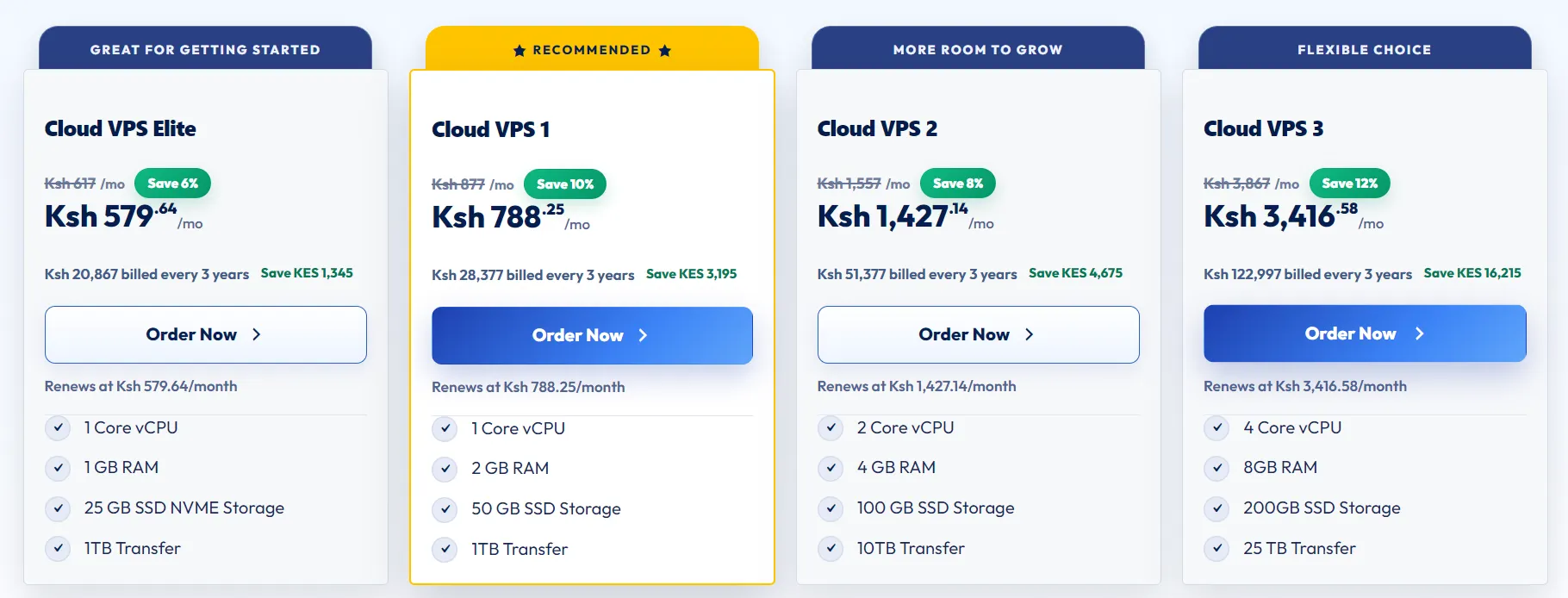
Linux VPS handles most modern app stacks without extra setup. If your app runs on any of the following, Linux is likely your answer.
- PHP and Laravel applications
- Node.js backends and APIs
- Python and Django projects
- WordPress and other PHP-based CMS platforms
- MySQL or PostgreSQL databases
Cost is where Linux pulls ahead fast. Most Linux distributions are free, so you skip the licensing fee that comes with Windows Server.
On Truehost Kenya, Linux VPS plans start from Kshs 585.58 a month for global servers.
Kenya-based servers start from Kshs 1,400.00 a month. That price difference alone can decide the deal for a small business or solo developer.
Performance follows the same pattern. Linux uses fewer system resources than Windows. That leaves more RAM and CPU for your app on the same plan.
Over 70 percent of websites worldwide run on Linux servers. That share keeps growing as more apps move to open source stacks.
Here is a detail most comparison articles skip. Truehost’s Kenya-based VPS data center in Nairobi runs on Linux.
If your users are mostly in Kenya, a Linux VPS in that Nairobi data center cuts latency sharply. Expect 20 to 80 milliseconds locally, versus 200 to 400 milliseconds from an overseas server.
That speed gap shows up directly in bounce rates and search rankings.
Linux does come with a learning curve. Server management leans on the command line rather than a graphical interface.
Control panels like cPanel or Webmin ease that curve, so beginners are not left guessing at terminal commands.
Windows VPS for Hosting Apps: Strengths and Limits
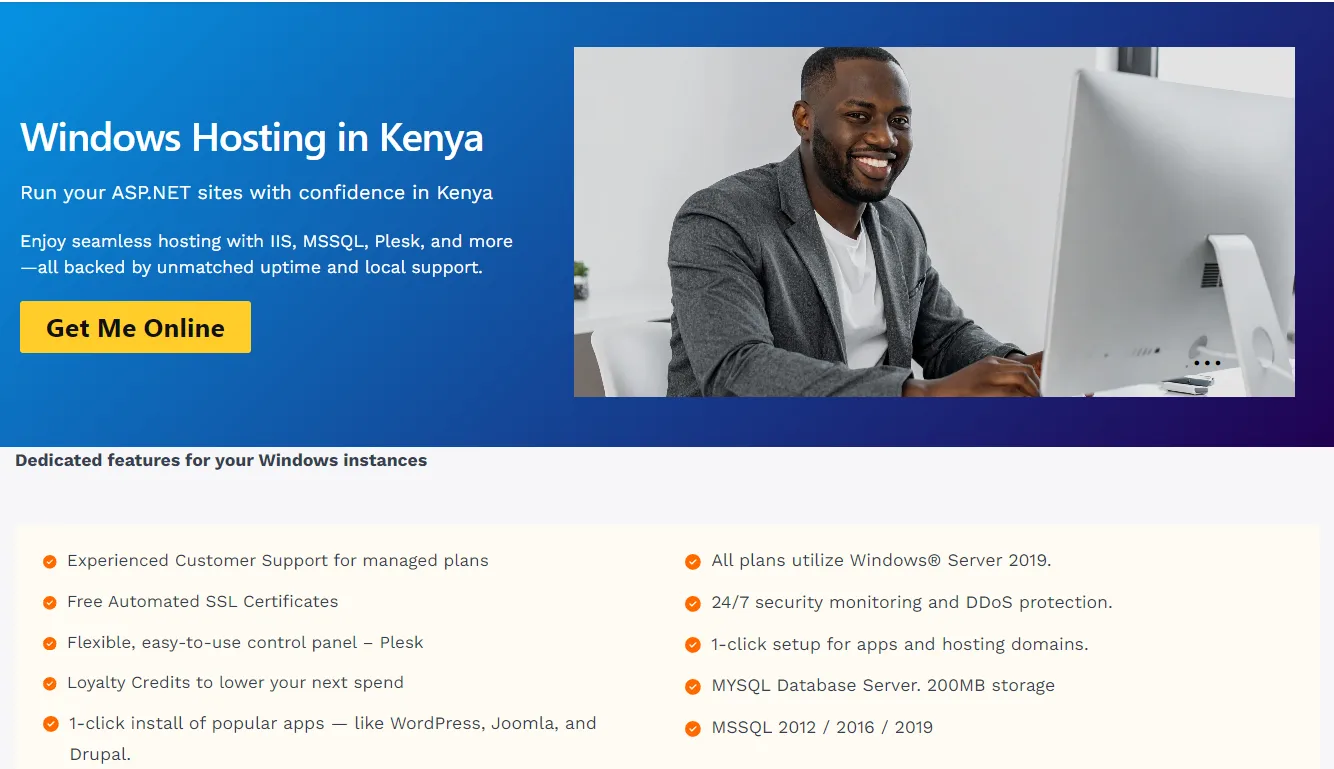
Windows VPS exists for one clear reason: some apps need Microsoft’s ecosystem to run at all. If your app depends on any of these, Windows VPS is not optional:
- ASP.NET applications
- .NET Core apps running on IIS
- Microsoft SQL Server databases
- Classic ASP projects
- Apps tied to Microsoft Exchange or Active Directory
Licensing is the tradeoff. Windows Server requires a paid license. On Truehost Kenya, Windows VPS plans often need an added Plesk license during checkout, too.
That stacks on top of the base VPS price. A Windows plan can cost noticeably more than an equivalent Linux plan over a year.
The upside is usability. Windows VPS ships with a familiar graphical interface and Remote Desktop Protocol access.
For a team used to Windows on their laptops, that familiarity shortens the setup time.
There is a local tradeoff worth flagging too. Truehost’s Windows VPS plans run from Europe-based data centers, not Nairobi.
For a Kenyan audience, that means higher latency compared to a Linux VPS hosted locally. It is a real cost to weigh against the convenience of a GUI.
One more practical point: Windows-specific sysadmin talent is smaller in the Kenyan freelance and agency market than Linux talent. Finding support when something breaks can take longer.
The table above makes the pattern clear. Linux wins on cost, performance, and local speed for a Kenyan audience.
Windows wins only when your app is built around Microsoft’s tools; for most apps, that narrows the decision fast.
Which VPS Should You Choose Based on Your App?
Match your app type to the OS below, then move forward with confidence.
1) PHP, Laravel, WordPress, Node.js, or Python apps: Choose Linux VPS. These stacks run natively and are cheaper on Linux.
2) ASP.NET, .NET Core, or MSSQL-based apps: Choose Windows VPS. Nothing else runs these stacks properly.
3) Apps with no strict OS requirement and a tight budget: Choose Linux VPS. The licensing savings alone justify it.
4) Enterprise apps locked into a Microsoft ecosystem: Choose Windows VPS. Fighting the ecosystem costs more than the license fee.
One hybrid case deserves a mention. A .NET app built on older ASP.NET can sometimes get rebuilt on .NET Core, which runs on Linux.
If your developer has time for that rebuild, it opens up Linux pricing for a Windows-style app.
Cost Breakdown: Linux VPS vs Windows VPS Pricing in Kenya
Numbers make this decision concrete, so here is a real comparison using Truehost Kenya’s current plans.
Linux VPS on Truehost starts from Kshs 585.58 a month for a global server. A Kenya-based server starts from Kshs 1,400.00 a month. Both include full root access and SSD storage, with no OS licensing fee added.
Windows VPS on Truehost runs from the Europe data center and adds a Plesk license fee during checkout.
That fee shows up separately from the base VPS price. The final total lands higher than a comparable Linux plan.
Managed and unmanaged plans change the math, too. Unmanaged VPS costs less since you handle server administration yourself.
Managed VPS on Truehost starts from around Kshs 980.00 a month and includes admin support. That suits a business without in-house technical staff.
Look at the total cost over 12 months, not just the monthly sticker price. A Linux VPS at Kshs 585.58 a month costs about Kshs 7,027.00 a year.
A Windows VPS at a similar spec, plus the Plesk license, usually pushes past that figure by a wide margin. For most apps without a Microsoft requirement, that gap is hard to justify.
Performance and Security Differences That Affect App Uptime
Resource overhead is the first difference that hits your app’s response time. Linux uses fewer system resources for the OS itself, leaving more RAM and CPU for your app.
Windows needs more overhead just to run its graphical interface and background services.
Patching cadence changes uptime, too. Windows updates often force a server reboot, which briefly takes your app offline.
Linux servers tend to run for long stretches without needing a restart, so uptime stays higher on average.
Security follows a similar pattern, though with a caveat. Linux’s permission-based architecture reduces certain malware risks by design.
Windows remains a bigger target for malware simply due to its larger install base worldwide.
That said, security in practice depends more on server hardening than the OS label. Regular updates, strong passwords, firewalls, and active monitoring matter more than which OS sits underneath.
A poorly configured Linux server can still get compromised, and a well-managed Windows server can run securely for years.
How to Switch Your VPS OS Later Without Losing Your App
Switching from Linux to Windows, or the other way around, usually means a rebuild rather than an upgrade.
The two operating systems do not convert into each other in place.
Before any migration, back up these four things first.
- A full database dump, including schema and data
- Your app’s source code and dependencies
- Environment configuration files and environment variables
- DNS records tied to your domain
Sometimes it makes more sense to spin up a fresh VPS instance with the new OS. This avoids leftover configuration conflicts from the old setup.
Check this before you commit to a long billing cycle. Annual and triennial VPS plans lock in your OS choice for a long time.
Switching mid-term can mean paying for two servers during the transition.
FAQs
Can I run a Windows app on a Linux VPS?
No, not directly. Apps built on ASP.NET or MSSQL need Windows Server to run properly. Some can get rewritten on .NET Core, which does run on Linux, but that takes developer time.
Is Windows VPS more expensive than Linux VPS in Kenya?
Yes, generally. Windows VPS plans add a licensing cost, and on Truehost, that often includes a separate Plesk license fee during checkout. Linux VPS skips both charges.
Which VPS is better for Node.js apps?
Linux VPS. Node.js runs natively on Linux distributions, and most hosting tools and control panels are built around that combination.
Do I need Windows VPS for ASP.NET applications?
Yes, if you are running classic ASP.NET on the full .NET Framework. Newer apps built on .NET Core can run on Linux instead.
What is the best VPS OS for beginners?
Windows VPS offers an easier start due to its graphical interface and Remote Desktop access. Linux becomes just as easy once you add a control panel like cPanel or Webmin.
Can I switch my VPS from Windows to Linux later?
Yes, though it usually means setting up a new server rather than converting the old one. Back up your database, code, configs, and DNS records first.
Match Your VPS OS to Your App, Not the Other Way Around
Let your app’s tech stack decide the operating system. Do not pick based on habit or what feels familiar.
PHP, Node.js, Python, and WordPress apps run cheaper and faster on Linux. ASP.NET, .NET Core, and MSSQL apps need Windows, no matter the cost.
For a Kenyan audience, one factor stands above the rest. A Linux VPS on Truehost’s Nairobi data center delivers lower latency than any Windows VPS routed through Europe.
That speed advantage rarely shows up in other comparison articles. Yet it can shape your app’s bounce rate and rankings directly.
Compare Truehost’s Kenya VPS plans side by side before you commit to a billing cycle. If you are still unsure which OS your app needs, reach out to Truehost’s support team.
They can walk through your stack and point you to the right plan first. That way, you avoid spending on the wrong setup.