 Domain SearchInstantly check and register your preferred domain name
 Web Hosting
 cPanel HostingHosting powered by cPanel (Most user friendly)
 WordPress HostingHost your WordPress website with fast, secure, and affordable WordPress hosting in Kenya.
 KE Domains
 Reseller HostingStart your own hosting business without tech hustles
 Windows HostingOptimized for Windows-based applications and sites.
 Free Domain
 Affiliate ProgramEarn commissions by referring customers to our platforms
 Free HostingTest our SSD Hosting for free, for life (1GB storage)
 Domain TransferMove your domain to us with zero downtime and full control
 All DomainsBrowse and register domain extensions from around the world
 .Com Domain
 WhoisLook up domain ownership, expiry dates, and registrar information
 VPS Hosting
 Managed VPSNon techy? Opt for fully managed VPS server
 Dedicated ServersEnjoy unmatched power and control with your own physical server.
 Website Builder
 Online Store BuilderLaunch a professional e-commerce store without writing code.
 Web Design ServiceGet a custom-designed website tailored to your brand and goals. From just KES 15,600
 BlogRead our guides on web hosting, online business, digital marketing, and more
 SupportOur support guides cover everything you need to know about our services
 ContactContact us via chat or email
The main reason you would want to check DNS records is to look into how your website presence is faring on the internet and see if the systems are working as expected.
The main thing is you want to ensure that your visitors can access it without a hitch.
Now, for you to even get here, the question that must be crossing your mind is, “Is everything properly set on my domain?”
I mean, who wouldn’t want their website to perform perfectly?
Hence, the check is like performing a health check on domains to ensure everything is properly calibrated and ready in case the need arises.
The next question would be, how do you perform the check?
Well, join me today as we learn how to do exactly that.
Ready? Off we go!
DNS and Its Role in Your Online Presence
So, what’s this DNS thing we are talking about?
Think about the internet as a city. The domain name system, or DNS, acts as a phonebook to the said city with locations and their corresponding contacts and all.
Every time someone types your domain on their browser, say, yourbusiness.co.ke, it gets translated through DNS to an IP address like 192.168.1.1, which computers can understand.
So in our city case, you find a location in the city, and you see the contact or phone address of that location. That way, it’s easy to call that location and get information.
Without the phonebook, no one will be able to call the location in the city.
Similarly, without DNS, your website is simply a name existing in the vastness of the internet, unreachable for your customers.
What is the importance of checking DNS records?
For starters, it ensures that your website is responsive and reliable.
In the worst case, poorly configured DNS records can lead to excessive downtime, sluggish load times, or even security risks like hackers redirecting your traffic.
For businesses in Kenya, where the digital market is thriving, smooth online operations can give you a competitive edge.
Plus, checking DNS records isn’t just techy stuff for IT gurus—it’s a practical step to protect your brand.
Types of DNS Records You Need to Know
Before you check DNS records, it helps to know what you’re looking for.
DNS records are like the instruction manual for your domain, telling the internet how to handle requests for your website, emails, and more.
Here’s a rundown of the key players:
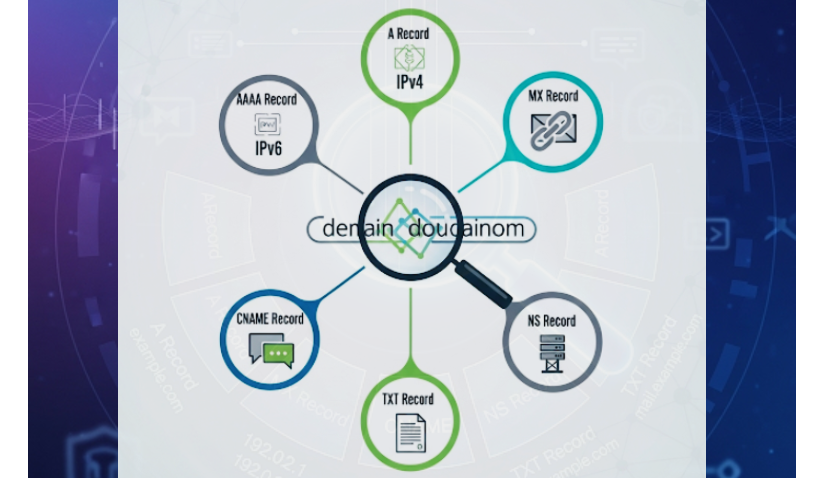
- A Record: This maps your domain (e.g., yourbusiness.co.ke) to an IPv4 address, like 192.168.1.1. It’s the core of getting your website online.
- AAAA Record: Similar to the A record but for IPv6 addresses, which are the newer standard for internet addresses.
- MX Record: Directs emails to your mail server. Without this, your [email protected] emails might never arrive.
- CNAME Record: Acts like a nickname, pointing one domain to another (e.g., www.yourbusiness.co.ke to
yourbusiness.co.ke). - TXT Record: Stores text data, often used for security settings like SPF or DKIM to prevent email spoofing.
- NS Record: Lists the name servers managing your domain’s DNS, ensuring the right servers are in charge.
For businesses, these records are your website’s backbone.
A correct A record keeps your site live, proper MX records ensure customers get your emails, and TXT records protect against fraud.
When you check DNS records, you’re making sure all these pieces work together.
Why Checking DNS Records is Essential for Businesses
To be honest, running a business in the digital space is very competitive, interesting yet quite challenging.
Checking the DNS records ensures that your online shop is safe, up and running, and easy to find.
Here’s the difference it can make:
First, there’s SEO.
Slow DNS resolution can drag down your website’s load time, and Google doesn’t love that.
A sluggish site means higher bounce rates and lower rankings, which is bad news when you’re competing for customers.
Checking DNS records ensures that all components are in place to maintain website speed and maintain a good position in the search results.
Then, there’s security.
Misconfigured DNS records can leave you vulnerable to attacks like DNS spoofing, where hackers redirect your traffic to fake sites.
For businesses, where trust is everything, checking DNS records with tools like DNSSEC keeps your customers safe.
Plus, it helps you spot issues like typosquatting—when someone registers a domain like yorbusiness.co.ke to trick your customers.
Finally, there’s the reliability factor.
A single wrong DNS setting can take your site offline or stop emails from reaching clients.
With reliable hosting, you can check DNS records and fix issues before they hurt your business.
It’s like having a mechanic check your car before a cross-country trip—peace of mind for the road ahead.
Step-by-Step Guide to Check DNS Records
Alright, let’s get to the fun part—how do you actually check DNS records?
There are three easy ways to do this. Let’s break them down:
Method 1: Online DNS Lookup Tools
If you want a quick and user-friendly option, online tools are your best friend.
Websites like dnschecker.org or smallseotools.com let you check DNS records without breaking a sweat.
- Visit a DNS lookup tool.
- Enter your domain name (e.g.,
yourbusiness.co.ke). - Select the record type you want to check (A, MX, TXT, etc.).
- Hit “Search” and review the results.
These tools show you everything from your A record’s IP address to your MX record’s mail server.
Method 2: Command-Line Tools (nslookup, dig)
If you’re comfortable with a bit of tech, command-line tools like nslookup (Windows) or dig (macOS/Linux) give you more control.
Here’s how to check DNS records with them:
- For Windows (nslookup):
- Open Command Prompt (type cmd in the search bar).
- Type
nslookup -type=A yourbusiness.co.keto check the A record. - Try other types like
-type=MXor-type=TXTfor different records.
- For macOS/Linux (dig):
- Open Terminal.
- Type dig yourbusiness.co.ke MX to check MX records or dig yourbusiness.co.ke A for A records.
- Review the detailed output.
These tools are great for advanced users who want to dig deep (pun intended) into their DNS settings.
They’re free and give you raw, unfiltered data to troubleshoot issues.
Method 3: Truehost Kenya’s DNS Management Tools
For the easiest experience, the Truehost cPanel lets you check DNS records right from your dashboard.
Here’s how:
- Log in to your Truehost cPanel account.
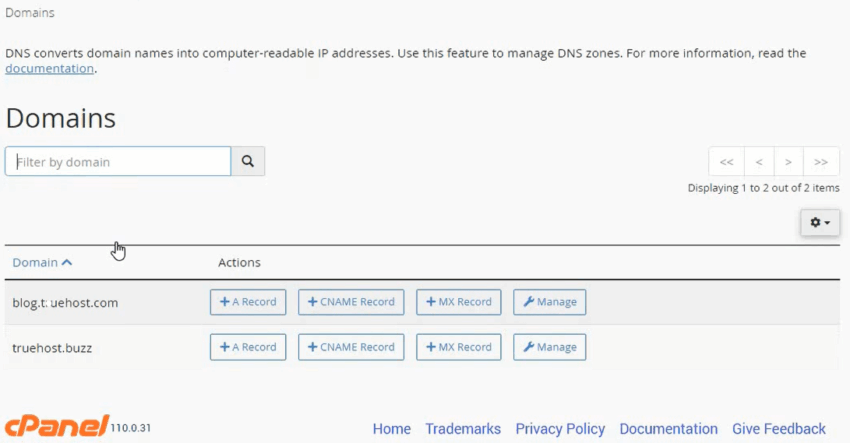
- Navigate to the “Domains” section and select your domain.
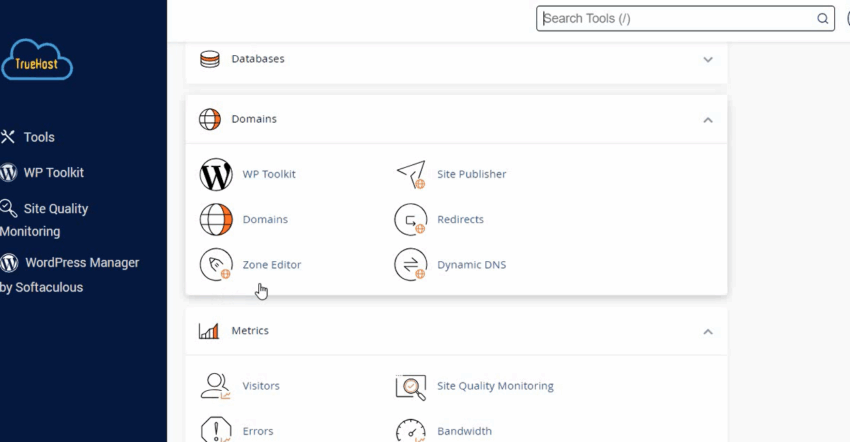
- Click on “Zone Editor” to view all records (A, MX, CNAME, etc.).
- Verify or edit settings as needed.
Truehost’s tools are designed with Kenyan businesses in mind, offering local support and a user-friendly interface.
Plus, if you’re stuck, their customer support team is just a call or click away.
Common DNS Issues and How to Fix Them
Even the best websites can hit DNS snags.
Here are some common issues domain owners face when they check DNS records:
- Website Not Loading (Incorrect A/CNAME Records): If your A or CNAME record points to the wrong IP, your site goes offline. Fix it by updating the record to the correct IP.
- Emails Not Delivering (Missing MX Records): Without an MX record, your emails might not reach customers. Add or correct the MX record to point to your mail server (e.g., mail.yourbusiness.co.ke).
- DNS Propagation Delays: After changing DNS records, it can take up to 48 hours for updates to spread across the internet. Lower your TTL (Time to Live) setting before changes to speed this up.
- Security Gaps (Missing TXT Records): No SPF or DKIM records? Your emails could be flagged as spam. Add these in Truehost’s dashboard to boost deliverability.
How Truehost Simplifies DNS Management for Domains
Truehost offers everything you need to succeed online:
- Affordable Domain Registration: Grab a .co.ke, .com, or other TLD at budget-friendly prices.
- Free DNS Management Tools: Every plan comes with access to an intuitive cPanel to check and update records.
- Privacy Protection: Keep your personal details safe with Truehost’s domain privacy features.
- Local Support: Truehost’s Kenyan team understands the local market, offering support via phone, email, or live chat.
With Truehost, checking DNS records is just the start.
Their global Anycast DNS network ensures fast resolution, meaning your website loads quickly for customers in Nairobi, Mombasa, or even abroad.
Plus, our hosting packages integrate seamlessly with DNS management, so you can manage everything in one place.
Conclusion
Checking DNS records is like giving your website a regular check-up.
It keeps things running smoothly, securely, and optimized for your Kenyan audience.
DNS management is a must for any business.
And with Truehost, you’ve got a partner that makes it simple, affordable, and tailored to the local market.






