Domain SearchInstantly check and register your preferred domain name
 Web Hosting
 cPanel HostingHosting powered by cPanel (Most user friendly)
 WordPress HostingHost your WordPress website with fast, secure, and affordable WordPress hosting in Kenya.
 KE Domains
 Reseller HostingStart your own hosting business without tech hustles
 Windows HostingOptimized for Windows-based applications and sites.
 Free Domain
 Affiliate ProgramEarn commissions by referring customers to our platforms
 Free HostingTest our SSD Hosting for free, for life (1GB storage)
 Domain TransferMove your domain to us with zero downtime and full control
 All DomainsBrowse and register domain extensions from around the world
 .Com Domain
 WhoisLook up domain ownership, expiry dates, and registrar information
 VPS Hosting
 Managed VPSNon techy? Opt for fully managed VPS server
 Dedicated ServersEnjoy unmatched power and control with your own physical server.
 Website Builder
 Online Store BuilderLaunch a professional e-commerce store without writing code.
 Web Design ServiceGet a custom-designed website tailored to your brand and goals. From just KES 15,600
 BlogRead our guides on web hosting, online business, digital marketing, and more
 SupportOur support guides cover everything you need to know about our services
 ContactContact us via chat or email
Plesk and cPanel remain the two most popular tools for managing websites and servers.
When you need to choose a web hosting control panel, you often compare Plesk vs cPanel directly.
A web hosting control panel acts like a simple dashboard with buttons and visuals.
It lets you handle emails, files, domains, databases, and security without typing complex server commands.
Both panels offer user-friendly interfaces. Plesk works on both Linux and Windows and feels similar to the WordPress dashboard.
cPanel focuses on Linux only and delivers a clean, proven layout many developers know well.
They overlap in many areas but differ in tools, pricing, performance, and platform support.
This guide breaks it down clearly so you can pick the right one for your needs.
Plesk vs cPanel Comparison Table
| Feature | Plesk | cPanel |
| OS Support | Linux + Windows | Linux only |
| Interface | Modern, WordPress-like | Traditional, functional |
| Performance | Very good | Excellent (often lighter) |
| WordPress Tools | Excellent built-in Toolkit | Good via installers |
| Security | More built-in tools | Strong with add-ons |
| Backups | Automated + easy restore | Reliable, slightly more manual |
| Best For | Mixed OS, developers, Windows | Linux shared hosting, resellers |
| Pricing Model | Per edition (domains) | Per accounts |
What Is Plesk?
Plesk is a powerful, modern web hosting control panel designed for ease and flexibility.
It supports both Linux and Windows servers, making it ideal if you run mixed environments or need Windows-specific applications.
You get a centralized dashboard where you manage multiple sites, emails, domains, and security from one place.
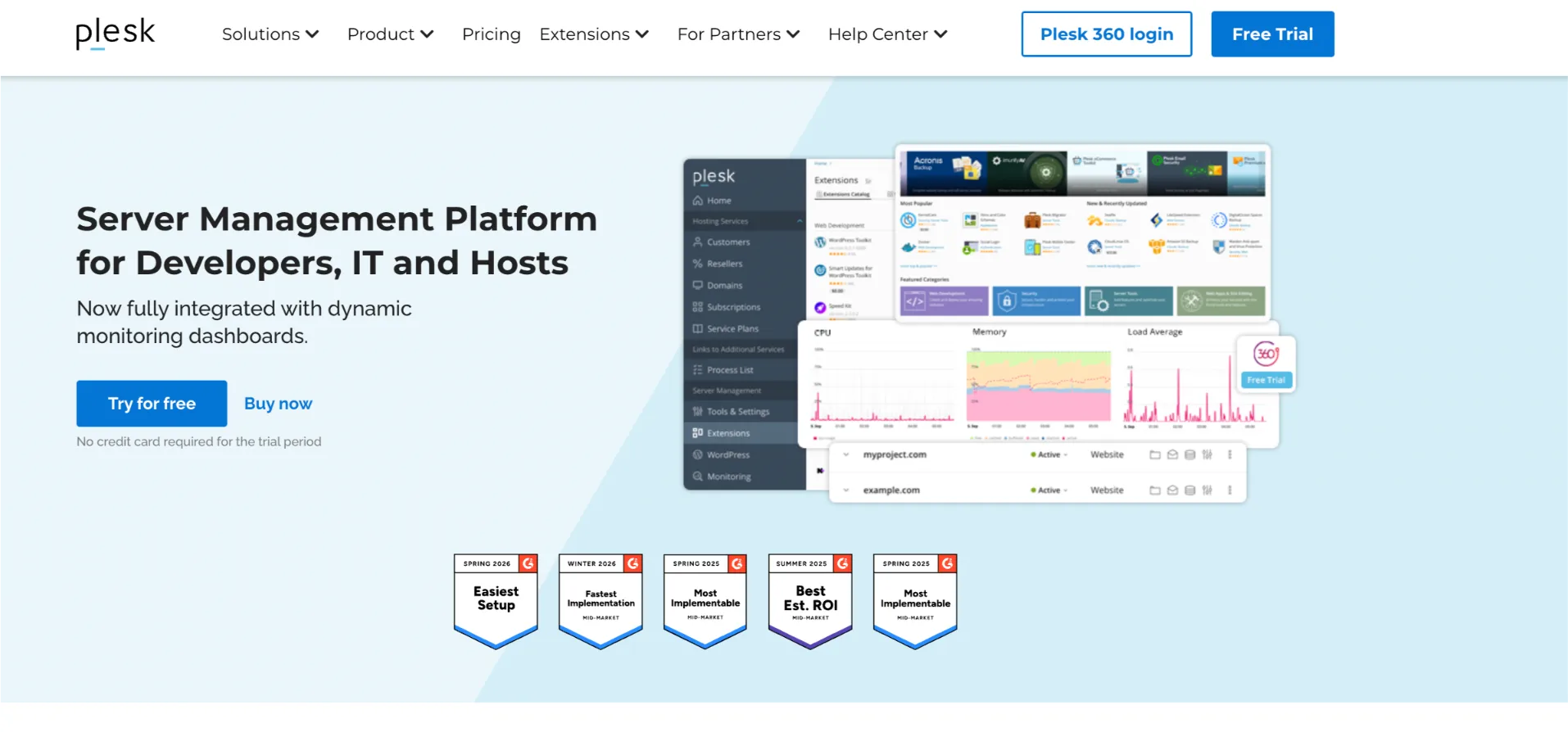
Plesk stands out with its strong WordPress Toolkit you can install, clone, stage, update, and secure WordPress sites with just a few clicks.
Recent versions (around 18.0.7x in 2026) include better AI tools, improved Docker support, and strong automation features.
Many users find the interface clean and beginner-friendly, especially if you come from WordPress.
What is cPanel?
cPanel is the long-time industry standard for Linux-based hosting.
It delivers a reliable, feature-packed interface that millions of hosting providers and users trust.
Through cPanel (and its companion WHM for resellers), you manage files, emails, databases, domains, and backups efficiently.
It excels in stability and has massive community support plus third-party integrations.
The latest versions focus on performance tweaks, better security integrations, and an updated Jupiter theme.
cPanel feels familiar to experienced users and works exceptionally well for shared hosting and reseller setups.
What is the Difference Between Plesk and cPanel?
While both simplify server management, they take different approaches. Here’s a clear breakdown across the key areas.
1) User Interfaces
Plesk offers a modern, card-based layout that resembles WordPress. You see all your sites in one clean view, making navigation fast and intuitive, especially on mobile.
This makes it a strong choice for developers and agencies managing multiple client sites, since switching between domains takes just a few clicks.
cPanel uses a more traditional, section-based interface. It packs many options but can feel denser or slightly outdated to new users.
Many people who have used it for years prefer it for its familiarity. The layout is predictable, which matters when you need to find a setting quickly without thinking about it.
For web hosting beginners in Kenya, cPanel’s structured menu system also makes it easier to follow tutorials since most online guides are written with cPanel in mind.
2) Performance
cPanel generally edges out in raw speed and lower resource usage on similar hardware.
It loads quickly and handles high traffic efficiently, partly because its architecture has been refined over decades of widespread deployment.
Plesk performs very well too and often feels lighter in real-world mixed workloads, especially with its newer optimizations.
However, it can use slightly more resources depending on the extensions you enable. Keeping extensions lean helps maintain consistent performance on lower-tier VPS plans.
For most Kenyan businesses running normal sites, the difference stays small. Choose based on your OS needs rather than minor speed gaps.
3) Features and Tools
Both panels cover essentials like one-click installs, email, databases, and file management.
Differences appear in depth:
- Plesk shines with built-in WordPress tools, Docker/Kubernetes support, and strong developer features. It includes powerful extensions for staging and security hardening. Its Git integration and SSH key management also make it a favourite among developers building modern web applications.
- cPanel offers excellent ecosystem support through Softaculous and deep integration with Linux tools. It excels for traditional shared hosting. The Softaculous library alone gives you access to over 400 scripts, covering everything from e-commerce platforms to LMS tools.

At Truehost, we provide strong cPanel hosting with LiteSpeed servers, free SSL, daily backups, and one-click WordPress installs. Our plans also support Python, NodeJS, and easy scaling to VPS or dedicated servers when you grow.
4) Security
Both deliver strong protection, but with different strengths:
- Plesk includes more built-in tools like Fail2Ban, ModSecurity, and advanced spam filters out of the box. These come pre-configured, reducing the setup work needed before your server is properly hardened.
- cPanel relies on solid core features plus popular add-ons like ImunifyAV and CSF firewall. The add-on ecosystem is mature and well-documented, giving experienced administrators granular control over their security stack.
You can secure either panel effectively. Regular updates and good practices matter most. Truehost adds extra layers like Immunify protection on our cPanel servers.
5) Distros (Operating Systems)
This is a major difference:
- Plesk: Supports both Linux (AlmaLinux, Ubuntu, etc.) and Windows servers.
- cPanel: Linux only.
This distinction has real implications for the type of projects you can host.
Plesk’s Windows support makes it the right call for businesses running ASP.NET applications, MSSQL databases, or software built on the Microsoft stack.
cPanel, on the other hand, is optimised specifically for Linux environments and benefits from years of deep integration with tools native to that ecosystem.
Choose Plesk if you need Windows hosting for .NET apps or specific software. Stick with cPanel for pure Linux environments.
6) Support
cPanel benefits from a huge user community, extensive documentation, and strong official support.
Many hosting companies (including Truehost) offer direct help with cPanel issues.
Because cPanel has been the dominant panel for shared hosting globally, you’ll find answers to almost any problem through a quick search, community forums, or YouTube tutorials.
Plesk provides solid official support and a good knowledge base. Its interface often reduces the need for support because tasks feel more straightforward.
That said, finding community help for niche Plesk issues can sometimes take longer compared to cPanel.
At Truehost, our team knows cPanel inside out. We provide 24/7 local support via phone, chat, and tickets for all our Kenya-hosted plans.
7) Backups
Both handle backups well:
- Plesk: Offers scheduled, incremental backups with easy one-click restore and off-site options. Incremental backups are particularly efficient since only changed files are saved each time, reducing storage costs on long-running sites.
- cPanel: Provides reliable full and partial backups. Restoration works well but can feel more manual. That said, cPanel’s JetBackup integration (available on many hosts) significantly streamlines the restore process.
Truehost includes free daily backups (with retention) on cPanel plans, giving you peace of mind.
8) Pricing
Pricing models differ significantly (as of early 2026):
- cPanel: Charges based on number of accounts. Solo starts around $29.99/month, with higher tiers scaling up. This model means costs grow in line with the number of clients or domains you manage, which is worth factoring in if you plan to resell hosting.
- Plesk: Uses edition-based pricing (Web Admin, Pro, Host). It often starts cheaper for fewer domains but increases with unlimited options. For small agencies or solo developers managing under 10 sites, Plesk’s entry tiers can be more cost-effective.
Licenses add to your hosting cost. Many providers like Truehost bundle the control panel into plans, so you don’t pay extra.
Check our guide on the best cPanel-compatible VPS providers
Which Hosting Control Panel Should You Choose?
There is no universal winner in the Plesk vs cPanel debate. Your choice depends on your specific situation.
- Choose cPanel if you run Linux-based sites, value familiarity, need strong reseller tools, or prefer maximum community support. It works great for most Kenyan businesses, bloggers, and e-commerce stores.
- Choose Plesk if you need Windows support, love a modern interface, or manage many WordPress sites with advanced automation.
For most users in Kenya, cPanel delivers the best balance of reliability, performance, and support, especially when paired with a local provider.
At Truehost, we make cPanel hosting simple and affordable with fast Kenya data centers, M-PESA payments, free migrations, and excellent uptime.
Whether you need shared hosting, VPS, or dedicated servers, we have plans that grow with you.
Ready to get started? Check out our cPanel hosting plans and launch your site today with full control and local support.