Domain SearchInstantly check and register your preferred domain name
 Web Hosting
 cPanel HostingHosting powered by cPanel (Most user friendly)
 WordPress HostingHost your WordPress website with fast, secure, and affordable WordPress hosting in Kenya.
 KE Domains
 Reseller HostingStart your own hosting business without tech hustles
 Windows HostingOptimized for Windows-based applications and sites.
 Free Domain
 Affiliate ProgramEarn commissions by referring customers to our platforms
 Free HostingTest our SSD Hosting for free, for life (1GB storage)
 Domain TransferMove your domain to us with zero downtime and full control
 All DomainsBrowse and register domain extensions from around the world
 .Com Domain
 WhoisLook up domain ownership, expiry dates, and registrar information
 VPS Hosting
 Managed VPSNon techy? Opt for fully managed VPS server
 Dedicated ServersEnjoy unmatched power and control with your own physical server.
 Website Builder
 Online Store BuilderLaunch a professional e-commerce store without writing code.
 Web Design ServiceGet a custom-designed website tailored to your brand and goals. From just KES 15,600
 BlogRead our guides on web hosting, online business, digital marketing, and more
 SupportOur support guides cover everything you need to know about our services
 ContactContact us via chat or email
You’ve probabily come across n8n workflows vs Power Automate comparison when trying to choose an automation platform. Well, it sounds simple until you actually try to pick one for your business.
While both tools automate repetitive tasks, they take very different approaches and it’s time you knew which is which.
First, Power Automate is Microsoft’s subscription-based automation platform, designed for organizations already using Outlook, Teams, SharePoint, and the wider Microsoft ecosystem.
n8n, on the other hand, is an open-source, self-hostable platform built for connecting virtually any service with an API while giving you greater control over your automation environment.
For a business in Kenya, those differences become clear as automation needs grow.
For instance, in what you pay once your automations scale past a handful of flows a month.
Or, when you try to connect M-Pesa’s Daraja API or WhatsApp Business and one platform makes you jump through hoops.
Also, in where your customer data actually sits, on Microsoft’s servers abroad, or on infrastructure you control.
So, which tool is right for you, and why.
Well, let’s compare them side by side, then walk through how each one actually feels once you start building real workflows.
Side-by-Side Comparison Table
Before we compare each platform in detail, here’s a quick overview of how n8n and Power Automate stack up across the features that matter most to businesses.
| Core Aspect | Power Automate | n8n |
|---|---|---|
| Built For | Microsoft 365, SharePoint, Teams, and Dynamics users | Any application with an API, self-hosted or cloud |
| Best For | Non-technical teams and businesses invested in Microsoft | Technical teams, mixed SaaS environments, and AI-driven workflows |
| Setup Style | Drag-and-drop, no-code builder | Visual workflow builder with optional JavaScript for advanced logic |
| Pricing Model | Per-user or per-flow subscription | Flat-rate when self-hosted, execution-based on n8n Cloud |
| Self-Hosting | Not available | Fully supported – you own and manage the server |
| Learning Curve | Low, especially if you already use Outlook or Excel | Moderate, with the best experience for users familiar with APIs and JSON |
| Integration Scope | Around 600 connectors, primarily Microsoft-approved services | 400+ built-in integrations plus direct access to any REST API |
| Data Control & Privacy | Workflows and data run on Microsoft’s cloud | Keep your data on your own server when self-hosting |
| AI/LLM Support | AI Builder and Microsoft Copilot | Native nodes for OpenAI, Anthropic, Google AI, and local models through Ollama |
| Scaling & Costs | Costs increase with more runs, flows, and premium connectors | Costs stay predictable after self-hosting, regardless of workflow volume |
| Compliance | Strong enterprise governance built into the Microsoft ecosystem | Depends on your deployment, giving you full control over compliance and security |
This comparison gives you a clear snapshot of what each platform offers.
But the bigger question is how they perform once you start building real automations. That’s where the differences become much easier to see.
How They Really Compare Once You Start Building Workflows
1) Microsoft Power Automate vs n8n Workflows
At first glance, Microsoft Power Automate and n8n look similar. Both let you build workflows with a visual editor instead of writing everything from scratch. Once you start building, though, their priorities become clear.
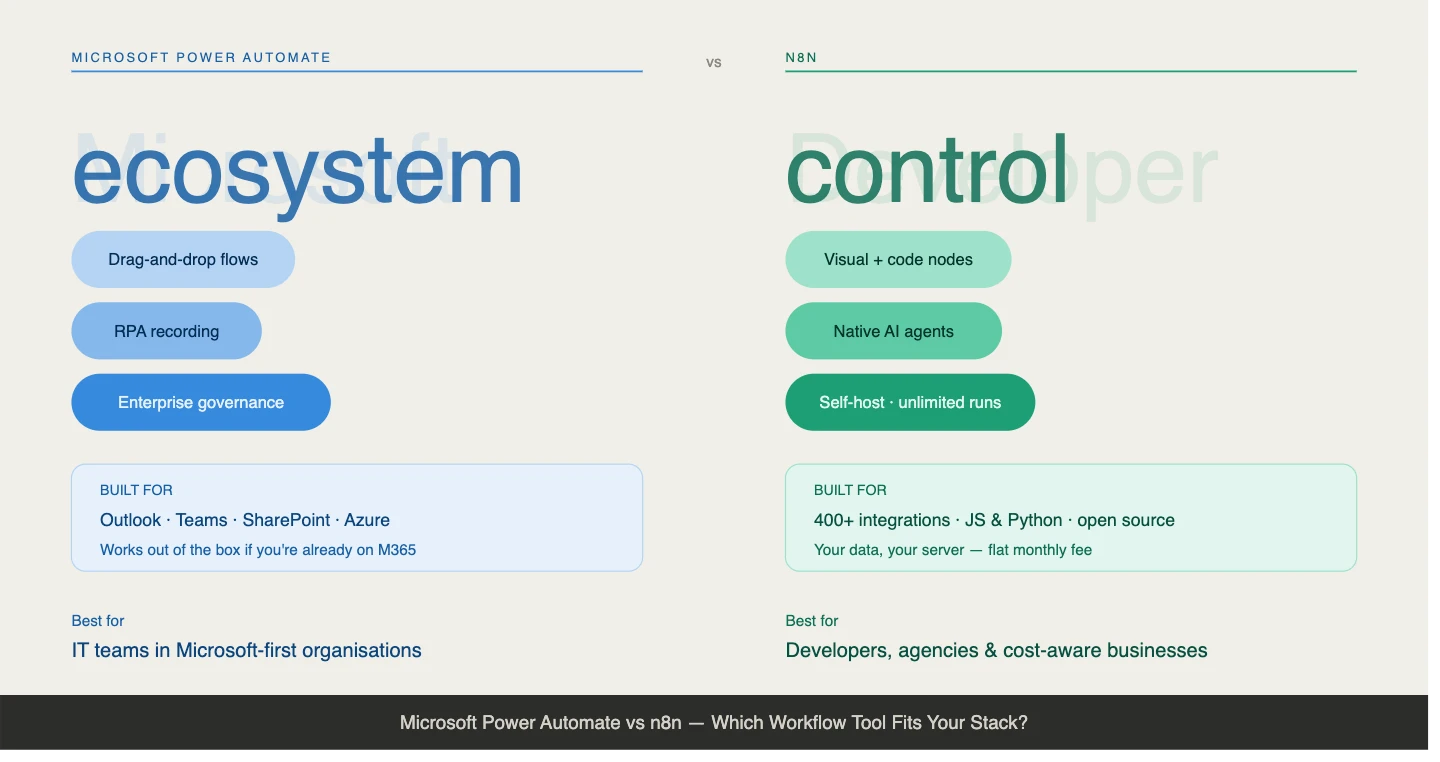
Power Automate is built around the Microsoft ecosystem.
It’s a visual editor with built-in robotic process automation (RPA) recording, so it can watch you click through a desktop app and turn that into a repeatable flow. It includes a drag-and-drop workflow builder and enterprise governance features that help organizations manage permissions, security, and compliance.
If your business already relies on Outlook, Teams, SharePoint, and other Microsoft services, everything works together with minimal setup.
n8n takes a more developer-friendly approach.
It also uses a visual workflow builder, but it doesn’t stop there. You can add JavaScript or Python whenever you need custom logic beyond the built-in nodes.
It also includes native support for AI agents and gives you the option to self-host, so you stay in control of where your data is stored and how your automation platform scales.
2) Ease of Setup and Onboarding
The first experience with each platform feels very different because they’re designed for different types of users.
Power Automate assumes you’ve never automated anything before, and it’s built for that.
The interface feels familiar if you’ve already worked with Outlook, Excel, or other Microsoft applications. Templates walk you through the first few steps, and the platform guides you through creating your first workflows step by step.
You can build tasks like:
- Routing leave approval requests through SharePoint
- Syncing Outlook emails to a tracking list
- Sending Microsoft Teams notifications after a form submission
For these kinds of business processes, Power Automate keeps the learning curve low.
n8n starts with a similar visual builder, but it gives you far more freedom from the beginning. Instead of guiding every step, it hands you a flexible workspace and expects you to connect the pieces.
If you’re comfortable working with APIs and JSON, or you’re willing to learn, you’ll feel right at home.
That flexibility is where n8n stands out. You can connect services far beyond the Microsoft ecosystem, build advanced automation with custom code, and create AI-powered workflows that would be much harder to achieve with a purely no-code approach.
The trade-off is that both platforms eventually reach a point where the “easy” label fades.
Power Automate becomes more complex as workflows grow beyond Microsoft’s ecosystem or require premium connectors.
n8n asks for more technical knowledge upfront, but it rewards that investment with far greater flexibility and control as your automation needs expand.
3) Handling Complex Logic and Data
Simple workflows are easy to build on both platforms. The real differences appear when your automation starts working with larger datasets, multiple conditions, or complex API responses.
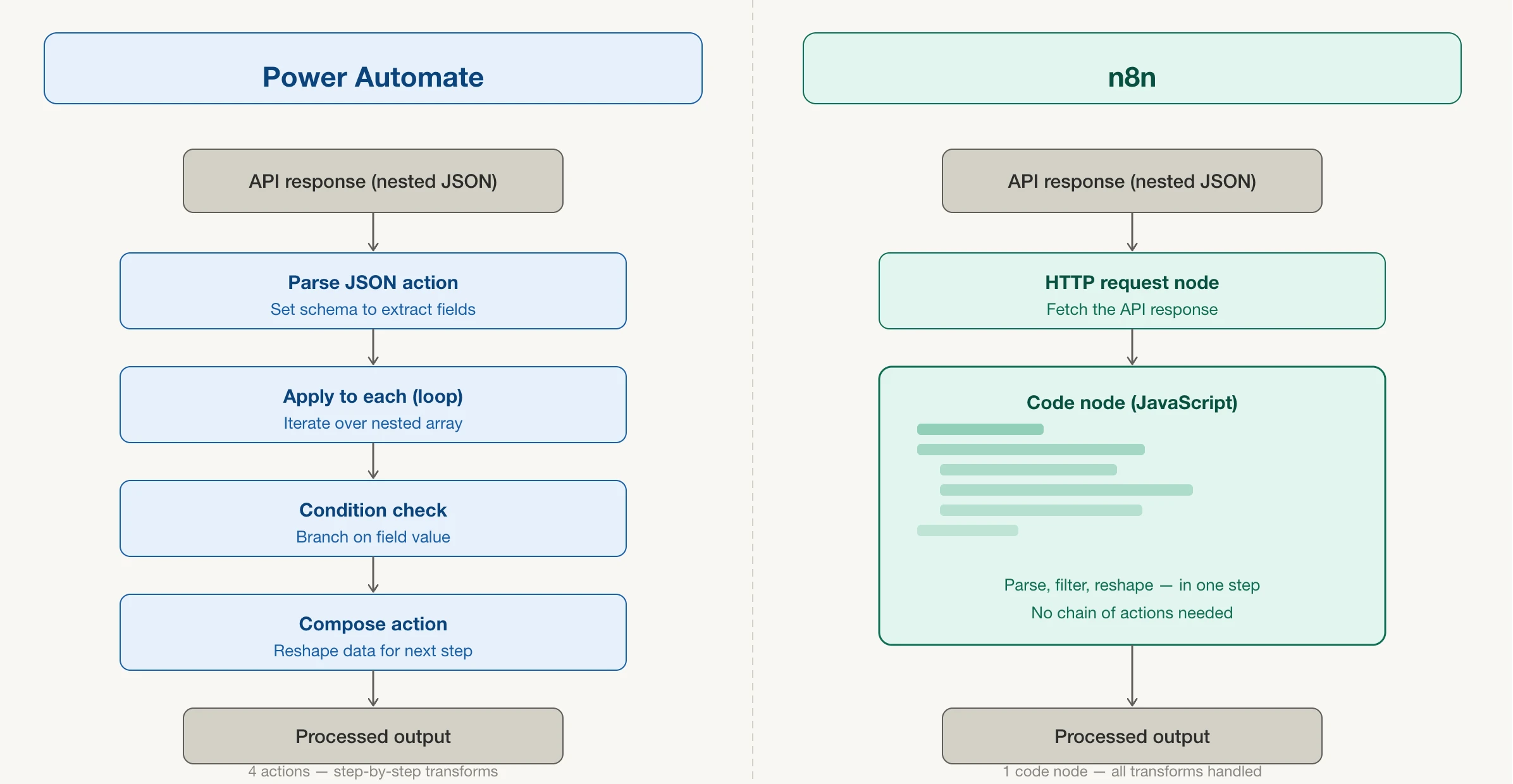
Power Automate supports conditions, loops, and branching, making it capable of handling many business processes.
The challenge comes when you’re working with nested JSON data returned by APIs. Extracting the information you need often requires stacking multiple actions together, just to get the data into a shape you can use.
n8n handles that same problem by giving you native JavaScript right inside the workflow, whenever the built-in nodes aren’t enough. Instead of building long chains of actions to process complex data, a few lines of code can handle the job much more efficiently.
This becomes increasingly valuable as workflows grow beyond simple trigger-and-action automations.
The more branching logic, conditions, and API data you introduce, the more flexibility you need.
The trade-off:
- Power Automate keeps everything low-code for as long as possible, but that simplicity has limits as workflows become more advanced.
- n8n asks for occasional coding when needed, giving you far more flexibility without forcing every workflow to be code-heavy.
4) Connecting Apps Outside Your Core Ecosystem
Integration options are another area where the two platforms take different approaches.
Power Automate offers around 600 connectors, making it an excellent choice for businesses already invested in Microsoft services and approved partner applications.
Once you move outside that ecosystem, however, you’ll often rely on HTTP request actions to connect unsupported services. They work, but they require extra configuration and aren’t as seamless as native connectors.
n8n includes 400+ built-in integrations, but its biggest advantage is that it isn’t limited to a predefined connector library. If an application provides a public REST API, n8n can usually connect to it without waiting for an official integration.
Now you can cash on this flexibility here in Kenya. Services such as WhatsApp Business, M-Pesa Daraja API, and many locally developed CRM platforms are unlikely to have native Power Automate connectors. While it’s still possible to connect them using HTTP requests, that becomes the workaround.
In n8n, connecting directly to an API is part of the platform’s design, making these integrations much more natural to build and maintain.
5) Pricing and Execution Limits
Power Automate uses a usage-based pricing model. As your business creates more workflows, adds premium connectors, and processes more automation runs, your subscription costs can increase alongside that growth.
n8n takes a different approach when self-hosted. Instead of paying for every workflow execution, you pay for the infrastructure running the platform. Your server handles as many workflow executions as its resources allow, without adding a fee for every task completed.
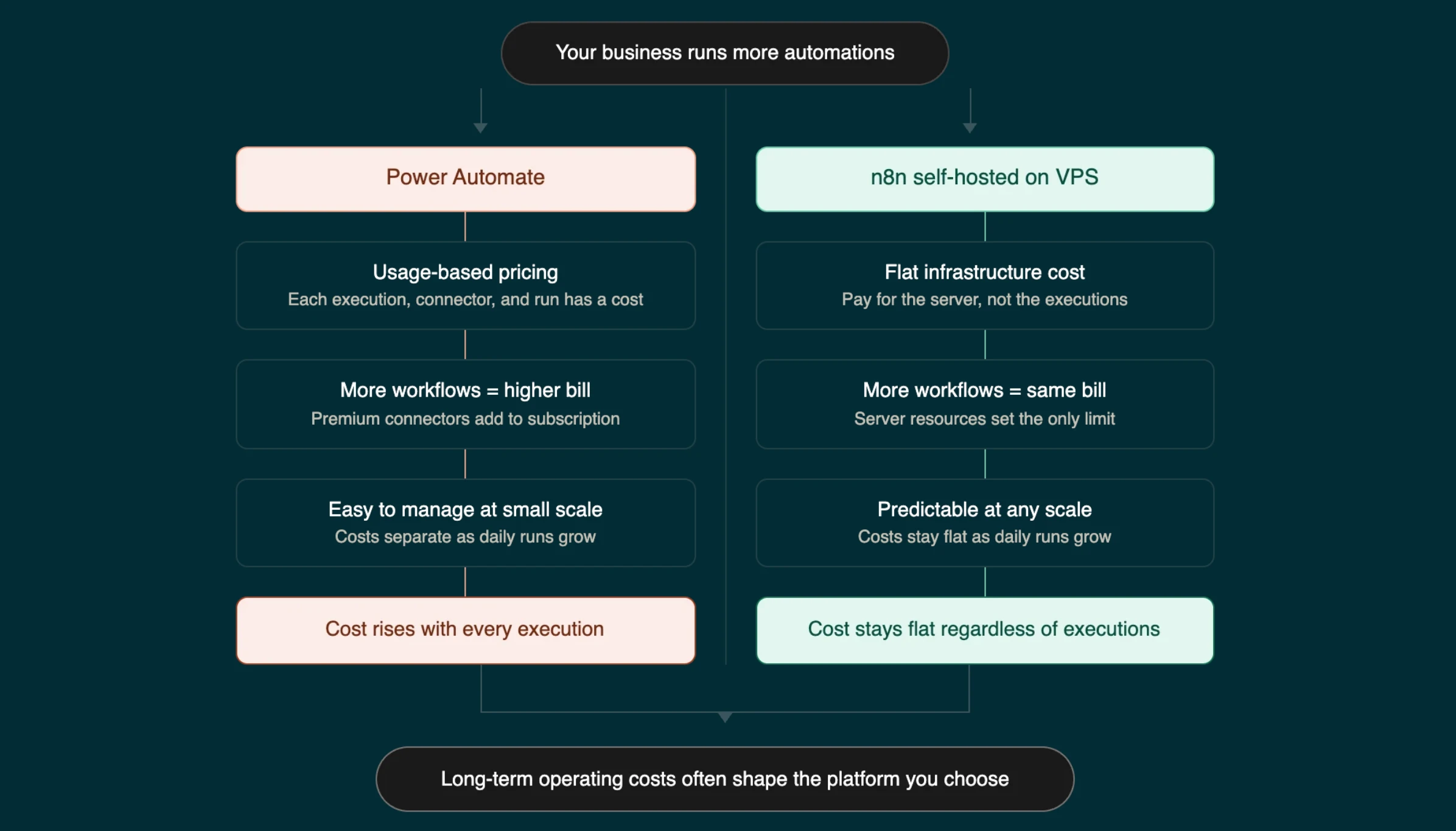
The key term here is execution. In both platforms, an execution is a single run of a workflow. The difference is how those executions affect your costs.
At a smaller scale, Power Automate’s pricing is easy to manage. Once your business starts running dozens of automations every day, the pricing models begin to separate.
A flat infrastructure cost can become far more predictable than paying for increasing workflow activity.
Features are important, but long-term operating costs often have a much bigger impact on the platform you choose.
6) AI and LLM Integration
Power Automate integrates AI Builder and Microsoft Copilot, making AI features easy to add if your business already relies on Microsoft’s ecosystem. The experience is streamlined, but it’s largely built around Microsoft’s AI services.
n8n ships with dedicated nodes for OpenAI, Anthropic, Google AI, and even locally hosted models through Ollama. That gives you the freedom to choose the AI provider that best fits your requirements instead of staying within a single ecosystem.
The difference becomes more noticeable as AI workflows become more advanced.
Power Automate works well for adding AI-assisted steps to existing business processes.
n8n makes it much easier to build complete AI agents, retrieval-augmented generation (RAG) pipelines, and other multi-step AI workflows that combine different models and external services.
If your goal is simply to add occasional AI assistance to existing workflows, either platform can handle it. If you’re building AI-powered automation as a core part of your business, n8n provides significantly more flexibility.
Who Should Pick Which?
Choose Power Automate if:
- Your team works primarily inside Microsoft 365.
- You want the simplest experience for non-technical staff.
- Most of your workflows stay within the Microsoft ecosystem, and you already have Microsoft licensing.
- Built-in enterprise compliance and governance are top priorities.
Choose n8n Workflows (Self-Hosted) if:
- You connect a wide range of applications beyond Microsoft.
- You want predictable infrastructure costs instead of pricing that grows with workflow usage.
- Data privacy is important, and you want to keep your business information on infrastructure you control.
- You run medium- to high-volume automations or need custom logic and AI agents.
- Your team has some technical experience, or you’d rather use managed hosting.
Some businesses fall somewhere in the middle. If you mainly use Microsoft applications but also depend on external services, it’s worth comparing the long-term cost of Power Automate’s premium connectors against n8n’s flat infrastructure model.
As your automation grows, that comparison can save a significant amount over time.
From our experience at Truehost, n8n is an excellent fit for many businesses in Kenya. Hosting n8n on our infrastructure gives you predictable costs, lower latency when connecting to services such as M-Pesa and local CRM platforms, and full control over where your workflow data is stored.
It’s a practical option for organizations that want automation without giving up flexibility or data ownership.
n8n Workflows vs Power Automate FAQs
Is n8n harder to use than Power Automate?
Not necessarily. Power Automate is designed to help first-time users get started quickly with templates and guided setup. n8n expects a little more familiarity with APIs and JSON, but its visual workflow builder handles most automation tasks without requiring code.
How much does self-hosting n8n cost in Kenya?
Our managed n8n hosting plans start from KSh 1,999/month, including 1 vCPU, 4 GB RAM, and 50 GB NVMe storage. The plan includes unlimited workflows and executions, giving you predictable monthly costs as your automation grows.
Can I connect n8n to M-Pesa and local tools?
Yes. n8n can connect to any service with a public API, including M-Pesa Daraja API, WhatsApp Business, and many locally developed CRM platforms. These services typically don’t have native Power Automate connectors, making n8n a more flexible option for local integrations.
What if I am already using Microsoft 365?
If most of your workflows stay inside Microsoft 365, Power Automate is usually the smoother experience thanks to its native integrations. n8n can still connect to Microsoft services using HTTP requests and API nodes, but Power Automate has the advantage for Microsoft-only workflows.
Is n8n cheaper than Power Automate long-term?
For many growing businesses, yes. A self-hosted n8n deployment runs on a fixed infrastructure cost, regardless of how many workflows or executions you run. Power Automate costs can increase as workflow usage grows and premium connectors are added.
Can n8n replace Power Automate for Microsoft 365 tasks?
In many cases, yes. n8n can automate Microsoft 365 services through APIs, but Power Automate’s native Microsoft integrations remain the easier choice for workflows that stay entirely within the Microsoft ecosystem.
Do I need to know how to code to self-host n8n?
No. With our managed hosting, deploying n8n is a one-click process. Advanced workflows can benefit from some coding knowledge, but the visual editor is powerful enough to build many automations without writing code.
Is self-hosting n8n in Kenya reliable for business data?
Yes. Running n8n on reliable infrastructure with automated backups, SSL, and strong uptime makes self-hosting a dependable option for business automation. Hosting closer to your users and local services can also reduce latency when connecting to APIs such as M-Pesa.
Where to Self-Host n8n in Kenya
Setting up n8n no longer means spending hours configuring servers, installing dependencies, or troubleshooting Docker containers. With our managed hosting, we take care of the server setup so you can focus on building workflows.
Our managed n8n self-hosting runs the complete open-source version of n8n on a KVM VPS with Node.js, PostgreSQL, queue mode, and free SSL already configured.
Plans include:
- From KSh 1,999/month
- 1 vCPU
- 4 GB RAM
- 50 GB NVMe storage
- Unlimited workflows and executions
- KVM 2 plan from approximately KSh 2,499/month
- Double the compute resources
- Ideal for production workloads and AI-powered automations
There are no setup fees and no per-execution charges. Once your server is ready, you can sign in to the n8n editor and begin building workflows the same day.
If you’re new to server management, we’ve got you covered. Our support team is available through live chat 24/7 to help with server-related questions. For workflow design and automation ideas, the active n8n community forum is an excellent resource.
Set up your instance on Truehost today and start building your first workflow before the day is out.