Domain SearchInstantly check and register your preferred domain name
 Web Hosting
 cPanel HostingHosting powered by cPanel (Most user friendly)
 WordPress HostingHost your WordPress website with fast, secure, and affordable WordPress hosting in Kenya.
 KE Domains
 Reseller HostingStart your own hosting business without tech hustles
 Windows HostingOptimized for Windows-based applications and sites.
 Free Domain
 Affiliate ProgramEarn commissions by referring customers to our platforms
 Free HostingTest our SSD Hosting for free, for life (1GB storage)
 Domain TransferMove your domain to us with zero downtime and full control
 All DomainsBrowse and register domain extensions from around the world
 .Com Domain
 WhoisLook up domain ownership, expiry dates, and registrar information
 VPS Hosting
 Managed VPSNon techy? Opt for fully managed VPS server
 Dedicated ServersEnjoy unmatched power and control with your own physical server.
 Website Builder
 Online Store BuilderLaunch a professional e-commerce store without writing code.
 Web Design ServiceGet a custom-designed website tailored to your brand and goals. From just KES 15,600
 BlogRead our guides on web hosting, online business, digital marketing, and more
 SupportOur support guides cover everything you need to know about our services
 ContactContact us via chat or email
n8n is powerful and flexible. It can automate almost anything.
That same flexibility also makes it a target for attackers.
With over 100 million Docker pulls, n8n is widely used across automation stacks.
In 2026, several critical vulnerabilities exposed self-hosted instances and, in some cases, enabled remote code execution.
If you run n8n yourself, security is very important. This guide covers the main areas of how to make n8n workflows secure: authentication, encryption, network security, workflow hardening, and monitoring.
1) Authentication and Access Control
Strong authentication forms your first line of defense. Weak or shared logins turn n8n into an easy entry point.
- Enforce strong user practices. Require passwords of at least 12 characters with complexity. Turn on MFA for all admin and editor accounts right away, it blocks most credential-stuffing attacks.
- Use SSO where possible. Integrate OIDC or SAML with tools like Keycloak, Okta, or Auth0. This centralizes authentication, enforces company policies, and lets you deprovision users instantly when someone leaves the team.
- Implement proper RBAC. Limit access by role: Admins stay rare and audited. Editors build workflows. Viewers or Auditors only inspect. Assign based on actual job needs, not convenience.
- Manage tokens and sessions carefully. Set short session timeouts (e.g., 15-30 minutes of inactivity). Use scoped, short-lived API tokens for integrations. Avoid permanent tokens in production workflows.
Additional controls make a big difference:
- Disable open account registration and require email verification.
- IP allowlisting for the editor UI.
- Force access through a VPN or bastion host.
At Truehost, we see many Kenyan technical teams run n8n on our VPS or dedicated servers with these controls baked in from day one.
2) Data Protection and Credential Management
Credentials represent your biggest risk. Handle them wrong and one breach exposes everything.
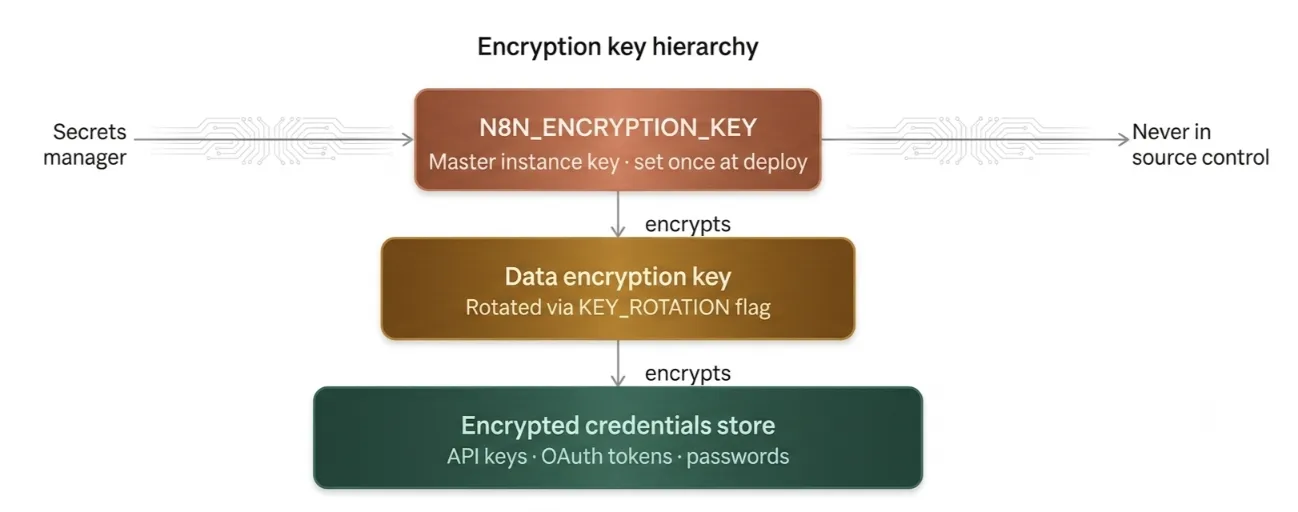
Master your encryption keys. The instance encryption key (N8N_ENCRYPTION_KEY) is set once at deployment, generated securely with openssl rand -hex 32, and stored in a secrets manager, never in source control.
Do not rotate this key manually after initial setup.
n8n uses a separate data encryption key for credentials (stored encrypted under the instance key).
Rotate this via the official N8N_ENV_FEAT_ENCRYPTION_KEY_ROTATION feature flag instead of swapping the master key.
Critical warning: Manually changing N8N_ENCRYPTION_KEY after the first boot makes existing credentials unreadable with no recovery except from a pre-change backup. Always snapshot your database first. Some users report issues with External Secrets or SSO after rotation test thoroughly in staging.
check our guide on 13 n8n Automation Ideas to Try with Your VPS
Credential handling best practices:
- Always use n8n’s built-in encrypted Credential Manager.
- Never hardcode secrets in nodes or workflows.
- Use least-privilege service accounts and prefer OAuth over long-lived API keys.
In workflows, minimize sensitive data flow. Redact PII from logs and variables using Function nodes. Encrypt payloads with the Crypto node when needed.
Database and backups are Important. Use Postgres or MySQL in production instead of SQLite. Enforce TLS connections, restrict DB access to internal networks only, and use encrypted disks. Run regular encrypted backups and test restores.
Realistic example: A finance automation workflow pulling bank data should store credentials encrypted, process minimal PII, and log only non-sensitive metadata. This keeps you compliant and reduces blast radius.
We at Truehost make this easier. Our n8n self-hosting plans include proper secret handling and encrypted storage from the start.
3) Network Security
Never expose your n8n editor directly to the internet.
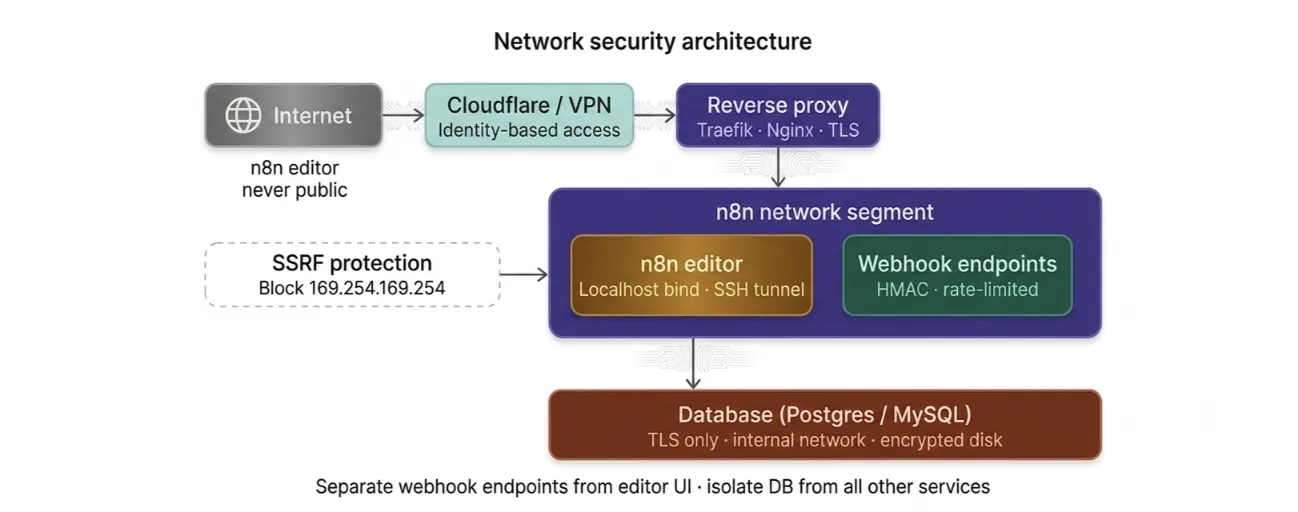
- Use HTTPS everywhere. Put Traefik, Nginx, or Cloudflare in front for TLS termination. This encrypts traffic in transit and handles certificates automatically.
- Restrict and isolate access. Use VPNs, Cloudflare Tunnel/Zero Trust, or strict firewall rules. Bind the editor UI to localhost and access it via SSH tunnel or bastion, where possible. Place n8n in its own network segment, away from other services, and isolate the database.
- Secure webhooks tightly. Generate long, unique URLs. Add HMAC signatures or auth tokens for incoming integrations (Stripe, GitHub, etc.). Separate webhook endpoints from the admin UI. Rate-limit aggressively and monitor for abuse.
- Protect against SSRF. Restrict outgoing connections from HTTP Request or Code nodes. Block access to internal services and cloud metadata endpoints (like AWS 169.254.169.254). Use allowlists for external calls.
Practical tip: Many teams run n8n behind Cloudflare Zero Trust. This adds identity-based access without exposing ports publicly.
Check our guide on n8n Automation: Why Your Business Needs This Guiding Approach
4) Workflow-Level Security Practices
Security lives in your workflows too.
Restrict powerful nodes. Limit Code, HTTP Request, and Execute Command nodes to trusted users only.
Note that n8n v2.0+ disables Execute Command and Local File Trigger by default and blocks env var access from Code nodes.
Check upgraded instances, older configs may have re-enabled risky behavior via NODES_EXCLUDE.
Validate inputs and handle errors. Use IF/Switch and Function nodes to sanitize data. Never leak secrets in error messages or logs.
Govern workflows properly. Disable unused ones. Add ownership, sensitivity tags, and review dates. Version control with Git or IaC for audit trails and easy rollbacks.
Extra mitigations: Block unnecessary node instances, redact execution data, and enforce strict file permissions (e.g., config files at 0600).
5) Monitoring, Logging, and Incident Response
You can’t protect what you can’t see.
- Centralize logs. Send them to ELK, Loki, or similar. Capture webhook metadata (source IP, headers, timestamps) and enable detailed execution auditing.
- Set up smart monitoring. Use Prometheus + Grafana. Alert on thresholds like 5+ failed executions in 10 minutes, spikes in webhook volume, or unusual credential access.
- Prepare for incidents. Document a clear playbook: disable affected workflows, revoke credentials, rotate keys. Store break-glass access in a secure vault. Run regular tabletop exercises with your team.
Read also: How to Run n8n on a VPS
Advanced Considerations for Multi-Team Instances
Shared environments need extra care:
- Strong auditing on shared credentials and webhooks.
- Clear ownership registry and tagging for every workflow.
- Regular OAuth scope reviews.
- IaC for workflows to enable review and rollback.
- Integrate external secrets managers for better control.
Implementation Checklist and Roadmap
Quick wins (do these today):
- Set and secure your encryption key.
- Enable HTTPS with a reverse proxy.
- Enforce MFA/SSO.
- Migrate all secrets to the Credential Manager.
- Lock down editor UI access.
Medium-term:
- Fine-tune RBAC.
- Add webhook authentication and rate limiting.
- Set up centralized logging and monitoring.
- Implement node restrictions and SSRF controls.
Ongoing:
- Quarterly workflow audits.
- Scheduled key rotation (test first!).
- Monitor security bulletins and patch promptly.
- Train your team regularly.
How to Make n8n Workflows Secure FAQs
Is self-hosted n8n secure by default?
No. Defaults work for development but leave production exposed. You must actively harden it.
What’s the single most critical n8n environment variable for security?
N8N_ENCRYPTION_KEY. Protect it like your life depends on it because your credentials do.
Can I rotate my n8n encryption key without losing credentials?
Yes, using the official rotation feature for the data encryption key (not the master instance key). Always back up and test first.
How do I check if my instance is affected by a recent CVE?
Update to the latest version immediately and run community-provided scanner workflows. Check n8n’s security advisories.
Can n8n be made HIPAA/GDPR/SOC 2 compliant?
Yes, with proper configuration, encryption, access controls, auditing, and supporting infrastructure, but you own the compliance work in self-hosted setups.
n8n Cloud vs. self-hosted: Which is more secure?
Cloud handles many basics for you. Self-hosted gives full control but requires your ongoing effort.
Make Security a Habit, Not a One-Time Setup
Every layer of this guide works together. Skip encryption or network controls and the rest weakens.
The 2025–2026 CVE wave shows that even powerful tools need constant attention, and an outdated but ‘hardened’ instance stays vulnerable.
Prioritize: Harden workflows touching customer data or payments first. Tackle internal automations next.
Skip the headaches of manual server setup.
We at Truehost built n8n self-hosting plans with one-click installation, queue mode enabled, secure defaults, and 100+ pre-built workflows.
They start at just KES 1,999/month and run on reliable Kenyan infrastructure.