Rank #1 on Google Maps
India English
Kenya English
United Kingdom English
South Africa English
Nigeria English
United States English
United States Español
Indonesia English
Bangladesh English
Egypt العربية
Tanzania English
Ethiopia English
Uganda English
Congo - Kinshasa English
Ghana English
Côte d’Ivoire English
Zambia English
Cameroon English
Rwanda English
Germany Deutsch
France Français
Spain Català
Spain Español
Italy Italiano
Russia Русский
Japan English
Brazil Português
Brazil Português
Mexico Español
Philippines English
Pakistan English
Türkiye Türkçe
Vietnam English
Thailand English
South Korea English
Australia English
China 中文
Somalia English
Canada English
Canada Français
Netherlands Nederlands

n8n Hosting in Kenya.Build Workflows That Work.

n8n Hosting in Kenya for the jobs your team repeats. Turn an incoming enquiry, a daily report or a routine handoff into an automation hosted on Truehost. Set up the connections once, then review the results as work comes in.

Start with N8N Starter

Kshs 840 / month

Billed every 3 years · Kshs 30,240 recurring total

  • 1 vCPUProcessor
  • 2 GB RAMMemory
  • 50 GBNVMe storage

n8n Hosting Pricing

Billing cycle

Swipe sideways to compare all 3 plans

N8N Starter

Kshs 1,120/mo

Kshs 1,120 billed monthly

Order Now

Renews at Kshs 1,120/month

  • 1 vCPU Core
  • 2 GB RAM
  • 50 GB NVMe Storage
  • 4 TB Bandwidth
  • Unlimited Workflows

N8N Business

Kshs 5,040/mo

Kshs 5,040 billed monthly

Order Now

Renews at Kshs 5,040/month

  • 4 vCPU Core
  • 8 GB RAM
  • 200 GB NVMe Storage
  • 48TB Bandwidth
  • Unlimited Workflows

Put a repeatable process on a server

Less copying between apps.
More work moving forward.

An n8n workflow joins the events and actions behind a task. Hosting gives that process a continuing home instead of tying it to the computer on your desk.

Ready to connect

The plan’s automated installation supplies the starting environment. Configure authorised accounts, map the information between steps and decide how the routine should behave.

Build around your tools

Use integrations, compatible community nodes or HTTP requests to reach your tools. A connection is useful when it carries the right information to the right action.

Size for the work you run

An occasional notification and a batch of large documents place different demands on a server. Review resource use with examples of the work you intend to automate.

Practical automation ideas

Start with the task you keep repeating.

These examples describe routines you can build; each requires the relevant service access and configuration.

Capture and route enquiries

For a Nairobi service firm, route a website enquiry by service area and send the assigned colleague a follow-up task. Reject submissions missing a contact method.

Bring orders into your operations

For an online shop, add a confirmed order to a dispatch register and mark its unique reference as processed. A repeated event should update the record rather than create another delivery.

Prepare a scheduled report

For a team with several branches, collect each location’s daily totals and deliver one morning summary. Flag an absent return rather than treating missing figures as zero.

Add AI where it helps

For a consultancy, turn a lengthy document into a review draft through an authorised AI API. Keep a person responsible for checking the draft before it reaches a client.

Design the handoff before automating it

A workflow needs more
than a happy path.

Define a useful result, decide which records qualify and work out who handles exceptions.

Trigger. Check. Act.

For an enquiry routine, establish the fields required for a reply and the rules for assigning its owner. Incomplete entries can go to a review list.

Test before you activate

Include duplicated, incomplete and unusual records in your rehearsal. Compare the destination data with what you expected the routine to produce.

Make exceptions visible

Route a failed handoff to somebody who can act on it. Decide whether another attempt is safe before enabling automatic retries.

Choose capacity with a real workload

Choose resources around your workflow.

Test with the records and files you expect to process. Watch CPU and memory use, then repeat the test with several jobs running together.

N8N Starter: a focused starting routine

Build a modest-payload process and measure its demand.

Processor
1 vCPU
Memory
2 GB RAM
NVMe storage
50 GB
Choose N8N Starter
  • A small enquiry routine or notification service.
  • Short batches with modest payloads while you establish the workflow.
  • A place to gather measurements before committing to a larger allocation.

N8N Pro: activity arriving together

Allow capacity for scheduled and event-driven work to coincide.

Processor
2 vCPU
Memory
4 GB RAM
NVMe storage
100 GB
Choose N8N Pro
  • Daily summaries running alongside event-driven tasks.
  • Extra memory for broader transformations and intermediate data.
  • Review peak activity as new routines join the environment.

N8N Business: substantial processing jobs

Evaluate larger batches, documents and retained operational data.

Processor
4 vCPU
Memory
8 GB RAM
NVMe storage
200 GB
Choose N8N Business
  • Document-heavy processing or sizeable collections of records.
  • Additional capacity when several substantial jobs coincide.
  • Include retained history and working files in the storage budget.

Take one routine from idea to operation

Build it. Test it. Put it to work.

Choose a task whose completion you can verify, rehearse it and only then rely on it for daily work.

Choose your hosting

Order the resource allocation that fits your initial workload. Automated installation prepares the application environment for configuration.

Connect and build

Authorise the tools the routine will reach and map their fields. Establish the start event, filtering rules and intended destination.

Test and activate

Exercise the routine with controlled inputs, then enable production operation. Watch early results for omissions, repeated actions or unexpected costs.

Keep ownership of the operation clear

Your workflows.
Your operating checklist.

Assign responsibility for expired access, failed runs and recoverable data. Hosting the application is one part of operating a dependable business routine.

A launch checklist for the operator

1

Permissions

Restrict each authorised account to the actions the routine requires.

2

Restore readiness

Preserve instance settings, persistent data and the credential key in a recoverable backup.

3

Exception review

Assign somebody to inspect unsuccessful runs and capacity alerts.

n8n hosting questions, answered

Getting started

What is n8n, and what can I automate with it?

Think of n8n as a way to join separate tools into a process. An event or timer starts the routine; nodes then read, transform or send information according to your rules.

  • A website enquiry can become a task assigned to the relevant salesperson.
  • A confirmed order can become an entry in a dispatch register.
  • A daily timer can gather branch returns into a morning summary.
  • A document can become a proposed summary awaiting an employee’s approval.

The examples above show starting points. Pick an outcome that you can check, rather than automating a whole department on day one.

Do I need coding skills to use n8n?

You can connect supported actions in the visual editor without writing each step in code. You still need to choose which fields to pass, grant access to connected accounts and decide what happens when a step fails.

Begin with a simple timer and one destination. If the task needs a custom endpoint or complex transformation, allow for technical configuration as well as time spent learning the editor.

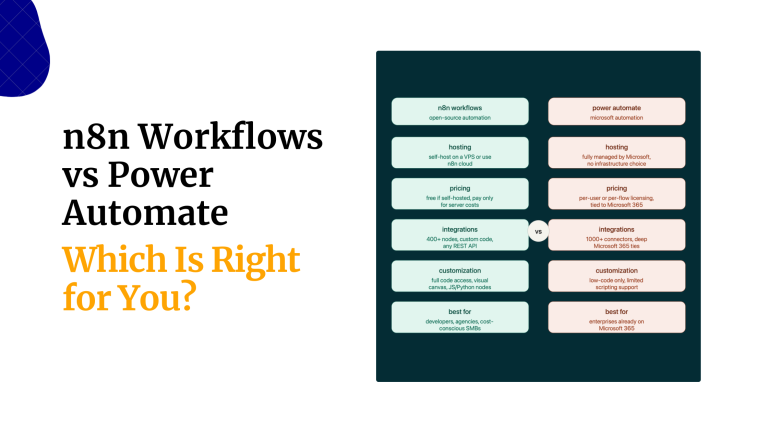
How is Truehost n8n hosting different from n8n Cloud?

Here you buy a hosting environment for an n8n installation you operate. The hosted n8n Cloud service is sold and operated by n8n under its own subscription terms.

  • At Truehost, select server capacity and configure the installed application for your work.
  • With n8n Cloud, select a software-service subscription from n8n itself.

Assess operational responsibility, desired edition features and external usage charges when comparing the two approaches.

Can I run n8n on my laptop instead?

A computer installation is useful for experimenting. It only handles scheduled tasks while the machine and application are running, and external callers need a reachable webhook address.

Move a routine to a hosted environment when it needs a continuing endpoint independent of your working laptop. Its success still depends on reachable integrations and a correctly configured deployment.

Plans, costs and software editions

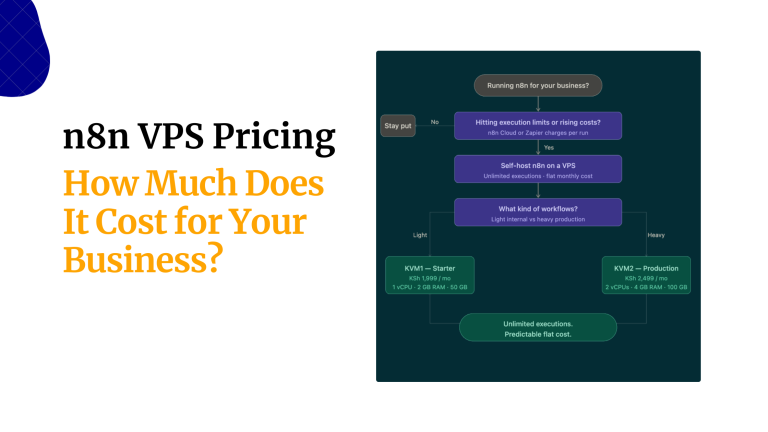
How much does n8n hosting cost in Kenya?

Select a term in n8n Hosting Pricing to see the applicable amount. The cards present both the payment for that term and its monthly equivalent where relevant.

Plan the complete operating budget:

  • Server capacity billed by Truehost.
  • Subscriptions for the services your nodes use.
  • Metered model calls or message delivery from external providers.
  • Edition licensing for paid n8n capabilities, if required.

Measure usage on the routine you build. The hosting price alone cannot predict the bill from a metered external service.

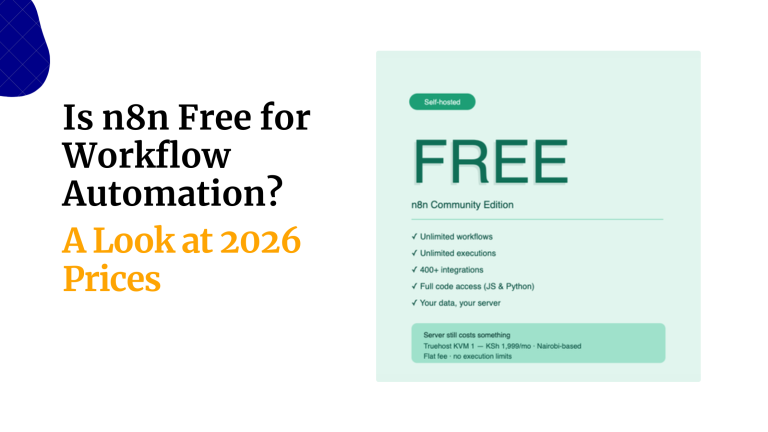
Is n8n free to self-host?

Community edition is available for self-hosting without a paid edition subscription. Server resources and any chargeable services you connect remain part of the budget.

Review the edition feature list and applicable licence before choosing a team deployment. Some administrative and collaboration capabilities require a paid edition.

Does N8N Business hosting include n8n’s Business software licence?

N8N Business names a resource tier in the Truehost hosting catalogue. That purchase allocates hosting capacity; the similarly named software edition is licensed separately by n8n.

If the project requires paid software capabilities, arrange the relevant n8n subscription independently. Choose this hosting tier according to processing, memory and storage needs.

Which plan should I start with?

Evaluate the heaviest job you expect to run and how often it overlaps other activity. A document transformation can demand more capacity than many lightweight message tasks.

  • Starter is a candidate for an initial, modest-payload routine.
  • Pro offers a larger allocation for activity that begins to coincide.
  • Business offers further headroom for demanding jobs.

These are sizing suggestions. Use the guidance cards and measured demand together; a hosting tier does not promise a fixed execution throughput.

Are workflows and concurrent executions really unlimited?

An unlimited workflow allowance describes the catalogue limit, not infinite computing capacity. Simultaneous processing remains constrained by the server and the tools it calls.

  • Active jobs share the available processor time and memory.
  • Saved history, databases and files occupy the assigned disk.
  • External services may throttle requests or cap account usage.

Control batch size and parallel activity, and retain only the history you need. Increase capacity when normal demand consistently exhausts the existing allocation.

Can I use a standard VPS for n8n and other applications?

For a stack you assemble yourself, use a VPS and install compatible services within its resources. The n8n plans provide a prepared starting point for this application.

Several services on one server share its capacity and require an operating plan for updates, routing and recovery. Inventory that stack before deciding its size.

Connections and real workflows

Can I automate WhatsApp messages with n8n?

The WhatsApp Business Cloud integration connects through the appropriate business API credentials. Set up that service first, then authorise the operations your routine needs.

  1. Establish an eligible WhatsApp Business Cloud account and API access.
  2. Configure its credential and action in the n8n editor.
  3. Run a controlled message test and inspect the response.

Follow the provider’s sending rules and account charges. The integration reference explains the supported actions.

Can I connect an app that has no built-in node?

A service with a suitable API may be reachable through an HTTP request even without a dedicated node. Establish that its permitted operations cover the task you have in mind.

  • Read its access-token requirements and permission scopes.
  • Map the required payload and the returned record structure.
  • Handle throttling, pagination and unsuccessful responses.

Begin with one controlled call and inspect the response before connecting it to a larger production routine.

Can I build AI workflows, and do I need a GPU?

An n8n job can call an authorised external model API. In that arrangement, the model provider does the inference; your hosting handles orchestration and the data passed between steps.

For example, a document-processing routine can request a proposed summary and store it for editorial review. Include the provider’s metered usage in its operating cost.

Running a model on your own infrastructure is a separate deployment decision. Size this environment for the workflow and its payloads.

Can I use my own domain and receive webhooks?

Give the instance its own hostname, such as automate.biashara.co.ke. This keeps the editor and event endpoint identifiable alongside the business’s main site.

  1. Create DNS routing for the endpoint assigned to the deployment.
  2. Enable HTTPS and set the public instance URL used by n8n.
  3. Update the calling service with the production webhook endpoint.
  4. Submit a controlled event and trace it through to its destination.

Revisit external registrations whenever the hostname or deployment changes. Browser access alone does not establish that event delivery works.

What is a good first workflow for my business?

Try a daily follow-up list for unanswered enquiries. Its inputs and result are easy for the responsible employee to inspect:

  1. Retrieve enquiries still awaiting a response.
  2. Filter records using your agreed follow-up interval.
  3. Write each qualifying reference to a review list.
  4. Send the list to the colleague who handles replies.

Test an empty list, a repeated run and a record already answered. Expand the routine only after those cases produce the expected result.

Performance, migration and maintenance

What does queue mode do?

In queue mode, the receiving process and execution workers have separate roles. Redis coordinates pending work so workers can pick up jobs.

Each worker uses server resources. Test how many jobs your server can run together before adding more workers.

Consult the queue-mode reference for shared keys, worker configuration and data-storage requirements before altering the deployment.

How can I tell when my server needs more resources?

Inspect a repeated slowdown alongside server metrics and external response times. A slow provider call and an overloaded server need different remedies.

  • High processor use can accompany costly transformations or coinciding jobs.
  • Memory exhaustion can cause crashes during large payload processing.
  • Low free space can reflect retained results and uploaded files.
  • A growing backlog can indicate that workers cannot clear arriving work.

Reduce oversized batches and unnecessary retained data first where appropriate. More server capacity cannot bypass an external account’s request quota.

Can I migrate workflows from another n8n installation?

You can move compatible workflow definitions, but that alone does not recreate all instance data and secrets. Inventory the source deployment before planning the switch.

  1. Preserve a recoverable source snapshot.
  2. Bring across definitions and verify required node compatibility.
  3. Authorise destination connections and review deployment-specific values.
  4. Repoint event senders after destination testing succeeds.

Disable source schedules at the handover so two installations do not perform duplicate actions. Use the recovery reference for an instance-level restore.

What should I back up?

Preserve the information needed to recreate access as well as the routines themselves. A useful recovery set covers persistent data and its dependencies:

  • Instance data and the key used to encrypt stored credentials.
  • The database serving the deployment.
  • Environment configuration and installed custom nodes.
  • Any files stored outside the application’s main data directory.

Keep the credential key with a protected recovery plan: encrypted secrets depend on it. Verify restoration on a test environment using the backup instructions.

Who handles updates, backups and workflow support?

These plans list automated installation and dedicated support. Check who handles software updates, backups and restores before ordering.

Your team defines the process, authorises connected accounts and checks business outcomes. Rehearse important routines against a proposed software release before adopting it.

When requesting help, supply the failing node, timestamp and error details. Remove secret values and personal records from diagnostic material.

What happens when a workflow fails?

Build a failure path alongside the normal result. A disconnected service or invalid input should leave a trace and a clear next action for the operator.

  • Locate the earliest failed operation in the execution trace.
  • Route actionable exceptions to the responsible colleague.
  • Retry transient failures only when repeating the action is safe.
  • Use a unique reference to detect an operation that already succeeded.

An unsuccessful overall run may still have changed a destination in an earlier step. Check that destination before replaying the job.

Does hosting n8n keep all my workflow data in one place?

A workflow can cross several service boundaries. When it sends information to a model, CRM or messaging API, the receiving provider handles that information under its own service arrangements.

  • Minimise the fields transmitted for each action.
  • Grant accounts the smallest useful permission scope.
  • Set appropriate retention for saved input and output records.
  • Protect the editor, administrator accounts and recovery copies.

Document the destinations a routine reaches before introducing confidential records, and decide which fields each destination needs.

Guides

Build your next n8n workflow

Explore routines, connections and capacity planning for your automation project.

Give your next workflow a place to run

Connect the steps.
Keep work moving.

Choose the hosting capacity above and put your first repeatable task to work.