Domain SearchInstantly check and register your preferred domain name
 Web Hosting
 cPanel HostingHosting powered by cPanel (Most user friendly)
 WordPress HostingHost your WordPress website with fast, secure, and affordable WordPress hosting in Kenya.
 KE Domains
 Reseller HostingStart your own hosting business without tech hustles
 Windows HostingOptimized for Windows-based applications and sites.
 Free Domain
 Affiliate ProgramEarn commissions by referring customers to our platforms
 Free HostingTest our SSD Hosting for free, for life (1GB storage)
 Domain TransferMove your domain to us with zero downtime and full control
 All DomainsBrowse and register domain extensions from around the world
 .Com Domain
 WhoisLook up domain ownership, expiry dates, and registrar information
 VPS Hosting
 Managed VPSNon techy? Opt for fully managed VPS server
 Dedicated ServersEnjoy unmatched power and control with your own physical server.
 Website Builder
 Online Store BuilderLaunch a professional e-commerce store without writing code.
 Web Design ServiceGet a custom-designed website tailored to your brand and goals. From just KES 15,600
 BlogRead our guides on web hosting, online business, digital marketing, and more
 SupportOur support guides cover everything you need to know about our services
 ContactContact us via chat or email
A CRM can hold your leads, customer contacts, quotations, sales notes, support history and follow-up tasks.
If that system becomes slow or unavailable, your team does not just lose a webpage. It loses the working memory behind its customer relationships.
CRM hosting gives a business a place to run self-hosted software such as:
EspoCRM,
SuiteCRM or
ERPNext.
A virtual private server is often the practical middle ground: you receive more control than shared hosting without leasing an entire physical server.
This guide will help you decide if that control is useful, estimate a starting server size and avoid the security and maintenance costs that make a cheap deployment expensive later.
The short answer: use a VPS when you need control of the CRM stack
A VPS is a strong fit when your CRM must support custom modules, background jobs, API integrations, scheduled imports or a database configuration that shared hosting cannot reliably provide.
It also lets you select the operating system, web server, PHP or Python version, database and backup method required by the application.
That control comes with responsibility though. Someone must:
Patch the server,
Restrict access,
Monitor capacity,
Test backups and
Recover the service after a failure.
If nobody on your team owns those jobs, choose a managed VPS or a vendor-hosted CRM.
Our VPS hosting plans include Kenya-based and global server options, plus managed and unmanaged routes.
Match the plan to the CRM’s documented requirements and your team’s ability to administer Linux rather than buying on price alone.
What CRM hosting actually includes
A hosted CRM needs more than disk space. A normal production setup contains several moving parts:
the CRM application;
a database such as MariaDB, MySQL or PostgreSQL;
a web server such as Nginx or Apache;
a supported language runtime and extensions;
HTTPS for encrypted browser connections;
scheduled jobs for workflows, reports, email polling and reminders;
outbound email delivery;
application files and customer attachments;
backups stored away from the main server; and
monitoring for uptime, memory, disk space and failed jobs.
The VPS supplies the computing environment. It does not automatically configure, secure or maintain the CRM.
This is critical when comparing offers. “CRM hosting” may describe a ready-to-use managed service, a VPS with an installer or a bare server on which you do all the work.
Ask exactly which layer the provider manages.
Choose between SaaS, shared hosting, VPS and a dedicated server
The best hosting model depends on how much control you need and how much technical work you can support.
Hosting model | Best fit | Main advantage | Main trade-off |
|---|---|---|---|
Vendor-hosted SaaS CRM | Teams that want to sign in and start selling | Vendor manages the application and infrastructure | Less control over hosting, code and some customisation |
Shared hosting | A small, compatible PHP CRM used lightly | Low entry cost and a familiar control panel | Resource, process and configuration limits |
Unmanaged VPS | A technical team running a custom or integrated CRM | Root access and control of the full software stack | Your team manages security, updates, backups and recovery |
Managed VPS | A business that needs server control without doing every administration task | Provider handles an agreed management scope | Higher cost and management coverage varies by provider |
Dedicated server | A large or specialised workload with measured demand | A whole physical server and broad hardware control | Higher cost and greater operational responsibility |
Shared hosting is not automatically off-limit though.
EspoCRM says it can run on shared hosting, but its current server guidance recommends a VPS or dedicated server for production because shared environments can impose limits.
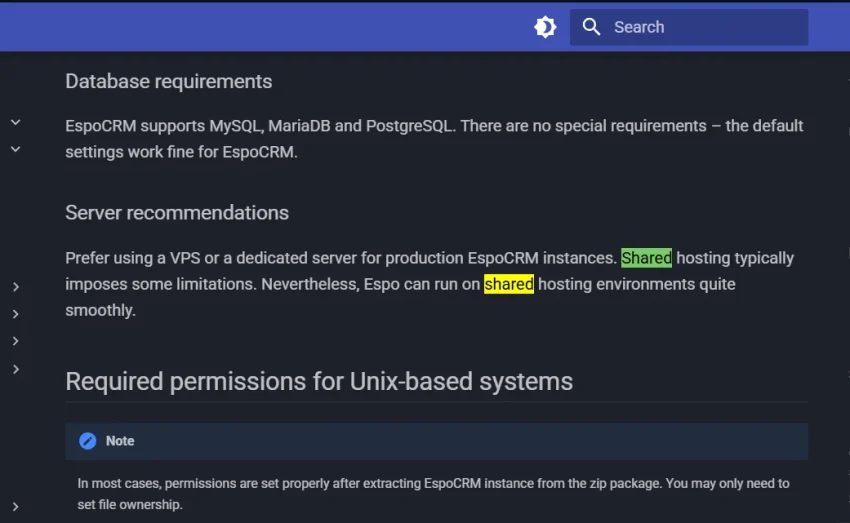
Move to a VPS when those limits affect cron jobs, background workers, database access, PHP settings, integrations or predictable performance.
If your problem is simply poor CRM adoption, changing servers will not fix it.
Size the VPS around active work, not stored contacts
A contact count is a poor sizing metric by itself.
Ten thousand simple contact records may be easy to serve, while a smaller database with large attachments, frequent reports, email synchronisation and automation workers can consume far more resources.
Use these ranges as planning estimates, not vendor minimums:
Workload | Practical starting point | Typical situation |
|---|---|---|
Trial or internal proof of concept | 1-2 vCPU, 2 GB RAM, 30-50 GB storage | A few users, sample data and no critical integrations |
Small production CRM | 2 vCPU, 4 GB RAM, 60-100 GB SSD/NVMe | Roughly 5-20 active users, normal reports and light email jobs |
Growing team or heavier automation | 4 vCPU, 8 GB RAM, 100-200 GB SSD/NVMe | More concurrent users, imports, APIs, workflows and attachments |
Large or mixed business application | 8 GB RAM or more, sized after testing | CRM plus ERP modules, many workers, large reports or multiple integrations |
Start with the CRM vendor’s compatibility matrix. Then allow capacity for Linux, the database, web server, cache, scheduled workers, logs, security tools and short traffic spikes.
Before ordering, estimate:
active users at the busiest hour;
database size and monthly growth;
attachment volume and retention period;
frequency of reports, imports and exports;
email polling and outbound campaign workload;
API and automation activity;
space needed to create backups safely; and
the recovery time the business can tolerate.
If you need a deeper resource check, use our guide to estimating VPS RAM. Choose a plan that can be upgraded without rebuilding the CRM from scratch.
Match the server stack to the CRM you select
Do not pick a VPS image or control panel before choosing the CRM version. Each application has its own supported stack and background processes.
a) EspoCRM suits a relatively direct PHP deployment
EspoCRM’s current documentation supports Apache, Nginx or IIS, PHP 8.3 through 8.5, and MySQL, MariaDB or PostgreSQL versions listed on its server configuration page.
It also requires a scheduled job, and its documentation provides a cron command for Unix-like systems.
This makes EspoCRM a reasonable candidate for a standard Linux VPS. You still need to configure the correct PHP extensions, file ownership, HTTPS, email and backups.
b) SuiteCRM needs its compatibility matrix and workers checked
SuiteCRM 8 uses a web server, PHP and MySQL or MariaDB.
The official SuiteCRM installation guide tells administrators to check the compatibility matrix for the chosen release and configure scheduled jobs after installation.
SuiteCRM 8.10 also introduced asynchronous background tasks that depend on a Messenger worker.
If that worker is not running, the documentation warns that those tasks remain pending.
This is exactly the type of long-running process that can push a production CRM beyond a restrictive shared account.
ERPNext needs a broader application stack
ERPNext runs on the Frappe Framework and brings CRM together with functions such as accounting, stock, projects and operations.
That makes it useful for a business seeking a connected system, but it is not a lightweight PHP-only install.
Frappe’s current installation documentation lists dependencies that include MariaDB, Python, Node, Redis or Valkey, Yarn, PDF tooling and scheduled jobs.
It recommends its Docker route for production deployments. Give this stack more room than a small contact-only CRM and test it with your real modules.
Kenya hosting location helps with latency and data planning
A Nairobi-based VPS can reduce network distance for staff working mainly in Kenya.
This can make repeated page loads, searches and record updates feel more responsive, especially where office connections already add delay.
Location also belongs in your data-governance review. Section 25 of Kenya’s Data Protection Act restricts transfers of personal data outside Kenya unless adequate safeguards or consent exists.
A local server can simplify one part of that discussion, while a global server may still be appropriate when the business establishes the required safeguards.
Hosting in Kenya does not make a CRM compliant by itself. The Data Protection Act requires appropriate technical and organisational measures.
It specifically points to risk identification, safeguards, encryption, timely restoration and ongoing review.
Treat the following as one operating system for privacy and security:
collect only customer data you can justify;
give users the minimum access required for their roles;
require strong passwords and multi-factor authentication where supported;
encrypt browser traffic with HTTPS;
protect database, SMTP and integration credentials;
patch Linux and the CRM promptly;
keep audit logs and review suspicious access;
define retention and deletion rules;
maintain an incident-response procedure; and
test that an off-server backup can restore both files and the database.
Ask a qualified Kenyan data-protection professional to review high-risk or regulated processing.
This article is a hosting guide, not legal advice, so I won’t go further into this.
Set up a production CRM on a VPS in ten stages
The exact commands change by application, but the deployment sequence stays fairly consistent.
Choose the CRM and version. Confirm its licence, supported operating system, runtime, database, web server and upgrade path.
Select a suitable VPS. Use the sizing estimates above, then confirm that the plan supports the required operating system, storage, network traffic and upgrade route.
Decide who manages the server. Write down who owns initial setup, security updates, monitoring, CRM upgrades, backups and emergency recovery.
Review managed VPS hosting if your business cannot assign those tasks internally.Create a dedicated CRM address. A subdomain such as
crm.example.co.keis easier to manage than exposing a raw IP address. Follow the process for linking a domain to a VPS, then allow DNS changes to propagate.Harden the server before adding customer data. Update packages, create a non-root administration account, use SSH keys, restrict the firewall and remove services you do not need.
Our SSH key guide for Linux VPS security covers one important part of that baseline.Install the supported application stack. Use the CRM’s official documentation for the exact runtime and database versions.
Avoid a one-click installer that deploys an unsupported release or hides default credentials.Enable HTTPS and secure secrets. Issue an SSL/TLS certificate, redirect browser traffic to HTTPS and keep database passwords, API keys and SMTP credentials outside public directories.
Configure email and scheduled work. Connect a suitable transactional mail service, set sender authentication and test delivery.
Add the CRM’s cron jobs, queues or workers, then confirm they actually run.Create off-server backups. Back up the database, application configuration and uploaded files.
Encrypt sensitive copies, set retention rules and store at least one recoverable copy away from the VPS.Test before inviting the team. Create a lead, assign it, send a test email, run a report, upload a file, exercise an integration and complete a restore rehearsal.
Add resource and uptime monitoring using the checks in our VPS monitoring guide.
Budget for administration, backups and migration
The VPS bill is only one line in the cost of self-hosting. Include:
CRM implementation and configuration;
data cleaning and migration;
custom fields, workflows and integrations;
Linux and application administration;
backup storage and restore testing;
transactional email;
monitoring and alerting;
security reviews and incident response;
staff training; and
future upgrades or custom-code repair.
Open-source software can remove or reduce a licence fee, but it does not remove operating cost.
A managed SaaS CRM may be cheaper for a five-person team with standard needs.
A self-hosted CRM becomes more attractive when control, customisation, integrations or the per-user SaaS model matters enough to justify administration.
Migrate customer data without disrupting the sales team
Do not move every spreadsheet column into the new CRM just because it exists. Approach the migration with lots of care and intention:
a) List every source of customer data, including spreadsheets, email tools, forms, invoicing systems and the old CRM.
b) Decide which system is authoritative for each field.
c) Remove duplicates and obsolete records before import.
d) Map owners, statuses, consent records, notes, activities and attachments.
e) Import a small sample into a staging instance.
f) Ask real users to test searches, pipelines, reports and permissions.
g) Schedule a short change freeze, take a final export and run the production migration.
h) Reconcile record counts and totals, then keep the old system read-only for an agreed period.
The migration is complete only when users can do their daily work and the backup can be restored.
A successful import alone is not enough.
CRM Hosting FAQs
What is CRM hosting?
CRM hosting is the server environment used to run customer relationship management software and its database, files, scheduled jobs and integrations. With a self-hosted CRM, your business or hosting partner manages more of that environment than it would with a vendor-hosted SaaS product.
Can I host a CRM on a VPS in Kenya?
Yes. A Kenya-based VPS can host a compatible CRM when the server has the required operating system, runtime, database, storage and memory. Confirm the CRM’s current documentation before selecting a plan and assign responsibility for security, updates, backups and monitoring.
How much RAM does a self-hosted CRM need?
A small production PHP CRM often has a more practical starting point at about 4 GB RAM, while a trial may run on less. ERP modules, large reports, many users, email processing and automation can require 8 GB or more. Treat these as planning estimates and test the exact CRM version with realistic data.
Is shared hosting suitable for a CRM?
Shared hosting can support a small CRM when the application is compatible and the account allows its required PHP settings, database access and scheduled jobs. Use a VPS when you need root access, background workers, custom packages, predictable resources or greater control of the security configuration.
Does hosting a CRM in Kenya guarantee compliance with the Data Protection Act?
No. Server location is only one consideration. A business must also establish a lawful purpose for processing, control access, protect data, manage retention, honour applicable data-subject rights, prepare for incidents and maintain appropriate technical and organisational safeguards. Obtain professional advice for your specific processing.
Should I choose managed or unmanaged CRM VPS hosting?
Choose an unmanaged VPS when your team can administer Linux, security, monitoring, backups and recovery. Choose a managed option when you need help with those tasks, but read the management scope carefully. CRM configuration, custom code and data migration may sit outside normal server management.
Compare Truehost VPS plansGive the CRM enough room and a named owner
A VPS gives a Kenyan business a useful level of control over its CRM, database, integrations and hosting location.
It works best when that control has an owner.
Choose the CRM first. Size the server from its supported stack and your busiest workload.
Then decide who will patch, monitor, back up and recover it before customer data arrives.
Compare Truehost VPS plans for Kenya-based and global deployment options, and choose managed support if your team does not want to own the server layer.