Domain SearchInstantly check and register your preferred domain name
 Web Hosting
 cPanel HostingHosting powered by cPanel (Most user friendly)
 WordPress HostingHost your WordPress website with fast, secure, and affordable WordPress hosting in Kenya.
 KE Domains
 Reseller HostingStart your own hosting business without tech hustles
 Windows HostingOptimized for Windows-based applications and sites.
 Free Domain
 Affiliate ProgramEarn commissions by referring customers to our platforms
 Free HostingTest our SSD Hosting for free, for life (1GB storage)
 Domain TransferMove your domain to us with zero downtime and full control
 All DomainsBrowse and register domain extensions from around the world
 .Com Domain
 WhoisLook up domain ownership, expiry dates, and registrar information
 VPS Hosting
 Managed VPSNon techy? Opt for fully managed VPS server
 Dedicated ServersEnjoy unmatched power and control with your own physical server.
 Website Builder
 Online Store BuilderLaunch a professional e-commerce store without writing code.
 Web Design ServiceGet a custom-designed website tailored to your brand and goals. From just KES 15,600
 BlogRead our guides on web hosting, online business, digital marketing, and more
 SupportOur support guides cover everything you need to know about our services
 ContactContact us via chat or email

A web hosting control panel is the tool that makes managing your website simple.
Instead of dealing with technical server commands, you get an easy-to-use dashboard where you can manage your domains, emails, files, databases, security settings, and more, all from your browser.
I mean, your time is better spent serving customers and growing your brand than handling complicated hosting tasks. Right?
So now, web hosting control panels take those tasks off you to help you manage websites quickly without needing advanced technical skills.
It’s also often referred to as a hosting dashboard, server control panel, or web hosting management tool. The idea is the same: giving you a simpler way to control your hosting account and website.
Most modern control panels use a visual interface with menus, buttons, and forms, making website management accessible even if you have never managed a server before.
Tasks like creating email accounts, uploading website files, installing WordPress, backing up data, or adding security features can all be done in just a few clicks.
Some of the most popular web hosting control panels today include cPanel, Plesk, and other server management platforms designed for different hosting needs.
At Truehost, several of these control panels are included or supported on different hosting plans, making it easier to get online, manage your website comfortably, and stay focused on growing your business.
Let’s look at them in detail.
Core Functions of a Web Hosting Control Panel
A good web hosting control panel gives you all the tools you need to manage your website from one place.
Instead of jumping between different systems or relying on technical support for every small task, you can handle most things yourself in a few clicks.
These are the main functions you will usually find inside a hosting control panel.
1) Domain Management
Your control panel helps you manage domains connected to your hosting account.
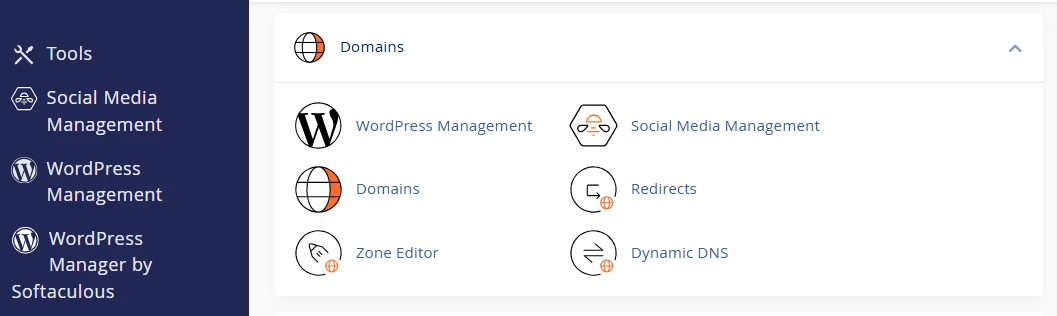
You can add your main domain, create add-on domains for additional websites, or park domains you want to reserve for future use.
It also gives you access to DNS settings, where you can edit records such as A records, MX records, and CNAME records.
These settings help connect your domain to your website, email services, and other online tools.
2) Email Management
Most hosting control panels allow you to create professional email accounts using your domain name, such as [email protected] or [email protected].
You can also set up email forwarders, autoresponders, and spam filters and access webmail directly from your browser.
This makes it easier to manage business communication without paying for separate email hosting services.
3) File Management
A built-in file manager lets you upload, edit, move, and organize website files directly from the control panel. In many cases, you do not even need extra FTP software.
This is especially useful when updating website pages, uploading images, or making quick changes to your site without involving a developer.
4) Database Management
Most websites and content management systems, including WordPress, rely on databases to store content and settings.
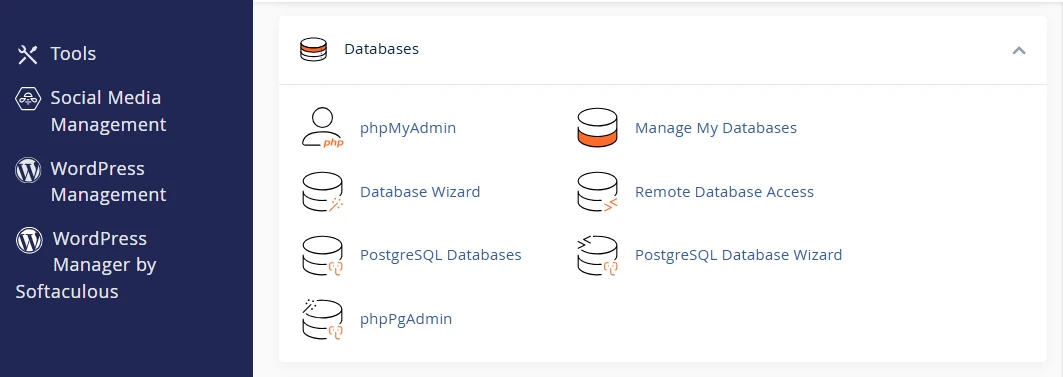
A web hosting control panel allows you to create and manage MySQL or MariaDB databases easily.
You can also access tools for importing, exporting, or editing database information whenever needed.
5) Security Features
Security tools are another important part of a web hosting control panel.
You can install free SSL certificates to activate HTTPS, manage firewalls, create backups, and monitor potential security threats from a central dashboard.
These features help keep your website secure while protecting customer information and business data.
6) Backups and Extra Tools
Many hosting control panels also include additional tools that make website management easier.
You can schedule automatic backups, monitor resource usage, install applications like WordPress with one click, and sometimes even access simple website builders.
All of these features help save time, reduce errors, and make website management less stressful, especially if you are running multiple websites or getting started for the first time.
Popular Web Hosting Control Panels
There are many web hosting control panels available today, but a few have become the go-to choices for website owners, developers, agencies, and hosting providers.
Each one comes with its own strengths, depending on the type of hosting you need and how you prefer to manage your server.
Let’s take a closer look at the most common options.
| Feature | cPanel | Plesk | CyberPanel | DirectAdmin | CloudPanel / SolidCP |
|---|---|---|---|---|---|
| OS Support | Primarily Linux | Linux + Windows | Linux (LiteSpeed) | Linux | Varies |
| Interface Style | Traditional and intuitive | Modern and organized | Lightweight and fast | Simple and efficient | Modern / Windows-focused |
| Best For | Shared hosting and beginners | Multi-domain sites, WordPress, Windows hosting | High-traffic websites and speed optimization | Budget VPS and dedicated servers | Cloud hosting, developers, or Windows resellers |
| Resource Usage | Moderate | Moderate | Very low | Low | Very low |
| Availability at Truehost | Shared , VPS and Dedicated hosting plans | Windows, VPS and Dedicated hosting plans | VPS and dedicated options | VPS and dedicated hosting | VPS and cloud hosting, windows hosting |
a) cPanel
cPanel remains one of the most widely used Linux-based hosting control panels.
Many website owners prefer it because the layout is easy to follow, even for beginners. You can manage files, emails, databases, backups, and domains and install applications like WordPress in just a few clicks.
It is especially common on shared hosting plans because it balances simplicity with powerful features.
For small businesses, blogs, online stores, and company websites in Kenya, cPanel is often the starting point.
b) Plesk
Plesk offers a cleaner and more modern interface while supporting both Linux and Windows servers.
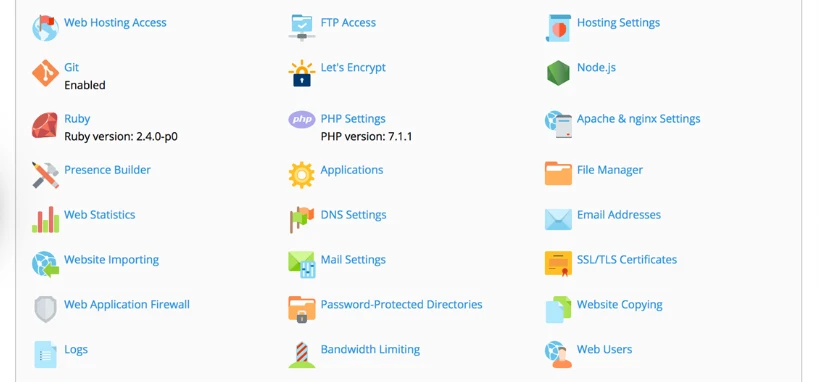
It is popular among agencies, developers, and businesses managing multiple websites from one dashboard.
One feature many users like is the built-in WordPress Toolkit, which simplifies updates, staging, security checks, and site management.
Plesk is also a strong option for ASP.NET and Windows hosting projects.
c) DirectAdmin
DirectAdmin focuses on speed, simplicity, and lower resource usage. The interface is simple, but it still includes all the important tools needed to manage hosting accounts, emails, DNS settings, backups, and files.
It performs efficiently while keeping server resource usage low.
It is a practical option for VPS and dedicated hosting users looking for stability without extra overhead.
d) CyberPanel
CyberPanel is designed for high performance and works closely with LiteSpeed and OpenLiteSpeed servers.

It is known for fast loading speeds, automatic SSL setup, one-click WordPress installation, and built-in security tools like ModSecurity.
This panel works well for websites expecting higher traffic, including e-commerce stores, blogs, and content-heavy platforms serving visitors across Kenya and beyond.
e) CloudPanel
CloudPanel is a lightweight and developer-focused control panel built for cloud and VPS hosting environments.
It uses modern technologies like NGINX and PHP-FPM to deliver fast performance with minimal resource usage.
It also includes features like one-click SSL installation, server monitoring, file management, and support for modern PHP applications, making it appealing for developers and advanced users.
f) SolidCP
SolidCP is designed specifically for Windows hosting environments.
It supports multi-server management and includes tools for handling websites, FTP accounts, emails, and MSSQL databases.
It is commonly used by resellers and businesses running Windows-based applications that require more specialized hosting support.
g) Other Notable Options
There are also lighter alternatives like aaPanel and Webuzo.
These panels are often used for niche hosting setups, testing environments, or users who prefer more flexibility with lower licensing costs.
Web Hosting Control Panel FAQs
What is the difference between cPanel and Plesk?
cPanel is mainly used for Linux hosting and is known for its familiar, beginner-friendly layout. Plesk supports both Linux and Windows hosting and offers a more modern interface with strong multi-site management tools.
Which control panel is best for beginners in Kenya?
For many beginners, cPanel is easy to learn because of its simple layout and popularity.
Can I switch control panels later?
Yes. Switching is possible, although it may require migrating your website files, emails, and databases. Hosting providers can usually help with the process.
Do I need technical skills to use these panels?
No. Most control panels are designed for beginners and allow you to manage websites, emails, domains, and backups through a simple dashboard.
What is the difference between a web host and a hosting control panel?
A web host provides the server and infrastructure that keep your website online. A hosting control panel is the tool you use to manage your hosting account and website settings.
Ready to Manage Your Website Easily?
A good web hosting control panel removes a lot of the technical stress that comes with running a website.
You can launch websites faster, manage emails and domains more comfortably, monitor performance, and scale your hosting as your business or brand grows.
At Truehost, our hosting packages include free reliable control panels designed to help Kenyan businesses, bloggers, developers, and online stores manage their websites with confidence.
Right now, we are using cPanel as part of our hosting environment to provide a fast and resource-efficient experience.
You can explore our hosting options, get your site online quickly, manage everything confidently, and let us handle the rest.
Sign up today and start building. We’ll be right here if you need help.