Domain SearchInstantly check and register your preferred domain name
 Web Hosting
 cPanel HostingHosting powered by cPanel (Most user friendly)
 WordPress HostingHost your WordPress website with fast, secure, and affordable WordPress hosting in Kenya.
 KE Domains
 Reseller HostingStart your own hosting business without tech hustles
 Windows HostingOptimized for Windows-based applications and sites.
 Free Domain
 Affiliate ProgramEarn commissions by referring customers to our platforms
 Free HostingTest our SSD Hosting for free, for life (1GB storage)
 Domain TransferMove your domain to us with zero downtime and full control
 All DomainsBrowse and register domain extensions from around the world
 .Com Domain
 WhoisLook up domain ownership, expiry dates, and registrar information
 VPS Hosting
 Managed VPSNon techy? Opt for fully managed VPS server
 Dedicated ServersEnjoy unmatched power and control with your own physical server.
 Website Builder
 Online Store BuilderLaunch a professional e-commerce store without writing code.
 Web Design ServiceGet a custom-designed website tailored to your brand and goals. From just KES 15,600
 BlogRead our guides on web hosting, online business, digital marketing, and more
 SupportOur support guides cover everything you need to know about our services
 ContactContact us via chat or email
To save money on web hosting, it doesn’t mean you settle for slow performance, weak security, or unreliable uptime. With the right approach, it’s possible to keep your website fast, stable, and secure while still staying within budget.
It’s very easy to start out paying more than you need to, especially if you’ve not done your due diligence.
It often begins with attractive introductory prices, then grows into higher renewal fees, unnecessary add-ons, and hosting plans that don’t really match the actual website needs.
But honestly, all these unnecessary costs are avoidable.
A bit of planning and the right decisions around plan selection, billing cycles, and features can reduce monthly expenses without affecting performance.
I actually tried this on my web hosting, and now I can’t imagine all that extra cash was just draining unnecessarily.
I’ll take you through the best 7 ways to save money on web hosting costs in 2026 that have worked for me.
Ways to Save Money on Web Hosting
1) Start with Shared Hosting for Most Websites
For new websites, blogs, portfolios, and small business pages, shared hosting usually gives the best value.
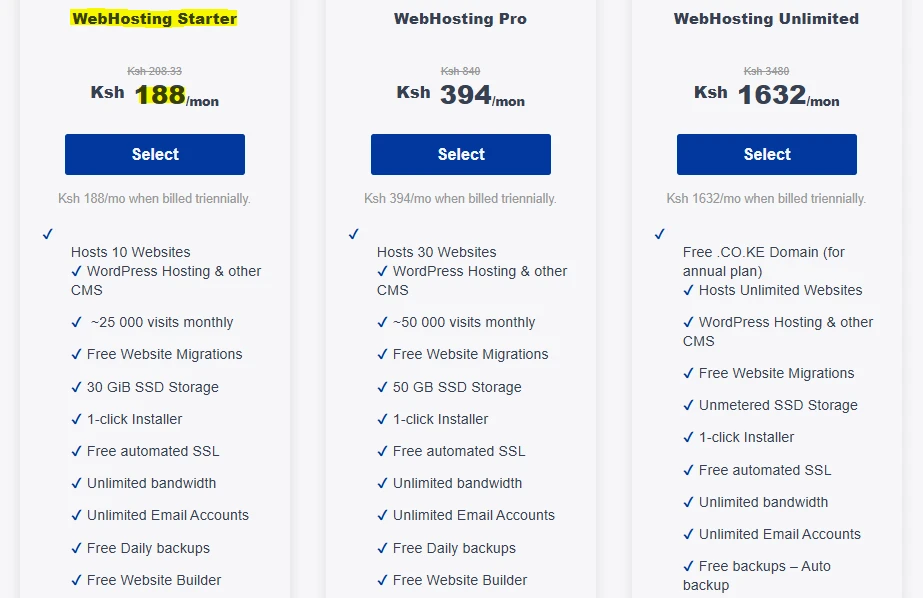
Your website runs on a server shared with other users, which keeps the cost much lower compared to VPS or dedicated hosting.
This setup works comfortably if your site handles up to around 25,000 – 50,000 monthly visits.
You still get good performance through SSD storage, cPanel access, and all the basic tools needed to run a website without paying for extra power you don’t yet need.
At Truehost, the shared web hosting Starter plan begins at about KSh 188 per month when billed triennially.
It includes 30GB SSD storage, unlimited bandwidth and email accounts, free daily backups, free SSL, free migrations, and one-click WordPress installation.
It’s a practical entry point for getting started with reasonable costs.
2) Choose Longer Billing Cycles
Monthly payments tend to look flexible, but they usually come at a higher total cost. Switching to annual or even three-year billing can cut your hosting bill by 40 – 70%.
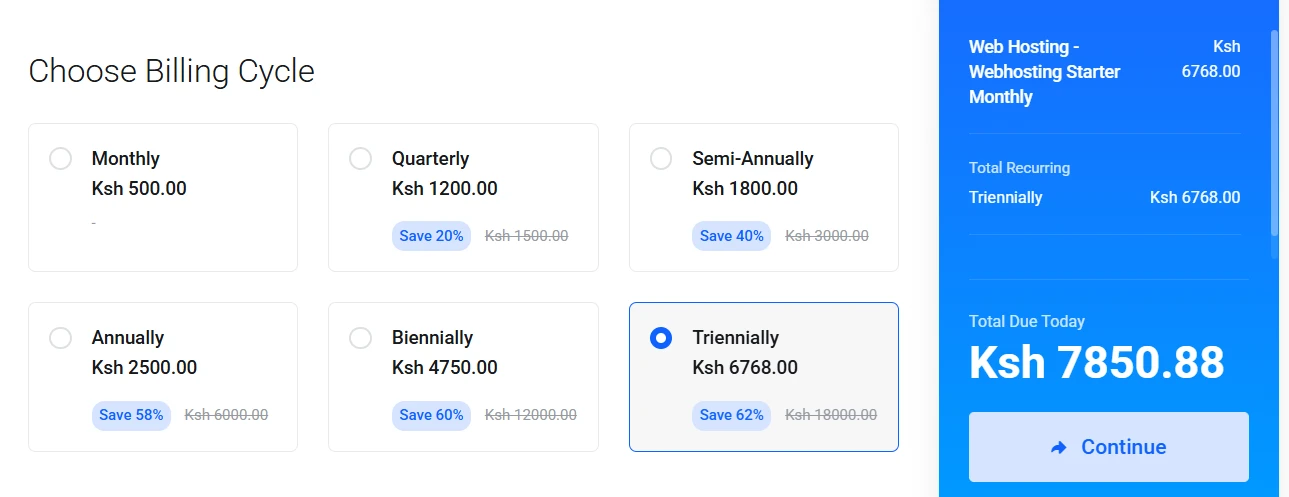
For instance, with the above example, you can save a whole Ksh 11,232 if you pay for the triennial package compared to the cumulative Ksh 18,000 you would have paid if monthly for over three years.
It’s also worth checking both the introductory price and the renewal rate so there are no surprises later.
If you want your website to run long-term, locking in a longer plan is one of the simplest ways to reduce ongoing hosting expenses.
3) Take Full Advantage of Free Bundled Features
A lot of hosting costs come from paying separately for tools that are already included in your plan. Choosing a host that bundles these extras helps keep your total spend low.
Common valuable inclusions include:
- Free domain (first year or selected extensions like
.co.ke) - Free SSL certificates for security and SEO
- Free professional email accounts (for example,
[email protected]) - Free website migrations and automated backups
- Website builders and ready-made templates
This setup removes the need for separate paid services and saves a noticeable amount every year.
In my above example, if you’re opting for the shared hosting starter plan, you can get the free .cloud domain, among other free extras, saving you Ksh 559 more.
4) Skip Unnecessary Add-ons at Checkout
Hosting companies often include extra services during checkout, things like advanced security packages, additional backup storage, or SEO tools.
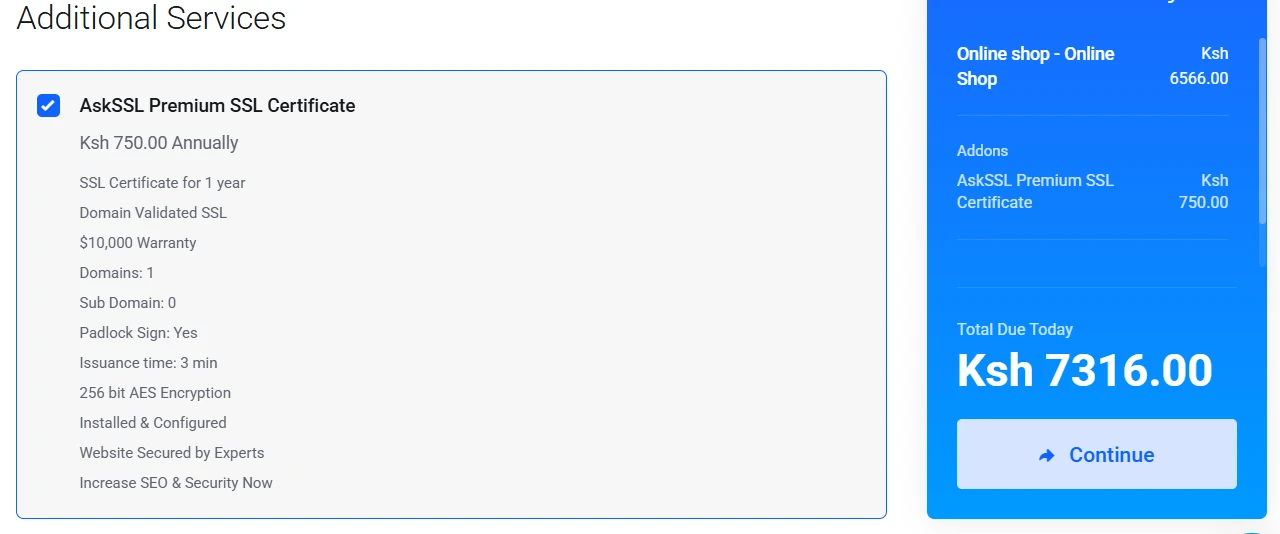
These can quietly push your total cost much higher than expected.
A good habit is to slow down at the checkout page and remove anything you don’t actually need at the moment. Most websites can run smoothly without paid extras.
For example, a free SSL is already included in this package, and since I am starting out, I don’t need the premium one. Also, check features that you can get using free WordPress plugins like UpdraftPlus for backups or Cloudflare’s free plan for basic protection.
Cutting out unnecessary add-ons can easily save hundreds of shillings each year (Ksh 750 from the above SSL certificate).
5) Use Free and Open-Source Tools
Running a website doesn’t require expensive software. A lot of reliable tools are available at no cost and work well for both beginners and experienced users.
WordPress is the most common starting point, and it installs easily on Truehost with one click. Other options like Joomla and Drupal are also free and widely supported.
You can also improve performance and security without spending extra:
- Cloudflare free tier for faster loading and basic protection
- Let’s Encrypt for free SSL certificates
- Free website builders for simple site creation
These tools are actively maintained and widely trusted.
6) Time Your Purchase Around Promotions
Web hosting prices often drop during major sales periods like Black Friday, New Year offers, or seasonal campaigns. In many cases, discounts go beyond 50%, making it a good time to lock in long-term savings.
Truehost regularly runs promotions that make already affordable hosting even cheaper.
During these periods, you may also find bonus offers like free migration for existing websites, which removes the cost and hassle of moving from another provider.
If timing is flexible, waiting for an active promotion can reduce your total hosting cost significantly from day one.
7) Monitor Your Usage, Scale Gradually, and Review Regularly
There’s no need to start with a large hosting plan right away. A small, well-chosen plan is usually enough in the early stages, and upgrading can come later when traffic actually increases.
Tools like Google Analytics help you keep track of visitors, bandwidth use, and overall site performance. This gives a clear picture of when it makes sense to move from a Starter plan to something like Pro or Unlimited.
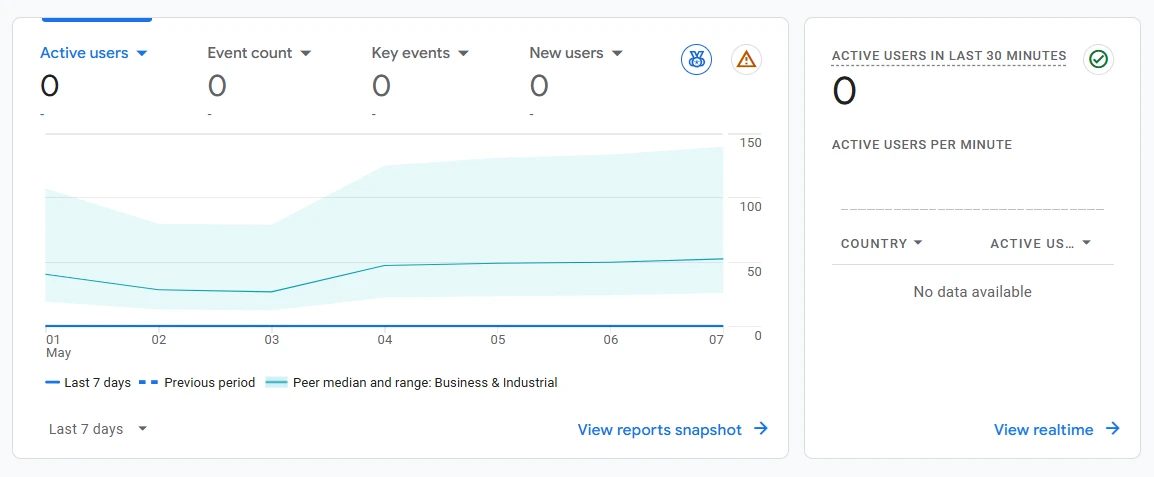
The benefit is simple: you only pay for what your website is currently using, not what it might need someday.
It also helps to review your hosting once a year. Sometimes better deals appear, or your website needs change. Just make sure to factor in migration time and any renewal terms before switching.
A bit of extra care goes a long way when it comes to ensuring you save money on web hosting, and these practices and coins here and there may seem few individually, but cumulatively they can save you a whole business campaign budget.
Ways to Save Money on Web Hosting FAQs
How much does web hosting cost in Kenya in 2026?
Most reliable shared hosting plans range between KSh 188 and KSh 500 per month depending on the provider, billing cycle, and features included.
Is shared hosting safe and fast enough for Kenyan websites?
Yes. With providers like Truehost, shared hosting includes SSL, daily backups, and optimized servers that handle small to medium websites efficiently.
Does Truehost include a free domain and SSL?
Many plans include free SSL by default, and some promotions or packages also include a free domain and free migration services. It’s best to check current offers on the website.
What’s the best way to save on renewals?
Longer billing cycles (like annual or triennial plans) usually offer the biggest savings. Also, reviewing renewal terms before purchase helps avoid surprises later.
Can I migrate my existing site to Truehost for free?
Yes. Free website migration is available on many hosting plans, making it easier to switch without extra cost or downtime.
Save Web Hosting Costs Today
Cutting down web hosting costs doesn’t require technical tricks or cutting corners on quality.
It mostly comes down to the small decisions made at the start, like choosing the right plan, avoiding unnecessary extras, paying attention to billing cycles, and using tools that don’t add extra cost.
When these choices are made carefully, it becomes easier to run a website that feels professional without stretching the budget. A blog can grow steadily, a business site can stay reliable, and an online store can keep running smoothly without constant worry about rising hosting bills.
The key is staying intentional as your website evolves.
So, start with what fits your current stage, keep an eye on usage, and adjust only when there’s a real need. That way, your hosting supports your growth instead of draining your resources.
If you’re ready to set things up the right way from the beginning, you can explore our web hosting plans that are already designed with affordability and performance in mind.