Domain SearchInstantly check and register your preferred domain name
 Web Hosting
 cPanel HostingHosting powered by cPanel (Most user friendly)
 WordPress HostingHost your WordPress website with fast, secure, and affordable WordPress hosting in Kenya.
 KE Domains
 Reseller HostingStart your own hosting business without tech hustles
 Windows HostingOptimized for Windows-based applications and sites.
 Free Domain
 Affiliate ProgramEarn commissions by referring customers to our platforms
 Free HostingTest our SSD Hosting for free, for life (1GB storage)
 Domain TransferMove your domain to us with zero downtime and full control
 All DomainsBrowse and register domain extensions from around the world
 .Com Domain
 WhoisLook up domain ownership, expiry dates, and registrar information
 VPS Hosting
 Managed VPSNon techy? Opt for fully managed VPS server
 Dedicated ServersEnjoy unmatched power and control with your own physical server.
 Website Builder
 Online Store BuilderLaunch a professional e-commerce store without writing code.
 Web Design ServiceGet a custom-designed website tailored to your brand and goals. From just KES 15,600
 BlogRead our guides on web hosting, online business, digital marketing, and more
 SupportOur support guides cover everything you need to know about our services
 ContactContact us via chat or email
If you run a hosting business, chances are WHM is probably one of the first tools you encountered.
It has been the standard choice for many hosting resellers because, paired with cPanel, it lets you spin up client accounts, bundle packages, control resources, and manage everything from one server dashboard.
But lately, the conversation has shifted.
One of the biggest reasons is cost. Licensing fees for cPanel and WHM have continued to rise, making it harder for small hosting businesses to maintain healthy profit margins.
For resellers who are still growing, every recurring expense adds pressure.
Some people also want a simpler dashboard, lighter server usage, or a control panel that better matches the way they work.
Others prefer platforms with fewer restrictions, better customization, or lower long-term operating costs.
The good news is that WHM is no longer your only choice.
Some of the best WHM alternatives now offer reseller-friendly features and are beginner-friendly and easy to manage, while others give you deeper server control and customization.
All in all, the right option comes down to a few honest questions:
- What is your budget?
- How comfortable are you with server administration?
- What do your clients need?
- And how much do you want to grow?
Now, let me take you through the best WHM alternatives for hosting resellers out there.
What is WHM and How Does it Tie to cPanel?
Before looking at alternatives, it helps to know how WHM and cPanel work together in a hosting environment.
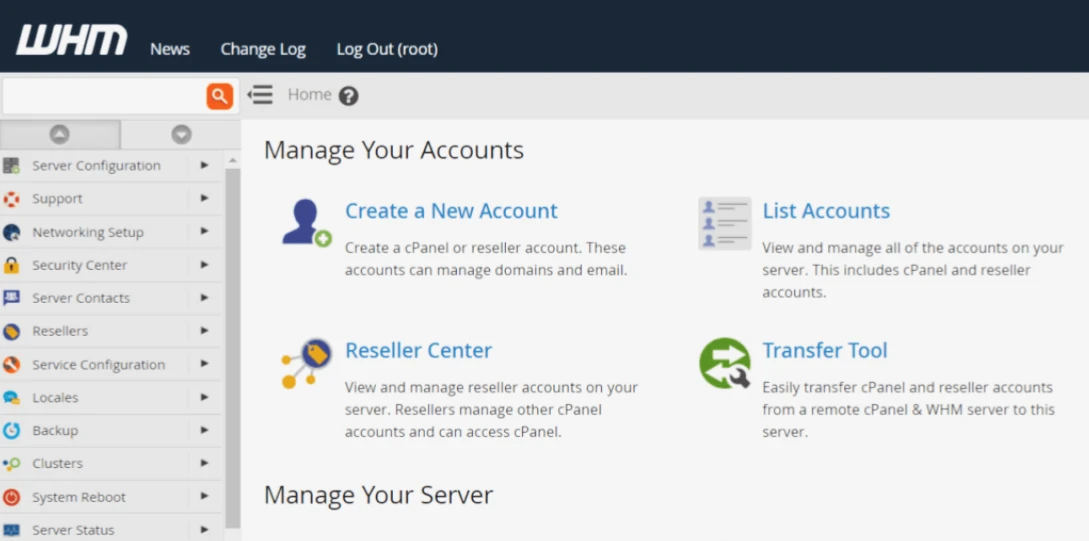
WHM (WebHost Manager) is the administrative side of the hosting environment. It is mainly used by hosting providers and resellers to manage multiple hosting accounts on a server.
With WHM, you can:
- Create and suspend hosting accounts
- Set hosting packages and limits
- Manage server resources
- Configure DNS settings
- Monitor server activity
- Control reseller privileges
cPanel, on the other hand, is what your customers use.
Each client gets their own cPanel dashboard where they can manage their website files, emails, databases, domains, backups, and other hosting features without needing direct server access.
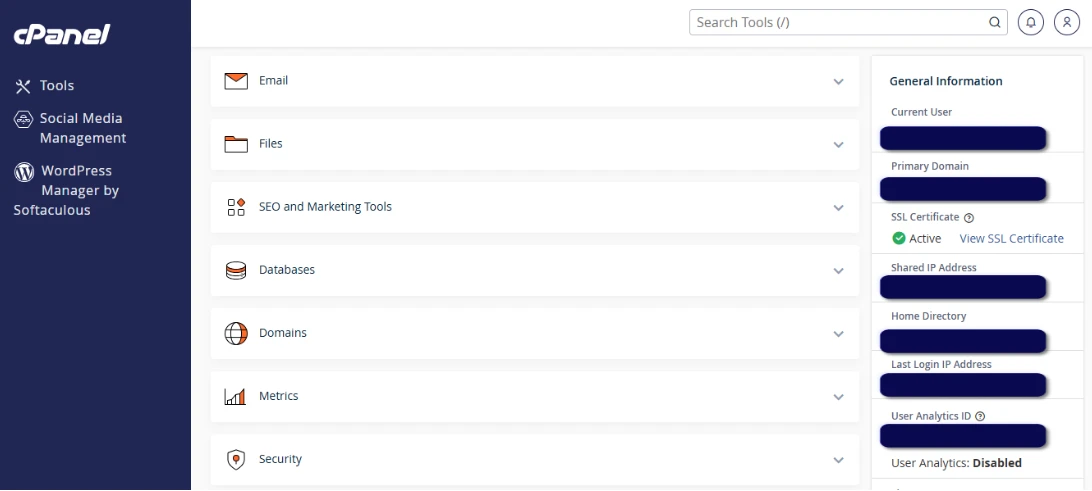
So in simple terms:
- WHM is for the reseller or server administrator
- cPanel is for the end customer
The reason this setup became so popular is because it makes hosting management easier on both sides. Resellers can organize and control multiple client accounts efficiently, while customers get a clean interface to manage their websites.
That balance between server control and customer convenience is what made WHM and cPanel a dominant choice in the hosting industry for many years.
Still, as reseller hosting continues to evolve, many providers now want solutions that offer similar functionality at a lower cost or with different features better suited to modern hosting needs.
The 7 Best WHM Alternatives for Hosting Resellers
Before getting into individual options, one thing they all share is worth pointing out.
Every panel on this list supports the core things resellers actually need, like creating client accounts, setting up packages, enforcing resource limits, and keeping clients separated from each other.
Some do this through two distinct dashboards, the way WHM and cPanel work together. Others handle it through a single unified interface with role-based permissions.
This is what each one brings to the table.
1) DirectAdmin
If you are coming from WHM and cPanel and want something that feels familiar without the price tag, DirectAdmin is probably the most natural transition.
Its setup feels very close to the WHM and cPanel structure that many hosting providers already know.
It keeps the same two-panel logic, an administrator dashboard where you manage everything at the server level, and a separate user panel where clients log in to manage their own accounts.
That makes the transition easier if you already have experience with WHM.
The bigger difference shows up in the pricing.
Unlike cPanel licensing, which increases based on the number of accounts you host, DirectAdmin uses a more predictable flat-rate pricing model. For growing resellers, this can significantly reduce monthly operating costs.
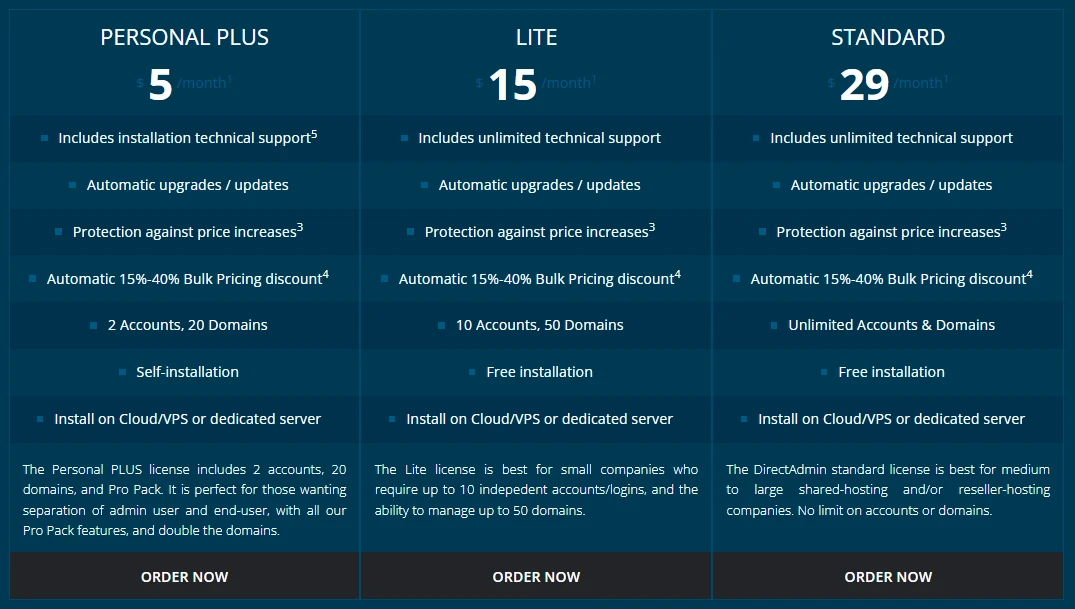
DirectAdmin also runs well on lightweight servers, which helps improve performance while lowering resource usage.
For reseller hosting, it includes the core features most providers need:
- Reseller account creation
- Hosting package management
- Resource allocation and limits
- Client account separation
- DNS and email management
- WHMCS billing integration support
The interface may feel less polished compared to cPanel at first, but you’ll appreciate its speed and simplicity once you get used to it.
Plus, nothing is missing from the reseller toolkit.
2) ISPConfig
ISPConfig takes a different approach to the cost question entirely, since it is free and open-source, which immediately removes licensing fees from the equation.
But its appeal goes beyond cost savings.
ISPConfig is built with multi-server management in mind, making it a strong option for resellers planning to scale beyond a single hosting server.
Like WHM and cPanel, it keeps admin and user interfaces separate, so the reseller workflow stays logical.
You manage accounts, set package limits, allocate resources, and control client access from the admin side. Clients get their own login without ever touching your server settings.
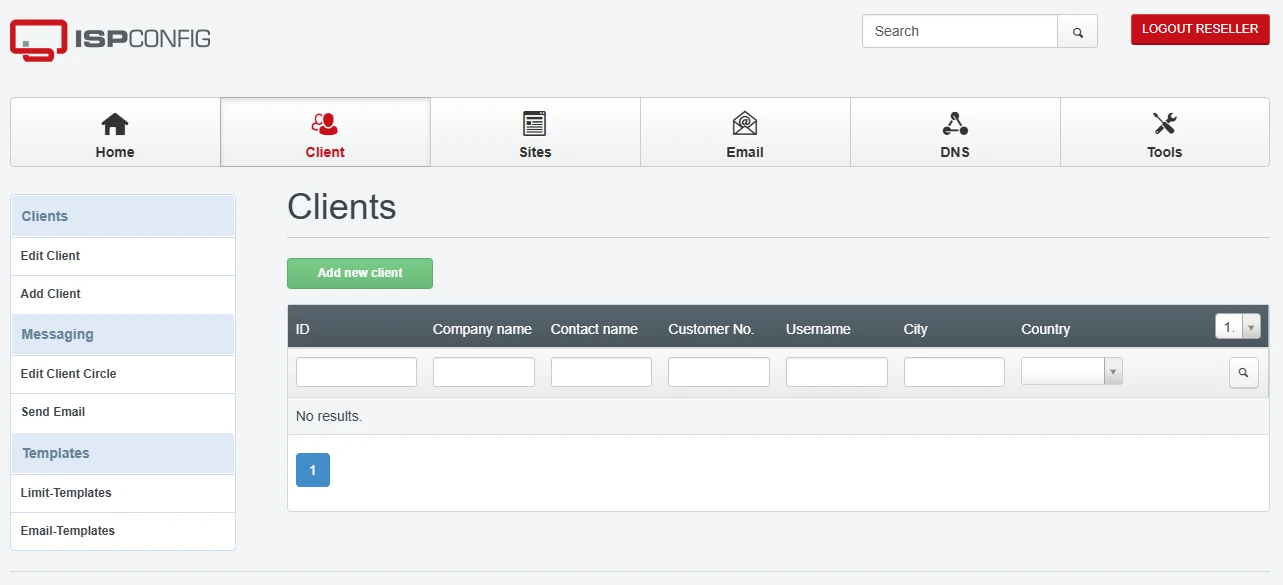
Where ISPConfig genuinely stands out is multi-server support.
If you are running accounts across more than one server or planning to get there, ISPConfig handles that natively in a way that most panels require workarounds for.
That makes it a serious option for resellers with growth ambitions rather than just those managing a small, stable client list.
It also connects with WHMCS for billing automation, so the operational side of running a hosting business stays manageable.
The tradeoff is that the interface is less polished than some paid alternatives, and the setup process asks more of your technical experience. But for resellers who are comfortable with that, the stability and zero licensing cost make it hard to overlook.
3) CyberPanel
CyberPanel is built around OpenLiteSpeed, and that decision shapes everything about how it performs.
OpenLiteSpeed is known for handling high traffic with significantly lower resource consumption than Apache or Nginx, which translates directly to faster loading sites for your clients, without needing to upgrade your server hardware to keep up.
One thing that makes CyberPanel different from WHM and cPanel is how the interface is structured.
Instead of separating everything into two different dashboards, CyberPanel uses one unified interface with role-based permissions. What you see depends on the type of account you log into.
If you sign in as the main administrator, you get access to the full server management side of the platform. This includes tools for:
- Creating hosting packages
- Managing reseller accounts
- Configuring LiteSpeed or OpenLiteSpeed settings
- Managing firewalls and security settings
- Controlling server-wide resources
- Monitoring websites and services
This works similarly to the WHM side of traditional reseller hosting.
When a reseller or regular client logs in, the dashboard becomes more limited. Users only see the tools related to their own websites and hosting accounts, including:
- File management
- Database access
- Email configuration
- Domain management
- SSL installation
- Backups
That role-based structure keeps account separation clean while still using one central interface.
For resellers serving clients who run WordPress-heavy sites, which describes a large share of the Kenyan market, CyberPanel’s built-in LiteSpeed caching gives those sites a genuine speed advantage out of the box.
That is a selling point you can actually lead with when pitching clients.
4) Plesk
Plesk sits in a different category from the free options on this list. It is a commercial product, owned by WebPros, the same parent company behind cPanel, and it is priced accordingly.
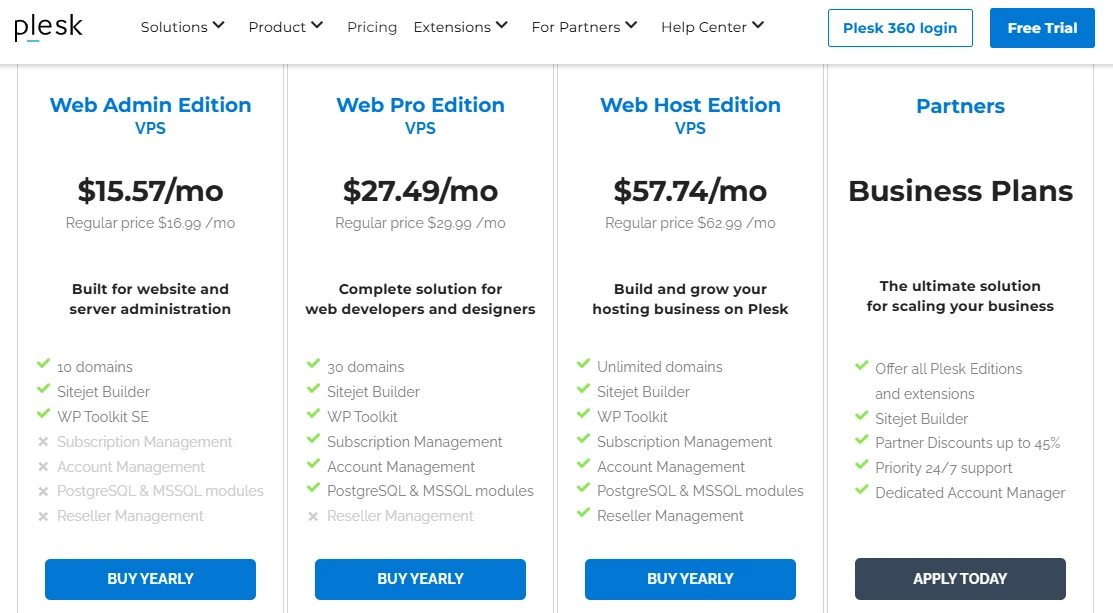
But it earns its place here because the feature set and reliability are genuinely strong, particularly for resellers who want a professional-grade setup without juggling multiple tools.
Where it departs from the WHM model is the interface.
Plesk consolidates everything into a single unified dashboard, like CyberPanel, rather than splitting admin and user functions across two separate panels.
That takes a small adjustment if you are used to the WHM and cPanel separation, but most resellers find the unified layout cleaner once they settle in.
Plesk is especially popular in Windows hosting environments, though it also performs extremely well on Linux servers. That flexibility makes it useful for resellers serving different types of customers and applications.
Reseller tools cover account creation, package limits, and client access management, and the extensions library connects cleanly with billing platforms like WHMCS.
If your hosting business is growing and you want something that scales professionally, Plesk is worth the licensing cost conversation.
5) aaPanel
aaPanel is the most accessible entry point on this list.
It is free, open-source, and built around simplicity, the kind of panel you can get running quickly without a steep learning curve or a long afternoon of configuration.
Like CyberPanel, it uses a single interface rather than splitting admin and user functions across two dashboards.
The main admin handles all server-level operations from one clean view, and the permission system controls what different users can access.
The reseller angle is worth clarifying here because it has evolved.
Historically, aaPanel was a single-user panel with no real mechanism for separating client accounts. That changed with the Pro and Enterprise editions, which introduced a sub-accounts feature.
The main admin can now allocate disk space, bandwidth, and site limits to up to 100 independent user control panels. Each sub-account gets its own restricted dashboard, which is what resellers actually need to keep clients properly separated.
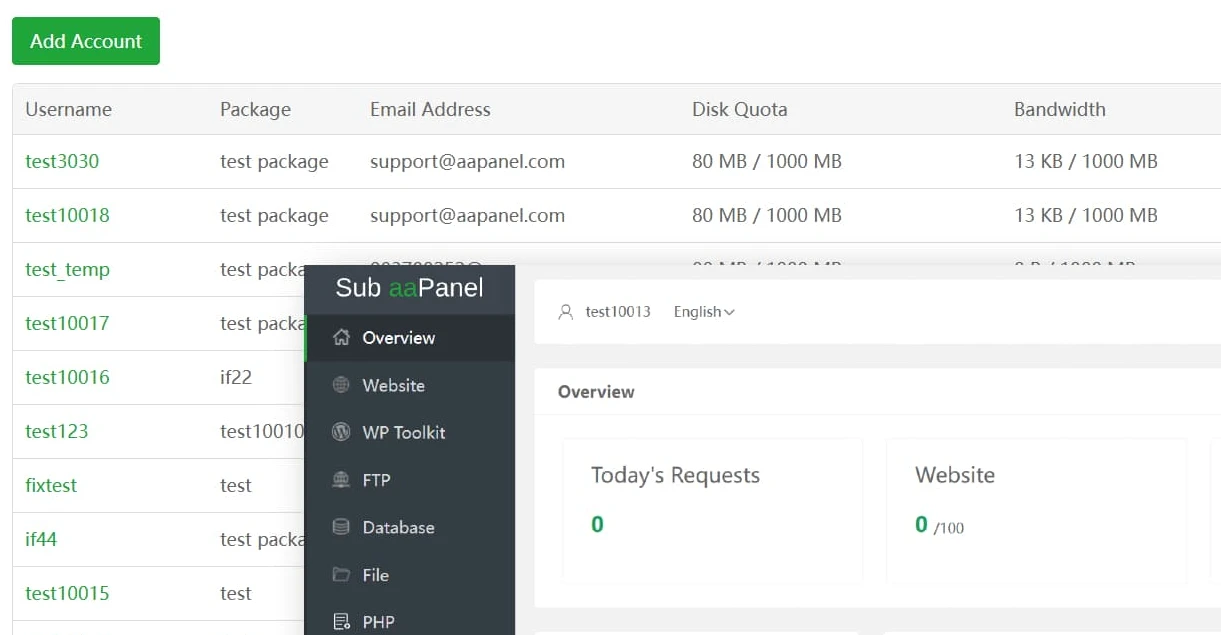
The 100-account ceiling means aaPanel is better suited to smaller reseller operations than to someone building a large hosting business.
But for freelancers or new resellers serving a focused client base, the combination of zero licensing cost, low resource usage, and one-click module installation makes it a practical starting point.
6) InterWorx
InterWorx is built with scaling in mind, and it shows in how it is structured.
Instead of trying to mimic WHM and cPanel exactly, it uses a more system-oriented design that separates server administration from website management in a clear way.
It comes with two main sections:
- NodeWorx handles server-level control.
- SiteWorx handles individual websites and hosting accounts.
NodeWorx plays the same role as WHM in a traditional setup. From here, you manage everything at the server level, including:
- Creating hosting accounts
- Setting up reseller accounts
- Defining hosting packages
- Assigning resource limits
- Managing DNS and server services
- Monitoring system performance
This is where most of the backend work happens, especially when managing multiple clients or resellers.
SiteWorx is the customer-facing side. It works like cPanel and gives users access to their own hosting environment. From here, they can manage the following:
- Websites and files
- Email accounts
- Databases
- Domains
- Backups and SSL certificates
The separation between NodeWorx and SiteWorx keeps responsibilities clear and organized, especially when managing several resellers or hosting clients on the same infrastructure.
Where InterWorx stands out is clustering. It supports multi-server setups in a way that allows resellers to scale beyond a single machine without complicated workarounds.
That makes it a strong option for hosting businesses planning for growth and higher traffic demands.
For resellers who care about stability, structured control, and long-term expansion, InterWorx fits perfectly.
7) HestiaCP
HestiaCP is one of the simplest and lightest control panels available today.
It started as a fork of VestaCP and has grown into a clean, fast, and efficient tool for managing Linux servers without heavy resource usage or licensing costs.
Like several modern panels, it does not split into WHM and cPanel-style dashboards. Instead, everything runs through one interface, with permissions determining what each user can access.
At the top level, you have the admin account, which acts as the server control center.
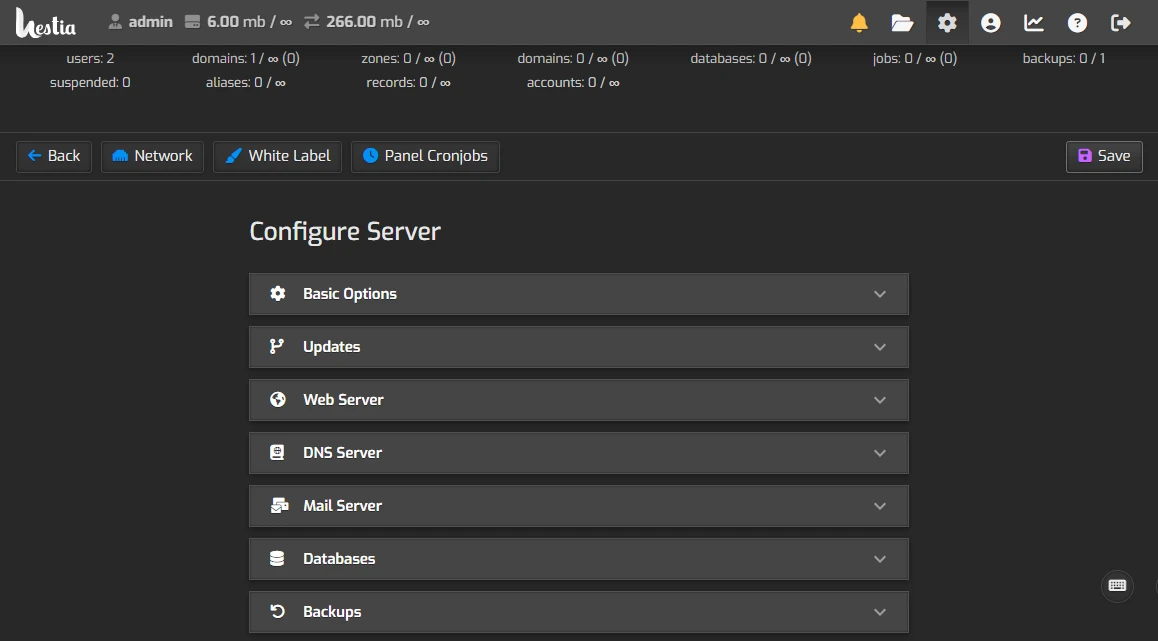
It gives you access to server resource graphs, the ability to restart services like Nginx, PHP, or MySQL, backup configuration, and global IP address management.
It is a complete server-level view without unnecessary clutter.
Below that, you can create user accounts, which function like cPanel users. Each user gets their own isolated environment where they see only what they need, like domain management, file access, and email configuration.
One thing HestiaCP is firm about: the admin account itself should not host live websites. That separation is a deliberate security design and great for stability.
For resellers, this structure works well when the goal is simplicity. It keeps things lightweight, reduces server strain, and avoids unnecessary complexity.
It may not have the advanced enterprise features of larger platforms, but for small to mid-sized hosting setups, it delivers solid performance with very low overhead.
How to Choose the Best WHM Alternative for Your Reseller Business
With seven options in front of you, the right control panel depends on how your hosting business is set up and where you want it to go next.
A few key points usually help narrow the decision.
Budget is the obvious starting point. If licensing costs are the main thing you are trying to solve, ISPConfig, CyberPanel, HestiaCP, and aaPanel are all free.
DirectAdmin and InterWorx charge less than WHM, and Plesk is the premium end of the spectrum.
On technical skill, HestiaCP and ISPConfig suit resellers comfortable in a Linux terminal. CyberPanel and aaPanel are more forgiving. DirectAdmin and Plesk feel closest to the cPanel experience you already know.
Next is your client base. CyberPanel’s OpenLiteSpeed gives WordPress-heavy sites a real speed advantage, which is relevant in Kenya, where most clients are on mobile networks and page load speed directly affects bounce rates.
For email-heavy or custom application setups, Plesk or DirectAdmin covers more ground.
On scale, ISPConfig and InterWorx handle multi-server environments best. aaPanel’s 30-account ceiling suits smaller operations. The rest sit comfortably in between.
If you would rather skip server administration entirely and focus on growing your client base, our Truehost’s Reseller Hosting plans give you WHM and cPanel access, private nameservers, and white-label branding out of the box.
The infrastructure is ready; you just focus on the business.
At the end of the day, the goal is not just picking a control panel. It is choosing a setup that helps you stay profitable and keep clients satisfied.