Domain SearchInstantly check and register your preferred domain name
 Web Hosting
 cPanel HostingHosting powered by cPanel (Most user friendly)
 WordPress HostingHost your WordPress website with fast, secure, and affordable WordPress hosting in Kenya.
 KE Domains
 Reseller HostingStart your own hosting business without tech hustles
 Windows HostingOptimized for Windows-based applications and sites.
 Free Domain
 Affiliate ProgramEarn commissions by referring customers to our platforms
 Free HostingTest our SSD Hosting for free, for life (1GB storage)
 Domain TransferMove your domain to us with zero downtime and full control
 All DomainsBrowse and register domain extensions from around the world
 .Com Domain
 WhoisLook up domain ownership, expiry dates, and registrar information
 VPS Hosting
 Managed VPSNon techy? Opt for fully managed VPS server
 Dedicated ServersEnjoy unmatched power and control with your own physical server.
 Website Builder
 Online Store BuilderLaunch a professional e-commerce store without writing code.
 Web Design ServiceGet a custom-designed website tailored to your brand and goals. From just KES 15,600
 BlogRead our guides on web hosting, online business, digital marketing, and more
 SupportOur support guides cover everything you need to know about our services
 ContactContact us via chat or email
WebHost Manager, commonly known as WHM, is a server administration tool that sits a level above cPanel.
Where cPanel manages an individual hosting account, WHM manages multiple cPanel accounts and the broader hosting environment behind them.
This distinction is worth knowing because the two tools serve very different users.
A typical website owner interacts with cPanel to manage their own site, while WHM is built for the person or business responsible for the whole server those cPanel accounts live on.
WHM is particularly useful for hosting resellers, web design agencies, developers managing multiple websites, server administrators, and businesses hosting several separate accounts under one roof.
If you fall into any of these categories, knowing what WebHost Manager actually does can save you considerable time and confusion.
How Does WebHost Manager Work?
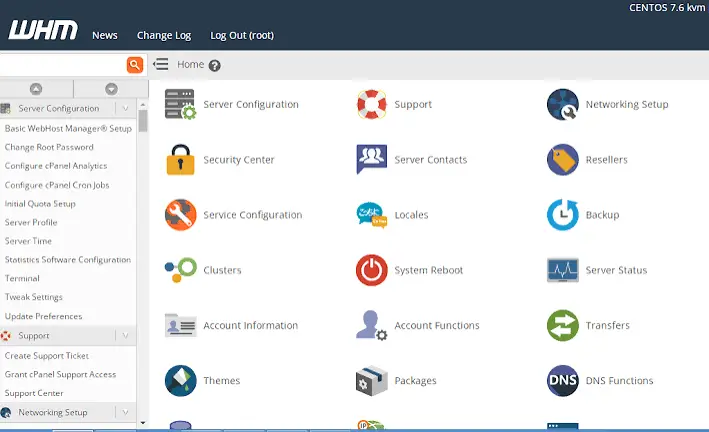
WHM sits at the top of a fairly simple structure: the physical server, then WHM, then the individual cPanel accounts, then the actual websites running on those accounts.
Picture a large apartment building again, but this time WHM is the building manager’s office, cPanel is each individual tenant’s apartment, and the website is what that tenant actually keeps inside.
The building manager sets the rules for the whole property, while each tenant only controls what happens within their own unit.
Through WHM, an administrator can create new hosting accounts, assign hosting packages to them, and set specific resource limits for each one accordingly.
WHM also handles managing domains and DNS at the server level, along with broader server-wide settings that go beyond what any single cPanel account can touch.
Once an account is created, WHM gives that individual user their own separate cPanel access.
So they can manage their own site directly without needing any visibility into the rest of the server.
cPanel’s own documentation confirms that WHM can create cPanel accounts and assign packages and feature lists to them.
Which forms the backbone of how most hosting providers and resellers actually operate their services day to day.
What Can You Do With WebHost Manager?
WHM covers a wide range of administrative functions.
Here are the main ones worth knowing, roughly ordered from the most commonly used to the more specialized.
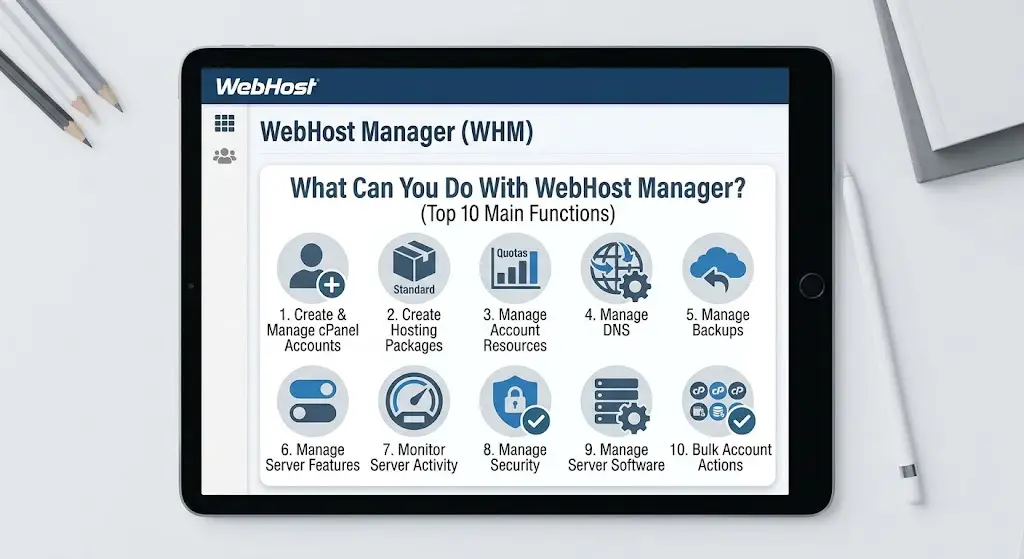
1) Create and Manage cPanel Accounts
WHM lets you create new hosting accounts, assign domains to them, and choose which package each account should use.
Beyond creation, you can manage existing accounts on an ongoing basis.
Including suspending accounts that need to be paused and terminating accounts that are no longer needed.
2) Create Hosting Packages
Packages define what each hosting account actually gets, covering disk space, bandwidth, email accounts, databases, domains, resource limits and feature lists.
Rather than configuring every single account individually from scratch, packages let you create standardized hosting plans that can be applied consistently across many accounts at once.
This standardization saves significant time for anyone managing a growing number of accounts.
Since a single package update can apply consistent changes across every account using it, rather than requiring individual edits one by one.
3) Manage Account Resources
WHM gives administrators visibility into disk usage, bandwidth, account quotas and overall resource allocation across every account on the server.
You can upgrade or modify packages as needed, and importantly, prevent any single account from consuming a disproportionate share of shared server resources.
4) Manage DNS
At the server level, WHM handles DNS zones, nameservers, DNS records and broader domain configuration.
It is worth knowing that WHM-level DNS management differs from the DNS tools available inside an individual cPanel account.
Since WHM operates with a wider view across the entire server rather than a single hosting account.
5) Manage Backups
WHM includes dedicated backup configuration and restoration functions, letting administrators configure how backups run across the server, select specific accounts for backup, and restore individual files or entire accounts when needed.
Exactly how backup configuration works in practice depends heavily on the specific hosting environment and provider policies in place.
6) Manage Server Features
Through Feature Manager, administrators can enable or disable specific cPanel features, create custom feature lists, and assign those feature lists to different hosting packages.
cPanel’s Feature Manager specifically allows administrators to control which features are available to cPanel accounts through these feature lists, giving providers fine-grained control over what each client can actually access.
7) Monitor Server and Account Activity
WHM provides visibility into overall server status, resource usage, and account-level activity, including running processes, bandwidth usage and disk usage across every account.
This makes it considerably easier to identify accounts consuming excessive resources before they start affecting other users on the same server.
8) Manage Security
WHM covers account security, SSL management, password policies, IP controls and various additional security tools, including malware scanning where available and integration with firewall or broader server security systems.
It is worth being clear that not every WHM installation includes exactly the same security tools, since hosting providers can enable or disable specific features depending on their own setup and policies.
9) Manage Server Software
Administrators can manage PHP versions, Apache configuration, PHP-FPM settings, MySQL or MariaDB, general server configuration, software updates and various application settings through WHM.
The exact controls available here depend on the specific server configuration and the administrative privileges granted to a given user.
10) Manage Multiple Accounts at Once
WHM includes functions for handling bulk account modifications, package upgrades, IP changes and other administrative tasks across multiple accounts simultaneously.
This is particularly valuable for anyone managing dozens or hundreds of websites, where making changes one account at a time simply is not practical.
Who Uses WebHost Manager?
WHM tends to attract a fairly specific set of users, each with slightly different reasons for needing it.
Seeing which category fits your situation can help clarify whether WHM is actually the right tool for you.

1) Hosting Resellers
WHM lets resellers create and manage individual client hosting accounts under their own branding.
Effectively letting them run a hosting business without owning the underlying physical infrastructure themselves.
2) Web Design Agencies
Agencies use WHM to manage hosting accounts for multiple clients from a single, centralized dashboard, rather than juggling separate logins and systems for every client relationship.
3) Developers
Developers use WHM to manage multiple projects and environments.
Particularly when they are responsible for more than just the code itself and need control over the hosting layer too.
4) Hosting Businesses
Hosting businesses rely on WHM for creating packages, managing client accounts, and controlling the overall hosting environment their customers depend on daily.
5) Server Administrators
Server administrators use WHM for server-wide configuration and broader account administration, particularly on servers hosting many unrelated accounts that all need consistent oversight.
Truehost’s current reseller hosting specifically includes WHM and cPanel access, private nameservers, and tools for creating hosting packages and managing client accounts, making it a practical starting point for anyone in one of these categories.
How to Access WebHost Manager
Getting into WHM generally follows a similar pattern, though the exact details vary by provider.
Knowing this general flow helps regardless of which specific hosting company issues your access.
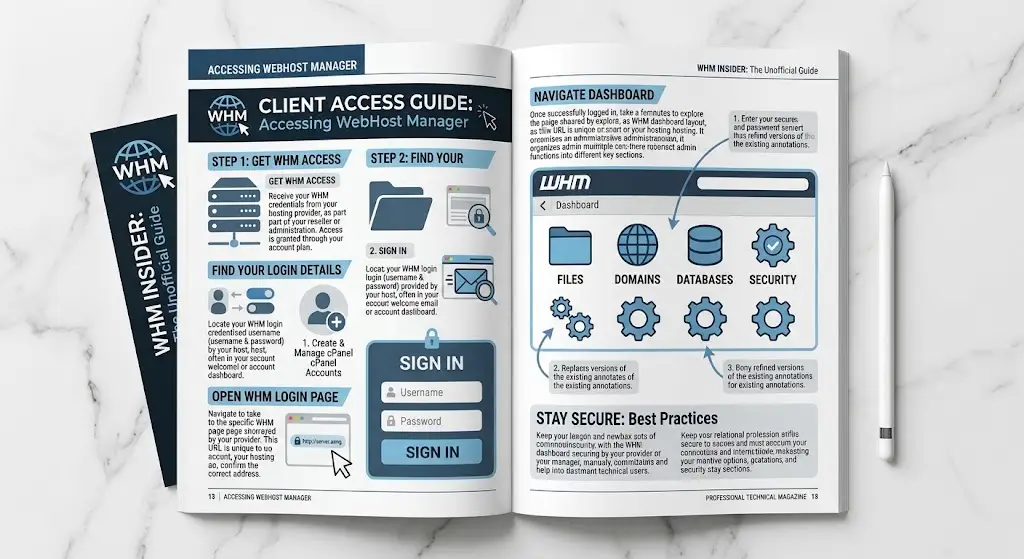
1) Get WHM Access From Your Hosting Provider
WHM access is typically provided by your hosting company as part of a reseller or server administration plan, rather than being something you set up entirely on your own.
2) Find Your WHM Login Details
Your provider will usually supply your WHM login details, often through a welcome email or your account dashboard, similar to how cPanel credentials are typically shared.
3) Open the WHM Login Page
Navigate to your WHM login page, which your specific hosting provider will have shared with you.
The exact URL structure varies between providers, so it is worth avoiding any assumption that a single universal login address applies everywhere.
4) Sign In
Enter your WHM username and password to access the dashboard, much like signing into any other secure administrative panel.
5) Navigate the WHM Dashboard
Once logged in, take some time to explore the WHM dashboard layout, since it organizes a large number of administrative functions into different sections.
Getting familiar with this structure early makes day-to-day account management considerably faster.
Start Managing Hosting Accounts With Truehost
If you are looking to manage multiple hosting accounts, or you want to start offering hosting services of your own, Truehost Kenya’s reseller hosting is worth exploring.
It is built around the kind of functionality covered throughout this guide, including:
- WHM and cPanel access
- Reseller hosting
- Private nameservers
- Hosting packages
- Client account management
- White-label branding
- Resource monitoring
- Ongoing support
- The ability to scale as your client base grows
This is not something every website owner necessarily needs.
If you are only managing a single website, standard cPanel hosting is likely a better fit, and adding WHM into the mix would only introduce unnecessary complexity.
But for resellers, agencies and anyone managing multiple hosting accounts, Truehost’s reseller hosting gives you the WHM-level control this guide has covered.