Domain SearchInstantly check and register your preferred domain name
 Web Hosting
 cPanel HostingHosting powered by cPanel (Most user friendly)
 WordPress HostingHost your WordPress website with fast, secure, and affordable WordPress hosting in Kenya.
 KE Domains
 Reseller HostingStart your own hosting business without tech hustles
 Windows HostingOptimized for Windows-based applications and sites.
 Free Domain
 Affiliate ProgramEarn commissions by referring customers to our platforms
 Free HostingTest our SSD Hosting for free, for life (1GB storage)
 Domain TransferMove your domain to us with zero downtime and full control
 All DomainsBrowse and register domain extensions from around the world
 .Com Domain
 WhoisLook up domain ownership, expiry dates, and registrar information
 VPS Hosting
 Managed VPSNon techy? Opt for fully managed VPS server
 Dedicated ServersEnjoy unmatched power and control with your own physical server.
 Website Builder
 Online Store BuilderLaunch a professional e-commerce store without writing code.
 Web Design ServiceGet a custom-designed website tailored to your brand and goals. From just KES 15,600
 BlogRead our guides on web hosting, online business, digital marketing, and more
 SupportOur support guides cover everything you need to know about our services
 ContactContact us via chat or email
Website bandwidth in hosting is the amount of data your hosting account transfers when people visit your site or use services connected to it.
Every page, image, stylesheet, video, download and other file sent from the server adds to that transfer.
If a hosting plan includes 100 GB of monthly bandwidth, for example, your website and other counted services can transfer up to that allowance during the billing period.
If the plan describes bandwidth as unlimited or unmetered, there may be no stated monthly data cap, but server capacity, network speed and acceptable-use rules still apply.
This guide explains what bandwidth measures, how it differs from speed and storage, how to estimate what your site needs and what to check before choosing a hosting plan.
The short answer: bandwidth is the data your hosting account transfers
cPanel defines bandwidth as the total size of the files transferred to visitors’ computers.
A person opening one page may download the HTML document, a logo, several photos, fonts, CSS and JavaScript. Those file transfers all count.
Hosting companies commonly express the allowance in gigabytes (GB) or terabytes (TB) per month.
A control panel may also count traffic generated by email, FTP or other account services, depending on the provider’s setup.
The easiest mental model is this:
Storage is how much data stays on the server.
Bandwidth or data transfer is how much data moves to and from it over time.
Connection speed is how quickly that data can move at a given moment.
A website can therefore use little storage but consume substantial bandwidth. A 100 MB file stored once occupies about 100 MB of disk space. If 1,000 people download it, the downloads alone transfer roughly 100 GB.
If you are comparing plans now, Truehost web hosting currently lists cPanel-powered options with unlimited bandwidth.
Compare the whole resource package, not bandwidth wording alone, because storage, traffic profile, CPU, memory and provider policies also affect fit.
Bandwidth and data transfer are closely related, but not always identical
The terms are often used interchangeably on hosting pages, but there is a technical distinction.
Bandwidth can describe transfer capacity: the maximum rate at which a network connection can carry data. This is commonly shown in megabits or gigabits per second, such as 100 Mbps or 1 Gbps.
Data transfer describes the total volume moved during a period. Hosting plans commonly show this in GB or TB per month.
Think of a road. Its number of lanes is like network capacity, while the number of vehicles that travel along it during a month is like data transfer.
A wider road can move more vehicles at the same time, but it does not tell you how many vehicles will use it all month.
When a shared-hosting plan lists 100 GB of bandwidth, it usually means a monthly transfer allowance. When a VPS plan lists a 1 Gbps port, it usually describes connection capacity.
Read the unit and the plan terms to see which meaning applies.
Our guide to the eight types of bandwidth in web hosting explains metered, unmetered, unlimited and other billing models in more detail.
Bandwidth, storage, speed and traffic are different
These hosting terms answer different questions:
Term | What it tells you | Common unit | Simple example |
|---|---|---|---|
Bandwidth or data-transfer allowance | How much data the account can transfer during a period | GB or TB per month | 100 GB monthly transfer |
Network capacity or port speed | How quickly the server connection can transfer data at one moment | Mbps or Gbps | 1 Gbps port |
Storage | How much data can remain on the hosting account | GB or TB | 30 GB SSD storage |
Traffic | How many people, sessions, pageviews or requests reach the site | Visitors, sessions, pageviews or requests | 10,000 pageviews per month |
CPU and RAM | How much processing and working memory the site can use | vCPU, cores and GB RAM | 2 vCPU and 4 GB RAM |
More bandwidth does not automatically make a page faster.
Page weight, server response time, caching, image size, connection quality, scripts and the visitor’s location can all affect loading time.
If speed is the problem, use a wider performance checklist such as how to improve website speed instead of treating bandwidth as the only fix.
Traffic also does not translate directly into bandwidth.
Ten thousand visits to a lightweight text site can transfer less data than one thousand views of a gallery containing large photographs.
Pageviews, file sizes and caching matter more than visitor count by itself.
What uses website bandwidth?
Anything transferred through the hosting account can contribute to usage. Common sources include:
HTML pages;
images, icons and web fonts;
CSS and JavaScript files;
audio and video hosted on the server;
PDFs, software, catalogues and other downloads;
files uploaded through forms or customer portals;
API responses and application traffic;
backups downloaded from the server;
FTP transfers;
email sent and received through the hosting account;
legitimate crawlers and monitoring services; and
unwanted bots, scrapers or hotlinking from other websites.
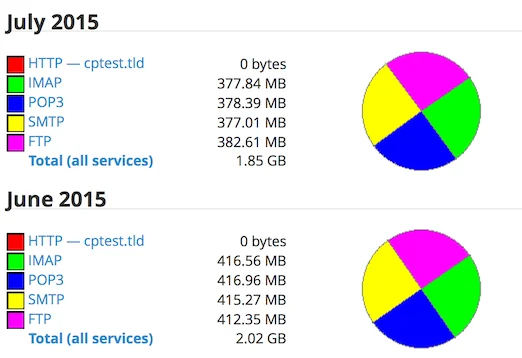
The exact total depends on what your provider measures. The cPanel Bandwidth interface can display HTTP, POP3, IMAP, FTP and SMTP traffic, but cPanel also notes that some transfers are not included in its reports.
For example, its documentation excludes certain activity from File Manager, incoming mail and some server processes.
That means the number in one dashboard may not match a provider’s billing system exactly.
Use the provider’s official usage figure for billing and the control panel breakdown for diagnosis.
Calculate a realistic monthly bandwidth estimate
You do not need a perfect forecast before launching. You need a reasonable starting estimate and enough headroom for growth.
Use this formula:
Estimated monthly website transfer = average transferred page weight × monthly pageviews
Then add large downloads, self-hosted media, uploads, email or other services counted by the plan.
Finally, add a safety margin of about 20% to 30% for traffic changes, bots and measurement differences.
Use transferred page weight, not the size of your entire website folder. A 2 MB page viewed 10,000 times creates roughly:
2 MB × 10,000 pageviews = 20,000 MB, or about 20 GB
Adding a 25% planning margin gives approximately 25 GB for that pageview workload before separate downloads, email and other traffic.
Example planning scenarios
Website scenario | Working assumption | Estimated page transfer | With a 25% margin |
|---|---|---|---|
Small brochure site | 1.5 MB × 3,000 pageviews | 4.5 GB | About 5.6 GB |
Growing business site | 2 MB × 10,000 pageviews | 20 GB | About 25 GB |
Content-rich blog | 3 MB × 30,000 pageviews | 90 GB | About 112.5 GB |
Image-heavy catalogue | 4 MB × 50,000 pageviews | 200 GB | About 250 GB |
These are calculation examples, not universal website categories. A well-optimised catalogue can be lighter than a poorly built five-page site.
Browser caching and a CDN can also reduce how often your origin server sends the same files.
Remember to calculate major downloads separately. A 100 MB catalogue downloaded 1,000 times adds about 100 GB.
Ten such downloads add only about 1 GB. The transfer pattern matters more than the fact that the file exists.
If you only know monthly visitors, estimate pageviews first:
Monthly pageviews = monthly visitors × average pages viewed per visitor
For 5,000 visitors averaging three pages each, use 15,000 pageviews in the bandwidth calculation.
How much bandwidth does a website need?
There is no single allowance that fits every site. Start with these questions:
What is the average transferred size of your most-viewed pages?
How many pageviews do you expect in a normal month?
Will the server deliver video, audio or large downloadable files?
Does the account also handle busy email, FTP or application traffic?
Could a campaign, sale, news mention or seasonal event create a spike?
Is a CDN serving some static files instead of the origin server?
How does the provider respond when usage grows?
A new brochure website often needs little transfer. A news site, photography portfolio, software-download page or busy online store may use far more even at a similar visitor count.
For an existing site, recent measurements are more useful than a generic range. Check at least three normal months, identify the busiest month and add room for planned campaigns or growth.
If usage is climbing quickly, choose a plan that can be upgraded without a disruptive migration.
Our web hosting plan selection guide covers the other resources that should be evaluated with bandwidth.
What happens if you exceed your bandwidth limit?
The outcome depends on the hosting provider and plan. A provider may:
send a warning as the account approaches its allowance;
charge for extra transfer;
temporarily restrict or slow the account;
stop serving the website until the next period begins;
ask you to optimise the site; or
require an upgrade.
Do not assume the response. Check the service terms, overage pricing, notification process and upgrade route before buying.
If the website generates leads or sales, also ask whether traffic remains available while an overage issue is being resolved.
A sudden spike is not always business growth.
It can come from a bot, a large file shared publicly, a misconfigured backup job or another site hotlinking your images.
Investigate the source before paying for a larger plan.
Does unlimited bandwidth mean infinite bandwidth?
No hosting platform has infinite network or server capacity.
The phrase unlimited bandwidth normally means there is no fixed data-transfer allowance for ordinary website use under the plan’s stated policies.
The account may still be subject to:
acceptable-use or fair-use rules;
limits on CPU, RAM, disk input/output or concurrent processes;
restrictions on file sharing, backup storage or media streaming;
a maximum port or network speed; and
actions the provider can take when one account affects other customers.
This does not make unlimited plans inherently misleading. They can remove routine transfer calculations for a normal website.
The practical question is whether your intended workload is allowed and whether the remaining resources can handle it.
Before ordering, read the product page and terms for words such as unlimited, unmetered, normal use, resource limits, overage and acceptable use.
Ask support about unusually large downloads, video delivery or expected traffic spikes in writing.
Check bandwidth usage in cPanel
On a typical cPanel account:
Sign in to cPanel.
Open Metrics.
Select Bandwidth.
Review the current month and previous months.
Check whether HTTP, email or FTP generated the transfer.
Compare the busiest days with campaigns, downloads, bot activity or site changes.
cPanel’s interface provides daily and monthly views and can break usage down by service and domain.
It is useful for finding patterns, such as whether a spike came from normal website traffic or email.
However, some data may take time to process, and not every transfer type is recorded.
Use a web analytics platform alongside cPanel.
Analytics explains visitors, pages and campaigns; the hosting panel explains transferred data. Neither tool replaces the other.
Set alerts if your provider offers them. Reviewing bandwidth only after a website becomes unavailable is too late for a business-critical site.
Reduce website bandwidth without reducing useful traffic
Good optimisation sends fewer unnecessary bytes while keeping the experience useful.
1) Compress and resize images
Do not upload a 4,000-pixel photograph when the page displays it at 800 pixels.
Generate suitable sizes, compress them and use modern formats such as WebP or AVIF when supported. G
oogle’s image performance guidance recommends sending properly sized images to reduce bytes transferred.
2) Use responsive images and lazy loading
Responsive image markup lets the browser choose a file appropriate to the screen.
Lazy loading delays off-screen images until the visitor approaches them. Both can reduce unnecessary transfer, especially on long pages.
3) Enable browser and server caching
Caching avoids regenerating or retransferring unchanged resources on every request.
Configure cache headers carefully and test logged-in, cart and checkout pages so private or dynamic content is not cached incorrectly.
4) Put suitable static files behind a CDN
A content delivery network can store copies of images, stylesheets and other cacheable files closer to visitors.
Cloudflare’s cache documentation explains that cache hits reduce the need to fetch content from the origin, lowering origin load and transfer.
Read our introduction to using a content delivery network before configuring one.
A CDN does not make every byte disappear. Cache misses, dynamic pages and content excluded from caching can still reach the hosting server.
Now, when you buy a domain from us here at Truehost, you can easily push it to Cloudflare with just one click.
5) Host video on a suitable video platform
Video files are large and can consume transfer quickly.
For a normal business website, embedding a video platform is often more practical than serving every video directly from shared hosting.
Check privacy, advertising, branding and accessibility requirements before choosing the platform.
6) Compress text-based resources
Enable Brotli or Gzip compression for suitable HTML, CSS, JavaScript and text responses.
Minify production assets and remove unused libraries where practical.
7) Stop hotlinking and abusive bots
Hotlinking happens when another website displays a file directly from your server, using your transfer each time its visitors load the page.
cPanel provides Hotlink Protection where the host enables it.
Security tools, rate limits and bot-management rules can also reduce abusive requests, but they should be configured carefully to avoid blocking real customers and search engines.
8) Review backups and downloads
Do not place unrestricted backup archives in a public directory. Remove obsolete downloadable files, protect private reports and make sure automated jobs are not repeatedly transferring full backups when incremental copies would meet the recovery plan.
Choose hosting based on the workload, not one headline number
Bandwidth is important, but it is only one part of hosting capacity. Before choosing a plan, confirm:
the bandwidth model and any acceptable-use terms;
storage type and capacity;
CPU, memory and process limits;
expected visitor or account limits;
backup and restore coverage;
control-panel and analytics access;
CDN and caching compatibility;
upgrade options; and
support for your website software.
Shared hosting is usually the sensible starting point for a standard business site, blog or small store.
A VPS becomes useful when an application needs more control, isolated resources, custom server software or a workload that no longer fits shared-hosting policies.
Use this VPS hosting versus shared hosting comparison if you are approaching that decision.
Compare Truehost web hosting plans and choose from the whole workload: pages, files, traffic, email, software and growth, not bandwidth wording alone.
Website Bandwidth FAQs
What is website bandwidth in hosting?
Website bandwidth is the amount of data a hosting account transfers when visitors load pages, images, scripts, downloads and other files. Hosting plans often express this as a monthly allowance in GB or TB, although the word bandwidth can technically also describe network transfer capacity.
Is bandwidth the same as website speed?
No. A monthly bandwidth allowance measures data volume, while network speed measures how quickly data can move at one moment. Website speed also depends on page weight, server response time, caching, scripts, the visitor’s connection and other factors.
How do I calculate how much bandwidth my website needs?
Multiply the average transferred page weight by expected monthly pageviews. Add large downloads, self-hosted media and other services counted by the plan, then add roughly 20% to 30% as planning headroom. Replace the estimate with measured usage once the site has enough real traffic data.
Does video use a lot of website bandwidth?
Yes. Self-hosted video can transfer much more data than text and normal web images. A normal business website will often be better served by embedding a suitable video platform or using infrastructure designed for media delivery.
What happens when a website exceeds its bandwidth?
The provider may issue a warning, charge an overage, restrict the account, pause service or require an upgrade. The response varies by plan, so check the provider’s terms and notification process before relying on the account for a business-critical site.
Is unlimited bandwidth really unlimited?
It normally means there is no fixed monthly transfer allowance for ordinary permitted use. Physical network capacity, server resources, acceptable-use rules and restrictions on activities such as large-scale file hosting or streaming can still apply. Read the plan terms.
Where can I see bandwidth usage in cPanel?
Open cPanel, go to Metrics and select Bandwidth. The interface can show daily and monthly usage and break traffic down by services such as HTTP, email and FTP. Some transfers are not included, so use the provider’s official usage figure for billing decisions.
Compare Truehost web hosting plansStart with an estimate, then manage the real number
Website bandwidth is not a mystery once you reduce it to files multiplied by requests.
Measure the average data transferred per page, multiply it by expected pageviews, add large files and other counted services, then keep sensible headroom.
After launch, replace assumptions with cPanel and analytics data. Optimise large assets, investigate unexpected spikes and upgrade because the workload requires it, not because one marketing number looks bigger.