Domain SearchInstantly check and register your preferred domain name
 Web Hosting
 cPanel HostingHosting powered by cPanel (Most user friendly)
 WordPress HostingHost your WordPress website with fast, secure, and affordable WordPress hosting in Kenya.
 KE Domains
 Reseller HostingStart your own hosting business without tech hustles
 Windows HostingOptimized for Windows-based applications and sites.
 Free Domain
 Affiliate ProgramEarn commissions by referring customers to our platforms
 Free HostingTest our SSD Hosting for free, for life (1GB storage)
 Domain TransferMove your domain to us with zero downtime and full control
 All DomainsBrowse and register domain extensions from around the world
 .Com Domain
 WhoisLook up domain ownership, expiry dates, and registrar information
 VPS Hosting
 Managed VPSNon techy? Opt for fully managed VPS server
 Dedicated ServersEnjoy unmatched power and control with your own physical server.
 Website Builder
 Online Store BuilderLaunch a professional e-commerce store without writing code.
 Web Design ServiceGet a custom-designed website tailored to your brand and goals. From just KES 15,600
 BlogRead our guides on web hosting, online business, digital marketing, and more
 SupportOur support guides cover everything you need to know about our services
 ContactContact us via chat or email
Bandwidth is one of the most important, but also one of the most misunderstood parts of web hosting. A lot of website owners assume it simply means internet “speed,” or they take terms like “unlimited bandwidth” at face value.
In reality, bandwidth refers to the total amount of data transferred between your server and visitors over a period of time, usually measured monthly in gigabytes (GB) or terabytes (TB).
This is different from speed (or port speed), which is the rate at which data moves, such as 100 Mbps or 1 Gbps. Bandwidth is the total amount of data available over time, while speed is how quickly that data is transferred at any given moment.
Hosting providers structure bandwidth in different ways to manage infrastructure costs, ensure performance stability, and serve different types of users, from small blogs to high-traffic applications. These variations are where most of the confusion comes in.
Terms like metered, unmetered, unlimited, or burstable are often used interchangeably, even though they behave very differently in practice.
Choosing the wrong bandwidth type can lead to unexpected charges, slower website performance, traffic throttling, or, in some cases, temporary suspension of your site. That’s why it’s important to know how each model works before selecting a hosting plan.
In this guide, we break down the eight main types of bandwidth in web hosting, explain how each one works, and highlight their pros, limitations, and ideal use cases, so you can make a more informed and practical decision for your website.
1) Metered Bandwidth (Capped Bandwidth)
Metered bandwidth means your hosting plan comes with a fixed monthly data allowance, such as 100GB, 500GB, or 1TB. Every byte transferred between your website and visitors is tracked against this limit.
How it works:
Every time someone loads your site, images, pages, videos, and downloads, your server records the data used. Once you hit your monthly cap, the provider reacts in one of three ways, depending on the plan:
- Charges overage fees (commonly ranging from a few cents up to $1+ per GB)
- Reduces your site speed (throttling)
- Temporarily suspends the site until the next billing cycle
This model is very transparent, but it requires you to pay attention to usage, especially if your traffic is growing.
Best for:
Small websites, personal blogs, portfolios, or early-stage business sites with stable and predictable traffic.
Pros:
- Usually, the cheapest starting option
- Easy to understand and budget for
- Works well when traffic is steady and low
Cons:
- Sudden traffic spikes (like a viral post) can cause overage bills
- Risk of slowdowns or downtime if you exceed limits
- Requires ongoing monitoring as your site grows
This model is commonly used in entry-level shared hosting and some VPS plans because it keeps pricing simple for beginners.
2) Unmetered Bandwidth (Speed-Based Bandwidth)
Unmetered bandwidth means there is no fixed data limit, but your usage is still restricted by the network speed of your server connection (for example, 100 Mbps, 1 Gbps, or 10 Gbps).
How it works:
You can technically transfer unlimited data per month, but only as fast as your server’s port allows. For example, a 1 Gbps connection can handle very large volumes of traffic, but it still has a physical ceiling based on that speed. In real-world use, most sites never fully saturate the line continuously, but heavy traffic can still hit limits during peak times.
Best for:
Growing websites, media-heavy platforms (images, downloads, video), e-commerce stores, and applications with unpredictable traffic patterns.
Pros:
- No per-GB overage charges
- Handles traffic spikes without surprise billing
- Stable monthly cost tied to infrastructure, not usage
Cons:
- Not truly unlimited, speed is the real limit
- Performance can bottleneck under heavy simultaneous traffic
- Usually more expensive than metered plans
Unmetered bandwidth is very common in VPS and dedicated servers because it gives flexibility without unpredictable billing.
3) Unlimited Bandwidth (Marketing-Based Bandwidth)
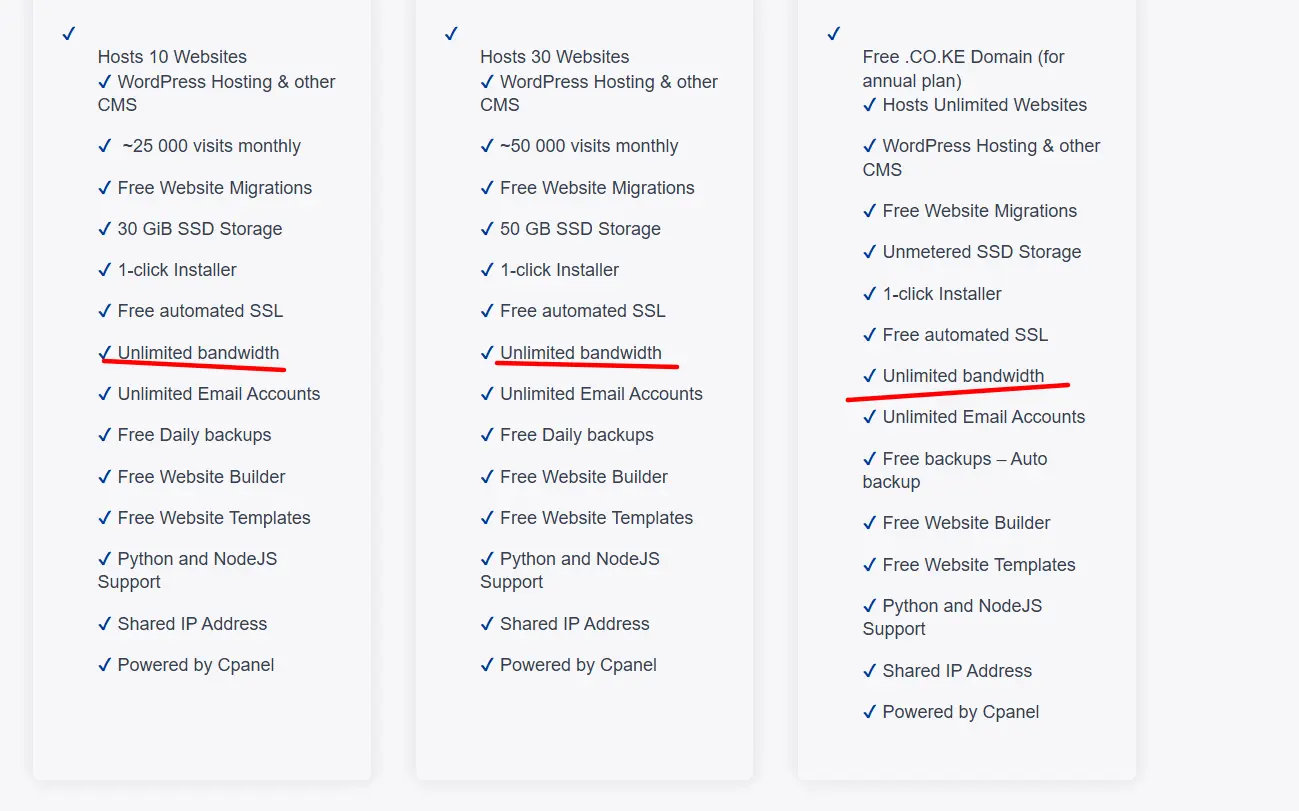
“Unlimited bandwidth” is a marketing term used to describe hosting plans with no clearly stated data cap, but they are still governed by fair usage policies (FUP) or acceptable use rules.
Reality check:
There is no such thing as truly unlimited bandwidth in practice. Every server has physical limits, CPU, network ports, storage, and upstream provider restrictions. When usage becomes too heavy, providers step in.
How it works:
For normal websites, you’ll likely never hit restrictions. But if a site consumes excessive resources (large file hosting, streaming abuse, or unusually high traffic), the provider may:
- Throttle performance
- Request an upgrade
- Temporarily suspend the account
Best for:
Beginners, small business websites, blogs, and low-to-moderate traffic sites that don’t expect sudden large spikes.
Pros:
- Simple and easy to understand
- No visible bandwidth calculations for everyday use
- Works well for standard websites
Cons:
- Hidden limitations in the fine print
- Possible throttling under heavy use
- Performance can vary in shared hosting environments
Always read the provider’s terms carefully; “unlimited” usually means “unlimited under normal usage patterns.”
4) Burstable Bandwidth (95th Percentile Billing)
Burstable bandwidth is a pricing model based on sustained usage levels, using the 95th percentile method. It allows short traffic spikes without penalty while billing you for consistent high usage.
How it works:
Your bandwidth is measured at regular intervals (often every 5 minutes). At the end of the month, the top 5% of highest usage samples are ignored. The remaining highest sustained value becomes your billing point.
This means:
- Short traffic spikes (like a viral post) are ignored
- Long-sustained traffic growth is what you pay for
Common in:
Enterprise hosting, dedicated servers, cloud infrastructure, and data centers.
Best for:
Businesses with occasional spikes, such as news sites, seasonal e-commerce stores, event platforms, or campaigns that drive temporary traffic surges.
Pros:
- Fair handling of short-term spikes
- Cost reflects real sustained usage
- Ideal for fluctuating traffic patterns
Cons:
- Difficult to estimate the exact monthly cost upfront
- Requires monitoring and traffic analysis
- Not beginner-friendly
5) Dedicated Bandwidth
Dedicated bandwidth means a fully reserved connection assigned to one server or client, with no sharing of network resources.
How it works:
You get guaranteed access to the full speed of your network port (e.g., 1 Gbps or 10 Gbps), without competition from other users. This ensures consistent performance regardless of what others are doing on the network.
Best for:
High-traffic websites, streaming platforms, SaaS applications, gaming servers, and any mission-critical system that demands stability.
Pros:
- Consistent and predictable performance
- No interference from other users
- Strong reliability under heavy load
Cons:
- Expensive compared to shared or unmetered plans
- Often unnecessary for small or medium sites
6) Shared Bandwidth
Shared bandwidth means multiple websites share the same server resources, including network capacity.
How it works:
All users on a shared hosting server draw from a common pool of bandwidth. If one site becomes busy, it can affect others on the same server.
Best for:
Small websites, personal blogs, static pages, and beginners.
Pros:
- Very affordable
- Easy to set up and manage
- Good for low-traffic projects
Cons:
- Performance can fluctuate
- “Noisy neighbor” effect (other sites impact yours)
- Limited scalability
7) Tiered Bandwidth (Usage-Based Pricing)
Tiered bandwidth pricing gives you a base amount of bandwidth included, then charges higher rates as you move into higher usage tiers.
How it works:
For example:
- First 1TB at a standard rate
- Additional usage is charged at increasing per-GB rates
The more you use, the higher your cost per unit may become, depending on the tier structure.
Best for:
Scalable cloud projects, growing businesses, and applications with moderate but increasing traffic.
Pros:
- Flexible scaling model
- Better than pure pay-as-you-go for mid-level usage
- Encourages efficient usage planning
Cons:
- Can become expensive at scale
- Requires careful monitoring to stay within cost-effective tiers

8) Pay-As-You-Go Bandwidth
Pay-as-you-go means you are billed strictly for the exact amount of data transferred, with little or no included allowance.
Common in:
Cloud platforms like AWS, Google Cloud, Azure, and some VPS providers.
How it works:
Every GB transferred is recorded and billed directly. There are no fixed bundles—you pay exactly for what you use.
Best for:
Developers, startups, SaaS apps, and systems with unpredictable or rapidly changing traffic.
Pros:
- No wasted resources
- Highly scalable
- Full control over usage costs
Cons:
- Costs can spike quickly with traffic
- Requires monitoring tools and alerts
- Can lead to “bill shock” if not optimized
To reduce costs, it’s often paired with CDNs like Cloudflare, caching systems, and compression tools to offload traffic from the origin server.
Choosing the Right Bandwidth Type (Conclusion)
The right bandwidth depends on your website’s size, traffic, and growth plans.
- Small or predictable sites: Metered or shared hosting
- Growing or media-heavy sites: Unmetered bandwidth
- Simple beginner needs: “Unlimited” plans (with fair use awareness)
- Traffic spikes or enterprise sites: Burstable (95th percentile)
- High-performance platforms: Dedicated bandwidth
- Cloud-based or flexible projects: Pay-as-you-go or tiered pricing
To improve performance and reduce bandwidth usage, it’s also smart to pair your hosting with a CDN for faster content delivery.
As your site grows, your bandwidth needs will change, so always review your usage and upgrade when necessary.
If you want reliable hosting with flexible bandwidth options, check out Truehost for affordable plans built for beginners, growing websites, and businesses.
Bandwidth FAQs
What happens if you exceed bandwidth?
Overage charges, throttling (slowed speeds), temporary suspension, or forced upgrades. Policies vary; some auto-bill, others cut access.
What is better, metered or unmetered?
Unmetered for growth and spikes (predictable costs); metered for tight budgets and low usage. It depends on traffic predictability.
Is unmetered better than unlimited?
Generally, yes, unmetered offers clearer rules (port speed) without vague fair-use risks. Unlimited often has hidden caveats.
How much bandwidth does a website need?
It varies: 1–10 GB for tiny sites; 100+ GB for moderate; TBs for video/e-commerce. Calculate based on page size and views, then monitor real usage.
Does bandwidth affect SEO?
Indirectly, slow sites due to poor bandwidth hurt user experience, bounce rates, and Core Web Vitals, which influence rankings. Fast, reliable hosting helps.
Can bandwidth slow down my site?
Yes. Insufficient bandwidth, throttling, or shared contention leads to slow load times, failed requests, or downtime. Optimize with caching, compression, and a good CDN.
Knowing these models helps you make smarter hosting decisions and avoid unexpected costs. Choose based on your website’s actual needs, not marketing claims.