Domain SearchInstantly check and register your preferred domain name
 Web Hosting
 cPanel HostingHosting powered by cPanel (Most user friendly)
 WordPress HostingHost your WordPress website with fast, secure, and affordable WordPress hosting in Kenya.
 KE Domains
 Reseller HostingStart your own hosting business without tech hustles
 Windows HostingOptimized for Windows-based applications and sites.
 Free Domain
 Affiliate ProgramEarn commissions by referring customers to our platforms
 Free HostingTest our SSD Hosting for free, for life (1GB storage)
 Domain TransferMove your domain to us with zero downtime and full control
 All DomainsBrowse and register domain extensions from around the world
 .Com Domain
 WhoisLook up domain ownership, expiry dates, and registrar information
 VPS Hosting
 Managed VPSNon techy? Opt for fully managed VPS server
 Dedicated ServersEnjoy unmatched power and control with your own physical server.
 Website Builder
 Online Store BuilderLaunch a professional e-commerce store without writing code.
 Web Design ServiceGet a custom-designed website tailored to your brand and goals. From just KES 15,600
 BlogRead our guides on web hosting, online business, digital marketing, and more
 SupportOur support guides cover everything you need to know about our services
 ContactContact us via chat or email
You wake up and say: ‘OpenClaw, what’s my day look like? Any fires? Plan a healthy dinner and remind me to call Mom.’
OpenClaw responds with a concise briefing, flags urgent items, suggests a dinner recipe based on your fridge contents, sets the reminder, and drafts a warm message to your mom, all without you lifting a finger.
That’s just the beginning.
In this guide, I’ll break down the best OpenClaw personal assistant ideas you can set up today.
But first, what exactly is OpenClaw?
It’s an open-source, self-hosted AI agent that acts as a true personal assistant.
It’s proactive, context-aware, and built to handle real tasks. It doesn’t wait to be prompted.
It runs on your own server, your data stays private, and it connects to the messaging apps you already use: WhatsApp, Telegram, Slack, and more.
Let’s get into it.
1) Morning Briefings
Most people start their morning by opening five different apps. Email. Calendar. Slack. WhatsApp. News.
By the time they’ve processed everything, twenty minutes are gone and they’re already reactive.
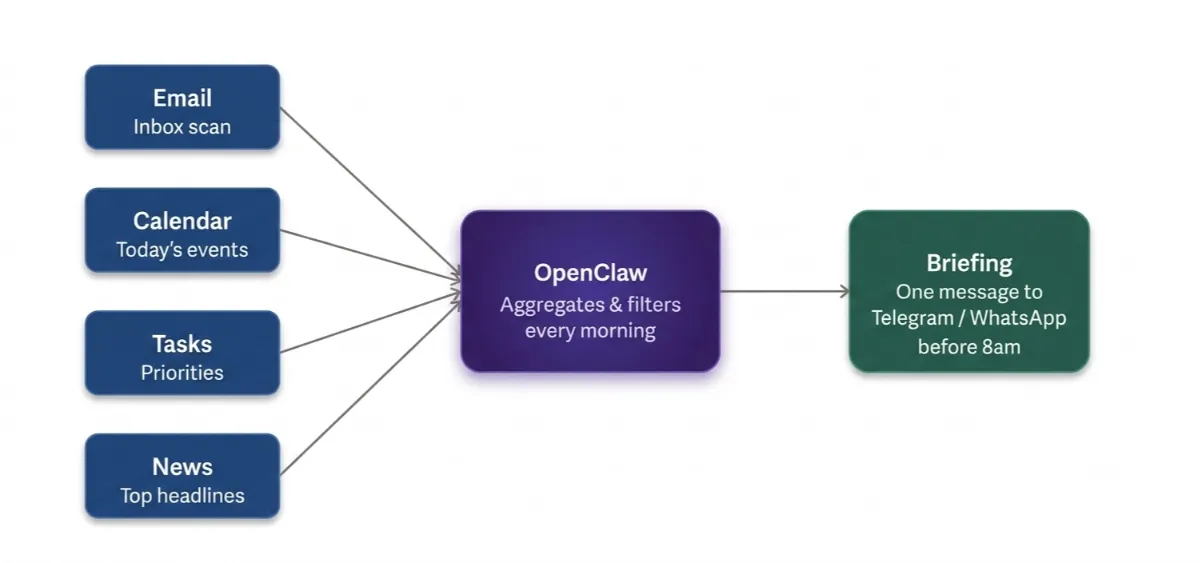
OpenClaw fixes this.
What it does: Aggregates your email, calendar, task list, and news into a single morning message delivered to your Telegram or WhatsApp before you reach your desk.
A typical briefing might read: ‘3 meetings today. 2 unread client emails flagged urgent. Your 10 am overlaps with a blocked focus block want me to reschedule? Here’s the weather and top tech headlines.’
You define exactly what goes into it. Weather only, or news too. Work tasks only, or personal reminders as well. One consolidated message replaces the entire scroll-and-check routine.
This is also the easiest entry point for first-time OpenClaw users. Configure the morning briefing first, get comfortable with the rhythm, then add more automation on top.
Check our guide on Openclaw use cases for businesses
2) Email Triage and Inbox Management
Your inbox is not a to-do list. But without a system, it becomes one a chaotic, unstructured one.
How it works: OpenClaw reads, prioritises, flags, summarises, and responds to emails on your behalf.
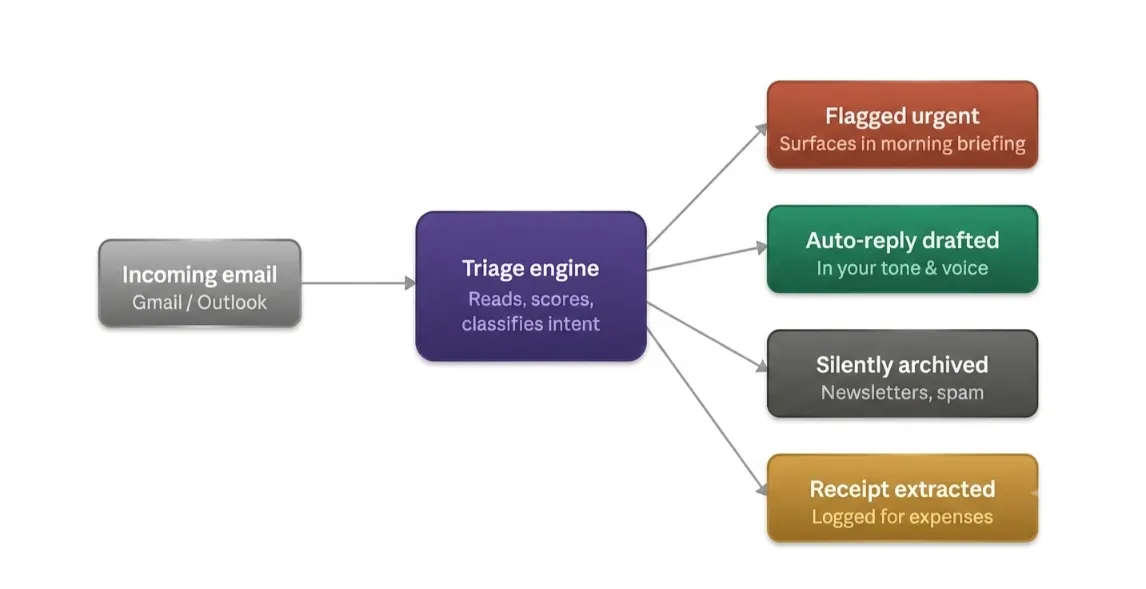
Email triage automation saves 30–60 minutes per day for most users, according to community benchmarks from the OpenClaw ecosystem.
Some practical examples of what you can configure:
- Auto-flag urgent client emails and surface them in your morning briefing
- Auto-unsubscribe from newsletters you haven’t opened in 30 days
- Extract receipts from your inbox and log them for expense tracking
- Draft replies in your voice not a generic AI tone, but calibrated to how you write
The goal here isn’t to automate everything. It’s to ensure you only touch your inbox when something genuinely needs a human decision.
Routine stuff gets handled. Important stuff gets surfaced. Nothing slips through.
3) Calendar, Scheduling, and Meeting Intelligence
Scheduling back-and-forth is one of the most friction-heavy parts of knowledge work.
If you schedule more than five meetings per week with external parties, the back-and-forth of ‘Does Tuesday at 2 work?’ wastes hours that an agent can handle in seconds.
OpenClaw handles the entire meeting lifecycle.
Natural language scheduling: Just say ‘Block 2–4 pm Thursday for deep work’ or ‘What’s free on Friday afternoon?’ It reads your calendar and responds in plain English.
Conflict detection: It detects overlaps and suggests alternatives without you having to manually open your calendar.
Defining your preferences: You can set rules like ‘No meetings before 10 am. Keep Fridays for deep work. Buffer 15 minutes between back-to-back meetings.’ When someone emails asking for time, OpenClaw can draft a response with available slots or send a scheduling link.
Meeting intelligence: After a meeting ends, OpenClaw automatically generates notes, action items, summaries, and follow-up drafts.
One important thing: your calendar data stays on your own machine or VPS, not shared with a third-party cloud service. That’s a genuine advantage for professionals handling sensitive client schedules.
4) Personal Second Brain and Task Management
How much time do you spend searching for something you know you saved somewhere? A note. A client brief.
A summary you wrote three weeks ago. It’s there. But finding it means opening three apps, scrolling, and hoping.
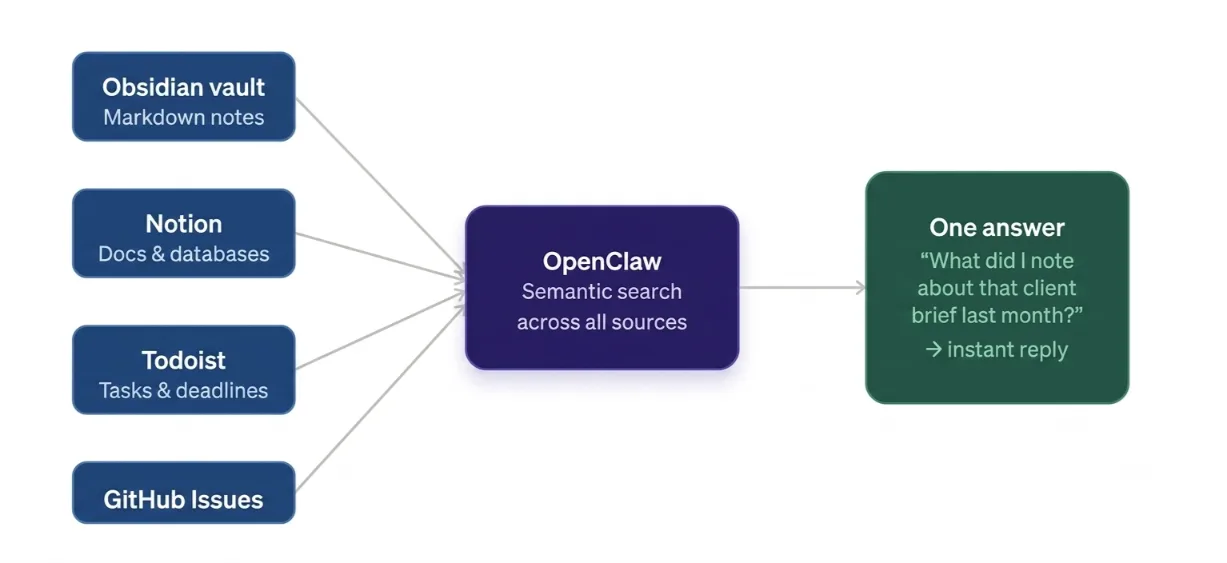
OpenClaw solves this differently.
Second brain: Connect OpenClaw to your notes, Obsidian, Notion, or plain markdown files, and you can ask it questions in plain language. ‘What did I note about that client brief last month?’ or ‘Summarise everything I’ve saved on index fund investing.’ It finds it, synthesises it, and delivers it in one message.
Unlike a traditional second brain that relies on human memory to retrieve notes, OpenClaw’s approach uses persistent memory across sessions via large context windows, meaning it can maintain institutional memory that compounds daily.
Task management: Ask ‘What’s on my plate this week?’ and get a consolidated view across Notion, Todoist, GitHub Issues, or plain markdown task files, all from one chat.
Your knowledge and tasks become instantly searchable without switching apps.
5) Life Admin Automation
Life admin is the work that never ends. Bills. Subscriptions. Renewal dates.
The things you know you need to track but can’t quite hold in your head alongside everything else.
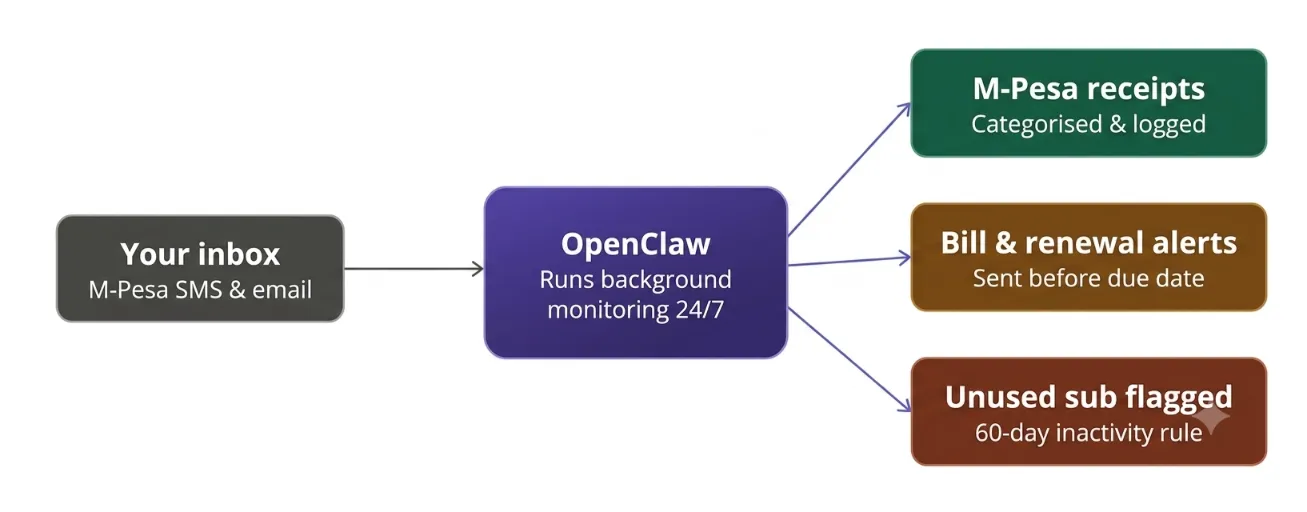
The job it handles: OpenClaw takes on the low-effort but high-friction admin that quietly eats your week.
Some real examples you can configure today:
- Track bill due dates and send reminders before they lapse
- Monitor subscription renewals and flag services you haven’t used in 60 days
- Extract and categorise M-Pesa receipts from your inbox automatically
- Send renewal reminders for domain names, insurance, or annual subscriptions
For Kenyan users specifically, M-Pesa transaction tracking is one of the most immediately practical use cases.
Truehost’s OpenClaw hosting plans include a Nairobi datacenter that delivers sub-10ms latency to East Africa, meaning your agent processes local M-Pesa callbacks and Safaricom-related data with minimal delay.
The admin keeps running in the background. You don’t have to hold it all in your head.
6) Deep Research on Demand
Research used to mean opening twelve tabs, reading half of each, copy-pasting notes into a document, and still not feeling confident you’d covered everything. It’s exhausting.
OpenClaw handles this differently.
How it runs: Browses the web, synthesises findings across multiple sources, and delivers cited insights while you do other work. It doesn’t just return a summary it builds context from everything it reads.
Some practical examples:
- ‘Research the top VPS providers in Kenya and compare pricing.’
- ‘Find the latest NSSF contribution rates and summarise the changes.’
- ‘Pull recent coverage on OpenClaw and give me the key points.’
The result is one clear message instead of a folder full of half-read articles. Hours of tab-switching compressed into a single ask.
7) Content and Writing Workflows
If you create content articles, social posts, newsletters, and client reports, you already know how much of the work is repetitive. Reformatting. Repurposing. Drafting variations.
The thinking is done, but the execution still takes time.
Writing in your voice: OpenClaw drafts emails, reports, articles, and social posts calibrated to your tone. Not generic output. It learns how you write and mirrors it.
Content repurposing pipeline: Monitor a blog RSS feed, auto-generate social variants, then send them for your review before scheduling. One piece of content, multiple formats, minimal effort.
Some examples that fit real workflows:
- Repurpose a YouTube script into a Twitter/X thread and LinkedIn post
- Draft a client update email from a bullet-point list
- Generate a weekly newsletter from a folder of saved links
This is especially valuable for freelancers and small content teams managing multiple platforms with limited hours.
Workflows like these need a server that’s always running. We at Truehost offer OpenClaw hosting plans starting from KES 1,990/month one-click deployment, scalable resources, and M-Pesa payment. No international card required.
8) Personal CFO and Finance Tracking
Most Kenyans don’t have a CFO. But between side hustles, M-Pesa transactions, and dollar-denominated SaaS subscriptions, the financial picture gets complicated fast.
Where it fits: Tracks spending, surfaces patterns, and helps with financial decisions without paying for a separate finance app.
Kenya-specific examples you can set up:
- Reconcile M-Pesa send/receive history into weekly spending categories
- Track side hustle income versus expenses in a simple running log
- Flag when a recurring payment changes amount or a new charge appears
Decision modelling: Run a scenario. ‘If I cut this subscription and moved my hosting to a cheaper plan, what does that save annually?’ OpenClaw calculates it and gives you a plain-English answer.
Scattered transaction data becomes a clear financial picture. No separate app, no spreadsheet you abandon after two weeks.
9) Health, Habits, and Meal Planning
Most habit-tracking apps create a new habit in themselves: remembering to open the app. OpenClaw removes that friction entirely.
The role it plays: Acts as a lightweight wellness coach grounded in your actual routine not generic advice.
Some practical examples:
- ‘Log: 7 hours sleep, skipped workout’ → OpenClaw tracks it and gives a weekly summary
- ‘What can I cook with eggs, tomatoes, and ugali flour?’ → generates a meal suggestion based on what you actually have
- Morning check-in: sends a gentle habit nudge based on your set goals: hydration, movement, and reading
- Mood and habit tracking via simple message-based logging, no separate app needed
The barrier to tracking healthy habits drops to a single WhatsApp message. That’s the real innovation here.
Learn how to integrate Openclaw with OpenAI
10) Proactive Automations: It Acts Without Being Asked
This is what separates OpenClaw from a chatbot.
A chatbot waits. OpenClaw initiates.
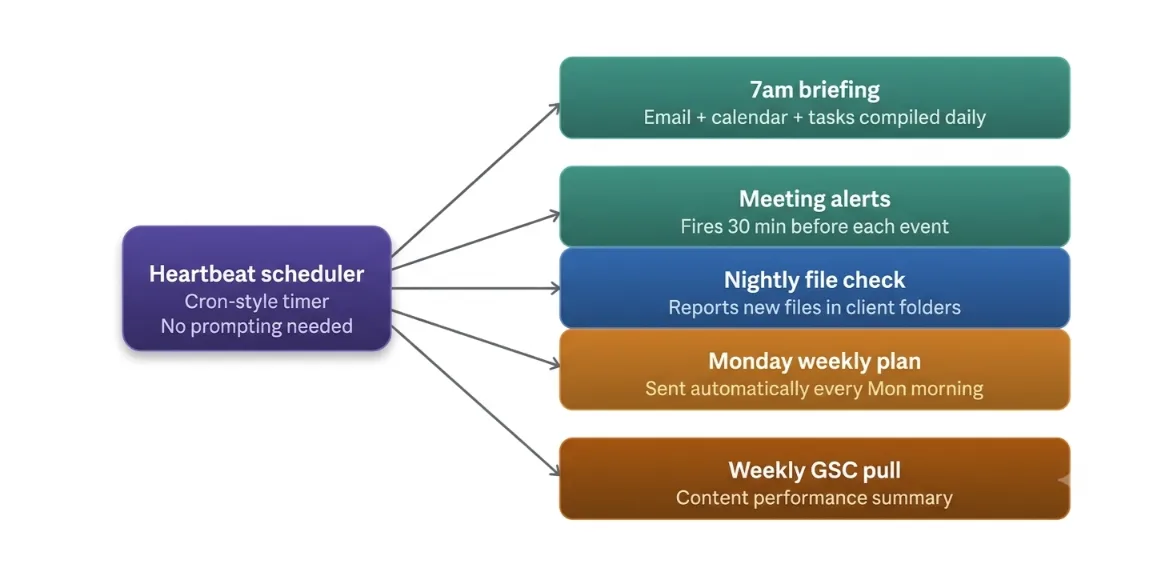
The official guidance treats this as an automation stack built from safe channel gating, a workspace with standing orders, plus heartbeat/cron scheduling.
The agent reads the inbox, calendar, and tasks and delivers summaries without being prompted.
What this looks like in practice:
- Check a client’s deliverables folder every night and report new files
- Send a Monday morning weekly plan summary automatically
- Alert you 30 minutes before every meeting
- Run a weekly content performance pull from Google Search Console
Five small automations running daily compound into hours saved per week. That’s not a productivity hack, it’s a structural change in how you work.
11) Replace Multiple Paid Tools
Here’s the cost argument, stated plainly.
Inbox cleaners. Scheduling assistants. Note-search tools. Habit trackers. Finance apps. Each one charges a monthly subscription.
Most are priced in USD, which means the cost in KES fluctuates with the exchange rate.
OpenClaw consolidates these functions locally, with no per-user subscription fees.
For freelancers and small businesses watching software costs in KES, a single self-hosted instance replaces a stack of dollar-denominated SaaS tools.
Gartner projects that 40% of enterprise applications will include task-specific AI agents by the end of 2026, but you don’t need to wait for enterprise adoption. The tools are available now.
The only recurring cost is your hosting server.
How to Get Started
Getting OpenClaw running doesn’t require a DevOps background. Here’s the straightforward path:
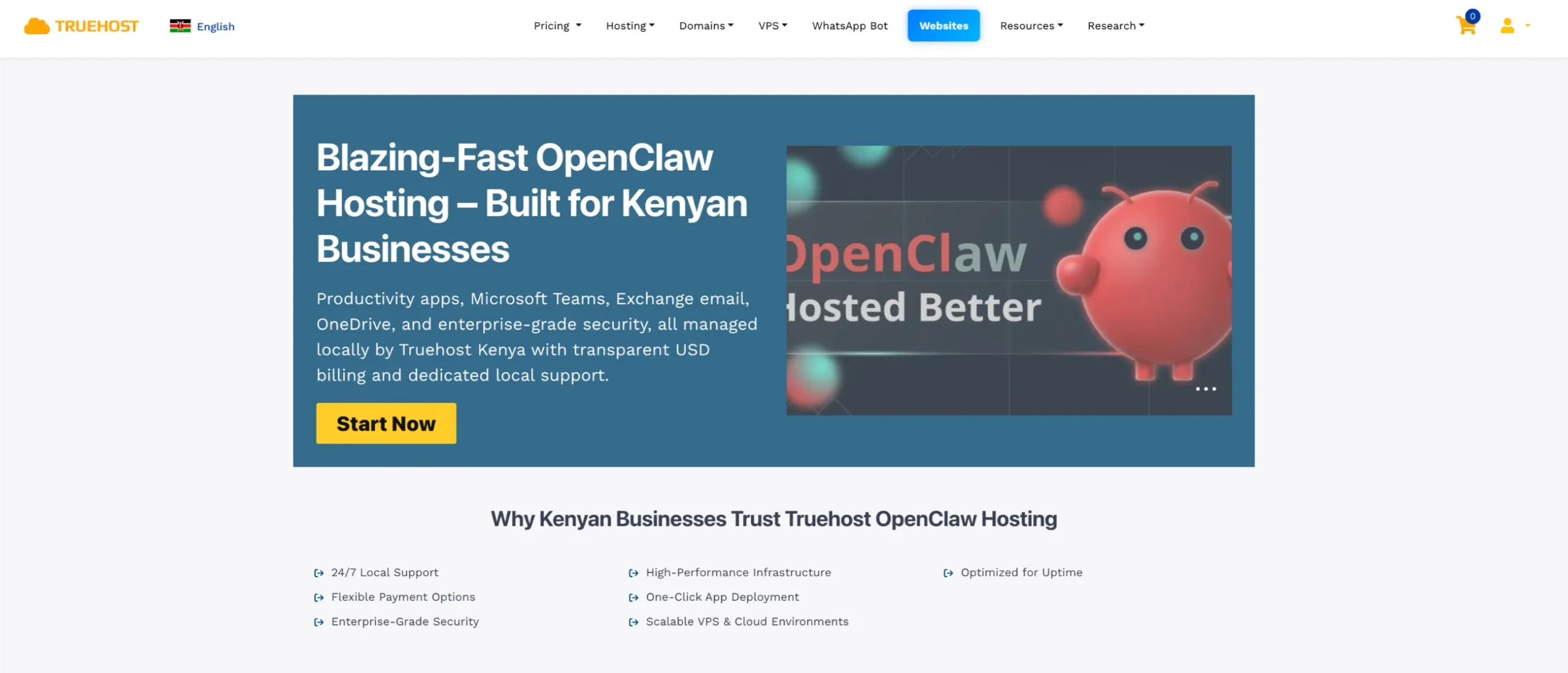
- Get an always-on VPS. OpenClaw needs a server running 24/7 to deliver on all of the above. A laptop that sleeps doesn’t count.
- Deploy OpenClaw. We at Truehost offer one-click OpenClaw deployment; the server is provisioned, dependencies installed, and configuration handled for you. The system automatically provisions your VPS, installs OpenClaw, and configures the basic settings. You receive your server login credentials and dashboard details within minutes.
- Connect your messaging app. Telegram is the easiest starting point. WhatsApp works too.
- Configure your first automation. Morning briefing or email triage is the recommended starting point for immediate value, low complexity.
- Add skills as you go. The official community registry contains over 13,000 skills as of early 2026, growing weekly. Start with one or two, then layer more as you get comfortable.
You can check our more detailed guide on how to set up Openclaw on a VPS
Our OpenClaw hosting plans are optimised specifically for this stack, with one-click deployment, scalable resources, 24/7 local support, and M-Pesa payment. No international card required.
OpenClaw personal assistant ideas aren’t in short supply. The more relevant question is: where do you lose the most time?
Start there. Configure one automation this week. See what it’s like to wake up to a briefing instead of five open tabs.
The compounding effect kicks in fast.