Domain SearchInstantly check and register your preferred domain name
 Web Hosting
 cPanel HostingHosting powered by cPanel (Most user friendly)
 WordPress HostingHost your WordPress website with fast, secure, and affordable WordPress hosting in Kenya.
 KE Domains
 Reseller HostingStart your own hosting business without tech hustles
 Windows HostingOptimized for Windows-based applications and sites.
 Free Domain
 Affiliate ProgramEarn commissions by referring customers to our platforms
 Free HostingTest our SSD Hosting for free, for life (1GB storage)
 Domain TransferMove your domain to us with zero downtime and full control
 All DomainsBrowse and register domain extensions from around the world
 .Com Domain
 WhoisLook up domain ownership, expiry dates, and registrar information
 VPS Hosting
 Managed VPSNon techy? Opt for fully managed VPS server
 Dedicated ServersEnjoy unmatched power and control with your own physical server.
 Website Builder
 Online Store BuilderLaunch a professional e-commerce store without writing code.
 Web Design ServiceGet a custom-designed website tailored to your brand and goals. From just KES 15,600
 BlogRead our guides on web hosting, online business, digital marketing, and more
 SupportOur support guides cover everything you need to know about our services
 ContactContact us via chat or email
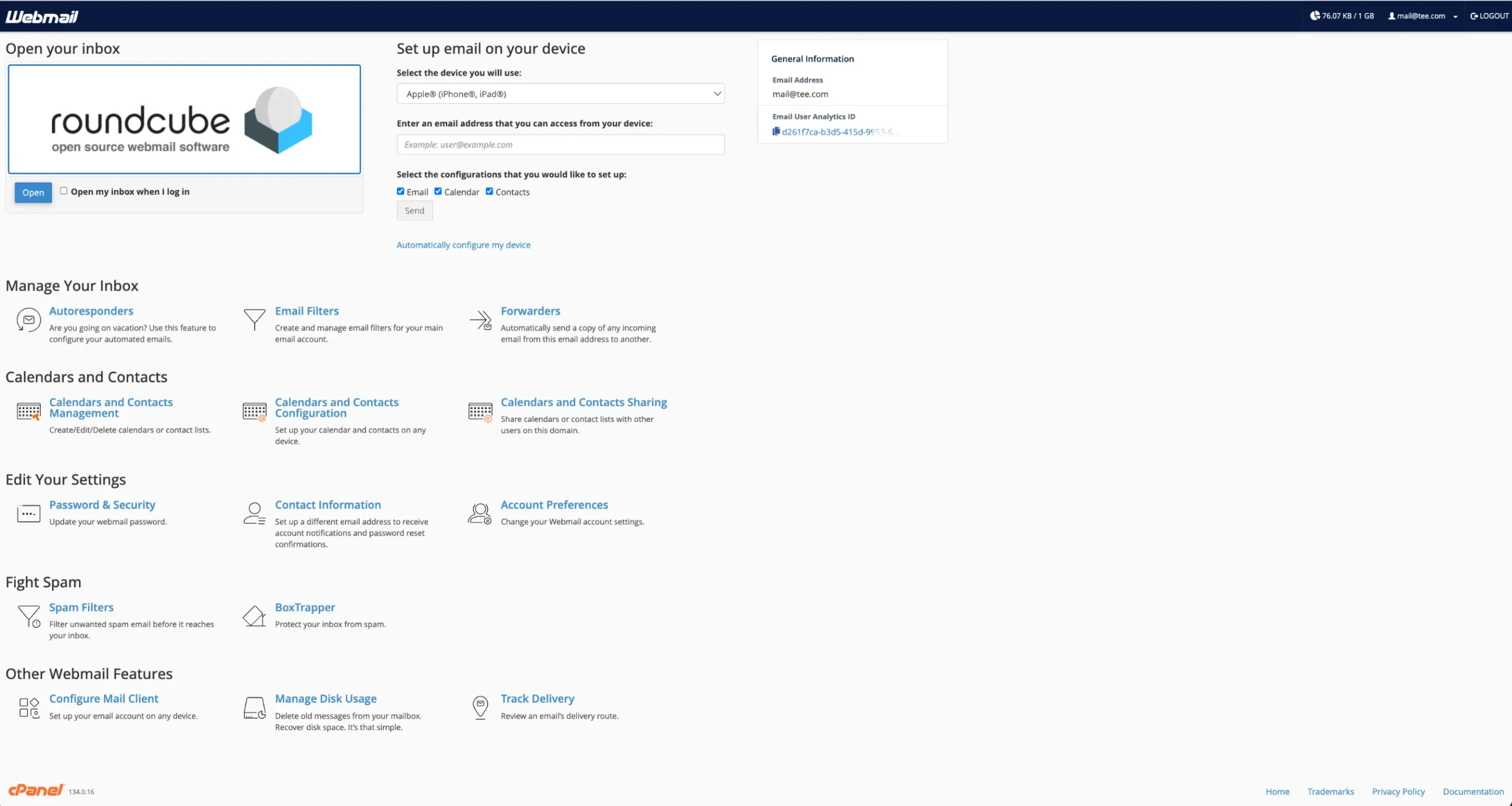
So what is cPanel webmail? It is a browser-based email interface built into your cPanel hosting account.
It lets you send, receive, and manage email from any browser.
When you log into cPanel webmail, you’re choosing a client, the actual interface you’ll use to read and write email.
cPanel used to offer three: SquirrelMail, Horde, and Roundcube. Today, only Roundcube remains.
Horde was dropped because it relied on PHP 7.4, which reached end of life and couldn’t support PHP 8.x.
All Horde data was automatically migrated to Roundcube. If you’re wondering where Horde went, your emails are still there, just inside Roundcube now.
Features of cPanel Webmail
Here’s a breakdown of what you actually get when you use cPanel webmail through Roundcube.
a) Core Email Management
The basics are solid and reliable:
- Compose and send emails with a full HTML editor, bold, italic, bullet points, links, and more
- Attachments: attach and download files of any common type
- Folders: create custom folders and move messages between them with drag-and-drop
- Search: find emails quickly by sender, subject, or keyword
- Auto-responders: set up ‘out of office’ replies directly from cPanel
- Email forwarders: forward messages from one address to another automatically
b) Inbox Organization Tools
Staying organized is straightforward:
- Filters: set rules to automatically sort, delete, or flag incoming mail
- Spam controls: SpamAssassin integration helps keep junk out of your inbox
- Flags and labels: mark messages as important or sort them by status
- Multiple identities: send from different addresses or names within the same account
c) Calendars, Contacts, and Productivity
Roundcube includes a calendar for managing appointments, events, and schedules, and an address book to store, organise, and search contacts.
Starting with cPanel 120, you can add and share calendars through Webmail’s Calendars and Contacts Sharing interface.
This means you can sync your calendar and contacts with external apps and mobile devices using CalDAV and CardDAV protocols.
For example, create a calendar event in Webmail and have it sync directly to your iPhone calendar. It works.
d) Security and Account Settings
- SSL/TLS encryption: all webmail connections run over HTTPS
- Password management: Change your email password directly inside Webmail
- SPF and DKIM: cPanel’s Email Deliverability tool helps you configure these to improve inbox delivery rates
- 2FA support: Some cPanel setups support two-factor authentication for webmail logins
e) Device Setup Options
From the Email Accounts section in cPanel, you can find ‘Set up email on your device’ and fill in the appropriate information, selecting your device (iPhone, Android, etc.) and which services to configure (email, contacts, calendar).
Manual IMAP and SMTP settings are also available for any email app that needs them.
Advantages of Using cPanel Webmail
Now, let’s talk about why cPanel webmail is genuinely useful.
a) Cost-Effective Professional Email
With Google Workspace Business Starter at $6.80 (KSh 880) per user per month and Microsoft 365 Business Basic at $6 (KSh 776) per user per month, a team of 10 people costs $860 (KSh 111258) per year just for email.
With a Truehost hosting plan, you get email accounts included at no extra per-user charge.
For startups and small businesses watching every shilling, that’s a meaningful saving.
b) Convenience and Accessibility
Webmail needs nothing but a browser. No app to install. No software to update.
You can check your email from any computer, phone, or tablet at the office, at a client meeting, or while traveling. As long as you have internet access, your inbox is open.
c) Full Integration with cPanel
Because webmail is built into cPanel, everything sits in one place. Your email accounts, domain settings, DNS records, spam filters, and hosting are all managed from the same dashboard.
No switching between multiple platforms or billing accounts. One login to rule them all.
d) Branding and Professionalism
A custom domain email [email protected] looks far more professional than a free Gmail or Yahoo address.
Clients and partners take branded email addresses more seriously. It signals that you’re a real business, not just someone testing the waters.
e) Basic Collaboration and Control
You control your email completely. Create accounts for new staff, delete old ones, set storage limits, and monitor usage all without involving a third party.
You’re also not locked into a tech giant’s ecosystem. Your data stays on your server, under your terms.
Check out our guide on how to create an Email Account on cPanel
How to Log Into cPanel Webmail
There are three ways to get in.
1) Direct Webmail Login URLs
The quickest method. Just type one of these into your browser:
https://yourdomain.com/webmailhttps://yourdomain.com:2096
Replace yourdomain.com with your actual domain. Enter your full email address and password, and you’re in.
2) Accessing from Inside cPanel Dashboard
- Log in to your cPanel account
- Go to Email → Email Accounts
- Find the email address you want to access
- Click Check Email next to it
- Roundcube will open in a new browser tab
3) Setting Your Default Webmail Client
When you first access webmail and are shown a client selection screen, you can choose your preferred client and check ‘Set as Default’ to skip that selection screen on future visits.
To change the default later, go to Email > Webmail in cPanel and select your preferred client from the dropdown.
cPanel Webmail vs. Google Workspace (Quick Comparison)
Not sure which one is right for you? Here’s a side-by-side comparison:
| Feature | cPanel Webmail | Google Workspace |
| Cost | Included with hosting | From $7/user/month |
| Custom domain email | Yes | Yes |
| Storage | Set by hosting plan | 30GB+ per user |
| Spam filtering | SpamAssassin | Advanced AI filtering |
| Collaboration tools | Basic | Docs, Sheets, Meet, Drive |
| Mobile apps | Via IMAP | Dedicated Gmail app |
| Setup complexity | Simple | Moderate |
| Offline access | No | Yes |
| Best for | Small teams, budget-conscious | Teams needing collaboration |
cPanel email shines in pricing. You create as many email accounts as your hosting plan allows at no additional per-user cost.
But Google Workspace wins on collaboration features, spam protection, and mobile experience.
If your team primarily sends and receives emails and doesn’t need real-time document collaboration, cPanel webmail is more than enough.
Common cPanel Webmail Problems and How to Fix Them
Even reliable tools have bad days. Here are the most common issues and how to solve them.
a) Cannot Log In or Webmail Not Loading
Possible causes:
- Wrong password or username format
- Browser cache is causing display issues
- SSL certificate error
Fixes:
- Make sure you’re entering your full email address as the username (e.g.,
[email protected]not just info) - Reset your email password from cPanel → Email Accounts → Manage
- Clear your browser cache and try again
- Try a different browser to rule out compatibility issues
- Check that your SSL certificate is active. cPanel usually handles this automatically via AutoSSL
b) Emails Not Sending or Receiving
If you can’t send:
Common causes include disabled SMTP authentication, wrong ports or TLS settings, mailbox quota limits, or DNS issues (SPF/DKIM/DMARC).
Fix steps:
- Open cPanel → Email Deliverability and click Repair on any flagged SPF or DKIM issues
- Check that your outgoing port is 465 (SSL) or 587 (STARTTLS)
- Check if your server’s IP appears on any blacklists. If it does, contact the blacklist to request removal or ask your hosting provider to assist.
If you can’t receive:
- Verify your MX records are pointing to the correct mail server
- Check that your mailbox quota isn’t full (cPanel → Email Accounts → Manage → check disk usage)
- Look in your Junk or Spam folder. The message may have been filtered automatically
c) Slow Performance, Internal Server Errors, Password Problems
- Slow webmail: This often happens with very large inboxes. Archive old emails or delete large attachments to free up space.
- Internal server errors: Usually a temporary server issue. Wait a few minutes and refresh. If it persists, contact your host’s support team.
- Password rejected: Reset it directly in cPanel → Email Accounts, then update it in any connected mail apps immediately.
Learn how to create an email account for an Addon Domain in cPanel.
How to Set Up cPanel Email on Desktop and Mobile Devices
Webmail is great for occasional access. But for daily use, setting up your email in a dedicated app like Outlook, Apple Mail, Gmail app, or Thunderbird gives you a much smoother experience.
Using Automatic Configuration Scripts
cPanel makes this easy:
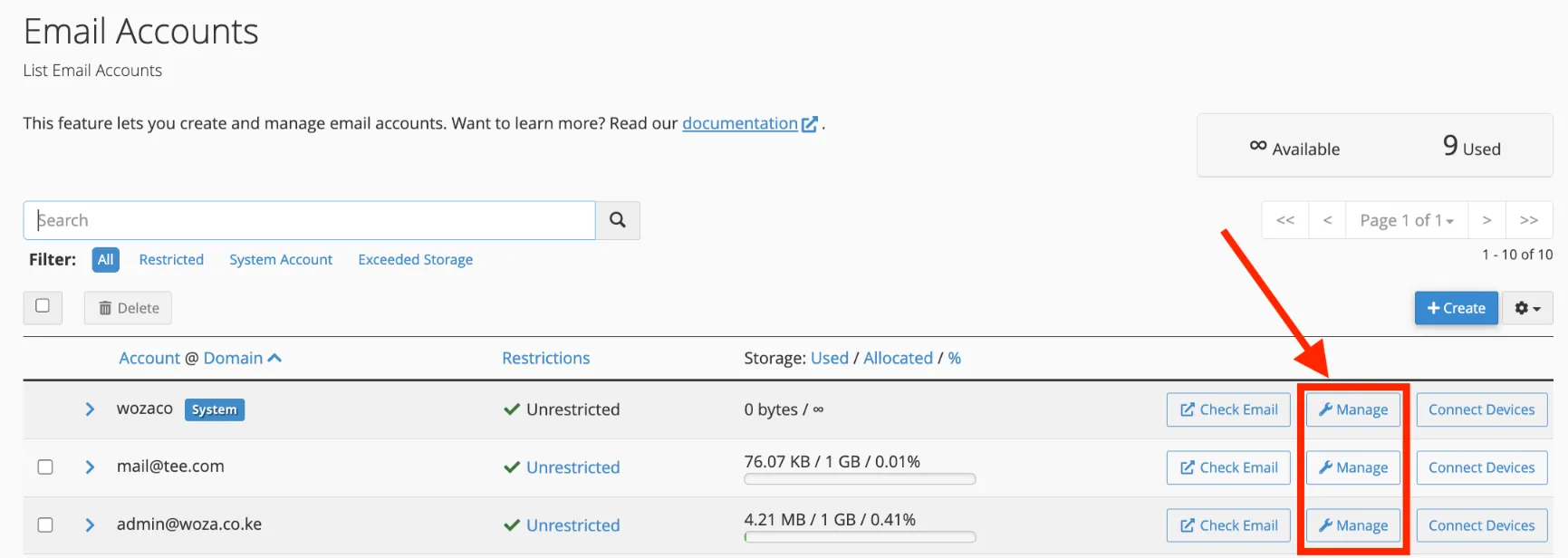
- Log in to cPanel → Email Accounts
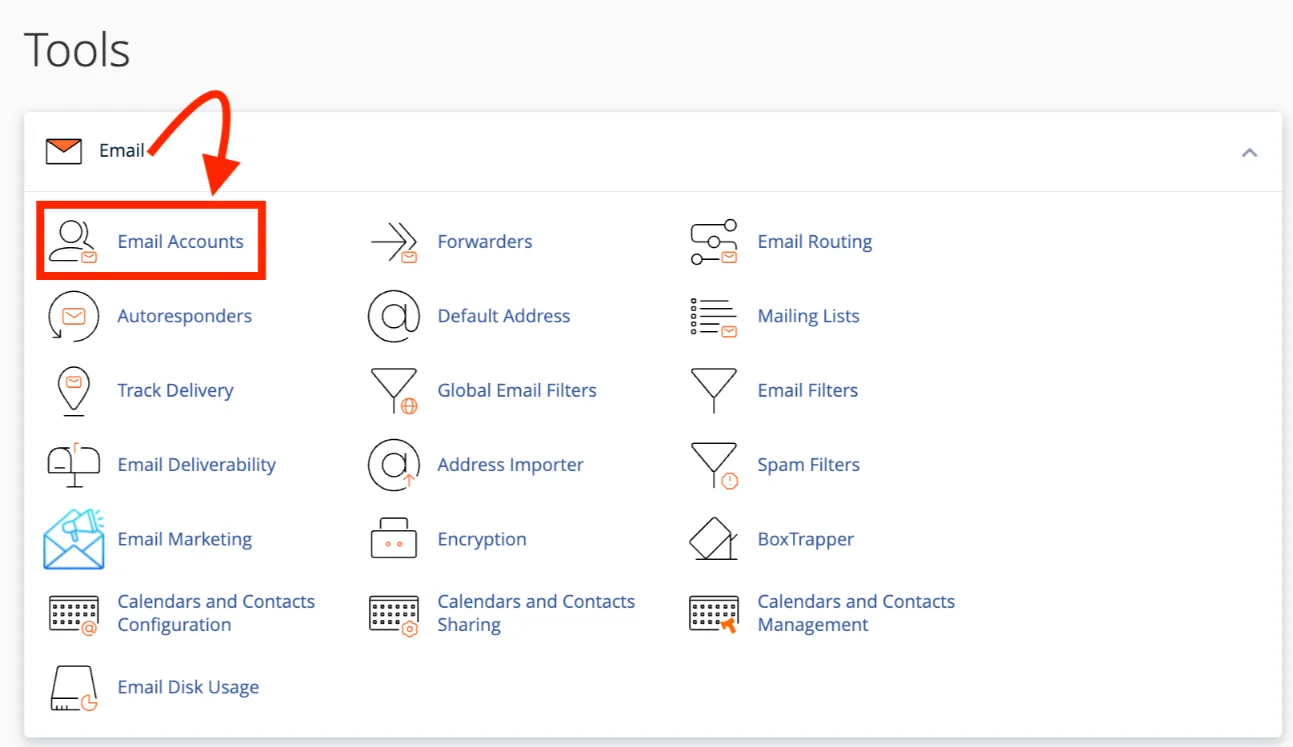
- Click Manage next to your email address
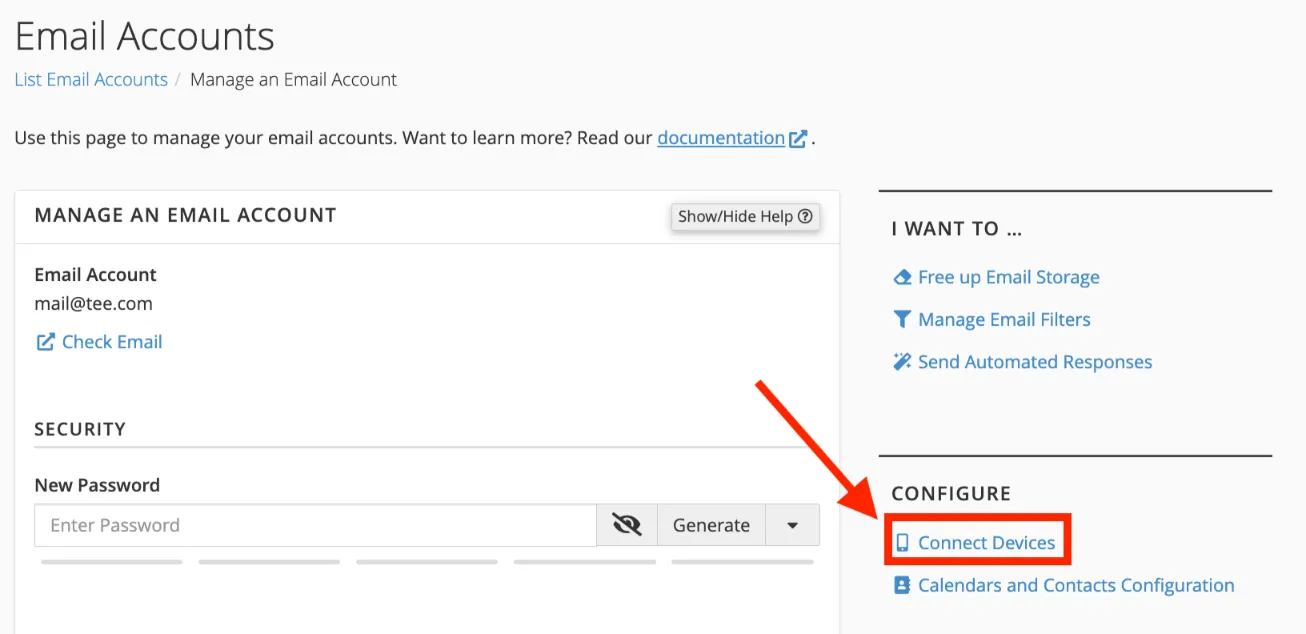
- Scroll to Connect Devices and click Set Up Mail, Client
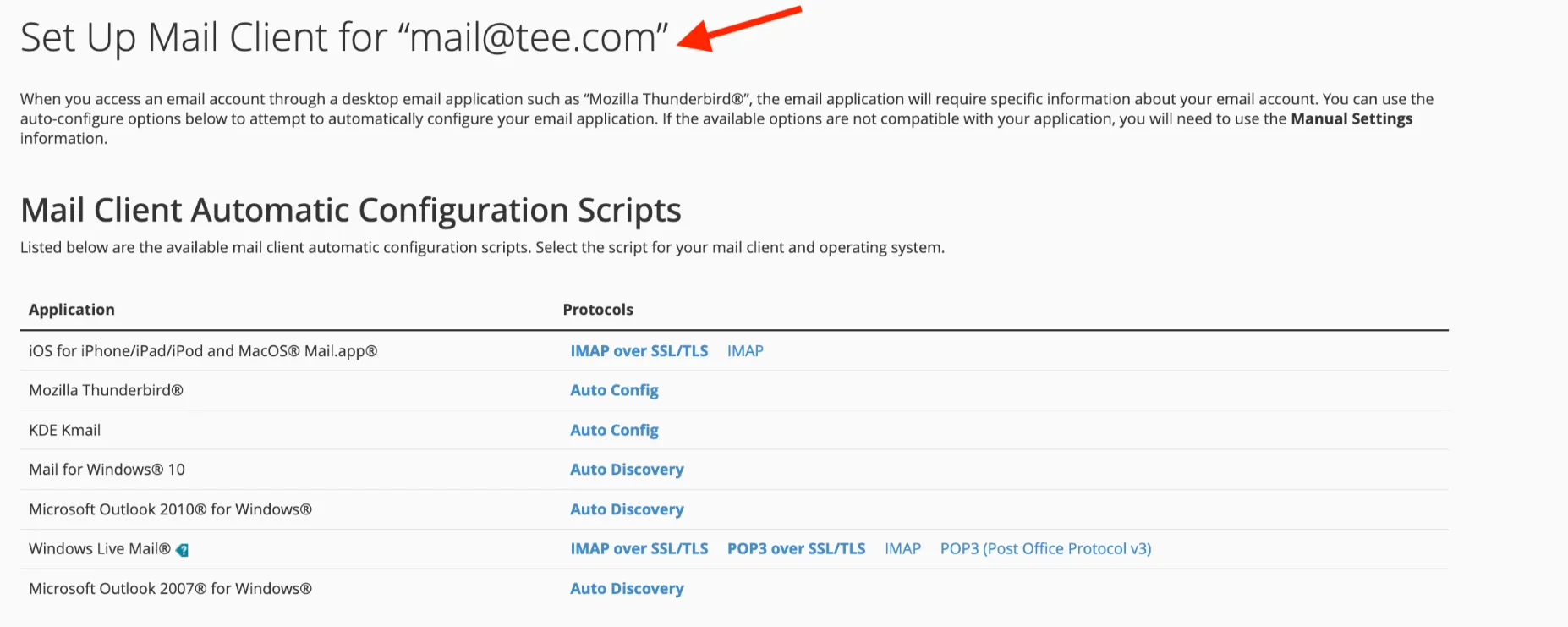
- Choose your device type (iPhone, Android, Windows, Mac)
- Download and run the auto-configuration script
This fills in all the settings for you automatically. No manual entry needed.
Manual IMAP/POP3 Settings
If auto-setup doesn’t work, use these settings in any email app:
Incoming Mail (IMAP):
- Server: mail.yourdomain.com
- Port: 993
- Encryption: SSL/TLS
- Username: your full email address
Outgoing Mail (SMTP):
- Server: mail.yourdomain.com
- Port: 465
- Encryption: SSL/TLS
- Username: your full email address
Use IMAP rather than POP3 if you check your email on multiple devices. IMAP keeps everything in sync across all of them.
Read also: Is cPanel Free? (Pricing and Features)
Create Your Professional Email Address Today
Here’s what you need:
- A domain name: something like
yourbusiness.co.ke - A hosting plan: it comes with email accounts included
- Create your email: done inside cPanel in under two minutes
We at Truehost make this simple. Register your domain and get hosting here, and your first professional email address is just minutes away.
A branded email address built on cPanel webmail is one of the smartest, most affordable moves you can make.
cPanel Webmail FAQs
Is cPanel webmail free?
Yes, cPanel webmail is included with any cPanel hosting plan. You don’t pay separately for email accounts or webmail access. The cost is bundled with your hosting.
Which is better, Outlook or webmail?
It depends on your needs. Outlook is a dedicated desktop app with offline access, calendar integration, and advanced features. Webmail is browser-based and requires no installation. It’s great for checking email on the go. For heavy daily use, Outlook (connected via IMAP to cPanel) often gives a better experience.
Does Webmail sync with Outlook?
Yes. Set up your cPanel email in Outlook using IMAP on port 993. All emails will sync between Outlook and webmail in real time since both connect to the same server mailbox.
What is the best webmail client?
For cPanel users in 2026, Roundcube is the top choice and the only one actively supported. It’s clean, fast, and familiar to anyone who has used Gmail.
What are the different types of webmail accounts?
Webmail accounts are typically tied to your domain (e.g., [email protected]). You can create multiple types: personal inboxes, shared team addresses, role-based addresses like support@ or sales@, and forwarder accounts that redirect mail to another inbox.
Who provides webmail?
Webmail is provided by your hosting company. When you host with Truehost, cPanel webmail (Roundcube) is included in your plan. Other providers like Bluehost, SiteGround, and Namecheap also offer cPanel-based webmail.
How do I choose a webmail provider?
Look for a hosting provider that offers reliable uptime, good spam filtering, easy cPanel access, and local support. Businesses in Kenya, choose Truehost because we support M-PESA payments and we affordable pricing.
Is SMTP the same as webmail?
No. SMTP is the protocol used to send emails between mail servers. Webmail is the interface you use to compose and read emails in a browser. When you hit ‘send’ in Roundcube, it uses SMTP behind the scenes to deliver your message.