Domain SearchInstantly check and register your preferred domain name
 Web Hosting
 cPanel HostingHosting powered by cPanel (Most user friendly)
 WordPress HostingHost your WordPress website with fast, secure, and affordable WordPress hosting in Kenya.
 KE Domains
 Reseller HostingStart your own hosting business without tech hustles
 Windows HostingOptimized for Windows-based applications and sites.
 Free Domain
 Affiliate ProgramEarn commissions by referring customers to our platforms
 Free HostingTest our SSD Hosting for free, for life (1GB storage)
 Domain TransferMove your domain to us with zero downtime and full control
 All DomainsBrowse and register domain extensions from around the world
 .Com Domain
 WhoisLook up domain ownership, expiry dates, and registrar information
 VPS Hosting
 Managed VPSNon techy? Opt for fully managed VPS server
 Dedicated ServersEnjoy unmatched power and control with your own physical server.
 Website Builder
 Online Store BuilderLaunch a professional e-commerce store without writing code.
 Web Design ServiceGet a custom-designed website tailored to your brand and goals. From just KES 15,600
 BlogRead our guides on web hosting, online business, digital marketing, and more
 SupportOur support guides cover everything you need to know about our services
 ContactContact us via chat or email
Python’s real strength is more of the ecosystem behind it than the language itself. PyPI, the Python Package Index, now hosts over 800,000 projects.
I know that number sounds intimidating, but in practice, most developers ship the majority of their work using a focused set of 20 to 30 packages. The rest of the index is noise unless you have a very specific need.
Now that leads to picking the wrong ones, a problem most people run into. And unfortunately, you only need to install something that conflicts with an existing dependency, and your whole environment breaks. Again, add packages without structure, and your deployments become unpredictable.
A bloated environment with unnecessary libraries will also slow down build times and make debugging harder.
So before you install anything, it helps to know how Python package management actually works. I mean, as projects grow, package management becomes just as important as writing code.
To begin with, pip is Python’s official package manager. It ships with Python 3.4 and above, so most probably you already have it. It pulls packages directly from PyPI and installs them into your environment with a single command.
Installing packages is only one part of the process, though. You also need a reliable way to recreate the same environment whenever the project moves to a different machine, server, or team member.
That is the role of the requirements.txt file. It serves as a blueprint for your project by recording the packages and versions required for the application to run correctly. With this file, the entire environment can be rebuilt consistently using a single command.
Something else as important is the virtual environment, which is how you keep projects from interfering with each other. It creates an isolated space for each project, allowing dependencies to remain separate from other projects on the same computer.
This prevents version conflicts, keeps installations organized, and ensures that changes made in one project do not accidentally affect another.
Together, pip, requirements.txt, and virtual environments form the foundation of clean Python development.
Essential Pip Packages by Application Domain
While thousands of packages are available on PyPI, we will go through a small group of libraries that power most modern applications. I’ve also organized them by use case, including some specific sets of pip packages from the OpenClaw Python ecosystem.
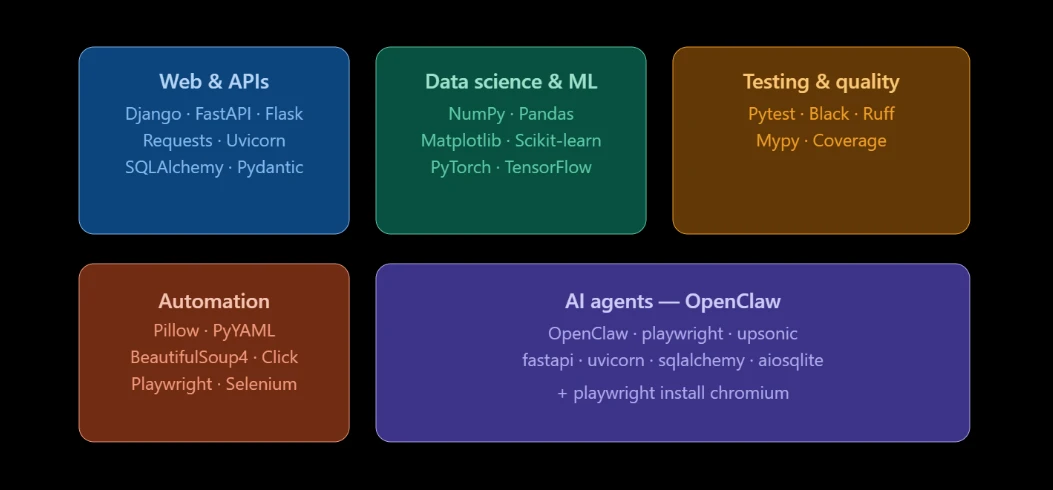
Web Development and APIs
These packages handle everything from serving web pages and building REST APIs to making HTTP requests and managing database connections.
1) Django is the framework you reach for when you need a complete, production-ready web application. It comes with authentication, an admin interface, database migrations, routing, and form handling all built in. So, you spend less time wiring components together and more time building features.
pip install django2) FastAPI is all about speed and modern API development. It’s especially useful when you’re building backend services that need to handle many requests at once. One nice bonus: it automatically generates API documentation as you write your code, so you don’t have to build that separately.
pip install "fastapi[standard]"3) Flask sits at the other end of the spectrum, minimal and unopinionated. You start with almost nothing and add only what your project actually needs. That flexibility makes it ideal for microservices, small apps, or situations where Django’s structure would get in the way.
pip install flask4) Requests is how Python talks to the internet. It simplifies HTTP calls so you can send GET and POST requests, handle authentication headers, upload files, and parse JSON responses, all with clean, readable code. Once your app starts talking to other services or APIs, Requests becomes one of the most used tools in your toolkit.
pip install requests5) Uvicorn is what actually runs modern async Python apps in production. If FastAPI is the engine design, Uvicorn is what keeps it running efficiently under real traffic.
pip install uvicorn6) SQLAlchemy gives your application a consistent, Pythonic way to interact with databases, like PostgreSQL, MySQL, SQLite, and more. You write Python objects and relationships instead of raw SQL strings, which makes your database code cleaner and easier to maintain across different environments.
pip install sqlalchemy7) Pydantic handles data validation and settings management using Python type hints. FastAPI uses it internally, but it is useful on its own any time you need to enforce structure on incoming data, like API payloads, config files, or form submissions.
pip install pydanticData Science and Machine Learning
This stack covers everything from loading a CSV file to training and deploying a neural network. Basically, it turns raw data into insights, predictions, and models.
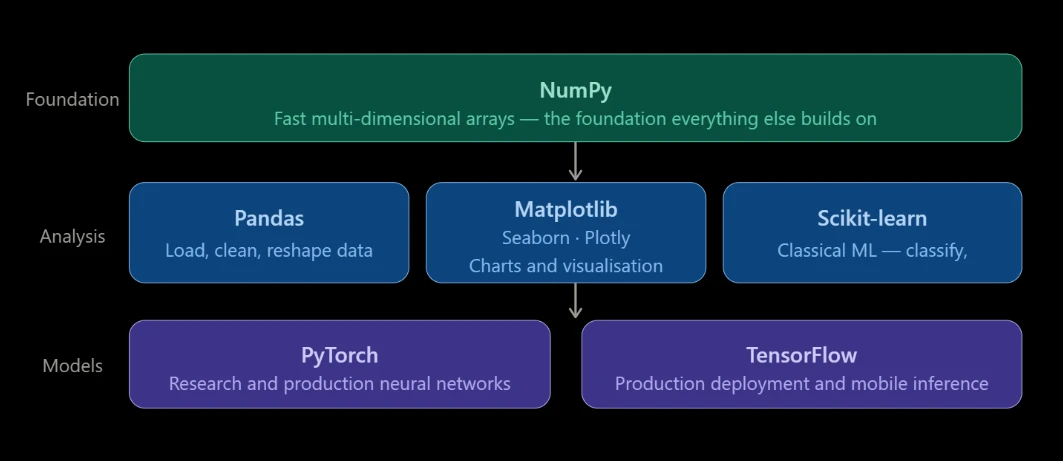
8) NumPy is the foundation everything else in data science is built on. It provides fast, multi-dimensional arrays and the mathematical operations that act on them. If you are doing any kind of numerical work in Python, NumPy is already there in the background, whether you called it directly or not.
pip install numpy9) Pandas is the standard tool for working with tabular data. Load a spreadsheet, a database export, or a raw CSV file, and Pandas gives you the tools to clean it, reshape it, filter it, and summarize it, all in code you can run repeatedly and share with others.
pip install pandas10) Matplotlib creates charts and visualizations. From line charts, bar graphs, scatter plots, and histograms, it handles all of them and gives you fine control over how they look when exported. You can use it when you need to turn numbers into something a non-technical audience can read.
pip install matplotlib11) Seaborn builds on Matplotlib with higher-level statistical plots that look polished with minimal configuration. It’s great for exploring correlations, distributions, and categorical data during analysis.
pip install seaborn12) Plotly creates interactive charts that work in a browser, including hoverable data points, zoomable axes, and dynamic filters. It’s the right choice when your output is a dashboard or a web report rather than a static image.
pip install plotly13) Scikit-learn is where classical machine learning lives in Python. It gives you tools for classification, regression, clustering, feature extraction, and cross-validation, with consistent APIs and thorough documentation. If your project does not require deep learning, Scikit-learn probably has everything you need.
pip install scikit-learn14) PyTorch is the framework of choice for building and training neural networks, both in research and production. It gives you direct control over tensors and gradients, which makes debugging and customisation far easier than older frameworks allowed.
pip install torch15) TensorFlow is the other major deep learning framework, backed by Google. It is particularly strong for production deployments and mobile inference. Which one you choose often comes down to your team’s background and the ecosystem around your specific model type.
pip install tensorflowTesting and Code Quality
Writing working code is one thing. Writing code that keeps working as it grows and changes is another. These packages help you stay on the right side of that line.
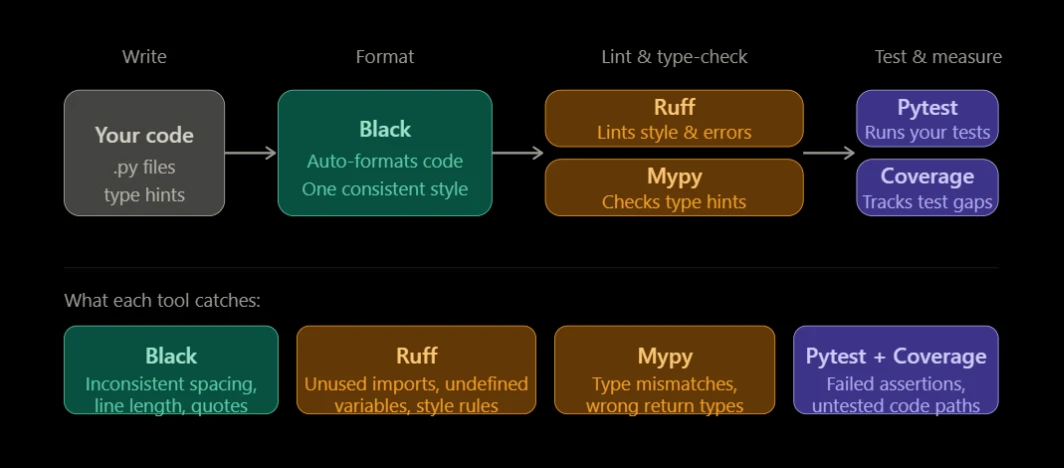
16) Pytest is the standard testing framework for Python. It finds your test files automatically, gives you clear output when tests fail, and scales from simple unit tests to complex integration suites. Most Python projects, open-source and commercial alike, standardise on Pytest.
pip install pytest17) Black is an opinionated code formatter. Point it at your codebase, and it rewrites your code to a single consistent style automatically. No more time spent debating indentation or line length in code reviews. Black just decides, and everyone works with the result.
pip install black18) Ruff is a fast linter that catches style violations, undefined variables, unused imports, and common bugs before you run your code. It replaces Flake8 in most modern setups and runs significantly faster, which matters in large codebases.
pip install ruff19) Mypy is a static type checker. If your codebase uses Python type hints, and most new projects should, Mypy reads those hints and flags anywhere the types do not line up. It catches a class of bugs that would otherwise only surface at runtime.
pip install mypy20) Coverage measures how much of your code your tests actually exercise. It reports which lines were never hit during a test run, so you know where your safety net has gaps.
pip install coverageAutomation and Utilities
These packages come up across virtually every project type. They handle the practical tasks that most applications need at some point.
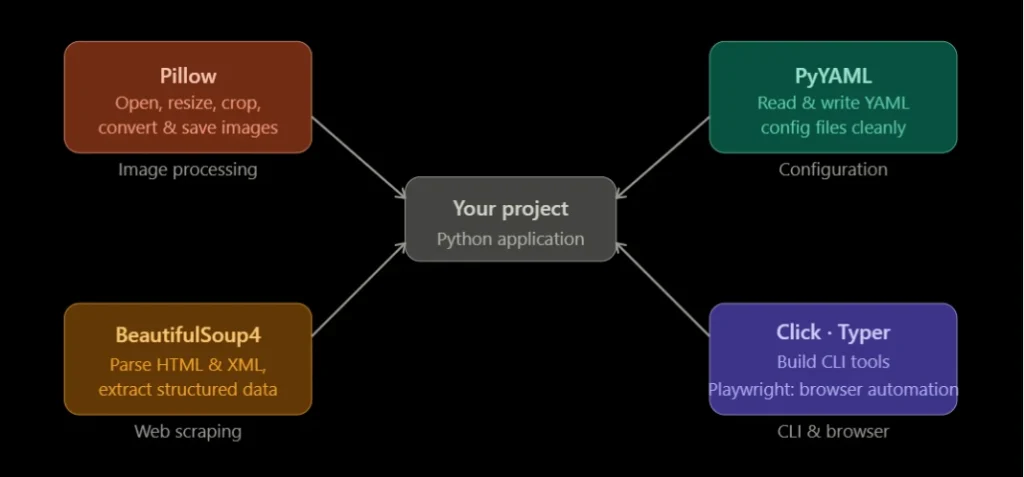
21) Pillow is Python’s standard image processing library. Open, resize, crop, convert, and save images in any common format. It comes up in web apps that handle user uploads, data pipelines that process images, and automation scripts that generate visual outputs.
pip install Pillow22) PyYAML reads and writes YAML configuration files cleanly. Most Python applications store their settings in YAML, so this package ends up in nearly every requirements.txt at some point.
pip install pyyaml23) BeautifulSoup4 parses HTML and XML to pull structured data from web pages. If you need to extract specific information from a site like prices, headlines, links, or tables, BeautifulSoup4 is the standard tool for the job.
pip install beautifulsoup424) Click builds clean, structured command-line interfaces. It handles argument parsing, automatic help text, command grouping, and input validation with minimal boilerplate. Use it any time your Python script needs to behave like a proper CLI tool.
pip install click25) Typer does the same thing as Click but uses Python type hints to define arguments automatically, which means even less code to write. The two are closely related, and Typer is actually built on top of Click.
pip install typer26) Playwright automates real browsers like Chromium, Firefox, and Safari. It can navigate pages, fill forms, click buttons, and extract content from JavaScript-rendered sites that BeautifulSoup4 cannot reach. Also the tool of choice for end-to-end browser testing.
pip install playwright27) Selenium is Playwright’s predecessor and is still widely used for browser automation and web testing, particularly in teams with existing Selenium infrastructure.
pip install seleniumAI Agents and Autonomous Systems (OpenClaw)
When you move from standard web apps or data scripts into autonomous AI agents, the requirements shift considerably.
An agent is not just responding to requests, but it is browsing the web independently, maintaining memory across sessions, serving its own API interface, and executing multi-step tasks without human involvement at each stage.
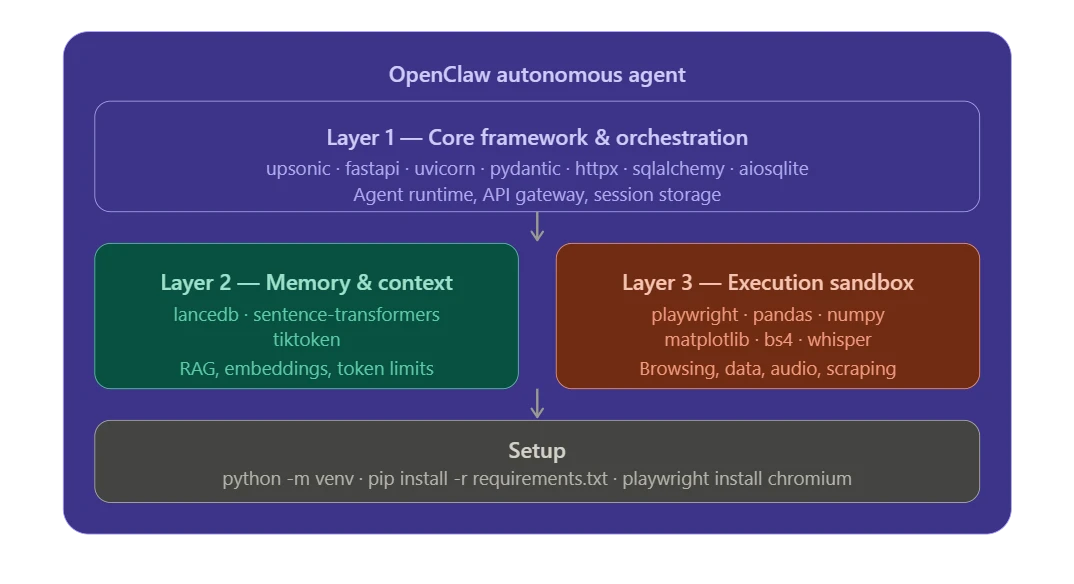
OpenClaw is built for exactly this kind of deployment. Its core engine is written in TypeScript, but it exposes a full Python SDK and integrates deeply with Python-based tooling.
In practice, this means your Python environment for an OpenClaw deployment is not a single flat requirements.txt, it is three distinct dependency layers, each handling a different part of the agent’s operation.
Layer 1 – Core framework and orchestration
This layer keeps the agent running. It handles the daemon lifecycle, API routing, multi-channel messaging endpoints, and the local gateway server that everything else talks through.
upsonic
fastapi
uvicorn
pydantic
httpx
sqlalchemy
aiosqliteupsonic– the autonomous agent runtime, background loop management, and token trackingfastapi+uvicorn– power the local hosting gateway and handle API requests from the frontend or connected botspydantic– validates configuration and standardises data structures passed between toolshttpx– handles concurrent network calls to model providers like Anthropic, OpenAI, or DeepSeeksqlalchemy+aiosqlite– lightweight local storage for message histories and session state
Layer 2 – Context and long-term memory
This layer manages everything OpenClaw needs to remember. It handles Retrieval-Augmented Generation (RAG) pipelines, document chunking, vector storage, and semantic context recall, so the agent can draw on past conversations and uploaded documents when responding.
lancedb
sentence-transformers
tiktokenlancedb– embedded, zero-setup local vector database for semantic search and memory storagesentence-transformers– generates local text embeddings without requiring a cloud API calltiktoken– counts exact token usage before payloads go to the model, preventing context window crashes
Layer 3 – Execution sandbox and skills
This is the layer most people think of when they picture an AI agent doing real work. It is dynamically activated when OpenClaw’s execution extensions are enabled, giving the agent the ability to analyze data, generate charts, scrape pages, and process audio.
playwright
pandas
numpy
matplotlib
seaborn
beautifulsoup4
openai-whisperplaywright– drives headless browsers for autonomous web navigation, form interaction, and scrapingpandas+numpy– allow the agent to read local CSV and JSON files, perform calculations, and modify tablesmatplotlib+seaborn– let the agent export visual charts directly from data analysis tasksbeautifulsoup4– parses HTML for structured extraction from pages that do not require full browser renderingopenai-whisper– handles local audio transcription for voice inputs via connected messaging platforms
Setting up a full OpenClaw environment
Always start with a virtual environment to keep OpenClaw’s dependencies isolated from your other projects:
python -m venv openclaw-env
source openclaw-env/bin/activate      # macOS / Linux
openclaw-env\Scripts\activate         # Windows
Then install from your requirements file:
pip install -r requirements.txtFinally, install the Playwright browser binaries. This step is separate from the pip install and is easy to miss, but without it, the agent cannot browse the web regardless of what is in your requirements file:
playwright install chromiumIf you are deploying via Docker, OpenClaw also supports injecting additional packages at build time through an environment variable, which gets baked into the container automatically:
OPENCLAW_IMAGE_PIP_PACKAGES="scikit-learn yfinance beautifulsoup4"This is useful when you want to extend the agent’s skills without modifying the base image.
Core Pip Package Management Commands
These are the commands you will use regularly once a project is underway. Each one is worth knowing well.
Install a single package:
pip install requestsInstall an exact version – recommended for anything going to production, where consistency matters:
pip install requests==2.31.0Save your current environment to a requirements file. This snapshots every package and its version number so you can recreate the environment exactly elsewhere:
pip freeze > requirements.txtReplicate an environment from a requirements file. Run this on any machine or server to install the same packages at the same versions:
pip install -r requirements.txtSee everything currently installed in your active environment:
pip listGet metadata and dependency information for a specific package, useful when you are diagnosing conflicts:
pip show requestsRemove a package cleanly:
pip uninstall requestsA few habits worth building early:
1. Always work inside a virtual environment. Create one with python -m venv venv, activate it, and install packages from there. It keeps projects from interfering with each other and protects your system Python.
Pin your versions in requirements.txt for production environments. requests in a requirements file is a moving target. requests==2.31.0 is not.
If you are working on a modern Python project, take a look at uv, a faster package manager and virtual environment tool that is compatible with standard requirements.txt files and significantly faster than pip for large dependency trees.
Pip Packages Complete List FAQs
How do I see all pip packages installed on my system?
Run pip list in your terminal. It prints every package name and version number installed in your active environment. If you are inside a virtual environment, it only shows packages installed there not anything from your system Python. To see packages installed globally, deactivate the virtual environment first and run pip list again.
What is the difference between pip install and pip install -r requirements.txt?
pip install [package] installs a single package. pip install -r requirements.txt reads a file and installs every package listed inside it, all at once. The -r flag is how you replicate a full application environment on a new machine, a CI server, or a production host. The first is for development and experimentation. The second is for consistency across environments.
Why does OpenClaw have its own curated requirements.txt?
Because an autonomous AI agent has different infrastructure needs than a standard web app or data script. OpenClaw handles browser automation, persistent memory, LLM connectivity, and real-time API serving simultaneously. Each package in its requirements list covers a specific part of that stack. A general-purpose Python environment will not have all of them, and the missing pieces, particularly the Playwright browser binaries, are not obvious from error messages alone.
Can I run pip packages on a shared hosting environment?
Shared hosting typically does not provide the root access or process persistence that Python applications need. You can install packages, but you generally cannot run long-lived processes, control your Python version, or maintain state between requests the way a real application needs to. A VPS is the correct environment for Python apps. Our hosting plans at Truehost are configured specifically for this.
What Python version does OpenClaw require?
OpenClaw requires Python 3.10 or higher. Always check the package page on PyPI before deploying. Version requirements occasionally update between releases, and building against an older Python version will cause problems that are frustrating to debug after the fact.
Deploying Your Python Applications with OpenClaw on Truehost
Getting code running locally is the easy part. The harder part is keeping it running reliably, 24 hours a day, with consistent uptime, proper network connectivity, and a managed environment that does not require you to be a sysadmin to maintain.
This challenge is amplified with autonomous AI agents.
OpenClaw needs persistent memory storage, uninterrupted connectivity for web browsing, and a stable environment to manage its task queue. A local machine or a poorly configured VPS will cause problems that are difficult to trace.
Truehost OpenClaw VPS Hosting solves it by giving you a preconfigured environment for Python and OpenClaw projects, which means you skip the server setup entirely and go straight to running your agent.
You get:
- One-click or guided deployment for OpenClaw applications
- A managed environment with security updates and performance monitoring handled for you
- Local Kenyan data centers for low-latency access and local support
- Payment via M-Pesa, card, or bank transfer
You should not be spending time on server configuration when you could be building. Host your OpenClaw AI agent on Truehost and focus on something better.
Start with the section of this pip packages complete list that matches your project type. Build a clean requirements.txt, test locally, and when you are ready to go live, bring it to Truehost.