Domain SearchInstantly check and register your preferred domain name
 Web Hosting
 cPanel HostingHosting powered by cPanel (Most user friendly)
 WordPress HostingHost your WordPress website with fast, secure, and affordable WordPress hosting in Kenya.
 KE Domains
 Reseller HostingStart your own hosting business without tech hustles
 Windows HostingOptimized for Windows-based applications and sites.
 Free Domain
 Affiliate ProgramEarn commissions by referring customers to our platforms
 Free HostingTest our SSD Hosting for free, for life (1GB storage)
 Domain TransferMove your domain to us with zero downtime and full control
 All DomainsBrowse and register domain extensions from around the world
 .Com Domain
 WhoisLook up domain ownership, expiry dates, and registrar information
 VPS Hosting
 Managed VPSNon techy? Opt for fully managed VPS server
 Dedicated ServersEnjoy unmatched power and control with your own physical server.
 Website Builder
 Online Store BuilderLaunch a professional e-commerce store without writing code.
 Web Design ServiceGet a custom-designed website tailored to your brand and goals. From just KES 15,600
 BlogRead our guides on web hosting, online business, digital marketing, and more
 SupportOur support guides cover everything you need to know about our services
 ContactContact us via chat or email
Your hardware needs depend on what you’re building, not just that you’re using Python.
A beginner writing scripts needs a basic laptop. A data scientist training ML models needs serious specs.
This guide gives you details on Python system and hardware requirements, broken down by component and use case, so you stop guessing and start building.
Hardware Components and Their Role
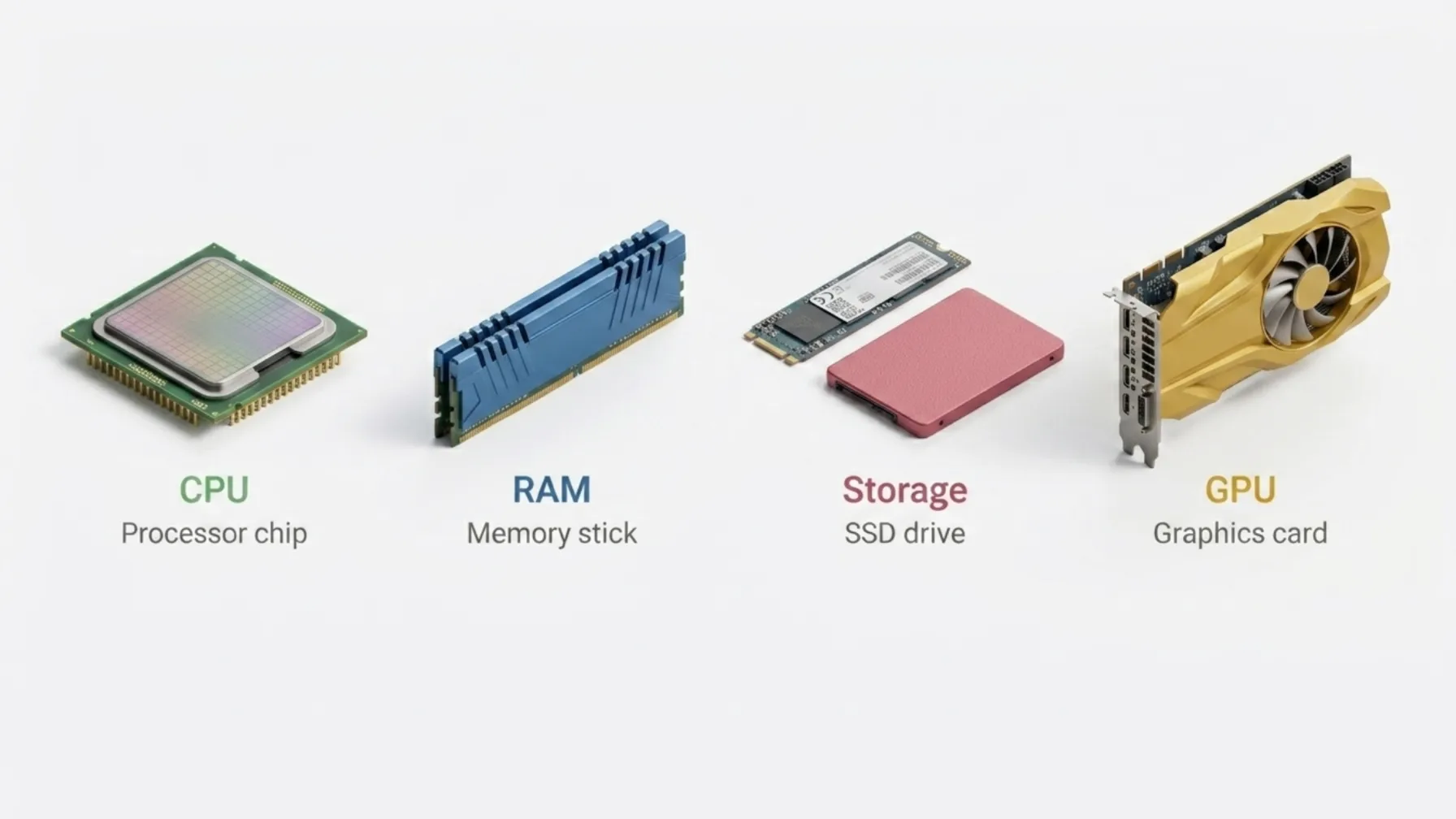
1) CPU
Python is primarily single-threaded due to the Global Interpreter Lock (GIL). The GIL is a mutex that allows only one thread to execute Python bytecode at a time, even on a multi-core machine.
This is a fundamental design decision in CPython (the standard Python implementation) that has significant hardware implications.
Clock Speed vs. Core Count
Because of the GIL, clock speed is more important than core count for most Python tasks.
A processor that can execute each instruction faster will outperform one with more cores sitting idle.
In practical terms, a 3.5 GHz quad-core will outperform a 2.0 GHz eight-core for general Python work you’re getting more done per clock cycle, not just more clocks running in parallel.
Cache Size and IPC
Beyond raw clock speed, cache size, and IPC (Instructions Per Clock) are also key performance factors.
A larger L3 cache reduces the time the CPU spends waiting on memory, and higher IPC means more work per cycle even at the same frequency.
Modern Ryzen 5 or Core i5 processors hit the sweet spot here they offer strong single-core performance, decent cache sizes, and don’t require a workstation budget.
When More Cores Do Help
The exception to the single-threaded rule: libraries like NumPy, TensorFlow, and Python’s multiprocessing module can bypass the GIL entirely.
NumPy operations run in compiled C code outside the GIL. TensorFlow and PyTorch use native threads and GPU parallelism.
The multiprocessing module spawns separate processes, each with their own GIL, allowing true parallelism.
For those workloads, more cores genuinely help a 12-core processor will outpace a 4-core one when you’re training a model or running parallel data pipelines.
2) RAM
Python itself uses very little memory; the interpreter and a basic script might consume 30–50 MB. But that’s rarely the whole picture. Your libraries, datasets, and IDE use a lot.
Here’s a practical breakdown by use case:
- 4 GB: Enough to learn Python and run basic scripts. You’ll feel the pressure if you open a browser and an IDE at the same time, but it works.
- 8 GB: The minimum for general development. Comfortable for most scripting, web development, and light automation work.
- 16 GB: Recommended for data science as of 2025. Pandas DataFrames, loaded models, and Jupyter kernels consume memory fast. 16 GB keeps you from constantly hitting swap.
- 32 GB+: Required for training ML models locally or processing large datasets. If you’re working with datasets that don’t fit in memory, or fine-tuning language models, this is where you need to be.
One thing worth knowing: Python’s memory management relies on reference counting and a garbage collector, which means memory isn’t always released immediately after use.
Long-running scripts or iterative data processing can accumulate memory over time. More RAM gives you headroom to work without interruption.
If your machine has 8 GB and you’re hitting limits, a cloud VPS with more RAM is often cheaper than buying new hardware.
3) Storage (SSD vs HDD)
Use an SSD. Full stop.
Python loads libraries, reads datasets, and writes files constantly throughout a typical development session.
Every time you run a script, Python imports modules from disk. Every time you load a dataset, it reads from storage.
Every time you write output, log files, or model checkpoints, it writes to storage.
An SSD handles all of this in milliseconds. An HDD with its spinning platters and mechanical read heads turns those milliseconds into seconds, and those seconds into minutes every single time you run your project.
Over the course of a workday, the difference is significant.
Here’s what to think about in terms of capacity:
- 50 GB: Fine for beginners learning the language and running small projects
- 256 GB SSD: A good starting point for most developers. Covers your OS, Python environments, common libraries, and a handful of projects
- 512 GB – 1 TB SSD: Needed for large datasets, Docker images, or game development assets. These workloads expand fast, and you don’t want to be managing disk space mid-project
NVMe SSDs offer even better performance than standard SATA SSDs, especially for heavy read/write workloads like dataset processing or running multiple Docker containers.
If you’re building a dedicated development machine, it’s worth the upgrade.
4) GPU
For most Python work, scripting, web apps, REST APIs, automation, data wrangling you don’t need a GPU.
Your CPU handles it without issue, and a dedicated graphics card adds cost and power consumption without any benefit.
You do need a GPU for:
- Deep learning with TensorFlow or PyTorch: Training neural networks on a CPU is technically possible, but practically painful. A task that takes 2 hours on a GPU can take days on CPU-only hardware.
- Game development with real-time rendering: Tools like Pygame handle 2D without much GPU demand, but anything with 3D graphics or physics simulation needs dedicated GPU processing power.
- Computer vision and video processing: Frame-by-frame analysis, real-time inference, and video encoding all benefit substantially from GPU acceleration.
GPU recommendations by use case:
| Use Case | Recommended GPU |
|---|---|
| Entry-level ML | NVIDIA GTX 1050 Ti |
| Intermediate ML / Game Dev | NVIDIA RTX 2060 or 3060 |
| Production ML | NVIDIA RTX 3080 / 4080, or cloud GPU instances |
One important note on GPU brand: stick to NVIDIA. CUDA support across Python ML libraries is far better than AMD’s ROCm.
TensorFlow, PyTorch, and most ML frameworks have native, well-documented CUDA support.
ROCm has improved, but NVIDIA remains the standard for Python ML development and you’ll encounter far fewer compatibility issues.
If you only occasionally need GPU power, cloud GPU instances (from providers like RunPod, Lambda Labs, or a VPS with GPU add-ons) let you pay for what you use rather than committing to expensive hardware upfront.
Hardware Requirements by Use Case
| Use Case | CPU | RAM | Storage | GPU |
| Beginner / Simple Scripts | Dual-core, 2.0 GHz | 4 GB | 50 GB HDD/SSD | Not needed |
| Data Science / ML | Quad-core, 3.0 GHz+ | 16–32 GB | 256 GB SSD+ | NVIDIA GTX 1050+ |
| Game Dev / Graphics | Multi-core, 3.5 GHz+ | 16 GB+ | 512 GB SSD+ | NVIDIA RTX 2060+ |
| Large-Scale Apps | Multi-core, 3.5 GHz+ | 32 GB+ | 1 TB SSD | Optional |
Operating System Compatibility
Python runs on Windows, macOS, and Linux. Each has its strengths, and the right choice depends on what you’re building and where it will run.
Linux (Ubuntu 22.04 LTS recommended)
This is the best environment for data science and server-side development. It’s lightweight, gives you full control over your environment, and most production servers run it anyway.
If you’re deploying Python apps to a VPS, you’re running Linux, and learning to develop on it locally means fewer surprises at deployment.
Package management with apt, environment control with venv or conda, and native support for most Python tooling make it the cleanest option for serious development work.
macOS (Strong Developer Experience )
The terminal is Unix-based, so it behaves similarly to Linux in most development scenarios.
Apple Silicon (M1/M2/M3) chips have strong ML performance for their power envelope.
This makes macOS a solid choice if you’re doing light-to-moderate model training. It is especially useful when you don’t have a dedicated GPU.
IDE support is excellent. The overall developer ecosystem is also mature.
Windows (For Beginners and General Projects)
The main friction has historically been around tooling compatibility many Python libraries are built and tested on Unix-first environments.
WSL2 (Windows Subsystem for Linux) closes this gap significantly by giving you a full Linux terminal inside Windows, complete with its own filesystem and package manager.
Most Python developers on Windows use WSL2 for anything server-related or data-heavy.
If you’re deploying to servers or doing data science, Linux is the cleanest path. For everything else, use what you’re comfortable with.
Recommended Tools by Use Case
Choosing the right tools alongside your hardware makes a meaningful difference in how productive your Python environment is.
Here’s what works well across different development contexts:
Beginner
- VS Code: Lightweight, free, and has excellent Python extension support including linting, IntelliSense, and integrated terminal
- Sublime Text: Fast and minimal, good for quick scripting without the overhead of a full IDE
- PyCharm Community: More full-featured than VS Code, especially for handling larger codebases and managing virtual environments
Data Science / ML
- Jupyter Notebook / JupyterLab: The standard for interactive data exploration. Lets you run code in cells, visualise output inline, and document your process
- Anaconda: Bundles Python, Jupyter, and most data science libraries into one installer. Good for getting set up quickly without managing dependencies manually
- TensorFlow / PyTorch: The two dominant deep learning frameworks. TensorFlow is more suited to production deployments; PyTorch is preferred for research and experimentation
- scikit-learn: The go-to library for classical machine learning algorithms: regression, clustering, classification, and preprocessing pipelines
Game Development
- Pygame: The most widely used Python library for 2D game development. Good for learning game logic and building small projects
- Unity / Unreal Engine: Both support Python for scripting, automation, and pipeline tooling even though their core engines use C# and C++ respectively
- Blender: A full 3D modelling and animation tool with Python scripting built in, used extensively in games, film, and visual effects pipelines
Large-Scale Apps
- PyCharm Professional: Adds database tools, remote interpreter support, and deeper framework integration compared to the Community edition
- Docker: Lets you containerise your Python application so it runs identically across development, staging, and production environments
- Git: Version control is non-negotiable at scale. Git with a remote repository (GitHub, GitLab, or Bitbucket) keeps your codebase safe and collaborative
We at Truehost offer VPS hosting plans built for Python developers and businesses in Kenya.
Full root access, SSD storage, scalable RAM, and Ubuntu ready to go. Write code on any machine, run it on a server that doesn’t slow you down.
Python System and Hardware Requirements: FAQs
Do I need a powerful PC for Python?
No, not to get started. A basic laptop with 4 GB RAM runs Python fine. Your projects determine your real requirements. For scripting and web apps, budget hardware works. For ML and data science, you need 16 GB RAM and an SSD minimum. When local hardware becomes the bottleneck, a cloud VPS is the smarter spend.
Which PC is best for Python?
For general development: Core i5 or Ryzen 5, 16 GB RAM, 256 GB SSD covers 90% of use cases. For data science and ML: Core i7/Ryzen 7, 32 GB RAM, 512 GB SSD, NVIDIA GPU. Apple M-series MacBooks are excellent across the board. On a budget, a mid-range machine plus a VPS for heavy computation is the smart combination.
What OS is best for Python?
Linux (Ubuntu 22.04 LTS) for server deployment and data science. macOS for everyday development. Windows with WSL2 if that’s your environment. The best OS is the one you’ll actually use but for production server work, Linux wins.
Check our guide on how to update all pip packages
Run Python Without Hardware Limits With Truehost VPS
Hardware shouldn’t be what slows your Python project down.
Our VPS hosting plans give you SSD storage, scalable RAM, Ubuntu pre-installed, and full root access billed in KES via M-PESA.
Spin one up, deploy your project, and stop fighting your local machine.