Domain SearchInstantly check and register your preferred domain name
 Web Hosting
 cPanel HostingHosting powered by cPanel (Most user friendly)
 WordPress HostingHost your WordPress website with fast, secure, and affordable WordPress hosting in Kenya.
 KE Domains
 Reseller HostingStart your own hosting business without tech hustles
 Windows HostingOptimized for Windows-based applications and sites.
 Free Domain
 Affiliate ProgramEarn commissions by referring customers to our platforms
 Free HostingTest our SSD Hosting for free, for life (1GB storage)
 Domain TransferMove your domain to us with zero downtime and full control
 All DomainsBrowse and register domain extensions from around the world
 .Com Domain
 WhoisLook up domain ownership, expiry dates, and registrar information
 VPS Hosting
 Managed VPSNon techy? Opt for fully managed VPS server
 Dedicated ServersEnjoy unmatched power and control with your own physical server.
 Website Builder
 Online Store BuilderLaunch a professional e-commerce store without writing code.
 Web Design ServiceGet a custom-designed website tailored to your brand and goals. From just KES 15,600
 BlogRead our guides on web hosting, online business, digital marketing, and more
 SupportOur support guides cover everything you need to know about our services
 ContactContact us via chat or email
The AI assistant market is moving fast, but few platforms have captured as much attention in 2026 as OpenClaw. What started as a promising open-source project has quickly grown into one of the most talked-about self-hosted AI assistant platforms available today. In fact, OpenClaw’s website traffic jumped by more than 925% between February and March 2026, a clear sign that interest in autonomous AI agents is growing rapidly.
Part of the excitement comes from the fact that OpenClaw does much more than answer questions. It can monitor systems, complete tasks, browse the web, manage workflows, and interact with other tools on your behalf. With features like AgentSkills, persistent memory, browser automation, scheduling, and support for local AI models, it feels less like a chatbot and more like a capable digital assistant that can actually get work done.
The possibilities are surprisingly broad. Businesses are using it to monitor competitors and manage customer outreach, developers are automating coding tasks, and individuals are simplifying everything from meal planning to daily briefings. As more integrations and AgentSkills become available, new use cases continue to emerge.
To help you get inspired, here are 13 creative OpenClaw assistant use cases you need to try.
1) Daily Briefing Assistant
What It Does
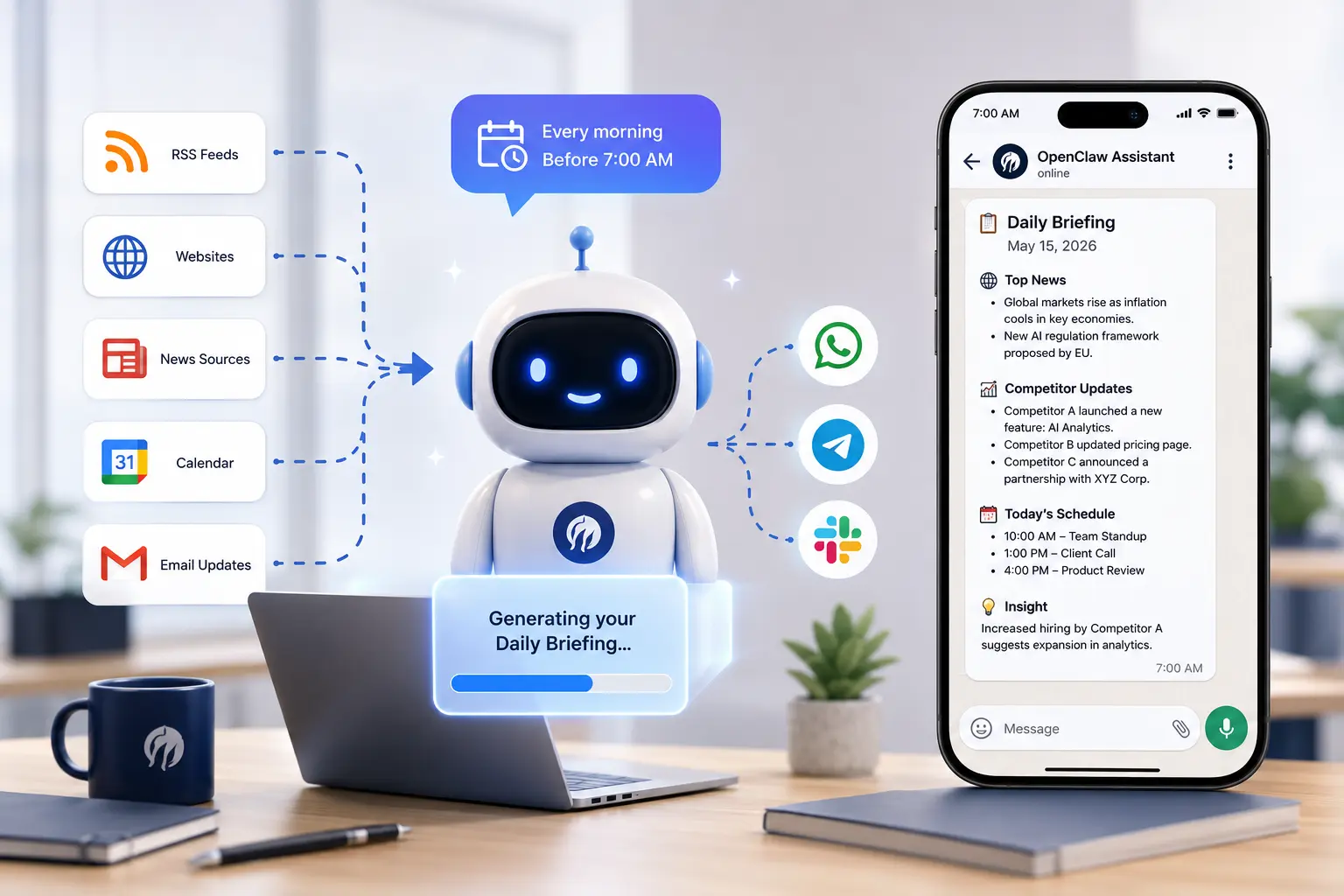
Every morning, OpenClaw can prepare a personalized briefing and deliver it directly to WhatsApp, Telegram, Slack, or your preferred communication channel.
Instead of spending the first hour of your day checking emails, industry websites, calendars, and news feeds, OpenClaw does the work for you.
How It Works
- Uses the Cron Scheduler AgentSkill to run automatically
- Pulls information from RSS feeds, websites, calendars, and news sources
- Summarizes updates into an easy-to-read report
- Delivers the briefing to your messaging app
Real-World Example
A startup founder configures OpenClaw to monitor five competitor websites overnight. Every morning before 7 AM, they receive a summary highlighting new product launches, pricing changes, blog posts, and announcements.
Why It’s Creative
Most AI assistants are reactive. You open them and ask questions. This workflow flips the relationship entirely by having OpenClaw proactively bring information to you.
Agent Skills Needed: Cron Scheduler, TinyFish Web Agent, Gmail Pub/Sub (optional)
Difficulty Level: Beginner
2) Email Management Assistant
What It Does
OpenClaw can monitor your inbox, categorize incoming messages, draft responses, flag important conversations, and remind you about follow-ups.
How It Works
- Gmail Pub/Sub monitors email activity in real time
- AI categorizes messages by urgency and topic
- Routine emails receive draft responses automatically
- Important conversations are escalated for human review
Real-World Example
A freelance consultant uses OpenClaw to process all new client inquiries overnight. By morning, potential client emails already have personalized draft responses waiting for approval.
Why It’s Creative
Email often consumes hours every week. OpenClaw transforms inbox management from a constant interruption into a structured workflow.
Agent Skills Needed: Gmail Pub/Sub, Cron Scheduler
Difficulty Level: Beginner to Intermediate
3) Automated Coding Assistant
What It Does
Instead of spending hours fixing bugs yourself, you can hand OpenClaw a task list before bed and wake up to fixes, test results, and a clear report showing what was accomplished overnight.
That’s one of the most powerful OpenClaw use cases available today.
How It Works
- Accesses approved project files
- Uses persistent memory to understand project context
- Runs terminal commands and tests
- Creates commits and deployment summaries
Real-World Example
Developers have reported using OpenClaw overnight to identify issues, implement fixes, run validation tests, and prepare pull requests while they sleep.
Why It’s Creative
The real advantage isn’t code generation. It’s the combination of context, memory, automation, and decision-making.
Safety Recommendation
Always use staging environments and review autonomous changes before production deployment.
Agent Skills Needed: Terminal Access, Git Integration, Nix Mode
Difficulty Level: Advanced
4) Real-Time Competitor Monitoring
What It Does
OpenClaw can continuously monitor competitor websites, social channels, changelogs, and job boards for meaningful changes.
How It Works
- Browser automation checks selected sources
- Stores snapshots for comparison
- Detects meaningful updates
- Sends alerts when changes occur
Real-World Example
A SaaS company tracks competitor pricing pages, product updates, and hiring trends to identify market opportunities before competitors gain traction.
Why It’s Creative
Competitive intelligence is usually reactive and manual. OpenClaw turns it into an automated background process.
Agent Skills Needed: TinyFish Web Agent, Cron Scheduler, Persistent Memory
Difficulty Level: Intermediate
5) Meal Planning and Grocery Automation

What It Does
OpenClaw can manage weekly meal plans, create shopping lists, coordinate household preferences, and even trigger grocery ordering workflows.
How It Works
- Reads dietary preferences from Notion
- Builds balanced meal schedules
- Generates grocery lists automatically
- Communicates updates through messaging apps
Real-World Example
A family uses OpenClaw to coordinate meals for the week, ensuring nutritional goals, dietary restrictions, and grocery budgets remain aligned.
Why It’s Creative
The value comes from connecting multiple systems into a single automated household workflow.
Agent Skills Needed: Notion Integration, WhatsApp Integration, Cron Scheduler
Difficulty Level: Intermediate
6) Build Your Own CRM
What It Does
Instead of paying for expensive CRM software, OpenClaw can help create a custom relationship management system customised to your workflow.
How It Works
- Tracks interactions across email and messaging platforms
- Stores notes and contact history
- Schedules follow-up reminders
- Suggests outreach opportunities
Real-World Example
A consultant uses OpenClaw to monitor client communications and receive reminders whenever a relationship has gone inactive for too long.
Why It’s Creative
Traditional CRMs show data. OpenClaw analyzes the data and recommends actions.
Agent Skills Needed: Gmail Pub/Sub, Notion or Database Integration, Persistent Memory
Difficulty Level: Intermediate to Advanced
7) Autonomous Research Assistant
What It Does
Give OpenClaw a research topic and let it spend hours collecting information, comparing sources, and creating structured reports.
How It Works
- Browses websites and online resources
- Collects and organizes findings
- Stores discoveries in memory
- Produces summaries and reports
Real-World Example
A marketer asks OpenClaw to analyze competitor content strategies. By morning, a detailed report outlining trends, opportunities, and content gaps is ready.
Why It’s Creative
Research becomes a delegated task rather than a time-consuming activity.
Agent Skills Needed: TinyFish Web Agent, Cron Scheduler, File System Access
Difficulty Level: Intermediate
8) Smart Home and Health Monitoring
What It Does
OpenClaw can monitor smart home devices and health data, alerting users only when meaningful events occur.
How It Works
- Connects to smart home platforms
- Monitors sensor and device activity
- Detects unusual patterns
- Sends proactive alerts
Example Scenarios
- Unexpected energy spikes
- Missed medication reminders
- Sleep pattern changes
- Home security notifications
Why It’s Creative
Instead of simply displaying data, OpenClaw interprets information and provides actionable insights.
Agent Skills Needed: API Integrations, Cron Scheduler, Messaging Integration
Difficulty Level: Advanced
9) Content Publishing Pipeline
What It Does
OpenClaw can transform a simple idea into a finished piece of content ready for publication.
How It Works
- Receives a content brief
- Researches supporting information
- Drafts content
- Formats for target platforms
- Publishes or schedules posts
Real-World Example
A creator sends a blog topic via WhatsApp. OpenClaw researches the subject, drafts the article, creates social media snippets, and prepares everything for review.
Why It’s Creative
A workflow that once required multiple tools and several hours can be initiated from a single message.
AgentSkills Needed: X Articles AgentSkill, TinyFish Web Agent, Cron Scheduler
Difficulty Level: Beginner to Intermediate
10) Automated Sales Outreach
What It Does
OpenClaw can research prospects, personalize outreach messages, manage follow-up sequences, and categorize responses.
How It Works
- Imports prospect lists
- Researches companies automatically
- Generates personalized outreach
- Adapts follow-up timing based on engagement
Why It’s Creative
Most sales tools rely on templates. OpenClaw can generate genuinely contextual outreach based on actual research.
Example Use Case
A startup founder launches a campaign to 100 prospects, with each email referencing recent company news or business developments.
Agent Skills Needed: Gmail Pub/Sub, TinyFish Web Agent, Cron Scheduler
Difficulty Level: Advanced
11) Cross-Platform Project Manager
What It Does
OpenClaw can monitor projects across multiple platforms and keep everyone aligned.
How It Works
- Tracks GitHub issues
- Monitors Notion boards
- Reads Slack or Discord updates
- Identifies blockers and overdue tasks
- Generates status summaries
Why It’s Creative
OpenClaw effectively acts as an operations coordinator that never forgets deadlines or missed updates.
Real-World Example
A remote team uses OpenClaw to generate weekly project reports and identify bottlenecks before they become serious issues.
Agent Skills Needed: GitHub Integration, Notion Integration, Slack or Discord Integration
Difficulty Level: Advanced
12) Voice-Controlled AI Assistant
What It Does
OpenClaw can function as a fully voice-controlled assistant that accesses all configured tools and workflows.
How It Works
- Voice activation starts interactions
- Speech is converted into prompts
- AgentSkills execute requested actions
- Responses can be spoken back to the user
Example Commands
- “What’s on my calendar today?”
- “Summarize my unread emails.”
- “Generate this week’s competitor report.”
- “Create a new task in Notion.”
Why It’s Creative
Unlike traditional voice assistants that operate within limited ecosystems, OpenClaw can access the custom workflows you’ve built.
Agent Skills Needed: Built-In Voice Mode
Difficulty Level: Beginner
13) Private AI That Runs Locally
What It Does
OpenClaw can run entirely on your own hardware using local AI models through Ollama.
How It Works
- Install Ollama
- Download a compatible local model
- Configure OpenClaw to use local inference
- Keep all data on your machine
Benefits
- Improved privacy
- No API dependency
- Reduced long-term operating costs
- Complete control over your data
Why It’s Creative
Many AI platforms require sending data to third-party cloud providers. OpenClaw offers a path to full local ownership without sacrificing automation capabilities.
AgentSkills Needed: Ollama and any desired AgentSkills
Difficulty Level: Intermediate
What Makes OpenClaw Different?
OpenClaw represents a shift in how AI is used. Instead of simply responding to prompts, it can monitor information, perform tasks, coordinate workflows, and keep projects moving forward with minimal supervision. From email management and competitor research to content creation, project tracking, and custom automations, OpenClaw helps transform repetitive work into streamlined, automated processes.
What makes it especially powerful is the combination of autonomous agents, persistent memory, browser automation, scheduling capabilities, and support for both cloud and local AI models. Together, these features allow OpenClaw to function more like a digital team member than a traditional AI assistant.
The 13 examples in this guide are just the beginning. As new AgentSkills, integrations, and workflows continue to emerge, the possibilities for automation will only grow. Start with one task that consumes too much of your time, automate it, and expand from there. You’ll quickly discover how much work OpenClaw can handle behind the scenes.
Ready to build your own AI assistant? Deploy OpenClaw on a reliable, fully managed environment with Truehost and get started in minutes. Explore Truehost OpenClaw hosting plans and launch your first autonomous AI agent today