Domain SearchInstantly check and register your preferred domain name
 Web Hosting
 cPanel HostingHosting powered by cPanel (Most user friendly)
 WordPress HostingHost your WordPress website with fast, secure, and affordable WordPress hosting in Kenya.
 KE Domains
 Reseller HostingStart your own hosting business without tech hustles
 Windows HostingOptimized for Windows-based applications and sites.
 Free Domain
 Affiliate ProgramEarn commissions by referring customers to our platforms
 Free HostingTest our SSD Hosting for free, for life (1GB storage)
 Domain TransferMove your domain to us with zero downtime and full control
 All DomainsBrowse and register domain extensions from around the world
 .Com Domain
 WhoisLook up domain ownership, expiry dates, and registrar information
 VPS Hosting
 Managed VPSNon techy? Opt for fully managed VPS server
 Dedicated ServersEnjoy unmatched power and control with your own physical server.
 Website Builder
 Online Store BuilderLaunch a professional e-commerce store without writing code.
 Web Design ServiceGet a custom-designed website tailored to your brand and goals. From just KES 15,600
 BlogRead our guides on web hosting, online business, digital marketing, and more
 SupportOur support guides cover everything you need to know about our services
 ContactContact us via chat or email
Most AI assistants wait for you to type. OpenClaw doesn’t.
While you’re asleep, it’s checking your inbox. While you’re offline, it’s scanning your calendar.
While you’re in a meeting, it’s executing tasks you set up once, without a single prompt from you.
That’s not a chatbot. That’s an agent.
OpenClaw is a viral open-source personal AI agent. It connects AI models with your local files and messaging apps like WhatsApp and Discord to automate tasks around the clock.
It runs on your own machine or VPS. Your data stays yours.
It launched in November 2025 as a weekend side project by Peter Steinberger.
By April 2026, it had hit 347,000 GitHub stars, the most-starred repository in GitHub history.
MIT-licensed. 1,200+ contributors. And it only keeps getting better.
This article covers the standout OpenClaw AI assistant features worth knowing before you set one up.
OpenClaw AI Assistant Features List
1) Multi-Channel Messaging
OpenClaw doesn’t give you a new app to install or a new dashboard to check. It slides into the apps you already live in.
You message your agent on WhatsApp, Telegram, Slack, Discord, or any of 20+ supported platforms.
OpenClaw routes your request to your chosen LLM, and the agent executes the task then replies.
Signal and iMessage are also supported in DMs and group chats.
Say you’re buried in office work. You fire off a quick WhatsApp message: ‘Summarise my unread emails and flag anything urgent.’
You get back to your tasks. By the time you’re done, so is OpenClaw.
You don’t change your workflow. OpenClaw fits into it.
This works cross-platform too: Mac, Windows, and Linux all run the same agent instance without any configuration differences.
2) Agentic Capabilities
Here’s where OpenClaw separates itself from every other AI tool you’ve used.
The agent has direct access to your file system, shell, and connected apps. It doesn’t stop at generating a draft it can run it, send it, file it, and report back.
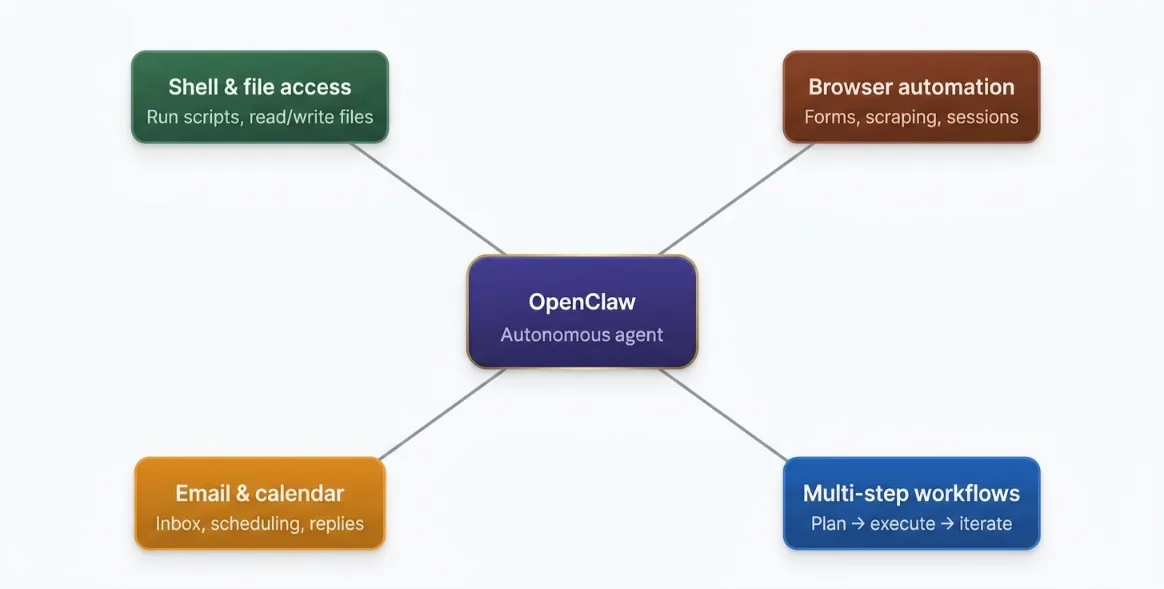
Here’s what that looks like in practice across four main areas:
- Shell & file access. OpenClaw can run terminal commands, read and write files, and execute scripts directly on your machine. Tell it to reorganise a project folder or run a deployment script it will.
- Browser automation. It can fill web forms, extract data from pages, and control browser sessions. Useful for repetitive data-entry tasks or scraping information you check daily.
- Email & calendar management. Clear your inbox, send replies, schedule meetings, and resolve scheduling conflicts all from a single message.
- Multi-step autonomous workflows. This is the real differentiator. OpenClaw can plan a task, use tools to execute it, evaluate the result, iterate, and finish without you holding its hand at every step.
That last capability is what separates an agent from a chatbot. A chatbot responds. An agent operates.
Check our guide on OpenClaw AI assistant capabilities
3) Persistent Memory & Personalization
Every time you open a new ChatGPT conversation, you start from scratch. OpenClaw doesn’t work that way.
Unlike stateless chatbots, OpenClaw stores configuration data and interaction history locally in Markdown files.
Your preferences, task history, and scheduled jobs live in a MEMORY.md file.
This file holds durable facts, preferences, and decisions that should survive indefinitely.
It is loaded at the start of every session, so anything written here is always in context at session open.
Tell it once that you prefer bullet-point summaries, work in Swahili and English, or always want meeting invites sent one day in advance.
It writes that to MEMORY.md. Every future session starts with that context already loaded.
The storage format is very important here. These are plain Markdown files human-readable, editable, and inspectable.
You can open MEMORY.md in any text editor and see what your agent knows about you. No black boxes.
If you want your agent to remember something, just ask it: ‘Remember that I prefer TypeScript.’ It will write it to the appropriate file.
Over time, the agent adapts. You stop repeating yourself. It stops asking obvious questions. The experience genuinely improves the longer you use it.
Read also: How to Set Up OpenClaw to WhatsApp and Use It
4) Heartbeat / Proactive Mode
This is the feature that makes OpenClaw feel less like software and more like a colleague.
HEARTBEAT.md is the scheduling brain. OpenClaw reads it every 30 minutes and executes any scheduled tasks it finds.
It wakes up every N minutes, reads HEARTBEAT.md, and stays silent unless something needs your attention.
When it fires, it sends the agent a prompt to read HEARTBEAT.md and follow it strictly.
If nothing needs attention, the agent replies with HEARTBEAT_OK, and OpenClaw suppresses this message so you never see it.
Your phone stays silent. Something needs attention. The agent sends you an actual message through your configured channel.
Practical use cases:
- Inbox monitoring: flag urgent emails without you checking manually
- Calendar awareness: reminds you of conflicts or back-to-back meetings
- Task follow-ups: surface anything you queued but haven’t acted on
- System checks: verify that scripts or services are running correctly
The beauty of the design is the silence. A heartbeat might check your inbox every 10 minutes, but only notify you once about a specific urgent email instead of spamming you repeatedly.
Here’s the practical tradeoff to know: at a 30-minute interval (48 runs per day), heartbeat consumes roughly 75,000 tokens daily.
That’s manageable on most plans, but it does mean your instance needs to be always running for the heartbeat to work as intended.
Consider Truehost’s managed OpenClaw hosting is worth considering. Your instance stays live 24/7 on a reliable VPS so heartbeat never stops, even when your laptop is off.
| Feature | Traditional Chatbot | OpenClaw with Heartbeat |
| Initiation | Requires human prompt | Self-initiates on schedule |
| Monitoring | Passive | Continuously active |
| Notifications | None | Event-driven alerts only |
| Operates offline | No | Yes (if hosted on VPS) |
5) AgentSkills & Extensibility
OpenClaw ships ready to work, but it’s also built to be extended.
OpenClaw skills are Markdown files that contain instructions for agents to complete specific tasks and use specific tools.
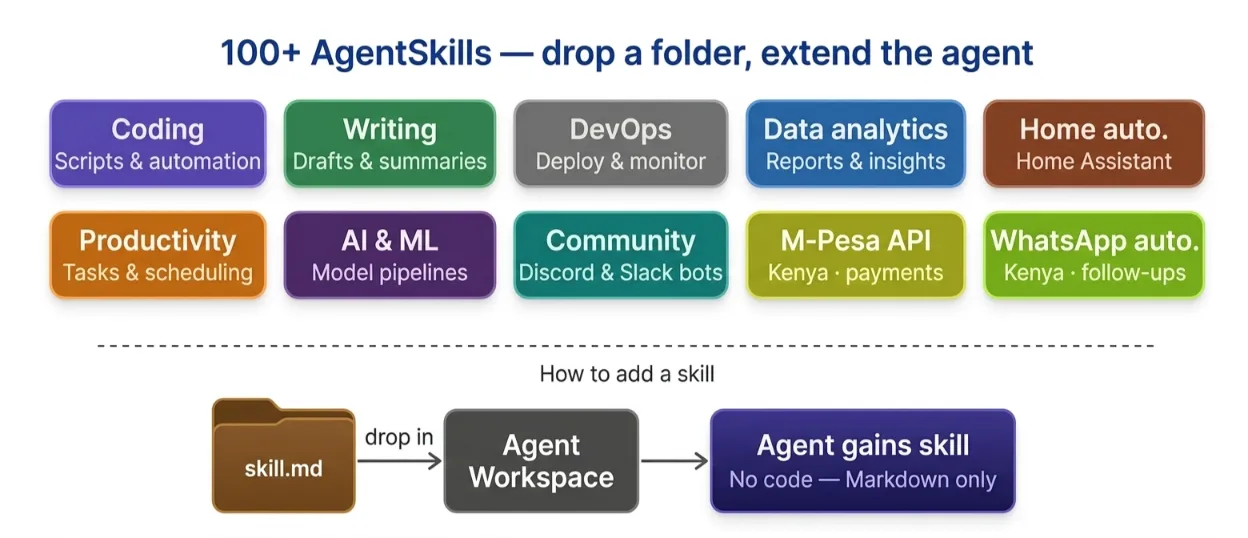
Each skill is a directory containing a skill.md file with YAML frontmatter and instructions.
These skills are available for a variety of categories, including coding, writing, data analytics, DevOps, AI and ML, community, and productivity.
The official skill library covers over 100 pre-built AgentSkills spanning shell execution, file system management, web automation, and more.
Adding a skill is as simple as dropping a folder into your workspace.
Want OpenClaw to control your smart home via Home Assistant? There’s a skill for that.
Connect to a music service, automate a project management workflow, or build a pipeline that pushes daily reports to Slack. The community has built setups for all of these.
Multi-agent support pushes this even further. You can set up routing between multiple agents or build ‘agent armies’ that handle complex, parallel tasks collaboratively.
One developer created Moltbook, a social network where OpenClaw agents generate posts, comment, and interact with each other autonomously.
That’s an extreme example, but it shows the ceiling of what’s possible.
For Kenyan businesses and developers, this extensibility is practical.
Connect OpenClaw to your M-Pesa API data, automate customer follow-up messages on WhatsApp, or build a daily business metrics digest, all without touching a line of complex code.
The community-maintained Awesome OpenClaw Skills GitHub repo is the best place to discover what others have already built.
Related: Best Openclaw Skills to Install
6) Privacy & Local Control
OpenClaw stores configuration data and interaction history locally in Markdown files.
When you run it on your own machine or VPS, your prompts, files, and outputs stay where you put them.
The only data that leaves your setup is what you send to your chosen AI model’s API, and that’s a direct connection you control.
OpenClaw is fully model-agnostic. It supports Claude (Anthropic), GPT models (OpenAI), DeepSeek V4 Flash and Pro, Grok (xAI), and local models via Ollama.
With Ollama, you can run everything fully offline not a single byte leaves your machine.
The MIT licence means the entire codebase is open for inspection. If you want to verify what the software does, you can read every line.
For Kenyan businesses handling sensitive customer data or financial records, this is significant. You’re not trusting a vendor’s privacy policy, you’re in full control.
Truehost’s managed OpenClaw hosting gives you that local-equivalent control on a reliable, always-on VPS.
7) Media Support & Web Control UI
You can send and receive images, audio files, and documents through your connected messaging channels.
Mobile nodes support camera input and voice useful when you want to photograph a document and ask the agent to extract data from it.
The Web Control UI gives you a dashboard for managing your instance, reviewing activity logs, and monitoring what the agent is doing in the background.
It’s particularly useful when you’re running multiple skills or agents and want a single-pane view of everything.
These features are power-user additions rather than core differentiators.
But for teams running OpenClaw as a shared business assistant, the visibility they provide makes operations significantly easier to audit and manage.
Top OpenClaw AI Assistant Features FAQ
What is the OpenClaw heartbeat feature?
Heartbeat is a proactive scheduling system that wakes your agent every 30 minutes (configurable), reads your HEARTBEAT.md file, and decides if anything needs attention. If not, it stays silent. If something needs your attention, it sends you a message via your configured channel.
Does OpenClaw work with WhatsApp?
Yes. WhatsApp is one of the primary supported channels alongside Telegram, Slack, Discord, Signal, and iMessage.
What are OpenClaw AgentSkills?
AgentSkills are Markdown-based instruction bundles that extend what your agent can do from shell commands and file management to web automation and third-party app integrations. The community maintains a growing library of pre-built skills.
How does OpenClaw store memory?
In plain Markdown files on your local machine. MEMORY.md holds long-term preferences and facts loaded at every session start. Daily logs are stored in dated files (e.g. memory/2026-06-09.md). Everything is human-readable and editable.
What AI models does OpenClaw support?
Claude (Anthropic), GPT-4o and variants (OpenAI), Gemini (Google), DeepSeek, Grok (xAI), and fully local models via Ollama.
What’s the difference between OpenClaw and ChatGPT?
ChatGPT is a conversational AI that responds to prompts in a web interface with no persistent memory between sessions and no ability to take actions on your machine. OpenClaw is an autonomous agent that executes real tasks, remembers context across sessions, monitors your environment proactively, and runs on your own infrastructure.
What messaging apps does OpenClaw support?
WhatsApp, Telegram, Discord, Slack, Signal, and iMessage in both DMs and group chats.
Can I use OpenClaw for business or team use?
Yes. Multi-agent setups, shared skill libraries, and team-accessible WhatsApp or Slack channels make OpenClaw viable for small teams. For 24/7 availability, running it on a hosted VPS is strongly recommended over a personal laptop.
Get OpenClaw Hosting Now
OpenClaw isn’t a chatbot. It’s an autonomous agent. It works on a schedule. It remembers your context.
It acts across your entire digital environment, including email, calendar, browser, file system, and messaging apps. No prompting required every time.
It’s free. It’s open-source. It’s privacy-first. It’s model-agnostic. That last one is very important; you’re never locked into one AI provider.
For Kenyan developers and businesses who want an always-on setup without the hardware headaches, we at Truehost have you covered.
We offer managed OpenClaw hosting starting at KES 1,990 (on discount). Pay via M-Pesa. Deploy in minutes. Keep your agent running 24/7.
Your agent is ready. Let it work.