Domain SearchInstantly check and register your preferred domain name
 Web Hosting
 cPanel HostingHosting powered by cPanel (Most user friendly)
 WordPress HostingHost your WordPress website with fast, secure, and affordable WordPress hosting in Kenya.
 KE Domains
 Reseller HostingStart your own hosting business without tech hustles
 Windows HostingOptimized for Windows-based applications and sites.
 Free Domain
 Affiliate ProgramEarn commissions by referring customers to our platforms
 Free HostingTest our SSD Hosting for free, for life (1GB storage)
 Domain TransferMove your domain to us with zero downtime and full control
 All DomainsBrowse and register domain extensions from around the world
 .Com Domain
 WhoisLook up domain ownership, expiry dates, and registrar information
 VPS Hosting
 Managed VPSNon techy? Opt for fully managed VPS server
 Dedicated ServersEnjoy unmatched power and control with your own physical server.
 Website Builder
 Online Store BuilderLaunch a professional e-commerce store without writing code.
 Web Design ServiceGet a custom-designed website tailored to your brand and goals. From just KES 15,600
 BlogRead our guides on web hosting, online business, digital marketing, and more
 SupportOur support guides cover everything you need to know about our services
 ContactContact us via chat or email
As AI becomes a bigger part of workflow automation, many people use Claude to build n8n workflows, troubleshoot errors, and improve existing automations. It can speed up the process, but like any AI assistant, it doesn’t always understand n8n’s specific expressions, node configurations, or recommended workflow practices. That can sometimes lead to suggestions that don’t quite work or require extra tweaking.
That’s where Claude Skills come in. Instead of relying on a single, oversized prompt, Claude can load the specific knowledge it needs for the task at hand.
Claude Skills provide targeted expertise, helping Claude deliver more accurate, relevant, and dependable answers when building workflows, debugging issues, or optimizing automations.
We’ll look at seven of the best Claude Skills for n8n users and how they can help you build better automations with less effort.
1) Expression Syntax
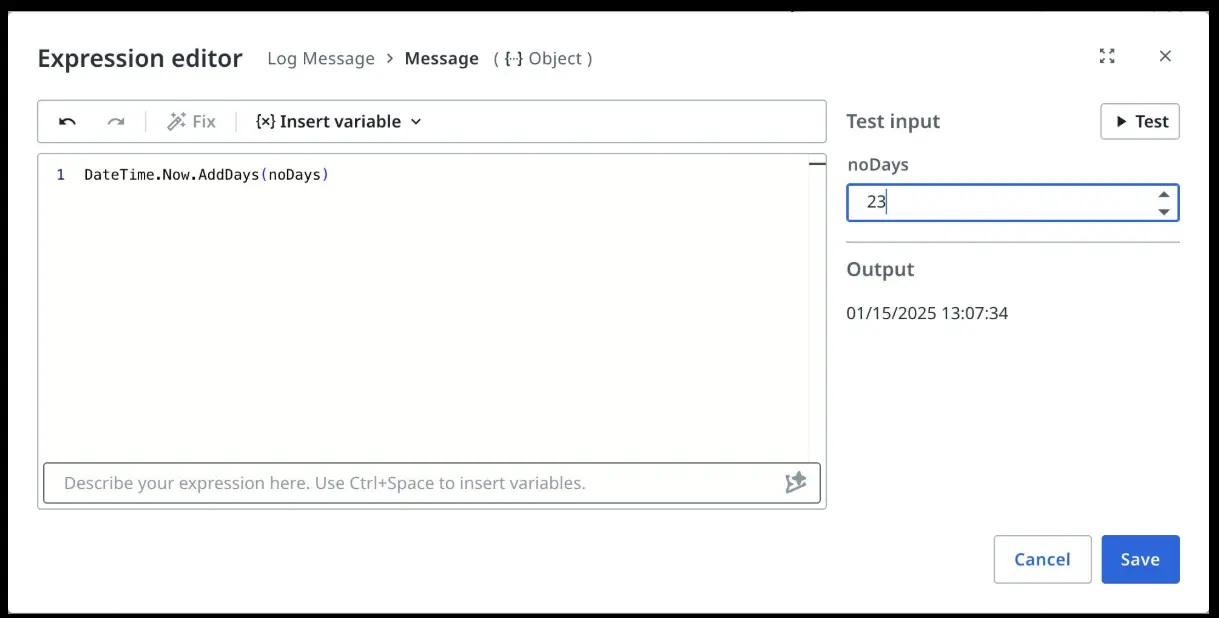
n8n’s `{{ }}` expression syntax looks familiar enough that people assume they can improvise. The most common casualty of that assumption: webhook data.
In n8n, webhook payload fields live under `$json.body`, not `$json` directly. So `$json.email` returns `undefined`, while `$json.body.email` returns what you actually want. Generic AI assistants don’t know this because it’s n8n-specific. Neither do most developers until it bites them.
The Expression Syntax Skill teaches Claude the full n8n expression environment, so it writes correct expressions the first time, not after an hour of debugging.
Key Capabilities
- Access current node data with
`$json`and upstream node data with`$node["NodeName"]` - Use nested webhook payloads correctly via
`$json.body` - Write conditional ternary expressions inside
`{{ }}.` - Format and calculate dates using
`$now`and Luxon - Map fields dynamically across multi-step workflows
- Detect node rename issues that silently break expressions
Example Use Cases
- Build Dynamic Email Content: Pull a customer name from a webhook trigger using the correct body path, and insert personalized order details pulled from a previous CRM node by referencing that node by name.
- Create Conditional Routing: Route leads based on score using a ternary expression inside an IF node, or process orders differently by value without writing any code, just an expression.
2) MCP Tools Expert
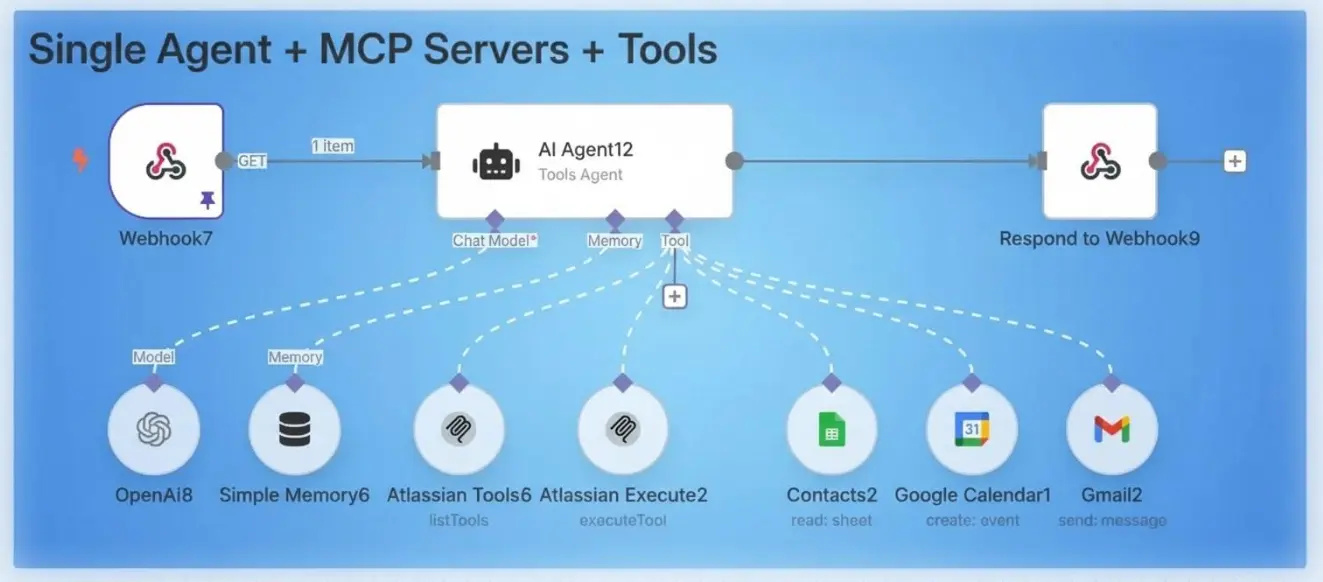
The n8n-MCP server gives Claude programmatic access to over 1,800 n8n nodes, 2,600+ workflow templates, and a full suite of tools for generating, validating, and deploying workflows. It’s powerful and easy to misuse.
Calling `get_node` when `get_node_essentials` would flood Claude’s context with unnecessary detail. Using the wrong validation profile produces misleading errors that send debugging in the wrong direction. These aren’t edge cases; they’re the default outcome when an AI uses unfamiliar tooling without guidance.
The MCP Tools Expert Skill is the highest-priority skill in the ecosystem because every other skill depends on Claude using MCP tools correctly.
Key Capabilities
- Select the right tool for each task:
`search_nodes`,`get_node`,`get_node_essentials`,`validate_workflow`,`search_templates` - Know when to use lightweight essentials versus full node schemas to avoid context overload
- Generate complete workflows from natural language descriptions
- Apply 19 distinct partial-update operation types to modify existing workflows without rewriting them
- Execute and manage workflows via the n8n API
- Access 2,600+ real workflow templates as a grounding before building from scratch
Example Use Cases
- Generate Workflows from Natural Language: Describe a workflow in plain English; the skill ensures Claude calls the right MCP tools in the right order to produce valid, deployable output.
- Update Existing Workflows Automatically: Modify individual nodes or connections without rewriting the entire workflow, using the correct partial-update operation.
- Create Workflow Templates at Scale: Search existing templates before building from scratch, grounding Claude in real-world patterns rather than invented structures.
3) Workflow Patterns
When an AI designs a workflow without pattern grounding, it improvises. Sometimes that’s fine. Often it skips the parts that only count in production, error branches, retry logic, and batch handling for large datasets, because those patterns aren’t obvious until you’ve seen workflows fail in specific ways.
The Workflow Patterns Skill grounds Claude in five architectures drawn from thousands of real n8n templates, so it selects proven structure rather than inventing it.
Key Capabilities
- Webhook Processing (1,000+ templates): Receive, validate, process, and respond with error-output branches built in from the start
- HTTP API Integration (900+ templates): REST polling, pagination, rate limiting, and retry logic for unreliable third-party APIs
- Database Operations (450+ templates): Read/write/sync patterns for Postgres, MySQL, MongoDB, and Airtable with batching for large datasets
- AI-Powered Workflows (200+ templates): LLM node chaining, memory wiring, tool node connections, and structured output handling
- Scheduled Workflows: Cron and Schedule node patterns for recurring reports, data syncs, and content pipelines
Example Use Cases
- Webinar Registration Pipeline: The marketing team needs registrations captured, synced to HubSpot, and followed up by email. The Webhook Processing pattern produces a validation step, correct HubSpot field mapping, an error branch that logs failures to Google Sheets, and a proper 200 OK response, all in the first draft.
- AI Customer Support Agent: An incoming support ticket triggers the workflow, an AI Agent node classifies intent and drafts a reply, and the result is routed to the correct team channel based on category.
- Weekly Reporting System: A Cron node fires every Monday, pulls data from a database, aggregates results with a Code node, and delivers a formatted summary to Slack, following the Scheduled pattern’s batching approach to handle large datasets without memory issues.
4) Validation Expert
n8n’s workflow validator is useful, but it can be misleading. It sometimes flags errors that aren’t real, produces cryptic messages that point to symptoms rather than root causes, and occasionally passes configurations that fail at runtime.
The Validation Expert Skill helps Claude identify genuine issues, ignore false positives, and troubleshoot workflow problems more accurately before deployment.
Key Capabilities
- Accurately interpret n8n validation messages and distinguish real errors from false positives
- Select the right validation profile for each build stage
- Detect false positives caused by auto-sanitization behavior
- Fix node incompatibilities between versions and operation types
- Diagnose connection-level issues: output type mismatches, incorrect port references
- Know the limits of the auto-fix tool, what it actually fixes versus what it only claims to
Example Use Cases
- Failed Workflow Import: A workflow imports from JSON without error but fails to activate. The validator throws three errors.
The Validation Expert Skill identifies two as real configuration issues and one as a false positive for a field that the runtime populates automatically, saving the time spent chasing a problem that doesn’t exist.
- Broken Node Connections: Two nodes refuse to connect in the editor. The skill diagnoses whether the issue is an output type mismatch, an incorrect port reference, or a version incompatibility between node definitions.
- Pre-Deployment Audit: Before activating a complex AI agent workflow, run a strict validation pass to surface any credential gaps, missing required fields, or parameter values that passed the UI check but will fail at runtime.
5) Node Configuration
Every n8n node is operation-aware. The Slack node’s "Send Message" operation requires different fields than "Update Message." The Google Sheets "Append Row" operation requires a different configuration than "Update Row." Beyond that, n8n uses property dependency chains: certain fields only appear after a parent field is set to a specific value. Configure in the wrong order, and you end up with parameters that look valid in the editor but fail at runtime.
The Node Configuration Skill ensures Claude follows the correct path through each node’s configuration from the start.
Key Capabilities
- Operation-specific field requirements for n8n’s most commonly used nodes
- Property dependency chains, knowing which fields unlock which other fields, and in what order
- Credential requirements and authentication methods per node type
- AI Agent node wiring: correct connection order and format for LLMs, memory nodes, and tool nodes
- When to request
`get_node_essentials`versus the full node schema during workflow construction
Example Use Cases
- Google Sheets Row Updates: A workflow needs to update existing rows based on a lookup value rather than always appending. The skill guides Claude through the dependency chain in the following order: spreadsheet ID, sheet selection, match column, field mapping, and adds handling for the case where no matching row exists.
- Slack Notifications with Block Kit: Configure the correct token type, choose between channel ID and channel name, and select block kit versus plain text formatting for the right visual output.
- AI Agent with Memory and Tools: Wire an LLM node, a memory node, and two tool sub-workflows into an AI Agent node in the correct connection order so the agent actually has access to its tools during execution.
6) JavaScript Code Node
The Code node is where n8n workflows handle what built-in nodes can’t: reshaping API responses, merging upstream data sources, and implementing custom business logic. JavaScript handles roughly 95% of these cases because it has full access to n8n’s helpers and date libraries.
But n8n’s JavaScript environment isn’t standard JavaScript. The input variables are different. The return format is strict and unforgiving. And the regular Code node and the Code Tool node used inside AI Agents are completely different beasts, with different return formats, different input bindings, and different sandbox restrictions.
Key Capabilities
- Item access patterns:
`$input.all()`,`$input.first()`,`$input.item`for each execution mode - Correct webhook payload access:
`$json.body.email`, not`$json.email.` - Built-in helpers:
`$helpers.httpRequest()`for API calls, Luxon for dates,`$jmespath()`For nested JSON queries,`$getWorkflowStaticData()`for cross-execution persistence - Correct return format: always
`[{ json: { ... } }]`, never a plain object - Differences between the standard Code node and the Code Tool node used inside AI Agents
Example Use Cases
- Shopify Order Transformation: Normalize nested, inconsistently named order fields before inserting into Postgres, handling optional chaining, type coercion, email sanitization, and timestamp formatting in a single Code node.
- Multi-Source Data Merge: Combine items from two upstream nodes into a single unified structure that a downstream CRM node can consume without additional mapping.
- Custom Business Logic: Calculate tiered pricing, apply discount rules, or validate field combinations that no built-in node handles, returning clean, typed output for downstream nodes.
7) Python Code Node
Python handles the remaining 5% of Code node use cases: regex-heavy text processing, statistical calculations, and data transformations, where Python’s syntax is genuinely cleaner than JavaScript.
The constraints are severe and poorly documented. On n8n Cloud, there are no imports at all, not even `re` or `json` from the standard library. On self-hosted instances using Pyodide (the default), pandas, numpy, requests, and any C-extension library are unavailable.
Python also uses underscore-prefixed variables,`_input.all()`, `json["field"]` With bracket notation only, instead of the dollar signs used in JavaScript.
Key Capabilities
- Correct Python variable syntax:
`_input`,`_json`,`_now`instead of`$input`,`$json`,`$now` - Safe key access using
`.get()`to avoid`KeyError`on missing fields - Data processing using Python’s standard library across supported environments
- Identifying which imports are available based on the deployment environment (
Cloud vs. Pyodide vs. native runner) - Recognizing when to recommend JavaScript instead of Python
Example Use Cases
- Contract Text Extraction: A legal workflow needs all email addresses and phone numbers pulled from large blocks of unstructured contract text. Python’s `re` module handles this cleanly, and the skill includes the caveat that `import re` fails on n8n Cloud.
- Statistical Aggregation: Calculate averages, medians, and outliers across a dataset of numeric items using Python’s
`statistics`module, appropriate for self-hosted Pyodide instances where the module is available. - Regex Pattern Validation: Validate complex field formats (tax IDs, IBANs, custom SKU patterns) using Python regex when the pattern logic is cleaner than its JavaScript equivalent.
Take Your n8n Automations Further with Claude Skills
As your n8n workflows become more advanced, having an AI assistant that understands the platform can significantly improve the way you build and manage automations. Claude Skills bridge the gap by providing specialized knowledge that helps Claude generate more accurate workflows, recommend best practices, troubleshoot issues, and work effectively with n8n’s unique features.
By loading expertise only when it’s needed, Claude Skills also reduce unnecessary token usage while improving the quality and consistency of AI-generated workflows. The result is a faster development process, fewer configuration errors, and automations that are easier to maintain as they grow in complexity.
Claude Skills help you get more from both Claude and n8n by improving workflow accuracy, reducing errors, and simplifying automation development.
If you’re ready to build and self-host powerful n8n automations, get started with Truehost’s n8n Self-Hosting platform and deploy your workflows on a fast, secure, and affordable cloud infrastructure designed to scale with your business.