 Domain SearchInstantly check and register your preferred domain name
 Web Hosting
 cPanel HostingHosting powered by cPanel (Most user friendly)
 WordPress HostingHost your WordPress website with fast, secure, and affordable WordPress hosting in Kenya.
 KE Domains
 Reseller HostingStart your own hosting business without tech hustles
 Windows HostingOptimized for Windows-based applications and sites.
 Free Domain
 Affiliate ProgramEarn commissions by referring customers to our platforms
 Free HostingTest our SSD Hosting for free, for life (1GB storage)
 Domain TransferMove your domain to us with zero downtime and full control
 All DomainsBrowse and register domain extensions from around the world
 .Com Domain
 WhoisLook up domain ownership, expiry dates, and registrar information
 VPS Hosting
 Managed VPSNon techy? Opt for fully managed VPS server
 Dedicated ServersEnjoy unmatched power and control with your own physical server.
 Website Builder
 Online Store BuilderLaunch a professional e-commerce store without writing code.
 Web Design ServiceGet a custom-designed website tailored to your brand and goals. From just KES 15,600
 BlogRead our guides on web hosting, online business, digital marketing, and more
 SupportOur support guides cover everything you need to know about our services
 ContactContact us via chat or email
If you’ve been concerned about your domain security lately, it’s time you know what is domain locking.
Your domain name is one of your most valuable digital assets. It’s how customers find your website, contact you, and trust your brand.
Now here’s something many site owners don’t realize: domains can be transferred, modified, or even deleted if the right access falls into the wrong hands.
That could mean your website goes offline, your emails stop working, and your business suddenly becomes unreachable.
But with domain locking, this is a totally different story.
Domain locking is a security setting that prevents your domain from being transferred, modified, or deleted without your authorization.
Most domain registrars, including us at Truehost, offer this feature by default, often referred to as Registrar Lock.
In simple terms, it acts like a padlock on your domain, keeping it safe from unauthorized access or tampering.
Let’s look at how it works and its benefits to you and your website.
How Domain Locking Protects Your Site
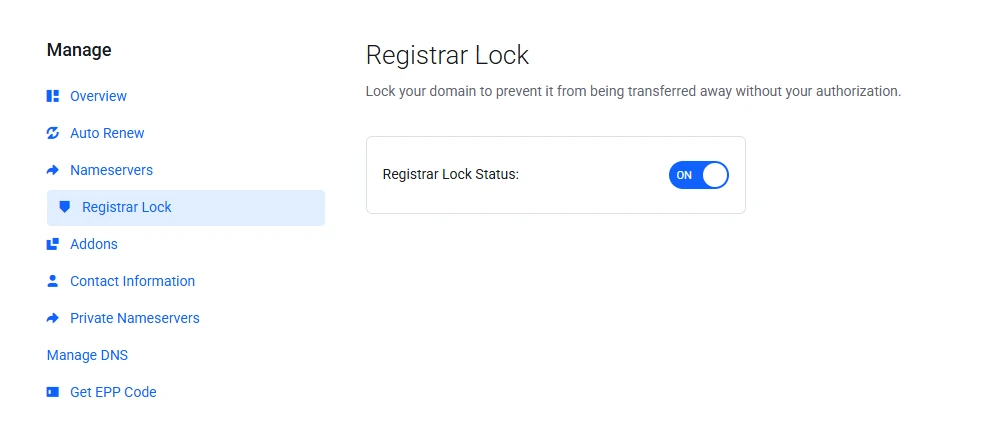
1) Prevents unauthorized domain transfers
One of the biggest risks to any domain owner is losing control of your domain through an unauthorized transfer.
Without a lock in place, someone could initiate a transfer request and move your domain to another registrar.
With domain locking enabled, that simply can’t happen.
The system blocks any transfer attempts until you personally unlock the domain.
Even if someone gains access to your account or tries to manipulate the process, the lock stops the transfer in its tracks.
2) Prevents accidental changes
Some issues don’t even come from malicious activity. Sometimes mistakes happen.
A small change to your DNS settings or contact information can accidentally take your website offline or disrupt your email.
Domain locking helps prevent this.
It restricts critical changes unless the domain is first unlocked, giving you a moment to double-check before anything goes live.
That extra step can save you from unexpected downtime or broken services.
3) Adds an extra layer of security
Domain locking doesn’t replace other security measures but strengthens them.
When combined with strong passwords and two-factor authentication, it creates a much more secure environment for your domain.
Even in a worst-case scenario where someone gains access to your login details, the lock acts as a final barrier.
A Locked Domain Status
When you enable domain locking, your registrar applies a special status to your domain called “clientTransferProhibited.”
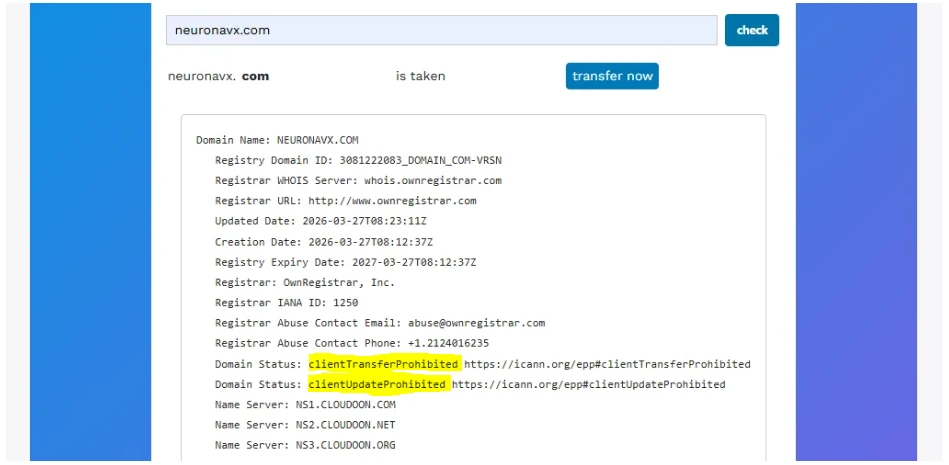
This status is set at the registry level, which is the central system that manages domain records.
Once that status is active:
- Your domain cannot be transferred to another registrar
- Nameservers cannot be changed
- Ownership details cannot be updated without unlocking first
There’s also an added layer of protection built into the system.
After a new domain registration, transfer, or major contact update, a 60-day lock is automatically applied in line with ICANN rules. This prevents any rushed or fraudulent changes during that period.
At Truehost, unlocking your domain is quick and straightforward when you need to make changes or transfer it.
Once you’re done, locking it again keeps everything secure moving forward.
Benefits of Domain Locking
1. Peace of mind
Running a website already comes with enough to manage. Domain locking removes one major worry from the list.
Once it’s enabled, you can be confident your domain isn’t going anywhere without your approval.
2. Continuous website uptime
Your domain is the foundation of your website and email.
If it’s transferred or its settings are changed without your knowledge, everything can go offline instantly.
Domain locking helps keep things stable by blocking those unauthorized changes, so your site stays accessible to customers at all times.
3. Protects your brand reputation
Your domain name is closely tied to your brand.
If someone else gains control of it, they could misuse it in ways that damage your credibility.
Locking your domain helps ensure it remains in the right hands, protecting the trust you’ve built with your audience.
4. Compliance with industry best practices
Domain locking is part of standard security practices recommended by ICANN, the global body that oversees domain name systems.
Keeping your domain locked aligns you with these guidelines and helps you maintain proper control over your digital assets.
5. Saves time and legal headaches
Recovering a lost or hijacked domain can be stressful, time-consuming, and in some cases expensive.
By preventing unauthorized actions in the first place, domain locking helps you avoid disputes, support tickets, and potential legal processes.
6. Free and automatic protection
With Truehost, domain locking is included at no extra cost.
It’s typically enabled by default, so you get immediate protection without needing to set anything up manually.
In simple terms, domain locking is a small step that delivers a big impact. It protects your website, your brand, and your peace of mind, all without adding complexity or extra cost.
How to Enable Domain Locking with Truehost
Keeping your domain secure at Truehost doesn’t require any technical steps.
Everything is built into your dashboard, and you can turn it on in just a few clicks.
Step 1: Log in to your Truehost account
Start by accessing your Truehost client area using your login details. This is where you manage everything related to your domains.
Step 2: Go to “My Domains.”
Once you’re inside your dashboard, navigate to My Domains. You’ll see a list of all the domains you own under your account.
Step 3: Open domain management
Find the domain you want to secure. Click on the three dots next to it, then select “Manage Domain.” This opens the control panel for that specific domain.
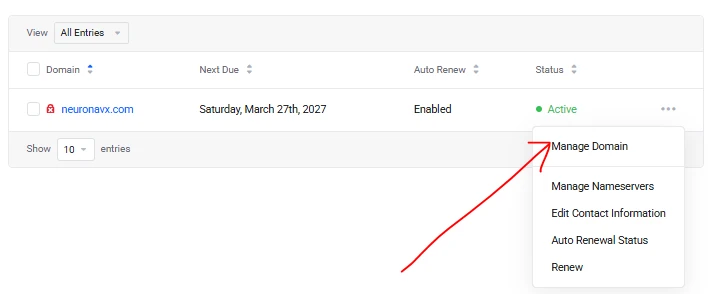
Step 4: Enable Domain Lock
Look for the “Domain Lock” or “Registrar Lock” setting.
Switch it on, and that’s it; your domain is now protected from unauthorized transfers and critical changes.
Extra tip for better security
Domain locking works best when combined with a few simple habits:
- Keep your account email address up-to-date.
- Enable two-factor authentication (2FA)
- Use a strong, unique password
- Enable Domain ID privacy protection
These small steps, together with domain locking, go a long way in keeping your website safe and fully under your control.
When to Use Domain Locking
a. For business websites, personal brands, and e-commerce sites
If your website represents your business, brand, or income, domain locking should always be on.
These are the kinds of sites that can suffer the most from unauthorized access or sudden downtime.
b. Right after registering your domain
The best time to enable domain locking is immediately after you register or transfer your domain.
This ensures you’re protected from the very beginning, before any risks come into play.
c. Only unlock when necessary
There are very few situations where you’ll need to turn off domain locking.
The most common one is when you want to transfer your domain to another registrar. In that case, you can temporarily unlock it, complete the transfer, and then lock it again.
Your Next Steps
Domain locking may seem like a small setting, but it plays a big role in protecting your online presence.
It keeps your domain safe from unauthorized transfers, prevents costly mistakes, and adds a strong layer of security to your website and email.
If your domain is important to you, and it should be, this is one feature you don’t want to ignore.
With Truehost, enabling domain locking takes just a few clicks, and in many cases, it’s already turned on by default. That means you get protection without extra effort or cost.
If you haven’t checked your domain settings yet, now is a good time to do it.
A simple action today can save you from major issues down the line.






