Domain SearchInstantly check and register your preferred domain name
 Web Hosting
 cPanel HostingHosting powered by cPanel (Most user friendly)
 WordPress HostingHost your WordPress website with fast, secure, and affordable WordPress hosting in Kenya.
 KE Domains
 Reseller HostingStart your own hosting business without tech hustles
 Windows HostingOptimized for Windows-based applications and sites.
 Free Domain
 Affiliate ProgramEarn commissions by referring customers to our platforms
 Free HostingTest our SSD Hosting for free, for life (1GB storage)
 Domain TransferMove your domain to us with zero downtime and full control
 All DomainsBrowse and register domain extensions from around the world
 .Com Domain
 WhoisLook up domain ownership, expiry dates, and registrar information
 VPS Hosting
 Managed VPSNon techy? Opt for fully managed VPS server
 Dedicated ServersEnjoy unmatched power and control with your own physical server.
 Website Builder
 Online Store BuilderLaunch a professional e-commerce store without writing code.
 Web Design ServiceGet a custom-designed website tailored to your brand and goals. From just KES 15,600
 BlogRead our guides on web hosting, online business, digital marketing, and more
 SupportOur support guides cover everything you need to know about our services
 ContactContact us via chat or email

If you’re looking to move your domain, it’s high time you learn how to transfer a domain securely.
It’s only natural to start looking for a better option if your current provider is slow to respond, charges unpredictable fees with extra costs due to foreign exchange rates, or makes simple tasks harder than they should be.
On top of that, the fear of downtime or losing your domain during transfer can make you hesitate, even when you know it’s time to move.
But Truehost always comes to save the day, built with all a domain owner can dream of.
In this guide, I’ll help you break everything down into clear, simple steps so you can transfer your domain to Truehost with confidence.
You’ll learn:
- Reasons why you should transfer your domain to Truehost
- The process on how to transfer a domain
Now, let’s make sure your domain transfer is quick, safe, and straightforward.
Step-by-Step: How to Transfer a Domain to Truehost

Step 1: Check if your domain is eligible
Before you start the transfer, it’s important to confirm that your domain meets a few basic requirements.
These are standard rules set by domain authorities, and they help ensure your transfer goes through smoothly without delays.
Here’s what to check:
- Your domain must be at least 60 days old
If you recently registered or transferred it, you’ll need to wait until the 60-day period passes. - It should not be expired or in redemption
Active domains transfer easily. If yours has already expired or entered the redemption period, you’ll need to renew it first. - You must have access to your current registrar account
This is where you’ll approve the transfer and unlock the domain. Without access, the process can’t move forward. - Your WHOIS admin email must be active and accessible
Approval emails will be sent here during the transfer process, so make sure it’s correct and you can receive messages.
If you’re unsure who your current registrar is, a quick WHOIS lookup will show you.
You can also reach out to our Truehost support; they can help you figure it out quickly and point you in the right direction.
Step 2: Unlock your domain with your current registrar
Most domains are locked by default as a security measure. This prevents unauthorized transfers, which is great, but it also means you’ll need to unlock it before moving it to Truehost.
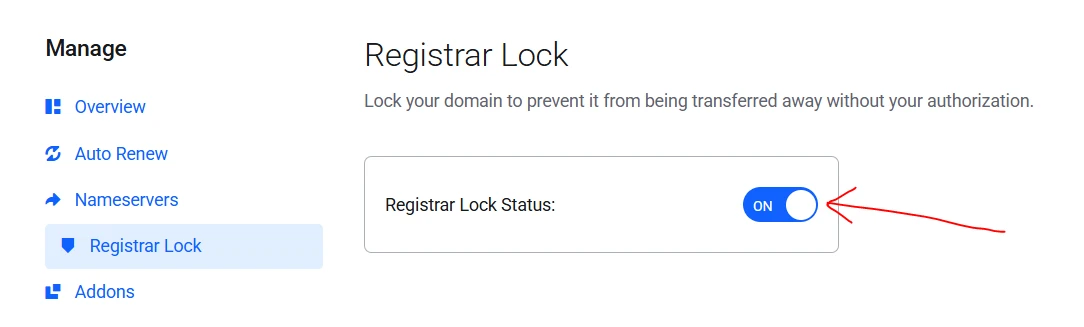
Here’s how to do it:
- Log in to your current registrar’s dashboard
- Locate the domain you want to transfer
- Find the Domain Lock or Registrar Lock setting
- Turn it off (unlock the domain)
- Save your changes
Once unlocked, your domain is ready for the next step. If you don’t see this option, your registrar’s support team can quickly point you to the right place or do it for you.
Step 3: Get the EPP/Auth code
The EPP (Authorization) code is like a secure password for your domain transfer. Without it, the transfer can’t go through.
Here’s how to get it:
- Go to your domain settings in your current registrar’s dashboard
- Look for an option like “Get EPP Code” or “Transfer Code”
- Request the code
Depending on the provider, the code will either:
- Be shown directly on your screen, or
- Be sent to your registered email address
Keep this code safe. You’ll need to enter it in the next step when initiating the transfer to Truehost.
Step 4: Start the transfer on Truehost
Now that your domain is unlocked and you have your EPP/Auth code, you’re ready to begin the transfer on Truehost.
This part only takes a few minutes.
Here’s what to do:
- Go to the Truehost website and open the Domain Transfer page
- Log in to your client area (or create an account if you don’t have one yet)
- Enter the domain name you want to transfer
- Paste your EPP/Auth code when prompted
At this stage, you’ll also have the option to choose a few add-ons depending on your needs, such as:
- DNS management
- Email forwarding
- WHOIS privacy protection
Once everything looks good, proceed to checkout and complete your payment.
Step 5: Approve the transfer
After placing your order, there’s one more important step, confirming the transfer. Without this approval, the process won’t move forward.
You’ll receive a confirmation email asking you to approve the transfer.
In some cases, your current registrar may also send a separate approval request
Open the email and follow the instructions provided. This usually involves clicking a confirmation link.
Once you’ve approved the transfer, the process officially begins. From here, it’s just a matter of waiting for the transfer to complete.
Step 6: Wait for the transfer to complete
The transfer waiting time depends on the type of domain you’re moving:
- .co.ke and .ke domains usually move very quickly, sometimes even instantly.
- Global extensions like .com, .net, or .org typically take 5–7 days to complete.
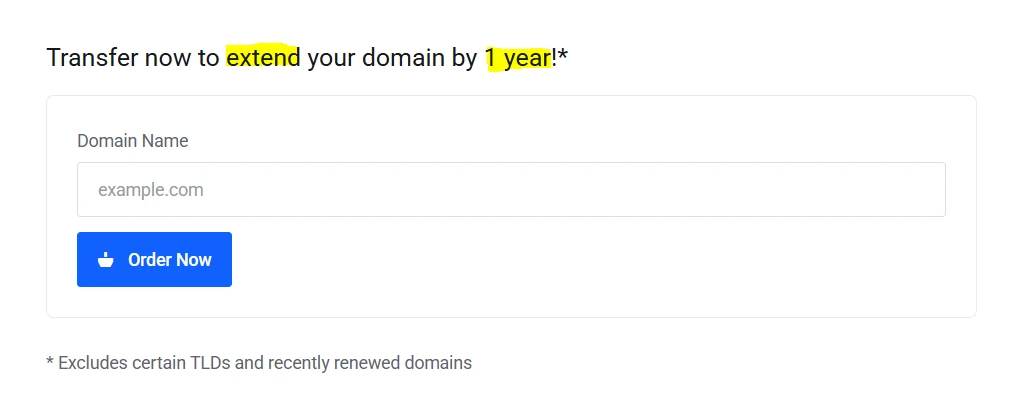
After the transfer finishes, Truehost automatically adds an extra year to your domain’s registration, so you don’t lose any time.
Step 7: Check that everything is working
Once the transfer is done, take a few minutes to make sure everything is set up correctly:
- Log in to your Truehost dashboard and confirm your domain appears there
- Review your nameservers and DNS settings, as some may reset during the transfer
- Check that your website and email are functioning as expected
Quick Checklist
- Unlock your domain with your current registrar
- Get your domain’s EPP/Auth code
- Start the transfer request on Truehost
- Approve the transfer via email confirmation
- Wait up to 7 days, depending on your domain extension
- Verify your domain in the Truehost dashboard and confirm everything works
- Enjoy your domain with an extra 1-year renewal added
Note: Transfers for .co.ke and .ke domains are no longer free. Kenic introduced domain transfer charges starting February 3, 2025.
This completes the full transfer process; your domain is now secure, fully managed locally, and backed by Truehost support.
Why Transfer to Truehost?
Still not sure if we are the best destination for your domain?
Well, we are, and here is why:

- We have the cheapest domain renewal and transfer prices you can get
- You get local support with people who speak your language
- Our powerful client panel helps you manage everything in one place
- Built for developers deploying apps and APIs
- Lightning-fast DNS management and instant propagation
- Bulk transfer options for agencies and resellers
- Easy payments with Mpesa or payment methods of your choice
- You also get an extra year added free once your transfer is complete
- Your website and emails continue running with zero downtime during the transfer
- You have the option of WHOIS privacy protection
- You can easily bundle your domain with fast SSD hosting if you want to upgrade
Truehost is trusted by over 70,000 individuals, businesses, and organizations across Kenya and is fully accredited to handle domain registrations securely.
The entire experience is designed to keep things simple, local, and reliable, just the way it should be.
Domain Transfer FAQs
How much does it cost to transfer to Truehost?
Most .ke and .co.ke domains usually cost Ksh 1,000 to transfer. International domains like .com, .net, or .org differ in prices, ranging from Ksh 629.00 to Ksh 832,191.00 to transfer.
Will my website go down during the transfer?
No. Your website and emails remain fully functional throughout the process. Zero downtime is guaranteed.
Is Truehost safe and official?
Absolutely. Truehost is fully accredited by KENIC and ICANN, and trusted by over 70,000 Kenyans.
What if something goes wrong during the transfer?
Our 24/7 Kenyan support team is ready to help. Most issues are resolved in minutes.
Can I transfer my domain and add hosting at the same time?
Yes. During checkout, just select the hosting option, and we’ll set everything up together.
Next Steps
You now have everything you need and know how to transfer a domain to Truehost safely and efficiently.
The process is simple, fast, and comes with local support, transparent Ksh pricing, and an extra free year of registration.
If you feel ready to start your transfer, you can begin now and be done in just two minutes.
You have questions? Our team is available to chat anytime.
We’re your fellow Kenyans here to help you succeed online. And with Truehost, your domain is in good hands.