Domain SearchInstantly check and register your preferred domain name
 Web Hosting
 cPanel HostingHosting powered by cPanel (Most user friendly)
 WordPress HostingHost your WordPress website with fast, secure, and affordable WordPress hosting in Kenya.
 KE Domains
 Reseller HostingStart your own hosting business without tech hustles
 Windows HostingOptimized for Windows-based applications and sites.
 Free Domain
 Affiliate ProgramEarn commissions by referring customers to our platforms
 Free HostingTest our SSD Hosting for free, for life (1GB storage)
 Domain TransferMove your domain to us with zero downtime and full control
 All DomainsBrowse and register domain extensions from around the world
 .Com Domain
 WhoisLook up domain ownership, expiry dates, and registrar information
 VPS Hosting
 Managed VPSNon techy? Opt for fully managed VPS server
 Dedicated ServersEnjoy unmatched power and control with your own physical server.
 Website Builder
 Online Store BuilderLaunch a professional e-commerce store without writing code.
 Web Design ServiceGet a custom-designed website tailored to your brand and goals. From just KES 15,600
 BlogRead our guides on web hosting, online business, digital marketing, and more
 SupportOur support guides cover everything you need to know about our services
 ContactContact us via chat or email

When you’re starting a website or building a business online, it’s easy to focus on design, content, or marketing first. But there’s one critical step that often gets pushed aside, and that is to secure your domain name properly.
Your domain name is your online identity.
It’s how customers find you, how they remember you, and how they decide if they can trust you.
Now, if someone gains access to it due to weak security, the consequences can be serious, from lost traffic and damaged reputation to, in some cases, a complete shutdown of your online presence.
So, before anything else, your domain needs to be safe and fully under your control.
In this guide, I’ll walk you through the 6 essential steps needed to secure your domain the right way from day one.
You’ll learn how to:
- Choose and register your domain safely
- Protect your ownership details
- Set up essential security features
- Keep your domain protected long-term
So let’s get you a clear, practical path to keeping your domain and your business safe online.
Steps to Secure Your Domain Name
Step 1: Choose a reliable domain registrar
Your registrar is where everything about your domain lives, from registration and renewals to ownership details and security settings.
That’s why this decision is crucial.
A reliable registrar should be:
- Properly accredited and recognized
- Transparent with pricing (no surprise fees later)
- Equipped with built-in tools to manage and protect your domain
- Available when you need support
The right provider makes domain security easier from the start. The wrong one creates friction and sometimes risk.
At Truehost, we are fully accredited by KENIC for Kenyan domains.
We also have simple payments through M-PESA, clear, upfront pricing, 24/7 local support when you need help, and easy-to-use tools to manage and secure your domain.
When you get this step right, it sets the foundation for everything that follows.
Step 2: Enable two-factor authentication (2FA)
Once your domain is registered, the next step is to secure access to your account.
Two-factor authentication (2FA) adds an extra layer of protection.
Instead of relying only on your password, it requires a second verification, usually a one-time code sent to your phone or generated by an app.
In this case, even if someone manages to get your password, they still won’t be able to access your account or transfer your domain without that second code.
Setting it up is easy in your Truehost client dashboard:
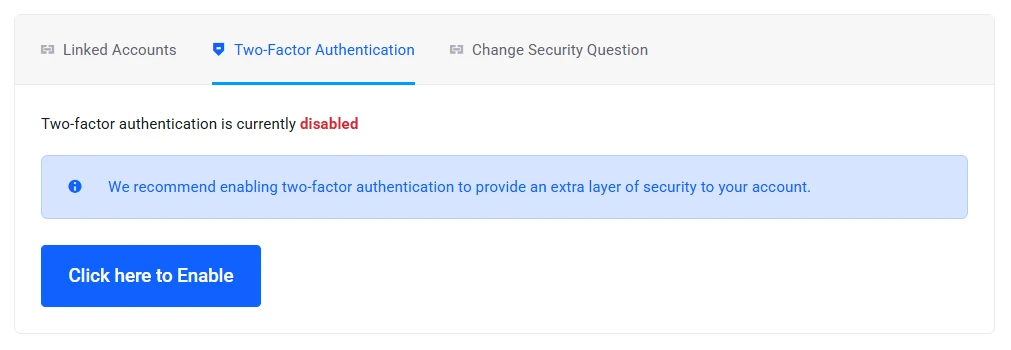
- Next to your account name, click on the down arrow to open the drop-down menu.
- Click on the security settings.
- Enable two-factor authentication.
- Link your phone or authentication app.
It only takes a minute, but it closes one of the most common security gaps.
Step 3: Regularly update and maintain your contact information
Your contact details might not seem like a security feature, but they play a bigger role in securing your domain.
The email address, phone number, and physical address in your account are how important messages reach you, like renewal reminders, security alerts, verification requests, and any urgent notices about your domain.
If these details are outdated, you risk missing something critical.
In some cases, that could mean your domain expires without you noticing, leaving it open for someone else to take.
To keep your details updated, log in to your account dashboard, open your profile, account settings, or contacts, and review and update your email, phone number, and address.
A good habit is to check this every 3–6 months, or anytime your contact information changes.
It only takes a few minutes, but it helps you stay in control and avoid unnecessary risks.
Step 4: Use SSL certificates
Once your domain is secured, the next step is protecting what happens on your website. That’s where an SSL certificate comes in.
An SSL certificate encrypts the connection between your website and your visitors.
When it’s active, your site shows the padlock icon and uses “https://” instead of “http://”.
This does three important things:
- Protects sensitive data like login details, contact forms, and payments
- Builds trust with visitors who expect a secure browsing experience
- Helps improve your visibility on search engines like Google
With Truehost, many hosting plans already include a free SSL certificate. You can activate it as soon as your domain is connected to your hosting.
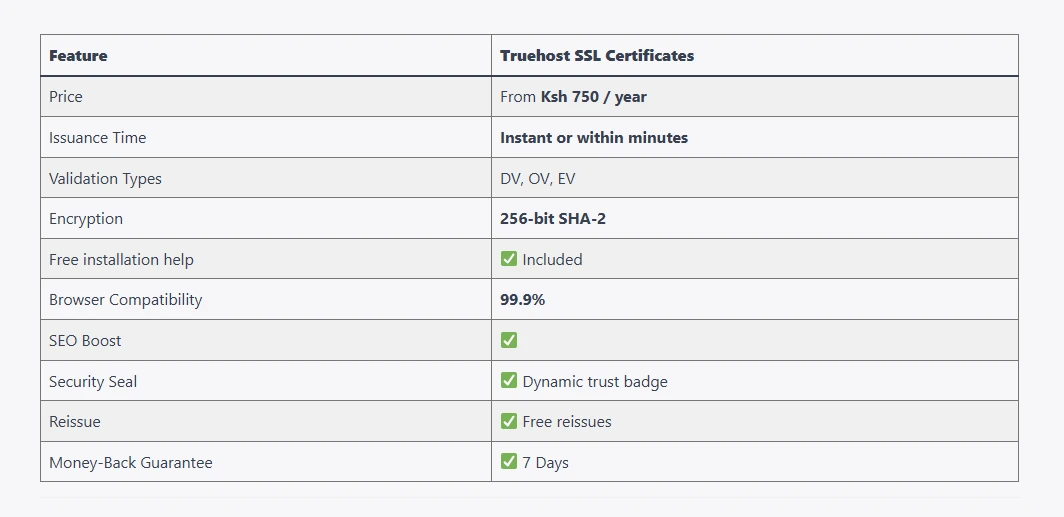
If your plan doesn’t include one, you can still add it easily from your dashboard.
Either way, it’s a quick step that makes your website safer and more credible from the moment visitors arrive.
Step 5: Enable auto-renewal
One of the easiest ways to lose a domain is also one of the most preventable: forgetting to renew it.
Domains are registered for a fixed period, and if you miss the renewal window, they can expire and eventually become available for someone else to register.
Auto-renewal solves this problem completely.
At Truehost, you can turn it on directly from your account:
- Log in to your dashboard.
- Go to your domain settings.
- Enable auto-renewal.
- Confirm your preferred payment method (including M-Pesa).
Once it’s active, your domain renews automatically before it expires. You’ll still receive reminders ahead of time, so nothing happens without your awareness.
The benefit is simple. You don’t have to keep track of expiry dates or worry about losing your domain due to a missed deadline.
Step 6: Use domain privacy protection
When you register a domain, your personal details, such as your name, phone number, and address, can be publicly visible through the WHOIS database.
This is where domain privacy protection becomes important.
By enabling WHOIS privacy, your personal information is hidden and replaced with generic contact details.
This reduces exposure and protects you from spam calls and emails, phishing attempts, unwanted solicitations, and potential targeted attacks.
With Truehost, you can activate domain privacy during registration or anytime afterward from your dashboard.
It’s a small additional cost, but it adds a strong layer of protection to your domain.
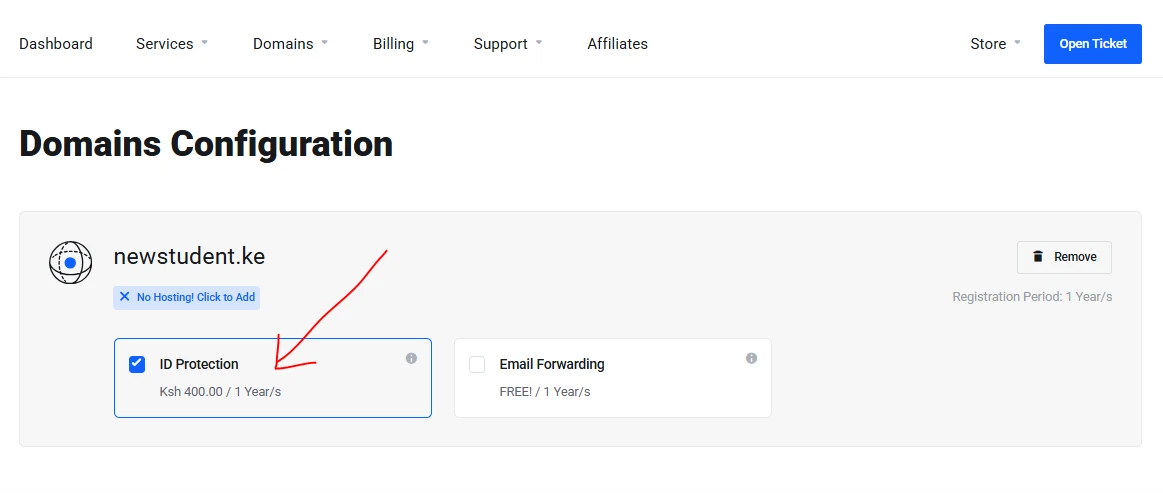
It’s a simple switch, but it makes a noticeable difference in keeping your information secure while you run your website or business.
Step 7: Register for multiple years
Most people register a domain for one year and leave it at that. It works, but it also means you’re relying on annual renewals to keep your domain safe.
Registering your domain for multiple years adds an extra layer of security and stability.
When you choose to register your domain for several years upfront, it means you reduce the chances of accidental expiry, lock in your domain for a longer period, and spend less time managing yearly renewals.
It also sends a strong signal of commitment to your brand.
A domain secured for multiple years shows you’re building something long-term, not temporary.
If you’re serious about your website or business, this step is worth considering early on.
Step 8: Build something with your domain
A domain that’s actively in use is far less likely to be forgotten.
Once your domain is registered, put it to work right away. Even a simple setup makes a difference. You can:
- Launch a basic website
- Create a landing page
- Set up professional email addresses (like
[email protected])
Using your domain regularly keeps it top of mind and easier to manage.
At Truehost, you can pair your domain with hosting and activate your site quickly.
You can also use Workplace Email Hosting to create branded email accounts at a much lower cost compared to Google Workspace.
The more your domain becomes part of your daily operations, the less likely it is to slip through the cracks.
Step 9: Register look-alike or close-variation domain names
As your brand grows, protecting your name becomes just as important as using it.
One common risk is someone registering a similar domain, either intentionally or by coincidence. This can lead to confusion, lost traffic, or even brand misuse.
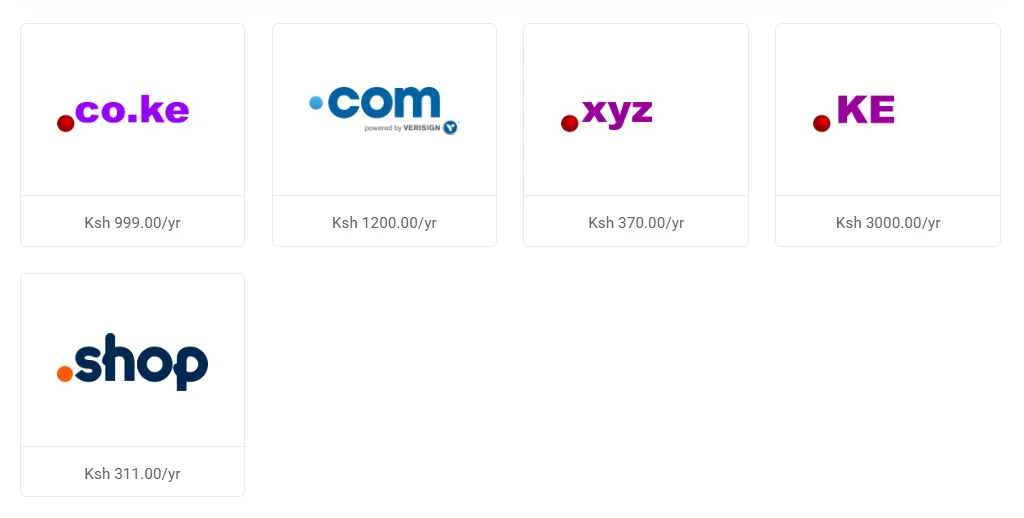
To stay ahead of this, consider registering variations of your domain, such as:
- Different extensions (TLDs):
yourbrand.co.keyourbrand.comyourbrand.ke
- Common misspellings or close variations
You don’t need to build separate websites for each one. Instead, you can point them all to your main domain.
This step helps you:
- Protect your brand identity
- Capture traffic that might otherwise go elsewhere
- Reduce the risk of impersonation or misuse
It’s a simple move that strengthens your overall domain security strategy.
Quick Extra Protections
By this point, you’ve covered the major steps. These final touches help close any remaining gaps and keep your domain fully secure.
- Enable domain locking
Domain locking prevents unauthorized transfers. Once it’s turned on, no one can move your domain to another registrar without your approval.
- Use a strong, unique password
Your account password is your first line of defense. Avoid reusing passwords from other platforms, and go for something long and unique.
What to do next
Securing your domain is basically a series of simple steps that work together to protect your online presence.
Each step above builds on the last, giving you full control and peace of mind.
So, if your domain isn’t fully secured yet, now is the time to fix that.
Start by logging into your Truehost account and going through these steps one by one. Most of them take just a few minutes, but the impact is long-term.
If you’re doing this even before registering a domain, even better. Now you can apply these steps from the word go.
So, don’t let your perfect name slip away. Head to Truehost right now, search for your idea, and secure your domain in minutes.
The earlier you put these protections in place, the safer your website and business will be moving forward.