Domain SearchInstantly check and register your preferred domain name
 Web Hosting
 cPanel HostingHosting powered by cPanel (Most user friendly)
 WordPress HostingHost your WordPress website with fast, secure, and affordable WordPress hosting in Kenya.
 KE Domains
 Reseller HostingStart your own hosting business without tech hustles
 Windows HostingOptimized for Windows-based applications and sites.
 Free Domain
 Affiliate ProgramEarn commissions by referring customers to our platforms
 Free HostingTest our SSD Hosting for free, for life (1GB storage)
 Domain TransferMove your domain to us with zero downtime and full control
 All DomainsBrowse and register domain extensions from around the world
 .Com Domain
 WhoisLook up domain ownership, expiry dates, and registrar information
 VPS Hosting
 Managed VPSNon techy? Opt for fully managed VPS server
 Dedicated ServersEnjoy unmatched power and control with your own physical server.
 Website Builder
 Online Store BuilderLaunch a professional e-commerce store without writing code.
 Web Design ServiceGet a custom-designed website tailored to your brand and goals. From just KES 15,600
 BlogRead our guides on web hosting, online business, digital marketing, and more
 SupportOur support guides cover everything you need to know about our services
 ContactContact us via chat or email
Domain ID Privacy Protection is basically a service that hides your personal information from the public WHOIS database.
When you register a domain, you’re required to provide details like your name, email, phone, and address, and without protection, anyone can look up your domain and see this information.
This exposure often leads to spam emails, scam calls, and unwanted solicitations.
But with domain ID privacy protection, those personal details are replaced with generic registrar information.
Instead of your contact details, people see the privacy service provider’s information, keeping your identity safe and out of reach.
In short, ID protection acts like a barrier between you and the public internet.
Now, let’s see how it actually works and why you need one.
How Domain ID Privacy Protection Works
When you’re registering a domain online, you are given the option to add domain ID protection, which then replaces your personal information with the information of a third-party proxy service.
Let’s begin with the registering part where you get to enable the domain ID protection.
Step-by-Step Process to Enable Domain ID Protection with Truehost
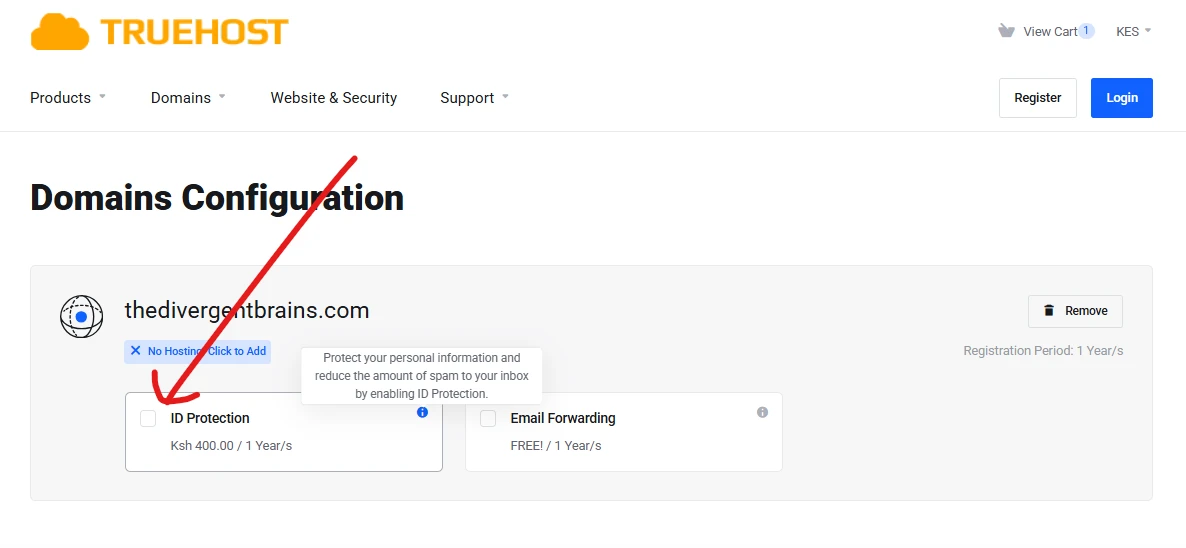
- Search and select your domain: Find the name you want on our domain page.
- Enable Domain ID Protection: Tick the “Domain ID Protection” box at checkout.
- Details are masked instantly: Once enabled, your real contact information is replaced in the WHOIS database with proxy details.
- Manage anytime: You can add or renew protection later in your client area without any hassle.
What Visitors See in WHOIS Lookup Tools
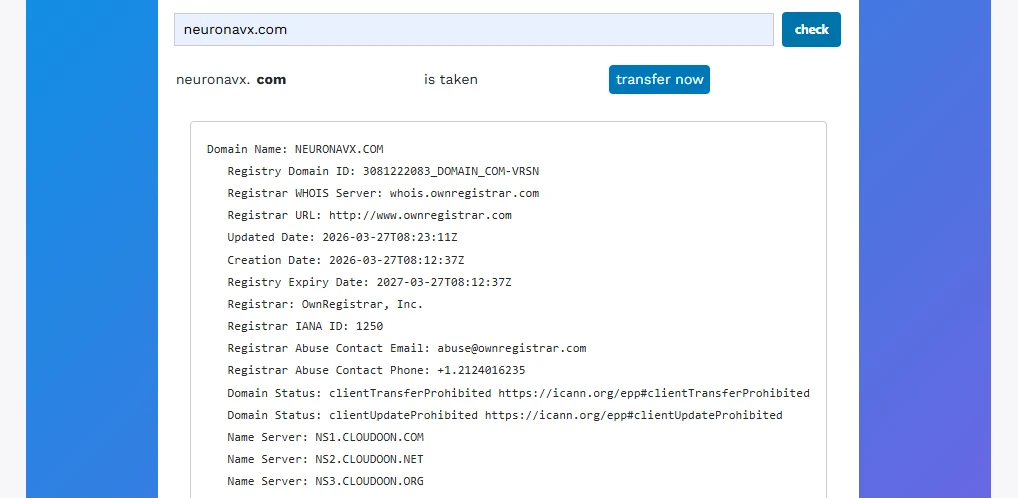
When someone runs a WHOIS lookup (you can try it for free at the Truehost WHOIS tool), they only see the proxy information provided by Truehost.
Your personal details are never exposed.
What Stays Private
With Domain ID Privacy Protection, the following remain completely hidden:
- Your full name
- Phone number
- Email address
- Physical address
Why Do You Need Domain ID Privacy Protection?
When you register a domain without privacy, your personal details become an open target for cybercriminals, scammers, and unwanted contacts.
Here’s why adding Domain ID Privacy Protection is essential:
Risk 1: Spam Overload
Public WHOIS data makes your email, phone number, and address visible to anyone.
This leads to constant spam emails, calls, and SMS messages.
Many domain owners report a 70–90% increase in unsolicited messages. With Domain ID Privacy, most of this disappears.
Risk 2: Identity Theft and Fraud
Exposed contact details make it easy for scammers to impersonate you or attempt phishing attacks.
They can trick you into revealing passwords or accessing your registrar account.
Enabling privacy cuts these targeted attacks by up to 50%.
Risk 3: Harassment and Doxing
Bloggers, women entrepreneurs, and public figures are particularly vulnerable.
Without protection, anyone can find personal addresses or phone numbers, putting you at risk of harassment.
Domain ID Privacy keeps your information private, reducing this exposure.
Risk 4: Domain Hijacking Attempts
Criminals sometimes contact domain owners pretending to be from a registrar, trying to steal their domain.
Masking your details makes it much harder for them to target you.
Risk 5: Business Reputation Damage
Direct access to your personal contacts can create unprofessional situations, like clients or angry customers reaching you at odd hours.
Privacy protection ensures your business communications remain professional and separate from personal life.
Quick Comparison With or Without ID Protection
| Risk | Without Domain ID Privacy | With Truehost Domain ID Privacy (KSh 400/yr) |
| Spam and calls | 12+ emails/day + telemarketing | Up to 70–90% reduction |
| Phishing exposure | High — real email/phone used | Drops by ~50% |
| Identity theft | Full details publicly available | Completely hidden (proxy only) |
| Harassment/doxing | Easy to find you | Real info stays private |
| Domain hijacking | Scammers contact you directly | Much harder to reach you |
In short, you’re better with domain ID privacy than without.
How to Get Domain ID Privacy Protection in Kenya Right Now
Now that we’ve established you need one, here’s the step-by-step process to secure your domain and keep your information private.
Step 1: Go to the Truehost Domain Registration Page
Visit Truehost domain registration to start.
Step 2: Search and Choose Your Domain
Look for the domain you want. Grab a .co.ke for KSh 999 (first year) or a .com for KSh 1,200. These deals are limited-time offers.
Step 3: Enable Domain ID Protection
At checkout, tick the “Domain ID Protection” addon. It costs just KSh 400 per year.
Step 4: Complete Payment
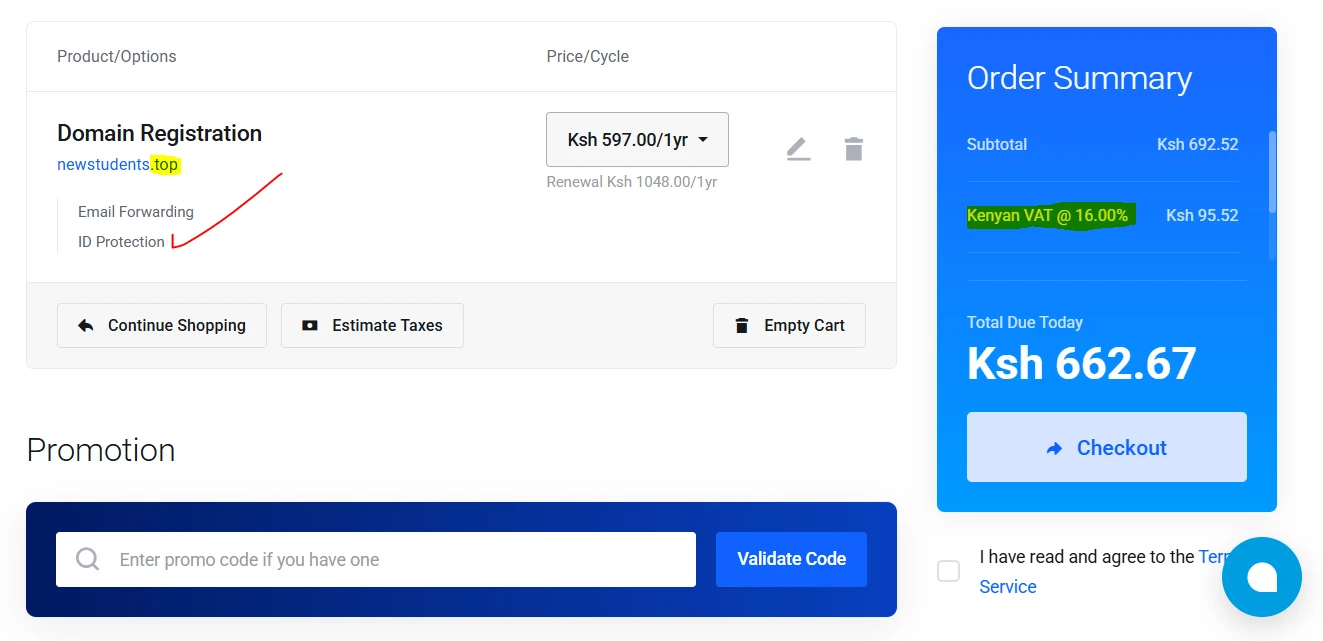
Pay with M-PESA. Make sure you have at least KSh 800 ready to cover the domain, privacy addon, and 16% VAT.
Step 5: Your Privacy is Active Instantly
Once payment is complete, your domain and privacy protection activate within minutes.
Optional: Add Later to Existing Domains
If you already own a domain, you can enable Domain ID Privacy at any time from your Truehost client area.
Just log in, go to “Manage Domain,” then “Addons.” Here you can purchase and enable your domain ID protection.
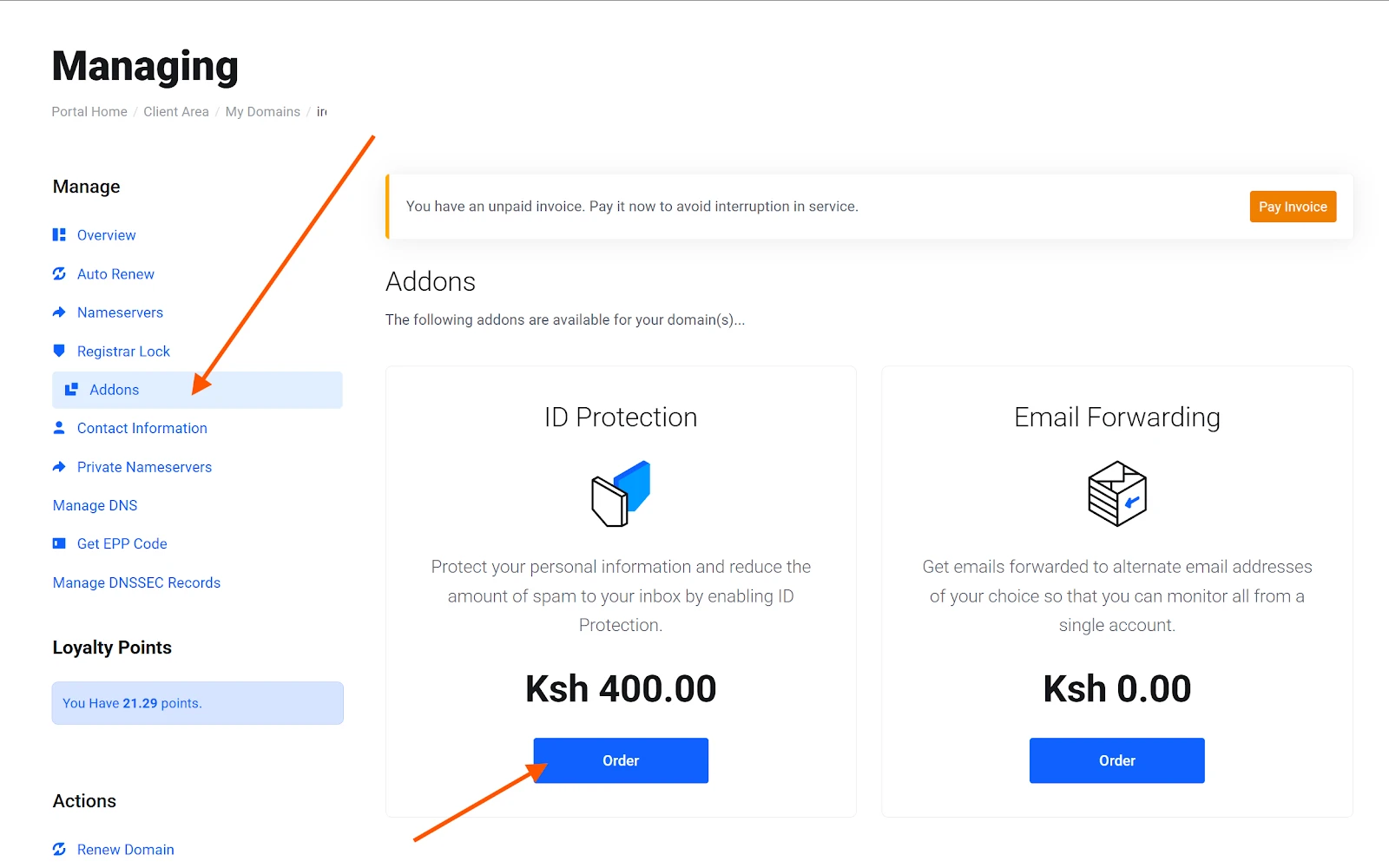
This process keeps your personal information secure while you focus on growing your business.
WHOIS Domain Protection Pricing
The cost of domain privacy protection varies depending on the registrar:
For most international providers, prices can range from KSh 500 to KSh 1,500 per year, depending on the domain extension and provider.
At Truehost you get it for only KSh 400 per year for full domain ID privacy protection on your domains.
This makes us one of the most affordable options in Kenya.
Some registrars promise free WHOIS privacy but still have you pay very high prices for a full domain ID privacy protection, so make sure to confirm that before you commit.
Truehost keeps pricing simple and transparent, with no hidden fees, so you know exactly what you’re paying for.
Final Thoughts
Domain ID Privacy Protection is one of the easiest and most cost-effective ways to secure your personal information online.
It shields you from spam, phishing, harassment, domain hijacking, and business reputation issues.
Protecting your domain is quick, affordable, and instantly effective.
So now you can secure your domain and activate domain ID privacy today with Truehost.
Your peace of mind online is just a few clicks away.