 Domain SearchInstantly check and register your preferred domain name
 Web Hosting
 cPanel HostingHosting powered by cPanel (Most user friendly)
 WordPress HostingHost your WordPress website with fast, secure, and affordable WordPress hosting in Kenya.
 KE Domains
 Reseller HostingStart your own hosting business without tech hustles
 Windows HostingOptimized for Windows-based applications and sites.
 Free Domain
 Affiliate ProgramEarn commissions by referring customers to our platforms
 Free HostingTest our SSD Hosting for free, for life (1GB storage)
 Domain TransferMove your domain to us with zero downtime and full control
 All DomainsBrowse and register domain extensions from around the world
 .Com Domain
 WhoisLook up domain ownership, expiry dates, and registrar information
 VPS Hosting
 Managed VPSNon techy? Opt for fully managed VPS server
 Dedicated ServersEnjoy unmatched power and control with your own physical server.
 Website Builder
 Online Store BuilderLaunch a professional e-commerce store without writing code.
 Web Design ServiceGet a custom-designed website tailored to your brand and goals. From just KES 15,600
 BlogRead our guides on web hosting, online business, digital marketing, and more
 SupportOur support guides cover everything you need to know about our services
 ContactContact us via chat or email

If you’ve already registered a domain or you’re about to get one for your website, you’ll probably need to differentiate these three terms: subdomain vs parked vs addon domain.
These are basically different domain structures and, definitely, each with a specific function.
So, getting them right is important.
The way you structure your domains can affect how your brand looks online, how you organize your content, and even how you grow multiple websites without unnecessary costs.
But before we compare the three, let’s ground ourselves in the basics.
A domain name is your website’s address on the internet. It’s what people type into their browser to find you, something like yourbusiness.co.ke.
Behind the scenes, it connects to a server where your website files are stored.
Once you own a domain, you can actually use it in different ways:
- You can split it into sections
- You can point other domains to it
- Or you can attach entirely new websites to your hosting account
That’s exactly where subdomains, parked domains, and add-on domains come from.
Now, normally a domain is made of two parts, the main domain name as the core identity (e.g., yourbusiness) and the extension (TLD) as the ending (like .co.ke, .com).
Once you understand this structure, the differences between the three options start to make a lot more sense.
Now, let’s see how the three, subdomain vs parked vs addon domain, are organized.
What Is a Subdomain?
A subdomain is simply a section of your main domain that works like its own space. It sits in front of your primary domain name and creates a separate area for specific content.
It usually follows this structure: subdomain.yourdomain.com
Even though it looks like a separate site, it’s still part of your main domain and brand.
Subdomain Example
You might see subdomains like:
blog.yourbusiness.co.kefor articlesshop.yourbusiness.co.kefor an online store
Each one serves a different purpose, but they all remain connected to the main domain.
How to Get a Subdomain
Once you have a domain and hosting, you can set a subdomain up from your control panel (like cPanel) in just a few steps.
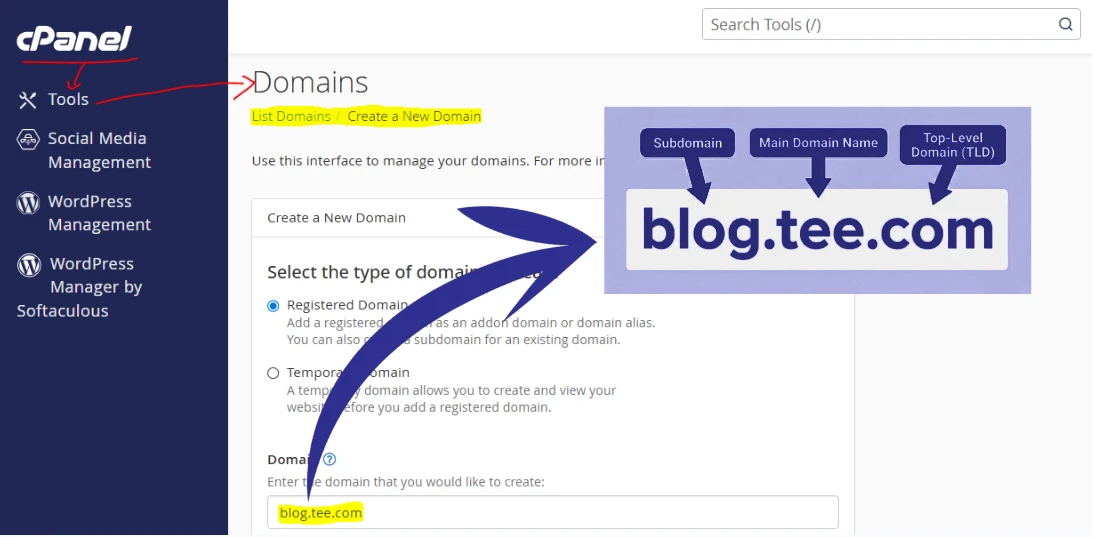
It doesn’t require buying a new domain.
Instead, it creates a new folder within your hosting account by adding a prefix before the main domain name.
In this folder, you can add different content, like a blog, booking system, or even a separate language version of your site.
This makes subdomains a practical option when you want to organize different parts of your website while keeping everything under one brand.
What Is a Parked Domain?
A parked domain, also known as a domain alias, is an extra domain name that points directly to your main website.
It doesn’t have its own content or files. Instead, it simply displays the exact same website as your primary domain.
In short, multiple domain names, one website.
Parked Domain Example
Let’s say your main domain is yourbusiness.co.ke. You could also register:
yourbusiness.comyourbusiness.net
When someone types any of these into their browser, they’re automatically taken to your main site.
Everything looks the same, with the same pages, same content, and same experience.
How to Get a Parked Domain
Setting up a parked domain is quite simple.
First, you register the additional domain name you want. Then, inside your hosting control panel, you link (or “park”) it to your main domain using the domain redirects tool or check the box on share document root when creating the new domain, though this option is permanent.
There’s no need to build a new website or manage separate files. The only cost involved is registering the extra domain itself.
This setup is especially useful if you want to protect your brand name by securing different extensions or common variations, so visitors always end up in the right place.
What Is an Add-On Domain?
An add-on domain is a completely separate website that you run under the same hosting account as your main domain. It has its own domain name, its own files, its own email accounts, and its own content.
Even though it shares the same hosting space, it operates independently, almost like a separate business living under the same roof.
Add-on Domain Example
You might have your main website on rladvocates.co.ke, then add another domain, like rlrealtors.co.ke to the same hosting account.
To visitors, these appear as two completely different websites. They don’t see any connection between them, even though you’re managing both from one place.
How to Get an Add-on Domain
To set up an add-on domain, you start by registering a new domain name. After that, you add it through your hosting control panel.
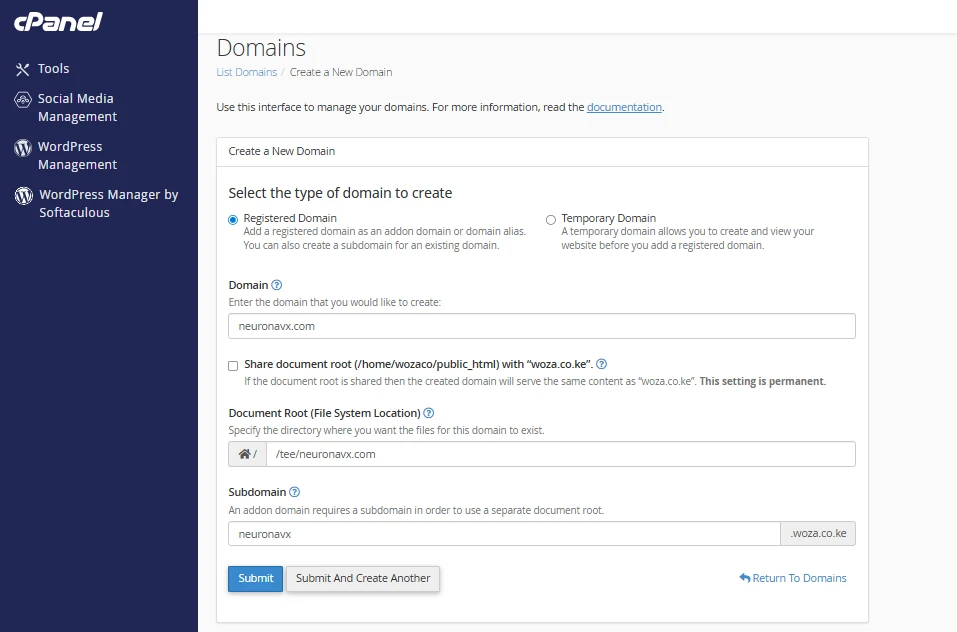
Once added, the system creates a separate folder for that domain, where you can build a new website from scratch, install WordPress, create emails, and manage content independently.
This setup is a practical option if you want to run multiple websites without paying for separate hosting plans.
Key Differences – Subdomain vs Parked vs Addon Domain
The main difference comes down to how each one is used.
Here’s a simple side-by-side comparison to make everything clear at a glance:
| Feature | Subdomain | Parked Domain (Alias) | Add-On Domain |
| Purpose | Organises sections within one website | Points to the main website | Runs a completely separate website |
| Content | Different content (own pages/files) | Same as the main site | Fully unique content |
| Files & Folder | Stored in its own subfolder | No separate folder (uses main site files) | Stored in its own separate folder |
| Emails | Can have its own email addresses | Uses main domain emails only | Has fully separate email accounts |
| Independence | Partial (still under one brand) | None (just redirects to main site) | Full independence (separate site) |
| Visitor Experience | Looks like a section of the main site | Looks identical to the main site | Feels like a completely different website |
| Cost | Free to create | Only pay for domain registration | Only pay for domain registration |
| Best Use Case (Kenya) | Blog, shop section, booking system | Brand protection, extra extensions, misspellings | Running multiple unrelated businesses |
It all comes down to how you want to use your domain:
- Subdomains help you organise one website
- Parked domains help you protect your brand
- Add-on domains let you run entirely separate websites
Many businesses start with one domain, then expand as they grow, adding sections, securing extra names, or launching new sites along the way.
Get Started
Once you know what you need, the next step is simple: register your domains and set them up to match your goals.
You can search and register your domain directly with Truehost, then create subdomains, parked domains, or add-on domains from your hosting dashboard.
If you’re planning to grow beyond a single website, setting this up early will save you time and keep everything organized from the start.






