Domain SearchInstantly check and register your preferred domain name
 Web Hosting
 cPanel HostingHosting powered by cPanel (Most user friendly)
 WordPress HostingHost your WordPress website with fast, secure, and affordable WordPress hosting in Kenya.
 KE Domains
 Reseller HostingStart your own hosting business without tech hustles
 Windows HostingOptimized for Windows-based applications and sites.
 Free Domain
 Affiliate ProgramEarn commissions by referring customers to our platforms
 Free HostingTest our SSD Hosting for free, for life (1GB storage)
 Domain TransferMove your domain to us with zero downtime and full control
 All DomainsBrowse and register domain extensions from around the world
 .Com Domain
 WhoisLook up domain ownership, expiry dates, and registrar information
 VPS Hosting
 Managed VPSNon techy? Opt for fully managed VPS server
 Dedicated ServersEnjoy unmatched power and control with your own physical server.
 Website Builder
 Online Store BuilderLaunch a professional e-commerce store without writing code.
 Web Design ServiceGet a custom-designed website tailored to your brand and goals. From just KES 15,600
 BlogRead our guides on web hosting, online business, digital marketing, and more
 SupportOur support guides cover everything you need to know about our services
 ContactContact us via chat or email
If you want to enhance your WordPress site or even build new pages, there’s probably a plugin for it.
AI makes these plugins even more powerful, reshaping how we handle content creation, SEO optimization, automation, and customer support.
With AI plugins for WordPress, you can perform these tasks with more ease and less budget.
What used to require developers or big-budget teams working with multiple tools and custom code is now possible inside your WordPress dashboard, thanks to a growing ecosystem of AI plugins.
Below, we’ll discuss the some of the best ones and the value they add to content creation, ranking, workflow efficiency, user experience, customer support, etc.
But first, here’s a summary of all these tools and what they offer:
|
Plugin |
Key Function |
AI Features |
Pricing |
Best For |
Ease of Use |
|---|---|---|---|---|---|
|
AIP: Complete AI Pack |
AI suite |
chatbot, content gen, image gen, AI Training, automation, WooCommerce |
BYO API model & user credits |
power users, agencies, developers |
Advanced, but intuitive UI |
|
Rank Math Content AI |
seo & content suggestions |
real-time keyword suggestions, NLP content scoring, content briefs, AI content credits |
Free (750 credits/month)& Paid Plans |
content creators, bloggers, and marketers |
Beginner-friendly |
|
Bertha AI |
AI writing & image assistant |
text and image generation, tone customization, rephrasing |
Free plan, pro plans from $45, pay-as-you-go model |
Writers, bloggers, WooCommerce stores |
Intuitive (integrates into the editor) |
|
Tidio AI Chatbot |
Customer Support & Lead Generation |
NLP-based responses, lead capture, sales funnel automation, WooCommerce & Messenger integration |
Free for up to 100 conversations. Paid plans from $24.17 / month |
Online stores, 24 / 7 support, lead gen |
Easy (drag-and-drop builder) |
|
Uncanny Automator |
AI-enhanced workflow automation |
OpenAI integration, AI-enhanced workflows, cross-plugin AI power |
Limited free version. Paid plans from $149 / year |
Complex, multi-plugin automations with AI |
No-code builder, simple AI setup |
|
Elementor AI |
Web design & content generation |
Copywriting, code snippets, translation, image generation |
No free version. Paid plans from $3.99 / month and a money-back guarantee |
Web designers, developers, content creators |
Seamless, beginner-friendly |
|
AI Engine By Jordy Meow |
Custom AI workflows & experimentation |
Chatgpt-style chatbot, prompt template builder, AI playground, text & image content, internal api, |
Free. Paid from $59/year/site. Lifetime plans from $449 |
Advanced users, developers, agencies |
Moderate |
Best AI Plugins for WordPress
And now let’s dive into the details!
1) Elementor AI
Elementor AI is one of WordPress’ top AI website builders. It integrates artificial intelligence directly into the Elementor page builder, allowing you to generate content, custom code, and images as you design your website.

Instead of switching between tools or relying on a team of people for content, layout, and custom code, Elementor AI lets you do it all in one place. You can write copy directly in the widget panel and generate custom code without advanced coding skills.
Elementor AI marks a significant shift in website building, enabling individuals and small teams to create websites more quickly and effectively compete with larger teams.
Elementor AI Features
- You can write copy directly within the widget panel for headlines, body text, and calls-to-action.
- The code generation feature lets you produce custom code snippets, simplifying the process of adding advanced functionalities for non-coders.
- Content refinement features help you enhance your content in different ways, such as adjusting text length, simplifying language, modifying tone, correcting grammar, and translating content into 29 languages
- AI-powered image generation with simple prompts. You can select image style, type, and aspect ratio
Elementor AI’s pricing plans include the Starter plan at $3.99/month, AI Power at $8.25/month, and AI Visionary at $15.99, all billed annually. It doesn’t offer a free trial, but the plans come with a money-back guarantee.
Advantages of Elementor AI
- It seamlessly integrates AI into the page design process
- It’s great for beginners as it can automatically generate code
- Elementor AI is one of the best tools for creating good basic texts and provides a wide array of editing tools for refining generated content
Elementor AI Downsides
- The text generator may sometimes lack awareness of broader contexts and only produce content based on the single prompt you input.
2) Rank Math Content AI
Rank Math Content AI is an AI tool inside the Rank Math SEO plugin. It uses AI to enhance on-page SEO and provide content suggestions meant to improve search engine rankings.
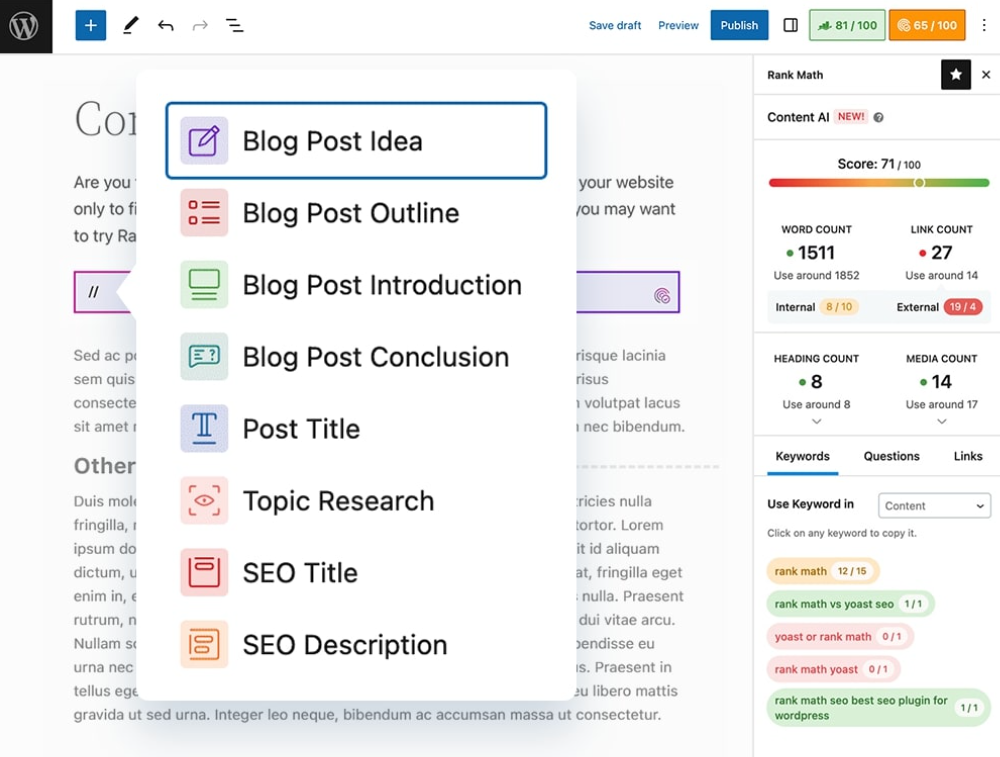
If you’re a content creator, blogger, or marketer, you can use this plugin to improve search engine rankings and optimize their content for SEO.
It has a user-friendly interface and makes suggestions in an easy-to-understand language, making it easy for beginners to use.
Rank Math AI features
- Providing real-time keyword suggestions as you write your content
- NLP content scoring system that analyzes content and offers readability tips to improve content clarity and structure
- Creating custom content briefs to help you tailor your content strategy to your audience
Rank Math is a free tool; the free version provides 750 monthly credits for life. Premium versions give you access to over 40 AI tools for optimizing your content for seo and working with multiple sites.
Advantages of Rank Math Content AI
-
It offers great and effective on-page SEO and content suggestions
-
Its “green-light” suggestions, explained in plain language, make it easy to resolve issues even for beginners
-
It has a lot of free features
-
It integrates seamlessly with Google Search Console and Google Analytics
-
It’s compatible with popular page builders (Elementor, Divi) and the Block Editor
-
Fast loading times and the ability to maintain swift website performance.
Disadvantages of Rank Math Content AI
- Its readability analysis is not as detailed as what you get on Yoast SEO
- While it provides internal linking suggestions, you have to manually insert them
3) AIP: Complete AI Pack (formerly AI Power)
AIP: Complete AI Pack integrates with WordPress, allowing you to create content, manage your site, and manage user interaction with AI straight from the dashboard.
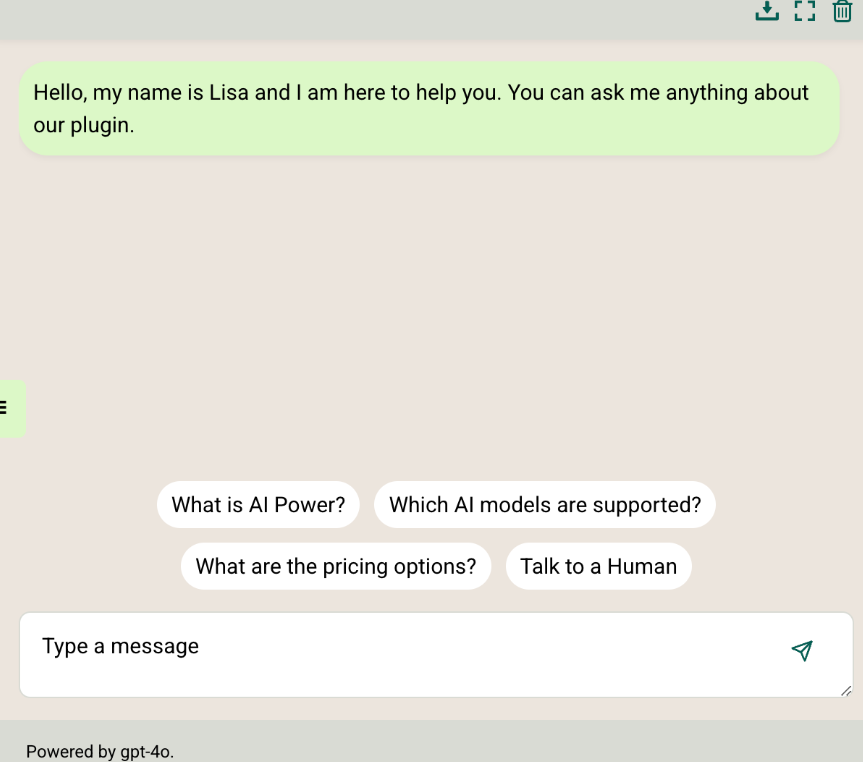
It’s a great tool for developers, web agencies, and power users who would benefit from branded AI features, complex content workflows, or even their AI tools right inside WordPress.
The plugin runs on a “Bring Your Own API Key” (BYO API) model, meaning it connects to external AI providers like OpenAI or Google, but you manage and pay for your API usage.
BYO API gives you more control over which AI services you use and how much you spend. But it also means you’ll need to keep an eye on your API keys, monitor usage, and understand third-party pricing models.
AIP Features
-
AI chatbot that allows you to build custom chatbots with voice input. You can train the chatbots with your content or web search
-
Content writer for generating text content like blog articles, web page copy, and product descriptions. The content writer takes instructions from different inputs, including URLs, lists, CSV files, and RSS feeds.
-
Image generator for text-to-image generation. It supports models like DALL-E 3, Google Imagen, and Replicate, and also has access to free stock photos.
-
An AI training feature that lets you train the AI with posts, pages, products, and files on your site. This enables the chatbot to give contextual answers.
-
Automated scheduling of AI content creation and automated replies
-
Woocommerce tools for AI-enhanced product titles and descriptions
-
Works with different AI providers such as OpenAI, Google, Microsoft Azure, openrouter, and deepseek. This wide choice gives you to work with the AI service you’re most comfortable with.
-
The user credits feature lets you charge visitors for using AI tools on your site. So if you’re building a SaaS-style WordPress setup or offering AI-powered services, this plugin gives you the infrastructure to monetize it.
Advantages of AIP: Complete AI Pack
- It offers a wide variety of AI tools for text, images, and chatbots.
- Provides excellent and responsive support
- Saves costs by eliminating the need for multiple specialized plugins
- It’s got an intuitive user interface.
Disadvantages of AIP: Complete AI Pack
- In case of major updates, you might need to set up everything afresh, which could be inconvenient.
- While the BYO API offers flexibility and potential cost savings, it also requires some setup and ongoing management.
4) Bertha AI
Bertha AI is an AI writing assistant that integrates directly into the WordPress editor, enabling you to generate blog posts, product descriptions, website copy, and images.
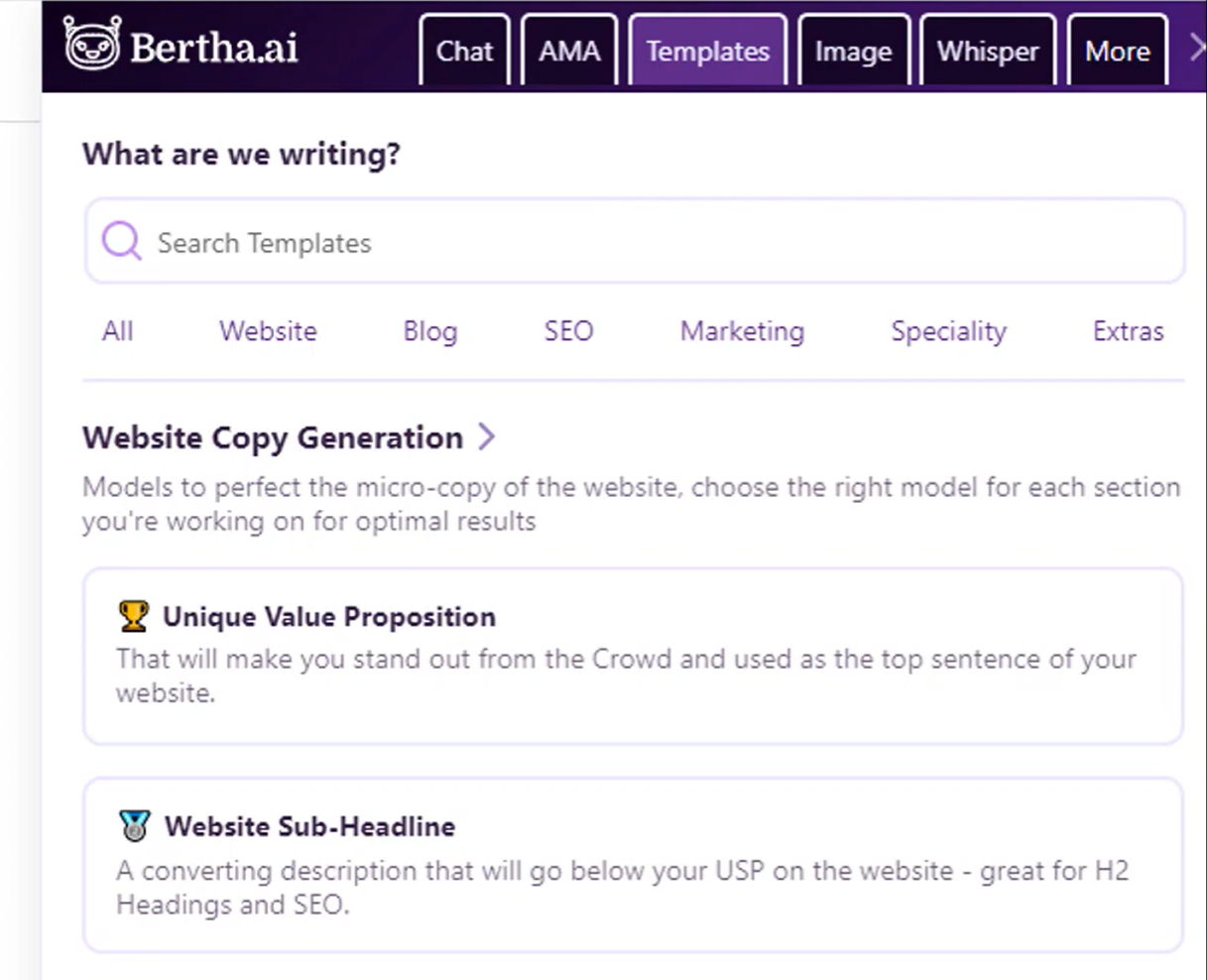
It is therefore quite useful for writers, bloggers, and WooCommerce store owners who need to produce high-quality, diverse content quickly within WordPress.
Bertha AI Features
- Generate a wide range of content, from blogs to landing page creation, product descriptions for WooCommerce, articles, and website copy.
- Tone customization allowing you to adjust your writing to be professional, playful, etc.
- AI-powered image generation based on user descriptions.
- Content rephrasing tool and seo keyword suggestions, supported by over 30 pre-built content models
Bertha AI offers a limited free version, a pro plan costing $45/month, and a pro unlimited plan for $150/month.
It also has flexible pay-as-you-go plans for text and images, giving you the flexibility to pay for what you need when you need it.
Advantages of Bertha AI
- It integrates smoothly into the WordPress editor and is compatible with popular page builders like Elementor and Gutenberg, which eliminates the need to switch between editors
- It provides a lot of AI tools for blogging
- Offers flexible pay-as-you-go pricing options, making it great for small bloggers who don’t have large content demands
- The plugin generates text and image content
Bertha AI Downsides
- Its yearly premium plan is relatively expensive
- Furthermore, the free version lacks most of the core functionalities
5) Tidio AI Chatbot
Tidio AI Chatbot is not just a customer support tool, but a powerful tool for enhancing customer interactions and facilitating lead generation in WordPress.

This WordPress AI plugin is essential for online stores, service providers, or any business requiring automated, continuous customer support, efficient lead qualification, and streamlined sales funnel management.
Tidio AI features
-
Uses natural language processing (NLP) to generate intelligent responses
-
It automates lead capture and streamlines the customer’s process through the sales funnel
-
Seamlessly integrates with WooCommerce, Messenger, and email, ensuring comprehensive customer communication
-
A customizable chat widget that allows you to personalize its appearance and automate how it responds based on customer behavior
-
Easy-to-use drag-and-drop builder eliminates the need for technical skills
-
A variety of ready-to-use templates for common tasks such as customer service, lead generation, e-commerce, and recruitment
Tidio is free for up to 100 conversations and charges between $24.17 and $749 per month for 100 conversations, with the price adjusting on a sliding scale.
Tidio’s advantages
- It automates customer interactions and provides continuous 24/7 support
- The drag-and-drop builder makes it easy to create and manage chatbots without coding
- It integrates natively with WordPress
Tidio Downsides
- It’s costly for the number of conversations you get
- Tidio branding on the free plan
- Its reports are too basic and may not provide a strong basis for customizing your customer interactions
6) Uncanny Automator
If you find yourself automating more than a few tasks on your site, you might want to consider using Uncanny Automator. With Uncanny Automator, you can connect any plugin to OpenAI, automatically turning that plugin into an AI tool.
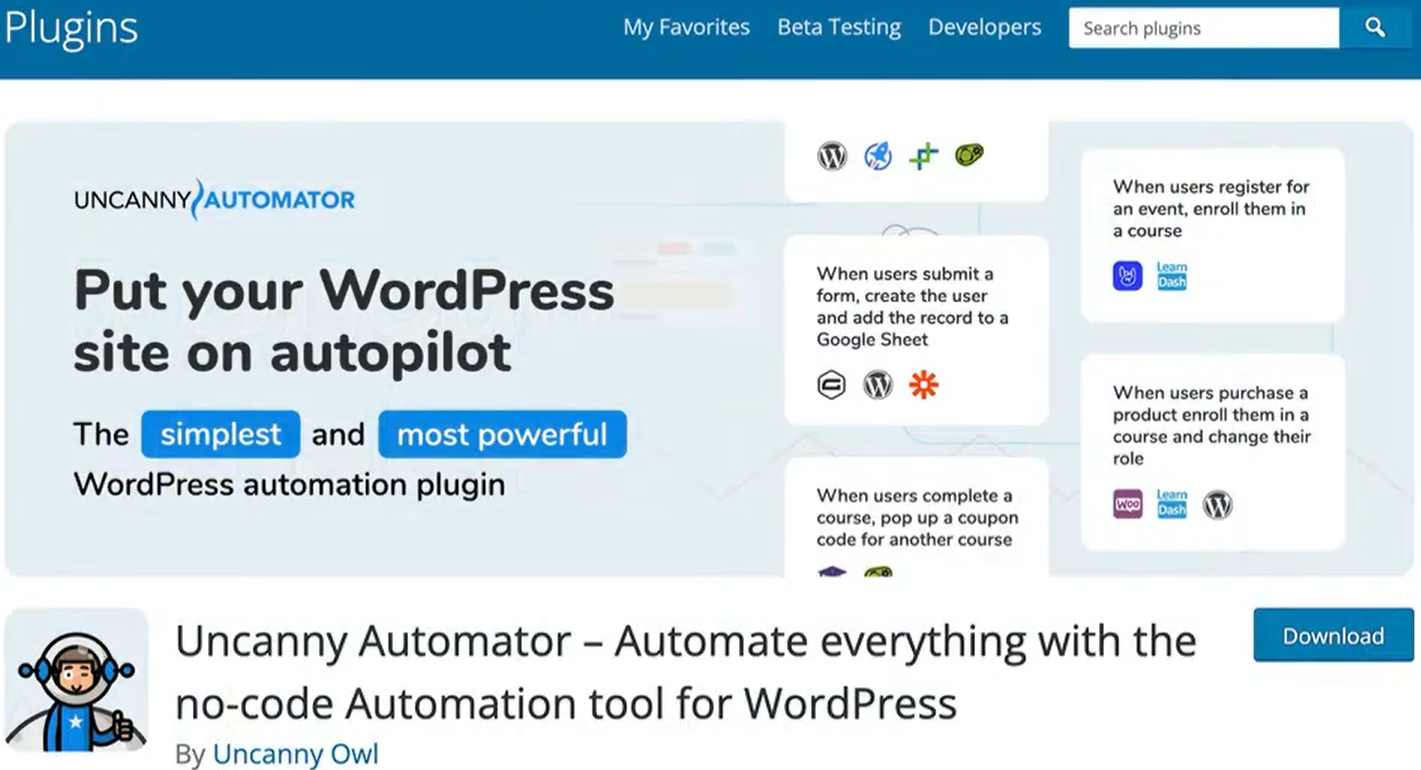
This allows you to automate workflows across your entire WordPress site, from creating content and media to managing communication or triggering responses after a form submission, all without writing custom code.
Uncanny Automator Features
-
Its OpenAI integration means it can connect with models such as ChatGPT, Davinci, etc., giving you access to a wide variety of content generators inside WordPress
-
You can use AI to automatically create anything, from new blog posts upon form submission, to image generation with text prompts, and automated replies to forum questions
-
You can effectively transform any WordPress plugin into an AI-powered one by connecting OpenAI with plugins like WPForms, OptinMonster, LearnDash, MemberPress, Elementor, and WooCommerce
-
Create WhatsApp chatbots that respond using OpenAI and ChatGPT
Uncanny Automator costs between $149 and $399 per year and also has a limited free version.
Advantages of Uncanny Automator
- It’s more than a plugin, but a tool for taking AI automation site-wide
- It allows you to create powerful workflows using a built-in, no-code builder
- The setup for AI workflows is quite simple
- You can create an unlimited number of recipes (automations)
Downsides of Uncanny Automator
- Uncanny AI’s free version does not offer AI support, so you can only get this feature with a paid subscription
7) AI Engine by Jordy Meow
AI Engine by Jordy Meow is a plugin for advanced users and developers who want control over AI to create custom chatbots, generate content, and experiment with various AI tools.
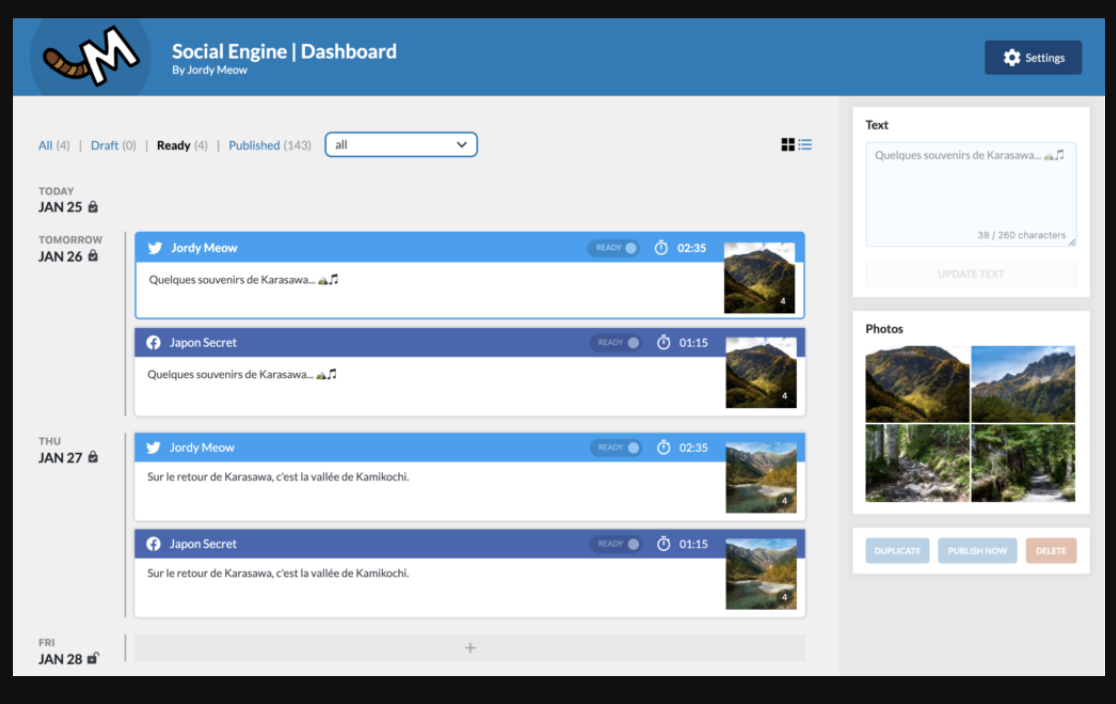
One thing that sets AI Engine apart is its built-in AI Playground. It’s a powerful space where developers and power users can experiment, tweak prompts, and customize how the AI behaves.
The playground doesn’t limit you to preset options, but lets you play around with different use cases, test outputs, and shape the AI to work the way you need it to. It’s a great fit when you want to go beyond just using AI features, to understanding and tailoring it to your needs.
AI Engine Features
-
A ChatGPT-style Chatbot Widget that allows you to create sophisticated chatbots with customizable behavior
-
You can create and manage prompt templates for diverse AI tasks using the prompt template builder
-
A dedicated AI Playground for testing different AI tools, experimenting with prompts, and exploring custom use cases such as translation, discussions, or drafting reviews
-
It also functions as a Content Generator, creating engaging content for websites
-
Internal API that links AI Engine with other WordPress plugins
-
Image generation with retina support, meow lightbox, and other imaging features, great for photographers
You can access most of AI Engine’s core features in the free version. A Pro version is also offered, starting at $59 per year for one site, up to $149/year for 20 websites. You can also pay a one-off lifetime fee starting at $449 for 1 website and going up to $1,499 for 2500 websites. While the lifetime fee might be attractive, you’ll only get support from AI Engine in the first year.
Advantages of AI Engine
- Complete control over how AI functions on your site makes it ideal for creating branded AI experiences
- It provides extensive customization options for developing unique AI models
- Excellent customer support
- The plugin can generate text and images
AI Engine Downsides
- Some features are still in beta mode
- If you’re a beginner, you might experience a steeper learning curve
Which AI Plugin For WordPress Will You Choose?
There’s no one-size-fits-all AI plugin for WordPress. The best tool depends on your specific needs. For,
- Content creation (text and visuals), use tools like Bertha AI or AIP: Complete AI Pack to quickly generate blog posts, product descriptions, and images.
- SEO and ranking improvements, go with Rank Math Content AI, for advanced on-page optimization and keyword guidance.
- Automating workflows or managing complex sites, go with Uncanny Automator or AI Engine for deeper customization and multi-step automations across plugins.
- Customer support and lead generation, Tidio AI Chatbot or WPBot will deliver 24/7 assistance and capture leads automatically.