Domain SearchInstantly check and register your preferred domain name
 Web Hosting
 cPanel HostingHosting powered by cPanel (Most user friendly)
 WordPress HostingHost your WordPress website with fast, secure, and affordable WordPress hosting in Kenya.
 KE Domains
 Reseller HostingStart your own hosting business without tech hustles
 Windows HostingOptimized for Windows-based applications and sites.
 Free Domain
 Affiliate ProgramEarn commissions by referring customers to our platforms
 Free HostingTest our SSD Hosting for free, for life (1GB storage)
 Domain TransferMove your domain to us with zero downtime and full control
 All DomainsBrowse and register domain extensions from around the world
 .Com Domain
 WhoisLook up domain ownership, expiry dates, and registrar information
 VPS Hosting
 Managed VPSNon techy? Opt for fully managed VPS server
 Dedicated ServersEnjoy unmatched power and control with your own physical server.
 Website Builder
 Online Store BuilderLaunch a professional e-commerce store without writing code.
 Web Design ServiceGet a custom-designed website tailored to your brand and goals. From just KES 15,600
 BlogRead our guides on web hosting, online business, digital marketing, and more
 SupportOur support guides cover everything you need to know about our services
 ContactContact us via chat or email
The biggest black friday VPS discount rarely wins. It just looks like the best deal.
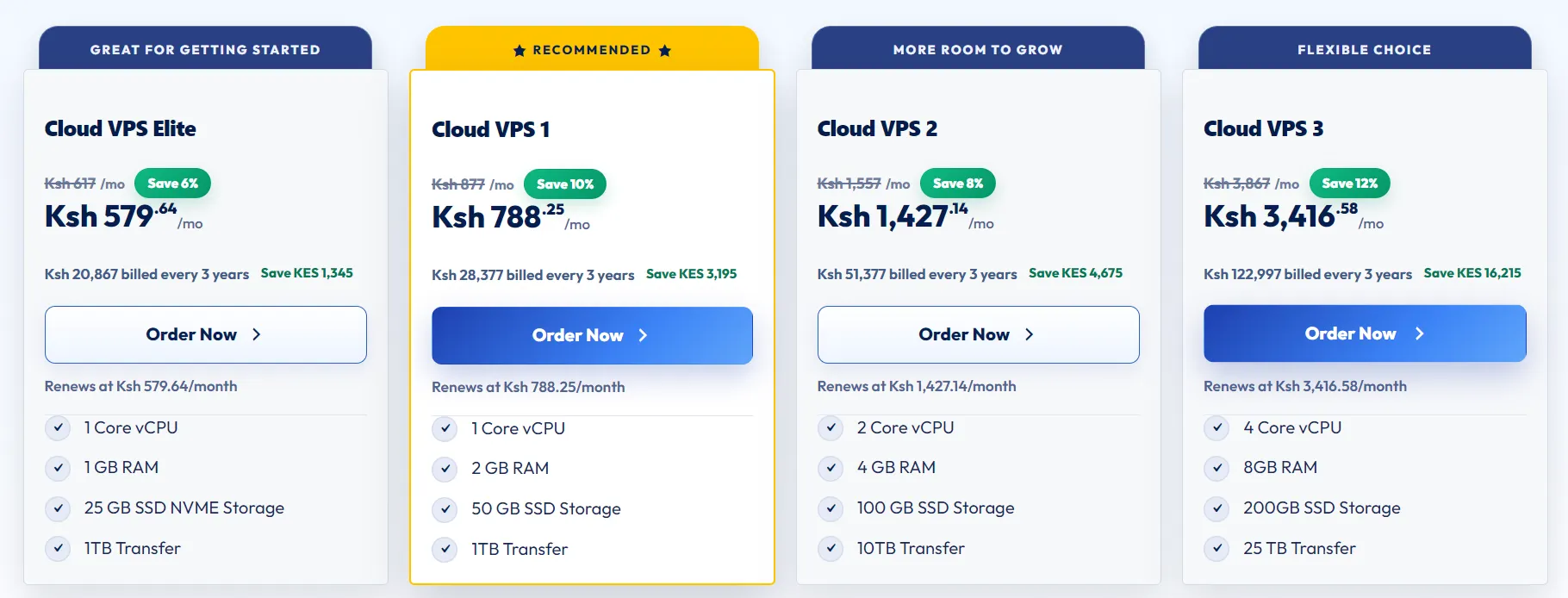
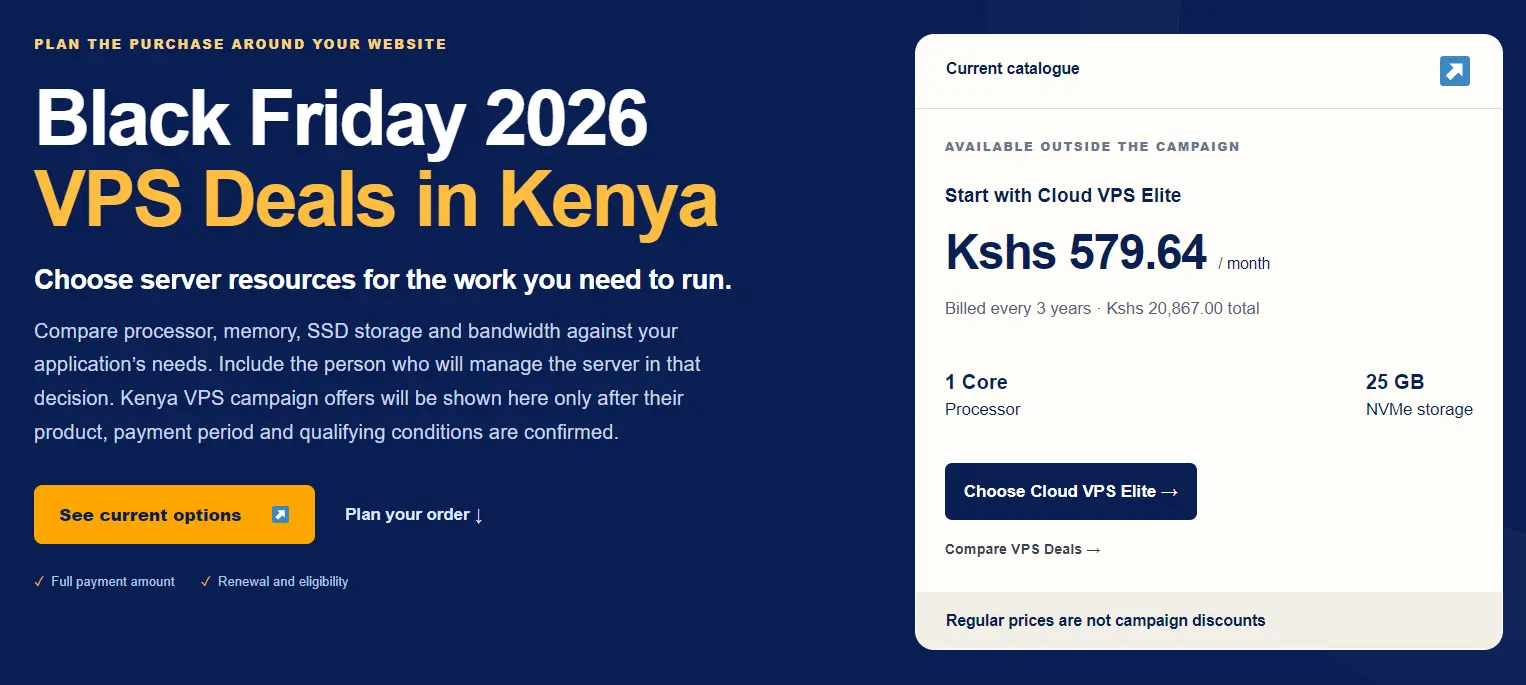
Take a plan listed at Kshs 579.64 a month. That sounds small. However, the plan bills every three years, so you pay Kshs 20,867 on day one. The monthly figure is simply the total split into 36 slices.
Truehost’s Cloud VPS Elite shows these numbers today. It offers 1 core and 25 GB of NVMe storage. Keep in mind that this is a regular catalog price, not a campaign discount.
The price tag tells you what you pay first. It says little about what you get, what you keep paying, or what happens when something breaks.
This guide gives you a checklist for judging any VPS offer. Use it on Truehost plans, rival hosts, and the black friday deals that appear in November. Kenya campaign offers have not been announced yet, so the checklist also works on current plans. Black Friday 2026 lands on 27 November, but that date does not decide when Truehost’s sale starts.
Here is the rule behind everything below. A deal is good only if it still makes sense at the renewal price.
Black Friday VPS Deal Checklist at a Glance
Skim this table first. Then read the sections that match your project.
| Feature | What to check | Red flag |
|---|---|---|
| Renewal price and term | Price after the first term, and months paid upfront | Renewal price is hidden |
| Hidden costs | Control panel, extra IP, backups, Windows license | Extras appear only at checkout |
| CPU and RAM | Dedicated or shared vCPU, CPU model, RAM amount | “Unlimited” with no numbers |
| Storage | NVMe or SSD, IOPS limit, capacity | Capacity listed with no speed figure |
| Virtualization and access | KVM or container, root access, OS choices | Shared kernel, no root |
| Network and IPs | Transfer cap, port speed, IPv4, IPv6, DDoS | “Unmetered” with a hidden fair-use cap |
| Location | Data center city, delay for your visitors | Server abroad but sold as local |
| Uptime SLA | Percentage, credit rules, claim window | Credits only, short claim window |
| Support and management | Managed scope, response times, promo-tier support | Promo plans sit in a slower queue |
| Backups and security | Frequency, retention, off-server copy | Snapshots sold as backups |
| Upgrades | Upgrade path, downgrade rules, price after upgrade | Promo price lost on upgrade |
| Terms and refunds | Eligibility, refund window, auto-renewal | The refund window ends before you can test |
1) Renewal Price, Billing Term, and Total Cost
Promo Price vs Renewal Price
Start here, since this is the number you pay for most of the server’s life. Some hosts cut the first term by 50-80 percent. Then they bill full price at renewal.
So ask one question before you pay. What is the renewal price, and for which term? If the answer is vague, treat the offer as unfinished. A good offer prints both prices side by side.
Monthly Equivalent vs Full Payment
Go back to the Cloud VPS Elite example. Kshs 579.64 a month, multiplied by 36 months, gives Kshs 20,867. That is one payment, not 36 small ones.
Check your cash flow before you click. A low monthly figure can still mean a large bill today.
What a 36-Month Term Locks You Into
A 36-month term is three years at that price. That is great if the rate holds. However, it has also been three years with one server. If your project changes, you still carry the cost.
Shorter terms cost more per month. Still, they keep your exit open.
VAT, Setup Fees, and Mandatory Add-Ons
Kenya’s standard VAT rate is 16 percent. Confirm whether the displayed price includes it. Then read the order summary line by line. Setup fees, migration charges, and required add-ons can lift the final total.
Black Friday-Only Bundles
Some hosts sell plans only during the sale. Those bundles have no regular price, so you cannot tell whether the discount is real. Compare the resources against a similar year-round plan. Then compare totals, not percentages.
The Three-Year Formula
Use this formula on every offer:
Total over three years = first payment + later renewals + extras + VAT
Here is an example with invented numbers. Plan A costs Kshs 12,000 in year one, then renews at Kshs 24,000. Plan B costs a flat KShs 18,000 each year.
Over three years, Plan A totals Kshs 60,000. Plan B totals Kshs 54,000. The “cheaper” plan costs more.
2) Hidden Costs: What the Advertised Price Leaves Out
The advertised price covers the server. It rarely covers everything around it. Add these items to your total before you compare two offers.
- Control panel license. cPanel’s single-account license was listed at around $27 a month in 2025. Free panels exist. However, you must install, update, and secure them yourself.
- Extra IPv4 addresses. Most plans include one address. Each extra address usually costs money.
- Backups and snapshots. Some plans include them. Others sell them as a monthly add-on.
- Windows license. Windows Server plans cost more than Linux plans. Confirm that the license is included in the price.
- Managed service fee. Managed VPS costs more because the host handles part of the admin work.
- SSL, monitoring, and migration. Each one can appear as a separate line at checkout.
3) Dedicated or Shared vCPU, and How Much RAM You Need
A vCPU is a Scheduling Slot, Not a Core
On KVM, each vCPU is a thread on the host. A host can sell four vCPUs backed by a single physical core. So treat any listing that does not say “dedicated” as shared.
Shared CPU works for light sites, since most servers sit idle most of the day. However, a busy shop or database server needs a dedicated CPU.
CPU Model and Clock Speed
Two plans can both list 4 vCPUs. One may run on hardware several generations older. Single-thread speed can differ by a factor of two.
Ask which CPU model the plan uses. After you buy, run lscpu to confirm it.
How Overselling Shows Up
Overselling means the host sells more resources than the server holds. It can hit CPU, RAM, disk, and network.
The clearest sign is steal time. It shows how long your vCPU waits for a physical core. Run a CPU-heavy task, then watch the st column:
vmstat 1 10A sustained reading above 5 percent under moderate load is a warning sign. Low or zero steal is what you want.
Burst Limits and Throttling
Some plans allow short bursts above the base CPU allowance. Ask how long a burst lasts. Also, ask what happens when it ends. Throttling can turn a quick plan into a slow one.
How Much RAM Do You Need
Size RAM based on the workload, not the plan name. List every service: web server, database, background jobs, and monitoring. Add up their memory needs. Then leave room for busy hours.
These rough starting points help:
- Small WordPress or Laravel site: 2 vCPU and 4 GB RAM.
- Mid-traffic dynamic site: 4 vCPU and 8 to 16 GB RAM.
- Light site, test server, or small tool: 1 core can be enough.
Treat these as rough guides, not rules. If your site already runs somewhere, measure its real usage first. Also, slow disks cause problems just as often as low memory. So do not overspend on RAM before you check storage.
4) NVMe Storage, IOPS, and Capacity
NVMe vs SSD
NVMe drives connect over PCIe. SATA SSDs use an older, slower link. NVMe often reads several times quicker, and the gap shows up in database queries. So prioritize NVMe if your plan runs a database or heavy file work.
IOPS Limits
Capacity tells you how much fits on the disk. IOPS tells you how many reads and writes the disk can perform per second. A 100 GB plan with a tight IOPS cap can still crawl.
Cheap plans often throttle IOPS hard. So ask for the limit in writing.
Inode Limits
A few plans cap the number of files, called inodes. Email stores each message as a file, so mail-heavy servers hit the cap early. Ask whether your plan has one.
Noisy Neighbours
Shared storage slows down when other tenants run backups or imports. Test your disk during the refund window. The last section shows how.
5) Virtualization, Operating Systems, and Access
KVM vs Container-Based Virtualization
KVM gives each VPS its own kernel. Container-based systems, such as OpenVZ, share the host kernel. That means less isolation. It can also mean shared swap, and you cannot run virtual machines inside your server.
For production work, choose KVM.
Root Access and SSH Keys
Full root access lets you install what you need. Confirm that the root is unrestricted. Then check that SSH key login works from the first boot. Password-only access is weaker.
Operating System Choices
Check the list of Linux distributions on offer. Add Windows Server if your software needs it. Windows costs more, so compare the price with a Linux plan. Also, ask whether you can upload a custom ISO.
Cloud-Init and API Access
If you plan to automate server builds, ask about cloud-init and an API. Skip this check if you run a single site.
6) Bandwidth, Port Speed, IP Addresses, and DDoS Protection
Transfer Caps vs “Unmetered”
A monthly cap is a hard number. “Unmetered” often hides a fair-use policy. Read it. Then ask what happens at the limit. You may face a slowdown, overage charges, or suspension.
Shared vs Dedicated Ports
A 1 Gbps port sounds great. However, a shared 1 Gbps port is a ceiling, not a promise. Ask whether other servers share your port.
IPv4, IPv6, and Reverse DNS
Most plans include one IPv4 address. Extra ones cost money. Check IPv6 support too.
Also, ask about reverse DNS control, since mail servers need it to avoid being marked as spam. Some cheap plans share a single address behind a NAT with a few forwarded ports. That breaks many setups.
DDoS Protection and Firewalls
Ask whether DDoS protection is included or sold separately. Then ask what size of attack it covers. Finally, confirm that you can edit firewall rules from the control panel.
7) Data Center Location, Latency, and Data Residency in Kenya
Distance Adds Delay
A server in Nairobi answers Kenyan visitors in fewer milliseconds than one in Europe. For online shops, booking sites, and trading tools, that gap shows. Visitors feel it on every page.
Local Peering
Hosts that peer locally can keep Kenyan traffic inside the country. The Kenya Internet Exchange Point (KIXP) is the usual meeting spot. Ask your host how it connects.
Data Protection Act
Kenya’s Data Protection Act sets conditions on moving personal data abroad. If you store customer records, ask a lawyer whether a local server helps you. This article is not legal advice.
Which Line Is the Black Friday Deal On?
Truehost offers VPS plans in multiple locations. A low price may be associated with a plan hosted abroad. So check the data center listed for your exact plan. Then ask for support to confirm it in writing.
8) Uptime SLA: What the Guarantee Actually Pays
What the Percentage Allows
A percentage sounds abstract until you turn it into minutes. This table does that for a 30-day month.
| SLA percentage | Downtime allowed per month |
|---|---|
| 99% | About 7 hours 12 minutes |
| 99.5% | About 3 hours 36 minutes |
| 99.9% | About 43 minutes |
| 99.99% | About 4 minutes |
Credits, Not Cash
Most SLAs pay in account credit. A credit lowers your next invoice. It does not return money to your wallet.
Claim Windows
You usually have to file the claim yourself. Windows range from about a week to a month. Miss it, and the credit is gone. Overdue accounts often lose their credit, too.
Exclusions
Scheduled maintenance, DDoS attacks, and customer misconfiguration usually fall outside the SLA. Read that list before you trust the number.
What the SLA Does Not Cover
Many SLAs skip backups. They also skip your own application. A 99.9% network uptime does not mean your website stays online.
9) Managed vs Unmanaged VPS and Support on Promo Plans
What “Managed” Covers
Unmanaged means you handle setup, updates, patches, monitoring, security, and recovery. Managed shifts, some or all of which were assigned to the host. Ask exactly which tasks are included.
Truehost offers both. See the managed VPS page and our managed VPS provider comparison for details.
Support on Promo Plans
Sales bring a rush of new tickets. So check whether promo plans get the same support tier as regular plans. Ask whether response times change during Black Friday.
Response Times and Channels
Look for stated response times and support hours in East Africa Time. Check which channels you receive messages on, such as chat, WhatsApp, phone, and tickets.
Better still, send a real question before you buy. Then, time the reply.
Migration Help
Ask whether the host moves your site for free. Then ask what the move includes. Databases, DNS records, and email often sit outside it.
10) Backups, Snapshots, and Security
Backup or Snapshot?
A snapshot is a point-in-time copy kept near the server. It is handy for rolling back a bad update. A backup is a separate copy stored elsewhere.
Snapshots alone will not save you if the host’s storage fails. So keep at least one copy off the server.
Frequency and Retention
Ask how often backups run. Ask how many copies the host keeps, and for how long. Then check whether the copies live off-server.
If backups cost extra, add them to your total.
Security From Day One
A new VPS sits on the open internet the minute it boots. Harden it on day one. Our VPS hardening guide walks you through each step.
11) Upgrades, Downgrades, and Room to Grow
The Upgrade Path
Check that you can move to a bigger plan without rebuilding the server. Ask whether the move needs a reboot. Also, ask how much downtime to expect.
Downgrade Rules
Some hosts block downgrades, since disks cannot shrink. So ask before you buy a plan bigger than you need.
Promo Price After an Upgrade
Ask whether the promo rate survives an upgrade. Often it does not. The new plan may be billed at the regular price.
Adding Resources Separately
Some hosts sell extra RAM, CPU, or disk on their own. That can cost less than a full plan change. Ask whether yours does.
12) Eligibility, Refunds, Auto-Renewal, and Acceptable Use
Who Qualifies
Read the eligibility terms on every card. Truehost’s page says a new-order offer does not cover renewals, upgrades, or existing accounts unless stated. It also says an earlier purchase does not automatically qualify for a later promotion.
Refund Window
Read the refund policy before you pay. Note the number of days and what it excludes. Some hosts refund only the first 14 days. After an automatic renewal, they may refund nothing.
Auto-Renewal
Check whether the service renews automatically. Then set a calendar reminder a week before the date.
Acceptable Use
Hosts can suspend servers for spam, crypto mining, or port scanning. Suspensions usually fall outside the SLA. Read the terms of service so nothing surprises you.
Test Your New VPS Inside the Refund Window
Do not wait for a problem. Run these five checks in your first days:
- Check the CPU. Run lscpu and compare the model with what the host promised.
- Watch steal time. Run a CPU-heavy job, such as compressing a large folder. Then watch vmstat 1 10 for the st column.
- Test the disk. Leave 1 GB free, then run the command below. It uses up part of any IOPS allowance, so run it once.
- Test a restore. Take a backup, delete a test file, and restore it.
- Test support. Open a ticket with a real question. Time to reply.
fio --name=iops --filename=fiotest --size=1G --direct=1 --ioengine=libaio --rw=randread --bs=4k --iodepth=32 --numjobs=1 --runtime=60 --time_based --group_reportingIf anything falls short of the listing, ask for a refund before the window closes.
FAQs
Is Black Friday a good time to buy a VPS, or should I buy now?
It depends on your timeline. If the project is urgent, buy now and check the full total. Truehost’s page says an earlier purchase will not automatically qualify for a later promotion.
If you can wait, compare the campaign terms against current plans. Then run this checklist on both.
How long do Black Friday VPS deals last?
Truehost’s Kenya campaign has no approved start or end dates yet. The 27 November date is a reminder, not a schedule. Other hosts vary a lot. For example, one global host ran its 2025 VPS sale from 13 October to 8 December.
Can I run multiple websites or services on a single VPS?
Yes, but they share the same resources. Add up the CPU, RAM, and disk each service needs. Monitor them together, so one busy task does not starve the rest. Also, check the license terms of your software.
Run Your Shortlist Through the Checklist
You now have twelve checks. Most weak black friday deals fail on three of them: renewal price, billing term, and the support tier on promo plans. Those three decide whether a discount stays a discount.
Also, buying early does not guarantee a later promotion. So decide with the real totals in front of you, not the headline percentage.
Your next step is simple. Compare the current plans on Truehost VPS hosting against this checklist. Then, message support to confirm the renewal price, billing term, and data center before you pay.