Domain SearchInstantly check and register your preferred domain name
 Web Hosting
 cPanel HostingHosting powered by cPanel (Most user friendly)
 KE Domains
 Reseller HostingStart your own hosting business without tech hustles
 Windows HostingOptimized for Windows-based applications and sites.
 Free Domain
 Affiliate ProgramEarn commissions by referring customers to our platforms
 Free HostingTest our SSD Hosting for free, for life (1GB storage)
 Domain TransferMove your domain to us with zero downtime and full control
 All DomainsBrowse and register domain extensions from around the world
 .Com Domain
 WhoisLook up domain ownership, expiry dates, and registrar information
 VPS Hosting
 Managed VPSNon techy? Opt for fully managed VPS server
 Dedicated ServersEnjoy unmatched power and control with your own physical server.
 Website Builder
 Online Store BuilderLaunch a professional e-commerce store without writing code.
 Web Design ServiceGet a custom-designed website tailored to your brand and goals. From just KES 15,600
 BlogRead our guides on web hosting, online business, digital marketing, and more
 SupportOur support guides cover everything you need to know about our services
 ContactContact us via chat or email
Domain management involves more than simply registering a domain name.
Once a domain is connected to hosting, website owners often need to manage DNS records, create subdomains, configure redirects, connect email services, and adjust various other domain settings as their website grows.
cPanel is a hosting control panel that provides several tools for handling these tasks in one place.
The exact tools available to you can vary depending on your hosting provider and the specific hosting plan you have chosen, so it is worth checking what your particular account includes.
Rather than jumping between separate systems for DNS, email and file management, having these cPanel domain tools grouped together in one dashboard saves considerable time, especially once you are managing more than one website at a time.
This guide covers the main cPanel domain tools and explains what each one can actually be used for.
1) Domains
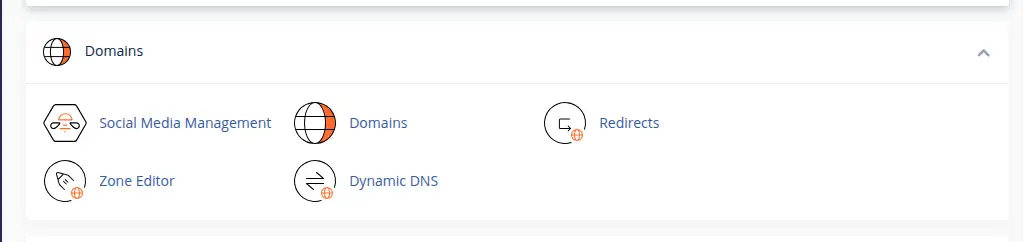
The Domains section is the central place for managing domains associated with your cPanel hosting account.
You can use it to add a new domain to your hosting account, view domains already connected, configure domain directories and document roots, manage additional domains, and access domain-related settings generally.
You would typically use this when adding another website to your hosting account, connecting a newly registered domain to your hosting, or managing several websites from a single cPanel account.
For anyone hosting more than one project, this section quickly becomes one of the more frequently visited parts of the dashboard.
2) Zone Editor
Zone Editor is one of the most important cPanel domain tools available for DNS management.
It allows you to view and manage DNS records for a domain, where your hosting configuration permits it.
Through Zone Editor, you can add DNS records, edit existing ones, or remove records you no longer need.
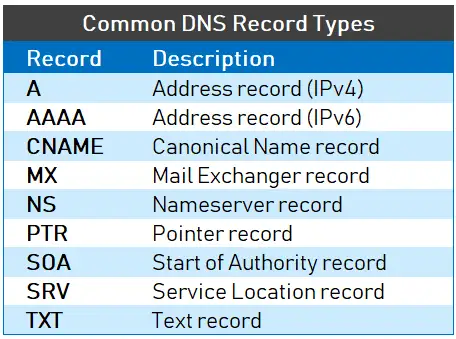
It lets you manage record types such as A, AAAA, CNAME, MX and TXT, along with domain verification records and email-related DNS settings.
You would use Zone Editor when pointing a domain or subdomain to an IP address, connecting a domain to another service, setting up domain email, or verifying ownership of a domain with a third-party platform.
Because Zone Editor touches so many of the settings that determine how a domain actually behaves, small mistakes here can have a noticeable ripple effect.
A single wrong character in a record can leave a website unreachable or break email delivery entirely, so it is worth double-checking any change before saving it.
3) A Records
Rather than treating this as an entirely separate tool, it makes more sense to think of it as a DNS function you access through Zone Editor.
An A record connects a hostname to an IPv4 address.
You can use it to point a domain to a web server, point a subdomain to a specific server, or connect a domain to an external service that provides an IPv4 address.
A simple example looks like this: example.com points to your server’s IP address.
4) AAAA Records
An AAAA record connects a hostname to an IPv6 address, functioning much like an A record but for the newer IPv6 addressing system.
You can use it to point a domain toward an IPv6-enabled server, or to configure IPv6 access for websites or services that support it.
In short, A records handle IPv4 addresses, while AAAA records handle IPv6 addresses.
5) CNAME Records
A CNAME record points one hostname to another hostname, rather than directly to an IP address.
You can use CNAME records to configure www subdomains, connect subdomains to external platforms, point a hostname toward a service’s designated hostname, or set up certain third-party integrations that require this kind of pointer.
A common example is www.example.com pointing to example.com.
6) MX Records
MX records tell the internet which mail servers should receive email for a domain.
You can use MX records to connect a domain to its email hosting service, change where domain email gets delivered, configure third-party email services, and manage overall email routing for your domain.
It is worth being careful here.
Changing MX records incorrectly can interrupt domain email entirely, so these records should only be modified when you know exactly which mail servers should be receiving your messages.
Before changing MX records, it is worth confirming with your email provider exactly which mail servers should be listed, and in what order.
Getting this sequence wrong can cause emails to bounce or route to the wrong destination without any obvious warning that something has gone off track.
7) TXT Records
TXT records store text-based information associated with a domain, and they serve several practical purposes beyond simple record-keeping.
You can use TXT records for domain verification, email authentication, SPF records, DKIM-related configuration, DMARC policies, and verifying ownership for various third-party platforms.
Among all the cPanel domain tools covered here, TXT records tend to come up often whenever cPanel domain settings or DNS management need adjusting for a new service or integration.
8) Subdomains
The Domains interface can also be used to create and manage subdomains, depending on your specific cPanel configuration.
You can use subdomains to create sections like blog.example.com, shop.example.com or support.example.com, separating different parts of your website or applications.
They also work well for giving a web application its own dedicated hostname.
It helps to draw a clear line here.
Creating a subdomain simply adds a new section under your existing domain, while registering an entirely new domain means purchasing and managing a completely separate name.
9) Domain Aliases
Domain aliases allow another domain name to point to the same website as your primary domain.
You can use aliases to point alternative domain names to an existing website, support multiple domain variations that all lead to the same content, or redirect and serve the same website through another domain, depending on your configuration.
For example, if a business owns both example.com and example.net, the second domain can potentially be configured as an alias for the primary website, so visitors reach the same content regardless of which one they type in.
10) Redirects
The Redirects tool lets you send visitors from one URL to another automatically.
You can use redirects to send traffic away from an old domain, redirect an old URL to a new one, redirect HTTP URLs to HTTPS where appropriate, redirect visitors between domain variations, or handle broader website migrations smoothly.
It is worth knowing the difference between redirect types here.
A 301 redirect signals a permanent move, which is generally what search engines and browsers expect for lasting changes, while a 302 redirect signals a temporary move, better suited to short-term situations.
Choosing the wrong type can occasionally confuse search engines about which version of a page they should treat as the primary one.
11) SSL/TLS Tools
SSL/TLS tools help manage the certificates used to secure your domains with HTTPS.
You can use these tools to install or manage SSL certificates where supported, check certificate status, secure both domains and subdomains, and enable HTTPS connections for your visitors.
This is an important part of domain management because a domain can be correctly pointed to a server and still generate security warnings if HTTPS is not properly configured.
Getting the domain connected is only part of the job.
Making sure it loads securely is just as important.
12) Email Accounts
The Email Accounts tool lets you create and manage email addresses associated with your domain.
You can use it to create addresses such as [email protected] or [email protected], set up employee and business email addresses, manage existing mailboxes, and set mailbox storage limits where supported.
This connects directly back to DNS, since MX records are what actually determine where incoming domain email gets delivered once an address has been created.
13) Email Forwarders
Forwarders automatically send messages received at one domain email address to another address entirely.
You can use forwarders to send info@ messages into another mailbox, consolidate multiple addresses into a single inbox, or create simple routing rules for how domain email gets handled day to day.
14) DNSSEC
Where a particular cPanel environment exposes DNSSEC functionality, this can be considered a more advanced domain-management tool worth knowing about.
DNSSEC adds cryptographic protection to DNS lookups, helping protect DNS responses from certain forms of tampering and strengthening the overall authenticity of DNS information for your domain.
It is worth being clear that DNSSEC setup involves both your DNS host and your domain registrar working together.
It is not something you can set up with a single click inside cPanel, since both sides of the configuration need to align correctly for it to function.
15) File Manager
File Manager is not strictly a domain tool on its own, but it is closely relevant to domain management in practice.
It provides access to the website files associated with your domain, letting you upload files, edit them, delete what you no longer need, create directories, locate a domain’s document root, and manage files for individual websites overall.
This becomes especially useful when managing multiple domains from a single cPanel account, since it gives you one central place to organize files across every site you host.
Rather than logging into separate systems for each domain, everything stays accessible from the same familiar interface.
16) Domain Document Root
Rather than treating this as a separate standalone tool, it makes more sense to explain it as an important concept within cPanel domain management generally.
The document root is the specific directory where the files for a particular domain’s website are stored.
Knowing this helps you determine where a domain’s website files belong, keep multiple websites organized on the same account, troubleshoot a website displaying the wrong content, and upload a new website to the correct location from the start.
17) Error and Access Logs
Logs provide information about the requests and errors associated with your websites.
You can use them to troubleshoot domain-related website errors, identify failed requests reaching your server, investigate unexpected website behavior, and diagnose configuration issues that might otherwise be difficult to pin down through guesswork alone.
How These cPanel Domain Tools Work Together
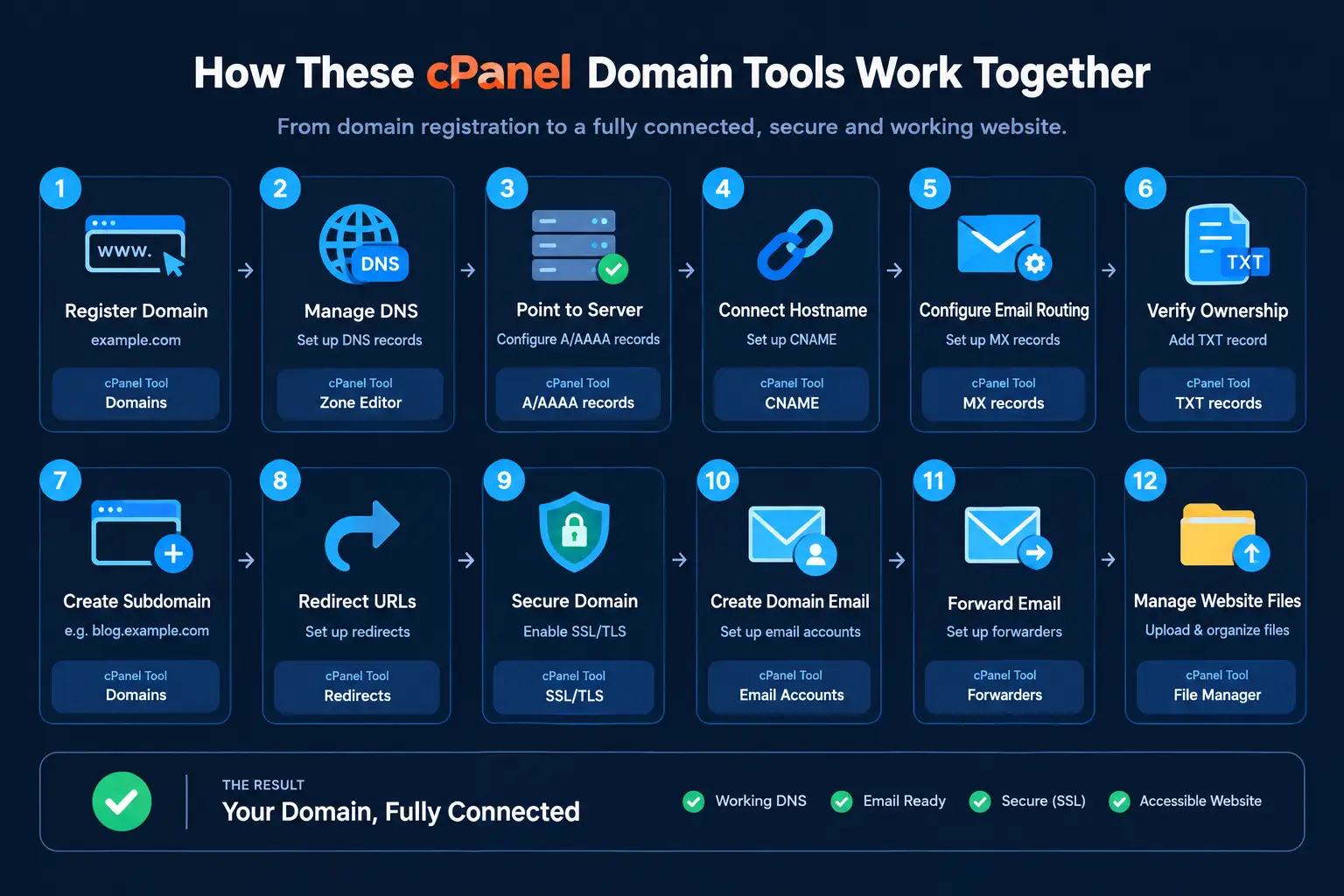
It helps to see these tools in action through a simple example, rather than treating each one as an isolated feature.
Say you register example.com.
You add it to cPanel, configure its DNS, point it to your server, create a subdomain for a specific section of your site, configure email for the domain, secure it with SSL, and manage its website files going forward.
Each of these steps maps to one of the cPanel domain tools covered above.
| Domain Task | cPanel Tool |
|---|---|
| Add domain | Domains |
| Manage DNS | Zone Editor |
| Point domain to server | A/AAAA records |
| Connect hostname | CNAME |
| Configure email routing | MX records |
| Verify domain ownership | TXT records |
| Create subdomain | Domains |
| Redirect URLs | Redirects |
| Secure domain | SSL/TLS |
| Create domain email | Email Accounts |
| Forward email | Forwarders |
| Manage website files | File Manager |
Seen this way, domain management stops looking like a scattered collection of unrelated settings.
Instead, it becomes a fairly logical sequence, where each cPanel tool handles one specific part of getting a domain fully connected, secured and functional, from the first DNS record all the way through to a working email inbox.
Manage Your Domain With Truehost Kenya
If you want these cPanel domain tools available alongside reliable hosting, Truehost Kenya’s cPanel hosting plans are worth considering.
Rather than juggling separate systems for your website, domains, DNS, email and other hosting settings, everything is managed from a single, centralized cPanel dashboard.
Explore Truehost cPanel Hosting Plans and see which package gives you the domain tools your website actually needs, without paying for extras you will never touch.