Domain SearchInstantly check and register your preferred domain name
 Web Hosting
 cPanel HostingHosting powered by cPanel (Most user friendly)
 WordPress HostingHost your WordPress website with fast, secure, and affordable WordPress hosting in Kenya.
 KE Domains
 Reseller HostingStart your own hosting business without tech hustles
 Windows HostingOptimized for Windows-based applications and sites.
 Free Domain
 Affiliate ProgramEarn commissions by referring customers to our platforms
 Free HostingTest our SSD Hosting for free, for life (1GB storage)
 Domain TransferMove your domain to us with zero downtime and full control
 All DomainsBrowse and register domain extensions from around the world
 .Com Domain
 WhoisLook up domain ownership, expiry dates, and registrar information
 VPS Hosting
 Managed VPSNon techy? Opt for fully managed VPS server
 Dedicated ServersEnjoy unmatched power and control with your own physical server.
 Website Builder
 Online Store BuilderLaunch a professional e-commerce store without writing code.
 Web Design ServiceGet a custom-designed website tailored to your brand and goals. From just KES 15,600
 BlogRead our guides on web hosting, online business, digital marketing, and more
 SupportOur support guides cover everything you need to know about our services
 ContactContact us via chat or email
You can create a subdomain without cPanel by using DNS management.
A subdomain helps you split your website into clear sections. Each section has its own link, but everything stays under one main domain.
This makes your site easier to manage and grow.
You may need a subdomain if:
- You want a blog like blog.yoursite.co.ke
- You want an online shop like shop.yoursite.co.ke
- You need a test area like test.yoursite.co.ke
- You want a support or client portal
Creating a subdomain without cPanel works well because:
- You can manage it using DNS only
- You don’t need full hosting access
- You can connect it to websites, apps, or external services
If you searched for how to create a subdomain without cPanel, this guide shows you the simplest way to do it.
What Is a Subdomain
A subdomain is a smaller part of your main domain.
If your website is yoursite.co.ke, a subdomain looks like:
blog.yoursite.co.keshop.yoursite.co.kesupport.yoursite.co.ke
Your main domain is the base. The subdomain adds a clear path to a specific section.
Visitors go straight where they need to go instead of clicking through many pages.
At first, you may only need a few pages. Later, you add a blog, sell products, or offer customer support. If everything stays in one place, the site becomes crowded and hard to manage.
Subdomains solve that problem.
Here’s why many website owners use them:
- They keep content organized
- They make large sites easier to manage
- They help test new ideas without breaking the main site
- They give each section its own purpose
Subdomains also help with trust. A link like shop.yoursite.co.ke looks cleaner and more professional than a long, messy URL.
Visitors know what to expect before they even click.
Search engines understand subdomains too. They can tell that your blog, shop, and main site are related but serve different roles.
Now that you know what a subdomain is, let’s move to the main part.
How to Create a Subdomain Without cPanel With Truehost
You can create a subdomain without cPanel if you’re using Truehost DNS management.
This method is direct, fast, and works even if your website hosting is in a different place.
Step 1: Log In to Your Truehost Client Area
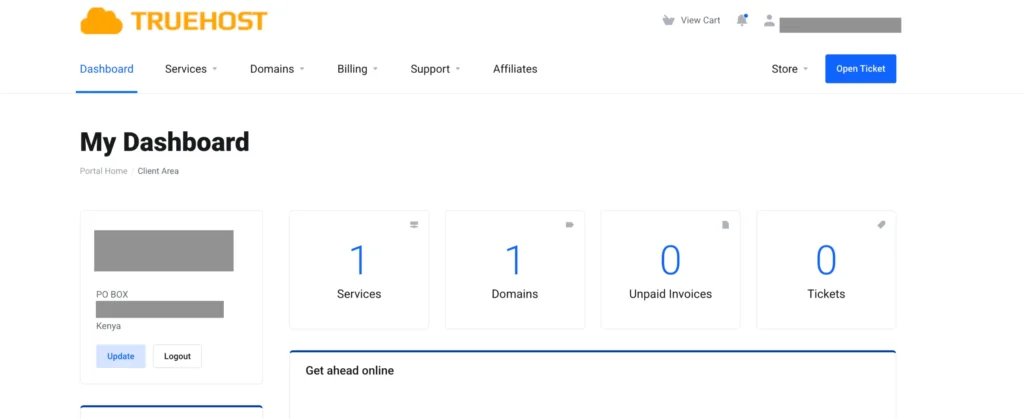
Go to your Truehost account and sign in using your email and password. This is where you manage domains, hosting, and DNS.
Step 2: Go to Domains and Select Your Domain
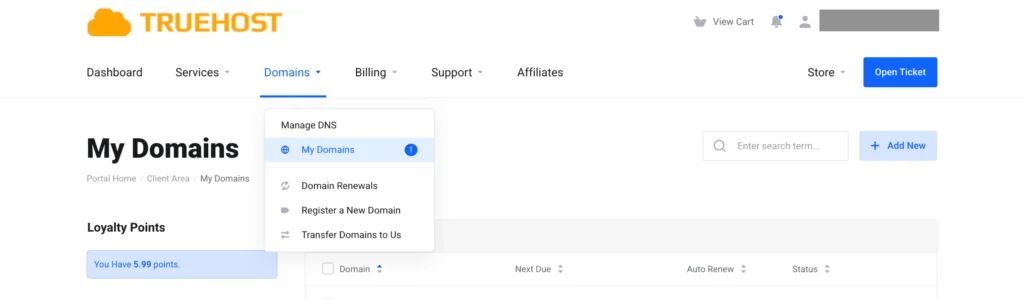
Click Domains, then My Domains.
You will see a list of domains you own. Click the domain where you want to add the subdomain.
Step 3: Open Manage DNS
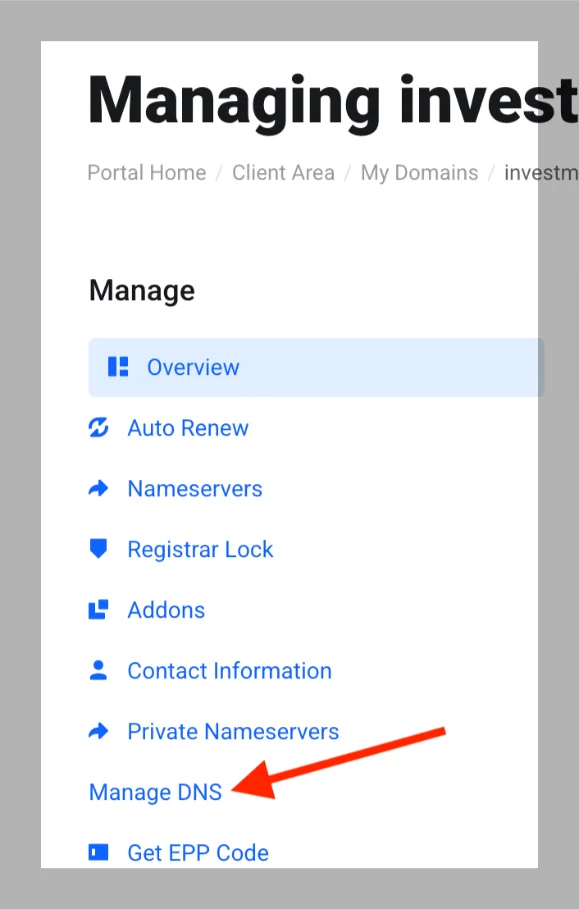
Inside the domain settings, click Manage DNS.
This section controls where your domain and subdomains point on the internet.
Step 4: Add an A Record or CNAME Record
Click Add Record.
Choose:
- A record if the subdomain should point to a server IP
- CNAME record if it should point to another hostname or service
In the Host field, enter only the subdomain name, such as:
- blog
- shop
- test
Do not include your full domain name.
Step 5: Point It to the Correct Destination
- For an A record, enter the server IP address
- For a CNAME, enter the full hostname
This tells the subdomain where to go.
Step 6: Save and Wait for DNS to Update
Save the record.
DNS changes usually take a few minutes but can take up to a few hours to fully update.
Step 7: Test and Use the Subdomain
Open your browser and type the full subdomain, such as blog.yoursite.co.ke.
If it loads or connects to the correct service, the setup is complete.
This DNS method works well when you want control without extra tools. It’s clean, flexible, and perfect when you don’t want to use cPanel.
See also: cPanel Domain Management: Tips for Effortless Handling of Your Domains
How to Create a Subdomain Using cPanel in Truehost (For Comparison)
If your hosting plan includes cPanel, creating a subdomain is very straightforward.
cPanel handles a lot of the setup automatically, so you don’t have to manually manage DNS records.
Here’s how to do it step by step:
Step 1: Log Into Your Truehost Client Area
Sign in to your account using your email and password. This is the same place where you manage your domains and hosting.
Step 2: Go to Services > My Services
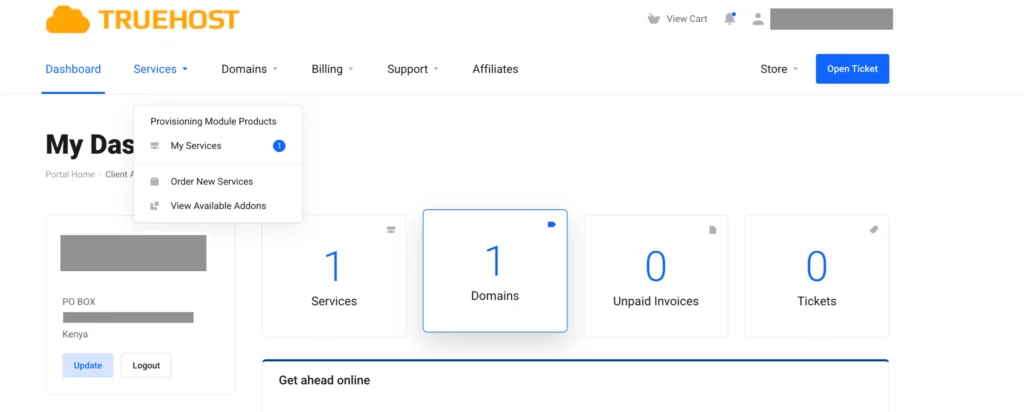
Click Services, then My Services. Find the hosting package where you want to create the subdomain.
Step 3: Open Your Hosting Account and Click the cPanel Button
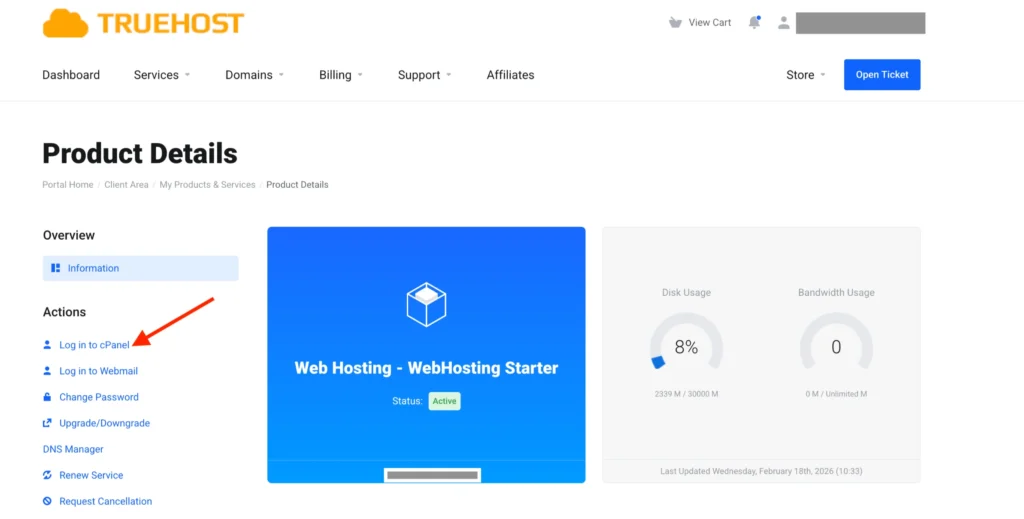
Inside your hosting package, click the cPanel button. This opens the familiar blue cPanel dashboard.
Step 4: Scroll to Domains > Subdomains
Once in cPanel, look for the Domains section. Click Subdomains.
Step 5: Enter the Subdomain Name and Select the Root Domain
Type the subdomain name you want, such as:
- blog
- shop
- test
The root domain will usually auto-fill (like yoursite.co.ke).
Step 6: Leave the Document Root as Suggested and Click Create
cPanel automatically creates a folder for the subdomain, usually inside public_html. For example, public_html/blog. This is where you will place your files.
Step 7: Upload Files to the Subdomain Folder
You can upload your website files using File Manager or an FTP client. Once files are in place, visiting the subdomain URL (e.g., blog.yoursite.co.ke) will show your site.
Why cPanel is Useful:
- Automatically sets up the folder and DNS
- Easier for beginners who don’t want to manage records manually
- Keeps everything organized if your website has multiple subdomains
DNS Method vs cPanel Method
Both methods get the job done, but they serve slightly different needs. Here’s a simple breakdown:
| Method | When to Use | Key Advantage |
| DNS-Only | Hosting is separate from your domain, or you just need to point the subdomain somewhere | Flexible, no cPanel needed, works with external services |
| cPanel | You have full hosting with cPanel | Auto-creates folders, sets up DNS, easier for beginners |
DNS-only method
- Lets you point your subdomain to any server or service
- Ideal if your website or app is hosted elsewhere
- Requires manual record management, but gives full control
cPanel method
- Automatically handles DNS and folder creation
- Perfect for hosting everything in one place
- Great if you’re running a WordPress site or small business website
Rule of thumb:
- If you need flexibility and control → DNS-only method
- If you want simplicity and everything in one place → cPanel
See also: What is an SSL Certificate?
Truehost Subdomain Pricing and Limits
One of the best things about using Truehost is that subdomains don’t cost extra. They are included with your existing domain or hosting plan.
This means you can create as many subdomains as your plan allows without worrying about hidden fees. For example, if you have mysite.co.ke, you could have:
blog.mysite.co.keshop.mysite.co.ketest.mysite.co.ke
All included at no additional charge.
Why this is important for Kenyan users:
- Saves money when expanding your site
- Lets small businesses test ideas, launch blogs, or run multiple services under one domain
- Affordable option alongside M-PESA-friendly payments
Most shared hosting plans from Truehost allow unlimited subdomains, making it easy to grow your website without extra costs.
See also: Do Exact Match Domains Matter?
Wrapping It Up
Learning how to create a subdomain without cPanel is easy just as explained in the article. You can use the DNS-only method or the familiar cPanel method to set up subdomains quickly and safely.
- Use the DNS method if you want flexibility, control, or are pointing your subdomain to an external server.
- Use cPanel if you want simplicity, auto-created folders, and hosting everything in one place.
Subdomains are perfect for blogs, online shops, support portals, and test areas. They keep your website organized, professional, and easy to grow.
Plus, with Truehost, subdomains come at no extra cost, support .co.ke domains, and work seamlessly with local M-PESA payments.
Now it’s your turn. Log into your Truehost client area, head to Domains > My Domains, and start adding subdomains.
Your website just got bigger and smarter. Go make those subdomains work for you!
FAQs About Subdomains
Can I create unlimited subdomains on Truehost?
Yes. Most hosting plans allow multiple subdomains at no extra cost. Just check your plan limits.
How long does DNS propagation take?
Usually 5 minutes to 2 hours. If it doesn’t show immediately, clear your browser cache and check again.
What’s the difference between A and CNAME records?
- A record points directly to an IP address (fast and simple)
- CNAME record points to another hostname, useful for third-party services like Shopify
Do subdomains need separate hosting?
No. You can point them to the same server as your main site. Only use separate hosting if the subdomain needs its own environment.
Is subdomain creation free on Truehost Kenya?
Yes. There’s no charge beyond your domain or hosting plan.
Can I use subdomains for email?
Yes. You can set up mail records separately if you want emails like [email protected].
Does it work with .co.ke domains?
Absolutely. Truehost supports local .co.ke domains fully, with fast local DNS propagation.