Domain SearchInstantly check and register your preferred domain name
 Web Hosting
 cPanel HostingHosting powered by cPanel (Most user friendly)
 WordPress HostingHost your WordPress website with fast, secure, and affordable WordPress hosting in Kenya.
 KE Domains
 Reseller HostingStart your own hosting business without tech hustles
 Windows HostingOptimized for Windows-based applications and sites.
 Free Domain
 Affiliate ProgramEarn commissions by referring customers to our platforms
 Free HostingTest our SSD Hosting for free, for life (1GB storage)
 Domain TransferMove your domain to us with zero downtime and full control
 All DomainsBrowse and register domain extensions from around the world
 .Com Domain
 WhoisLook up domain ownership, expiry dates, and registrar information
 VPS Hosting
 Managed VPSNon techy? Opt for fully managed VPS server
 Dedicated ServersEnjoy unmatched power and control with your own physical server.
 Website Builder
 Online Store BuilderLaunch a professional e-commerce store without writing code.
 Web Design ServiceGet a custom-designed website tailored to your brand and goals. From just KES 15,600
 BlogRead our guides on web hosting, online business, digital marketing, and more
 SupportOur support guides cover everything you need to know about our services
 ContactContact us via chat or email

If you want to build an online presence, the first and most important step is getting a domain name. In Kenya, one option that often comes up is Safaricom’s cloud platform, offering Safaricom domain registration as part of its wider digital services.
Because Safaricom is already a familiar name, chances are you’d feel comfortable starting there.
That convenience is a big reason why small business owners and individuals like you and me would often consider it when registering a domain.
But just like any other provider out here, Safaricom has its strengths and limitations worth knowing before you commit.
In this guide I will walk you through the Safaricom domain registration process step by step so you’ll be able to follow along easily.
We’ll also look at why you would find yourself exploring alternatives like Truehost, especially when we start comparing pricing, features, and overall flexibility.
Let’s begin.
How to Register a Domain with Safaricom
Let’s go through the actual process together. It’s simple, and you can complete everything in just a few minutes.
Step 1: Visit the Safaricom Domains Page
Start by heading over to the Safaricom domain page. This is where everything begins.
Step 2: Search for Your Domain Name
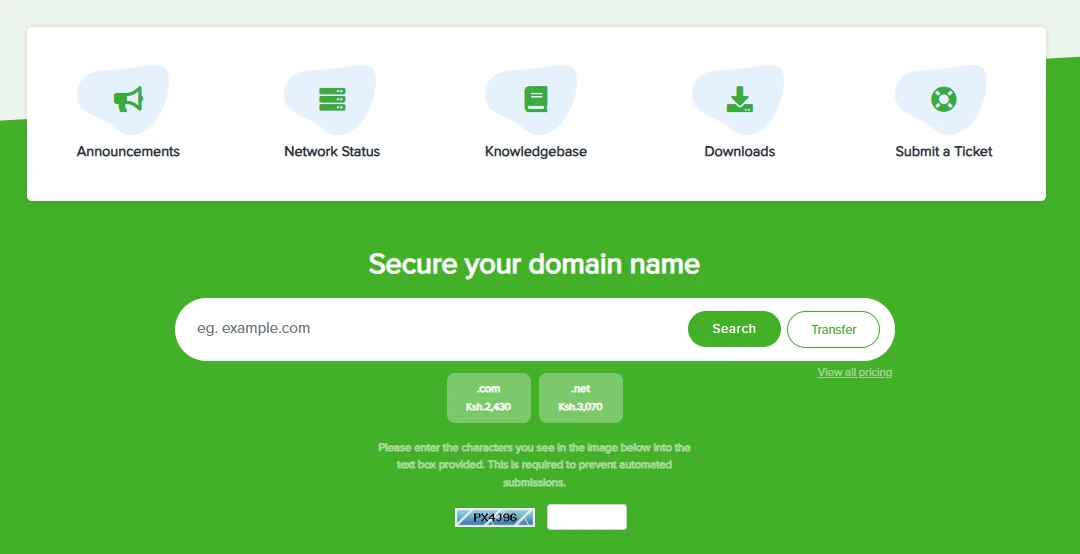
Once you’re on the site, you’ll see a search bar where you can enter the domain name you want.
Type in your preferred name and click on the “search” button to check if it’s available:
- If it’s available, go ahead and add it to your cart.
- If it’s already taken, try a different variation or switch to another extension like
.co.keor.com.
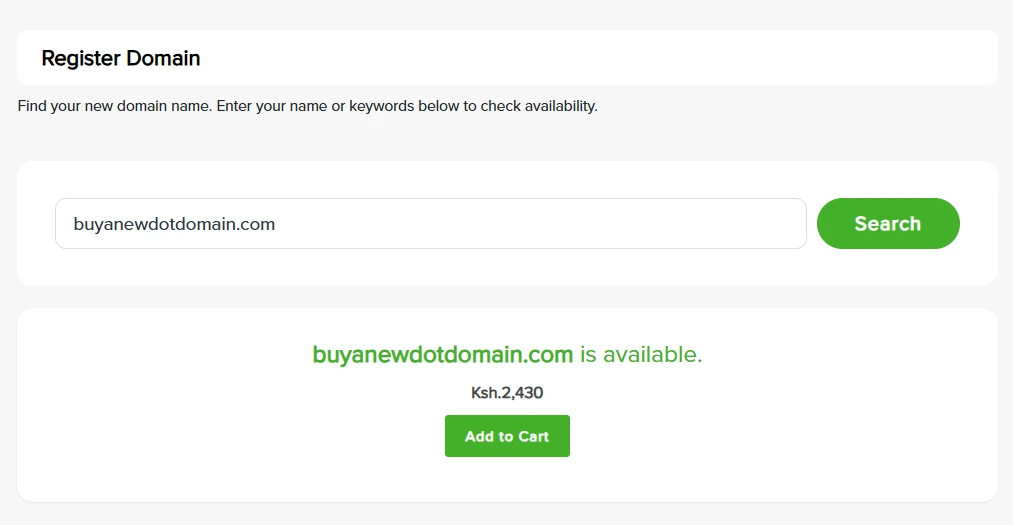
After you find a name that works, click “Add to Cart.” Immediately, you will see the “checkout” button. Click on it to start the domain registration process.
Step 3: Proceed to Next Step (Nameservers)
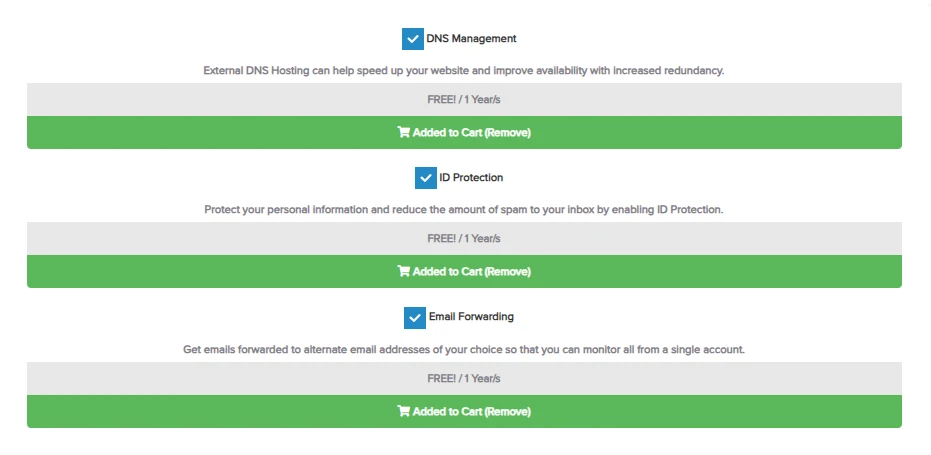
Once you click on checkout, you will be taken to the domain configuration page. Here you’ll be able to add the free DNS management, free ID protection, and free email forwarding to your cart.
You will also see Safaricom’s default nameservers:
- ns1.safaricombusiness.co.ke
- ns2.safaricombusiness.co.ke
- ns3.safaricombusiness.co.ke
- ns4.safaricombusiness.co.ke
These should be fine if you will be hosting with them. If not, you can still keep this. You can always configure your nameservers later after you’ve bought the domain.
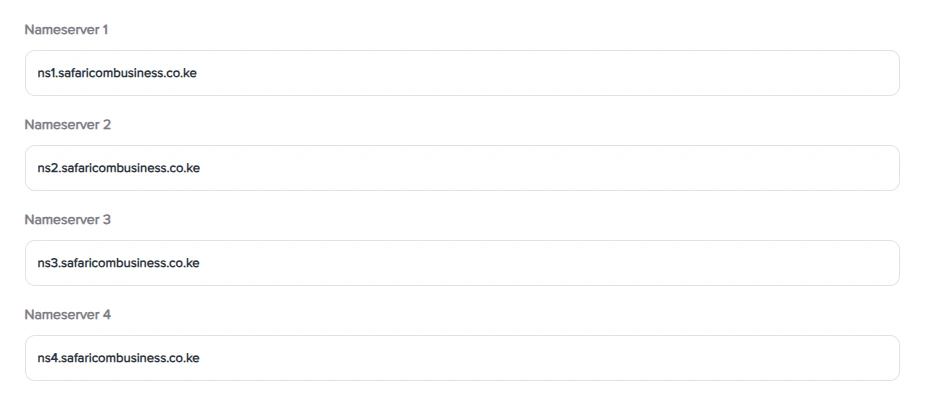
Click the continue button to proceed to the next step.
Step 4: Review and Proceed to Payments
Now you’ll see a summary of your order. Take a moment to go through it:
- Confirm the domain name
- Check the registration period
- Review the tax and total amount
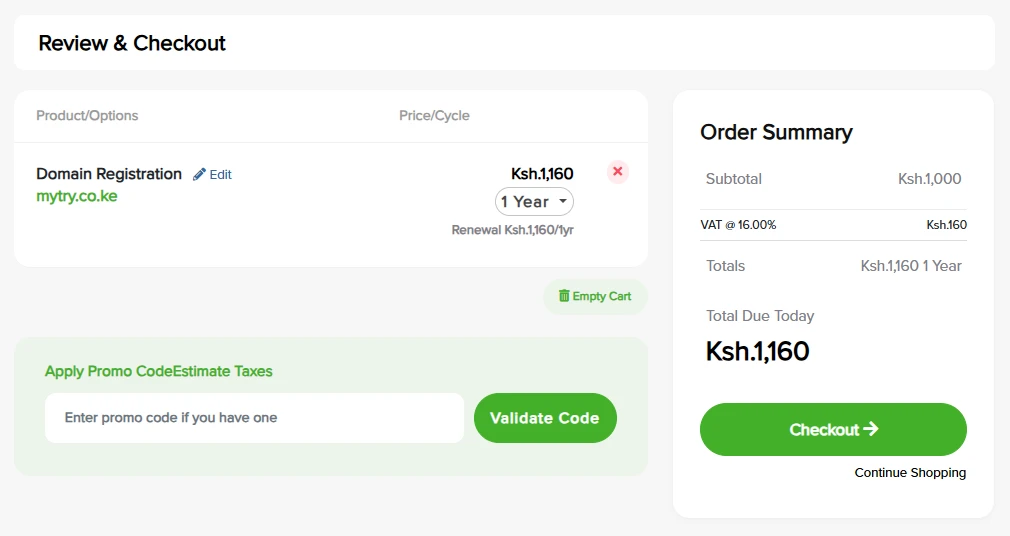
You can enter a promo code if you have one, then click “Validate Code.”
If everything is correct, proceed to checkout.
Step 5: Enter Checkout Information
If you’re a new customer, you’ll be asked to fill in the domain registration information and the billing information. This part is simple and only takes a minute.
Also select your preferred method of payment. M-Pesa is the default.
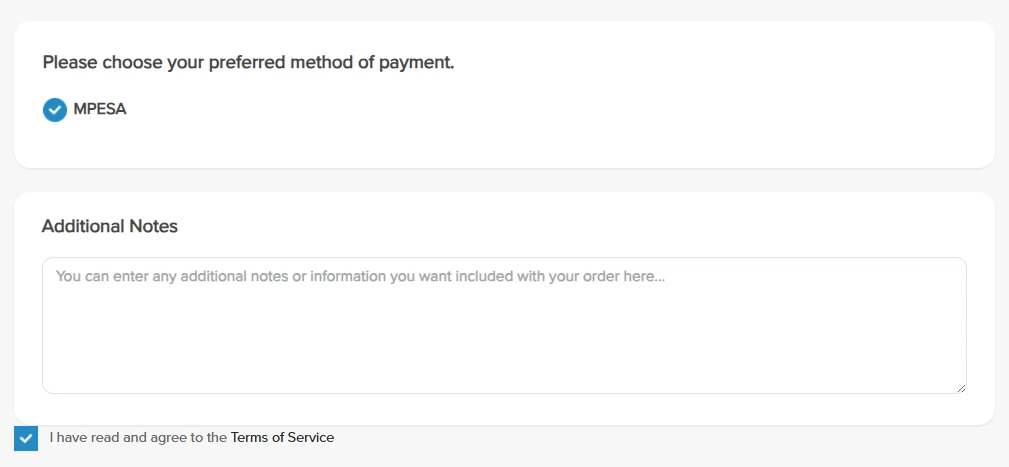
Before completing the order, tick the box confirming that you’ve agreed to the Terms of Service. Then click on “Complete Order.”
At this point:
- An unpaid invoice will be generated in your client area
- A copy of the invoice will also be sent to your email
After placing the order, you’ll be redirected to the invoice page, where you can review the payment details and complete the payment to activate your domain.
Step 6: Confirm order and pay
Once your invoice is ready, the next step is to complete the payment. Safaricom makes this part easy by integrating with M-Pesa.
You’ll be given two payment options:
- M-Pesa Paybill
- USSD Push (STK Push)
If you choose the Paybill option, follow the instructions shown on the screen:
- Open M-Pesa on your phone
- Enter the provided Paybill details
- Complete the payment
- Then return to the page and enter your M-Pesa transaction code to confirm
If you go with USSD Push, it’s even quicker:
- Enter your phone number
- A prompt will pop up on your phone
- Enter your M-Pesa PIN to approve the payment
Once payment is successful:
- You’ll receive a confirmation email along with an e-receipt (your invoice will now be marked as PAID)
- The system will automatically update your order status
After that, you’ll be redirected to the Order Confirmation page, where you’ll see your order number and details for your domain (and hosting, if included).
From the confirmation page, click on “Continue to Client Area” to access your domain management dashboard.
Current Safaricom Domain Pricing
Before you register your domain, it helps to have a clear idea of what you’ll be paying.
Safaricom lists standard pricing for popular domain extensions, and in most cases, the cost is the same for new registrations, transfers, and renewals.
Here’s a simple breakdown of some of the commonly used options:
.com– Ksh. 2,430 per year.net– Ksh. 3,070 per year.org– Ksh. 2,340 per year.biz– Ksh. 3,780 per year.info– Ksh. 4,230 per year
Each of these is billed annually, so you’ll need to renew your domain every year to keep it active.
Now, here’s something worth keeping in mind. While Safaricom offers convenience and familiarity, their domain pricing is often on the higher side compared to other registrars in Kenya, such as Truehost.
So while the process is simple, it’s a good idea to compare overall value, especially if you’re planning to build more than just a basic online presence.
Safaricom vs Truehost Domain Registration
At this point, you’ve seen how the process works with Safaricom domain registration.
But let’s take a moment to compare it with Truehost before making a final decision.
Here’s how the two stack up:
1) Pricing
Safaricom’s pricing is straightforward, but it tends to be higher across most domain extensions.
Truehost, on the other hand, is often more budget-friendly.
For example:
- .co.ke registration: 299.00 KES for the first year; renewal: Kshs 1,500.00 per year
- .com registration: 1100.00 KES for the first year; renewal: Kshs 1,600.00 per year
Over time, especially if you’re managing multiple domains, that price difference adds up.
2) Speed and Ease
Safaricom keeps things simple, especially if you’re already using their services. The flow is familiar, and payments are quick with M-Pesa.
At Truehost we also offer the M-Pesa option, but we focus on giving you a faster, more streamlined dashboard after signup.
3) Features
With Safaricom, some features are tied to bundled services, especially when it comes to hosting.
Truehost gives you more flexibility:
- Free DNS management included
- Optional WHOIS privacy for added security
- No pressure to bundle hosting if you don’t need it
This makes it easier to customize your setup based on what you actually want.
4) Reliability
Both providers are reliable in their own way.
Safaricom benefits from being a well-established telecom brand with strong infrastructure.
Truehost is more specialized in web services and domain management, which means our tools and support are built specifically for website owners.
5) Best for Who?
Safaricom is a good fit if:
- You prefer sticking with a brand you already use
- You want a very simple, familiar payment and setup process
Truehost is a better fit if:
- You want lower pricing
- You prefer more control and flexibility
- You’re planning to grow your website, blog, or online business
In the end, both options will get your domain registered.
What Next?
Safaricom domain registration is a solid, simple option that many Kenyans still use every month.
But if you want the lowest price, faster setup, and a registrar that focuses only on domains, we at Truehost are here to help you save money and time.
Ready to secure your domain today? Head over to our site and register your .co.ke for 299.00 KES for the first year. Renewal costs Kshs 1,500.00 per year.
Your online identity is just a few clicks away!