 Domain SearchInstantly check and register your preferred domain name
 Web Hosting
 cPanel HostingHosting powered by cPanel (Most user friendly)
 WordPress HostingHost your WordPress website with fast, secure, and affordable WordPress hosting in Kenya.
 KE Domains
 Reseller HostingStart your own hosting business without tech hustles
 Windows HostingOptimized for Windows-based applications and sites.
 Free Domain
 Affiliate ProgramEarn commissions by referring customers to our platforms
 Free HostingTest our SSD Hosting for free, for life (1GB storage)
 Domain TransferMove your domain to us with zero downtime and full control
 All DomainsBrowse and register domain extensions from around the world
 .Com Domain
 WhoisLook up domain ownership, expiry dates, and registrar information
 VPS Hosting
 Managed VPSNon techy? Opt for fully managed VPS server
 Dedicated ServersEnjoy unmatched power and control with your own physical server.
 Website Builder
 Online Store BuilderLaunch a professional e-commerce store without writing code.
 Web Design ServiceGet a custom-designed website tailored to your brand and goals. From just KES 15,600
 BlogRead our guides on web hosting, online business, digital marketing, and more
 SupportOur support guides cover everything you need to know about our services
 ContactContact us via chat or email
While reading this, you’ve probably decided to transfer your domain. Maybe your current registrar is charging too much for renewals, and you have found better pricing elsewhere.
Or perhaps you are tired of waiting days for a support ticket to be answered, or you simply cannot stand another minute navigating a complicated control panel that hides the settings you need.
For many people, the final push comes from hidden fees that keep appearing on their bills or from an unreliable registrar whose services seem to go down at the worst times.
Whatever your reason, moving a domain can feel risky. You worry about your website going offline, your email stopping, or something going wrong that leaves you locked out.
Well, don’t stress. In this article, I will walk you through what you need to do. You will get a clear checklist for transferring any domain to any registrar.
We will cover the common issues that cause transfers to fail and show you how to fix them. By the end, you will also see why Truehost makes this whole process effortless.
Domain Transfer Checklist
This checklist is your ticket to a smooth domain transfer to any registrar:
a) Verify Registrant Email Access
The first and most critical step is making sure you can receive emails at the registrant contact address. This is the email address listed in the WHOIS records for your domain.
Why is it so important?
Because the transfer approval link, the one you must click to authorize the move, will be sent right there.
If you no longer have access to that email account, you need to fix this before you start:
- Log in to your current registrar
- Find the contact information for the domain
- Update the registrant email to one you can access.
Keep in mind the ICANN rule: after updating the registrant email, you must wait 60 days before you can transfer the domain. This is a security measure to prevent unauthorized transfers.
b) Ensure Your Domain is Unlocked for Transfers
Your current registrar places a lock on your domain to prevent anyone from stealing it. Before you can move it, you need to turn that lock off.
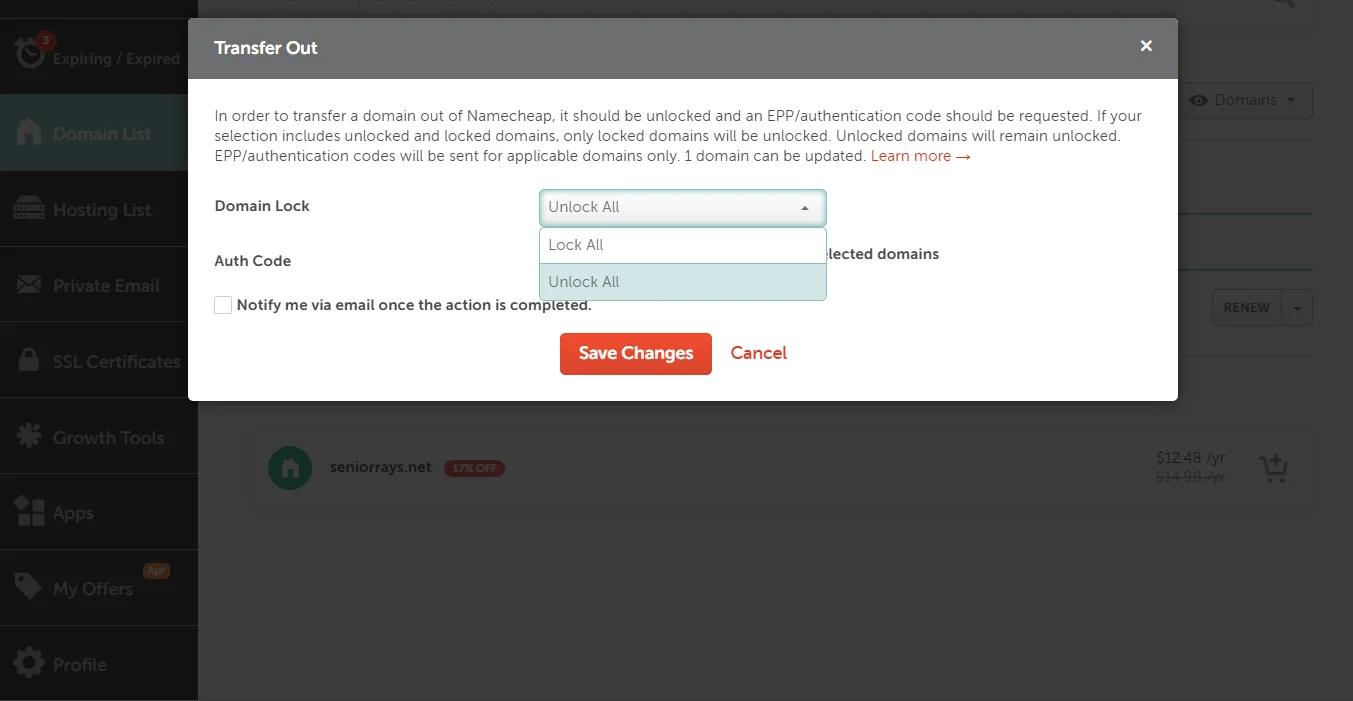
Go to your current registrar’s control panel, find the domain settings, and look for Domain lock, transfer lock, or registrar lock. Disable it.
Allow a few minutes for this change to take effect in the registry’s system before you start the transfer with the new registrar.
c) Obtain Authorization Code (Auth/EPP Code)
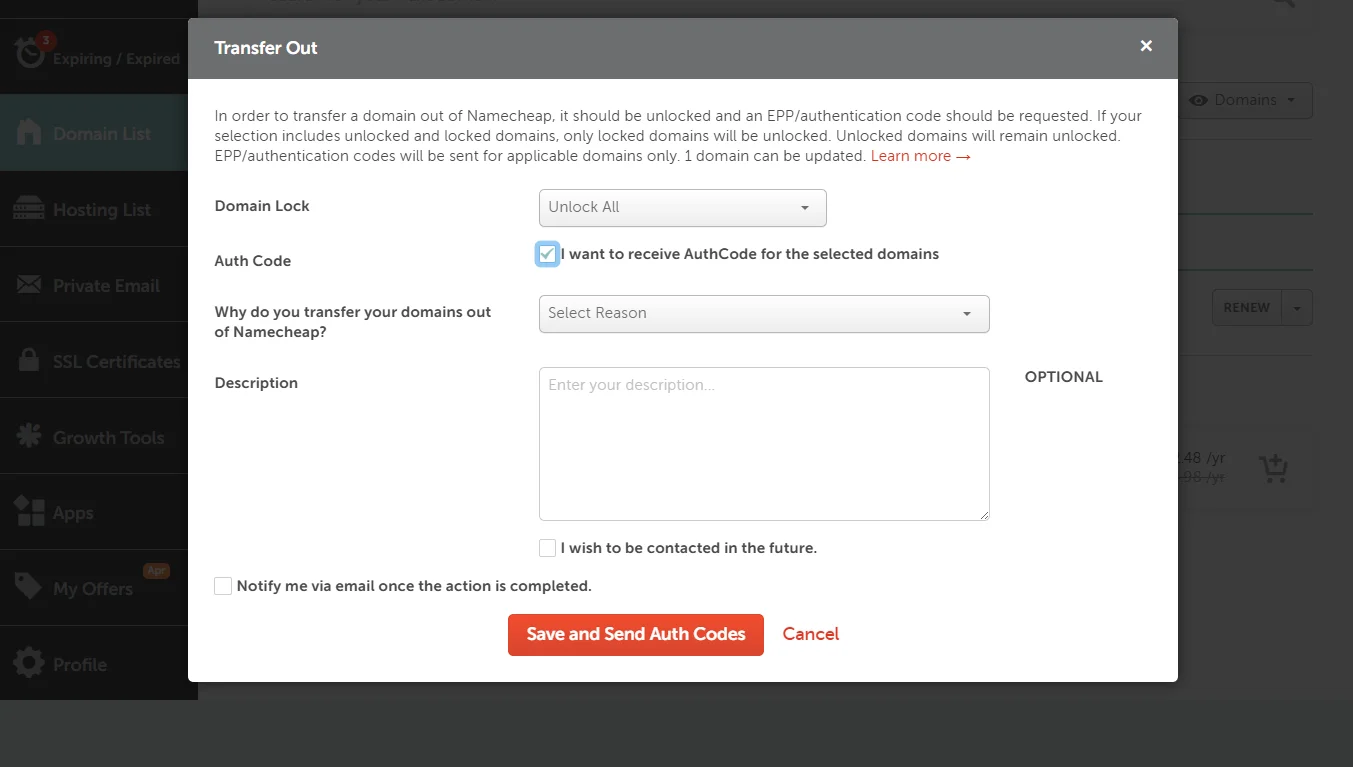
This is the password for your domain. It’s a unique code that proves you are the owner and have the authority to transfer it. You need to request this code from your current registrar.
They usually send it to your registered email address. You might also find it in your account dashboard. Keep this code confidential. You will be asked for it when you initiate the transfer with the new registrar.
d) Verify Domain Age and Eligibility
Not every domain is eligible for transfer at all times. There are a few rules to check:
- The domain must be at least 60 days old from the initial registration date.
- If the domain recently expired and was restored, at least 60 days must have passed since that restoration.
- ICANN regulations may also temporarily block a transfer if you’ve recently updated the registrant’s name or email address, as I mentioned in step 1.
If you are unsure about any of these, check with your current registrar’s support team before you begin.
e) Prepare Payment Method
Most registrars charge a fee to transfer a domain. This is usually the cost of a one-year renewal. Ensure your payment method is valid and has sufficient funds.
These are the current transfer fees for some of the most common domain TLDs in Kenya. Prices are in KES:
| Domain | Transfer fees |
| .co.ke | Ksh 1000 |
| .com | Ksh 1500 |
| .shop | Ksh 5613 |
| .ke | Ksh 3000 |
| .org | Ksh 1300 |
| .top | Ksh 633 |
| .buzz | Ksh 4146 |
Note that some registrars, like AWS Route 53, have specific policies. They might not accept credits for transfers, and the fee is charged before the transfer starts.
If the transfer fails, the fee is refunded. Always check your new registrar’s TLD pricing before initiating.
f) Disable DNSSEC (if enabled)
DNSSEC (DNS Security Extensions) adds a layer of security to your DNS by ensuring responses aren’t forged.
However, the cryptographic keys used in DNSSEC are tied to your current registrar. If DNSSEC is active, it can block the transfer.
If you have DNSSEC enabled at your current registrar, disable it before initiating the transfer.
After the transfer is complete and your domain is at the new registrar, you can create a new hosted zone and re-enable DNSSEC using the new keys provided by your new registrar.
g) Optional But Recommended
I promised to give you extra tips. These steps are not mandatory for the transfer to process, but they will save you from potential headaches.
Backup DNS records: Take screenshots or export all your DNS records (A, CNAME, MX, TXT, etc.). After the transfer, you will need to recreate these at your new registrar to keep your email and website functioning. Doing this beforehand ensures zero downtime.
Re-enable domain lock: Once the transfer is complete and everything is working, go back to your new registrar’s panel and re-enable the domain lock. This protects your domain from being transferred out without your consent in the future.
Check SSL certificates: After DNS has propagated, verify that your SSL certificate is still valid. If your SSL was tied to your old hosting or registrar, you may need to reissue or reinstall it to ensure HTTPS works.
Why Its Easy to Transfer with Truehost

We’ve covered the checklist for any registrar. Now, let’s talk about why choosing Truehost for your domain transfer makes the process super easy.
Truehost domain transfer offers you:
- Seamless Transfer with Zero Downtime: We handle the technical side to keep your website and email online throughout the transfer.
- Transparent Pricing: The price you see for the transfer is what you pay. No hidden fees or surprise charges.
- 1-Year Extension Added: When you transfer your domain to Truehost, we add one full year to its expiration date.
- Affordable WHOIS Privacy Protection: Keep your personal contact information private without breaking the bank.
- Local Kenyan Support Team: If you have any issues, you can talk to a support team in your time zone that understands the local market.
- Fast SSDs: Your DNS zones are hosted on fast SSD storage for quick lookups.
- Compatible with 700+ Extensions: We support a vast range of domain extensions, so you can consolidate all your domains in one place.
- Trusted by 70,000+ Customers: Join a community of thousands who have made the switch.
- ICANN and KENIC Accredited: We are officially accredited by the global and local internet governing bodies, giving you peace of mind.
- Pricing in KES: No need to worry about exchange rates or foreign transaction fees.
Final Take
So, don’t stress about a domain transfer. With this checklist, you can transfer to Truehost or any other domain registrar:
- Verify registrant email access – Make sure you can receive the approval email.
- Ensure the domain is unlocked for transfer – Disable the registrar lock.
- Get EPP code – Obtain the authorization code from your current registrar.
- Verify domain age and eligibility – Ensure it’s at least 60 days old and has no recent contact info changes.
- Approve transfer via email – Act quickly on the approval link sent to your inbox.
- Prepare payment method – Have your valid payment ready for the transfer fee.
- Disable DNSSEC – If enabled, turn it off before starting.
- Recommended (backups, re-enable lock, check SSL) – Do these to ensure a smooth and secure transition.
Domain Transfer FAQs
Can you transfer an expired domain?
No. A domain must be active to be transferred. If your domain has expired, you will first need to renew it with your current registrar. Once it’s active again, you can initiate the transfer to a new registrar.
Can you change a domain name during transfer?
No. A domain transfer moves the existing domain name exactly as it is registered. If you want a different domain name, you would need to register a new domain separately. The transfer process is for moving ownership or management, not changing the name itself.
Does domain transfer affect SEO?
When done correctly with no downtime, a domain transfer does not affect SEO. The key is to ensure your DNS records are backed up and recreated at the new registrar so your site stays live. Truehost ensures a seamless transfer so your search rankings remain intact.
How long does a domain transfer take?
The standard transfer time is 5–7 days. However, you can expedite the process. After you receive the approval email, approve the transfer immediately. Additionally, check if your current registrar offers a manual release or fast transfer option, which can complete the process in a matter of hours.







