Domain SearchInstantly check and register your preferred domain name
 Web Hosting
 cPanel HostingHosting powered by cPanel (Most user friendly)
 WordPress HostingHost your WordPress website with fast, secure, and affordable WordPress hosting in Kenya.
 KE Domains
 Reseller HostingStart your own hosting business without tech hustles
 Windows HostingOptimized for Windows-based applications and sites.
 Free Domain
 Affiliate ProgramEarn commissions by referring customers to our platforms
 Free HostingTest our SSD Hosting for free, for life (1GB storage)
 Domain TransferMove your domain to us with zero downtime and full control
 All DomainsBrowse and register domain extensions from around the world
 .Com Domain
 WhoisLook up domain ownership, expiry dates, and registrar information
 VPS Hosting
 Managed VPSNon techy? Opt for fully managed VPS server
 Dedicated ServersEnjoy unmatched power and control with your own physical server.
 Website Builder
 Online Store BuilderLaunch a professional e-commerce store without writing code.
 Web Design ServiceGet a custom-designed website tailored to your brand and goals. From just KES 15,600
 BlogRead our guides on web hosting, online business, digital marketing, and more
 SupportOur support guides cover everything you need to know about our services
 ContactContact us via chat or email
What actually happens after you register a domain? Or in other words, what is domain propagation?
Let’s say you complete your domain payment, everything looks successful, you log in to your dashboard, and it’s already listed there, and you expect your website to go live immediately.
But instead, the old page is still there, or nothing shows at all. That moment can feel confusing, especially when everything seemed to go through just fine.
Well, there is where domain propagation becomes a thing.
In simple terms, domain propagation is the time it takes for your domain’s new information to spread across the internet.
When you update your domain, like pointing it to a new website or hosting server, those changes don’t reflect everywhere instantly. Instead, they move from one server to another, across different networks worldwide.
So, how long does this process take? And why isn’t it instant?
In this article, I’ll walk you through everything you need to know about domain propagation.
We’ll go through:
- How it works behind the scenes
- How long it really takes and why
- How to check if your domain has fully updated
- What you can do to speed things up
Let’s begin.
How Does Domain Propagation Work?
So what’s really happening behind the scenes when you make a change to your domain?
So, it follows a simple process that takes a bit of time to fully settle across the internet.
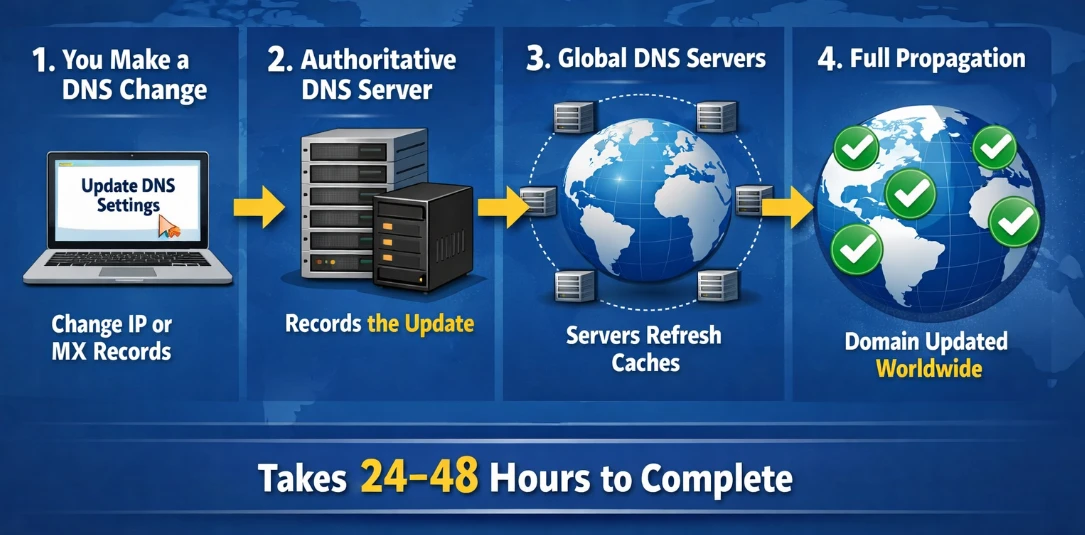
1. You make a DNS change
It starts with you.
You update your domain settings, for example, pointing your .co.ke domain to your hosting or setting up email by changing MX records.
This is the action that kicks everything off.
2. The authoritative server records it
Once you save those changes, your domain’s authoritative DNS server stores the new information immediately.
This server acts as the “main source of truth” for your domain. At this point, the update is already live, but only at the source.
3. Global servers begin updating their caches
Now comes the waiting part.
DNS servers around the world don’t all check for updates at the same time. Each one refreshes its stored data (called a cache) on its own schedule. Some update quickly while others take longer.
That’s why someone in one location might see your new website, while another person still sees the old version.
4. Full propagation happens
As more and more servers refresh their records, the new information spreads across the internet.
Eventually, all major DNS servers have the updated data.
At that point, your domain works consistently everywhere, and there are no more mixed results.
Now, that entire process, from the moment you make a change to when it reflects globally, is what we call domain propagation.
Why Does Propagation Take Time?
Once you buy, set up, or make a change to your domain, it’s already updated at the source, but the rest of the internet still needs to catch up.
It usually takes around 24–48 hours
In most cases, domain propagation completes within 24 to 48 hours. Bigger changes, like switching nameservers, tend to take the full window.
That said, we don’t all usually wait that long. Some users may see your website update in just a few minutes, especially when the setup is optimized properly.
Here in Kenya and across East Africa, many visitors start seeing the new version within 12–24 hours. This is largely because local internet providers like Safaricom and Airtel refresh their DNS records fairly quickly.
What affects propagation speed?
Several factors determine how fast your changes spread:
- TTL (Time To Live) settings
This controls how long DNS servers keep old information before checking for updates. A higher TTL means slower updates.
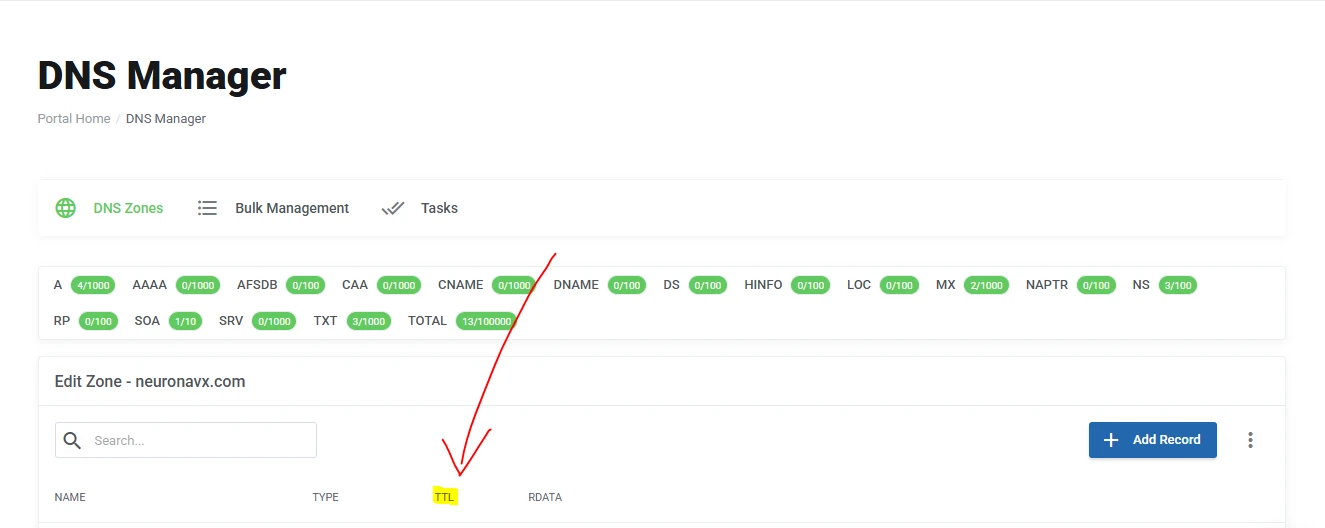
- DNS caching
Servers store previous records to reduce load and speed up browsing. Until that cache expires, they won’t fetch the new data.
- Your ISP (Internet Service Provider)
Different providers refresh their DNS records at different intervals.
- Geographical location
Someone in Mombasa might see your updated site before someone in Europe or the US, depending on how quickly servers in those regions refresh.
- Nameserver changes
These are the most significant updates, and they usually take the longest to fully propagate.
How to speed things up
While you can’t eliminate propagation time completely, you can reduce delays with a few simple steps:
- Lower your TTL before making changes
If you know you’ll be updating your DNS, reduce the TTL in advance. This tells servers to check for updates more frequently.
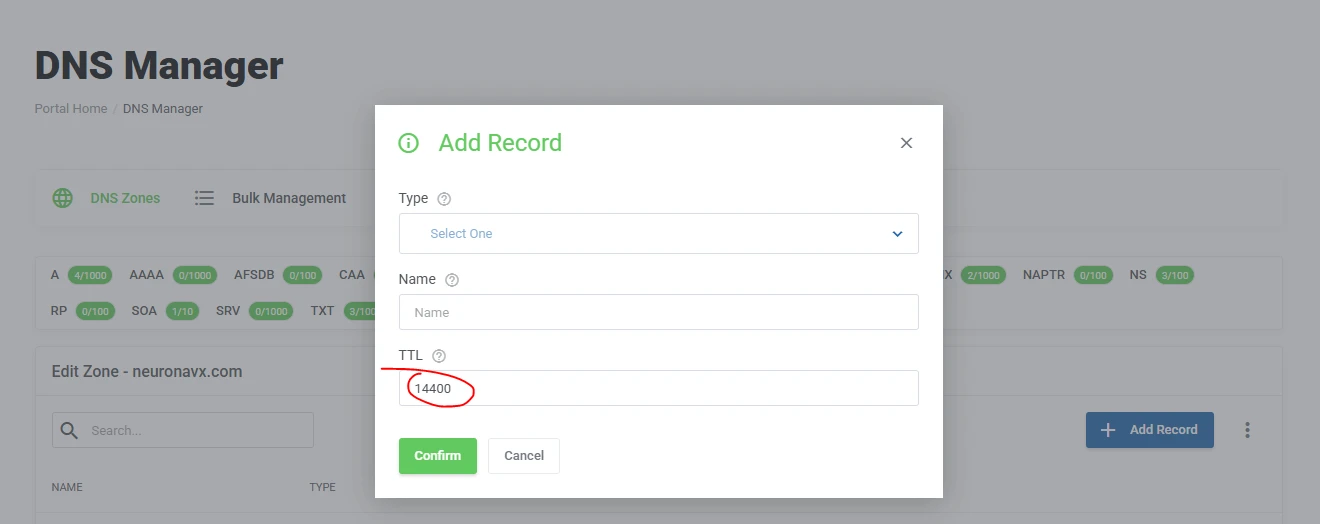
- Use a reliable provider with optimized settings
Some providers use lower default TTL values and faster infrastructure, which helps changes spread quicker.
- Clear your local cache
Sometimes the delay is just on your device. Clearing your browser or system DNS cache can help you see the update sooner.
In short, propagation takes time because the internet doesn’t update all at once, but in waves.
The good thing is that with the right setup, most of your visitors won’t be waiting nearly as long as you might expect.
What Actually Propagates?
When people talk about domain propagation, they’re usually referring to one of two things.
Knowing the difference helps you understand why some changes take longer than others.
1) Nameserver Propagation
This happens when you change your domain’s nameservers, for example, moving from one provider to another.
Nameservers are what tell the internet where to find your domain’s DNS information. When you switch them, you’re essentially changing the main directory that holds all your domain’s records.
Because of that, this type of update has to be recognized across the highest levels of the internet’s system, often referred to as the root nameservers.
These sit at the very top of how domains are resolved globally.
Since this change affects the foundation of your domain’s setup, it usually takes the longest to fully propagate, often close to the full 24–48 hours.
2) DNS Record Propagation
This is the more common and usually faster type of propagation.
Here, you’re not changing the nameservers, but instead you’re just updating specific records inside them.
For example:
- An A record (which points your domain to a server’s IP address)
- MX records (which control where your email is delivered)
Because your nameservers stay the same, the update doesn’t need to ripple through the entire internet structure.
Instead, it only depends on how quickly different servers refresh those specific records based on their TTL settings.
That’s why these changes can sometimes reflect much faster, often within a few minutes to a few hours.
So when you hear “domain propagation,” it’s not always the same thing.
If you changed nameservers, expect a longer wait. If you updated a DNS record, it’s usually much quicker.
How to Check Domain Propagation Status
At some point, you’ll want to confirm if your changes have actually gone through.
Instead of guessing, you can check the status in real time using a few simple tools.
Here’s how to do it step by step:
1) Using WhatsMyDNS
This is one of the easiest tools to use, especially for a quick global view.
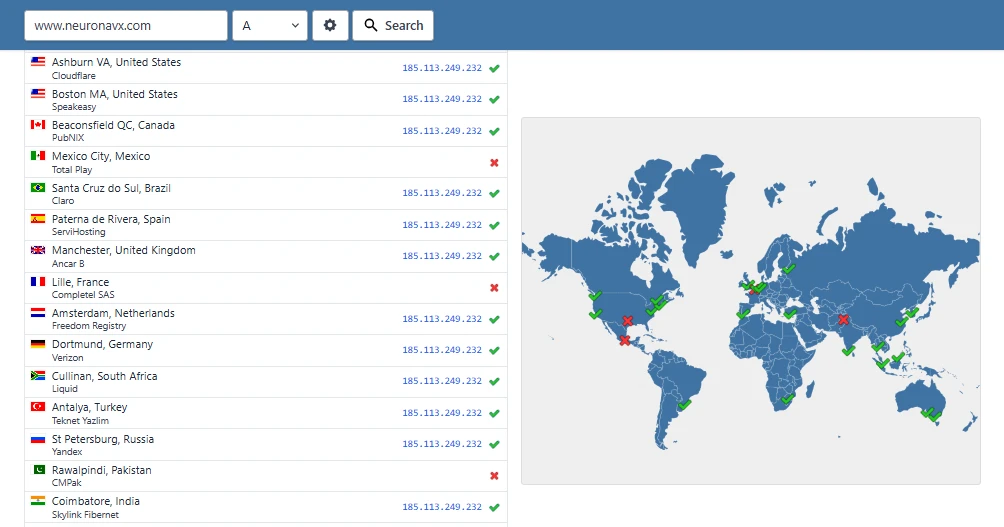
- Go to the DNS Propagation Checker page.
- Enter your domain name
- Choose the record type (A, MX, CNAME, etc.)
- Click “Search.”
You’ll see a map showing results from servers around the world.
If most locations show the new record, your propagation is nearly complete.
2) Using DNSChecker
This works similarly but gives a slightly different layout.
- Go to the DNS Checker site.
- Enter your domain name
- Select the record type you want to check
- Click “Search.”
You’ll get a list of global DNS servers and their current results.
It’s useful for spotting which regions have updated and which are still catching up.
3) Using MXToolbox
This one is best when you’re dealing with email setup.
- Visit the MX Toolbox website.
- Enter your domain name
- Click “MX Lookup”
This will show whether your email (MX) records have updated correctly and if there are any issues.
What you should look for
As you check, don’t expect everything to turn green instantly.
- Some locations will show the new records
- Others may still show old data
- Over time, more servers will update until everything is consistent
That gradual shift is completely normal, and it’s a clear sign that propagation is in progress.
How to Flush Your Local DNS
Sometimes the global checks show that everything has updated, but your own device is still stuck on the old version.
When that happens, the issue is usually your local DNS cache.
Your computer stores DNS information to speed things up. The downside is that it can hold onto outdated records longer than expected.
The fix is simple: clear that cache and force your device to fetch fresh data.
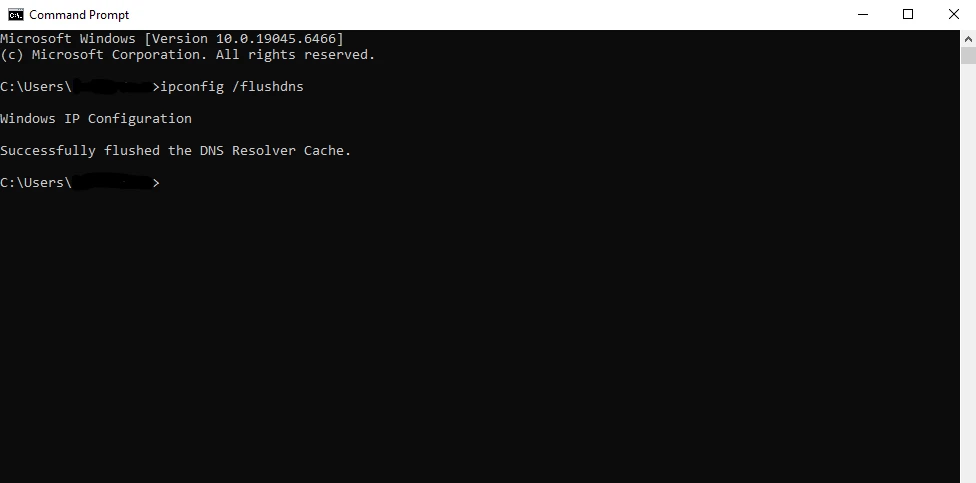
On Windows
- Open Command Prompt
- Type:
ipconfig /flushdns - Press Enter
You should see a confirmation message that the DNS cache has been cleared.
On macOS
- Open Terminal
- Type:
sudo dscacheutil -flushcache; sudo killall -HUP mDNSResponder - Press Enter
- Enter your password if prompted
This refreshes the system’s stored DNS records.
On Chrome browser
If the issue seems limited to your browser, you can clear Chrome’s DNS cache directly:
- Type chrome:
//net-internals/#dnsin the address bar - Click “Clear host cache”
After doing this, reload your website.
If propagation is already complete globally, your site should now display the updated version instead of the old one.
Common Domain Propagation Problems and Easy Fixes
Even when everything is set up correctly, a few common issues can make it seem like something is wrong.
Most of the time, the fix is quick and simple.
a) Your browser still shows the old site
This is one of the most common situations.
Your browser may be storing an older version of your site, even after the rest of the internet has updated.
What to do:
- Clear your browser cache
- Open your site in Incognito/Private mode
- Flush your local DNS
b) Wrong nameservers entered
If your nameservers were entered incorrectly, your domain won’t point to the right place, no matter how long you wait.
What to do:
- Double-check your nameserver settings in your hosting or domain dashboard
- Correct any mistakes
- Allow up to 48 hours for full propagation after fixing
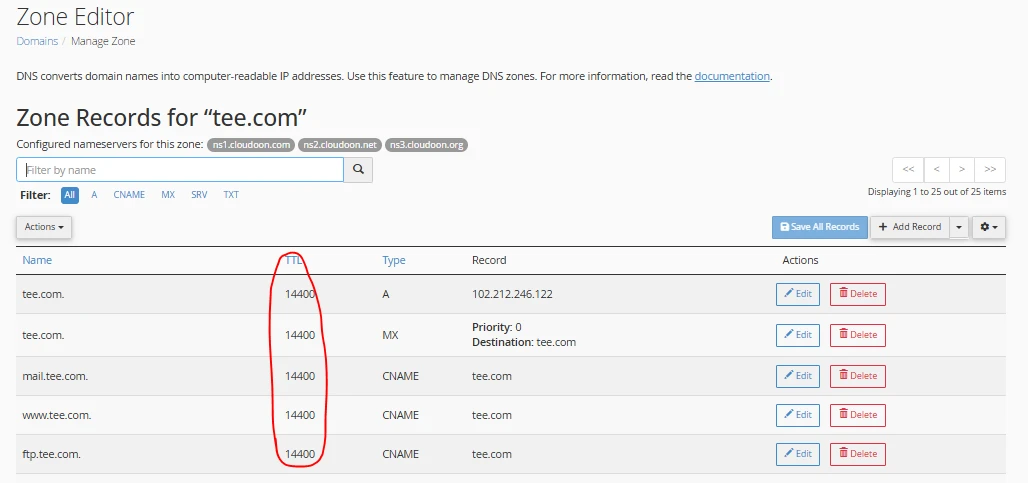
c) High TTL holding old records
A high TTL (Time To Live) means DNS servers keep old information longer before refreshing.
What to do:
- Before making changes, set your TTL to a lower value (e.g., 300 seconds)
- This allows updates to spread faster next time
d) Some people see the new site, and others don’t
This can feel frustrating, but it’s completely normal.
Different networks update at different times, so results won’t be consistent immediately.
What to do:
- Give it more time
- Check propagation using tools like WhatsMyDNS or DNSChecker
In most cases, nothing is actually broken. It’s just the internet catching up with your latest changes.
The Next Steps
Now you fully understand what is domain propagation, you know the triggers, how to check it, common fixes, and smart tips to speed it up.
You’ve seen that domain propagation isn’t an error or a delay caused by your provider, but simply how the internet updates itself
The next step is simple. Grab your domain with Truehost today, point it wherever you want, and watch your Kenyan business go live without the usual stress.
And if you’ve just made a change and things look a bit inconsistent, give it a little time.
The system is doing exactly what it’s supposed to do.