Domain SearchInstantly check and register your preferred domain name
 Web Hosting
 cPanel HostingHosting powered by cPanel (Most user friendly)
 WordPress HostingHost your WordPress website with fast, secure, and affordable WordPress hosting in Kenya.
 KE Domains
 Reseller HostingStart your own hosting business without tech hustles
 Windows HostingOptimized for Windows-based applications and sites.
 Free Domain
 Affiliate ProgramEarn commissions by referring customers to our platforms
 Free HostingTest our SSD Hosting for free, for life (1GB storage)
 Domain TransferMove your domain to us with zero downtime and full control
 All DomainsBrowse and register domain extensions from around the world
 .Com Domain
 WhoisLook up domain ownership, expiry dates, and registrar information
 VPS Hosting
 Managed VPSNon techy? Opt for fully managed VPS server
 Dedicated ServersEnjoy unmatched power and control with your own physical server.
 Website Builder
 Online Store BuilderLaunch a professional e-commerce store without writing code.
 Web Design ServiceGet a custom-designed website tailored to your brand and goals. From just KES 15,600
 BlogRead our guides on web hosting, online business, digital marketing, and more
 SupportOur support guides cover everything you need to know about our services
 ContactContact us via chat or email
The first big decision every OpenClaw user faces: do you host it locally on a machine in your home, or do you deploy it to a VPS (Virtual Private Server) in the cloud?
The short answer? Both can work. But which one wins depends entirely on what you value more: privacy and iMessage access, or 99.9% uptime and professional-grade reliability. Let’s break it down.
Features Comparison Table
| Feature | VPS (Cloud) | Local (Home Server) |
| Uptime & Availability | 99.9% data-center uptime | Tied to home power/internet |
| Monthly Cost | From $5 – $20/month (KES 1,990/month – Truehost) | ~KES 0/month (upfront hardware cost) |
| Data Privacy | Data leaves your premises | Full data sovereignty |
| iMessage Support | Not possible | Requires macOS hardware |
| Security Responsibility | You secure VPS (firewall/updates) | You secure home network |
| Scalability | Effortless (upgrade in minutes) | Limited by physical hardware |
| Setup Difficulty | Moderate (SSH, Docker) | Moderate to Hard (port forwarding, dynamic IP) |
1) Uptime & Availability
Uptime is simply how often your OpenClaw agent is available and running.
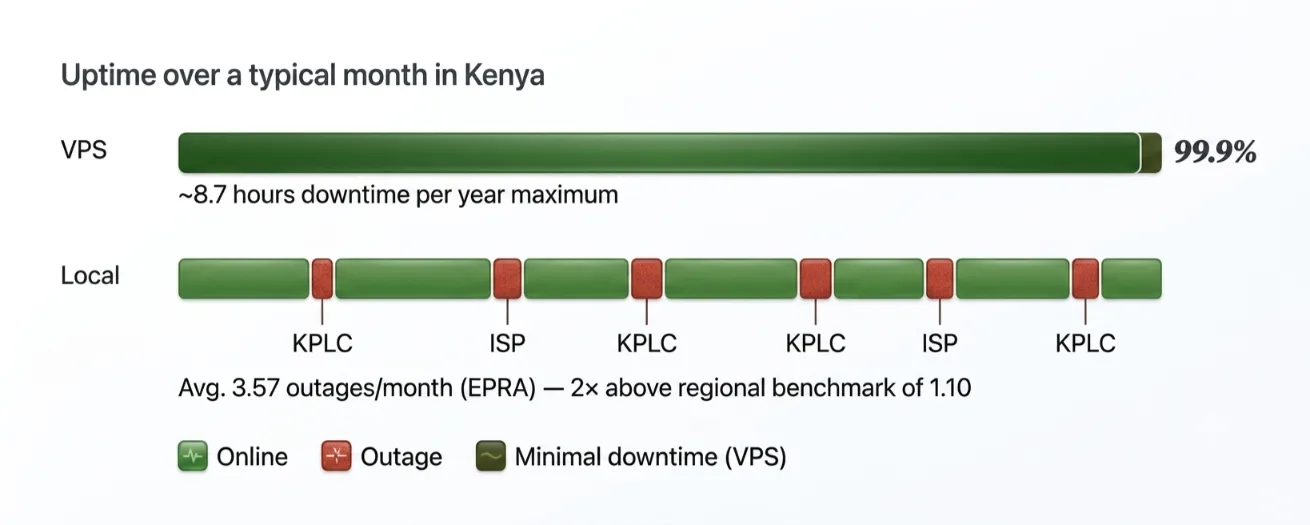
VPS: A professional data center runs on redundant power systems. It has enterprise-grade internet connections and backup generators.
Your agent stays alive through blackouts, ISP maintenance windows, and everything in between.
That’s 99.9% uptime, roughly 8.7 hours of total downtime per year, maximum.
Local: Your home setup depends on two things you don’t control. Your power supply.
Your internet connection. In Kenya, that’s a real problem.
According to EPRA’s official energy statistics report, Kenyans experienced an average of 3.57 outages per month.
That’s already 1.94 higher than EPRA’s own prescribed benchmark of 1.63. It’s more than double the regional benchmark of 1.10.
That’s an average month not a bad one. Add the routine ISP fluctuations from Safaricom, Zuku, or Faiba, and your agent is running on a foundation that can drop without warning.
The Bottom Line: VPS is the clear winner here. For anything business-critical, local uptime isn’t reliable enough in the Kenyan context.
2) Monthly Cost vs. Upfront Hardware
The question isn’t just what you pay today. It’s what the total cost looks like over the full life of your OpenClaw deployment.
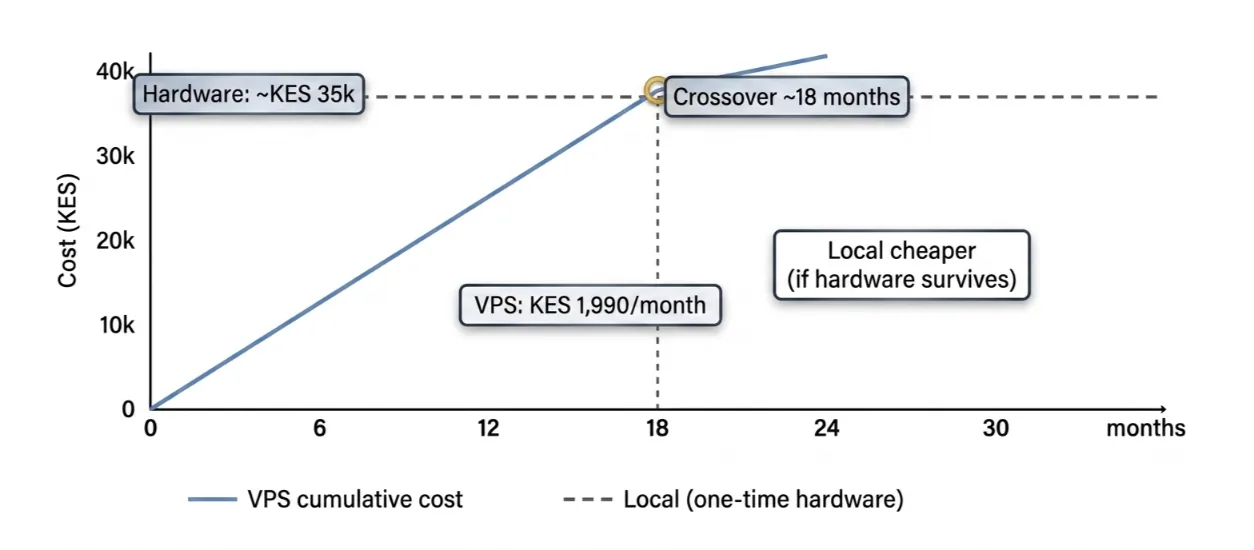
VPS: We at Truehost offer OpenClaw-ready VPS plans starting from KES 1,990/month.
That’s the KVM1 plan: 1 vCPU, 2GB RAM, and 50GB NVMe SSD. The absolute minimum baseline for a functional OpenClaw environment is 1 vCPU and 2GB RAM.
That entry plan covers you cleanly from day one. No hardware to buy. No depreciation to worry about. Cancel anytime.
If your workload grows, upgrading to KVM2 (2 vCPUs, 4GB RAM, 100GB SSD) takes a few clicks from the dashboard. Nothing more.
Local: The upfront cost of local hardware isn’t zero. It just arrives as a single lump sum instead of a monthly bill.
A Raspberry Pi 5 runs KES 10,000–15,000. A Mac Mini costs significantly more.
Because KPLC outages are a real operational risk, a UPS is essentially mandatory, adding another KES 5,000–15,000 depending on the model.
After the hardware is paid off, your monthly cost drops to near zero. That’s the genuine appeal of local.
The Tally: VPS wins on entry cost and flexibility. Local wins on long-term zero monthly fees but only if your hardware survives, the power doesn’t surge, and you never need to scale beyond your original specs.
Check our guide on Limitations of Local Hosting for Openclaw.
3) Data Privacy & Control
Every time OpenClaw runs a task, it generates data. Message logs. Automation history. Tool execution traces. API call records.
Where that data lives and who can access it is a question worth taking seriously before you pick a hosting path.
VPS: On a VPS, your data lives on physical hardware in a data center you don’t own.
At Truehost, we encrypt data and follow strong security practices. But the server is still off-premises.
For most everyday business automation customer support bots, scheduling agents, and sales workflows, that trade-off is completely acceptable.
The data involved doesn’t carry significant regulatory or liability risk. The convenience of the cloud far outweighs the privacy considerations for most users.
Local: When OpenClaw runs on your own hardware, nothing leaves your network. Message content. Workflow history. Tool outputs.
It all stays on your machine. For legal firms, healthcare providers, and financial services, this isn’t a preference. It’s a requirement.
Any workflow handling personally identifiable information at scale needs full data sovereignty. No third-party infrastructure should touch that data.
The Call: Local takes this one. If data privacy is a hard requirement for your use case, local hosting is the right answer. For most Kenyan SMEs running standard automation workflows, the VPS trade-off is reasonable and worth taking.
4) Security Responsibilities
Security for a self-hosted AI agent has two layers. First, the infrastructure the physical server, the network, the data center.
Second, the application layer includes your OS, firewall, and access controls.
How those responsibilities are split between you and your provider differs significantly depending on which path you choose.
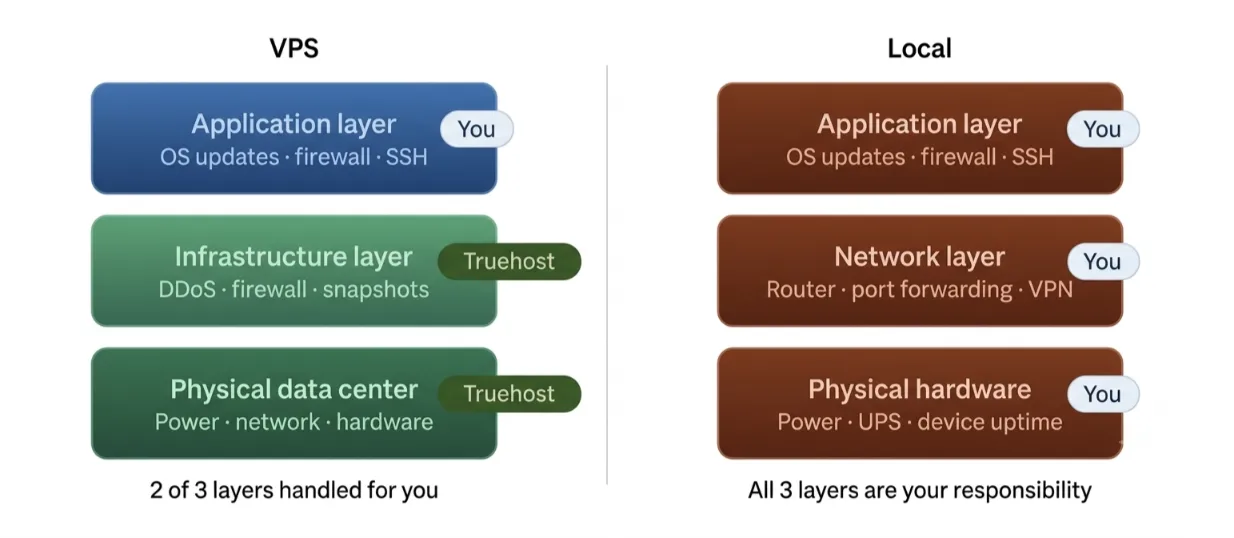
VPS: With a VPS, the infrastructure layer is handled by your provider.
Physical data center security, DDoS protection, network filtering, and hardware redundancy are not your problems.
You’re responsible for the application layer. That means keeping the OS updated, configuring your firewall, managing SSH access, and monitoring for intrusions.
At Truehost, our OpenClaw VPS plans include custom firewall rules, DDoS filtering, and automated daily SSD snapshots.
You’re not starting from scratch, even on the application side.
Local: With local hosting, you own all of it. The server. The home network. The router firewall.
Every port forwarding rule that connects your machine to the internet. One misconfigured port rule can expose your API keys.
One missed router firmware update can become an entry point.
For users who aren’t network administrators, which is most people, this is a meaningful, ongoing responsibility. It never fully goes away.
The Ruling: VPS is the stronger choice here. The infrastructure layer is covered. Your security burden is scoped to the application level, which is manageable. Local puts the entire stack on your shoulders.
Related: GLM-5.1 vs Claude Opus: Which One Should You Choose?
5) iMessage Support
iMessage integration is one of OpenClaw’s more niche capabilities.
It’s also the only category in this entire OpenClaw VPS vs. local comparison where the hosting environment creates a hard technical limit, not just a trade-off.
VPS: iMessage relies on Apple’s proprietary protocol. It cannot be emulated on Linux.
A VPS running Ubuntu simply cannot connect to iMessage. Full stop. If iMessage is part of your automation workflow, a Linux VPS will never support it.
The provider you use or how powerful the server is does not affect anything.
Local: Local hosting on real macOS hardware is the only way to get iMessage integration working.
A Mac Mini, a MacBook left running, or any always-on Mac qualifies. For users who need it, local is the only path.
That said, in Kenya, iMessage barely registers as a business communication platform.
WhatsApp dominates. Telegram is widely used. Slack handles most internal team communication.
All three work perfectly on a Linux VPS. No workarounds needed.
The Verdict: Local wins this round, but only for users who need iMessage. For the vast majority of Kenyan users, this entire section doesn’t apply.
6) Scalability
One OpenClaw agent handling a single workflow is manageable on almost any hardware. But agents grow. You add browser automation.
You run multiple agents in parallel. You build heavier multi-step workflows. At that point, your hardware ceiling becomes important.
VPS: Scaling on a VPS is as simple as clicking ‘upgrade’ from your dashboard.
Moving from Truehost’s KVM1 to KVM2 takes minutes. No downtime. No physical hardware to touch.
Each OpenClaw agent runs its own gateway process and needs roughly 2–3GB of RAM for comfortable headroom.
As your agent count grows, your resource needs grow with it. On a VPS, that’s a billing adjustment. Nothing more.
Local: Physical hardware has a fixed ceiling. Once your Raspberry Pi or desktop runs out of RAM, your options are limited.
Buy more hardware or live with degraded performance. In Kenya, sourcing specific RAM modules or compatible components isn’t always quick or straightforward.
In the meantime, your agents are competing for resources and dropping tasks under concurrent load.
The Scorecard: VPS wins this one easily. Scaling without disruption is one of the strongest practical arguments for cloud hosting, especially as your OpenClaw use cases multiply.
7) Setup Complexity
Getting OpenClaw running is one thing. Getting it reliably accessible from the internet is another.
Webhooks need to fire. Integrations need to connect. Your agent needs to respond in real time.
The setup path for VPS and local diverges significantly here.
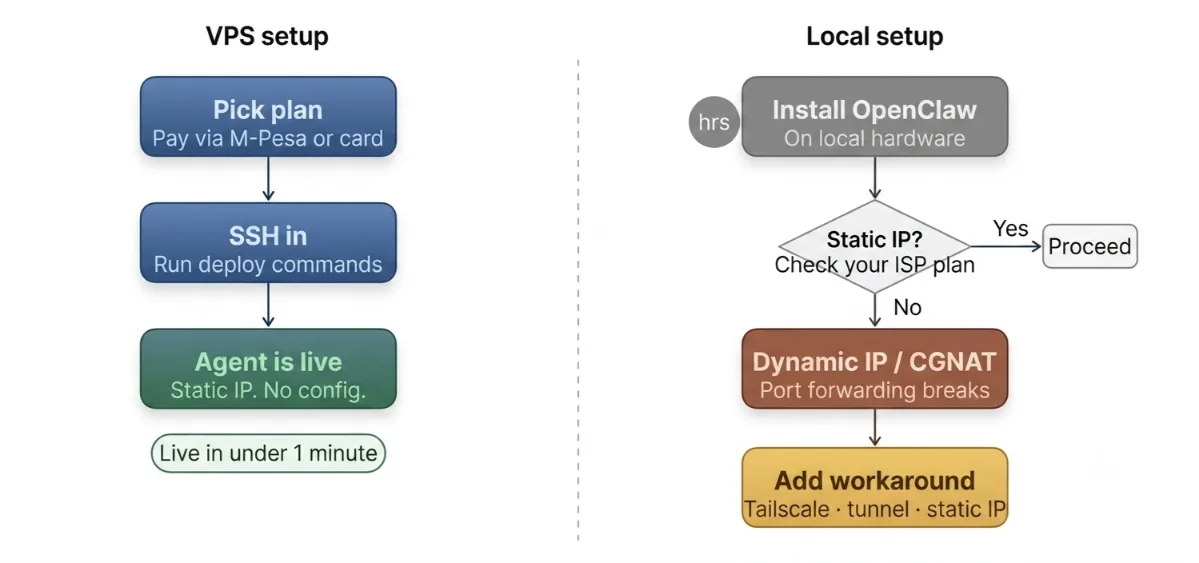
VPS: Pick your plan on Truehost. Pay via M-Pesa or card. Your environment is live in under a minute.
SSH in, run your deployment commands, and your agent is up on a stable, static public IP. No routing configuration needed.
The environment comes ready for Linux tooling, Docker, and standard OpenClaw deployment.
Local: Local setup requires more than just installing OpenClaw. You need to expose your agent to the internet via port forwarding.
That breaks the moment your ISP rotates your IP address which happens regularly on home plans. CGNAT (Carrier-Grade NAT) adds another layer of complexity.
Under CGNAT, your home is assigned a private WAN address. The ISP performs NAT at the carrier level.
Standard port forwarding often won’t work for inbound connections at all. Several Kenyan ISPs including major home broadband providers, use CGNAT on consumer plans.
Getting around it typically requires Tailscale, a tunnel service, or a paid static IP add-on. That’s viable. But it’s not simple.
The Final Word: VPS wins on setup. The local path is technically possible, but the friction is real especially given how Kenyan home internet is structured. For most users, VPS gets you running faster with fewer points of failure.
Related: OpenClaw vs ChatGPT: Which AI Is Right for You?
When to Choose VPS
Go the VPS route if:
- You need 24/7 reliability for business automation, customer-facing agents, or scheduled workflows
- You want a low monthly cost with no upfront hardware investment
- Your messaging platforms are WhatsApp, Telegram, or Slack (all VPS-compatible)
- You prefer a clean Linux environment with standard tooling
- You anticipate needing to scale more agents, heavier workloads, and browser automation
- You’re in Kenya, dealing with KPLC outages or ISP instability
When to Choose Local
Local hosting makes sense if:
- iMessage is your primary communication platform, and you need direct integration
- Maximum data privacy is a hard requirement for legal work, medical data, and sensitive personal workflows
- You already own suitable hardware (Mac Mini, Raspberry Pi 5, always-on spare PC)
- You’re comfortable managing your own network security, port routing, and uptime
Which One Wins?
For most OpenClaw users in Kenya, the answer is clear: a VPS wins.
The Kenyan context tilts the scale further than it might elsewhere. Kenyans average 3.57 power outages per month, well above regional benchmarks.
Local hardware reliability is a structural problem, not an edge case.
Dynamic home IPs and CGNAT make webhook-based integrations fragile.
And since iMessage isn’t part of most Kenyan business workflows, the one category where local wins simply doesn’t apply.
Local hosting has a real and valid niche. Privacy-sensitive use cases. iMessage users.
People who already own the hardware and are comfortable managing it. If that’s you, go local; it works.
For everyone else, the cloud is the practical choice.
We at Truehost have pre-configured OpenClaw VPS plans starting from KES 1,990/month with enterprise-grade security, automated daily snapshots, DDoS protection, and local 24/7 support.
You pay via M-Pesa. Your server is live in under a minute. You skip every local setup headache covered in this guide.