Domain SearchInstantly check and register your preferred domain name
 Web Hosting
 cPanel HostingHosting powered by cPanel (Most user friendly)
 WordPress HostingHost your WordPress website with fast, secure, and affordable WordPress hosting in Kenya.
 KE Domains
 Reseller HostingStart your own hosting business without tech hustles
 Windows HostingOptimized for Windows-based applications and sites.
 Free Domain
 Affiliate ProgramEarn commissions by referring customers to our platforms
 Free HostingTest our SSD Hosting for free, for life (1GB storage)
 Domain TransferMove your domain to us with zero downtime and full control
 All DomainsBrowse and register domain extensions from around the world
 .Com Domain
 WhoisLook up domain ownership, expiry dates, and registrar information
 VPS Hosting
 Managed VPSNon techy? Opt for fully managed VPS server
 Dedicated ServersEnjoy unmatched power and control with your own physical server.
 Website Builder
 Online Store BuilderLaunch a professional e-commerce store without writing code.
 Web Design ServiceGet a custom-designed website tailored to your brand and goals. From just KES 15,600
 BlogRead our guides on web hosting, online business, digital marketing, and more
 SupportOur support guides cover everything you need to know about our services
 ContactContact us via chat or email
You’ve decided to self-host n8n, a smart move for more control, flexibility, and scalability.
But the next question is: what are n8n VPS requirements?
The answer depends less on n8n itself and more on the workflows you plan to run.
n8n’s resource needs depend on how you use it.
Running a few simple automations requires far less power than handling multiple webhook workflows, complex Code nodes, or large data processes.
A basic setup can start with 1 vCPU, 2GB RAM, and 20–50GB SSD/NVMe storage.
For production environments, 2–4 vCPU, 4–8GB RAM, and 40–100GB NVMe storage provide better performance and reliability.
Memory is especially important because resource usage increases during active workflow runs.
n8n may stay lightweight when idle, but demanding tasks can quickly consume more resources, especially when processing files or running custom scripts.
For most self-hosted deployments, Ubuntu 24.04 LTS offers a stable and reliable environment.
This guide breaks down the n8n VPS requirements for your workload and shows which Truehost plan fits your needs.
Match Your VPS to Your Usage Type
| Usage Type | vCPU | RAM | Storage | Truehost Plan | KES Price |
| Beginner / small projects | 1 | 1–2GB | 20GB SSD | N8N KVM1 | Ksh 1,999/mo |
| Medium workloads | 2 | 2–4GB | 40GB NVMe | N8N KVM2 | Ksh 2,499/mo |
| Heavy automation | 4+ | 8GB+ | 80GB NVMe | Contact Truehost sales | Custom pricing |
A quick note on storage. Our KVM1 plan gives you 50GB NVMe, more than enough for a starter setup.
KVM2 steps that up to 100GB NVMe, which comfortably handles heavy automations with large databases and growing execution logs.
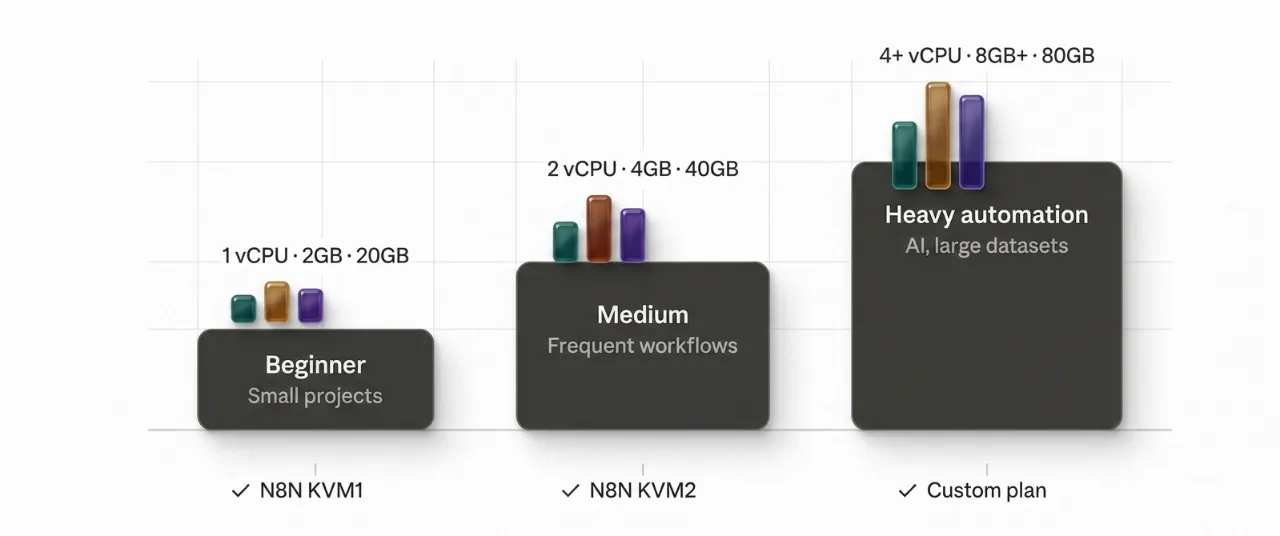
For workloads that go beyond KVM2, reach out to our sales team for a custom configuration.
What Changes Your Numbers
Workflow complexity drives requirements more than the total number of nodes.
Code nodes, binary file handling, loops over large datasets, or AI model integrations increase load significantly.
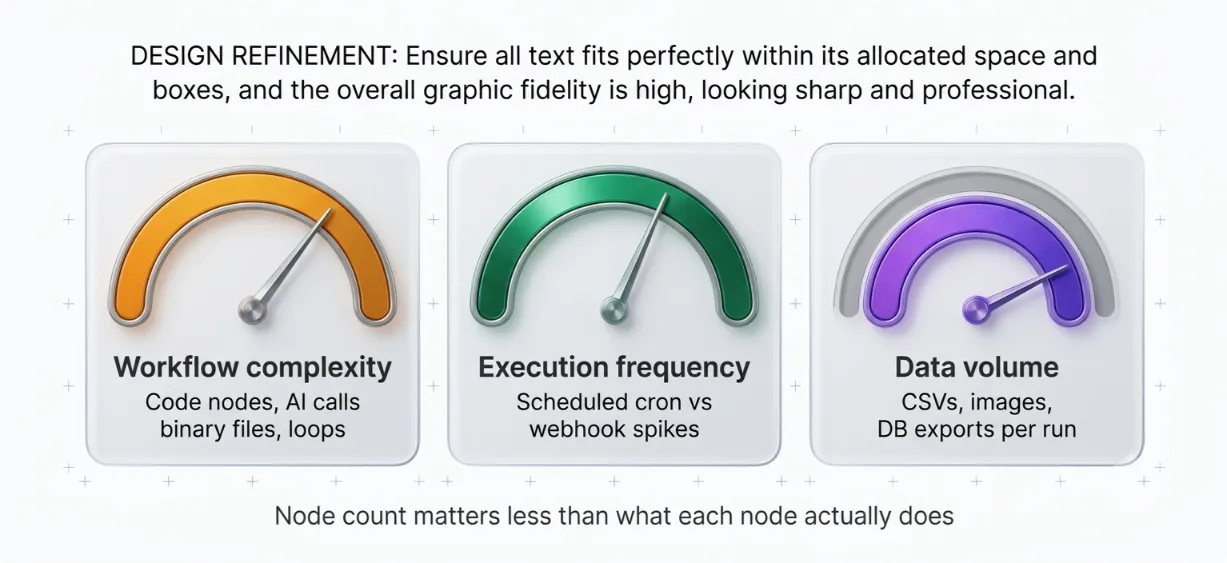
Execution frequency is important too. Scheduled cron jobs create a predictable load, while webhook-triggered workflows need headroom for sudden spikes.
Data volume per execution is key. Processing large CSV files, images, or database exports consumes more RAM and storage than simple API pings.
Start conservatively and monitor with tools like htop or n8n’s built-in metrics. You can always upgrade your Truehost VPS without downtime.
Learn more about n8n Automation
Minimum VPS Requirements for n8n
This is your entry-level setup. It works. It has real limits.
- vCPU: 1 core, handles simple, sequential workflows fine; slows under concurrent load
- RAM: 2GB recommended (1GB is possible, but risks memory errors and silent failures even on basic workflows)
- Storage: 20GB SSD minimum, covers the OS, Docker, n8n, and early log accumulation
- OS: Ubuntu 24.04 LTS
- Bandwidth: 1TB+ per month
- Best for: testing, personal projects, low-frequency automations
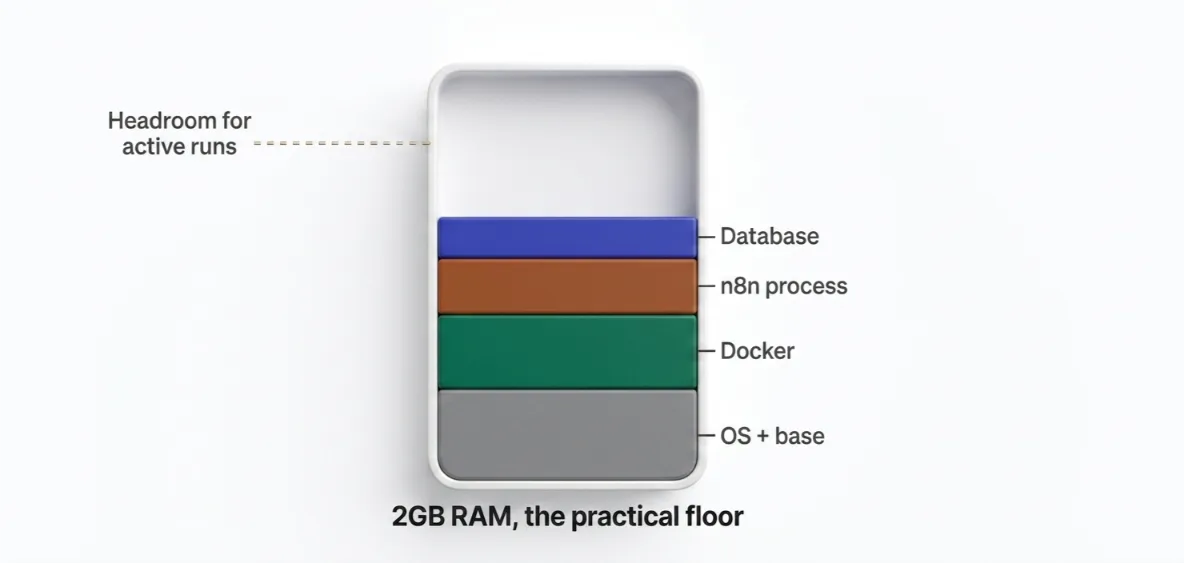
n8n itself uses around 180MiB RAM just to run. The base footprint is light. The problem is what happens the moment a workflow fires.
Add Docker overhead, your database process, and a few concurrent executions. A 1GB server runs out of headroom fast.
n8n can technically operate on 1GB. But it’s not recommended. Memory errors can show up on basic workflows, not just complex ones.
The 2GB floor gives you breathing room.
Simple, infrequent workflows, a daily report, a Slack notification, a form submission handler, this is genuinely enough to get started.
Our starter plan N8N KVM1 at Ksh 1,999/month: 1 vCPU, 2GB RAM, 50GB NVMe, 4TB bandwidth, unlimited workflows.
It’s the most affordable entry point for self-hosting n8n in Kenya. It ships pre-configured, so you skip the setup headache entirely.
Check our guide on how to run n8n on a VPS
n8n Recommended VPS Requirements for Stable, Production Use
This is where most small-to-medium teams should aim from day one.
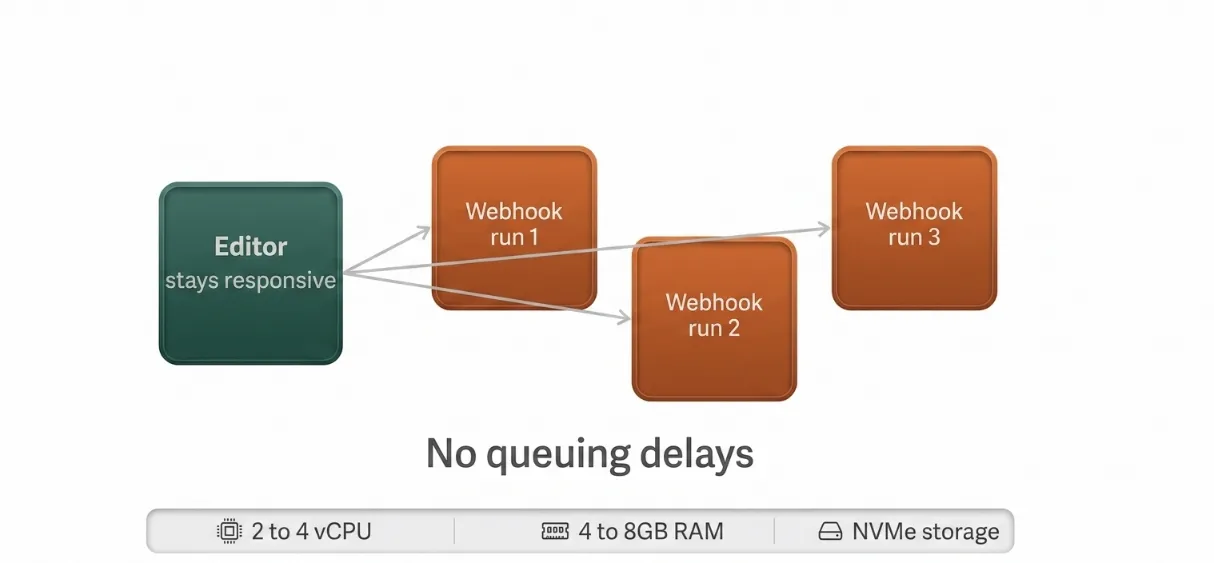
- vCPU: 2–4 cores, handles concurrent executions without queuing delays
- RAM: 4–8GB, the sweet spot per n8n’s own documentation for production environments
- Storage: 40–80GB NVMe, headroom for your database, execution logs, and room to grow
- Bandwidth: 2TB+ per month
- Best for: small-to-medium business automation, production environments, complex or webhook-triggered workflows
The CPU bump is important here. Without Queue Mode, n8n executes workflows in the same process that handles the web interface.
A single heavy workflow can freeze the editor. Incoming webhooks start failing.
At 2+ cores, you have enough capacity to keep the UI responsive while executions run in the background.
NVMe storage at this tier isn’t optional. It’s a real performance upgrade.
Faster disk I/O speeds up database reads and writes. That is important when your workflows log execution data or query large datasets on every run.
Running production automations? Invoice processing, CRM syncs, lead routing, API orchestration? Don’t start at the minimum.
Start with our N8N KVM2 at Ksh 2,499/month, 2 vCPU, 4GB RAM, 100GB NVMe, 8TB bandwidth.
For just Ksh 500 more per month than KVM1, you get double the CPU, double the RAM, and double the storage. For most production use cases, KVM2 is the sweet spot.
Read also: n8n Automation Ideas to Try with Your VPS
n8n VPS Requirements FAQ
How much RAM does n8n need to run smoothly?
For reliable performance, 2GB is the minimum. For production, start at 4GB. Memory usage grows with JSON data volume, binary file size, node count, and the number of workflows running at the same time. The Code node and older Function node are the biggest culprits. If you’re handling complex workflows or binary files regularly, budget for 4–8GB.
Can I run n8n on a 1GB VPS?
Technically yes. But it’s not recommended for anything beyond a quick test. Undersizing RAM is the most common cause of out-of-memory crashes during peak hours. On a 1GB server, you’re splitting that memory between the OS, Docker, the n8n process, and your database. There’s almost no margin left. Workflows that run fine on a 2GB server will break on 1GB.
What’s the cheapest VPS for n8n in Kenya?
Our KVM1 plan at Ksh 1,999/month is built specifically for n8n self-hosting. It’s one of the most affordable options available locally. It comes pre-configured too, so you skip the trial-and-error of setting up a VPS environment from scratch. See the full plan details here.
Do I need Docker to self-host n8n?
Docker is strongly recommended. It’s the standard deployment method and what n8n’s own documentation defaults to. It gives you reproducible builds via pinned images. Upgrades are as simple as changing an image tag. Docker Compose makes it easy to run Postgres, Redis, and n8n side by side. You’ll need basic Docker literacy, volumes, networks, and Compose files. Our n8n-optimized KVM plans are pre-configured to reduce that friction significantly.
Which Plan Should You Choose?
Choosing the right VPS from the start prevents frustration and unnecessary upgrades.
For most people getting started, our KVM1 plan at Ksh 1,999/month is the right call.
1 vCPU, 2GB RAM, 50GB NVMe, 4TB bandwidth. It covers personal projects, testing environments, and low-frequency business automations without overspending.
Step up to KVM2 at Ksh 2,499/month if:
- Your workflows fire frequently, webhook-triggered or scheduled every few minutes
- You’re handling binary files, large JSON payloads, or Code nodes
- You need the instance running reliably for production, not just experimentation
- You’re a developer or freelancer managing automations for clients
For heavy automation at scale, 4+ vCPU, 8GB+ RAM, contact our sales team for a custom configuration.
Ready to deploy? Check out Truehost’s n8n-optimized KVM plans pre-configured setups with queue mode support, NVMe storage, and generous bandwidth.
Built for self-hosting n8n in Kenya.