Domain SearchInstantly check and register your preferred domain name
 Web Hosting
 cPanel HostingHosting powered by cPanel (Most user friendly)
 WordPress HostingHost your WordPress website with fast, secure, and affordable WordPress hosting in Kenya.
 KE Domains
 Reseller HostingStart your own hosting business without tech hustles
 Windows HostingOptimized for Windows-based applications and sites.
 Free Domain
 Affiliate ProgramEarn commissions by referring customers to our platforms
 Free HostingTest our SSD Hosting for free, for life (1GB storage)
 Domain TransferMove your domain to us with zero downtime and full control
 All DomainsBrowse and register domain extensions from around the world
 .Com Domain
 WhoisLook up domain ownership, expiry dates, and registrar information
 VPS Hosting
 Managed VPSNon techy? Opt for fully managed VPS server
 Dedicated ServersEnjoy unmatched power and control with your own physical server.
 Website Builder
 Online Store BuilderLaunch a professional e-commerce store without writing code.
 Web Design ServiceGet a custom-designed website tailored to your brand and goals. From just KES 15,600
 BlogRead our guides on web hosting, online business, digital marketing, and more
 SupportOur support guides cover everything you need to know about our services
 ContactContact us via chat or email
Your website stops loading on Monday morning. Staff cannot receive mail at the company domain. The hosting account still looks active, and you paid the web developer last month.
Then a domain lookup shows serverHold.
That one line changes the investigation. A registry hold can keep the domain out of DNS even when the website files and mailboxes remain healthy. Moving the website to another server will not remove the hold.
Domain status codes show what the registrar or registry allows the domain to do. They can tell you whether a name should resolve, whether a lock blocks a transfer, whether an update remains unfinished, or whether an expired domain is approaching deletion.
For a Kenyan owner, the right response also depends on the extension. KeNIC operates the .ke registry, including names such as:
A Kenyan business may instead use .com, .org, .shop or another extension whose registry follows a different lifecycle.
Read the status first. Then apply the rules for the actual extension.
Start with the effect, not the technical name
Use this table to decide how quickly you need to act.
What you see | Likely effect | First response |
|---|---|---|
| Website, email and other DNS services can stop | Contact the registrar and ask for the exact cause |
| The registry has no usable nameserver delegation | Check nameservers and any registration requirements |
| Transfer to another registrar cannot start | Leave it enabled unless you intend to transfer |
| The registry blocks a transfer | Ask the registrar what the registry requires |
| A registrar transfer has started but has not finished | Confirm that you authorized it |
| Registry-level changes can fail | Identify the lock before editing nameservers or contacts |
| The domain is late in an expiry or deletion process | Contact the registrar immediately |
| No pending action or prohibition | Add appropriate security locks if the account lacks them |
One domain can show several codes. A working domain may carry transfer, update and deletion locks at the same time. A suspended domain may show a hold plus another restriction.
.ke and .com can show similar codes but follow different clocks
EPP stands for Extensible Provisioning Protocol.
Registrars and registries use it to create, renew, update, transfer and delete domain records.
RFC 5731 defines the standard domain-object status values. ICANN’s registrant guide translates those values into practical meanings.
The code semantics stay consistent:
holdaffects DNS publication;TransferProhibitedblocks a registrar transfer;UpdateProhibitedblocks an update;pendingTransfermarks an unfinished transfer; andpendingDeletemarks a deletion process.
The lifecycle around those codes does not stay identical across every extension.
KeNIC’s current public .ke domain lifecycle page says an unpaid .ke name enters an expiry phase, faces automatic suspension 14 days after expiry, moves through a later pending-delete stage and can eventually return to public availability.
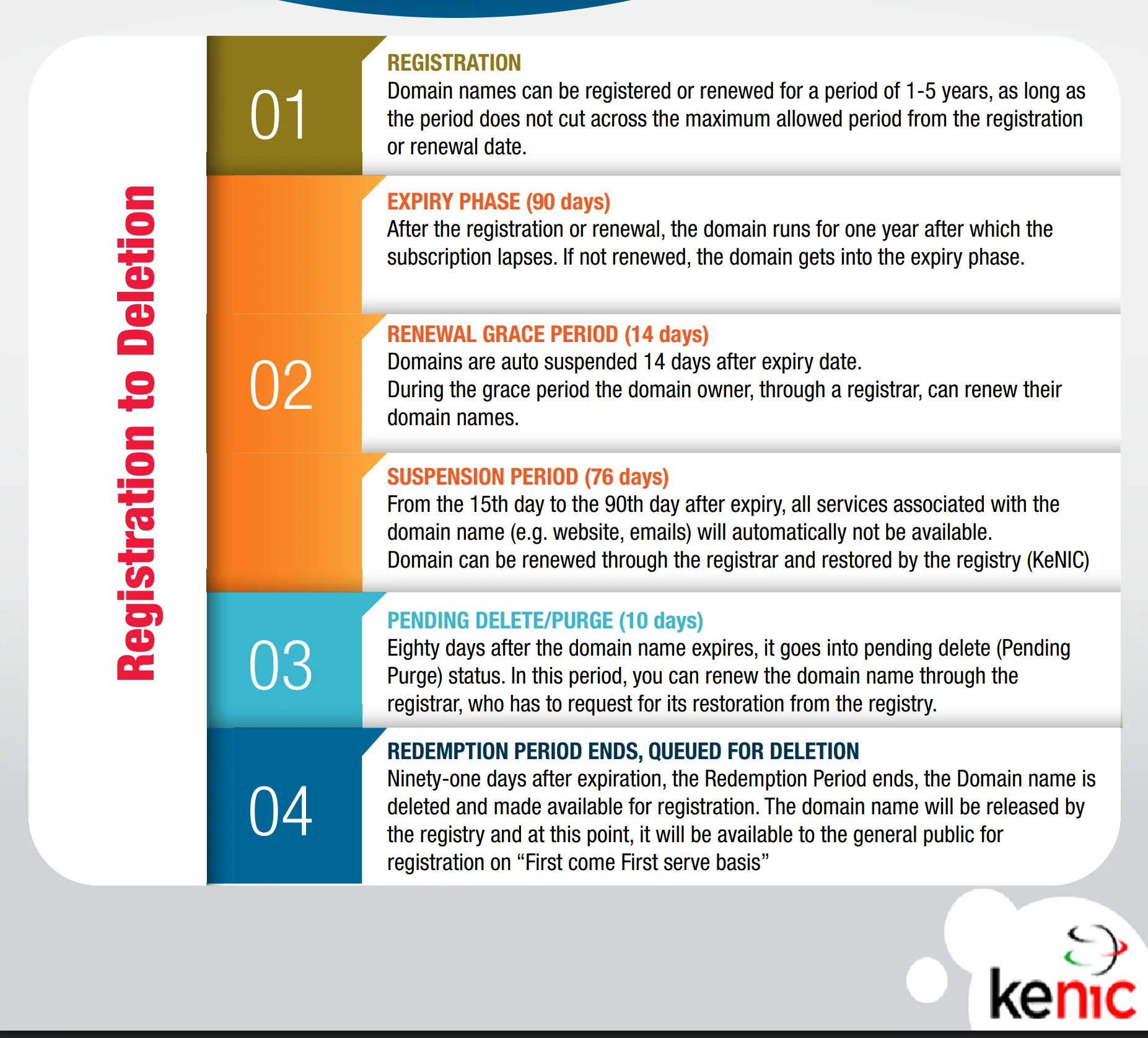
KeNIC also hosts a policy PDF with a different retention statement.
Do not calculate a safe last day from a generic blog post, an old reminder or a rule for .com. Check the live status and expiry date, then ask the sponsoring registrar to confirm the deadline and restoration process for your exact name.
A hold can take the whole domain offline
clientHold and serverHold both tell the registry not to publish the domain’s delegation in DNS.
Without that delegation, internet resolvers cannot find the authoritative nameservers. The failure can affect:
the main website and its
wwwaddress;staff email at the domain;
online shops and payment callbacks that use the domain;
portals, APIs and subdomains;
DNS-based ownership verification; and
remote services that depend on the domain name.
The registration can still exist. The hosting server can still contain every file. The mailboxes can still contain old messages. The missing DNS path prevents users and systems from reaching them normally.
clientHold: the registrar applied the hold
The registrar can apply clientHold for reasons such as an unpaid invoice, failed registrant verification, inaccurate account data, a policy complaint, suspected abuse or a legal issue.
The public status does not reveal which reason applies. Sign in to the registrar account and check:
the domain renewal invoice;
notices sent to the registrant and billing contacts;
identity or organization verification requests;
abuse or policy tickets;
recent changes to ownership details; and
the exact expiry date.
Ask support to name the unmet requirement and the removal process. Do not accept “wait for propagation” as the complete answer while clientHold remains active.
serverHold: the registry applied the hold
The registry controls serverHold. For a .ke domain, KeNIC is the registry and your accredited registrar acts between you and KeNIC.
KeNIC’s public lifecycle guidance specifically says an expired .ke domain can sit on server hold during suspension. A registry may also use a server hold for a policy, eligibility, security, dispute or court-related reason.
Start with the registrar even though the registry set the code. The registrar can see the sponsored domain record, confirm payment or verification and request registry action where necessary.
inactive: the registry has no delegation to publish
inactive usually means the domain record lacks associated nameservers. A new or restricted domain can remain inactive while the registrar or registry waits for setup or documents.
Check the registrar panel for at least the required authoritative nameservers. For restricted Kenyan namespaces such as .ac.ke or .go.ke, also confirm that the registrar received the required eligibility documents.
An inactive domain and a held domain can both fail to resolve, but they point to different fixes. Missing nameservers need configuration; a hold needs the responsible registrar or registry to clear its cause.
A transfer lock is often good news
The word prohibited sounds alarming. In many cases, it describes a deliberate security control.
clientTransferProhibited tells the registry to reject a transfer to another registrar. Providers commonly label this control Registrar Lock, Domain Lock or Transfer Lock.
Keep it enabled during normal use. It reduces the chance that someone who compromises an email account or obtains an authorization code can move the name without another barrier.
When you intentionally transfer a domain, unlock it through the registrar’s authenticated process.
If you plan to move an eligible name to us, follow our domain transfer checklist before submitting it through our Kenya domain transfer page.
The four client locks
Client status | Operation it blocks | Normal owner response |
|---|---|---|
| Deleting the registration | Keep it unless you genuinely need deletion |
| Renewing the domain | Ask the registrar to resolve it before expiry |
| Moving to another registrar | Keep it until you intentionally transfer |
| Updating the registry record | Remove it only for an authorized update |
The registrar controls client-level codes, subject to policy, legal and security requirements.
The four server locks
The registry controls:
serverDeleteProhibited;serverRenewProhibited;serverTransferProhibited; andserverUpdateProhibited.
A registry-lock service can use these codes to protect an important domain. A dispute, deletion process or registry restriction can also trigger them.
Ask the registrar whether the server status belongs to an intentional registry lock. If it does not, request the case reason and the exact evidence or authorization the registry needs.
Server restrictions usually require more coordination than client locks because the registrar must work with the registry.
An EPP authorization code is not an EPP status code
Kenyan domain owners often encounter the term “EPP code” during a transfer. It can refer to two different things.
An EPP status code describes the domain’s state, such as clientHold or pendingTransfer. You can see it in registration data.
An EPP authorization code is a secret transfer credential, also called an auth code or transfer key. You request it from the current registrar and give it to the new registrar.
KeNIC’s transfer instructions tell .ke registrants to request the authorization or EPP code from the current registrar and share it with the new registrar.
Never publish that authorization code, include it in an ordinary email thread or paste it into a public support ticket. Treat it like a password.
pendingTransfer means someone started a transfer
pendingTransfer means the registry received a transfer request and has not completed it.
If you requested the move, check:
the transfer order at the new registrar;
approval requests from the current registrar or registry;
the registrant email address;
the domain’s lock state;
the authorization code you submitted; and
any extension-specific transfer requirement.
If you did not request the transfer, contact the current registrar immediately and ask it to deny the request. Secure the registrar account and its recovery email, change compromised credentials and enable multifactor authentication.
Do not confuse pendingTransfer with clientTransferProhibited.
pendingTransfer says a transfer request has entered processing. clientTransferProhibited says the registry should reject transfer requests while the lock remains.
The remaining pending codes tell you which job has stalled
EPP defines five pending-operation statuses:
pendingCreate: the registry received a request to create the domain;pendingRenew: the registry received a request to renew it;pendingTransfer: the registry received a request to change registrars;pendingUpdate: the registry received a request to update the record; andpendingDelete: the domain has entered a deletion process.
The first four normally disappear when the registry completes or rejects the operation. Contact the registrar if a code remains beyond the stated processing time or appears after an action you did not authorize.
Treat pendingDelete as urgent. The registrar may have little or no restoration time left, depending on the extension and current lifecycle stage.
Expiry codes need extension-specific action
ICANN lists Registry Grace Period statuses alongside the base EPP domain statuses. You may see:
addPeriod: a short registry grace period after a new registration;autoRenewPeriod: a temporary period after the registry automatically extends an expired registration;renewPeriod: a temporary period after an explicit renewal;transferPeriod: a temporary period after a completed registrar transfer;redemptionPeriod: a restoration window after deletion from active registration; andpendingRestore: the registry awaits the documents or confirmation needed to complete a restore.
The first four often provide information rather than report a fault. redemptionPeriod, pendingRestore and pendingDelete require close attention because the owner can lose the name.
An autoRenewPeriod entry does not prove that your registrar invoice is paid. Confirm both the registrar account and the registry expiry information.
For a .ke name, use KeNIC’s live record and your registrar’s written deadline. For a .com or another generic extension, ask for the lifecycle of that TLD. Do not transfer one extension’s grace period to another.
ok means the record has no pending action or prohibition
ok is the standard EPP state when the domain has no pending operation or restriction. RFC 5731 does not allow it alongside another status.
An ok domain can resolve normally when it has valid delegation and working DNS. The status does not guarantee that:
the hosting server works;
the DNS zone contains correct records;
the SSL certificate remains valid;
the website application works; or
the registrar account has strong security.
If the site is down while the domain shows ok, move the investigation to nameserver delegation, DNS records, hosting, SSL and the application.
Check a .ke domain through a Whois Look Up Tool
KeNIC directs registrants to its Data Client to check a domain’s status. We have a similar tool you can use
Enter the full registered name, such as
biashara.co.ke, withouthttps://or a page path.Record every status, not just the first one.
Note the registrar, expiry date and nameservers.
Compare those details with the registrar account.
check Epp statuses:
Save a timestamped screenshot if you need to open a support case.
For .com, .org and many other generic extensions, use ICANN Lookup or the sponsoring registrar’s current lookup.
Registration-data systems may present an RDAP status in human-readable form rather than the exact camel-case EPP literal. Use the meaning and the responsible party, not the typography, to choose the next step.
Use this symptom-first diagnosis
The website and company email both fail
Check for clientHold, serverHold, inactive and expiry-related states. Confirm that the nameservers still appear in the registry record.
If several independent domain services fail at once, investigate the domain and DNS path before rebuilding the website.
The website works but the transfer fails
Look for clientTransferProhibited, serverTransferProhibited or an existing pendingTransfer.
Unlock only through the official account. Do not disable unrelated protections or share the authorization code with anyone except the intended new registrar.
A nameserver change fails
Look for clientUpdateProhibited, serverUpdateProhibited or pendingUpdate.
Changing a record inside the current DNS zone is not the same as changing the authoritative nameservers at registry level. Identify which action failed before removing a lock.
Renewal payment went through but the status did not change
Compare the invoice, registrar order, registry expiry date and current status. Look for pendingRenew, serverRenewProhibited, redemptionPeriod, serverHold or pendingDelete.
Send the payment reference to the registrar and ask whether the registry accepted the renewal or still requires restoration.
Give support a case it can act on
Include these details:
the exact domain;
every current status;
the lookup time and URL;
the expiry date and nameservers shown;
the affected services;
the last successful date;
recent transfer, renewal, contact or DNS changes;
the invoice or order reference; and
the exact control-panel error.
Ask one direct question:
Which organization set this status, what caused it, and what exact action will remove it?
That question separates registrar work from registry work and forces the case toward a concrete next step.
Keep the domain problem in the right layer
A status code can save hours of work when you read it before changing hosting, DNS or email settings.
Holds affect delegation. Prohibited codes block one operation. Pending codes mark unfinished transactions. Grace-period codes place the domain in its registration lifecycle. The extension determines the clock and policy around those states.
If you manage a .ke name, check KeNIC’s live record and work through the sponsoring registrar. If you manage a generic extension, use its registry and ICANN-compatible lookup data.
When you need to renew, consolidate or replace a domain, you can search and manage domains through Truehost. Keep the transfer lock on until you intentionally begin a verified transfer.