 Domain SearchInstantly check and register your preferred domain name
 Web Hosting
 cPanel HostingHosting powered by cPanel (Most user friendly)
 WordPress HostingHost your WordPress website with fast, secure, and affordable WordPress hosting in Kenya.
 KE Domains
 Reseller HostingStart your own hosting business without tech hustles
 Windows HostingOptimized for Windows-based applications and sites.
 Free Domain
 Affiliate ProgramEarn commissions by referring customers to our platforms
 Free HostingTest our SSD Hosting for free, for life (1GB storage)
 Domain TransferMove your domain to us with zero downtime and full control
 All DomainsBrowse and register domain extensions from around the world
 .Com Domain
 WhoisLook up domain ownership, expiry dates, and registrar information
 VPS Hosting
 Managed VPSNon techy? Opt for fully managed VPS server
 Dedicated ServersEnjoy unmatched power and control with your own physical server.
 Website Builder
 Online Store BuilderLaunch a professional e-commerce store without writing code.
 Web Design ServiceGet a custom-designed website tailored to your brand and goals. From just KES 15,600
 BlogRead our guides on web hosting, online business, digital marketing, and more
 SupportOur support guides cover everything you need to know about our services
 ContactContact us via chat or email
Before you settle on a domain name, there’s one detail that’s easy to overlook but carries real weight: its age. And to determine the age, you use domain name age checkers.
A domain name age checker is a simple tool that tells you when a domain was first registered and, in many cases, how it has changed over time.
Behind the scenes, these tools pull data from public registration records (what we normally call WHOIS data) to give you a clear timeline of a domain’s history in seconds.
Now, why care about a domain’s timeline?
Well, an older domain has had time to stabilize, gain credibility, and build a stronger foundation, but only if it was actually active. According to Ted Kubaitis’ experiment, if your old domain sat gathering dust, it most definitely won’t have any value to show.
On the other hand, a brand-new domain might still need time to build trust with both users and search engines.
Apart from buying reasons, a domain name age checker can even help you size up your competition to make smarter decisions from the start.
Again, a well-aged domain can improve how trustworthy your brand appears and help you compete more effectively in crowded markets.
In this guide, I’ve prepared for you 15 domain name age checkers you can start using right away.
I have used them personally to check on their reliability and provided my honest feedback for both the quick single-look tools and bulk checkers designed for deeper research.
Let’s check them out together.
Top 15 Domain Name Age Checkers
Single Domain Name Age Checkers
When you just want to check one domain quickly, these tools get the job done without overcomplicating things. You enter the domain, hit search, and get the key details almost instantly.
1) Truehost WHOIS Lookup
Let’s start with an option right here at home, Truehost. We offer a WHOIS lookup tool that lets you check domain age along with other important registration details.
You’ll see all the necessary information to help you decide from an informed point of view if a domain is credible and has a clean history.
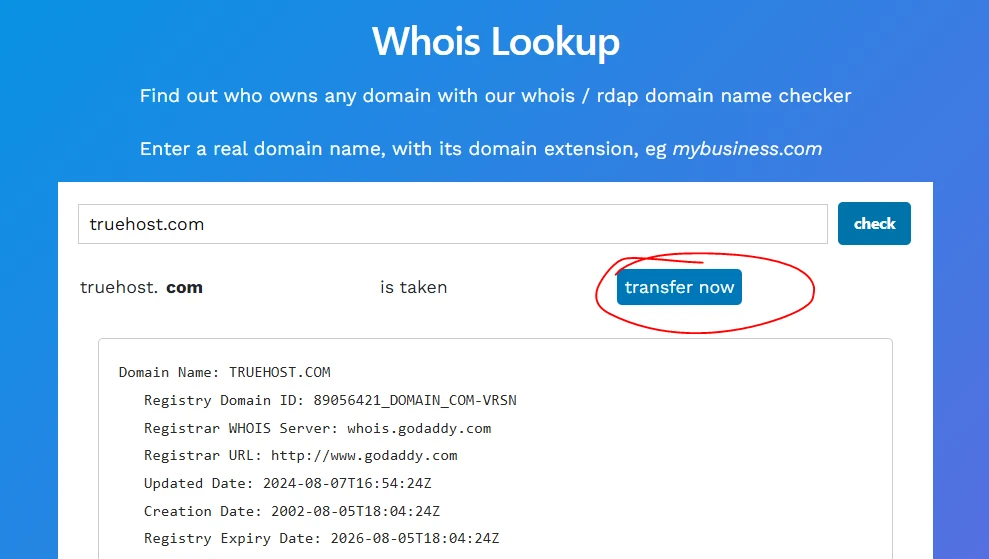
The tool lets you see when the domain was created, updated, and when it expires, the registry domain ID, the registrar information, the domain status, nameservers, DNSSEC, and the inaccuracy complaint form all in one place.
You get very accurate information, with date specifics down to the seconds, and even the timezone.
It’ll be especially convenient if you plan to register or transfer the domain right after checking.You can check your domain right away and decide if it’s for keeps or not.
2) Whois.is
With this tool, you can do a domain information lookup, giving you the domain information from the registration date, expiration date, and the registrar information.
You also get the registry domain ID, last update date, domain status, DNSSEC, and nameservers.
With all this information, you can easily determine if a domain name is worth your money and effort.
3) Whatsmydns.net Domain Age Tool
This tool focuses on clarity. Instead of just showing the registration date, it calculates exactly how long the domain has been active, down to years, months, and days.
It shows more than just the age, including expiration, last update, availability, owner, registrar, DNSSEC, and the Whois data.
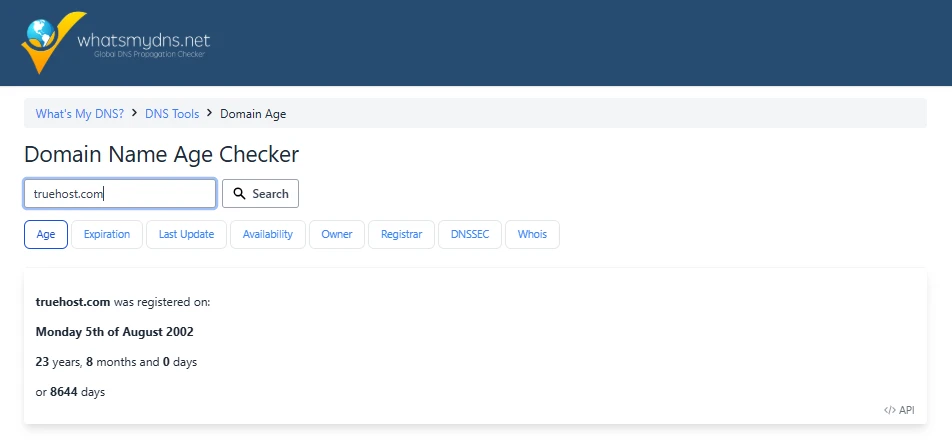
Its accuracy is commendable and gives you numbers you can immediately work with.
4) Zoho Toolkit Domain Age Checker
This one is all about speed and convenience. You get the domain age in years, months, and days; then the domain age in total days; and the registration details almost instantly.
It’s the kind of tool you can use in a quick break and still walk away with everything you need.
5) APIVoid Domain Age Checker
This tool leans more toward safety checks.
It’s very fast, giving you the domain registration status, domain creation date, age in days, months, and years.
It’s also very accurate down to the days and works as great for newly registered domains.
6) IPLocation Domain Age Checker
Clean and simple, giving you the age with date of registration, expiration, last updated, availability, registrar, owner, DNSSEC, Whois, nameservers, IP address, and a Wayback/Archive.org link.
However, it struggled to check a newly registered domain name, and you have to scroll down the website to find the domain name age checker.
7) WHOIS ICANN Lookup
If you want the official record, this is where to go. Run by Internet Corporation for Assigned Names and Numbers (ICANN), it provides direct access to domain registration data and history.
It may not have a flashy interface, but the information comes straight from the source.
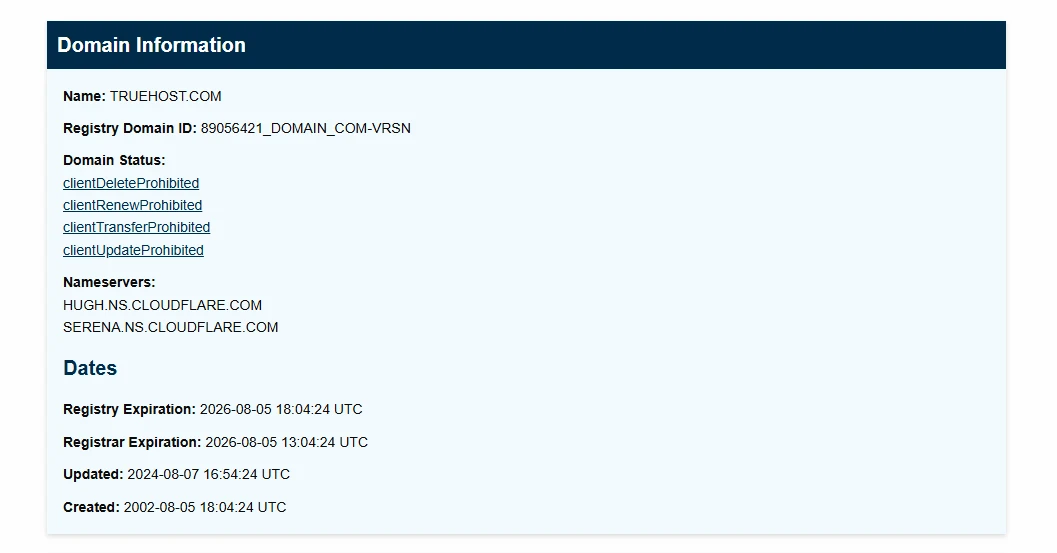
It gives you everything from the domain information including the registration date, last updated and expiration, nameservers, regisrant contact information, registrar information, DNSSEC, authoritative servers, and notices and remarks about the domain.
It even gives you the raw registry RDAP response. This is now what we call credibility check.
8) The HOTH Domain Age Checker
Fast and easy to use, this one is great for quick SEO checks.
You can look up a domain in seconds and get a sense of how established it is, which comes in handy when reviewing multiple sites.
It gives you the specific accurate age of the domain in years and days only.
9) Email Hippo Free Domain Checker
This tool gives you upto 50 single domain checks per day. It gives you only the domain registration date, but detailed enough with day of the week and the exact time down the second.
It helps you see exact how long a domain has been around, but you’ll need to use a different tool to check other age related details.
10) WebsiteAge
If you prefer something simple and direct, this tool keeps things clean. It shows when the domain was first registered and last updated, but I have listed it last on single checkers list for a reason.
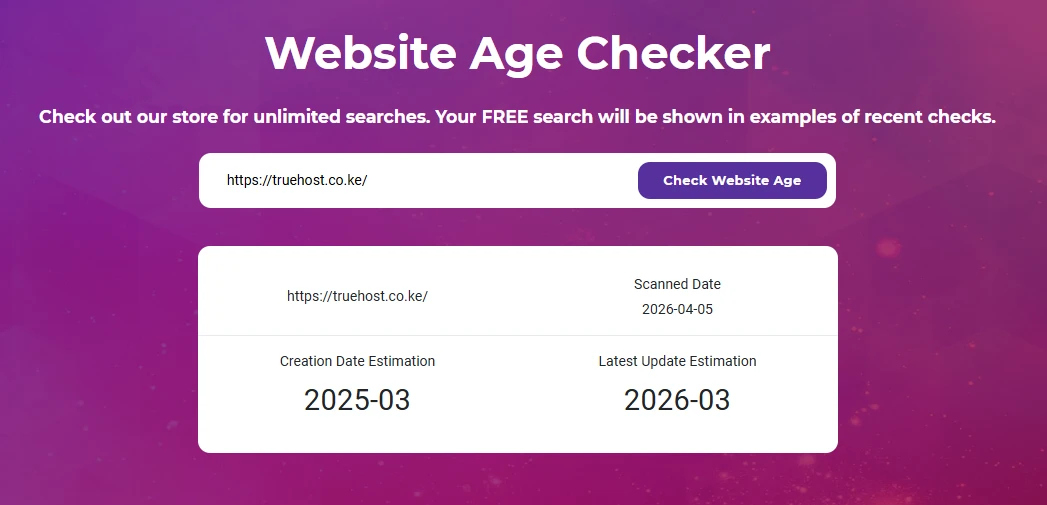
For one, I noticed it won’t search a plain domain unless you give it the full URL. Again, the estimation was so off. It’s not the best if you want accurate timelines.
Bulk Domain Name Age Checkers
When you’re working with several domains at once, checking them one by one quickly becomes tedious. But bulk tools let you review multiple domains in a single go and keep everything organized.
11) Apify Bulk Domain Age Checker
If you like your data neatly structured, this one delivers. It’s a bulk checker giving you upto 100,000 domains per check but recommends 10,000 to 20,000 domains at a go to maximize efficiency.
You can check domain registration age, creation date, expiration date, registrar, and nameservers in bulk. It uses RDAP, the modern, structured replacement for WHOIS, for accurate results.
Once it done, you can export the data in different formats like JSON, CSV, XML, Excel, HTML Table, RSS, and JSONL where you get to even select the specific fields to download, and ones to omit.
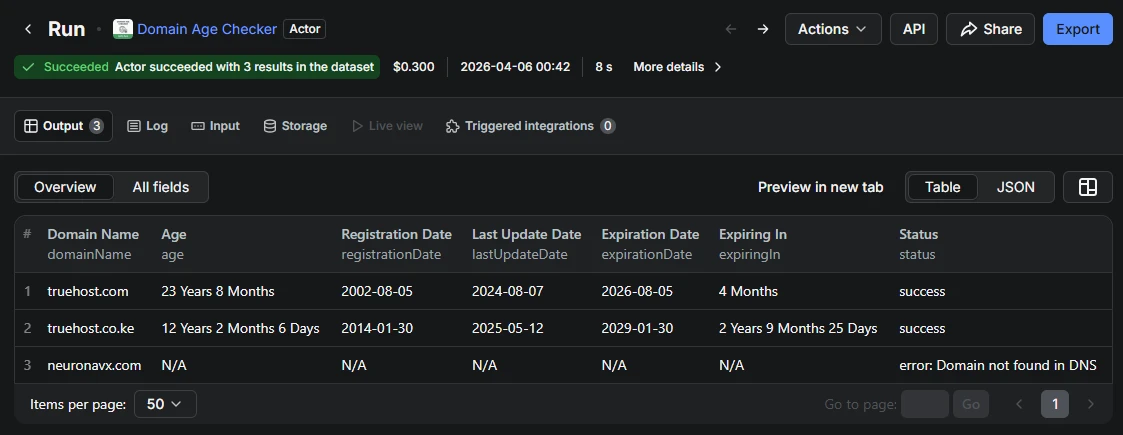
It pulls multiple domains into a table format, showing registration dates, expiry, and overall age side by side. That makes it much easier to compare options without switching between tabs.
However, its interface can be intimidating for non-developers. It also couldn’t give me any results on a new domain. You have to upgrade to get
12) SE Ranking Domain Age Checker
This tool strikes a nice balance between ease of use and functionality.
You can check one domain or run a bulk search of up to 5 at a time, with details like age, registration and expiration dates clearly laid out.
Once they’re analyzed and the table with the report opens up, you’ll see the domain age, creation and expiration dates.
They offer domain traffic checks but to analyze you need a premium plan.
It’s a practical option when you want quick answers without going through a lengthy setup.
13) Guest Post Links Domain Age Checker
This tool gives you up to 100 domain name age check credits, which reset after a certain period, approximately 4 hours.
Along with the domain age and creation date, it also includes the Whois last update and expiration date. To avoid duplication, you can check the avoid same domain box or even avoid some domains of your choice, especially when you’re pasting in bulk.
You can copy the results, print, or download in different formats, including CSV, Excel, and PDF. This can be very convenient when you need the data for research or writing reports or for later comparison before you buy a domain.
14) iNet Ventures Domain Age Checker
This one gives you up to 5 domains, where you paste them in the input field in seperate lines or seperated by commas.
You’ll be able to retrieve registration dates, expiration dates, last updated, and the registrar information.
It’s a bit slow but also accurate. From my experience, it was unable to retrieve domain creation dates from WHOIS data for some domains, leaving them empty.
15) Duplichecker
A familiar name for many SEO professionals, this tool covers the essentials like domain age, creation, update, and expiration dates.
It’s widely used by freelancers and marketers who want quick checks as part of their regular workflow.
You can check upto 10 domains at a go, giving you the age, creation date, last update and expiration date.
For me, it missed a domain name, had too many ads that made it slow down a bit, but generally performed well in terms of accuracy.
16) SmallSEOTools Domain Age Checker
This one gives you a full snapshot of up to 10 domain names in one place. You’ll see the age down to the days and creation and expiration dates down to the seconds.
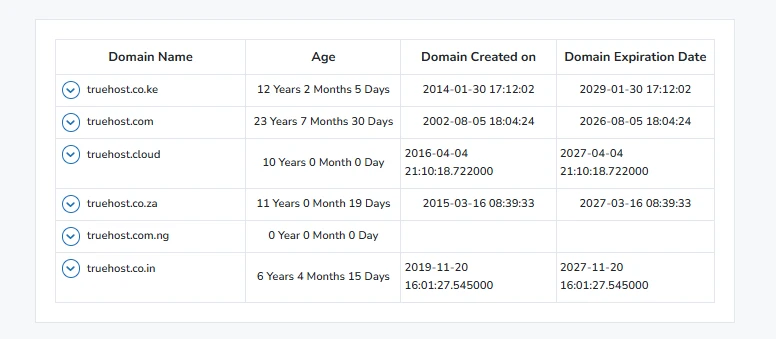
They also claim to provide the last updated, IP address, registrar, and nameserver, but from my results above, this is not verified.
17) Tenet Domain Age Checker
Another reliable option for checking up to 10 domains at once.
It also gives you a bit more history for each domain, which can help when narrowing down your final choices.
To check, add one per line in the input box and click the check button. It can take a while longer to load the results, as per my experience.
Once the results are out, you can view the basic inforamtion directly, or click the view button to check a specific domain’s detailed information.
The detailed information include the domain age, registrar, registrar URL, WHOIS Server, registrant Name, organization, location, and email if available, domain creation, update and expiration dates, status, and nameservers.
It’s especially useful when you’re reviewing a shortlist and need a clearer comparison.
Why Check Domain Age?
SEO and Trust
Domain age gives you a rough idea of how established a website is. Older active domains tend to carry more weight with search engines, which can translate into better rankings over time.
They’ve had longer to build backlinks, publish content, and earn user trust.
On the flip side, newer domains usually need more time and effort to reach that level.
Competitive Analysis
Checking domain age also helps you size up your competition.
If a competitor’s domain has been active for years, it explains why they may already have a strong online presence.
That insight helps you plan better in focusing on niche keywords or investing more in content and SEO to catch up.
Due Diligence
Before you buy or partner with a domain, it’s worth confirming its history. A quick age check can reveal if the domain has been around for a while or if it’s recently registered.
That small step can help you avoid poor investments and spot valuable opportunities.
Safety
Domain age can also be a simple way to assess risk.
Newly registered domains are sometimes linked to scams or low-trust websites, especially in online shopping. Checking how long a domain has existed adds an extra layer of confidence before you interact with it.
For an older domain, you can check if it has had issues before to also make sure you don’t add baggage with your purchase or association.
What To Do After Checking Domain Name Age
Once you’ve checked a domain’s age, you’ll have a clearer idea of its potential. If it’s an older domain, you might be looking at an asset with existing authority. If it’s new, you’ll know upfront that it needs time and consistent effort to grow.
This is your cue to build on what you have. Renew it on time, improve your content, and strengthen your SEO strategy so the domain gains more authority as it ages.
If the domain looks promising, you can move to the next step, negotiating with the current owner. Once you secure it, you can transfer it to a reliable provider like Truehost to make management easier and more smooth.
If you’re ready to secure your domain, here are some competitive first-year prices available through Truehost:
.co.ke→ KSh 999 (Hot offer).com→ KSh 1,200.net→ KSh 1,100.org→ KSh 1,200.ke→ KSh 3,000.africa→ KSh 1,800
You also get local 24/7 support, smooth domain transfers, and instant activation.
You now have 15 practical domain name age checkers at your disposal, all free and easy to use. Put them to work, compare your options, and make informed decisions.
Once you’ve found the right domain, register it, build on it consistently, and let it grow into an asset that supports your brand for the long term.






