Domain SearchInstantly check and register your preferred domain name
 Web Hosting
 cPanel HostingHosting powered by cPanel (Most user friendly)
 WordPress HostingHost your WordPress website with fast, secure, and affordable WordPress hosting in Kenya.
 KE Domains
 Reseller HostingStart your own hosting business without tech hustles
 Windows HostingOptimized for Windows-based applications and sites.
 Free Domain
 Affiliate ProgramEarn commissions by referring customers to our platforms
 Free HostingTest our SSD Hosting for free, for life (1GB storage)
 Domain TransferMove your domain to us with zero downtime and full control
 All DomainsBrowse and register domain extensions from around the world
 .Com Domain
 WhoisLook up domain ownership, expiry dates, and registrar information
 VPS Hosting
 Managed VPSNon techy? Opt for fully managed VPS server
 Dedicated ServersEnjoy unmatched power and control with your own physical server.
 Website Builder
 Online Store BuilderLaunch a professional e-commerce store without writing code.
 Web Design ServiceGet a custom-designed website tailored to your brand and goals. From just KES 15,600
 BlogRead our guides on web hosting, online business, digital marketing, and more
 SupportOur support guides cover everything you need to know about our services
 ContactContact us via chat or email
As your business starts growing, your website suddenly feels like it’s falling behind.
The shared hosting that was okay at first now loads super slowly, crashes when traffic picks up, and just feels unreliable.
People these days have zero patience for that. If your website doesn’t load and work within 3 seconds, over half your visitors are already gone.
That’s why many eventually switch to VPS hosting. It gives your site its own dedicated resources with far more power, control, and stability.
Everything runs more smoothly, even during busy periods. When you need to grow, you can upgrade without migrating everything.
This guide walks you through the buying a VPS features that will help you today.
You’ll learn what to check so you can pick a plan that supports your growth without wasting money or causing headaches.
Why Get Your VPS Hosting with Truehost
A managed VPS is a hosting plan where the provider handles OS updates, security patches, and server monitoring on your behalf, leaving you free to focus on your website or application.
We at Truehost built our VPS offerings specifically for the Kenyan market and growing African businesses. Here’s what sets us apart:
- SSD-Powered Speed: All plans use fast SSD (and often NVMe) storage for quick loading times.
- Local Kenya Data Centers: Host in Nairobi for the lowest latency to your East African customers.
- Scalability at Your Convenience: Upgrade resources easily as your traffic grows.
- 24/7 Swahili/English Support: Real people who know the local needs.
- Flexible Billing Options: Pay in KES with M-PESA and other local methods.
- Affordable Pricing with Value: Plans start from around KES 1,400/month with solid resources.
Now let’s get into the essential features you need to evaluate when buying a VPS features.
1) Check The VPS Resources
Resources determine how well your site or app performs under pressure. Don’t just chase the cheapest price; match specs to your needs.
CPU Cores
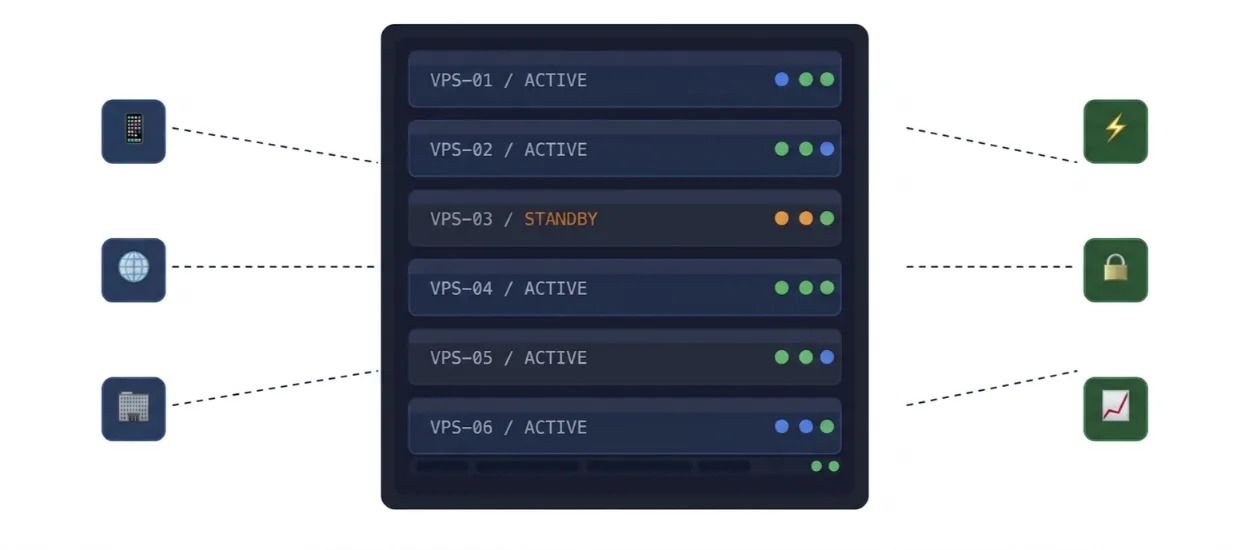
More cores handle more simultaneous tasks. Start with 1-2 vCPU for basic sites. Go for 4+ cores if you run e-commerce, apps, or multiple sites.
| Use Case | Recommended vCPUs |
| Blog / small business site | 1–2 vCPU |
| WooCommerce / moderate traffic | 2–4 vCPU |
| SaaS app or multiple sites | 4–8 vCPU |
| High-traffic or real-time apps | 8+ vCPU |
What to watch for: ‘vCPU’ quality varies. A provider using older Intel Xeon E5 chips at 2.4 GHz is not equivalent to one using AMD EPYC or Intel Xeon Scalable at 3.2 GHz.
Ask about the underlying hardware or check their documentation.
RAM
RAM is often the first bottleneck. A WordPress site with WooCommerce, caching plugins, and a moderate product catalogue regularly consumes 512 MB–1.5 GB of RAM under load. A database-heavy app can spike past 4 GB.
- 1–2 GB: Simple static or low-traffic WordPress sites
- 4–8 GB: WooCommerce stores, Laravel apps, small APIs
- 16 GB+: Database servers, high-concurrency applications
Storage Space
Storage type has a measurable impact on performance, particularly for database-heavy applications.
| Storage Type | Sequential Read | Random IOPS | Best For |
| HDD | ~150 MB/s | ~100–200 | Archive / cold storage only |
| SATA SSD | ~500 MB/s | ~50,000–80,000 | General purpose |
| NVMe SSD | ~3,500 MB/s | ~500,000+ | Databases, high-traffic apps |
A WordPress site loading from NVMe vs SATA SSD will show a 20–40% improvement in Time to First Byte (TTFB) on a cold cache.
For a busy WooCommerce store running MySQL, the difference in query response time is often 2–4×.
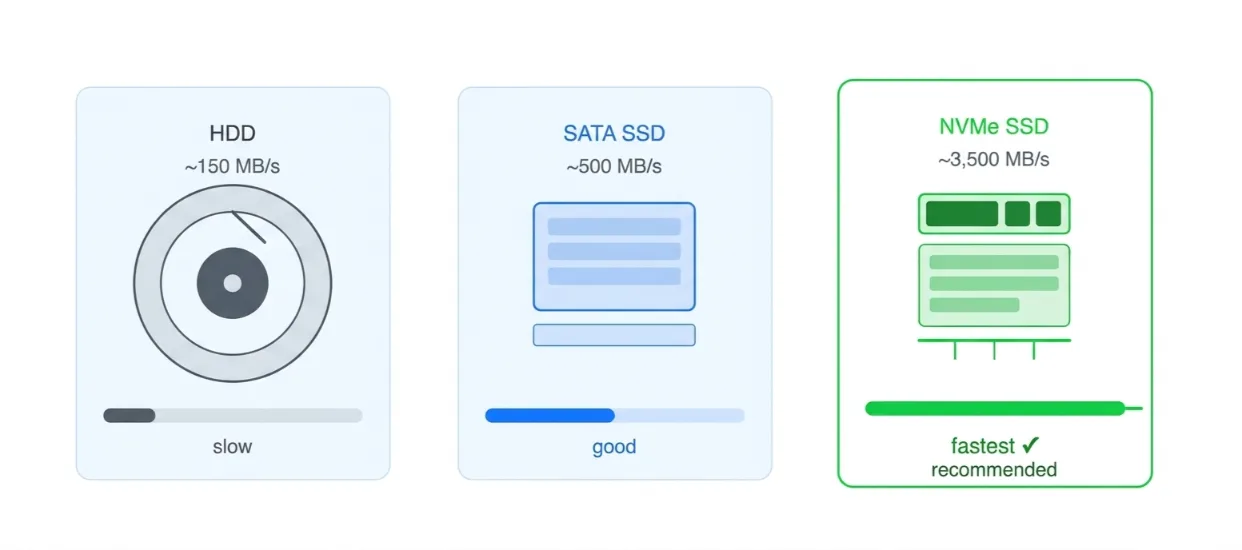
Prioritize NVMe if your plan includes a database or processes significant file I/O. For a basic static site, SATA SSD is more than adequate.
Bandwidth
Look for at least 1 TB/month on entry plans. Most genuine sites with under 50,000 monthly visitors won’t exceed this.
If a provider advertises ‘unlimited bandwidth,’ read the fair use policy that throttles after a threshold.
Inode Limits
An inode is a data structure that represents a single file, folder, or symlink on the filesystem.
Providers cap this to prevent any one VPS from overwhelming the host node’s filesystem.
You can run out of inodes while still having plenty of storage space. This causes the server to behave as if the disk is full, it can’t create new files, write logs, or send/receive email.
High-risk scenarios:
- Email hosting: Each email is a separate file. An inbox with 50,000 messages consumes 50,000 inodes
- WooCommerce / large catalogues: Thousands of product images plus thumbnail variants
- Node.js projects: A single npm install can generate 100,000+ inodes via node_modules
- Magento or similar platforms: Known for extremely high file counts out of the box
Ask the provider for the inode allocation on your plan. Entry plans commonly range from 250,000 to 1,000,000 inodes.
For email-heavy or large e-commerce setups, aim for 1M+ or confirm there’s no hard cap.
Learn how to set up a VPS as a beginner.
2) Look At The Operating System Options
Your choice of OS affects compatibility, security, and ease of use.
Linux VPS Options
Linux dominates for good reason it’s stable, secure, and free. Popular choices include Ubuntu (beginner-friendly), AlmaLinux, or Debian. Most developers and businesses in Kenya prefer Linux for its vast community support and lower cost.
Windows VPS Options
Choose Windows if you need ASP.NET, MSSQL databases, or specific Microsoft tools. It usually costs more due to licensing but offers familiar interfaces for some users.
Start with Linux unless you have a clear reason for Windows.
3) Consider Managed Vs Unmanaged VPS Hosting
This decision often determines your stress level.
What Managed VPS Means
The provider handles OS updates, security patches, server monitoring, and basic optimizations. You focus on your website or app. It costs more but saves huge time.
What Unmanaged VPS Means
You get full root access and control everything yourself. It’s cheaper but requires technical skills in Linux commands, security, and maintenance.
Which Option Is Better For Beginners?
Managed VPS wins for most beginners and busy business owners in Kenya. You avoid costly mistakes like missed updates that lead to hacks.
We at Truehost offer managed VPS options.
It’s a smart way to get reliability without becoming a full-time sysadmin.
4) Check Server Location
Location directly impacts speed and user experience.
Why Data Center Location Affects Speed
Data travels at the speed of light. The closer the server to your visitors, the lower the latency. A Nairobi-located server can cut loading times dramatically for Kenyan and East African users compared to distant European or US servers.
Choose A Location Close To Your Audience
For Kenyan businesses, local data centers in Nairobi make the biggest difference. Truehost gives you easy access to Kenya-based servers.
When To Use A CDN
Pair your VPS with a Content Delivery Network (like Cloudflare) if you have international visitors. The CDN caches static files globally while your main VPS handles dynamic content.
How do you monitor VPS performance?
5) Review Uptime And Reliability
Downtime is one of the most expensive risks for any online business. Even brief outages can result in lost sales, damaged customer trust, and lower search engine rankings.
Uptime Guarantee
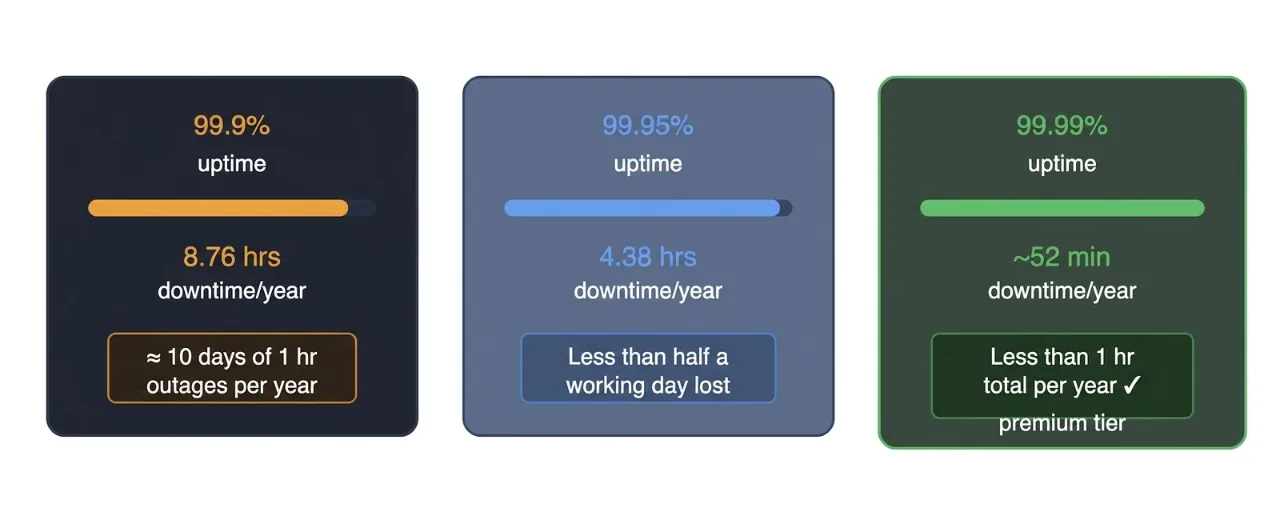
Reputable VPS providers should offer a minimum of 99.9% uptime, equivalent to no more than 8.76 hours of downtime per year. Many premium providers now guarantee 99.95% or even 99.99% (less than 52 minutes of downtime annually).
Always read the Service Level Agreement (SLA) carefully. A strong SLA should include clear compensation terms (e.g., service credits) if the guaranteed uptime is not met.
Network Quality
Uptime depends heavily on the quality of the provider’s network infrastructure. Look for providers that offer:
- Multiple Tier-1 carriers and redundant internet uplinks
- Good local peering (such as through the Kenya Internet Exchange Point – KIXP)
- Low-latency routing optimized for East Africa
High-quality peering significantly reduces packet loss and improves stability, especially during regional traffic surges.
Hardware and Infrastructure Redundancy
Enterprise-grade providers use redundant systems to eliminate single points of failure. Key features to look for include:
- Redundant power supplies with backup generators and UPS systems
- Multiple cooling systems
- RAID-protected storage arrays
- Failover network configurations
This level of redundancy ensures the server remains operational even if one component fails.
Provider Reputation and Track Record
Uptime claims mean little without proof. Take time to:
- Check independent uptime monitors (e.g., UptimeRobot, StatusCake)
- Read recent customer reviews on platforms like Trustpilot, Reddit, and local Kenyan forums
- Look for performance benchmarks specific to the African region
Truehost has built a strong reputation among Kenyan businesses for delivering reliable local performance through its Nairobi data centers, with consistent uptime and infrastructure designed for African market conditions.
6) Check Security Features
Firewall Options
Look for providers offering easy-to-configure options such as UFW (Uncomplicated Firewall), CSF (ConfigServer Security & Firewall), or advanced iptables/nftables rules. These allow you to control incoming and outgoing traffic and block unauthorized access attempts.
DDoS Protection
Choose a provider with strong volumetric and application-layer DDoS mitigation. Advanced protection often includes traffic scrubbing centers that can absorb large-scale attacks without affecting your server performance.
Malware Protection and Scanning
Some providers include real-time malware scanning, intrusion detection (e.g., Fail2Ban), and automatic security updates. These tools help detect and neutralize threats before they cause damage.
Secure Access
Always prioritize SSH key-based authentication over password-only access. Key authentication is significantly more resistant to brute-force attacks. Additional features like two-factor authentication (2FA) for login and SFTP support add extra layers of protection.
We include solid security baselines across all VPS plans, helping Kenyan businesses maintain strong protection without requiring advanced technical expertise.
7) Look At Backup Options
Data loss can be catastrophic, whether due to hardware failure, human error, cyberattacks, or accidental deletion. Reliable backup systems are not optional; they are critical insurance for your business continuity.
Automatic Backups
Look for daily or weekly automated backups with configurable retention periods (ideally 7–30 days). The best providers allow you to schedule backups during off-peak hours to minimize performance impact.
Manual Snapshots
Server snapshots enable quick point-in-time copies of your entire VPS. These are extremely useful for testing updates, deploying new features, or rolling back changes safely.
Offsite and Redundant Backups
For maximum safety, ensure backups are stored offsite (in a different data center or geographic location). This protects against regional disasters or data center-wide issues. Encrypted backups add another important layer of security.
Restore Process
The backup system is only as good as its restoration speed. Test how quickly you can restore data during a trial period. A good provider should offer one-click or near-instant restores with minimal downtime.
8) Check Scalability
The right VPS should grow smoothly with your traffic, applications, and ambitions without forcing complex migrations.
CPU and RAM Upgrades
Top providers allow you to upgrade CPU cores and RAM instantly or with minimal downtime. This vertical scaling is particularly valuable during seasonal traffic spikes or business expansion.
Storage Expansion
Check how easily you can increase storage space. The best solutions let you add NVMe storage without rebooting the server or migrating data manually.
Zero-Downtime Scaling
Avoid providers whose upgrades require server restarts or long maintenance windows. Look for solutions that support live resource allocation.
9) Review Control Panel Options
Control panels significantly affect how easily you can manage your VPS from installing software and managing domains to handling email and databases.
- cPanel: The most popular option. Highly user-friendly with excellent tools for website and email management. However, it comes with licensing fees that increase overall cost.
- Plesk: Excellent for Windows environments and multi-domain hosting. Strong for agencies and resellers who manage many client websites.
- CyberPanel: A modern, lightweight, and often free alternative that integrates with OpenLiteSpeed web server. It offers great performance for WordPress and other CMS platforms.
- Webmin / Virtualmin: Completely free and powerful for advanced users who prefer more control without extra costs.
- No Control Panel (CLI Only): Ideal for experienced users or developers who want maximum resources and performance. Requires strong Linux command-line knowledge.
Choose based on your technical comfort level.
10) Check Support Quality
Even technically skilled users occasionally need expert assistance. When your website is down or facing issues, fast and competent support becomes invaluable.
24/7 Availability
Business websites don’t follow office hours. Reliable 24/7 technical support is essential.
Technical Expertise
Support agents should handle both basic issues (e.g., login problems) and advanced topics (server optimization, security hardening, application troubleshooting).
Response Time
Look for providers that respond to support tickets within 15–30 minutes during critical issues. Live chat response times should be even faster.
Support Channels and Local Relevance
Multiple channels (live chat, phone, email tickets) provide flexibility. In Kenya, bilingual support in both Swahili and English is a major advantage for clear communication.
11) Compare Pricing Carefully
While price is important, focusing solely on the cheapest option often leads to poor performance and hidden costs. Adopt a Total Cost of Ownership (TCO) approach.
Monthly vs Renewal Pricing
Many providers offer attractive introductory rates that increase significantly upon renewal. Always check the long-term pricing.
Add-On and Hidden Costs
Carefully evaluate extra charges for:
- Additional IP addresses
- Backup storage
- Control panel licenses (especially cPanel)
- DDoS protection or premium support
Value for Money
Compare not just price, but what you receive resource quality, performance, support level, and local advantages.
VPS Features FAQs
How Much RAM Do I Need For A VPS?
The amount of RAM you need depends on your website’s traffic, the applications you run, and your growth plans.
- 2–4 GB RAM is a good starting point for most growing Kenyan websites (e.g., WordPress sites with moderate traffic, small e-commerce stores, or business websites with 1,000–5,000 monthly visitors).
- 4–8 GB RAM is recommended for higher-traffic sites, multiple websites, or applications that use databases heavily (like WooCommerce, Laravel, or custom web apps).
- 8 GB and above is ideal for high-traffic e-commerce platforms, video streaming, large databases, or running multiple resource-intensive services simultaneously.
Always monitor your actual usage with tools like htop or your hosting control panel. It’s easier (and cheaper) to start with a balanced plan and upgrade RAM/CPU as needed rather than over-provisioning from day one. Truehost VPS plans are designed to be easily scalable.
Is A Managed VPS Better Than An Unmanaged VPS?
Yes, for most beginners, small businesses, and non-technical users in Kenya, a Managed VPS is significantly better.
- Managed VPS: The hosting provider handles server setup, security updates, monitoring, backups, firewall configuration, and technical support. This saves you time and reduces the risk of downtime or security breaches. Ideal if you want to focus on your business instead of server administration.
- Unmanaged VPS: You get full root access and control but are responsible for everything OS installation, security patches, optimization, and troubleshooting. This is cheaper but requires strong Linux knowledge and ongoing maintenance time.
Recommendation: Choose Managed VPS unless you have a dedicated system administrator or advanced technical skills. Truehost’s managed plans include proactive monitoring and expert support tailored for Kenyan businesses.
Which VPS OS Should I Choose?
Linux distributions are the best choice for the vast majority of users.
- Ubuntu: Most popular, beginner-friendly, huge community support, and excellent for web hosting. Great choice if you’re using WordPress, PHP, or Node.js.
- AlmaLinux: A stable, enterprise-grade alternative to CentOS. Ideal for users who want long-term reliability and compatibility with business applications.
Windows VPS: Only choose this if you specifically need Microsoft tools (ASP.NET, MSSQL databases, or Windows-only software). Windows licenses cost more and generally use more resources.
Is NVMe Better Than SSD For VPS Hosting?
Yes, NVMe is noticeably faster than traditional SSDs.
- NVMe (Non-Volatile Memory Express) uses the PCIe interface, delivering much higher read/write speeds (often 3–6x faster than SATA SSDs). This results in:
- Faster website loading times
- Quicker database queries
- Better performance during traffic spikes
- Improved overall server responsiveness
- Traditional SSD is still very good and more than sufficient for low-to-medium traffic sites, but NVMe is superior for modern, performance-sensitive applications.
Do I Need cPanel On A VPS?
No, you don’t strictly need cPanel, but it depends on your comfort level with server management.
Without cPanel: You can use free alternatives like Webmin, CyberPanel, or even command-line tools (CLI). Many experienced users prefer this to keep costs low and performance high.
With cPanel: Very convenient. It offers an easy graphical interface for managing domains, emails, databases, backups, and security. Great for beginners and agencies managing multiple sites. However, it adds extra cost (cPanel license) and slight resource overhead.
Can I Upgrade My VPS Later?
Yes, almost all good VPS providers (including Truehost) allow seamless upgrades.
You can easily scale up:
- RAM
- CPU cores
- Storage (NVMe/SSD)
- Bandwidth
How it works:
- Most upgrades are done with minimal or no downtime.
- You only pay for the additional resources from the date of the upgrade.
- Downgrading is sometimes possible but less common.
Choose a provider with flexible, instant upgrade options so your Kenyan business can grow without migrating servers. Truehost makes vertical scaling straightforward through the client portal.