Domain SearchInstantly check and register your preferred domain name
 Web Hosting
 cPanel HostingHosting powered by cPanel (Most user friendly)
 WordPress HostingHost your WordPress website with fast, secure, and affordable WordPress hosting in Kenya.
 KE Domains
 Reseller HostingStart your own hosting business without tech hustles
 Windows HostingOptimized for Windows-based applications and sites.
 Free Domain
 Affiliate ProgramEarn commissions by referring customers to our platforms
 Free HostingTest our SSD Hosting for free, for life (1GB storage)
 Domain TransferMove your domain to us with zero downtime and full control
 All DomainsBrowse and register domain extensions from around the world
 .Com Domain
 WhoisLook up domain ownership, expiry dates, and registrar information
 VPS Hosting
 Managed VPSNon techy? Opt for fully managed VPS server
 Dedicated ServersEnjoy unmatched power and control with your own physical server.
 Website Builder
 Online Store BuilderLaunch a professional e-commerce store without writing code.
 Web Design ServiceGet a custom-designed website tailored to your brand and goals. From just KES 15,600
 BlogRead our guides on web hosting, online business, digital marketing, and more
 SupportOur support guides cover everything you need to know about our services
 ContactContact us via chat or email
You signed up for a VPS expecting better speed, more control, and smoother performance. On paper, everything looks solid: enough CPU cores, plenty of RAM, and SSD storage. But in reality, your pages load slowly, SSH feels laggy, and your applications struggle even under light traffic.
It’s frustrating, especially when the server feels slower than the shared hosting you upgraded from.
The good news is that a slow VPS usually isn’t caused by “bad” hardware. In most cases, the issue comes down to how server resources are being used, configured, or overloaded behind the scenes.
This guide breaks down the six most common reasons a VPS becomes slow and shows you practical fixes for each one, many of which can noticeably improve performance without upgrading your plan or spending extra money.
1) Your CPU Is Overloaded
The Problem
CPU overload is one of the easiest VPS performance problems to notice. When your CPU is constantly maxed out, the entire server starts feeling sluggish. Pages take longer to load, SSH sessions lag, and applications freeze or timeout even under moderate traffic.
This usually happens because:
- A process is consuming excessive CPU resources
- Your application code is inefficient
- Too many tasks are running simultaneously
- Your VPS simply doesn’t have enough CPU power for the workload
On shared VPS plans, neighboring users can also affect performance if CPU resources are heavily shared.
A quick way to diagnose CPU pressure is by running:
htop
This helps you identify which processes are consuming the most CPU.
The Fix
a) Kill or Restart Runaway Processes
Sometimes a single broken process consumes most of the CPU.
On Linux:
kill -9 PID
On Windows:
- Open Task Manager
- Identify the problematic process
- End the task
b) Move Heavy Jobs to Off-Peak Hours
Backups, indexing jobs, imports, and batch processing tasks should not run during high-traffic periods.
Schedule them during low-usage hours using cron or Task Scheduler.
c) Reduce Background Services
Many VPS setups run unnecessary services that quietly consume CPU cycles.
Disable:
- Unused daemons
- Idle Docker containers
- Extra monitoring agents
- Unnecessary scheduled tasks
d) Consider Dedicated CPU VPS Plans
Shared vCPUs can become inconsistent under load due to interference from neighboring users.
Dedicated CPU VPS plans reserve cores exclusively for your workload, making performance far more predictable for:
- Production websites
- Real-time applications
- Gaming servers
- High-traffic ecommerce stores
e) Know When It’s Time to Upgrade
If CPU usage stays maxed out despite optimization, the server may simply lack enough processing power for your workload.
At that point, upgrading cores is usually more effective than endlessly tweaking configurations.
2) Your VPS Is Running Out Of Memory
The Problem
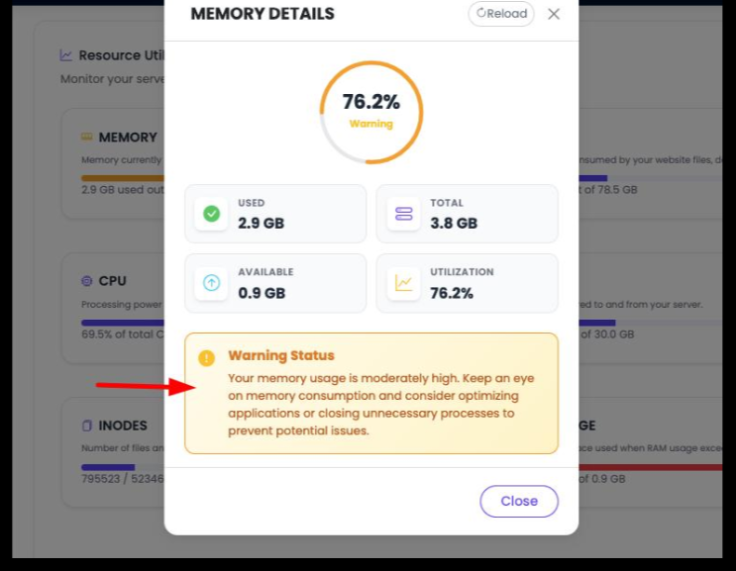
RAM issues can quietly destroy VPS performance. Once your server runs out of available memory, it starts using swap space on disk, which is dramatically slower than real RAM.
That’s when websites become slow, applications freeze randomly, and server responsiveness drops even if CPU usage looks normal.
Common signs include:
- High swap usage
- Slow response times during moderate traffic
- Applications crashing unexpectedly
- Constant disk activity
- Out-of-memory (OOM) errors
You can quickly check memory usage with:
free -h
The Fix
i) Identify Memory Hogs
Find applications consuming excessive memory and investigate why.
Common offenders:
- PHP workers
- Java applications
- MySQL/MariaDB
- Elasticsearch
- Poorly optimized WordPress plugins
ii) Tune Application Memory Limits
Adjust memory allocations carefully.
Examples:
- PHP memory_limit
- Java heap size
- Database buffer settings
Giving every service unlimited memory usually makes things worse.
iii) Use Swap Properly
Swap is useful as an emergency buffer, not as primary memory.
If your VPS has no swap configured, create a swap file. But if the server constantly relies on swap, you likely need optimization or more RAM.
iv) Implement Caching
Caching dramatically reduces repeated memory-intensive operations.
Useful tools include:
- Redis
- Memcached
Caching reduces database pressure and significantly speeds up response times.
In many cases, optimization alone improves performance by 50–80% without upgrading hardware.
v) Upgrade RAM When Necessary
If memory pressure remains constant after tuning, vertical scaling becomes unavoidable.
Sometimes the simplest solution is adding more RAM.
3) Your VPS Has Disk I/O Bottlenecks
The Problem
A VPS can have plenty of CPU and RAM, but still feel slow because of poor disk performance.
Disk I/O bottlenecks happen when your storage can’t keep up with read and write requests. This is especially common on budget VPS plans using slower storage infrastructure.
Typical causes include:
- HDD-based hosting instead of SSD/NVMe
- Heavy database activity
- Backup jobs running during peak traffic
- Large log files are growing uncontrollably
One major warning sign is consistently high I/O wait times.
The Fix
a) Use SSD or NVMe Storage
Traditional HDD storage is far too slow for modern workloads.
SSD-based VPS hosting offers dramatically faster:
- File access
- Database queries
- Application loading
NVMe storage performs even better for random read/write operations.
b) Schedule Backups Carefully
Running backups during traffic peaks creates massive disk contention.
Stagger:
- Backups
- Database dumps
- Large imports
- Log processing jobs
c) Enable Disk Caching
Linux page cache tuning can reduce repeated disk access.
Kernel tuning through /proc/sys/vm/ may improve performance for advanced users.
d) Rotate and Compress Logs
Massive log files quietly consume storage resources.
Use logrotate to:
- Compress old logs
- Remove outdated files
- Prevent uncontrolled disk growth
e) Upgrade Infrastructure if Needed
If high I/O wait continues despite optimization, your provider’s storage layer may simply be too slow.
Moving to:
- Faster NVMe nodes
- KVM virtualization
- Higher-performance providers
can produce immediate improvements.
4) Your Database Is Slowing Down Your Website
The Problem
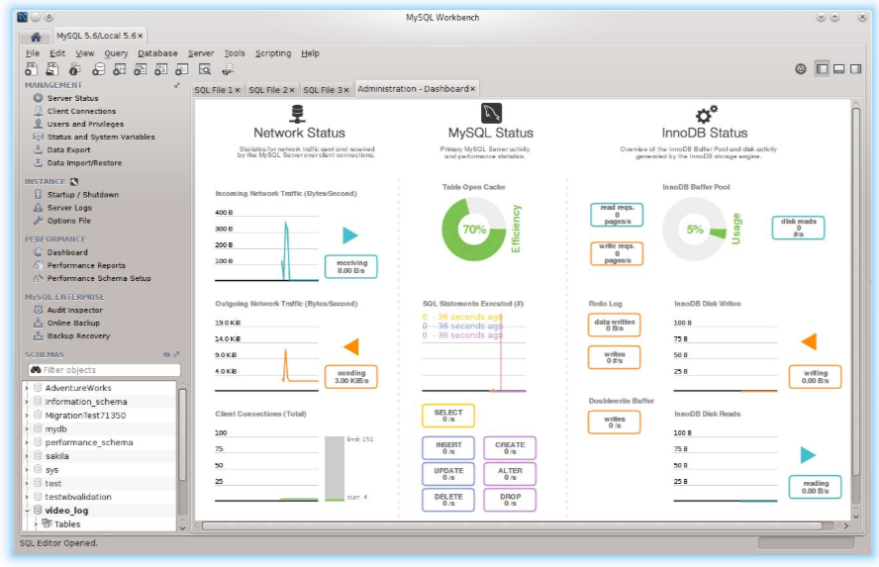
Databases are one of the most common hidden causes of VPS slowness. Even a powerful server can struggle if database queries are poorly optimized.
Every page request depends on database activity. Slow queries, missing indexes, and bloated tables can quickly create a major bottleneck.
This is especially common with:
- WordPress
- WooCommerce
- Ecommerce stores
- Membership websites
- Dynamic web applications
The Fix
i) Index Frequently Queried Data
Indexes help databases locate information much faster. Without them, the database may scan entire tables for every request.
Focus on indexing columns commonly used in searches, filters, and sorting.
ii) Tune MySQL or MariaDB Settings
Database configuration counts a lot. One of the most important settings is the InnoDB buffer pool, which controls how much data stays cached in memory instead of constantly reading from disk.
Tools like MySQLTuner can help identify configuration improvements.
iii) Add Redis or Memcached
Caching can dramatically reduce database workload by storing repeated query results in RAM.
This lowers response times, improves scalability, and helps websites handle traffic spikes much more smoothly.
iv) Enable Slow Query Logging
Slow query logs help identify the exact database queries causing performance problems, making optimization much easier.
5) Your Web Server And Application Stack Are Poorly Tuned
The Problem
Poorly configured web servers can bottleneck your VPS even when the hardware itself is perfectly fine.
Misconfigured Nginx, Apache, PHP, or worker processes often lead to:
- Slow page rendering
- Request queue buildup
- High memory usage
- Poor traffic handling
The Fix
a) Enable PHP OPcache
OPcache stores compiled PHP code in memory, reducing the amount of repeated processing needed for every request.
This alone can noticeably improve PHP application performance.
b) Tune Worker Processes Properly
Your web server worker settings should match your available CPU and RAM resources.
Too many workers can exhaust memory, while too few create request bottlenecks during traffic spikes.
c) Enable HTTP/2 and Compression
HTTP/2 improves request handling efficiency, while Gzip or Brotli compression reduces page sizes for faster loading.
d) Use a CDN
A CDN reduces the load on your VPS by serving static files from edge servers closer to visitors.
Popular CDN providers include:
- Cloudflare
- Bunny.net
e) Optimize Front-End Assets
Large images, unoptimized JavaScript, and bulky CSS files can slow down websites significantly.
Compressing images and minimizing unnecessary assets improves both speed and user experience.
6) Your VPS Resources Are Being Hijacked
The Problem
Sometimes a slow VPS is actually a compromised VPS.
Malware, cryptominers, spam scripts, and DDoS abuse can quietly consume server resources in the background without obvious warning signs.
Common indicators include:
- Unknown processes running
- High CPU usage during low traffic periods
- Suspicious outbound network activity
- Unfamiliar login attempts or SSH keys
The Fix
i) Audit Running Processes
Regularly review active processes and network connections to identify suspicious activity early.
ii) Keep Your Software Updated
Outdated operating systems, plugins, and applications are among the most common attack vectors.
Applying updates regularly reduces security risks significantly.
iii) Use a Firewall
A properly configured firewall limits unnecessary access and helps block malicious traffic before it reaches your applications.
iv) Enable DDoS Protection and Rate Limiting
Services like Cloudflare can absorb malicious traffic and reduce pressure on your VPS during attacks.
v) Monitor Your Server Continuously
Monitoring tools like:
- Netdata
- Grafana
- Zabbix
help you track CPU, RAM, storage, and network activity in real time so you can catch performance or security issues before they become serious problems.
A Slow VPS Usually Has a Fix
A slow VPS is usually a sign that something needs attention, not that your entire server is failing. In many cases, the real issue comes down to overloaded resources, poor configuration, unoptimized databases, or background processes quietly eating up performance.
That’s why troubleshooting should always start with the basics:
- CPU usage
- RAM and swap activity
- Disk I/O performance
- Database efficiency
- Web server configuration
- Security and malware checks
Small changes in these areas can make a huge difference. Sometimes, a few targeted optimizations are enough to turn a sluggish VPS into a fast and stable server again without spending anything extra.
But if your applications continue to outgrow your current resources, upgrading to a more powerful VPS with faster NVMe storage and reliable performance becomes the smarter long-term solution.
If you’re looking for a VPS built for speed, scalability, and consistent uptime, consider Truehost VPS hosting. Their VPS plans offer dedicated resources, SSD/NVMe-powered infrastructure, full root access, and flexible scaling options that work well for websites, ecommerce stores, business apps, and growing projects.
The bottom line: performance issues can feel overwhelming at first, but once you identify the bottleneck, fixing a slow VPS becomes much more manageable.