Domain SearchInstantly check and register your preferred domain name
 Web Hosting
 cPanel HostingHosting powered by cPanel (Most user friendly)
 WordPress HostingHost your WordPress website with fast, secure, and affordable WordPress hosting in Kenya.
 KE Domains
 Reseller HostingStart your own hosting business without tech hustles
 Windows HostingOptimized for Windows-based applications and sites.
 Free Domain
 Affiliate ProgramEarn commissions by referring customers to our platforms
 Free HostingTest our SSD Hosting for free, for life (1GB storage)
 Domain TransferMove your domain to us with zero downtime and full control
 All DomainsBrowse and register domain extensions from around the world
 .Com Domain
 WhoisLook up domain ownership, expiry dates, and registrar information
 VPS Hosting
 Managed VPSNon techy? Opt for fully managed VPS server
 Dedicated ServersEnjoy unmatched power and control with your own physical server.
 Website Builder
 Online Store BuilderLaunch a professional e-commerce store without writing code.
 Web Design ServiceGet a custom-designed website tailored to your brand and goals. From just KES 15,600
 BlogRead our guides on web hosting, online business, digital marketing, and more
 SupportOur support guides cover everything you need to know about our services
 ContactContact us via chat or email
Why are people moving away from WordPress? Some website owners are, and the reasons are easy enough to list.
Maintenance demands, technical complexity, security responsibilities, performance work and a better fit with another platform come up again and again.
Let’s be clear about what this article is not saying.
WordPress isn’t collapsing, and not everyone is switching platforms.
These are documented limitations and possible reasons for leaving, not proof that every WordPress user shares the same experience.
Plenty of people run fast, secure WordPress sites for years without drama.
So think of the seven reasons below as pressure points. If they sound like your daily headaches, a move might help.
If they don’t, you’re probably fine where you are.
We’ll also check the published usage data, compare the main alternatives and give you a simple way to decide.
Near the end, we look at how better hosting can fix some of these frustrations without any migration at all.
Why Are People Moving Away From WordPress?
Here are seven reasons website owners give, along with the facts behind each one.
1) WordPress Websites Require Ongoing Maintenance
WordPress site owners look after the core software, themes and plugins. Updates can bring security fixes, compatibility changes and bug fixes.
WordPress itself recommends keeping all of these components updated and keeping regular backups.
That means you need a routine.
Someone has to apply the updates, then check that the site still works afterward.
This gets trickier when a site leans on several plugins.
One update can throw another component off, so careful owners test changes before pushing them live.
Backups are your safety net. If an update breaks something, you want a recent copy and a quick way to restore it.
For some people this is normal housekeeping.
For others it’s a chore they never signed up for.
That’s why some owners prefer managed platforms, where the provider handles more of the maintenance for them.
2) Plugin and Theme Dependencies Can Make Websites More Complicated
WordPress lets you add features through plugins and themes. That’s a real strength.
But each extra component can bring its own settings, updates, support channels and compatibility concerns.
Think about a typical business site.
You might install one plugin for forms, another for SEO, another for ecommerce and a page builder on top. Each one needs attention.
WordPress’s own security guidance recommends choosing plugins and themes that keep receiving updates.
Compatibility problems between components are a fair troubleshooting concern.
They don’t happen on every site, but when they do, finding the culprit can eat an afternoon.
Compare that with a platform that has the features built in.
There’s less to install and fewer moving parts. Some users choose a simpler website builder, or a custom-built site, for exactly this reason.
3) Keeping WordPress Secure Requires Active Management
WordPress security depends on more than the core software.
Themes, plugins, hosting configuration, user permissions and update habits all affect how safe a site is.
WordPress maintains a security team and publishes fixes. Site owners still have to apply those fixes and follow good security practice.
Outdated software can expose known vulnerabilities. That’s the plain risk. Strong passwords, sensible user roles and regular backups all help.
So does keeping plugins and themes maintained, since they’re part of the same security picture.
To be fair, this doesn’t make WordPress inherently insecure. The factual point is simpler. Running a WordPress installation means managing its security.
A business that doesn’t want to handle those tasks might consider managed hosting or a hosted website platform. The work doesn’t vanish. It moves to the provider.
4) Website Performance Can Require Extra Optimization
WordPress builds pages using PHP and database queries. Some requests also involve plugins or external services.
WordPress’s performance documentation explains how caching can cut repeated processing and improve response times.
Several things can affect speed. Themes, plugins, database activity and external API requests all play a part.
Caching, image optimization and suitable hosting resources can help a lot. But someone has to set those up.
That’s where a website builder with managed infrastructure appeals to some people. They’d rather not configure performance tools at all.
One distinction is worth making. WordPress itself isn’t automatically slow. A poorly optimized WordPress installation can be.
We also can’t claim WordPress is slower than Wix, Shopify or any other platform without testing under comparable conditions.
Fair comparisons need the same content, the same traffic and the same setup.
5) WordPress Costs Can Add Up as a Website Grows
The WordPress software is open source. But running a website still costs money. WordPress.org separates the software from the hosting and services needed to operate a site.
Here’s where costs can show up:
- Web hosting and domain registration
- Premium themes and plugins
- Paid backups, security tools and other services
- Developers or maintenance support
- Ecommerce extensions and payment-related services
Many of these are optional or depend on the site. A simple blog might need very few. A growing store might need most of them.
So don’t assume one option is always cheaper.
Compare the full cost of your WordPress setup with the actual plan and transaction fees of the alternative. Add it all up for a year, then decide.
6) WordPress Can Have a Steeper Learning Curve for Some Users
WordPress gives you a dashboard for managing content. Writing and publishing a post is easy enough. Setting up a whole website is a different job.
You may need to configure themes, plugins, navigation, backups and user roles. You might also meet a hosting panel along the way.
WordPress’s official documentation has separate guides for installation, maintenance, security and troubleshooting, which tells you how many topics are in play.
Drag-and-drop website builders can cut the number of technical tasks for a simple site. For someone who just wants a few pages online, that’s a real benefit.
Still, WordPress may suit people who want more control and customization. Ease of use is partly personal. Your experience depends on what you need and which tools you install.
7) Some Users Need Features That Another Platform Provides More Directly
Different platforms are built around different priorities. Shopify focuses on ecommerce. Hosted website builders bundle editing and hosting together.
WordPress supports a wide range of site types through its core software, themes and plugins.
These are platform-fit decisions. Here are a few examples:
- Online stores: A business may compare Shopify’s integrated store management with WordPress and WooCommerce.
- Simple business websites: A user may prefer a hosted builder with bundled editing and maintenance features.
- Custom web applications: A business with very specific functionality may choose a custom application over a general-purpose CMS.
- Content-heavy websites: A publisher may stay with WordPress because of its publishing tools, extensibility and established workflow.
None of this is evidence that users are leaving WordPress in large numbers. It shows that one tool rarely fits every job.
Is WordPress Actually Losing Users?
Let’s test the big claim against published data. The main source here is the W3Techs WordPress usage report.
W3Techs measures how many of the websites it detects use a given technology.
For WordPress, it reports usage across all websites and its share among websites with a known CMS. It’s a measure of detected websites, not every site on the internet.
The latest figure we checked, dated 12 July 2026, shows WordPress used by 41.5% of all websites.
An earlier snapshot, reported in an article citing W3Techs, put the figure at 43.4% in April 2025. That’s a dip of about two points.
But different snapshots can differ in method, so compare figures from the same report and the same dates. The W3Techs trend charts, which go back to 2010, are the right place to do that.
There’s another distinction to keep straight. A falling market share is not the same as a falling number of WordPress websites.
The web keeps growing. WordPress can lose a little share while the total number of WordPress sites stays flat or rises.
Also, market share can’t tell you why any single site changed platforms. It shows a trend, not a motive. And forum threads or marketing posts shouldn’t count as proof of a mass migration.
The fair reading is this. WordPress is still the most widely used CMS in the W3Techs data, and its share has eased slightly. Some people are leaving. The data doesn’t show a collapse.
What Are People Switching From WordPress To?
There’s no single destination. People pick based on what they need. Use this table to see what to compare.
| Platform | Best suited to | What to compare |
| Shopify | Online stores | Ecommerce features, fees and customization |
| Wix | Small business websites and portfolios | Editing tools, plan limits and integrations |
| Squarespace | Portfolios and service businesses | Templates, commerce features and pricing |
| Webflow | Visually customized websites | Design flexibility and learning curve |
| Custom development | Specific business applications | Development cost, maintenance and ownership |
| WordPress with managed hosting | Users who want WordPress with less server administration | Included maintenance, backups, security and support |
Here’s the catch. Switching platforms doesn’t automatically remove maintenance, costs or technical limits.
It changes who handles what. Some responsibilities move to the provider. Others stay with you. Some new limits appear too, like plan caps or less freedom to customize.
So look at the whole bill of work, not just the feature list.
Should You Move Away From WordPress?
Only if your situation points that way. This table gives a rough guide.
| Your situation | Option to consider |
| You need a simple website and minimal setup | A hosted website builder |
| You mainly sell products online | An ecommerce-focused platform |
| You need extensive publishing and customization | WordPress may still fit |
| You want WordPress without managing as much server administration | Managed WordPress hosting |
| You need highly specialized functionality | Custom development |
If you land on a row that says WordPress may still fit, that’s a perfectly good answer. Staying put is a decision too.
WordPress Hosting for Kenyan Websites
Here’s something worth saying plainly.
Some of the frustrations above come from hosting, maintenance habits or how the site was set up, not from WordPress itself.
Slow pages, missing backups and tricky updates are often hosting problems in disguise.
So before you migrate, take a hard look at your hosting plan. Check these things:
- SSL: Is it included, and does it renew automatically?
- Backups: How often do they run, and can you restore them easily?
- Resources: Does the plan have enough storage, memory and processing power for your site?
- Support: Can you reach someone when something breaks?
- WordPress help: Does the provider assist with installation and troubleshooting?
Sometimes upgrading your hosting is a smarter move than changing platforms.
A bigger plan or a better host can solve speed and stability issues in one go. You keep your content, your design and your search rankings.
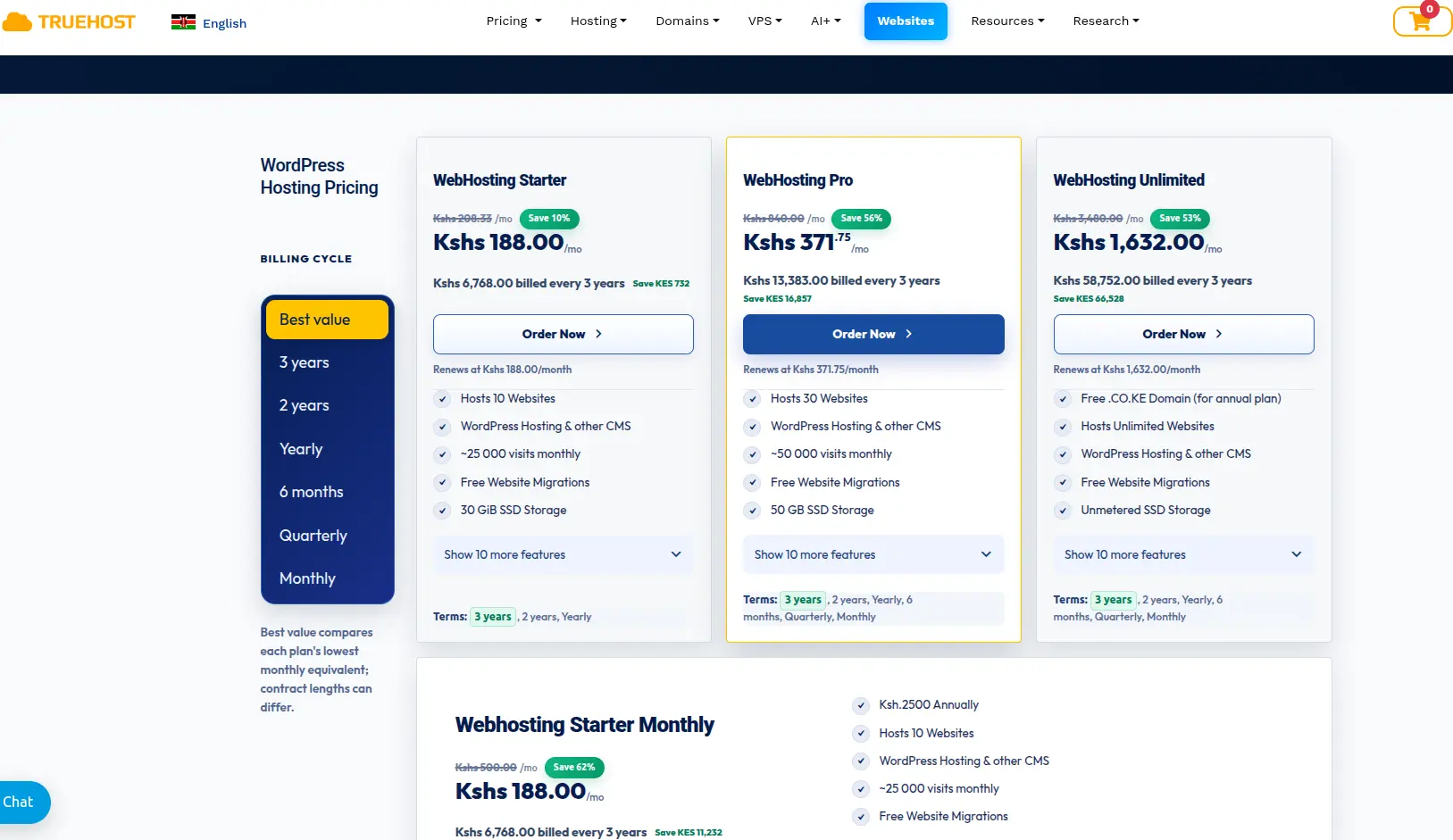
Truehost Kenya offers dedicated WordPress hosting for people in this position. According to Truehost, its WordPress plans come in Starter, Pro and Unlimited tiers.
They include a one-click WordPress installer, free SSL, daily or automatic backups, unlimited email and free WordPress migrations.
Truehost also runs local servers in Kenya, which can help pages load faster for local visitors. Plan details and prices change, so check the current plan pages before you buy.
So, why are people moving away from WordPress? Often it’s about maintenance, complexity or fit.
Sometimes the fix is a different platform. Sometimes it’s just better support behind the one you already have.
Want to keep using WordPress with hosting support behind you? Explore Truehost’s WordPress hosting plans.