Domain SearchInstantly check and register your preferred domain name
 Web Hosting
 cPanel HostingHosting powered by cPanel (Most user friendly)
 WordPress HostingHost your WordPress website with fast, secure, and affordable WordPress hosting in Kenya.
 KE Domains
 Reseller HostingStart your own hosting business without tech hustles
 Windows HostingOptimized for Windows-based applications and sites.
 Free Domain
 Affiliate ProgramEarn commissions by referring customers to our platforms
 Free HostingTest our SSD Hosting for free, for life (1GB storage)
 Domain TransferMove your domain to us with zero downtime and full control
 All DomainsBrowse and register domain extensions from around the world
 .Com Domain
 WhoisLook up domain ownership, expiry dates, and registrar information
 VPS Hosting
 Managed VPSNon techy? Opt for fully managed VPS server
 Dedicated ServersEnjoy unmatched power and control with your own physical server.
 Website Builder
 Online Store BuilderLaunch a professional e-commerce store without writing code.
 Web Design ServiceGet a custom-designed website tailored to your brand and goals. From just KES 15,600
 BlogRead our guides on web hosting, online business, digital marketing, and more
 SupportOur support guides cover everything you need to know about our services
 ContactContact us via chat or email
If you have worked with Python for any length of time, you have almost certainly encountered pip.
Pip (Pip Installs Packages) is the standard package manager for Python.
It is the tool you use to install and manage additional packages that are not part of the Python standard library.
Pip packages are essentially these third-party libraries or modules, distributed as versioned archives containing source files and resources.
They allow developers to easily incorporate pre-built code into their projects rather than reinventing the wheel.
These packages are critical for Python-hosted applications because they enable you to add extensive functionality quickly and reliably.
Now, Python is vast, with packages available for everything from web frameworks to data analysis to AI automation.
Without pip and the package distribution ecosystem, building complex applications would require writing every piece of code from scratch, which would be slow and inefficient.
Basic Concept of Pip Packages
a) Distribution format
A Python distribution is a versioned, compressed archive containing source, resource, and metadata files.
This archive is what pip downloads and installs when you run pip install package_name.
The distribution format ensures that the package can be distributed consistently and installed reliably on different systems.
The most common distribution formats are source distributions (sdist) and built distributions (wheels), which are faster to install because they do not require compilation.
b) Package Metadata
Every package contains metadata that describes it. This includes the package name, version, author information, description, and license.
When you browse a package on PyPI (the Python Package Index), you are looking at this metadata.
This metadata is also used by pip to manage the package’s dependencies and ensure that you get the correct version.
Metadata is defined in apyproject.toml,setup.cfg, or setup.py file when the package is being built
c) Versioning
Versioning is a crucial part of the package ecosystem. Releases are identified by version numbers, which follow semantic versioning conventions.
For example, a package may have versions 1.0.0, 1.0.1, or 2.0.0. Pip uses these version numbers to resolve dependencies and to let you install a specific version of a package.
You can specify the version you want by running pip install package_name==version_number.
Versioning ensures that updates are managed cleanly and that you can control which version of a package your application uses.
d) Dependencies
Packages rarely work in isolation; they rely on other packages. When you install a package, pip automatically resolves and installs its dependencies.
For example, if you install the requests library, pip will also install dependencies such as urllib3, certifi, and idna.
A package lists its dependencies in its metadata, and pip reads this information during installation.
This dependency resolution is automated, but it can occasionally be complex when different packages require conflicting versions of a shared dependency.
e) Namespace/import name vs. Package Name
There is a difference between the package name you use with pip and the import name you use in your Python code.
The package name is what you type for installation (pip install beautifulsoup4), whereas the import name is what you use in your scripts (import bs4).
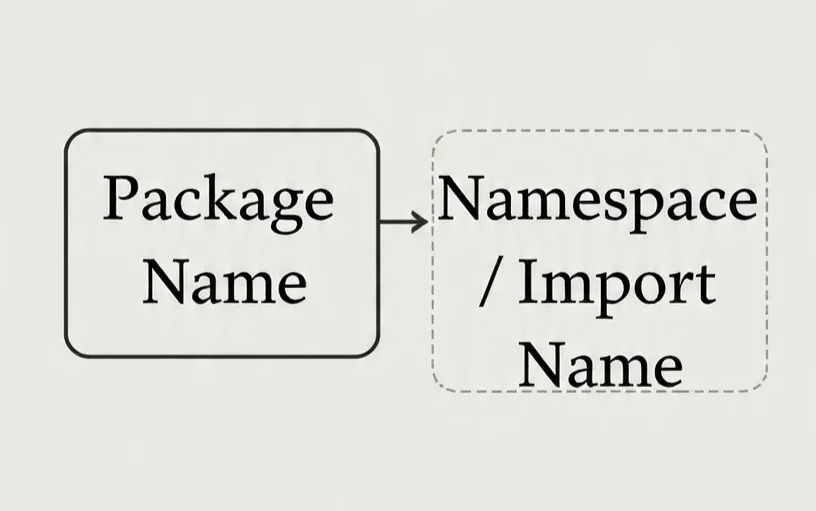
This distinction can sometimes cause confusion, as the installation name may differ from how the package is used in code.
The import name is the namespace that Python looks for when you call import.
It is worth noting this difference because the two names are not always the same.
Why Are Pip Packages Important For Hosted Applications?
Pip packages come with benefits for hosted environments, such as:
1) Speed of Development
Using pip packages speeds up development. Instead of writing hundreds or thousands of lines of code yourself, you can use pip to install a ready-made package that handles your specific needs.
This allows you to focus on building the unique features of your application rather than solving common problems.
The abundance of Python packages available on PyPI means that you can find a package for almost any task you can imagine.
2) Reproducibility
A requirements.txt file is a simple text file that lists all the packages and their specific versions that your project needs.
By using pip freeze > requirements.txt, you can create a snapshot of your current environment.
This file ensures that your application runs the same way in development, testing, and production because each environment installs the exact versions of the packages you specify.
This reproducibility is essential to avoid unexpected bugs caused by version discrepancies. Version control for this file also lets you track changes to dependencies over time.
3) Dependency Resolution
Pip handles dependency resolution automatically. When you install a package, pip installs all of its required dependencies as well.
This process saves you from the hassle of manually tracking down and installing each required library.
However, dependency management can become complex when packages have conflicting version requirements.
In such cases, pip will raise an error, prompting you to resolve the conflict. Using tools like pipenv or poetry can help manage dependencies more effectively in complex projects.
4) Security Patching
When a security vulnerability is discovered in a package, the package maintainer releases a patched version. By using pip, you can quickly update to the secure version.
Regularly checking for and applying updates is a critical security practice for hosted applications.
You can list outdated packages using pip list --outdated and then update them with pip install --upgrade package_name. This process helps keep your application secure and your data protected.
5) CI/CD Automation & Collaboration
In a Continuous Integration and Continuous Deployment (CI/CD) pipeline, pip is essential for automating dependency installation during the build process.
When you push code to a repository, the CI/CD system can automatically install all required packages from your requirements.txt file, run tests, and deploy your application.
Pip also enables collaboration by ensuring that all team members use the same set of packages.
Everyone can install the same dependencies from a shared requirements.txt file, fixing the “it works on my machine” problem.
6) Cost Efficiency & Compliance
Using pip packages is cost-efficient because you are leveraging free, open-source code created by the community.
This reduces the amount of custom code you need to write, saving you development hours and costs.
Additionally, many packages have permissive licenses that allow you to use them in commercial applications.
However, you must understand the licensing terms of each package you use to ensure compliance with your organisation’s legal and licensing policies.
How Pip Packages Work in a Hosted Environment
When a Python application is hosted, whether on a traditional server, a VPS, or a container, pip is the tool used to install and manage the necessary packages.
So, you will create a requirements.txt file that lists all of the project’s dependencies.
The hosting environment then runs pip install -r requirements.txt to install these packages. This process is often automated as part of the deployment script.
For example, when deploying to a VPS, your deployment pipeline might use SSH to connect to the server, pull the latest code, and then run pip install.
In containerized environments like Docker, pip is executed inside the container during the image build process
Common Pip Commands Cheat Sheet
| Command | Description |
pip install package_name | Installs the specified package from PyPI |
pip install package_name==1.0.0 | Installs a specific version of a package. |
pip install -r requirements.txt | Installs all packages listed in a requirements file |
pip uninstall package_name | Uninstalls a package. |
pip list | Lists all installed packages in the current environment |
pip freeze | Outputs installed packages in a requirements-file format. |
pip show package_name | Displays information about a specific package. |
pip install --upgrade package_name | Upgrades a package to the latest available version. |
What Are Pip Packages FAQs
Where are pip modules hosted?
Yes, pip is still the most widely used tool for installing Python packages. It is the recommended tool for package management and is actively maintained. Many of these newer tools are built on top of pip.
What is the pip tool for Python packages?
By default, packages are installed into your system’s Python site-packages directory. However, it is strongly recommended to use virtual environments, which create isolated Python environments for each project.
In a virtual environment, packages are installed within that environment’s own site-packages directory, preventing conflicts between projects
Is pip still used in Python?
Yes, pip is still the most widely used tool for installing Python packages. It is the recommended tool for package management and is actively maintained.
It continues to be the standard tool for developers, even as new tools like poetry and pipenv have emerged. Many of these newer tools are built on top of pip.
Where are pip packages installed?
By default, packages are installed into your system’s Python site-packages directory. However, it is strongly recommended to use virtual environments, which create isolated Python environments for each project.
In a virtual environment, packages are installed within that environment’s own site-packages directory, preventing conflicts between projects.
Do I need to install pip in Python?
In modern versions of Python (3.4 and above), pip is included by default. If you are using an older version, you may need to install it manually.
If you find that pip is not available, you can install it using the official installation script provided by the Python Packaging Authority.
Why can’t I use pip after installing Python?
If you cannot use pip after installing Python, it is likely because pip is not in your system’s PATH environment variable. This means the terminal cannot locate the pip executable.
You can resolve this by adding the Python Scripts directory to your PATH or by reinstalling Python and ensuring the option to add Python to PATH is selected during installation.
Host with Truehost OpenClaw
When you are deploying Python applications that rely on pip packages, having a hosting environment that already includes the right dependencies saves you significant time.
We provide managed OpenClaw hosting, pre-configuring everything for you: Python stacks, Playwright frameworks, and the OpenClaw orchestration engine.
This means you never have to wrestle with manual installations or compatibility issues.
Our infrastructure runs on high-performance AMD instances that deploy in under 45 seconds.
We allocate dedicated vCPU and isolated RAM to your environment, so your automation tasks run consistently without performance dips.
We also build security into every instance with custom firewalls, DDoS filtering, and automated daily snapshots.
And with our Nairobi data centre, you get lower latency and faster response times, particularly important if you are building WhatsApp automation or M-PESA integrations that require real-time performance.
Our plans start at KSh 1,990 per month for 1 vCPU, 2 GB RAM, and 50 GB NVMe storage.
The process is simple: select your package, and we provision your environment automatically within 45 seconds.
From there, connect via root SSH, paste your deployment keys, and start running your automation workflows immediately.