Domain SearchInstantly check and register your preferred domain name
 Web Hosting
 cPanel HostingHosting powered by cPanel (Most user friendly)
 WordPress HostingHost your WordPress website with fast, secure, and affordable WordPress hosting in Kenya.
 KE Domains
 Reseller HostingStart your own hosting business without tech hustles
 Windows HostingOptimized for Windows-based applications and sites.
 Free Domain
 Affiliate ProgramEarn commissions by referring customers to our platforms
 Free HostingTest our SSD Hosting for free, for life (1GB storage)
 Domain TransferMove your domain to us with zero downtime and full control
 All DomainsBrowse and register domain extensions from around the world
 .Com Domain
 WhoisLook up domain ownership, expiry dates, and registrar information
 VPS Hosting
 Managed VPSNon techy? Opt for fully managed VPS server
 Dedicated ServersEnjoy unmatched power and control with your own physical server.
 Website Builder
 Online Store BuilderLaunch a professional e-commerce store without writing code.
 Web Design ServiceGet a custom-designed website tailored to your brand and goals. From just KES 15,600
 BlogRead our guides on web hosting, online business, digital marketing, and more
 SupportOur support guides cover everything you need to know about our services
 ContactContact us via chat or email
If you’re creating a website for your business, blog, or portfolio, you’ve probably heard the terms “web hosting” and “cloud hosting.” But what do they mean, and more importantly, which one is the right fit for you?
It’s easy to get confused when you just want a reliable and affordable place for your website to live so people can find it online.
The good news is that the choice is actually relatively straightforward once you understand the basics.
In this article, we’ll walk through both options in plain language.
You’ll learn exactly how they work, what they cost, and how to decide which is the right fit for your website, your budget, and your goals. Let’s clear up the confusion so you can make a confident choice.
What Is Web Hosting?
If you have a Kenyan website like dukalangu.co.ke, that website comprises some files like images, HTML/XML files, CSS files, among others.
Now, these files do not simply exist in space. They are stored somewhere so that when anyone on the internet browses, they can see what your website has for them.
Your regular computer does not have the capacity to host your website. That is why you need web hosting services.
Web Hosting is a service where a provider, like Truehost, rents out space on a physical server to store your website files.

A server is a powerful, always-on computer that delivers your site to visitors when they type in your web address.
In a standard web hosting setup, your website resides on a single server alongside other websites. The hosting company is responsible for maintaining the physical server, its software, and its connection to the internet.
Therefore, when you have a web hosting plan, you upload your website files and manage your site through a user-friendly control panel.
How Does Web Hosting Work?
Web hosting works in these steps:
Step 1: You Purchase a Plan
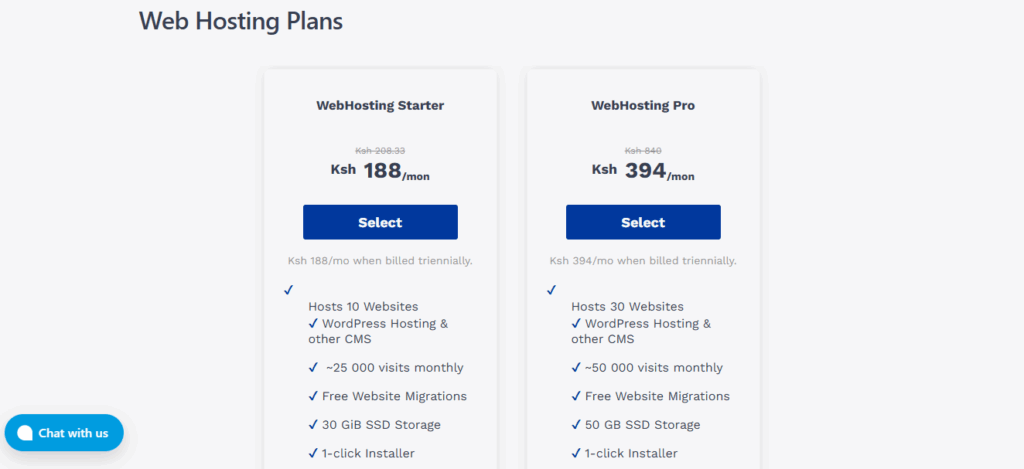
You sign up for a hosting plan from a provider, which gives you a specific amount of storage space, email accounts, and other features.
Truehost has many hosting plan options for every need and budget.
Step 2: You Upload Your Website
Using the provider’s control panel, like Truehost’s cPanel, you upload your website files to your allocated space on their server.
Step 3: A Visitor Requests Your Site
After you are all set with a web hosting plan, when someone wants to see your site, their internet browser sends a request over the internet.
Step 4: The Server Delivers the Files
The request reaches the specific server where your site is hosted. The server then sends all the necessary files back to the user’s browser, which assembles and displays your website.
Types of Web Hosting
Web hosting comes in different forms to accommodate every website’s needs. It includes:
1. Shared Hosting
- Your website shares a server with many other sites
- It is the most affordable option
- Easy to use with managed maintenance
Shared hosting is best for: New websites, small businesses, and personal blogs.
2. VPS Hosting
- You get a virtual private section of a server
- Dedicated resources just for your site
- More control and customization
It is best for: Growing businesses, medium traffic sites.
3. Dedicated Hosting
- You rent an entire physical server.
- Maximum performance and control
- It is the highest cost option.
Best for: Large enterprises, very high traffic sites
4. WordPress Hosting
- Optimized specifically for WordPress
- Managed version handles technical tasks automatically
- The unmanaged version is like standard hosting with WordPress pre-installed
It is best for: Any WordPress website
What is Cloud Hosting?
Cloud Hosting uses a different approach. Instead of relying on a single server, your website is hosted on a network of connected virtual servers.
This network is what we refer to as “the cloud.”
In cloud hosting, your website’s files and resources are spread across multiple machines in a cloud network.
Hence, this creates a more flexible and resilient system because the workload is distributed.
How Does Cloud Hosting Work?
Cloud hosting is like a power grid for your website.
In regular hosting, your website is plugged into one single generator. If that generator breaks, your website loses power.
In cloud hosting, your website is plugged into the entire city’s power grid. It works this way:
A Virtual Space is Made
The hosting company uses software to create a flexible space for your website that isn’t a single, physical computer.
It’s like your website gets a universal plug that fits any outlet in the city.
Your Website Moves In
Then, you install your website into this flexible space.
Power is Pulled from Everywhere
When your website gets more visitors and needs more power, the system instantly borrows a little electricity from other parts of the grid.
If one power station has a problem, another one immediately takes over.
The main advantage of cloud hosting is that your website doesn’t depend on one single machine. A whole network powers it, so it’s much more reliable and can easily handle busy times.
Types of Cloud Hosting
Just like web hosting, there are different types of cloud hosting.

a) Public Cloud
- Services provided over the public internet
- Shared infrastructure across multiple organizations
- Pay-as-you-go pricing model
- Managed entirely by the cloud provider
Public cloud is best for: Most businesses, web applications, and development environments.
b) Private Cloud
- Dedicated cloud infrastructure for a single organization
- Can be hosted on-premises or by a third-party provider
- Enhanced security and control
- Higher cost than public cloud
Private cloud is best for: Government agencies, financial institutions, and companies with strict compliance needs.
c) Hybrid Cloud
- Combines public and private cloud environments
- Allows data and applications to move between both
- Balances cost-effectiveness with security
Hybrid cloud is best for: Businesses that need flexibility, disaster recovery solutions
d) Infrastructure as a Service (IaaS)
- Provides virtualized computing resources over the internet
- Offers servers, storage, and networking hardware
- You manage operating systems and applications.
Examples: AWS EC2, Google Compute Engine
It is best for: IT administrators, developers needing infrastructure control
e) Platform as a Service (PaaS)
- Provides a platform for developing and deploying applications
- Manages underlying infrastructure and operating systems
- You focus only on application development.
Examples: Heroku, Google App Engine
It is best for: Application developers, software teams.
f) Software as a Service (SaaS)
- Ready-to-use software applications delivered over the internet
- Fully managed by the service provider
- Accessed through web browsers
Examples: Gmail, Salesforce, Microsoft Office 365
It is best for: End-users, businesses needing specific software solutions.
g) Serverless Computing
- Cloud provider automatically manages server allocation.
- You pay only for the execution time of your code.
- No server management required
Serveless computing is best for: Event-driven applications, microservices, API backends.
Web Hosting vs Cloud Hosting: Key Differences
| Feature | Web Hosting | Cloud Hosting |
| How it works | Your site lives on one physical server. | Your site runs on a network of connected servers. |
| Reliability | Good, but if that one server fails, your site goes down. | Excellent. If one server has a problem, another instantly takes over. |
| Handling traffic | Limited. A sudden traffic surge can slow or crash your site. Upgrading takes time. | Easy. It instantly uses more power from the network to handle traffic spikes. |
| Cost | Simple, fixed monthly or yearly price. | Pay-for-what-you-use, so the bill can change. |
| Ease of use | Very easy. Perfect for beginners. | It can be complex and requires more technical skill. |
Which One Should You Choose?
Your choice depends on your website’s needs, your budget, and your technical comfort.
Choose Web Hosting if:
- You are building your first website, a blog, or a portfolio.
- You run a small to medium-sized business website with relatively stable traffic.
- You have a fixed budget and prefer predictable monthly costs.
- You want a simple, managed solution and do not have deep technical server management skills.
- You are using popular platforms like WordPress, Joomla, or OpenCart.
Choose Cloud Hosting if:
- You run a large business or an e-commerce site with frequent, unpredictable traffic spikes.
- You are developing a custom web application that requires specific server configurations.
- You need guaranteed, near-100% uptime for mission-critical operations.
- You have a technical team capable of managing a more complex server environment.
Conclusion
So, what have we learned? Choosing between web hosting and cloud hosting comes down to your specific needs.
Web hosting is your go-to solution if you’re starting a new website, running a small business, or working with a fixed budget.
It’s simple, affordable, and perfect for most websites that don’t experience massive traffic spikes. Whether you choose Shared, VPS, or WordPress hosting, you get a straightforward solution that just works.
Cloud hosting is the power player for growing businesses, large e-commerce sites, and applications that need to handle unpredictable traffic.
While it costs more and requires more technical knowledge, it offers unbeatable reliability and the ability to scale instantly.
For most website owners in Kenya, web hosting provides everything you need at a price that makes sense.
If you’re looking for reliable, affordable web hosting that’s perfect for Kenyan websites, Truehost has you covered. With plans starting from just Ksh 188 per month, you get:
- Easy cPanel control panel
- One-click WordPress installation
- Free SSL certificates
- 24/7 customer support
- Free website migration
Don’t wait while your competitors grow their online presence. Get your website online today with Truehost’s web hosting packages.