Domain SearchInstantly check and register your preferred domain name
 Web Hosting
 cPanel HostingHosting powered by cPanel (Most user friendly)
 WordPress HostingHost your WordPress website with fast, secure, and affordable WordPress hosting in Kenya.
 KE Domains
 Reseller HostingStart your own hosting business without tech hustles
 Windows HostingOptimized for Windows-based applications and sites.
 Free Domain
 Affiliate ProgramEarn commissions by referring customers to our platforms
 Free HostingTest our SSD Hosting for free, for life (1GB storage)
 Domain TransferMove your domain to us with zero downtime and full control
 All DomainsBrowse and register domain extensions from around the world
 .Com Domain
 WhoisLook up domain ownership, expiry dates, and registrar information
 VPS Hosting
 Managed VPSNon techy? Opt for fully managed VPS server
 Dedicated ServersEnjoy unmatched power and control with your own physical server.
 Website Builder
 Online Store BuilderLaunch a professional e-commerce store without writing code.
 Web Design ServiceGet a custom-designed website tailored to your brand and goals. From just KES 15,600
 BlogRead our guides on web hosting, online business, digital marketing, and more
 SupportOur support guides cover everything you need to know about our services
 ContactContact us via chat or email
Choosing where to host OpenClaw is one of the first decisions you’ll make after deciding to run it yourself.
For many users, the choice comes down to two options: a VPS in the cloud or a Mac Mini at home. Both can run OpenClaw reliably, but they solve very different problems.
A VPS gives you a server that’s accessible from anywhere, runs 24/7 without relying on your home internet, and can be upgraded as your workloads grow. A Mac Mini offers dedicated hardware, complete control, and potentially lower long-term costs if you already own the device.
The right choice depends on factors such as uptime requirements, performance expectations, budget, maintenance effort, security considerations, and how heavily you plan to use OpenClaw. What works perfectly for a personal assistant handling a few daily tasks may become limiting once you start adding automations, integrations, multiple users, or always-on workflows.
Here, we’ll compare VPS hosting and Mac Mini hosting across performance, reliability, scalability, cost, security, and ease of management to help you determine which option makes the most sense for your OpenClaw deployment.
| Category | OpenClaw VPS | Mac Mini M4 |
| Performance | Shared resources; scales with plan tier | High-speed Apple Silicon; optimized for local AI |
| Uptime | 99.9%+ data center reliability | Dependent on home power and internet |
| Cost | Zero upfront; ongoing monthly fees | High upfront purchase; ~$5–10/mo in electricity |
| Scalability | One-click RAM/CPU upgrades | Soldered RAM; hardware is locked in at purchase |
| Security | Isolated remote environment | Sits on your home network |
| Privacy | Data on third-party infrastructure | 100% self-hosted; you control everything |
| Setup | One-click templates available | Manual configuration via macOS |
1) Performance
Mac Mini M4
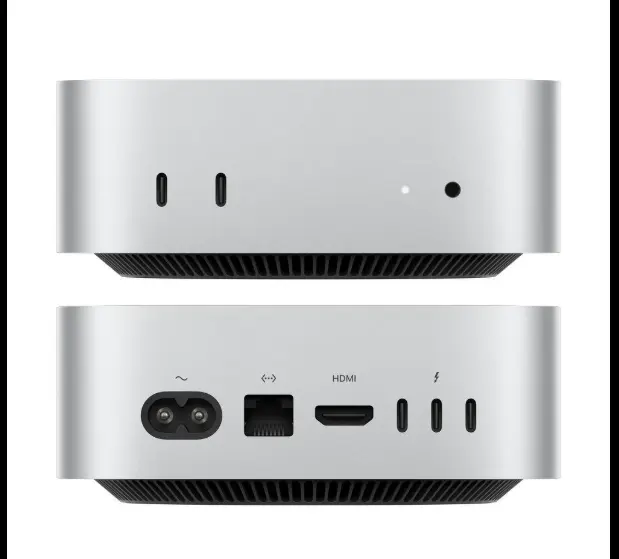
The M4’s Unified Memory Architecture (UMA), where the CPU, GPU, and Neural Engine share a single high-bandwidth memory pool, eliminates the data-copying overhead that bottlenecks traditional discrete GPU setups. For LLM inference, this is a genuine architectural edge.
The benchmarks back it up. The base M4 with 16GB hits 18–22 tokens per second on 8B models at 4-bit quantization (Q4), and around 10 tokens per second on 14B models. The M4 Pro with 64GB handles 32B models at 11–12 tokens per second, fast enough for real-time coding and content generation, and can push into 70B territory, which is remarkable for hardware this size and price.
One hard limit to understand: when model weights exceed installed RAM, macOS swaps to SSD and performance collapses, from ~10 tokens per second to 0.28. That’s slower than reading aloud, and entirely unusable. Since RAM is soldered in permanently, buy more than you need.
For OpenClaw specifically, the M4’s Neural Engine handles LLM matrix operations while the CPU manages the gateway and integrations, keeping the agent responsive even during complex multi-step tasks.
VPS: Cloud APIs Do the Heavy Lifting
A standard OpenClaw VPS isn’t doing local inference. The gateway routes messages and fires API calls to Claude, GPT, or another provider; the compute happens elsewhere.
That makes hardware requirements modest: 2 vCPU and 4GB RAM for personal use; 4 vCPU and 8GB for browser automation in production.
Running Ollama locally on a VPS is possible but requires 16–24GB RAM and 100GB+ NVMe, pushing into higher-tier plans that change the cost math considerably. Most operators don’t go this route.
2) Uptime and Reliability
This is where the VPS makes its strongest case.
An autonomous agent that monitors email, handles inbound messages, or runs scheduled automations cannot afford unpredictable downtime. A power outage, macOS update requiring a reboot, or dropped home internet connection can take your OpenClaw instance offline at exactly the wrong moment.
VPS hosting operates at 99.9%+ data center uptime with static public IPs, redundant power and networking, and no exposure to home environment variables. Hostinger logged 99.98% uptime through Q4 2025 in independent monitoring. The Mac Mini can run 24/7 with display sleep disabled, wake-for-network enabled, a static IP or dynamic DNS, and a UPS for power, but “can” isn’t the same as “will,” and for business-critical automations, that gap counts.
3) Cost
Focus on the total cost over 12–24 months rather than the upfront price.
Mac Mini
| Configuration | Price | RAM / Storage |
| M4 Base | $799 | 16GB, 512GB SSD |
| M4 Pro Base | $1,399 | 24GB, 512GB SSD |
| M4 Pro 48GB | $1,799 | 48GB, 512GB SSD |
| Electricity (24/7) | ~$5–10/mo | Ongoing |
Mac Mini prices are sourced directly from apple.com and are accurate as of mid-2025 for the US storefront. International pricing will vary.
Electricity costs are estimated based on Apple’s published power draw figures for the M4 Mac Mini (10–20W under load) and a US average electricity rate of roughly $0.13–0.17 per kWh. Your actual cost depends on your local rate and how hard the machine is running. A machine idle-browsing draws far less than one running continuous inference workloads.
At 10–20 watts under load, electricity runs about $60–120 per year. With local models, there are no per-token costs. For teams spending $150–250/month on API credits, the base Mac Mini typically breaks even in 6–12 months.
The catch: that upfront cost is real, the RAM is permanent, and you’re committing to 3–5 years of hardware. Apple has confirmed that M5 production begins later in 2026; the M4 remains fully capable for OpenClaw, but you’re buying last-generation.
VPS
VPS Providers & Key Specs
| Provider | Starting Price | Key Specs |
| Truehost (OpenClaw) | ~$15.40/mo (Ksh 1,990) | 1 vCPU, 2GB RAM, 50GB NVMe, 4TB bandwidth, pre-configured one-click deploy |
| Contabo | ~$3.96/mo (annual) | 4 vCPU, 8GB RAM, 75GB NVMe |
| Hetzner CX32 | ~$7.40/mo | 4 vCPU, 8GB RAM, 80GB NVMe |
| Hostinger 1-click | ~$6.99/mo | 8GB RAM, NVMe, one-click deploy |
| DigitalOcean | $24/mo | 4GB RAM, 2 vCPU, 4.3TB bandwidth |
| Oracle Cloud Free | $0/mo | 4 ARM cores, 24GB RAM, forever |
No upfront cost, instant flexibility. But the bill never stops; at $10/month, you’ll have matched the Mac Mini’s purchase price in under seven years, before accounting for API costs.
That’s the often-overlooked number: moderate OpenClaw usage adds $20–60/month in token costs on top of hosting, frequently exceeding the infrastructure bill itself. Local inference on a Mac Mini eliminates that line item.
4) Scalability
VPS
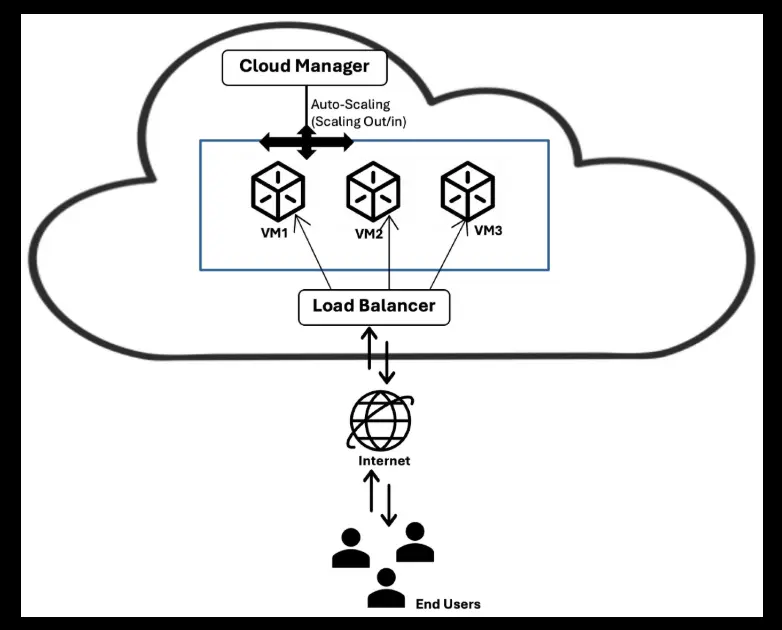
If your OpenClaw instance grows from a personal chatbot to a multi-agent operation, you can upgrade from 2GB to 32GB of RAM with a single click, no migration, no new hardware. Kamatera offers 1,000+ custom configurations with pay-as-you-go billing.
Contabo’s top tier offers 64GB of RAM and 500GB of NVMe storage when you need serious capacity.
Mac Mini
The RAM is soldered. Whatever you buy is what you have, permanently. If your workloads outgrow 64GB, you’re buying a new machine. Mac Mini clusters via Thunderbolt and Exo Labs exist as an option, but they’re a complex infrastructure that demands real technical investment, not a substitute for one-click cloud scaling.
5) Security
VPS
A compromised VPS gives an attacker one Linux box, your OpenClaw config and API keys, nothing more. DDoS protection, firewall controls, and one-click OS reinstall are standard on reputable providers. That said, VPS isolation doesn’t solve application-layer risks.
Cisco demonstrated a data exfiltration vulnerability in a third-party OpenClaw skill in March 2026, and Palo Alto Networks has flagged the agent’s broad system access as a high-value target. Prompt injection, where malicious content in an email or document hijacks agent behavior, is a real and documented vector regardless of where you host.
Mac Mini
A foothold on your Mac Mini potentially reaches every device on your home network: phones, NAS drives, smart home hardware, other computers. The blast radius is your entire digital life.
That doesn’t make the Mac Mini categorically insecure, but it means the security burden falls entirely on you: firewall configuration, timely macOS updates, minimal port exposure, and tight control over OpenClaw’s channel permissions.
6) Privacy and Data Control
This is where the Mac Mini makes its strongest argument.
On a VPS, your data, conversations, email summaries, agent logs, and file contents live on infrastructure you don’t own. You’re trusting the provider’s security practices, terms of service, and legal compliance with your jurisdiction’s data laws.
On a Mac Mini with local models, nothing leaves your home. Every conversation, every task, every piece of accumulated context stays on hardware you own and control. For professionals handling sensitive client data, health information, or financial records, that distinction is fundamental.
One important nuance: if you connect OpenClaw to Claude or GPT via API, those prompts leave your infrastructure regardless of where the gateway runs. True local-first privacy requires Ollama with local models, which requires hardware capable of running them. That’s the Mac Mini’s natural advantage.
7) Ease of Setup
VPS
Several providers offer one-click OpenClaw deployment through their marketplaces, where setup comes down to adding API keys and connecting your messaging apps, no Docker knowledge or terminal commands required, and you can be running in under five minutes. For developers who want full control, a self-managed VPS running Docker on any provider gives you complete authority over configuration, channels, and skill management.
One real frustration documented in community forums: headless browser automation on Linux can require troubleshooting. Chromium’s snap package, OAuth refresh loops, and WebSocket binding errors are recurring pain points that can cost an afternoon to resolve.
Mac Mini
The OpenClaw onboard wizard walks through gateway setup, channel configuration, and skill installation with a friendly interface. iMessage, Siri, and HomeKit integrations are native to macOS and simply unavailable on any Linux VPS. If those count in your workflow, the Mac Mini is the only path.
The tradeoff is that you’re responsible for everything: Node.js updates, gateway monitoring, launchd startup services, and energy settings for always-on operation. None of it is hard, but it’s all on you.
When to Choose an OpenClaw VPS
A VPS is the right choice if any of the following apply:
- You’re comfortable with Linux (or willing to learn). Full control requires technical engagement.
- You run a team or business where multiple people need access, downtime has real consequences, and role-based permissions count.
- 24/7 uptime is non-negotiable. If your agent monitors live systems or runs scheduled tasks that must fire at 3 AM, VPS hosting removes every variable you can’t control at home.
- You need to scale. Multi-agent deployments and growing workloads are far easier to accommodate on elastic cloud infrastructure than on fixed hardware.
- You’re starting lean. At $4–7/month with no hardware risk and no long-term commitment, there’s no cheaper way to get OpenClaw running today.
When to Choose a Mac Mini
The Mac Mini is the right choice if any of the following apply:
- Privacy is your top priority. If OpenClaw handles sensitive emails, medical notes, or client data, keeping everything on hardware you own is the only fully satisfying answer.
- You want local model inference. Running Ollama locally eliminates per-token API costs. With 24GB or more of unified memory, the M4 handles 32B quantized models at conversational speeds.
- You’re embedded in the Apple ecosystem. iMessage, Siri, and HomeKit integrations don’t exist on a Linux VPS. If these count to you, the Mac Mini isn’t a preference; it’s the only path.
- You value long-term economics. At $5–10/month in electricity with no API costs, the Mac Mini’s total cost undercuts a VPS-plus-API setup for anyone running it 18 months or more.
- Your home internet is reliable. A stable ISP and a UPS remove most of the uptime risk, and many solo operators run for months without a meaningful outage.
Which Is Better for Hosting?
Neither option is universally better. They serve different people running different workloads.
If you’re an individual who values privacy, loves the Apple ecosystem, wants to experiment with local models, and is comfortable accepting occasional downtime in exchange for complete data ownership and long-term cost efficiency, the Mac Mini M4 is a remarkable platform for OpenClaw. The hardware is capable, the experience is polished, and the economics favor you over time.
If you’re running a team, a business, or any workflow where uptime and scalability are non-negotiable, or if you simply want to be running in five minutes without touching a terminal, a VPS is the more pragmatic choice. Entry costs are low, the setup experience has never been easier, and cloud infrastructure removes every environmental variable you can’t control at home.
The ideal path for many users: start with a VPS on Truehost to learn OpenClaw’s capabilities and build your skill library with minimal friction, then migrate to a Mac Mini once you know exactly what you’re running and how critical it is to your workflow.
The community is large, the documentation is strong, and either platform will give you something that genuinely feels like having a capable assistant available at any hour.
OpenClaw VPS vs Mac Mini FAQs
Why do most users prefer a VPS over a Mac Mini for OpenClaw?
For most workflows, a VPS running gateway-only mode is cheaper, more reliable, and easier to reset than local hardware. Since OpenClaw simply orchestrates calls to hosted models like Claude or GPT, raw power isn’t the point — stability is. And if something goes wrong, a compromised VPS gives an attacker one isolated Linux box; a compromised Mac Mini gives them your entire home network.
What are the minimum VPS specs for OpenClaw in 2026?
The technical minimum is 2GB RAM, 1–2 vCPU, and 40GB of storage with Docker support on Ubuntu 22.04 LTS or later. In practice, 4GB RAM and 2 vCPU are the comfortable everyday specs. If you want to run browser automation or local LLMs on the same host, step up to 8–16GB RAM and 4+ vCPU.
Is a Mac Mini safe to use as a 24/7 server?
With proper configuration, disabled display sleep, wake for network access enabled, launchd service for automatic gateway restart, the Mac Mini handles continuous operation well. Power consumption is low (typically 10–20 watts), thermals are managed passively, and macOS’s stability is strong. The risks are environmental (power, internet, physical access) rather than hardware-related. A UPS and a reliable ISP address most of them.
Can I switch from a Mac Mini to a VPS later?
Yes, and it’s relatively straightforward. OpenClaw’s configuration, skills, and session memory can be exported and re-imported on a new host. The main friction is reconfiguring channel integrations (WhatsApp, Telegram, etc.), which requires re-linking accounts. Expect to spend 1–2 hours migrating a well-configured setup. Some macOS-specific integrations (iMessage, HomeKit) will not function on a Linux VPS.
Can I run local LLMs on a VPS instead of a Mac Mini?
Yes, but it depends on RAM. Running local LLMs on a VPS requires around 32GB RAM; a Mac Mini with Apple Silicon unified memory or a Strix Halo device with 128GB is more cost-effective for pure inference. For most users, the better path is running a lean VPS in gateway-only mode and routing inference to a hosted model; a full autonomous loop running 24/7 can cost as little as $2–5 per month in tokens at typical volumes.