Domain SearchInstantly check and register your preferred domain name
 Web Hosting
 cPanel HostingHosting powered by cPanel (Most user friendly)
 WordPress HostingHost your WordPress website with fast, secure, and affordable WordPress hosting in Kenya.
 KE Domains
 Reseller HostingStart your own hosting business without tech hustles
 Windows HostingOptimized for Windows-based applications and sites.
 Free Domain
 Affiliate ProgramEarn commissions by referring customers to our platforms
 Free HostingTest our SSD Hosting for free, for life (1GB storage)
 Domain TransferMove your domain to us with zero downtime and full control
 All DomainsBrowse and register domain extensions from around the world
 .Com Domain
 WhoisLook up domain ownership, expiry dates, and registrar information
 VPS Hosting
 Managed VPSNon techy? Opt for fully managed VPS server
 Dedicated ServersEnjoy unmatched power and control with your own physical server.
 Website Builder
 Online Store BuilderLaunch a professional e-commerce store without writing code.
 Web Design ServiceGet a custom-designed website tailored to your brand and goals. From just KES 15,600
 BlogRead our guides on web hosting, online business, digital marketing, and more
 SupportOur support guides cover everything you need to know about our services
 ContactContact us via chat or email
Choosing the right IP address type is one of those decisions that seems small at first, until it starts affecting your server. Launching a website, setting up a mail server, running a VPN, or managing a development environment all depend on stable connectivity. The type of IP address your VPS uses can impact uptime, email deliverability, security, remote access, and overall server management.
The short answer: a static IP stays fixed and is the standard choice for any serious hosting workload, while a dynamic IP changes periodically and is more common in consumer internet connections and certain cloud proxy arrangements. If you’re hosting with Truehost, you already have a dedicated static IP included with every VPS plan, meaning you’re covered for all the use cases that matter most, right out of the box.
But understanding why static IPs are preferred, and when dynamic IPs still come up, is worth knowing. Let’s break it all down.
Key Differences: Static vs Dynamic IP Address
| Dimension | Static IP | Dynamic IP |
| Stability | Never changes | Changes periodically or on reconnect |
| DNS compatibility | Simple | Requires DDNS workaround |
| Inbound hosting | Fully reliable | Unreliable without DDNS |
| Email deliverability | Excellent | Poor (often blacklisted) |
| Reverse DNS (PTR) | Fully configurable | Cannot be reliably maintained |
| Firewall whitelisting | Simple and stable | Must update rules on every change |
| Security targeting | Predictable attack surface | Minor obscurity advantage |
| IP reputation | Exclusively yours | May inherit the past tenant’s history |
| Cost | Slightly higher | Lower or included |
| Management overhead | Higher (manual tracking) | Lower (automated) |
1) Assignment and Configuration
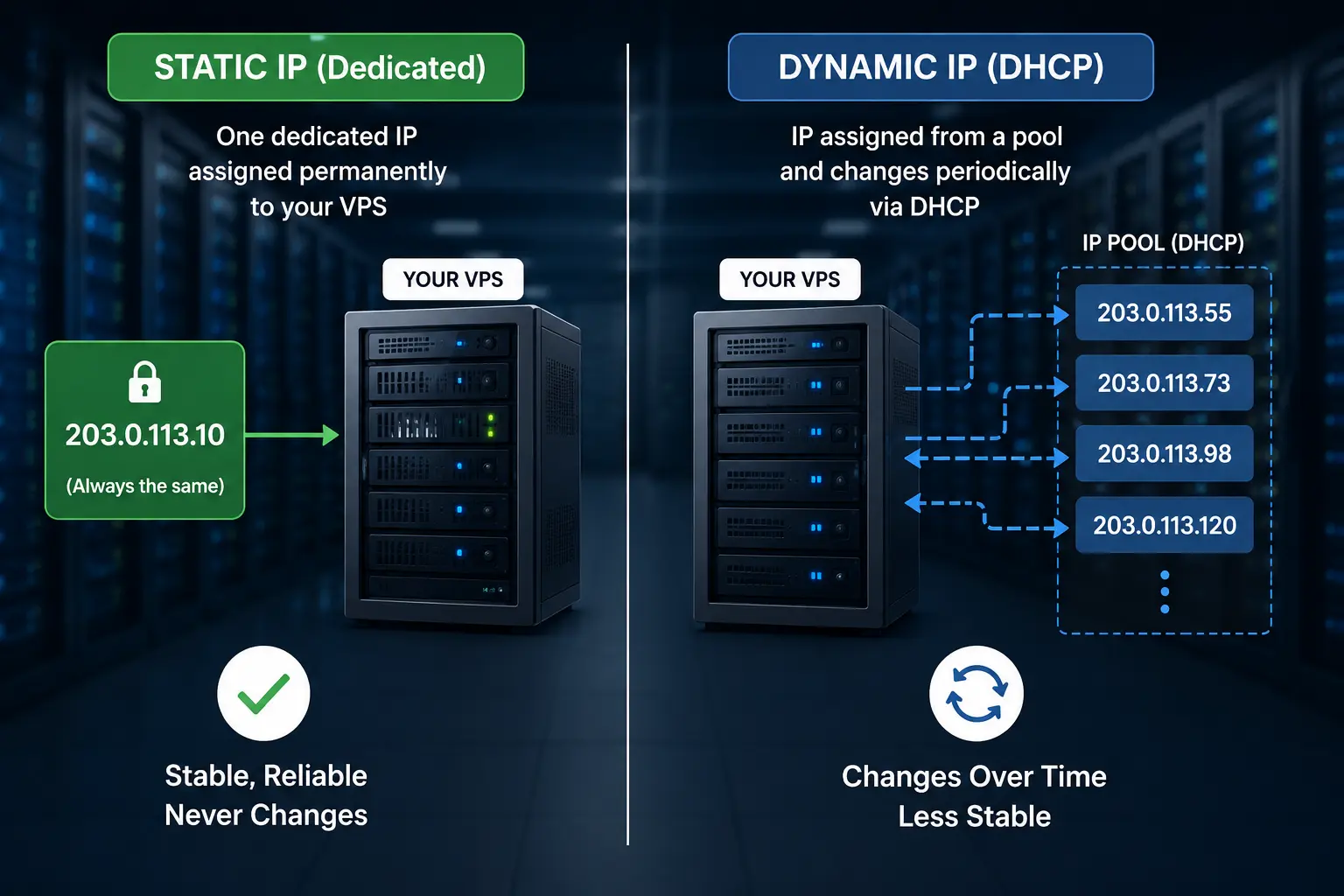
With a static IP, the address is manually assigned to your VPS at provisioning. It’s dedicated to your server and doesn’t participate in any shared pool. Nothing changes unless you explicitly request a change, and even then, it’s a deliberate action, not an automatic one.
With a dynamic IP, the address is handed out by a DHCP server from a rotating pool. When your lease expires, which could be hours, days, or weeks later, your server may receive a different address. In pooled environments, multiple customers share from the same address space, which creates additional unpredictability.
For Truehost VPS customers: Every plan comes with a dedicated static IP at no additional cost. You’re not drawing from a shared pool.
2) Permanence and Stability
This is the most fundamental difference. A static IP is, by definition, stable. Your server’s address is the same the day you launch as it is six months later. That consistency is what makes everything else, DNS, email, SSH access, and API integrations- work reliably.
A dynamic IP introduces instability. Even if the change only happens once every few weeks, that’s enough to disrupt DNS propagation, break firewall rules, and cause email deliverability issues. Any system that depends on knowing your server’s address in advance is at risk every time the IP address rotates.
3) DNS Compatibility
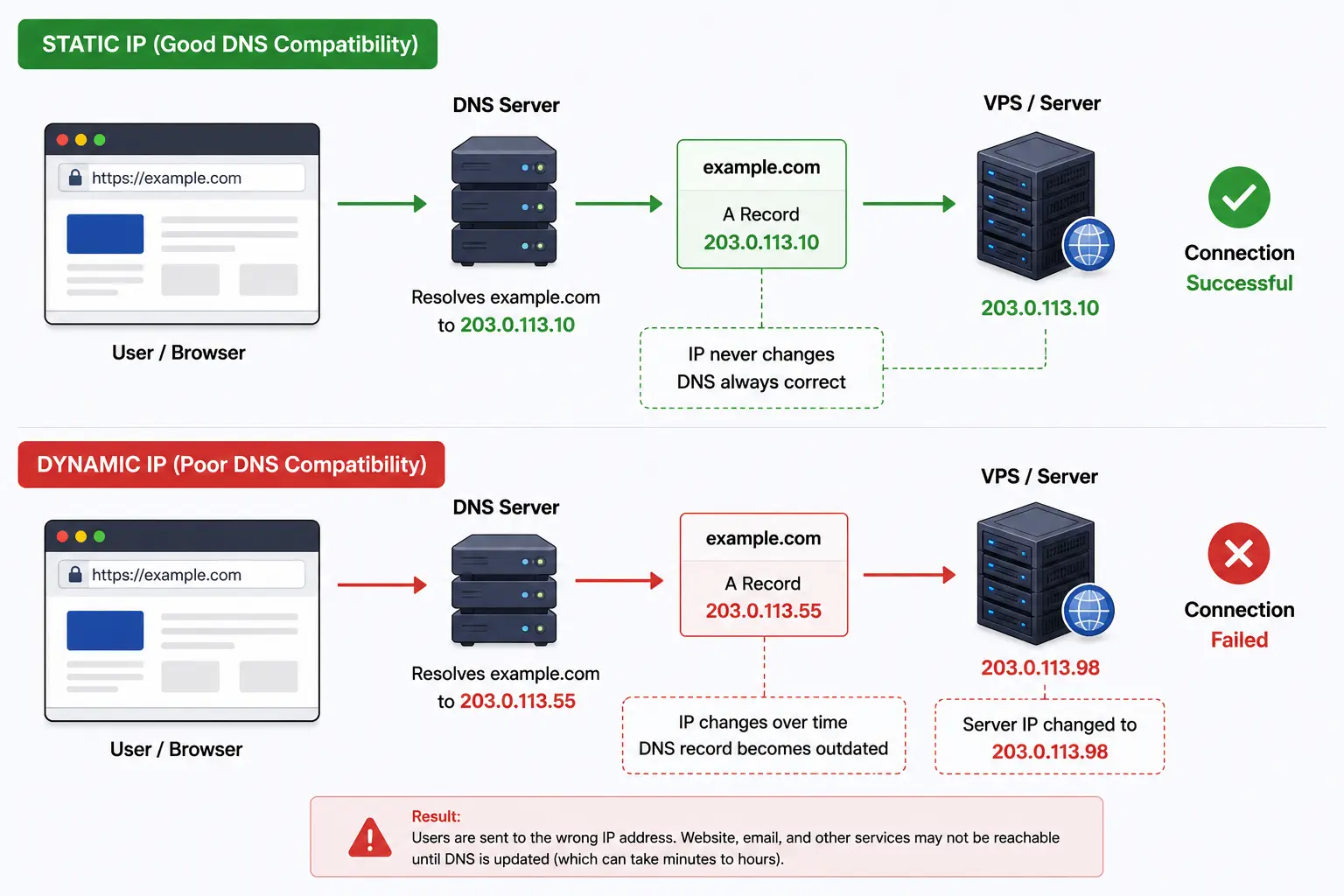
DNS (Domain Name System) is the system that maps your domain name to your server’s IP address. It works by storing A records that say, in effect: “example.com lives at 203.0.113.42.” When someone types your domain, their browser looks up that record and connects to the right server.
With a static IP, DNS just works. You set your A record once, and it stays accurate indefinitely.
With a dynamic IP, your A record goes stale every time your IP changes. The workaround is Dynamic DNS (DDNS), a service that automatically updates your DNS records when your IP changes. DDNS works reasonably well for home servers and hobbyist setups, but it’s not a substitute for a static IP in a production environment.
There’s always a propagation delay after an IP change, during which your domain points to the wrong address.
4) Reliability for Inbound Connections
Any service that accepts incoming connections- a website, a game server, an SSH endpoint, or a VPN needs a stable address. Clients connect to your IP directly or via a DNS record that resolves to your IP. Either way, if the IP changes, inbound connections fail until the new address is propagated everywhere.
Static IP gives you guaranteed availability. The address clients use today will work tomorrow and next year.
Dynamic IP creates a reliability gap. Depending on your DDNS setup and TTL settings, an IP change could mean minutes or hours of downtime for inbound services. For a production website or business application, that’s unacceptable.
5) Email Deliverability and Reverse DNS
Running a mail server, or even just sending transactional email from your VPS, requires a static IP. Here’s why:
a) Reverse DNS (PTR records): Mail servers use PTR records to verify that the IP address sending email matches a legitimate hostname. For example, if you’re sending from mail.example.com, the PTR record for your IP should resolve back to mail.example.com. Without a correct PTR record, many mail providers will either reject your email or send it straight to spam. PTR records can only be reliably configured on static IPs.
b) Blacklist reputation: Dynamic IPs are frequently blacklisted by mail providers. Because dynamic addresses are associated with residential connections and are historically linked to spam and botnet activity, services like Spamhaus and others pre-emptively block entire dynamic IP ranges. Even if you’ve done nothing wrong, your dynamic IP might be inheriting the reputation of whatever activity it was used for in the past.
c) DMARC, DKIM, and SPF: These email authentication standards all work better and are expected to work reliably, with a consistent sending IP. Rotating IPs creates authentication gaps that can damage your sender reputation over time.
With a static IP, your email reputation is entirely yours to build and protect.
6) Security Profile
The security comparison between static and dynamic IPs is more nuanced than it first appears.
Static IP advantages:
- Firewall whitelisting is straightforward; you define allowed IPs once, and they don’t change
- Access control lists (ACLs) for SSH, admin panels, and APIs stay current indefinitely
- Simpler to audit and monitor network traffic associated with your known IP address
Static IP considerations:
- Your IP is predictable, which means automated scanners and attackers can target it consistently
- You’re a stable target; bots that find your IP on a Tuesday will still be able to find it on Saturday
Dynamic IP advantages:
- Your address changes unpredictably, which can slow down persistent attackers
- Some automated attack campaigns lose track of you after an IP rotation
The honest assessment: The “security through obscurity” benefit of dynamic IPs is minor and not a reliable defense. A determined attacker will rescan and find you again. The operational benefits of a static IP, stable firewall rules, proper access control, and auditable traffic are far more valuable than the minor inconvenience a dynamic IP causes an attacker.
7) IP Reputation and Blacklisting
Every IP address has a reputation built from its history, whether email was sent from it, whether it was associated with malware, or whether it appeared in spam reports. IP reputation services track this and share it with mail providers, CDNs, and security tools.
With a static IP, your reputation is entirely yours. You start with a clean slate, and everything that happens on that IP going forward reflects your own activity. If you send good emails, follow best practices, and run a clean server, your reputation builds accordingly.
With a dynamic IP, you may inherit the history of the previous user of that address. If someone else sent spam from it last month, or if it was flagged for abusive behavior, those marks follow the IP, not the person. Even if you’re new to that address, you could face immediate deliverability problems or access restrictions based on someone else’s actions.
8) Geolocation Accuracy
IP geolocation services map IP addresses to approximate physical locations. This affects CDN routing (directing users to the nearest server), geographic access controls, analytics, and compliance requirements in some industries.
Static IPs maintain consistent geolocation data because the address is permanently tied to a known location. CDNs and geolocation databases can build accurate, stable records for your IP.
Dynamic IPs can have inconsistent geolocation, especially if they rotate through a shared pool with addresses spread across different registrations. This can cause issues with geo-based content delivery, regional pricing, or compliance checks that rely on location data.
9) Cost
IPv4 addresses are limited, which is why many hosting providers charge extra for dedicated static IPs, usually around $3–$5 per month per IP. Dynamic IPs cost less because they’re shared from a rotating pool across multiple users.
With Truehost VPS Hosting, this isn’t something you need to worry about. Every VPS plan already includes a dedicated static IP at no extra cost. Plans start at $9/month and scale up with more CPU, RAM, storage, and bandwidth as needed.
If you need extra IPs for separate projects, staging environments, or mail servers, you can add them later. But for most VPS users, the included static IP is more than enough.
10) Management Overhead
Static IPs require you to know your address and keep it in mind when configuring DNS, firewall rules, and remote access. The overhead is low but deliberate; you’re in control, which means you’re responsible for tracking the address.
Dynamic IPs automate address management through DHCP, but that automation creates a different kind of overhead: managing DDNS services, updating firewall rules when IPs rotate, and debugging connectivity issues that trace back to an unexpected IP change. For most use cases, this reactive overhead is worse than the low-touch management of a static IP.
Choose static IP if you:
i) Host a website or web application. Your domain’s A record points to your IP. If that IP changes, your site goes offline until DNS catches up. A static IP means your site stays up reliably.
ii) Run an email server. PTR records, sender reputation, and deliverability all depend on a consistent IP. Dynamic IPs are effectively incompatible with running a mail server in any serious capacity.
iii) Need stable remote access. SSH into your server from your laptop, connect from a monitoring system, or access a control panel; all of this is simpler and more reliable with a fixed IP.
iv) Operate business-critical applications. Any application with SLA requirements, uptime commitments, or regulatory compliance needs demands a stable, auditable IP address.
v) Use VPNs or API integrations. VPN endpoints and third-party APIs often whitelist specific IP addresses. If your IP changes, you lose access until you update every whitelist, which may involve third parties you don’t control.
vi) Run game servers or real-time services. Latency-sensitive services that players or clients bookmark by IP need a consistent address.
Dynamic IP may suffice if you:
i) Are testing locally or in a temporary environment. If you’re spinning up a throwaway dev server, testing a script, or running a one-time experiment, IP stability isn’t a concern.
ii) Use a rotating proxy or privacy service intentionally. Some use cases. Anonymization layers and load distribution across exit nodes are designed around changing IPs. These are purpose-built services, not standard VPS hosting.
iii) Have no inbound connection requirements. If your VPS only makes outbound connections and never accepts inbound traffic, a dynamic IP causes fewer problems. This is rare but possible.
Which Is Better?
For virtually every VPS hosting scenario, a static IP is the right choice. The operational benefits, DNS stability, email deliverability, reliable remote access, consistent firewall rules, and IP reputation ownership far outweigh the minor cost difference or the marginal “obscurity” benefit of a rotating address.
Dynamic IPs are a practical necessity for home internet connections and certain specialized proxy use cases. They’re not designed for server hosting, and the workarounds required to make them work (DDNS, frequent firewall updates, reputation monitoring) introduce exactly the kind of fragility you don’t want in a production environment.
The good news for Truehost VPS customers is that you don’t have to think about any of this. Your static IP is already there, already configured, and already working.
Dynamic IP vs Static IP for VPS Hosting FAQ
Is a static IP necessary for VPS hosting?
For any serious use case, websites, email, remote access, APIs, VPNs, yes, a static IP is essential. It’s the foundation on which reliable DNS, email deliverability, and consistent connectivity are built. Truehost includes a static IP with every VPS plan.
Can I host a website with a dynamic IP?
Technically, yes, using a Dynamic DNS (DDNS) service to keep your DNS records updated when your IP changes. In practice, this introduces downtime during IP transitions and propagation delays that make it unsuitable for production websites. A static IP is the right tool for the job.
Does a static IP improve internet speed?
No. IP type does not affect connection speed or bandwidth. Speed depends on your server’s hardware, your hosting plan, and network infrastructure, not whether your IP is static or dynamic.
Which is safer: dynamic or static IP?
Static IPs are operationally more secure because they support stable firewall rules, consistent access controls, and auditable traffic patterns. Dynamic IPs offer a minor “obscurity” benefit because they change, but this is not a meaningful security control. Proper firewall configuration, SSH hardening, and regular updates matter far more than IP type.
Can I run an email server on a dynamic IP?
Not effectively. Major mail providers block or heavily filter email from dynamic IP ranges. Without a proper PTR record (which requires a static IP), your mail will likely be rejected or flagged as spam by most recipients. Running a mail server requires a static IP.
Why do hosting providers charge extra for static IPs?
IPv4 addresses are a finite resource. The global pool of available IPv4 addresses is essentially exhausted, which makes dedicated static addresses more expensive to allocate than dynamic ones drawn from a shared pool. Truehost includes a static IP with every VPS. The cost is built into the plan.
Can I convert my VPS from dynamic IP to static later?
If you’re on a Truehost VPS, you already have a static IP, no conversion needed. If you need additional static IPs (for multiple sites or services), those can be added to your account. Contact Truehost support to discuss your requirements.
Does a dedicated IP improve SEO rankings?
Not directly. Google has stated that IP type is not a ranking factor, and multiple websites sharing a single IP is common and perfectly acceptable from an SEO standpoint. That said, a static IP does support reliable uptime and email deliverability, both of which indirectly support SEO by keeping your site accessible and your outreach effective.
Is IPv6 changing the need for static IPv4 addresses?
IPv6 addresses the scarcity problem that makes static IPv4 addresses expensive; there are effectively unlimited IPv6 addresses, so every device can have a unique, persistent address. As IPv6 adoption grows, the distinction between “static” and “dynamic” becomes less relevant because there’s no need to share a pool. For now, IPv4 remains dominant in web hosting, and static IPv4 is still the standard for VPS workloads.
Should freelancers and remote workers use static IP VPS hosting?
Yes, if they’re running any services their clients depend on, client portals, project management tools, freelance invoicing platforms, API endpoints. A static IP makes those services consistently accessible. For remote workers who just need a VPN to access a corporate network or a development server to test code, a static IP also simplifies firewall whitelisting and access control significantly.